
Motion Sensor - Motion detector POWERFIX - Free user manual and instructions
Find the device manual for free Motion Sensor POWERFIX in PDF.


| Product type | Motion detector |
| Brand | Powerfix |
| Model | Motion Sensor (ref. 10336A/B/C/D) |
| Power supply | 220-240 V~, 50 Hz |
| Rated load (incandescent lamps) | max. 1200 W |
| Rated load (energy-saving lamps) | max. 300 W |
| Time delay | 10 s to 7 min (adjustable) |
| Brightness threshold (day/night function) | 10-2000 lux (adjustable) |
| Detection range | max. 12 m |
| Detection angle | max. 160° |
| Operating temperature | -20 °C to +40 °C |
| Permissible ambient humidity | < 93% relative humidity |
| Recommended installation height | 1.8 - 2.5 m |
| Available settings | Sensitivity (models C/D), lighting duration, day/night threshold |
| Package contents | 1 detector, 2 screws, 2 wall plugs, 1 instruction manual |
| Warranty | 36 months |
| After-sales service | Uni-Elektra GmbH, Germany |
| Care and cleaning | Clean with a dry, lint-free cloth. Do not use detergents. |
| Safety | Disconnect power before installation. Installation by a specialist recommended. |
Frequently Asked Questions - Motion Sensor POWERFIX
User questions about Motion Sensor POWERFIX
0 question about this device. Answer the ones you know or ask your own.
Ask a new question about this device
Download the instructions for your Motion detector in PDF format for free! Find your manual Motion Sensor - POWERFIX and take your electronic device back in hand. On this page are published all the documents necessary for the use of your device. Motion Sensor by POWERFIX.
USER MANUAL Motion Sensor POWERFIX

MOTION SENSOR
GB IE NI
MOTIONSENSOR
Operation and Safety Notes
FR BE
DÉTECTEURDEMOUVEMENTS
GB/IE/NI Operation and Safety Notes
Page 5
10336C/D


flowchart
graph TD
    subgraph 10336A/B
        A["9"] --> B["Switch"]
        B --> C["Pin 10"]
        B --> D["Pin 3"]
        C --> E["Node 10"]
        D --> F["Node 3"]
        E --> G["Node 11"]
        F --> H["Node 11"]
    end
    subgraph 10336C/D
        I["9"] --> J["Switch"]
        J --> K["Pin 10"]
        J --> L["Node 10"]
        K --> M["Node 11"]
        L --> N["Node 11"]
        M --> O["Node 3"]
        N --> P["Node 3"]
    end

10336A/B
List of pictograms used....Page 6
Introduction Page 7
Intended use......Page 7
Technical Data Page 8
Scope of delivery......Page 9
Parts description......Page 9
Safety Page 10
Mounting......Page 12
Select a suitable place for installation......Page 12
Installation Page 13
Start-up Page 14
Setting the sensitivity of the sensor......Page 15
Setting the lighting duration of the device......Page 15
Setting the day light level....Page 16
Cleaning and Care......Page 16
Guarantee and Service......Page 17
Service address......Page 18
Manufacture......Page 19
| List of pictograms used | |
 | Please read the operating instructions! |
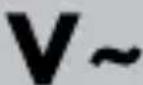 | Volt (AC) |
 | Hertz (mains frequency) |
 | Watt (effective power) |
 | Observe the warnings and safety notices! |
 | Caution!Risk of electric shock |
 | Danger to life and risk of accident for infants and children! |
 | Dispose of the packaging and device in an environmentally-friendly manner! |
Motion Sensor
- Introduction

We congratulate you on the purchase of your new product. You have chosen a high quality product. The instructions for use are part of the product. They contain important information concerning safety, use and disposal. Before using the product, please familiarise yourself with all of the safety information and instructions for use. Only use the unit as described and for the specified applications. If you pass the product on to anyone else, please ensure that you also pass on all the documentation with it.
Intended use
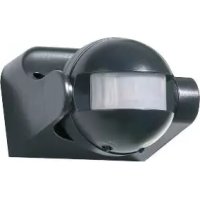
The motion detector is intended for the automatic control of light sources. The product is not intended for commercial use.
Technical Data
Rated voltage: 220-240 V\~50 Hz
Nominal load: max. 1200 watt (for LED
bulb/halogen bulb) max.
300 watt (for energy
saving bulb)
Delay time min.: 10 s - +/- 3 s
Delay time max.: 7 min +/- 2 min
Surrounding light: 10-2000 Lux (can be set)
Range: max. 12 m
Coverage area: max. 160°
Operating temperature: -20–40 °C
Operating humidity: < 93 % rF
Recommended installation height: 1.8–2.5 m
Model/Type numbers: 10336A / ES-P06 (black)
10336B/ES-P06 (white)
10336C/ES-P02C (black)
10336D/ES-P02C (white)
- Scope of delivery
1 motion sensor
2 screws
2 dowels
1 instruction manual
Parts description
1 Sensor
2 Screw
3 Block terminal
4 Base plate
5 Dowel
6 Control dial TIME
7 Control dial LUX
8 Control dial SENS (only 10336C/D)
9 Internal wiring of the article (do not modify)
10 Clamp room of the article
11 Lamp (not included)

Safety
YOU SHOULD STORE ALL SAFETY INFORMATION AND INSTRUCTIONS IN A SAFE PLACE IN CASE YOU NEED TO REFER TO THEM AGAIN IN THE FUTURE!
When passing this product on to others please be sure to also include all of its documentation.

Avoid the danger of death from electric shock!
Before installation, check the motion detector, as well as connection cords to ensure that these are intact. A defective product and defective cords increase the risk of electrical shock. A defective product and defective cords increase the risk of electrical shock.

WARNING!
DANGER TO LIFE BY ELECTRIC SHOCK!
Before installation or performing any work on outdoor lamp
with LED / halogen / energy-saving bulb, switch off the electrical circuit at the circuit breaker box or remove the fuse from the fuse box.

How to avoid personal injury and damage to the product!

RISK OF FATALINJURY
AND ACCIDENT HAZARD FOR TODDLERS AND SMALL CHILDREN! Never leave children
unattended with the packaging material or the product. Please keep children away from the device at all times.
This appliance can be used by children aged from 8 years and above and persons with reduced physical, sensory or mental capabilities or lack of experience and knowledge if they have been given supervision or instruction concerning use of the appliance in a safe way and understand the hazards involved. Children shall not play with the appliance. Cleaning and user maintenance shall not be made by children without supervision.
Before use, ensure that the mains voltage available is the same as the required operating voltage for the device (220–240V\~).
- Avoid extreme temperature fluctuations. Install the product only if the ambient temperatures are acceptable.
■ Installation shall only be performed by an electrician who is familiar with the regulations and risks.
■ The fuse in the product is not replaceable.
- Mounting
- Select a suitable place for installation
Ensure that
- the motion detector will not be functionally inhibited at the desired place of installation due to obstacles or constantly moving objects.
- the motion detector is not installed where there are strong temperature fluctuations, e.g. due to heating devices or air conditioners.
12 GB/IE/NI
Important warning about drilling into walls!
Before drilling, ensure there are no gas, water or electrical lines in the area where you will be drilling. Must be installed by a competent person. It is essential that you take note of the wall quality, as the included fittings are not suitable for all types of wall. Ask the retailer about screws and wall plugs suitable for the respective wall structure. The manufacturer assumes no liability for plugs installed incorrectly in the wall and any resulting damage.
Installation
WARNING! DANGER TO LIFE BY ELECTRIC SHOCK!
Before installation, switch off the electrical circuit at the circuit breaker box or remove the fuse from the fuse box.
Note: The recommended installation height is between 1.8 and 2.5 m.
Note: Before installation, ensure an optimal direction of motion. The motion detector reacts more sensitively to movement from the side than to motion from the front (see III. A).
Therefore, we recommend installing the motion detector 1 to the side of the direction of movement.
Note: To attach the base plate 4 it is necessary to drill two holes.

WARNING!
Ensure that you do not damage any electricity
□ Remove the screws 2 from the front of the motion detector (see III. B).
☐ Insert the cable through the cable opening of the base plate 4.
☐ Screw the base plate 4 to the desired position.
□ Connect the cable to the screw terminal 3 of the motion detector as depicted in Ill. C.
☐ Attach the cover of the connection area back to the base plate 4 by screwing the screws 2.

Start-up
Turn the electricity back on. The device is now ready for use.
- Setting the sensitivity of the sensor (Ill. D)
Only models 10336C/D
Note: the sensor range is max. 12 m (depending on the surrounding temperature).
Turn the control knob SENS 8 in the direction „-” in order to reduce the sensor range 1
Turn the control knob SENS 8 in the direction „+” in order to increase the sensor range 1.
- Setting the lighting duration of the device (Ill. D)
Note: the lighting duration of the device can be set from min. 10 seconds to max 7 minutes
Turn the control knob TIME 6 in the direction „-” in order to decrease the lighting duration of the device.
Turn the control knob TIME 6 in the direction „+“ in order to increase the lighting duration of the device.
Note: The lighting duration is always calculated based on the respective last movement recorded by the sensor 1.
- Setting the day light level (Ill. D)
Turn the control knob LUX 7 in the direction, The sensor 1 is in the night operation mode.
Turn the control knob LUX 7 in the direction „The sensor 1 is in the night and day operation mode.
Note: the intermediate range is for various light values.
- Cleaning and Care
■ Never use cleaners or a rough cloth. These may damage the sensor 1.
□ Clean the product with a dry, lint-free cloth.
- Disposal

The packaging is made of environmentally friendly materials that can be disposed at your local recycling facilities.
Contact your local refuse disposal authority for more details on how to dispose of your worn-out product.

When your device has come to the end of its life, please do not throw it out with your household refuse, but in the interest of the environment, take it to a suitable centre where it can be disposed of properly. Please contact your local authority for information on collection points and their opening hours.
• Guarantee and Service
Note: This product includes a 36 month warranty from the date of purchase. This product was manufactured with care
and thoroughly inspected prior to delivery. However, if defects in manufacturing or material arise during the warranty period, please contact your retailer immediately.
The warranty does not cover damages due to improper handling, failure to comply with the operating instructions, or manipulation by unauthorised persons. Most malfunctions are caused by incorrect operation. Therefore please first refer to the operating instructions if a malfunction occurs.
Contact the Uni-Elektra GmbH service address before returning the product. The product can only be accepted after contacting us. Postage due shipments will not be accepted. Warranty services do not extend or restart the warranty period of 36 months.

Service address
Uni-Elektra GmbH
Kirchstr. 48
72145 Hirrlingen / Germany
Tel.: +49 (0) 7478 / 91385-0
service@uni-elektra.de
IAN 279891
Please have your receipt and item number (e.g. IAN 12345) ready as your proof of purchase when enquiring about the product.
Manufacture
Uni-Elektra GmbH
Kirchstr. 48
72145 Hirrlingen / Germany

De anvendte piktogrammers legende ....Side 22
Indledning ......Side 23
10336C/ES-P02C (sort)
10336D/ES-P02C (hvid)
- Leverede dele
Installation Page 46
10336D/ES-P02C (wit)
WAARSCHUWING! LEVENSGEVAAR DOOR
LEVENSGEVAARSCHUWING!
EN GEVAAR VOOR ONGEVALLEN VOOR KLEUTERS EN KINDEREN! Laat kinderen
WAARSCHUWING! LEVENSGEVAAR DOOR
ELEKTRISCHESCHOKKEN! Schakel vóór de installatie


ra GmbH
Kirchstr. 48
72145 Hirrlingen
Deutschland
Last Information Update · Tilstand af information

- MOTION SENSOR
- MOTIONSENSOR
- DÉTECTEURDEMOUVEMENTS
- List of pictograms used....Page 6
- Introduction Page 7
- Safety Page 10
- Mounting......Page 12
- Start-up Page 14
- Cleaning and Care......Page 16
- Guarantee and Service......Page 17
- - Introduction
- Intended use
- Technical Data
- - Scope of delivery
- Parts description
- Safety
- Avoid the danger of death from electric shock!
- WARNING!
- DANGER TO LIFE BY ELECTRIC SHOCK!
- How to avoid personal injury and damage to the product!
- RISK OF FATALINJURY
- AND ACCIDENT HAZARD FOR TODDLERS AND SMALL CHILDREN! Never leave children
- - Mounting
- - Select a suitable place for installation
- Ensure that
- GB/IE/NI
- Important warning about drilling into walls!
- Installation
- WARNING! DANGER TO LIFE BY ELECTRIC SHOCK!
- Start-up
- - Setting the sensitivity of the sensor (Ill. D)
- Only models 10336C/D
- - Setting the lighting duration of the device (Ill. D)
- - Setting the day light level (Ill. D)
- - Cleaning and Care
- - Disposal
- • Guarantee and Service
- Service address
- IAN 279891
- Manufacture
- De anvendte piktogrammers legende ....Side 22
- Indledning ......Side 23
- - Leverede dele
- WAARSCHUWING! LEVENSGEVAAR DOOR
- LEVENSGEVAARSCHUWING!
- EN GEVAAR VOOR ONGEVALLEN VOOR KLEUTERS EN KINDEREN! Laat kinderen
Brand : POWERFIX
Model : Motion Sensor
Category : Motion detector