
SHGB 50 A1 - Hair straightener SILVERCREST - Free user manual and instructions
Find the device manual for free SHGB 50 A1 SILVERCREST in PDF.


| Product type | Hair straightener |
| Brand | SilverCrest |
| Model | SHGB 50 A1 |
| Dimensions (L x W x H) | 28 cm x 3.5 cm x 4 cm |
| Weight | 350 g |
| Power supply | Mains, 220-240 V ~ 50/60 Hz |
| Power | 45 W |
| Maximum temperature | 200 °C |
| Temperature setting | 5 levels from 120 °C to 200 °C |
| Plate material | Floating ceramic |
| Automatic shut-off function | Yes, after 30 minutes of inactivity |
| Fast heating | Ready in 30 seconds |
| Cord | Swivel, 2 meters |
| Indicator light | Power on indicator |
| Care and cleaning | Clean the plates with a damp cloth after cooling |
| Storage | Safety lock of plates |
| Spare parts | Not available separately |
| Warranty | 3 years (subject to legal conditions) |
Frequently Asked Questions - SHGB 50 A1 SILVERCREST
User questions about SHGB 50 A1 SILVERCREST
0 question about this device. Answer the ones you know or ask your own.
Ask a new question about this device
Download the instructions for your Hair straightener in PDF format for free! Find your manual SHGB 50 A1 - SILVERCREST and take your electronic device back in hand. On this page are published all the documents necessary for the use of your device. SHGB 50 A1 by SILVERCREST.
USER MANUAL SHGB 50 A1 SILVERCREST
natural_image
Color palette bar with grayscale gradient and a crosshair symbol (no text or labels)SILVERCREST®
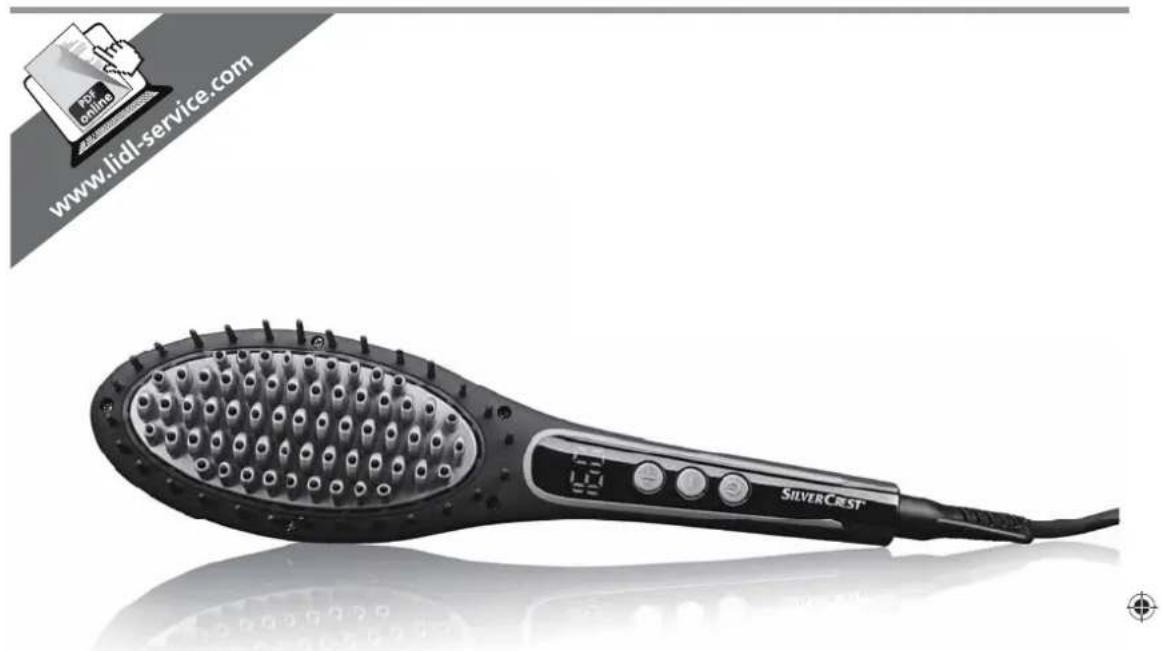
BROSSE COIFFANTE LISSANTE
Mode d'emploi
GB
Operating instructions
IAN 280615
DE AT CH FR IT GB


natural_image
Pure geometric diagram with intersecting lines and a central circular pattern (no text or symbols)

natural_image
Pure geometric diagram with intersecting lines and a central circle, no text or symbols present

natural_image
Pure geometric diagram with intersecting lines and circular shapes, no text or symbols presentContents
- Overview 32
- Intended purpose 33
- Safety instructions .... 33
- Items supplied 35
- Operation 36
5.1 Switching on/off and adjusting temperature.... 36
5.2 Styling.... 37
- Cleaning 37
- Storage 37
- Disposal 38
- Troubleshooting 38
- Technical specifications 38
- Warranty of the HOYER Handel GmbH 39
1. Overview
1 Power cable with mains plug
2 360° rotating cable joint with hanging loop
3 On/off button
4 +/- Buttons for temperature setting (100 °C - 180 °C in 10 °C steps)
5 Display
6 Brush insert with ceramic coating

Thank you for your trust!
Congratulations on the purchase of your new hair straightening brush.
For a safe handling of the product and in order to get to know the entire scope of features:
- Thoroughly read these user instructions prior to initial use.
- Above all, observe the safety instructions!
- The device should only be used as described in these user instructions.
- Keep these user instructions for reference.
- If you pass the device on to someone else, please include this copy of the user instructions.
We hope you enjoy using your new hair straightening brush!
Symbols on your device

Do not use this device in the vicinity of bathtubs, showers, washbasins or other vessels containing water.
2. Intended purpose
The hair straightening brush is intended exclusively for the purpose of styling your own real human head hair. The device is designed for private home use and must not be used for commercial purposes. The device must only be used indoors.
Foreseeable misuse
WARNING! Risk of injury!
Do not use the hair straightening brush for styling any other body parts, animals or objects. Do not use the device for artificial hair or hair extensions.
3. Safety instructions
Warnings
If necessary, the following warnings will be used in these user instructions:

DANGER! High risk: failure to observe this warning may result in injury to life and limb.
WARNING! Moderate risk: failure to observe this warning may result in injury or serious material damage.
CAUTION: low risk: failure to observe this warning may result in minor injury or material damage.
NOTE: circumstances and specifics that must be observed when handling the device.
Instructions for safe operation
- This device can be used by children from the age of 8 and people with restricted physical, sensory or intellectual abilities or people without adequate experience and/ or understanding, if they are supervised or instructed on how to use this device safely and if they are aware of the resulting danger. Children must not play with the device. Cleaning and user maintenance must not be performed by children unless they are older than 8 years and supervised.
- Keep children under the age of 8 away from the device and the power cable.
- If you use the hair straightening brush in a bathroom, always pull out the mains plug afterwards. The proximity of water represents a hazard even when the device is switched off.
- If the mains power cable of this device should become damaged, it must be replaced by the manufacturer, the manufacturer's customer service department or a similarly qualified specialist, in order to avoid any hazards.
- Installation of a residual current device (FI/ RCD) with a rated residual operating current of no more than 30 mA is recommended to provide additional protection. Ask your electrician for advice. The installation should only be carried out by a qualified electrician.

DANGER for children
Children must not play with packing material. Do not allow children to play with plastic bags. There is a risk of suffocation.

DANGER to and from pets and livestock
Electrical devices can represent a hazard to pets and livestock. In addition, animals can also cause damage to the device. For this reason you should keep animals away from electrical devices at all times.

DANGER! Risk of electric shock due to moisture
Do not use this device in the vicinity of bathtubs, showers, washbasins or other vessels containing water.
- Never place the device anywhere that it could fall into water while plugged in.
- Protect the device from moisture, water drops and water splashes.
The device, the cable and the mains plug must not be immersed in water or any other liquids.
- If liquid gets into the device, remove the mains plug immediately. Have the device checked before reusing.

If the device has fallen into water, pull out the mains plug immediately, and only then remove the device from the water. Do not use the device again, and have it checked by a specialist workshop.
- Never touch the device with wet hands.

DANGER! Risk of electric shock
Do not use the device if the device or the power cable has any visible damage, or if the device has previously been dropped.
- Lay the power cable such that no one can step on it, get caught on it, or trip over it.
- Only connect the mains plug to a properly installed and easily accessible wall socket whose voltage corresponds to the specifications on the rating plate. The wall socket must continue to be easily accessible after the device is plugged in.
- Ensure that the power cable cannot be damaged by sharp edges or hot points. Do not wrap the power cable around the device (Danger! Risk of cable damage!).
- Ensure that the power cable cannot be trapped or crushed.
To pull the mains plug out of the wall socket, always pull on the mains plug, and never on the power cable.
- Disconnect the mains plug from the wall socket...
... after every use,
... if there is a fault,
... when you are not using the device,
... before you clean the device and ... during thunderstorms.
To avoid any risk, do not make modifications to the product. You also must not replace the power cable yourself. Repairs must be carried out by a specialist workshop or the Service Centre.
- Never attempt to remove dust or foreign bodies from inside the device using a pointed object (e.g. with a tail comb).

DANGER! Fire hazard
- Never leave the device unattended while it is plugged in.
- Never cover the device or place it on soft objects (e.g. towels). As long as the device is switched on and/or hot, always place it on a stable, flat, heat-resistant surface.

DANGER! Risk of injury through burning
Do not touch the hot surfaces of the device.
- Allow the device to cool down completely before you clean it or put it away.
WARNING! Risk of material damage
- Use the original accessories only.
- Never place the device on hot surfaces (e.g. hot plates) or near heat sources or open fire.
- Do not use any astringent or abrasive cleaning agents.
- Do not expose the device to temperatures below -10 °C or above +40 °C.
4. Items supplied
1 hair straightening brush
1 user instructions
Before using for the first time
- Remove all packing material.
- Check that the device is undamaged.





5. Operation

DANGER! - Fire hazard!
- Never cover the device or place it on soft objects (e.g. towels). As long as the device is switched on and/or hot, always place it on a stable, flat, heat-resistant surface.

DANGER! Risk of injury through burning!
- Never touch the hot brush insert with ceramic coating 6.
NOTE:
- Before using it for the first time, switch the device on for a few minutes and set it to the highest temperature (180 °C). As a result of the manufacturing process, you may notice a slight odour. This is normal and only occurs during first use. Ensure that the room is well ventilated.
5.1 Switching on/off and adjusting temperature
- Place the device on a heat-resistant surface.
- Connect the mains plug 1 to a properly installed and easily accessible wall socket whose voltage corresponds to the specifications on the rating plate. The wall socket must continue to be easily accessible after the device is plugged in.
- Press the on/off button ⏻ 3 for approx. 2 seconds to switch the device on. The display 5 shows 150.
- Use the + / - 4 buttons to set the desired temperature between 100^ and 180^ in 10^ steps. LED segments moving clockwise in the display 5 will indicate that the device is heating up.
NOTE: LED segments running anticlockwise indicate that the device is cooling down. Wait until the desired temperature appears in the display before straightening your hair.
- In order to avoid changing the temperature by accidentally pressing the +/- 4 buttons, you can lock these buttons.
- Press one of the +/- 4 buttons for approx. 2 seconds. The buttons are now locked. The display 5 shows 🔒
-
Press one of the +/- 4 buttons again for approx. 2 seconds. The buttons are now unlocked. The display 5 stops showing 🔒
-
Press the on/off button ⏻ 3 for approx. 2 seconds to switch the device off.
-
Allow the device to cool down on the heat-resistant surface.
Switching off automatically
If you do not press a button on the switched-on device for 45 minutes, it will switch off automatically. Before this happens, the temperature display will flash in the display 5. Press the on/off button ⏻ 3 for approx. 2 seconds to switch the device back on.
5.2 Styling
The right temperature
WARNING!
- Hair can be damaged by excessive temperature, excessively long contact or too frequent straightening. Particularly at higher temperatures, you should not treat the same strand of hair more than once.
| Hair texture | Recommended temperature |
| bleached, dyed blonde | 100 - 120 °C |
| fine, dyed 120 - 140 °C | |
| normal to strong, not chemically treated | 140 - 180 °C |
- Start with the lowest temperature that is recommended for the hair texture to be treated.
- Increase the temperature in small steps if the straightening process is taking too long.
Straightening
- Dry your hair.
- Comb the hair well.
- Start with the lowest temperature that is recommended for the hair texture to be treated (see table).
- Separate one strand and brush it smooth. Brush evenly from the hairline to the tips of the hair. Do not stay in any one spot for too long. Ensure that you keep a sufficient distance from your scalp!
- Straighten all of your hair in this way, strand by strand.
-
Switch the device off using the on/off button Ⓐ, and allow the device to cool down.
-
Disconnect the mains plug 1 from the wall socket.
- Allow the hair to briefly cool before you treat it further e.g. with styling or care products.
6. Cleaning

DANGER! Risk of electric shock!
- Pull out the mains plug 1 from the wall socket before cleaning the hair straightening brush.
- Allow the device to cool down before cleaning.
WARNING! Risk of material damage!
- Do not use any astringent or abrasive cleaning agents.
- Hairs that are tangled in the bristles should ideally be pulled off using your fingers.
- Clean the device regularly. Wipe down the housing of the device with a damp cloth.
7. Storage
WARNING! Risk of material damage!
- Do not wrap the cable around the device (risk of cable damage!).
- Allow the device to cool down.
- You can use the hook loop 2 to safely and practically hang up the device for storage purposes.
8. Disposal
This product is subject to the provisions of European Directive 2012/19/EC. The symbol showing a wheelie bin crossed through indicates that the product requires separate refuse collection in the European Union. This applies to the product and all accessories marked with this symbol. Products identified with this symbol may not be discarded with normal household waste, but must be taken to a collection point for recycling electric and electronic appliances. Recycling helps to reduce the consumption of raw materials and protect the environment.

Packaging
When disposing of the packaging, make sure you comply with the environmental regulations applicable in your country.
9. Troubleshooting
If your device fails to function as required, please try this checklist first. Perhaps there is only a minor problem, and you can solve it yourself.
| Fault | Possible causes / Action |
| None Function | Has the device been connected to the power supply? |
| Error messages on the display (E1, E2, E3, E4) | Disconnect the mains plug 1 from the wall socket.Allow the device to cool down.Connect the mains plug 1 with the wall socket and put the device into operation. If the device cannot be switched on, contact the Service Centre. |
10. Technical specifications
| Model: SHGB 50 | A1 |
| Mains voltage: 220-240 V ~50/60 Hz | |
| Protection class: II | □ |
| Power rating: 50 | W |

DANGER! Risk of electric shock!
- Do not attempt to repair the device yourself under any circumstances.
CE
Subject to technical modification.
11. Warranty of the HO YER Handel GmbH
Dear Customer,
your device is provided with a 3 year warranty starting with the purchase date. In the event of product defects, you are entitled to statutory rights against the vendor. These statutory rights are not restricted by our warranty presented in the following.
Warranty conditions
The warranty period starts with the purchase date. Please keep the original purchase receipt in a safe place. This document is required to verify the purchase.
If within three years from the purchase date of this product a material or factory defect occurs, the product will be repaired or replaced by us – at our discretion – free of charge to you. This warranty implies that within the period of three years the defective device and the purchase receipt are presented, including a brief written description of the defect and the time it occurred.
If the defect is covered by our warranty, the repaired or a new product will be returned to you. No new warranty period starts with a repair or replacement of the product.
Warranty period and statutory claims for defects
The warranty period is not extended when the warranty has been claimed. This also applies to replaced and repaired parts. Any damages and defects already existing at the time of purchase must be reported immediately upon unpacking. Repairs arising after the expiration of the warranty period are subject to a charge.
Warranty coverage
The device was produced carefully according to strict quality guidelines and tested diligently prior to delivery.
The warranty applies to material or factory defects.
Excluded from the warranty are wear parts subject to normal wear and damages to fragile parts, e.g. switches, batteries, lamps or other parts manufactured from glass.
This warranty expires if the product is damaged, not used as intended or not serviced.
For the proper operation of the product, all instructions listed in the operating instructions must be observed carefully. Any form of use and handling that is advised against in the operating instructions or warned against must always be avoided.
The product is only intended for private and not for commercial use. In the case of incorrect and improper treatment, use of force and interventions not performed by our authorised Service Centre, the warranty shall cease.
Handling in case of a warranty claim
In order to ensure prompt processing of your matter, please observe the following notes:
- Please keep the article number IAN: 280615 and the purchase receipt as a purchase verification for all inquiries.
- The article number can be found on the rating plate, an engraving, the title page of your instructions (in the bottom left), or as a label on the rear or underside of the device.
- If faulty operation or other defects occur, first contact the Service Centre listed in the following by telephone or email.
- Then, you are able to send a product reported as defective free of charge to the service address specified to you, including the purchase receipt and the information on the defect and when it occurred.

Please visit www.lidl-service.com to download this and many other manuals, product videos and software.

Service Centre
GB Service Great Britain
Tel.: 0871 5000 720 (£ 0.10/ Min.)
E-Mail: hoyer@lidl.co.uk
IE Service Ireland
Tel.: 1890 930 034
(0,08 EUR/ Min., (peak))
(0,06 EUR/ Min., (off peak))
E-Mail: hoyer@lidl.ie
IAN: 280615

Supplier
Please note that the following address is no
service address. First contact the afore-
mentioned Service Centre.

HOYER Handel GmbH
Tasköprüstraße 3
22761 Hamburg
Germany


natural_image
Pure geometric diagram with intersecting lines and circular shapes, no text or symbols present

natural_image
Pure color palette bar with no text or symbols, showing grayscale gradient and a gray rectangle at bottom (no text or symbols)HOYER HANDEL GMBH
Tasköprüstraße 3
22761 Hamburg
Germany



- Contents
- Overview
- Thank you for your trust!
- Symbols on your device
- Intended purpose
- Foreseeable misuse
- WARNING! Risk of injury!
- Safety instructions
- Warnings
- Instructions for safe operation
- DANGER for children
- DANGER to and from pets and livestock
- DANGER! Risk of electric shock due to moisture
- DANGER! Risk of electric shock
- DANGER! Fire hazard
- DANGER! Risk of injury through burning
- WARNING! Risk of material damage
- Items supplied
- Before using for the first time
- Operation
- DANGER! - Fire hazard!
- DANGER! Risk of injury through burning!
- NOTE:
- Switching on/off and adjusting temperature
- Switching off automatically
- Styling
- The right temperature
- WARNING!
- Straightening
- Cleaning
- DANGER! Risk of electric shock!
- WARNING! Risk of material damage!
- Storage
- Disposal
- Packaging
- Troubleshooting
- Technical specifications
- Warranty of the HO YER Handel GmbH
- Warranty conditions
- Warranty period and statutory claims for defects
- Warranty coverage
- Handling in case of a warranty claim
- Service Centre
- Supplier
- HOYER HANDEL GMBH
Brand : SILVERCREST
Model : SHGB 50 A1
Category : Hair straightener