
DV90N62631W - Tumble drier SAMSUNG - Free user manual and instructions
Find the device manual for free DV90N62631W SAMSUNG in PDF.


| Product Type | Tumble Dryer |
| Brand | Samsung |
| Model | DV90N62631W |
| Capacity | 9 kg |
| Drying Type | Heat Pump |
| Energy Efficiency Class | A+++ |
| Dimensions (Height x Width x Depth) | 850 x 600 x 600 mm |
| Weight | 54 kg |
| Power Supply | 230 V, 50 Hz |
| Power Consumption (kWh per cycle) | 1.78 kWh |
| Noise Level | 65 dB(A) |
| Number of Programs | 14 |
| Key Programs | Cotton, Synthetics, Delicates, Wool, Mixed Load, Shirts, Outdoor, Bedding, Eco, Quick, Time Dry, Gentle Dry, Anti-Crease, Smart Control |
| Control Type | Electronic with Dial and Buttons |
| Display | LED |
| Lint Filter | Yes, removable and washable |
| Condenser Cleaning | Manual cleaning indicator |
| Safety Features | Child Lock, Overheating Protection, Door Lock |
| Spare Parts Availability | Yes, genuine parts available |
| Repair Index (France) | 8.5 / 10 |
| Manual Languages | DA, EN, FI, NO, SV |
Frequently Asked Questions - DV90N62631W SAMSUNG
User questions about DV90N62631W SAMSUNG
0 question about this device. Answer the ones you know or ask your own.
Ask a new question about this device
Download the instructions for your Tumble drier in PDF format for free! Find your manual DV90N62631W - SAMSUNG and take your electronic device back in hand. On this page are published all the documents necessary for the use of your device. DV90N62631W by SAMSUNG.
USER MANUAL DV90N62631W SAMSUNG
What you need to know about the safety instructions 4 Important safety symbols 4 Important safety precautions 5 Critical installation warnings 7 Critical usage warnings 9 Usage cautions 10 Critical cleaning warnings 12 Instructions about the WEEE 13
Installation 14
What's included 14 Installation requirements 16 Levelling 18 Drain hose (if necessary) 19 Installation checklist 22 Before using the dryer 22 Door reversal (DV9*N62****/DV8*N62**** only) 23
Operations 28 Control panel 28 Getting started 35 Special features 39 SmartThings 40
Maintenance 45 Control panel 45 Exterior 45 Drum 45 Lint filter 45 Water tank 47 Heat exchanger 48
English2
Troubleshooting 50
Checkpoints 50 Information codes 52
Appendix 53
Fabric care chart 53
Protecting the environment 54
Specification 55
Consumption data 56
Sheet of household tumble driers 57
Safety information
Congratulations on your new Samsung dryer. This manual contains important information on the installation, use, and care of your appliance. Please take the time to read this manual to take full advantage of your dryer's many benefits and features.
What you need to know about the safety instructions
Warnings and Important Safety Instructions in this manual do not cover all possible conditions and situations that may occur. It is your responsibility to use common sense, caution, and care when installing, maintaining, or operating your dryer.
Always contact your manufacturer about problems or conditions you do not understand.
Important safety symbols
What the icons and signs in this user manual mean:

WARNING
Hazards or unsafe practices that may result in severe personal injury, death and/or property damage.

CAUTION
Hazards or unsafe practices that may result in personal injury and/or property damage.

NOTE
Indicates that a risk of personal injury or material damage exists.

Read the instructions
These warning signs are here to prevent injury to yourself and others.
Please follow them explicitly.
After reading this manual, store it in a safe place for future reference.
Read all instructions before using the appliance.
As with any equipment that uses electricity and moving parts, potential hazards exist. To safely operate this appliance, familiarize yourself with its operation and exercise care when using it.

WARNING - Risk of Fire
- Clothes dryer installation must be performed by a qualified technician.
- Install the clothes dryer according to the manufacturer's instructions and local codes.
• To reduce the risk of severe injury or death, follow all installation instructions.
English4
Important safety precautions
WARNING
To reduce the risk of fire, electric shock, or injury to persons when using your appliance, follow basic precautions, including the following:
- This appliance is not to be used by persons (including children) with reduced physical, sensory or mental capabilities, or lack of experience and knowledge, unless they have been given supervision or instruction concerning use of the appliance by a person responsible for their safety.
- For use in Europe: This appliance can be used by children aged from 8 years and above and persons with reduced physical, sensory or mental capabilities or lack of experience and knowledge if they have been given supervision or instruction concerning use of the appliance in a safe way and understand the hazards involved. Children shall not play with the appliance. Cleaning and user maintenance shall not be made by children without supervision.
- Children should be supervised to ensure that they do not play with the appliance.
- If the supply cord is damaged, it must be replaced by the manufacturer, its service agent or similarly qualified persons in order to avoid a hazard.
- The new hose-sets supplied with the appliance are to be used and that old hose-sets should not be reused.
- For appliances with ventilation openings in the base, that a carpet must not obstruct the openings.
English 5
Safety information
- For use in Europe: Children of less than 3 years should be kept away unless continuously supervised.
- CAUTION: In order to avoid a hazard due to inadvertent resetting of the thermal cut-out, this appliance must not be supplied through an external switching device, such as a timer, or connected to a circuit that is regularly switched on and off by the utility.
- The tumble dryer is not to be used if industrial chemicals have been used for cleaning.
- The lint trap has to be cleaned frequently, if applicable.
- Lint must not to be allowed to accumulate around the tumble dryer. (not applicable for appliances intended to be vented to the exterior of the building)
- Adequate ventilation has to be provided to avoid the back flow of gases into the room from appliances burning other fuels, including open fires.
- Do not dry unwashed items in the tumble dryer.
- Items that have been soiled with substances such as cooking oil, acetone, alcohol, petrol, kerosene, spot removers, turpentine, waxes and wax removers should be washed in hot water with an extra amount of detergent before being dried in the tumble dryer.
- Items such as foam rubber (latex foam), shower caps, waterproof textiles, rubber backed articles and clothes or pillows fitted with foam rubber pads should not be dried in the tumble dryer.
- Fabric softeners, or similar products, should be used as specified by the fabric softener instructions.
English6
- The final part of a tumble dryer cycle occurs without heat (cool down cycle) to ensure that the items are left at a temperature that ensures that the items will not be damaged.
- Remove all objects from pockets such as lighters and matches.
- WARNING: Never stop a tumble dryer before the end of the drying cycle unless all items are quickly removed and spread out so that the heat is dissipated.
- Exhaust air must not be discharged into a flue which is used for exhausting fumes from appliances burning gas or other fuels.
- The appliance must not be installed behind a lockable door, a sliding door or a door with a hinge on the opposite side to that of the tumble dryer, in such a way that a full opening of the tumble dryer door is restricted.
- WARNING: The appliance must not be supplied through an external switching device, such as a timer, or connected to a circuit that is regularly switched on and off by a utility.
Heat pump model only: The instructions shall also include the substance of the following:
WARNING: In the appliance enclosure or in the built-in structure, keep ventilation openings clear of obstruction.
WARNING: Do not damage the refrigerant circuit.
Critical installation warnings
WARNING
The installation of this appliance must be performed by a qualified technician or service company.
- Failure to do so may result in electric shock, fire, an explosion, problems with the product, or injury.
English 7
Safety information
Plug the power cord into a wall socket and use the socket for this appliance only. In addition, do not use an extension cord.
- Sharing a wall socket with other appliances using a power strip or extending the power cord may result in electric shock or fire.
- Ensure that the power voltage, frequency and current are the same as those of the product specifications. Failure to do so may result in electric shock or fire. Failure Plug the power plug into the wall socket firmly.
Remove all foreign substances such as dust or water from the power plug terminals and contact points using a dry cloth on a regular basis.
- Unplug the power plug and clean it with a dry cloth.
- Failure to do so may result in electric shock or fire.
Keep all packaging materials well out of the reach of children, as packaging materials can be dangerous to children.
- If a child places a bag over its head, it may result in suffocation.
This appliance must be properly grounded.
Do not ground the appliance to a gas pipe, plastic water pipe, or telephone line.
- This may result in electric shock, fire, an explosion, or problems with the product
- Never plug the power cord into a socket that is not grounded correctly and make sure that it is in accordance with local and national codes.
Do not install or keep the product exposed to the outdoor elements.
Do not use a damaged power plug, damaged power cord or loose wall socket.
• This may result in electric shock or fire.
If the plug (power supply cord) is damaged, it must be replaced by the manufacturer or its service agent or a similar qualified technician in order to avoid a hazard.
This appliance should be positioned to be accessible to the power plug after installation.
Do not pull or excessively bend the power cord.
Do not twist or tie the power cord.
Do not hook the power cord over a metal object, place a heavy object on the power cord, insert the power cord between objects, or push the power cord into the space behind the appliance.
- This may result in electric shock or fire.
Do not pull the power cord, when unplugging the power plug.
- Unplug the power plug by holding the plug.
- Failure to do so may result in electric shock or fire.
English8
This appliance must be properly grounded. Never plug the power cord into a receptacle that is not grounded adequately and in accordance with local and national codes. See installation instructions for grounding this appliance.
Install this appliance in a location with solid, level floor.
- Failing to do so may result in abnormal vibrations, noise or problems with the product.
Since an ingredient in hair spray may degrade the hydrophile property of the heat exchanger so that dew may appear on the outer surface of the appliance when the cooling operation is running, do not install the appliance in a beauty salon.
This appliance should be positioned so that the power plug, the water supply taps, and the drain pipes are accessible.
Critical usage warnings
WARNING
Do not let children or pets on or into the product. In addition, when disposing of this product, disassemble the door lock (lever).
• This may result in children falling and injuring themselves.
- If children become locked in the product, there is a danger of suffocation.
Do not try to access the inside of the product when the drum is rotating.
Do not sit on the product or lean against the door.
- This may result in the product turning over and resulting in injury.
Dry the laundry only after it was spun by an appropriate washing machine.
Do not dry unwashed items in the tumble dryer.
Do not drink the condensed water.
Never stop a tumble dryer before the end of the drying cycle unless all items are quickly removed and spread out so that the heat is dissipated.
Do not dry laundry contaminated by inflammable materials such as gasoline, kerosene, benzene, thinner, alcohol, etc.
• This may result in electric shock, fire or explosion.
Do not let pets chew or play with the dryer.
• This may result in electric shock or injury.
When disposing of the product, separate the door and the power cord before disposing of the product.
- Failing to do so may result in damage to the power code or an injury.
Do not touch the power plug with wet hands.
• This may result in electric shock.
English 9
Safety information
When gas (city gas, propane gas, LP gas) leaks, do not touch this appliance or the power cord, ventilate immediately.
- At this time, do not use the ventilating fan.
- A spark may cause an explosion or fire.
Do not repair, replace, or attempt to service any part of the appliance unless specifically recommended in the user-repair instructions. You must also have the skills necessary to service this appliance.
Do not attempt to repair, disassemble, or modify the appliance yourself.
- Do not use any fuse(such as cooper, steel wire, etc.) other than the standard fuse.
- When repairing or reinstalling the appliance is required, contact your nearest service center.
- Failure to do so may result in electric shock, fire, problems with the product, or injury.
The product you have purchased is designed for domestic use only.
The use for business purposes qualifies as product misuse. In this case, the product will not be covered by the standard warranty provided by Samsung and no responsibility can be attributed to Samsung for malfunctions or damages resulting from such misuse.
If the product generates strange noise, smells of something burning, or generates smoke, immediately cut-off the power and contact the service center.
- Otherwise, it may cause an electric shock or fire as a result.
Do not let children (or pets) play in or on your product. The product door does not open easily from the inside and children may be seriously injured if trapped inside.
Usage cautions
CAUTION
Do not stand on top of the appliance or place objects (such as laundry, lighted candles, lighted cigarettes, dishes, chemicals, metal objects, etc.) on the appliance.
- This may result in electric shock, fire, problems with the product, or injury.
Do not touch the glass door and inside of the drum during or just after drying as it is hot.
• This may result in burns.
The door glass becomes hot during washing and drying. Therefore, do not touch the door glass.
Also, do not allow children to play around the washing machine or touch the door glass.
• This may result in burns.
Do not press the buttons using sharp objects such as pins, knives, fingernails, etc.
• This may result in electric shock or injury.
English10
Do not dry laundry containing forming rubber (latex) or similar rubber textures.
- If forming rubber is heated, it may start a fire.
Do not dry laundry contaminated by vegetable oil or cooking oil as a large amount of the oil will not be removed when washing the laundry. In addition, use the Cool Down cycle so that the laundry is not heated.
- The oxidization heat of the oil may start a fire.
Make sure that the pockets of all clothing to be dried are empty.
- Hard, sharp objects, such as coins, safety pins, nails, screws, or stones can cause extensive damage to the appliance.
Do not dry clothing with large buckles, buttons, or other heavy metal (zippers, hooks and eyelets, button-up covers).
If necessary, use the laundry net for small and lightweight laundry such as fabric tie belt, apron strings, and underwire bras which can dissolve or break during a cycle.
Dryer sheets are compatible with this model, and are recommended for better drying performance.
Dryer sheets are also beneficial in reducing the static electricity generated during a drying cycle. Static electricity could lead to damage of laundry items and potentially the appliance.
Do not use the dryer near dangerous powders such as coal dust, wheat flour, etc.
- This may result in electric shock, fire or an explosion.
Do not place inflammable materials near the product.
- This may result in toxic gases from the product, damage to parts, electric shock, fire or an explosion.
- The appliance should not be placed behind lockable doors etc.
Do not touch the rear side of the appliance during or immediately after drying is complete.
- The appliance remains hot and may cause burns.
Contains fluorinated greenhouse gases.
Hermetically sealed equipment.
Do not vent gases into the atmosphere.
Refrigerant (Type): R-134a (GWP = 1430)
Refrigerant (Charging): 0.37 kg, 0.529 tCO _2 e
Safety information
Critical cleaning warnings

WARNING
Do not clean the appliance by spraying water directly onto it.
Do not use benzene, thinner or alcohol to clean the appliance.
• This may result in discoloration, deformation, damage, electric shock or fire.
Before cleaning or performing maintenance, unplug the appliance from the wall socket.
- Failure to do so may result in electric shock or fire.
Clean the filter case before and after using the dryer.
Clean the inside of the product on a regular basis by asking an authorized service engineer.
Clean the Heat Exchanger with a soft brush or vacuum cleaner once a month, Do not touch the heat exchanger with your hand. Otherwise, it may cause an injury.
The interior of the dryer should be cleaned periodically by qualified service personnel.
English12
Instructions about the WEEE
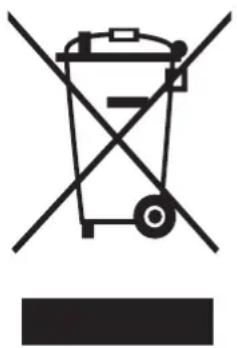
natural_image
Symbol of a trash bin crossed with a diagonal line, no text or numbers presentCorrect Disposal of This Product (Waste Electrical & Electronic Equipment)
(Applicable in countries with separate collection systems)
This marking on the product, accessories or literature indicates that the product and its electronic accessories (e.g. charger, headset, USB cable) should not be disposed of with other household waste at the end of their working life. To prevent possible harm to the environment or human health from uncontrolled waste disposal, please separate these items from other types of waste and recycle them responsibly to promote the sustainable reuse of material resources.
Household users should contact either the retailer where they purchased this product, or their local government office, for details of where and how they can take these items for environmentally safe recycling.
Business users should contact their supplier and check the terms and conditions of the purchase contract. This product and its electronic accessories should not be mixed with other commercial wastes for disposal.
For information on Samsung's environmental commitments and product regulatory obligations, e.g. REACH, WEEE or Batteries, visit our sustainability page available via www.samsung.com
Installation
What's included
Carefully unpack the dryer. Keep all packaging materials away from children. The parts and location of parts shown below may differ from your dryer. Before installation, make sure the dryer has all the parts listed here. If the dryer and/or parts are damaged or missing, contact the nearest Samsung customer service centre.
Dryer at a glance
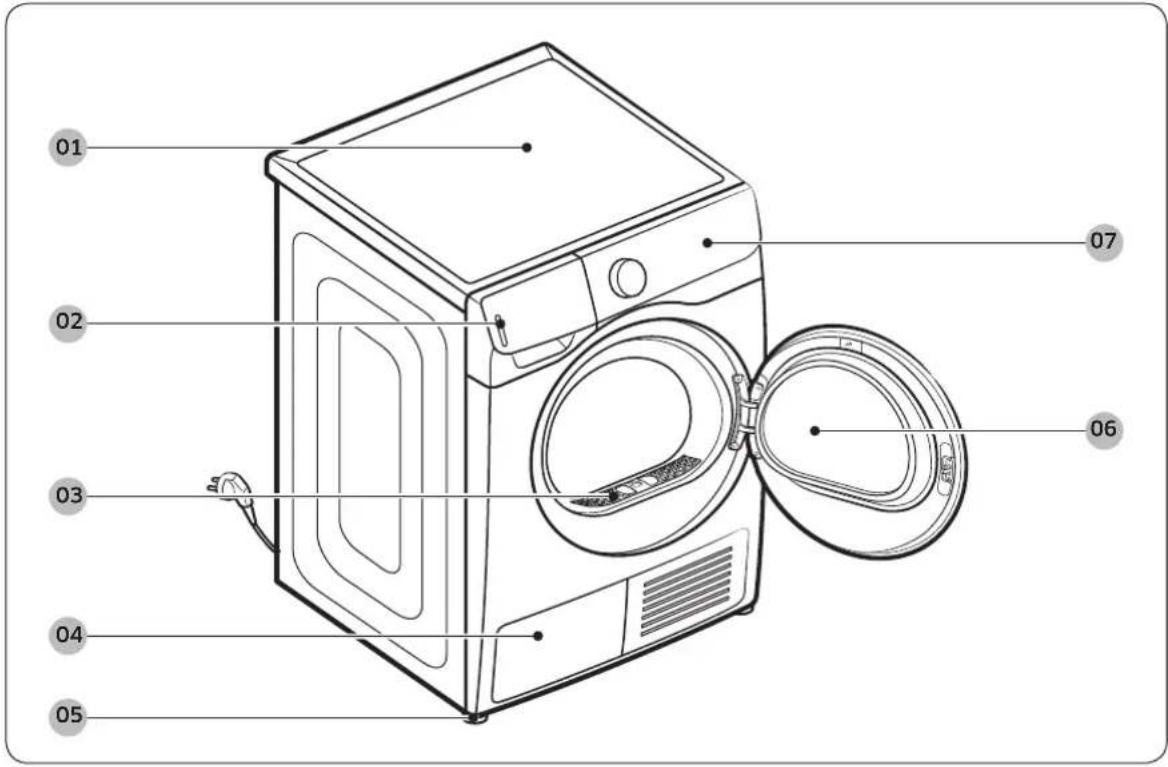
01 Top cover 02 Water Tank
03 Lint filter 04 Heat exchanger
05 Levelling Leg 06 Door
07 Control Panel
English14
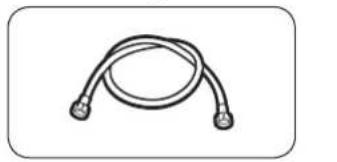
Accessories (supplied)
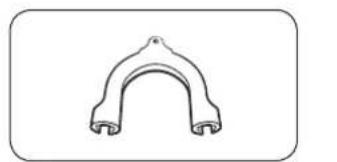
natural_image
Simple line drawing of a symmetrical mechanical bracket or clamp (no text or symbols)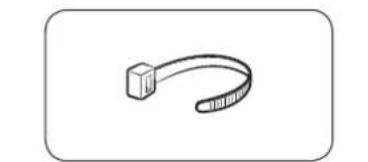
natural_image
Simple line drawing of a curved mechanical or tool component (no text or symbols)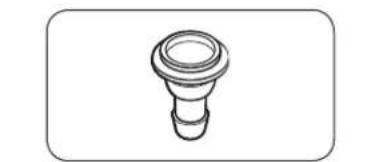
natural_image
Simple line drawing of a mechanical component with a flanged top and rounded base (no text or symbols)Hose guide Cable tie Hose connector
natural_image
Simple line drawing of a coiled tube or hose with two connectors (no text or symbols)
natural_image
Simple line drawing of a closed book with a blank cover (no text or symbols)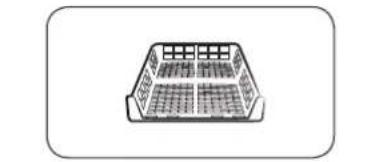
natural_image
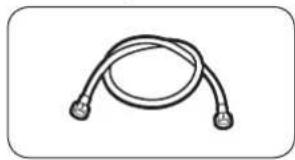
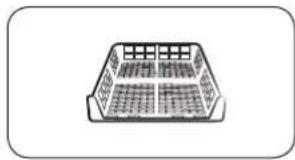
Simple line drawing of a rectangular container with internal compartments (no text or symbols)Long drain hose (2m) User manual Rack Dry (applicable
models only)
natural_image
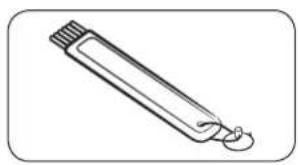
Simple line drawing of a laboratory pipette with a bulbous tip (no text or symbols)Cleaning brush
Accessories (not supplied)
natural_image
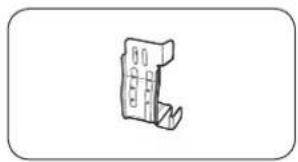
Simple line drawing of a mechanical component or bracket (no text or symbols)Bracket-Stacking kit (SK-DH, SK-DA, SKK-DF)
natural_image
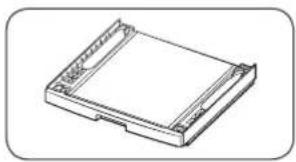
Isometric line drawing of a rectangular electronic component with mounting holes (no text or symbols)Stacking kit (SKK-DD, SKK-DDX)
NOTE
- The stacking kit allows the dryer to be stacked on top of a washer. Please note that the stacking kit can only be used with Samsung washers and dryers. To purchase a bracket stacking kit (SK-DH, SK-DA, SKK-DF) or stacking kit (SKK-DD, SKK-DDX), contact a Samsung service centre or local appliance retailer. The stacking kit differs with the washer model.
- For stacking instructions with the dryer, see the installation manual included in the stacking kit.
- For information about model-specific availability of the stacking kit, see the installation manual included in the stacking kit.
Installation
Installation requirements

NOTE
This dryer must be installed by a qualified installer. If service is required due to poor or faulty installation, it is considered the owner's responsibility and may void the warranty. Keep these instructions for future reference.

WARNING
- Do not plug the power cord into a wall outlet before the dryer is completely installed.
- Have two or more persons help move the dryer.
- Do not let children or pets play in, on, or around the dryer. Proper supervision is necessary at all times.
- Keep all packaging materials away from children.
- Do not replace a damaged power cord or power plug yourself. Have Samsung or a qualified service technician replace a damaged power cord or power plug.
- Do not attempt to repair, disassemble, or modify the dryer. For any repairs, contact the nearest Samsung service centre.
- Remove the door/lids from all discarded appliances to avoid children from suffocating.
- If the dryer generates a strange noise, burning smells, or smoke, unplug the power plug immediately and contact the nearest Samsung service centre.
- Do not unplug the dryer while it is operating.
- Do not place flammable objects near the dryer.
English16
Location requirements
Select a level, well-constructed surface that will withstand vibrations. Select a location where a grounded, 3-prong outlet is easily accessible.
WARNING
• Install the dryer indoors only.
- Do not install the dryer in areas exposed to the weather.
- Do not install the dryer where the temperature may fall below 5^ or rise above 35^ .
- Do not install the dryer where gas may leak.
- Do not block the cooling grill's air inlet located at the dryer front.
Alcove or closet installation
For alcove or closet installation, the dryer requires the following minimum clearances:
| Sides Top Front Rear | |||
| 25 mm 25 mm | DV**8*****: 550 mmDV**6*****: 490 mm | 50 mm |
If installing the dryer with a washer, the front of the alcove or closet must have an unobstructed air opening of at least 490 mm.
Electrical and grounding requirements
- The dryer requires an AC 220-240 V / 50 Hz electrical supply.
- The dryer must be properly grounded. If the dryer malfunctions or breaks down, grounding reduces the risk of electric shock by providing a path of least resistance for the electric current. The dryer comes with a power cord that has a 3-prong grounding plug. The plug must be plugged into an appropriate outlet that is properly installed and grounded in accordance with all local codes and ordinances.
- If you have any questions regarding the electrical or grounding requirements, please contact Samsung or a qualified electrician.
WARNING
- Plug into a grounded, 3-prong outlet.
- Do not use a damaged power plug, cord, or loose or damaged wall outlet.
- Do not use an adaptor or an extension cord.
- Improper connection of the equipment-grounding conductor may result in electric shock. If you are unsure if the dryer is properly grounded, check with a qualified electrician.
- Do not modify the power plug, power cord, or power outlet in any way.
- Do not connect the ground wire to plastic plumbing lines, gas lines, or hot water pipes.
English 17
Installation
Levelling
Before you install the dryer, make sure you have read Installation requirements on page 16. Please note that the following instructions are for installation without using a drain hose. For instructions for using a drain hose, see the next section, Drain hose (if necessary). For convenience, consider installing the dryer next to your washer.
installation
natural_image
Line drawing of a washing machine with labeled parts A and B (no text or symbols beyond labels)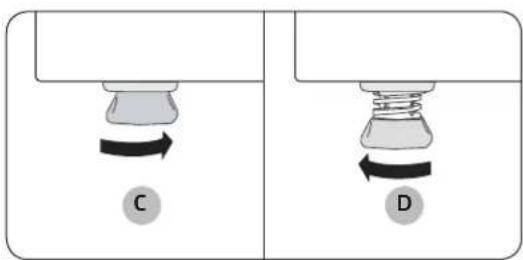
natural_image
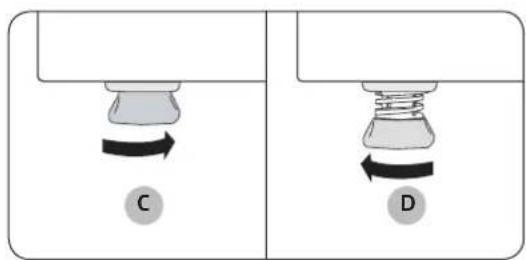
Two identical diagrams showing a mechanical component with arrows indicating rotation, labeled C and D (no text or symbols beyond labels)- Gently put the dryer on the desired location.
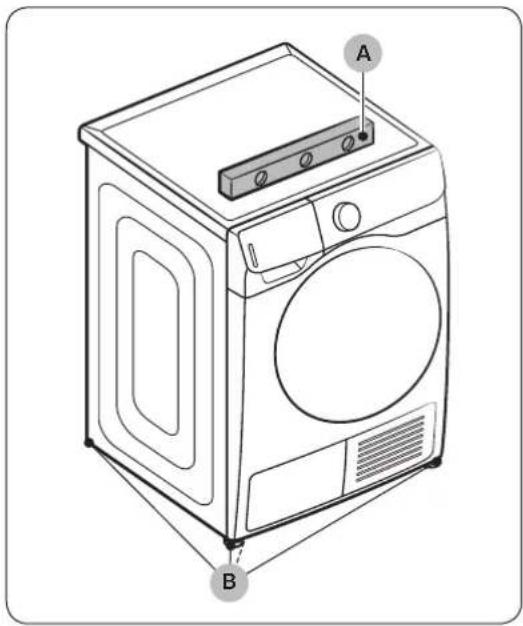
- Use a level (A) and check the levelness of the dryer from side to side and front to back.
- If the dryer is not level, adjust the levelling leg (B). Turning the leg counter-clockwise retracts the leg. Turning the leg clockwise extends the leg.
- Once the dryer is level, make sure the dryer stands firmly on the floor.
- Plug in the dryer.
NOTE
- The dryer can be levelled using either or both of the front and rear legs of the dryer.
- To set the dryer to the same height as the washer, fully retract (C) the levelling legs by turning them counter clockwise, then loosen (D) the legs by turning them clockwise.
- Extend the levelling leg only as much as necessary. Extending the levelling leg more than necessary can cause the dryer to vibrate.
English18
Drain hose (if necessary)
natural_image
Line drawing of a front view of a washing machine casing with internal components and a highlighted inset (no text or symbols)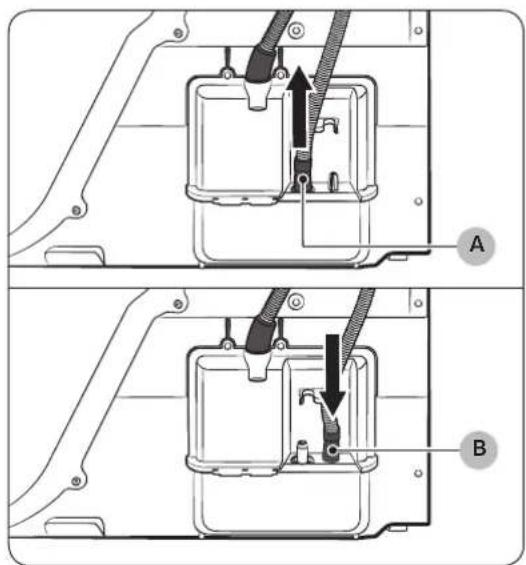
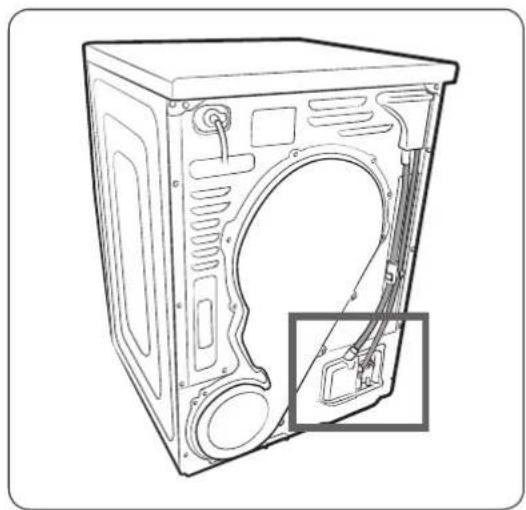
The dryer comes with a built-in water tank. However, if you do not want to use the water tank, you may install the drain hose. The provided accessory hose (long drain hose) can be used as an extension to the drain hose.
- Remove the drain hose from hole (A), and insert it into hole (B).
Installation
natural_image
Technical diagram of a mechanical assembly with labeled component A (no text or symbols beyond label)Over a wash basin:
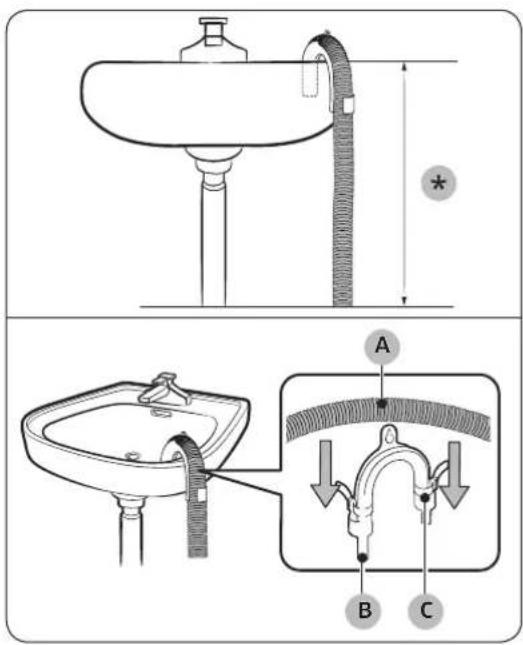
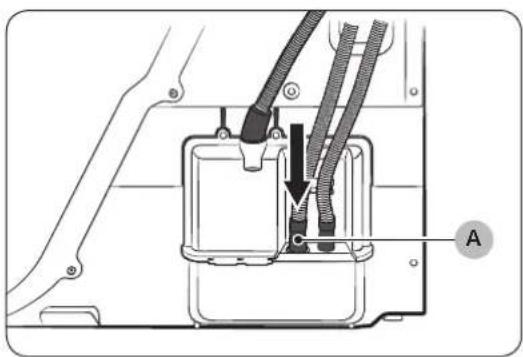
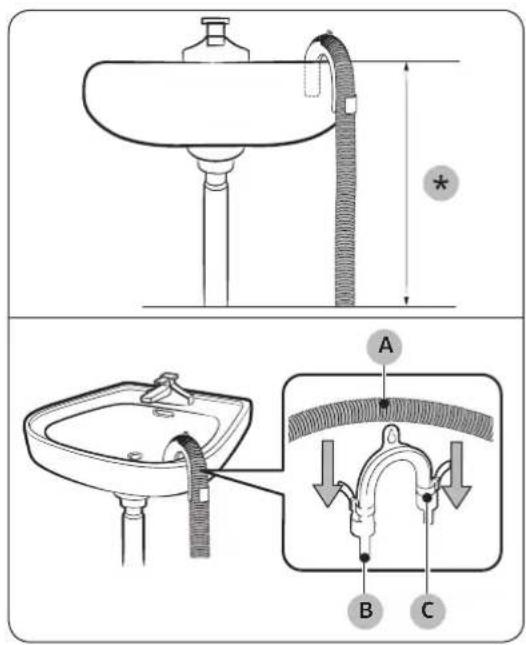
- Insert one end of the accessory hose (long drain hose) into hole (A).
-
Insert the other end (outlet) of the accessory hose to the drainage system in one of the following ways:
-
Make sure to place the end of the accessory hose lower than 90 cm (*) from the bottom of dryer.
- To bend some point of the accessory hose, use the supplied plastic hose guide (B) and secure the guide to the wall with a hook or to the tap with a piece of string. Assemble the drain hose (A) and the hose guide (B) and fix them with the cable-tie (C).
- You can drain the condensed water by connecting the accessory hose (long drain hose) to the drain-outlet directly.
CAUTION
Do not extend the drain hose. Water may leak from the connected area. Use a long drain hose.
English20
By using the drain pipe of the wash basin:
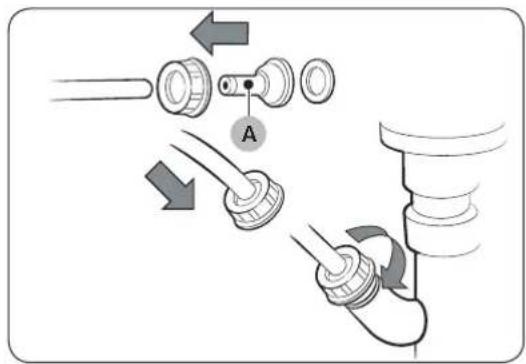
- Assemble the hose connector (A), and attach it to the end of the accessory hose as shown.
CAUTION
To prevent water leak, make sure to connect the hose and the connector firmly.
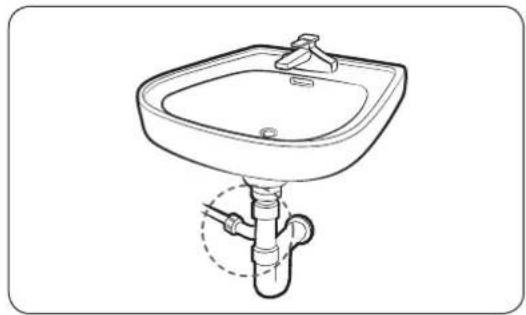
natural_image
Line drawing of a square sink with a pipe and valve, no text or symbols present- Connect the hose adaptor directly to the drain pipe of the wash basin.
Installation
Installation checklist
- The dryer is plugged into a properly grounded outlet.
- All packaging material is completely removed and properly disposed.
- The dryer is level and standing firmly on the floor.
- Start the dryer to make sure that it runs, heats, and shuts off.
- Run a TIME DRY cycle for 20 minutes to see if the HC information code is displayed. If this is the case, contact a local service centre.
• After installation, we recommend that you wait at least 1 hour before using the dryer.
Before using the dryer
- Make sure no accessory remains inside the drum.
- Plug in the power cord just before operating the dryer.
- Do not block the air inlet hole of the cooling grill at the front of the dryer.
- Do not place inflammable objects near the dryer and keep the surroundings clean.
- Keep the dryer level with the ground.
- Do not remove the adjustable levelling legs of the dryer. They are necessary to keep the dryer level with the ground.
English22
Door reversal (DV9\*N62\*\*\*\*/DV8\*N62\*\*\*\* only)
You might want to reverse the direction of the door, depending on your site conditions or to your needs.

WARNING
Make sure door reversal is performed by a qualified technician.
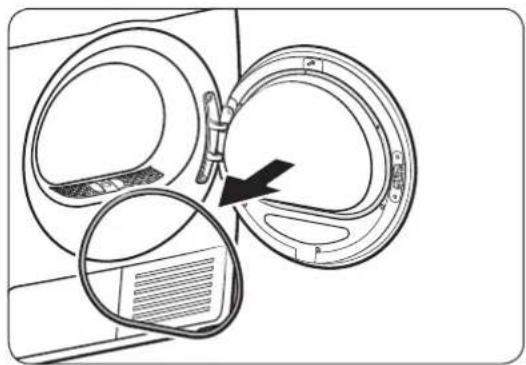
natural_image
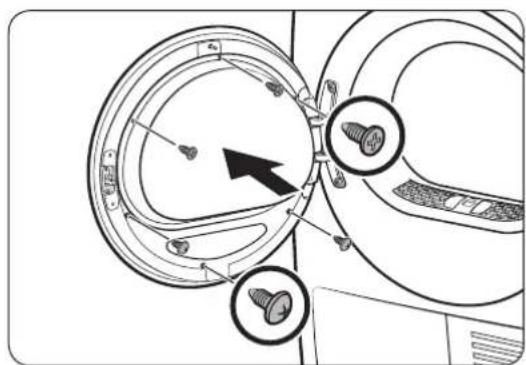
Diagram of a mechanical device with two circular components and a black arrow indicating rotation or assembly (no text or symbols)- Remove the door packing from the door.
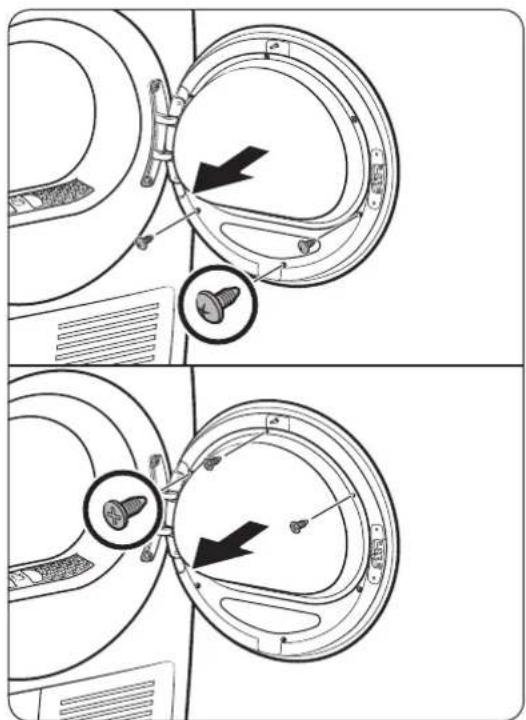
- Remove the screws on the inner glass holder of the door.
- First, loosen and remove the 3 screws on the bottom. Then, loosen and remove the 3 screws on the top of the holder.
Installation
installation
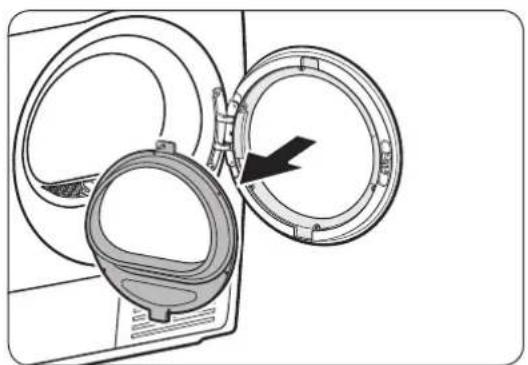
natural_image
Diagram showing two circular devices connected by a cable, with one device highlighted by an arrow (no text or symbols present)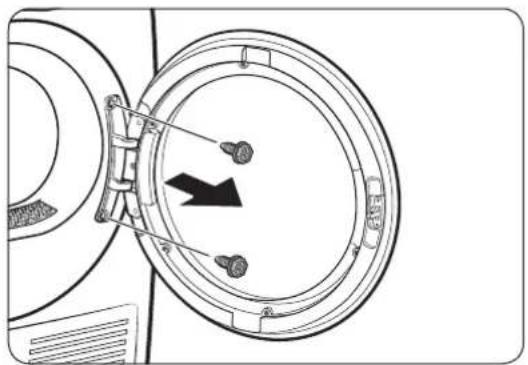
natural_image
Diagram of a door mechanism with a black arrow indicating direction (no text or symbols present)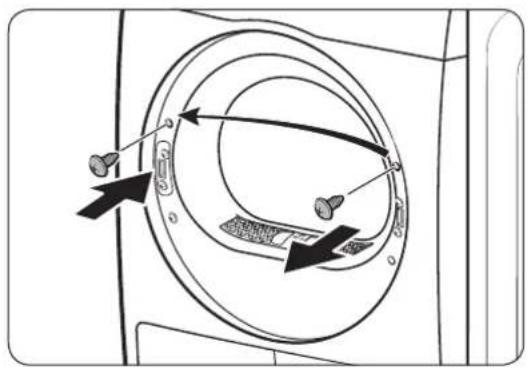
natural_image
Diagram of a circular device with directional arrows indicating motion or movement, no text or symbols present- Detach the glass holder.
CAUTION
Use caution not to drop any part of the holder when detaching it. Property damage (cracks or breaks) or physical injury may occur.
-
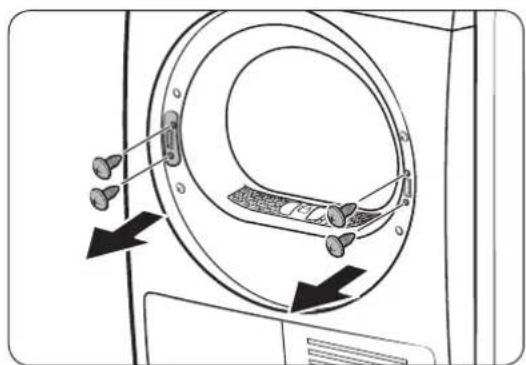
Remove the hinge screws, and then detach the door.
-
Loosen and remove the 2 bolts on the door frame.
-
To prevent abrasion on the bolts, use a hex screwdriver.
-
Remove the upper screw on the left of the door frame, and then insert it in the corresponding right hole of the door frame. Do not remove the lower bracket screws.
English24
natural_image
Diagram of a washing machine interior showing circular components and adjustment knobs (no text or symbols)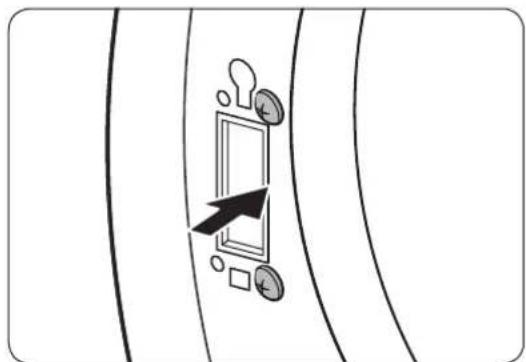
natural_image
Diagram showing a device with arrows pointing to it, surrounded by curved lines (no text or symbols)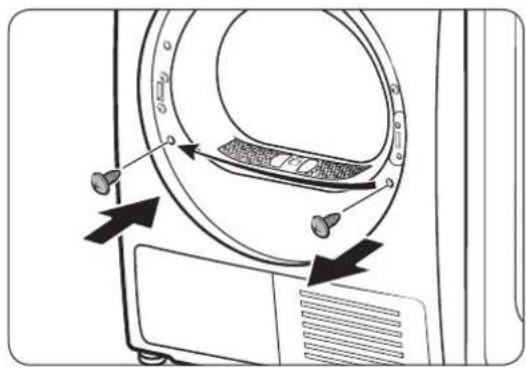
natural_image
Diagram of a device with circular components and directional arrows indicating motion or assembly (no text or symbols)-
Remove the 2 bracket screws on the right frame, and then remove the 2 holder screws on the left frame.
-
Insert the 2 removed bracket screws in the left frame as shown.
- See the figure on the right for the correct position of the screws.
- Remove the bottom screw on the left frame, and then insert it in the corresponding hole on the right frame.
Installation
Installation
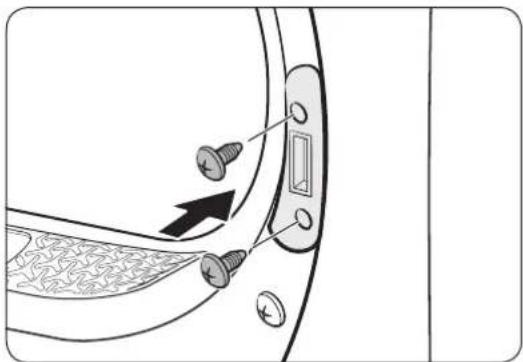
natural_image
Diagram of a door handle with screws and a lock, showing alignment and adjustment (no text or symbols)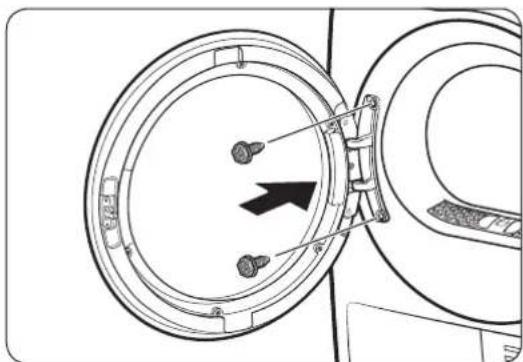
natural_image
Diagram of a circular mechanical component with internal components and an arrow indicating direction (no text or symbols)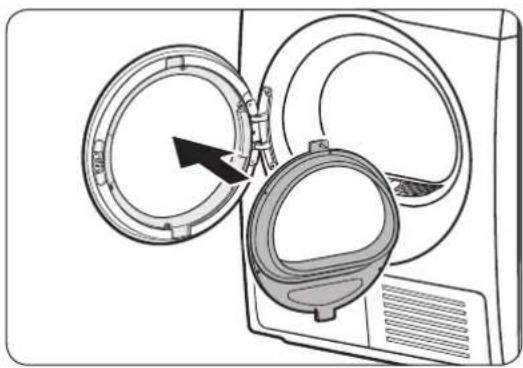
natural_image
Diagram of a washing machine with two circular components and an arrow indicating rotation (no text or symbols)-
Insert the lever holder on the right frame, and then tighten the 2 holder screws.
-
Insert the door hinge in the opposite position of the door frame, and then, tighten the 2 bolt screws.
-
Insert the inner glass holder in the door cover that has been installed on the left frame.
English26
natural_image
Diagram of a car interior showing circular components and a hand holding a ring, with no visible text or symbols.-
Tighten the 3 holder screws on the top. Then, tighten the 3 holder screws on the bottom.
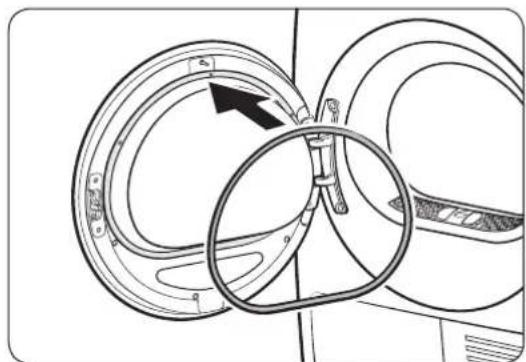
-
Attach the door packing to the door.
Operations
Control panel
DV**N82****
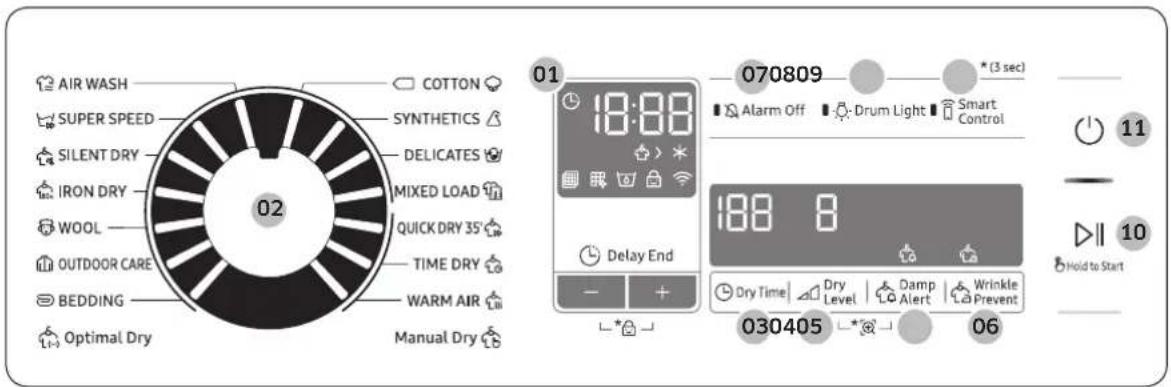
DV**N62****
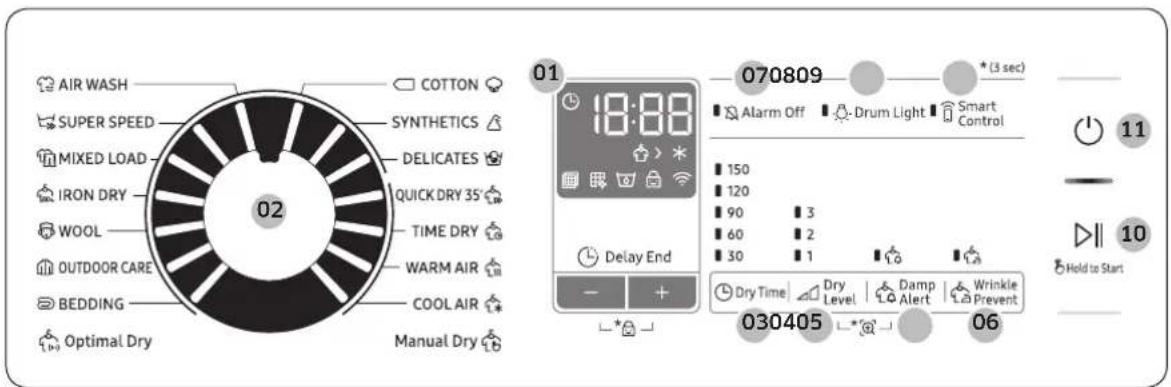
| 01 Digital Graphic Display | Displays all cycle information, including cycle time, information codes, and dryer status. See the table below for status details. | |||
| Check filter alarm Cooling | * | |||
| Heat-exchanger clean alarm | Delay End | |||
| Water Tank Full Smart Check | ||||
| Child Lock Damp Alert | ||||
| Wi-Fi Wrinkle Prevent | ||||
| Drying | ||||
| 02 Cycle Selector | Turn the dial to select a cycle. See the Cycle overview on page 30 for available cycles. | |||
English28
| 03 Dry Time | Press to adjust the cycle time for TIME DRY, WARM AIR, and COOL AIR (DV**N62**** models only) cycles.The following time options (unit: minute) are available: 30, 60, 90, 120, and 150.120 minutes and 150 minutes are not available for WARM AIR and COOL AIR (DV**N62**** models only) cycles.The exact drying time differs depending on the humidity of the load. |
| 04 Dry Level | Press to select the dryness level in the AIR WASH,COTTON MIXED LOAD, SYNTHETICS, and SILENT DRY (DV9*N82**** models only) cycles. The dryness can be set in three levels (1-3). Level 1 is used to partially dry items that lay flat or hang to dry. Level 3 is the strongest and is used to dry larger or bulk loads. |
| 05 Damp Alert | This alert is available only with COTTON MIXED LOAD, SYNTHETICS and SILENT DRY (DV9*N82**** models only)cycles. If a load contains mixed fabrics, the Damp Alert indicator blinks when the average dryness of the item is 80 % dry. This lets you take items that you don't want fully dried or that dry quickly out of the dryer early while letting others continue to dry. |
| 06 Wrinkle Prevent | Adds approximately 3 hours of intermittent tumbling at the end of the selected cycle to reduce wrinkles. To activate, press Wrinkle Prevent. The wrinkle prevent indicator blinks, and zero appears on the display. |
| 07 Alarm Off | Press to mute/unmute the alarm. The sound setting is retained when you turn the dryer off and turn it on again. |
| 08 Drum Light | Press to turn on or off the interior lamp. The lamp stays lit for 2 minutes after it has turned on, and then turns off automatically. |
| 09 Smart Control | After connecting the dryer to your home network using the SmartThings app, you can control dryer remotely. The Smart Control indicator blinks. The loader enters waiting mode for remote commands. For more information, see the SmartThings section on page 40. |
| 10 Start/Pause(Hold to Start) | Press and hold to start an operation, or press to stop an operation temporarily. |
Operations
| 11 Power | Press to turn the dryer on/off. If the dryer turns on for 10 minutes without any button being pressed, the dryer automatically turns off. |
Cycle overview
Optimal Dry
| Cycle Description | Max load(kg) | |
| For cottons, bed linen, table linen, underwear,towels, and shirts. | MAX | |
| For blouses, and shirts that are made of polyester(Diolen, Trevira), polyamide (Perlon, nylon), orother similar blends. | 4 | |
| For items to be handled with care such as lingerie. 2 | ||
| For mixed loads consisting of cotton and syntheticfabrics. | MAX | |
| Uses warm air to deodorise and refresh items. Youcan select from 3 levels depending on the odour ofthe items. This cycle is best to use for 1~2 items.Level 1: For light odours (default)Level 2: For normal odoursLevel 3: For strong odoursNOTETo maximise the deodorising effect, dampenthe garments with a little water. Check thecolourfastness of the fabric before adding water. | 1 | |
| For mixed loads consisting of cotton and syntheticfabrics. | 3 | |
| For mixed loads of cotton and synthetic fabricsthat you want to dry silently. This can be usedwith the Wrinkle Prevent option, so you can start acycle before going to bed and have it completed inthe morning. | MAX | |
| This cycle finishes the drying process in a moiststate, which facilitates ironing. | 4 |
English30
| Cycle Description | Max load (kg) |
| WOOL | For machine washable and tumble dryable wool only.For best results, turn laundry inside out before drying. |
| OUTDOOR CARE | For outdoor wear such as skiwear and mountain clothing, and also for fabrics such as spandex, stretch, and microfiber. It is recommended to use this cycle after you have washed your laundry using the OUTDOOR CARE cycle with your washing machine. |
| BEDDING | For bulky items such as blankets, sheets, comforters, and light duvets. |
Operations
Manual Dry
| Cycle Description | Max load(kg) |
| QUICK DRY 35' | For drying light cotton synthetics or items that needs quick drying. The default dry time is 35 minutes. |
| TIME DRY | Use to set a desired dry time.Turn the Cycle Selector to select TIME DRY.Press Dry Time to set the drying time between 30 minutes and 150 minutes. Keep pressing Time cycles through the available time options in 30-minute increments.NOTEThe actual cycle time may differ depending on the dryness of items. |
| WARM AIR | For small, pre-dried items. The dry time defaults to 30 minutes.Timed cycle for all types of fabric except for wool and silk. Dry laundry that is still slightly damp or has already been pre-dried. Also suitable for the subsequent drying of multi-layered, thick laundry that does not dry readily.NOTEThis cycle is suitable for drying individual woollen fabrics, sports shoes and soft toys. Only dry these using the basket for woollens. |
| COOL AIR(DV**N62**** models only) | All types of fabric. For freshening up or airing items of laundry that have not been worn for long. |
English32
Cycle chart
NOTE
For best results, follow the load size recommendations for each dry cycle.
- Large load: Fill the drum to about 34 full. Do not add items over this level as they need to tumble freely.
• Medium load : Fill the drum to about 12 full. - Small load: Fill the drum with 3-5 items, not more than 14 full.
| Cycle Recommended items Load size Dry Level | |||
| For cottons, bed linen, table linen, underwear, towels, and shirts. | MAX Available | ||
| Synthetic or blended fabrics. | 4 | Available | |
| 2 | Unavailable | ||
| Silk, fine fabrics and lingerie. | |||
| Mixed load consisting of cotton and synthetic fabrics | MAX Available | ||
| Synthetics and light cottons | 1 | Unavailable | |
| ○ | |||
| All types of fabric; time programme. - Unavailable | |||
| Small Items & damp clothing Everyday items suitable for heat drying | - Unavailable | ||
| All types of fabric. For freshening up or airing items of laundry that have not been worn for long. | - Unavailable | ||
| Clothes with excessive accessories (such as beads, spangles, lace, buttons etc.) may be damaged or deformed. Do not use this cycle for fabrics (such as wool, silk, leather, fur, velvet, printed t-shirts, etc.) that can be easily damaged by heat. | 1 | Available | |
| Synthetic or blended fabrics. | 3 | Unavailable | |
| Mixed load consisting of cotton and synthetic fabrics. | MAX Available | ||
| This cycle finishes the drying process in a moist state, which facilitates ironing. | 4 | Unavailable | |
| For machine washable and tumble dryable wool only. | 2 | Unavailable | |
Operations
 |
English34
Getting started
Simple steps to start
- Press Power to turn the dryer on.
- Load the dryer and close the door.
- Turn the Cycle Selector to select a cycle.
- Change the cycle settings ( ^① Dry Time, and Dry Level) as necessary.
- Select necessary settings and options to your preference. (Damp Alert, Wrinkle Prevent, Alarm Off, and/or Delay End).
- Press and hold ⚙ Start/Pause (Hold to Start). The dryer indicator lights up, and the estimated cycle time appears on the display.
NOTE
The number of available settings and options differs with the cycle.
To change the cycle during operation
- Press ⏻ Start/Pause (Hold to Start) to stop operation.
- Select a different cycle.
- Press and hold ⏻ Start/Pause (Hold to Start) to start new cycle.
Sorting and loading
- Put only one wash load in the dryer at a time.
- Avoid mixing heavy and lightweight items together.
- To increase drying efficiency when drying one or two items, add a dry towel to the load.
- For best results, untangle items before inserting into the dryer.
• Overloading restricts the tumbling process, resulting in uneven drying and wrinkling. - Unless recommended on the care label, avoid drying woollens or fibreglass items.
- Avoid drying unwashed items.
- Do not dry items soiled with oil, alcohol, gasoline, etc.
Operations
Rack Dry (applicable models only)
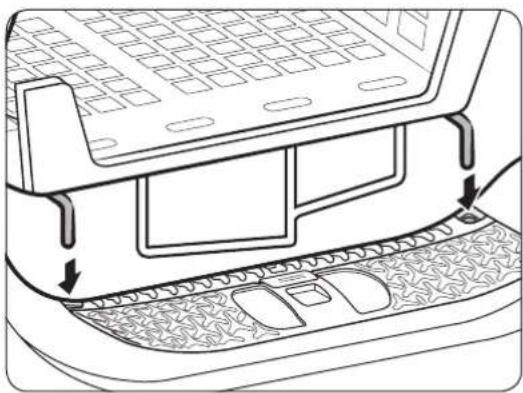
Set the drying time up to 150 minutes according to the moisture and weight of the items to dry. When drying laundry using the drying rack, the TIME DRY cycle is recommended.
natural_image
Technical line drawing of a car rear bumper with decorative patterned seating and doorways (no text or symbols)- Position the drying rack in the drum, inserting the front lips of the rack into the holes of the door diaphragm.
-
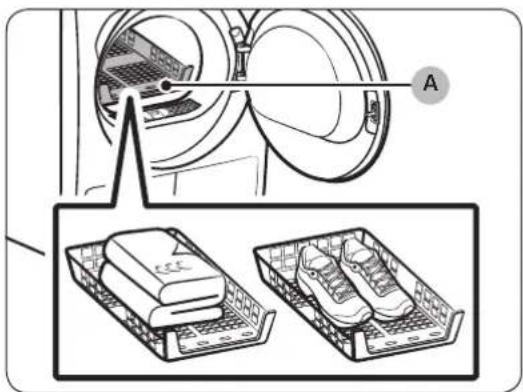
Place items on the rack, leaving enough space where air can circulate. For clothing items, fold and place flat on the rack. For shoes, place shoes with their soles facing down.
-
Close the door and press Power. Select TIME DRY, and then press Dry Time to select the drying time.
-
Press and hold ⏻ Start/Pause (Hold to Start).
A. Rack dry
English36
Drying suggestions
| Items (max 1.5 kg) Description | |
| Washable sweaters (block to shape and lay flat on rack) | When drying the laundry using the rack, fold and place the clothes on the rack to prevent the clothing from becoming wrinkled. |
| Stuffed toys (cotton or polyester fibre filled) | |
| Stuffed toys (foam or rubber-filled) | |
| Foam rubber pillows | |
| Sneakers To dry sports shoes, place the shoes | on the rack so that the soles of the shoes are facing downwards. |

CAUTION
- Drying foam rubber, plastic, or rubber on a heat setting may cause damage to the items and lead to a fire hazard.
• To prevent damage to shoes, use Rack Dry.
Operations
Cycle guide
Always follow the care label when drying. If care label instructions are not available, refer to the following table.
| Bedspreads and comforters | • Use the High temperature settings. |
| Blankets • For best results, dry only one blanket at a time. | |
| Cloth diapers • Use the High temperature settings. | |
| Down-filled items | • Do not dry on a heat setting. Doing so may cause a fire hazard. Only use the COOL AIR (DV**N62**** models only) cycle. |
| Foam rubber (rug backs, stuffed toys, etc.) | • Do not dry on a heat setting. Doing so may cause a fire hazard. Only use the COOL AIR (DV**N62**** models only) cycle. |
| Pillows • Add a few dry towels to help tumble and fluff items.• Do not dry kapok or foam pillows with heat. Use only the COOL AIR (DV**N62**** models only) cycle. | |
| Plastics (shower curtains, outdoor furniture covers, etc.) | • Use COOL AIR (DV**N62**** models only) or TIME DRY. |

CAUTION
Use caution when drying items that are not listed above.
English38
Special features
Delay End
You can set the dryer to complete a selected cycle at your set time.
- Select a cycle with necessary options.
- Press the - or + ⏻ Delay End buttons to set a time between 1 to 24 hours in 1-hour increment.
- Press and hold ⏻ Start/Pause (Hold to Start). The corresponding indicator blinks, and the clock begins counting down to the set time.
NOTE
To cancel the Delay End settings, restart the dryer using the Power button.
Child Lock
To prevent children or infants from accidentally starting or setting the dryer, Child Lock locks all buttons except for the Power button.
To activate/deactivate Child Lock, simultaneously press and hold the - and + Delay End buttons for 3 seconds.
NOTE
If Child Lock is activated, and the dryer is turned off and then on again, Child Lock remains activated.
Smart Check
If the dryer has detected an issue, Smart Check allows you to check the status of the dryer using a smartphone. Please note that Smart Check can only be used for Galaxy and iPhone series smartphones.
To use Smart Check, make sure you have downloaded the Samsung Smart Washer app, and then follow the steps below.
- Press and hold △Dry Level and ▶Damp Alert for 3 seconds. The LED's on the display panel rotate, and the Smart Check code is displayed.
- On the smartphone, open the Samsung Smart Washer app and tap the Smart Check button.
- Focus the smartphone's camera on the Smart Check code shown on the display panel.
- If the information code is recognised, the app provides detailed information for the issue and further instructions.
NOTE
- If the dryer reflects light on the display, the smartphone may fail to recognise the information code.
- If the smartphone fails to recognise the code, manually enter the information code into the smartphone.
Operations
SmartThings
Wi-Fi connection
On your smartphone, go to the Settings and turn on the wireless connection and select an AP (Access Point).

NOTE
- This device is designed for household use only (Class B), and can be used in all residential areas.
- This device may cause wireless interference, and neither the manufacturer or the installer of this device can provide a safety measure of any kind.
- Recommended encryption methods are WPA/TKIP and WPA2/AES. Newly developed Wi-Fi protocols or unapproved Wi-Fi protocols are not supported.
- The reception sensitivity of a wireless network may be affected by surrounding wireless environments.
- If your Internet provider has registered the MAC address of your PC or the modem module for permanent use, your Samsung dryer fails to connect to the Internet. If this is the case, contact your Internet provider.
- The Internet firewall may interrupt your Internet connection. If this happens, contact your Internet provider.
- If Internet failure continues after following the measurement of your Internet provider, contact a local Samsung retailer or service centre.
- For installing wired and wireless routers, refer to the user manual of the router you use.
- Samsung dryer supports the Wi-Fi 2.4 GHz protocols.
- Samsung dryer supports the IEEE802.11 b/g/n (2.4 GHz), Soft-AP protocols. (IEEE802.11n is recommended)
- An unapproved wired/wireless router may fail to connect to Samsung dryer.
Download
On an app market (Google Play Store, Apple App Store, Samsung Galaxy Apps), find the SmartThings app with a search term of "SmartThings". Download and install the app on your device.

NOTE
- The SmartThings app is available on third-party devices with Android OS 6.0 (Marshmallow) or higher, Samsung devices with Android OS 5.0 (Lollipop) or higher, and iOS devices with iOS 10.0 or higher (For iPhones, it must be iPhone 6 or higher). The app is optimised for Samsung smartphones (Galaxy S and Note series).
- Some functions of the app may operate differently on third-party devices.
- The app is subject to change without notice for improved performance.
English40
Log in
You must first log into SmartThings with your Samsung account. To create a new Samsung account, follow the instructions on the app. You don't need a separate app to create your account.

NOTE
If you have a Samsung account, use the account to log in. A registered Samsung smartphone user automatically logs in.
To register your device to SmartThings
- Make sure your smartphone is connected to a wireless network. If not, go to the Settings and turn on the wireless connection and select an AP (Access Point).
- Select to run SmartThings on your smartphone.
- When a message of "A new device is found.", select Add.
- If no message appears, select + and select your dryer in a list of devices available. If your dryer is not listed, select Device Type > Specific Device Model, and then add your dryer manually.
- Register your dryer to the SmartThings app as follows.
a. Log into SmartThings with your Samsung account.
b. Turn a Wi-Fi connection on.
c. Add your dryer to SmartThings. Make sure your dryer is connected to SmartThings.
d. When registration is complete, your dryer appears on your smartphone.
Dryer app
Integrated control: You can monitor and control your dryer both at home and on the go.
- Select the dryer icon on SmartThings. The dryer page appears.
- Check the operation status or notifications related to your dryer, and change options or settings if necessary.
Operations
SmartThings
| Category Checkpoint Description | ||
| Monitoring | Drying status | You can check the current cycle and its options, and the remaining cycle time. |
| Smart Control | The Smart Control status is shown for the dryer. | |
| Self Check | Use this to check if the dryer operates normally. | |
| Energy monitoring | Use this to monitor the energy consumption status. | |
| Control | Start/Pause/Cancel | Select a cycle and necessary options, and then select Start/Pause/ Cancel to start an operation, to stop temporarily, or to cancel the current operation. |
| My Favorite | Add frequently used cycles and options to My Favorite for later use. | |
| Notification | Cycle completed | Notifies you the current cycle is complete. |
| Remaining laundry (applicable models only) | Notifies you of any laundry left after a cycle is complete. | |
English42
| Category Checkpoint Description | ||
| Q-Rator | Laundry Recipe * | You can select the fabric type, dry level, and wrinkle prevent to get recommended options and dry cycles that you can start right away. |
| Laundry Planner * | You can set the desired time for a dry cycle to finish.After you set the desired time, you will get a recommended cycle that will end within the time you set, and you can start or reserve the recommended cycle. | |
| HomeCare Wizard * | Provides a regular report with an analysis of the machine operation state in a user-set frequency (every week/month).You can use this regular report to check your usage pattern, maintenance requirements, and energy consumption ** for the set period of time. | |
| * Requires 'SmartThings', available on Android and iOS. Registration required.** Indicative results only. | ||
Operations
Open Source Announcement
The software included in this product contains open source software. You may obtain the complete corresponding source code for a period of three years after the last shipment of this product by sending an email to mailto:oss.request@samsung.com.
It is also possible to obtain the complete corresponding source code in a physical medium such as a CD-ROM; a minimal charge will be required.
The following URL http://opensource.samsung.com/opensource/SMART_AT_051/seq/0 leads to the download page of the source code made available and open source license information as related to this product. This offer is valid to anyone in receipt of this information.
NOTE
Hereby, Samsung Electronics, declares that the radio equipment type appliance is in compliance with Directive 2014/53/EU. The full text of the EU declaration of conformity is available at the following internet address: The official Declaration of conformity may be found at http://www.samsung.com, go to Support > Search Product Support and enter the model name.
Wi-Fi max transmitter power : 20 dBm at 2.412 GHz - 2.472 GHz
English44
Maintenance

WARNING
- Do not clean the dryer by directly spraying water onto the dryer.
- Do not clean the dryer with benzene, thinner, alcohol, or acetone. This may cause discolouration, deformation, damage, electric shock, or fire.
- Before cleaning the dryer, be sure to unplug the power cord.
Control panel
Clean with a soft, damp cloth. Do not use abrasive cleaners. Do not spray cleaners directly on the panel. Immediately wipe up any spills or liquids from the control panel.
Exterior
Clean with a soft, damp cloth. Do not use abrasive cleaners. Avoid using or placing sharp or heavy objects near/on the dryer. Keep detergent and laundry supplies on the pedestal (sold separately) or in a separate storage container.
Drum
Clean with a damp cloth with a mild, non-abrasive cleaner suitable for stainless steel. Wipe remaining residue with a clean, dry cloth.
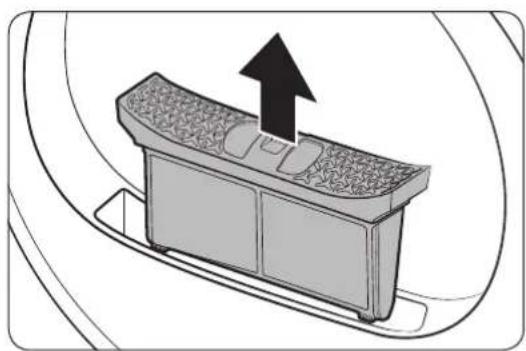
Lint filter
Clean the lint filter after each load.
natural_image
Diagram of a car interior with a double-decker seat and upward arrow indicating motion (no text or symbols)- Open the door and pull the lint filter upward to remove.
Maintenance
natural_image
Technical diagram of a mechanical device with labeled component A and directional arrows indicating motion (no text or symbols beyond labels)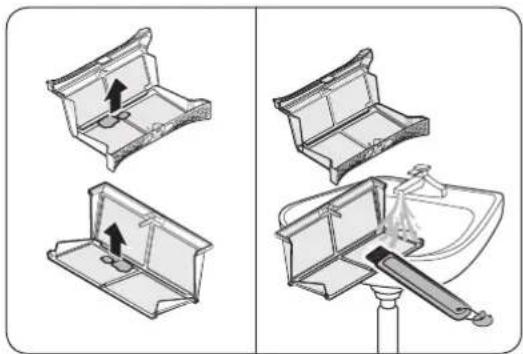
natural_image
Illustration of a kitchen sink with an open drawer and a showerhead, showing four different states of lifting or discharging (no text or symbols present)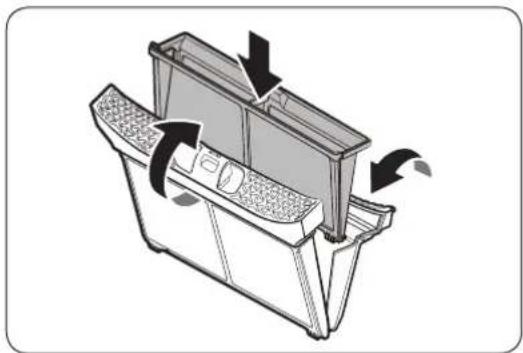
natural_image
Diagram of a mechanical device with internal components and directional arrows indicating motion (no text or symbols)-
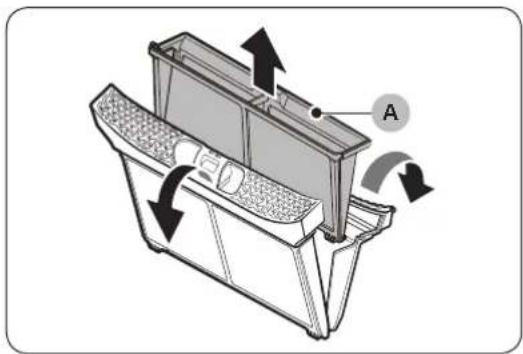
Open the outer filter and remove the inner filter (A).
-
Unfold both the inner filter and the outer filter.
-
Remove the lint from both filters, and then clean the filters with the cleaning brush.
NOTE
To clean the filters thoroughly, clean the filters in running water, and then dry them completely.
- Put the inner filter into the outer filter, and then reinsert the lint filter into the original position.
CAUTION
- Clean the lint filter after each load. Otherwise, the drying performance may decrease.
- Do not operate the dryer without the inner filter inside the outer filter.
- Using the dryer with a wet lint filter may cause mold, bad odours, or a decrease in drying performance.
English46
Water tank
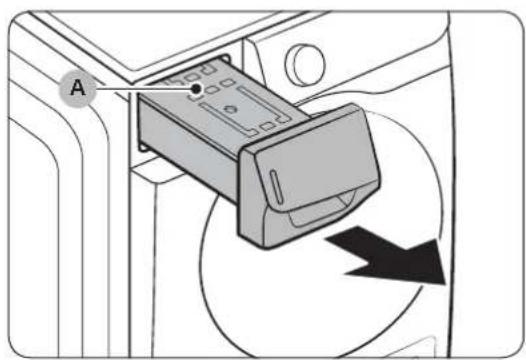
To avoid leaks, empty the water tank after every load.
natural_image
Diagram of a device component with an arrow indicating direction, no text or symbols present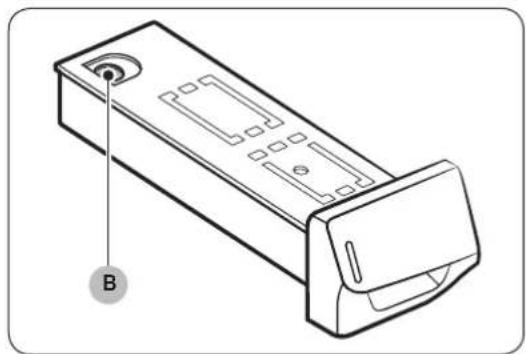
natural_image
Line drawing of a remote control box with labeled point B (no text or symbols on the device itself)-
Using both hands, pull the water tank (A) forward to remove.
-
Empty the water through the drain hole (B) and place the water tank back into place.
NOTE
If you empty the water tank and press and hold ⏻ Start/Pause (Hold to Start), the corresponding indicator turns off.
Maintenance
Heat exchanger
Clean the heat exchanger at least once a month. (or When the Buzzer rings and the heat exchanger indicator lights up on the display.)
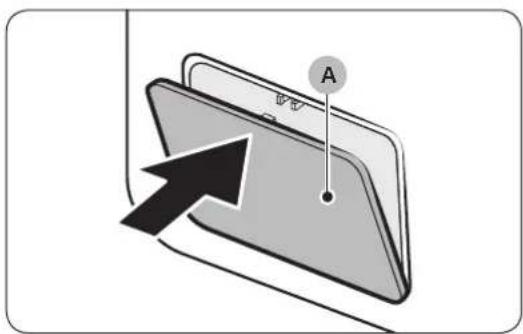
- Gently press the top part of the outer cover (A) to open.
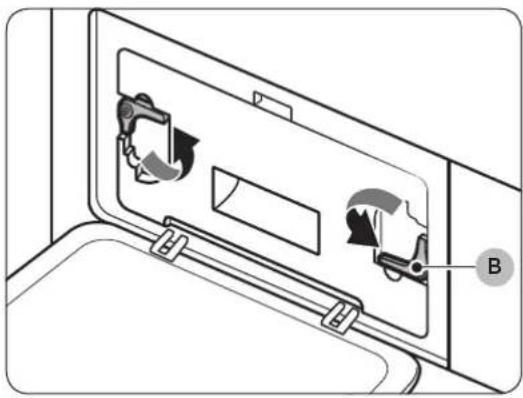
natural_image
Diagram of a door panel with two hanging clips and a labeled component (B), no text or symbols present.- Unlock the fixers (B).
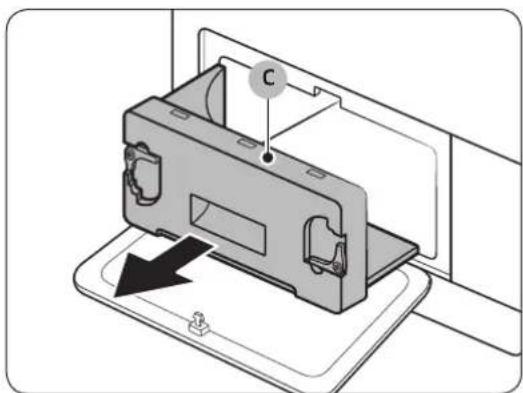
natural_image
Diagram of a device being inserted into a tray, showing internal components and a black arrow indicating direction (no text or symbols)- Remove the inner cover (C).
English48
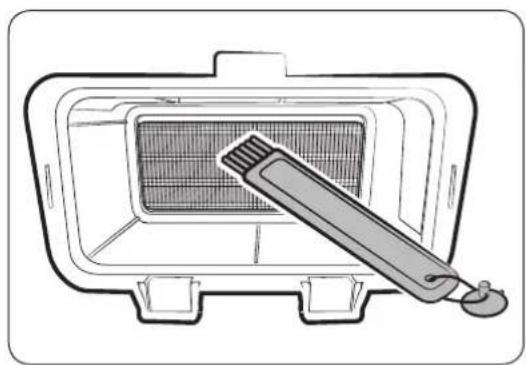
natural_image
Diagram of a grater inside a container with a toothbrush touching the interior (no text or symbols)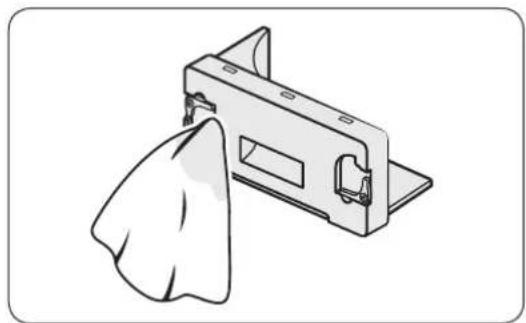
natural_image
Illustration of a mechanical component with a cloth hanging from its side (no text or symbols)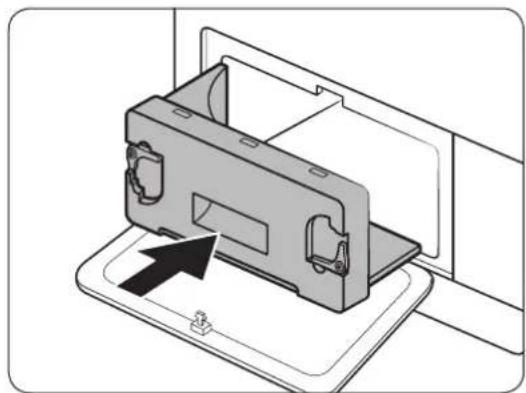
natural_image
Diagram of a device being inserted into a housing, showing internal components and an arrow indicating insertion (no text or symbols present)- Clean the heat exchanger with the provided cleaning brush or a vacuum cleaner with a brush attachment. Take care not to bend or damage the heat exchanger fins when cleaning. This may lead to a decrease in drying performance.
CAUTION
• To avoid physical injury and burns, do not touch or clean the heat exchanger with bare hands.
- Do not use water to clean the heat exchanger.
-
Clean the inner cover with a smooth, damp cloth.
-
Reinsert the inner cover to its original position, and then lock the fixers.
- Close the outer cover.
NOTE
After cleaning, make sure the fixers are locked.
Troubleshooting
Checkpoints
If you encounter an issue with the dryer, first check the table below and try the suggestions.
| Symptom Action | |
| Dryer does not run | Make sure the door is completely closed.Make sure the power cord is plugged in.Check the home's circuit breaker and fuses.Empty the water tank.Clean the lint filter. |
| Dryer does not heat | Check the home's circuit breaker and fuses.Select a heat setting other than COOL AIR (DV**N62**** models only).Check the lint filter and heat exchanger. Clean them if necessary.Dryer may be in the cool-down phase of the cycle. |
| Dryer does not dry | Check the above, plus...Make sure the dryer is not overloaded.Sort light and heavy items separately.Reposition large, bulky items to ensure even drying.Check that the dryer is draining properly.For small loads, add a few dry towels.Clean the lint filter and heat exchanger. |
| Dryer is noisy | Check for coins, buttons, lighters, etc.Make sure the dryer is level and standing firmly on the floor.The dryer may hum due to air moving through the drum and fan. This is normal. |
| Dries unevenly | Seams, pockets, and other parts of clothing are harder to dry than others. This is normal.Sort heavy and light items separately. |
| Dryer emits an odour | The dryer may draw household odours in from the surrounding air and then exhaust them. This is normal. |
| Dryer turns off before the load is dry | Dryer load is too small. Add more items and restart the cycle.Dryer load is too large. Remove items and restart the cycle. |
English50
| Symptom Action | |
| Lint on clothes | Make sure the lint filter is clean before every load.Dry lint-producing items (fuzzy towels) separate from lint trappers, such as black linen pants.Divide larger loads into smaller loads. |
| Items still wrinkled after 🚗Wrinkle Prevent | Small loads of 1-4 items work best.Load fewer items. Load similar type items. |
| Odours remain in items after 🚗COOL AIR (DV**N62**** models only) | Make sure to thoroughly wash items with strong odours. |
Troubleshooting
Information codes
If the dryer fails to operate, you may see an information code on the display. Check the table below and try the suggestions.
| Information code | Meaning Action | |
| tC Air temperature | sensor issue | Clean the lint filter and/or heat exchanger. If this continues, call for service. |
| tC5 | Compressor temperature sensor issue | Wait 2-3 minutes. Turn the power on and restart. |
| dC | Running the dryer with door open | Close the door and restart.If this continues, call for service. |
| HC Compressor overheat | Call for service. | |
| 5C | Water tank fullDrain pump is out of order | Empty the water tank, turn the power on, and restart. If this continues, call for service. |
| AC6 | Check communications between the main and the inverter PBAs. | ·Depending on the state, the dryer may automatically returns to normal operation.·Turn the dryer off and turn it on again. Then, restart the cycle.·If the information code continues to appear, call for service. |
| 3C Check the motor for operation. | ·Try restarting the cycle.·If the information code continues to appear, call for service. | |
| FIL+tEr (Buzzer rings) | Heat exchanger needs to be cleaned | Clean the heat exchanger. |
For any codes not listed above, or if the information code continues to appear, call for service.
English52
Appendix
Fabric care chart
The following symbols provide garment care direction. The Clothing care labels include symbols for drying, bleaching, drying and ironing, or dry cleaning when necessary. The use of symbols ensures consistency among garment manufacturers of domestic and imported items. Follow care label directions to maximise garment life and reduce laundering problems.
Wash cycle
| Normal | |
| Permanent Press / WrinkleResistant / Wrinkle Control | |
| Gentle / Delicates | |
| Hand Wash |
Water Temperature**
| ●●● | Hot |
| ●● | Warm |
| ● | Cold |
NOTE
** The dot symbols represent appropriate wash water temperatures for various items. The temperature range for Hot is 41-52 °C, for Warm 29-41 °C and for Cold 16-29 °C. (Wash water temperature must be a minimum of 16 °C for detergent activation and effective cleaning.)
Bleach
| Any Bleach (when needed) | |
| Only Non-Chlorine (colour-safe) Bleach (when needed) | |
| Tumble Dry Cycle |
Normal
| Permanent Press / WrinkleResistant / Wrinkle Control | |
| Gentle / Delicates |
Special instructions
| Line Dry / Hang to Dry | |
| Drip Dry | |
| Dry Flat |
Heat setting
| High | |
| Medium | |
| Low | |
| Any Heat | |
| No Heat / Air |
Appendix
Iron dry or steam temperatures
 | High |
 | Medium |
 | Low |
Warning symbols for laundering
| Do Not Wash | |
| Do Not Wring | |
| Do Not Bleach | |
| Do Not Tumble Dry | |
| No Steam (added to iron) | |
| Do Not Iron |
Dry-clean
| Dry-clean | |
| Do Not dry-clean | |
| Line Dry / Hang to Dry | |
| Drip Dry | |
| Dry Flat |
Protecting the environment
This appliance is manufactured from recyclable materials. If you decide to dispose of this appliance, please observe local waste disposal regulations. Cut off the power cord so that the appliance cannot be connected to a power source. Remove the door so that animals and small children cannot get trapped inside the appliance.
English54
Specification
natural_image
Line drawing of a front-loading washing machine with circular vent and side panel (no text or symbols)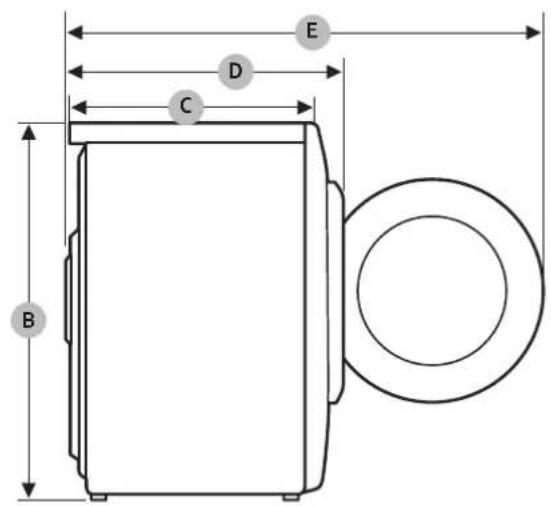
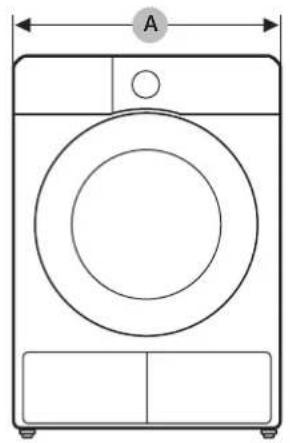
| TYPE FRONT LOADING DRYER | |||
| MODEL NAME DV9*N82**** | DV9*N62****DV8*N62**** | ||
| DIMENSIONS | A 600 mm 600 mm | ||
| B 850 mm 850 mm | |||
| C 600 mm 600 mm | |||
| D 655 mm 640 mm | |||
| E 1155 mm 1095 mm | |||
| WEIGHT 54 kg 50 kg | |||
| ELECTRICAL REQUIREMENTS | 220-240 V / 50 Hz | 550-600 W 550-600 W | |
| ALLOWABLE TEMPERATURE 5-35 °C 5-35 °C | |||
Appendix
Consumption data
| Model Program Load (kg) | (1) | Energy (kWh) | Max. Duration (Minutes) | |
| DV9*N82****DV9*N62**** |  (2) (2) | 9 1.56 188 | ||
| 4.5 0.9 130 | ||||
 | 9 1.1 130 | |||
 | 4.5 0.71 86 | |||
| DV8*N62**** |  (2) (2) | 8 1.43 169 | ||
| 4 0.8 120 | ||||
 | 8 1.02 118 | |||
 | 4 0.65 80 | |||
(1) : Weight of dry laundry
(2): EN 61121:2013 test program
All data without a "star" against it was calculated using EN 61121:2013
Consumption data can vary from the nominal values given above depending in the size of the load, types of textiles, residual moisture levels after spinning, fluctuations in the electricity supply and any extra options selected.
English56
Sheet of household tumble driers
Data sheet for Domestic Tumble Driers
As detailed in EU regulation No. 392/2012
| Samsung | ||
| Model Name DV9*N82**** | ||
| Capacity kg 9 | ||
| Type Condenser | ||
| Energy Efficiency | ||
| A+++ (highest efficiency) to D (least efficient) A+++ | ||
| Energy Consumption | ||
| Annual Energy Consumption (AE_C) (Energy consumption is based on 160 drying cycles of the standard cotton programme at full and partial load, and the consumption of the low-power modes. Actual energy consumption per cycle will depend on how the appliance is used.) | kWh/yr 194.0 | |
| Automatic tumble drier kWh Yes | ||
| Energy consumption (E_dry) standard cotton programme at full load kWh 1.56 | ||
| Energy consumption (E_dry.1/2) standard cotton programme at partial load kWh 0.90 | ||
| off mode and left-on mode | ||
| The power consumption off-mode (P_o) at full load W 0.50 | ||
| The power consumption in left-on mode (P_l) at full load W 5.00 | ||
| Duration of the left-on mode min 10 | ||
| Programme to which the information on the label and the Sheet relate ('standard cotton programme' used at full and partial load is the standard drying programme to which the information in the label and the fiche relates. This programme is suitable for drying normal wet cotton laundry and it is the most efficient programme in terms of energy consumption for cotton. Consumption data can vary from the nominal values given above depending on the size of the load, types of textiles, residual moisture levels after spinning, fluctuations in the electricity supply and any extra options selected.) | COTTONDry Level2+(Wrinkle Prevent off) | |
| programme duration of the standard program | ||
| Weighted Programme time standard cotton programme at full load and partial load | min | 155 |
| Programme Time (T_dry) standard cotton programme at full load | min | 188 |
| Programme Time (T_dry.1/2) standard cotton programme at partial load | min | 130 |
| condensation efficiency class | ||
| A (most efficient) to G (least efficient) | B | |
| Average condensation efficiency at full load | % | 81 |
| Average condensation efficiency at partial load | % | 81 |
| Weighted condensation efficiency | % | 81 |
| Airborne noise emissions | ||
| Dry at full load | dB (A) re 1 pW | 63 |
English 57
Appendix
| Samsung | ||
| Model Name DV9*N62**** | ||
| Capacity kg 9 | ||
| Type Condenser | ||
| Energy Efficiency | ||
| A+++ (highest efficiency) to D (least efficient) A+++ | ||
| Energy Consumption | ||
| Annual Energy Consumption (AE_C) (Energy consumption is based on 160 drying cycles of the standard cotton programme at full and partial load, and the consumption of the low-power modes. Actual energy consumption per cycle will depend on how the appliance is used.) | kWh/yr 194.0 | |
| Automatic tumble drier kWh Yes | ||
| Energy consumption (E_dry) standard cotton programme at full load kWh 1.56 | ||
| Energy consumption (E_dry.1/2) standard cotton programme at partial load kWh 0.90 | ||
| off mode and left-on mode | ||
| The power consumption off-mode (P_o) at full load W 0.50 | ||
| The power consumption in left-on mode (P_l) at full load W 5.00 | ||
| Duration of the left-on mode min 10 | ||
| Programme to which the information on the label and the Sheet relate ('standard cotton programme' used at full and partial load is the standard drying programme to which the information in the label and the fiche relates. This programme is suitable for drying normal wet cotton laundry and it is the most efficient programme in terms of energy consumption for cotton. Consumption data can vary from the nominal values given above depending on the size of the load, types of textiles, residual moisture levels after spinning, fluctuations in the electricity supply and any extra options selected.) | COTTONDry Level2+(Wrinkle Prevent off) | |
| programme duration of the standard program | ||
| Weighted Programme time standard cotton programme at full load and partial load | min | 155 |
| Programme Time (T_dry) standard cotton programme at full load | min | 188 |
| Programme Time (T_dry.1/2) standard cotton programme at partial load | min | 130 |
| condensation efficiency class | ||
| A (most efficient) to G (least efficient) | B | |
| Average condensation efficiency at full load | % | 81 |
| Average condensation efficiency at partial load | % | 81 |
| Weighted condensation efficiency | % | 81 |
| Airborne noise emissions | ||
| Dry at full load | dB (A) re 1 pW | 65 |
English58
| Samsung | ||
| Model Name DV8*N62**** | ||
| Capacity kg 8 | ||
| Type Condenser | ||
| Energy Efficiency | ||
| A+++ (highest efficiency) to D (least efficient) A+++ | ||
| Energy Consumption | ||
| Annual Energy Consumption (AE_C) (Energy consumption is based on 160 drying cycles of the standard cotton programme at full and partial load, and the consumption of the low-power modes. Actual energy consumption per cycle will depend on how the appliance is used.) | kWh/yr 176.0 | |
| Automatic tumble drier kWh Yes | ||
| Energy consumption (E_dry) standard cotton programme at full load kWh 1.43 | ||
| Energy consumption (E_dry.1/2) standard cotton programme at partial load kWh 0.80 | ||
| off mode and left-on mode | ||
| The power consumption off-mode (P_o) at full load W 0.50 | ||
| The power consumption in left-on mode (P_l) at full load W 5.00 | ||
| Duration of the left-on mode min 10 | ||
| Programme to which the information on the label and the Sheet relate ('standard cotton programme' used at full and partial load is the standard drying programme to which the information in the label and the fiche relates. This programme is suitable for drying normal wet cotton laundry and it is the most efficient programme in terms of energy consumption for cotton. Consumption data can vary from the nominal values given above depending on the size of the load, types of textiles, residual moisture levels after spinning, fluctuations in the electricity supply and any extra options selected.) | COTTONDry Level2+(Wrinkle Prevent off) | |
| programme duration of the standard program | ||
| Weighted Programme time standard cotton programme at full load and partial load | min | 141 |
| Programme Time (T_dry) standard cotton programme at full load | min | 169 |
| Programme Time (T_dry.1/2) standard cotton programme at partial load | min | 120 |
| condensation efficiency class | ||
| A (most efficient) to G (least efficient) | B | |
| Average condensation efficiency at full load | % | 81 |
| Average condensation efficiency at partial load | % | 81 |
| Weighted condensation efficiency | % | 81 |
| Airborne noise emissions | ||
| Dry at full load | dB (A) re 1 pW | 65 |

NOTE
4+11
Asterisk(s) means variant model and can be varied (0-9) or (A-Z).
English 59
SAMSUNG
QUESTIONS OR COMMENTS?
| COUNTRY CALL OR VISIT US ONLINE AT | |
| DENMARK 707 019 70 www.samsung.com/dk/support | |
| FINLAND 030-6227 515 www.samsung.com/fi/support | |
| NORWAY 21629099 www.samsung.com/no/support | |
| SWEDEN 0771 726 786 www.samsung.com/se/support |
Varmepumpetørretumbler
Brugervejledning
DV9*N82****/DV9*N62****/DV8*N62****
SAMSUNG
Indhold
Installationskrav 15
Nivellering 17
natural_image
Symbol of a trash bin crossed with a diagonal line, no text or numbers presentnatural_image
Simple line drawing of a curved mechanical component (no text or symbols)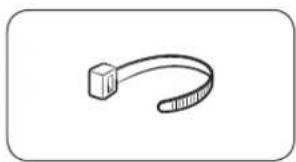
natural_image
Simple line drawing of a curved object resembling a stylized bar or ribbon (no text or symbols)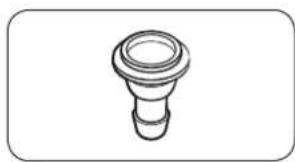
natural_image
Simple line drawing of a bulb-like object with a flared top and base (no text or symbols)Slangeholder Kabelbinder Slangetilslutning
natural_image
Simple line drawing of a coiled tube or hose with two connectors (no text or symbols)natural_image
Simple line drawing of a closed book with a blank cover (no text or symbols)Brugervejledning
natural_image
Simple line drawing of a rectangular container with internal compartments (no text or symbols)natural_image
Simple line drawing of a pen-like object with a loop handle (no text or symbols)Rengøringsbørste
natural_image
Simple line drawing of a mechanical component or bracket (no text or symbols)natural_image
Isometric line drawing of a rectangular electronic component with mounting holes (no text or symbols)Stablingssæt (SKK-DD, SKK-DDX)
BEMÆRK
natural_image
Two identical diagrams showing a mechanical component with arrows indicating motion, labeled C and D (no text or symbols beyond labels)natural_image
Line drawing of a front view of a washing machine casing with internal components and a magnified inset showing internal structure (no text or symbols)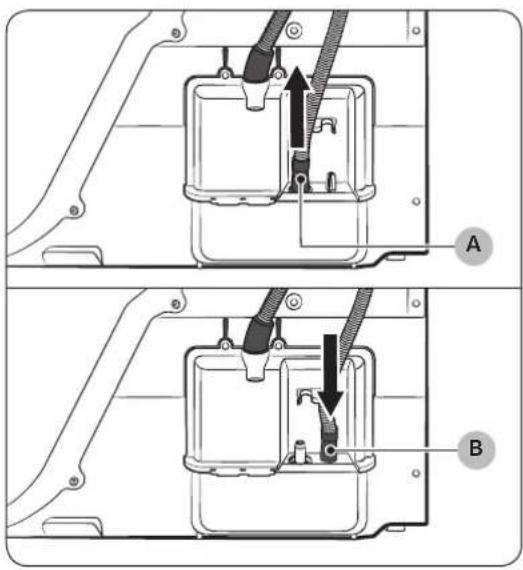
natural_image
Technical diagram of a mechanical assembly with labeled component A (no text or symbols beyond label)Over en vaskekumme:
natural_image
Line drawing of a standard square sink with a pipe and valve, no text or symbols present- Slut slangeadapteren direkte til vaskekummens afledningsslange.
Dansk20
natural_image
Diagram of a washing machine with three circular components and a black arrow indicating rotation (no text or symbols)natural_image
Diagram of a device with two circular components and an arrow indicating direction (no text or symbols)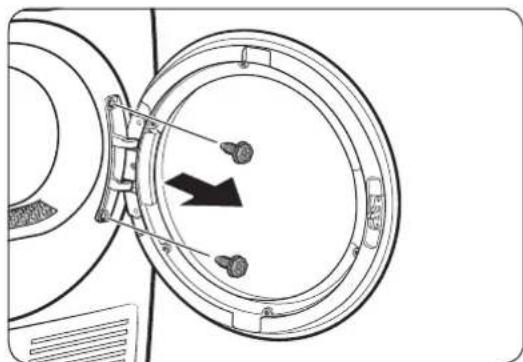
natural_image
Diagram of a door mechanism with a black arrow indicating direction (no text or symbols present)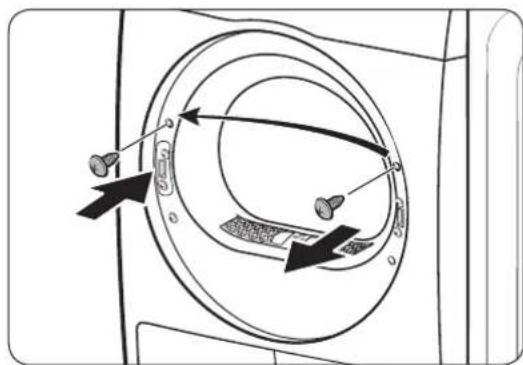
- Tag glasholderen af.
! FORSIGTIG
natural_image
Diagram of a washing machine interior showing a circular dial with attached components and directional arrows indicating motion (no text or symbols)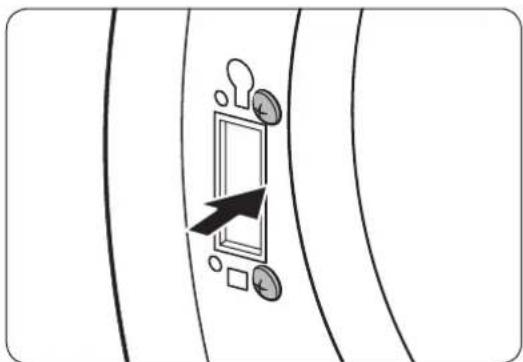
natural_image
Diagram showing a device with a black arrow pointing to it, surrounded by curved lines and icons (no text or symbols)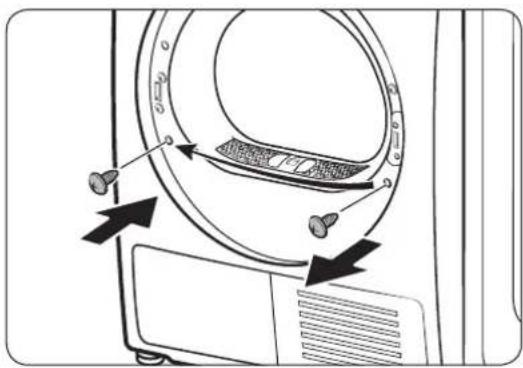
natural_image
Diagram of a washing machine with circular dial and ventilation slots, showing mechanical components (no text or symbols)natural_image
Diagram of a door handle with screws and an arrow indicating direction (no text or symbols)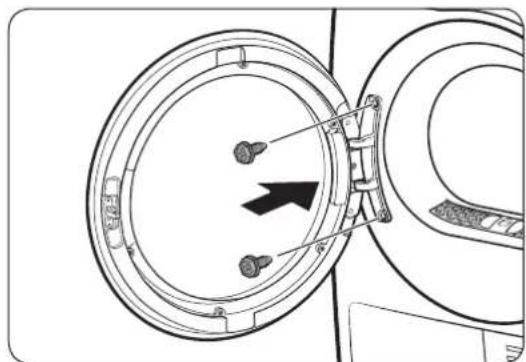
natural_image
Diagram of a circular mechanical component with internal components and an arrow indicating direction (no text or symbols)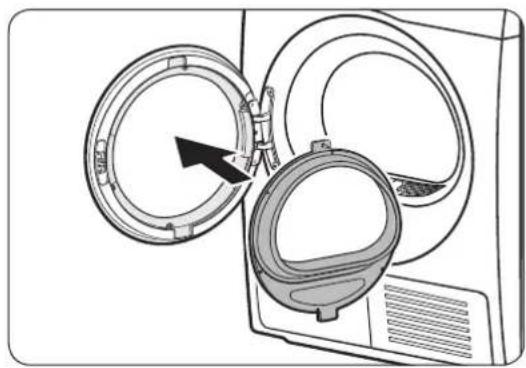
natural_image
Diagram of a washing machine with two circular washers and a handle, showing internal components (no text or labels)natural_image
Diagram of a mechanical assembly with circular components and a central rotating ring (no text or symbols)natural_image
Technical line drawing of a car rear bumper with decorative patterned seating and doorways (no text or symbols)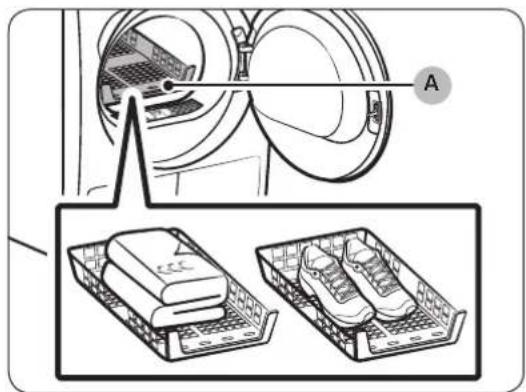
A. Hyldetørring

BEMÆRK
natural_image
Diagram of a car interior with a double-door refrigerator and upward arrow indicating motion (no text or symbols)natural_image
Technical diagram of a mechanical device with labeled component A and directional arrows indicating motion (no text or symbols beyond labels)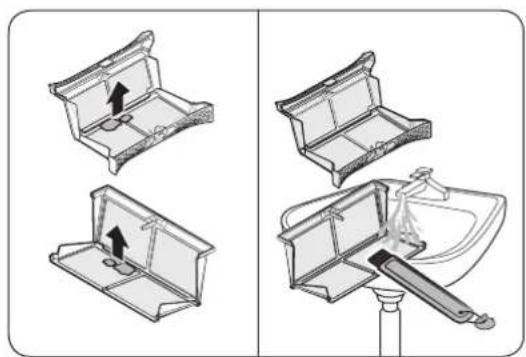
natural_image
Illustration of a bathroom sink with an open drawer and a showerhead, showing four different states of the opening (no text or symbols present)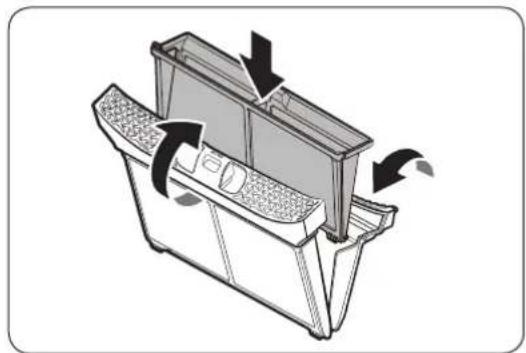
natural_image
Diagram of a mechanical device with internal components and directional arrows indicating motion (no text or symbols)natural_image
Diagram of a device component with an arrow indicating direction, no text or symbols presentnatural_image
Line drawing of a remote control box with labeled point B (no text or symbols on the device itself)natural_image
Diagram of a door panel with two hanging clips and a labeled component 'B' (no text or symbols beyond label)natural_image
Diagram of a device being inserted into a tray, showing internal components and a black arrow indicating direction (no text or symbols)natural_image
Diagram of a grater inside a rectangular chamber with a tool inserted (no text or symbols)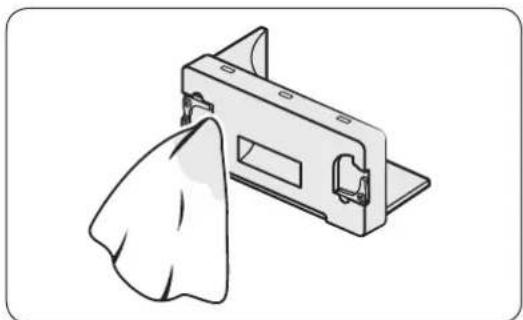
natural_image
Illustration of a mechanical component with a cloth attachment (no text or symbols)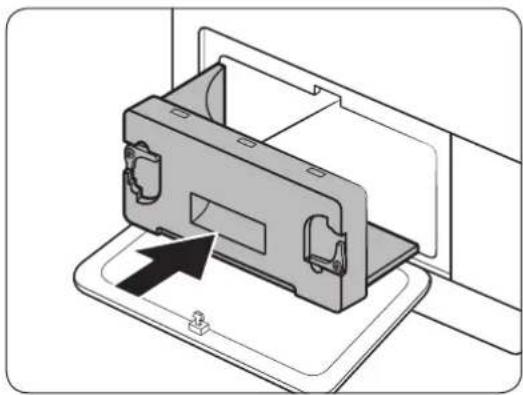
natural_image
Diagram of a device with an open box and a black arrow pointing to a component, no text or symbols present.natural_image
Line drawing of a front-loading washing machine with circular vent and side panel (no text or symbols)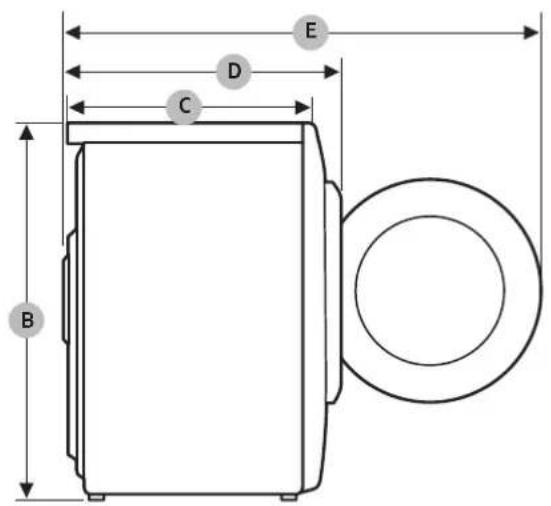
| TYPE | T∅RRETUMBLER MED PÅFYLDNING FRA FORSIDEN | ||
| MODELNAVN DV9*N82**** | DV9*N62****DV8*N62**** | ||
| DIMENSIONER | A 600 mm 600 mm | ||
| B 850 mm 850 mm | |||
| C 600 mm 600 mm | |||
| D 655 mm 640 mm | |||
| E 1155 mm 1095 mm | |||
| VÆGT 54 kg 50 kg | |||
| ELEKTRISKE KRAV | 220-240 V / 50 Hz | 550-600 W 550-600 W | |
| TILLADT TEMPERATUR 5-35 °C 5-35 °C | |||
Dansk54
Forbrugsdata
| Model Program Kapacitet (kg) | (1) | Energi (kWh) | Maks. varighed (minutter) | |
| DV9*N82****DV9*N62**** | COTTON(BOMULD) (2) | 9 1,56 188 | ||
| 4,5 0,9 130 | ||||
| IRON DRY(STRYGET∅RT) (2) | 9 1,1 130 | |||
| SYNTHETICS(SYNTETISK) | 4,5 0,71 86 | |||
| DV8*N62**** | COTTON(BOMULD) (2) | 8 1,43 169 | ||
| 4 0,8 120 | ||||
| IRON DRY(STRYGET∅RT) (2) | 8 1,02 118 | |||
| SYNTHETICS(SYNTETISK) | 4 0,65 80 | |||
natural_image
Symbol of a trash bin crossed with no text or numbers, representing waste sorting or restriction (no text present)natural_image
Simple line drawing of a curved mechanical bracket or clamp (no text or symbols)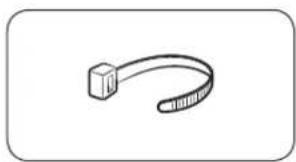
natural_image
Simple line drawing of a curved object resembling a stylized bar or ribbon (no text or symbols)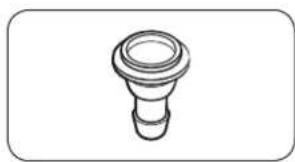
natural_image
Simple line drawing of a bulb-like object with a flared top and base (no text or symbols)natural_image
Simple line drawing of a coiled tube or hose with two connectors (no text or symbols)natural_image
Simple line drawing of a closed book with a blank cover (no text or symbols)Käyttöopas
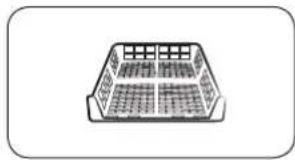
natural_image
Simple line drawing of a rectangular container with internal compartments (no text or symbols)Kuivausteline (vain soveltuvissa malleissa)
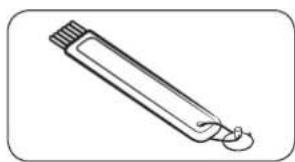
natural_image
Simple line drawing of a pen-like object with a loop handle (no text or symbols)Puhdistusharja
natural_image
Simple line drawing of a mechanical component or bracket (no text or symbols)natural_image
Isometric line drawing of a rectangular electronic component with mounting holes (no text or symbols)Pinoamispakkaus (SKK-DD, SKK-DDX)
HUOM.
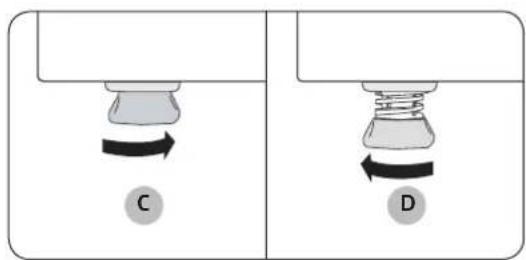
natural_image
Two identical diagrams showing a mechanical component with arrows indicating motion, labeled C and D (no text or symbols beyond labels)natural_image
Line drawing of a front view of a washing machine casing with internal components and a magnified inset showing internal wiring (no text or symbols)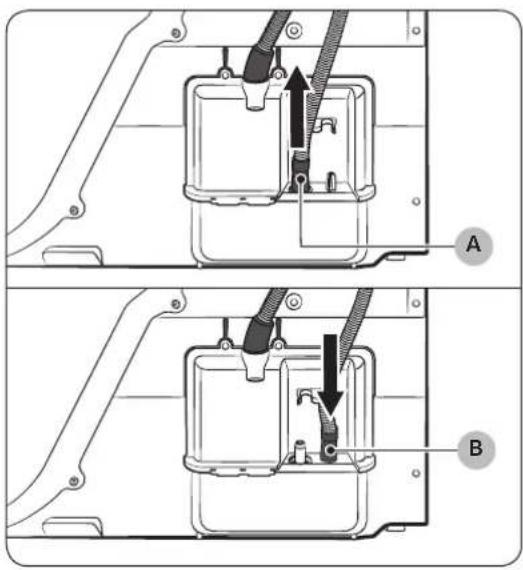
natural_image
Technical diagram of a mechanical assembly with labeled component A (no text or symbols beyond label)Pesualtaan päälle:
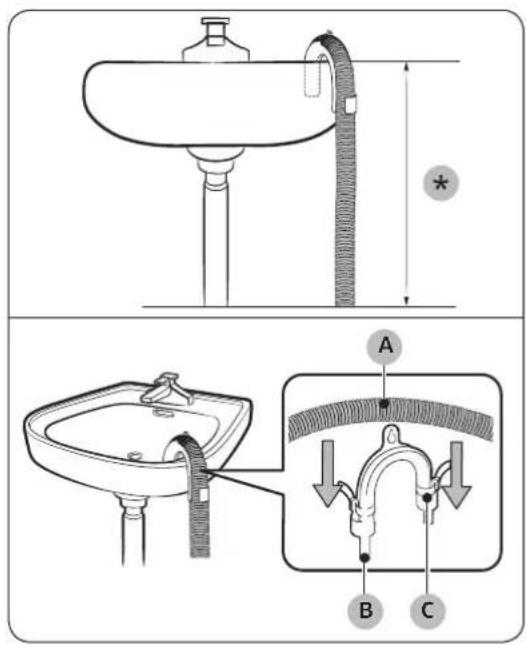
natural_image
Line drawing of a standard square sink with a pipe and valve, no text or symbols presentnatural_image
Diagram of a washing machine with three circular components and a black arrow indicating rotation (no text or symbols)- Irrota luukun sisälasin pitimen ruuvit.
natural_image
Diagram of a device with two circular components and an arrow indicating direction (no text or symbols)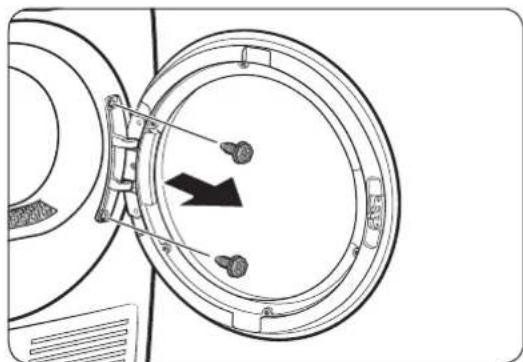
natural_image
Diagram of a door mechanism with a black arrow indicating direction (no text or symbols present)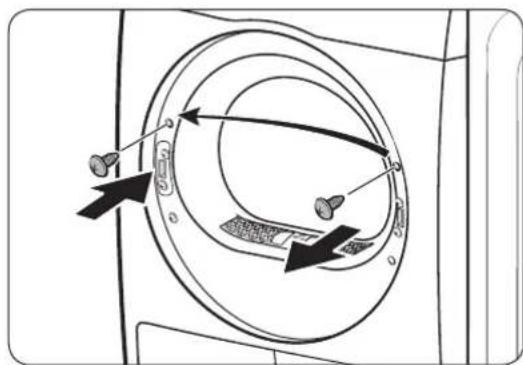
- Irrota lasin pidike.

HUOMIO
natural_image
Diagram of a washing machine interior showing a circular dial with attached components and directional arrows indicating motion (no text or symbols)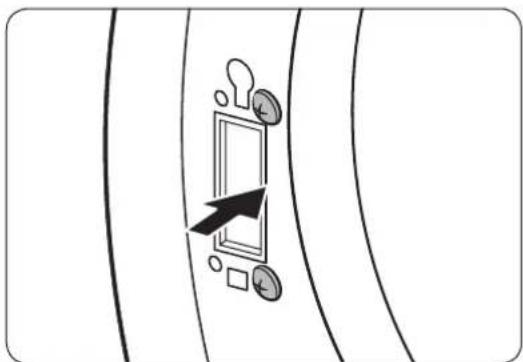
natural_image
Diagram showing a device with a black arrow pointing to it, surrounded by curved lines and icons (no text or symbols)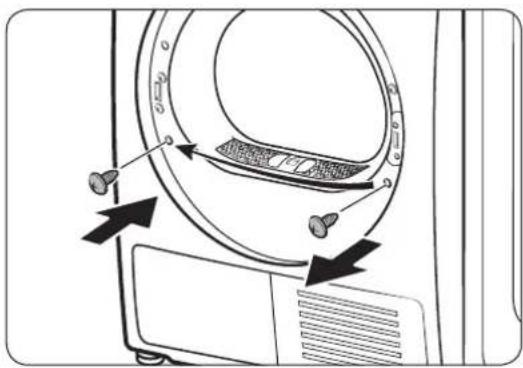
natural_image
Diagram of a washing machine with circular dial and ventilation slots, showing mechanical components (no text or symbols)natural_image
Diagram of a door handle with screws and an arrow indicating direction (no text or symbols)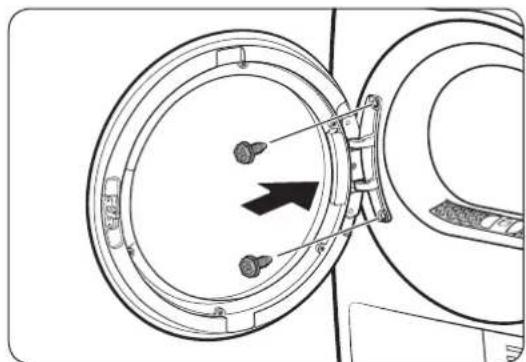
natural_image
Diagram of a circular mechanical component with internal components and an arrow indicating direction (no text or symbols)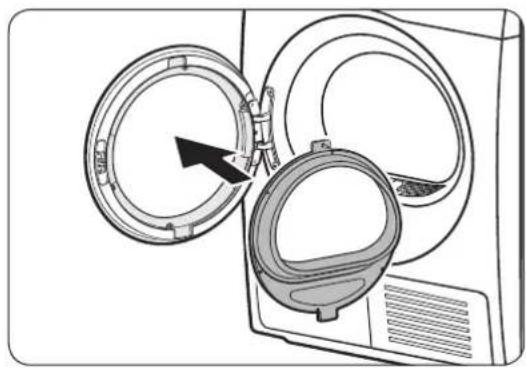
natural_image
Diagram of a washing machine with two circular washers and a handle, showing internal components (no text or labels)natural_image
Diagram of a mechanical assembly with circular components and a central rotating ring (no text or symbols)natural_image
Technical line drawing of a car rear bumper with decorative patterned seating and doorways (no text or symbols)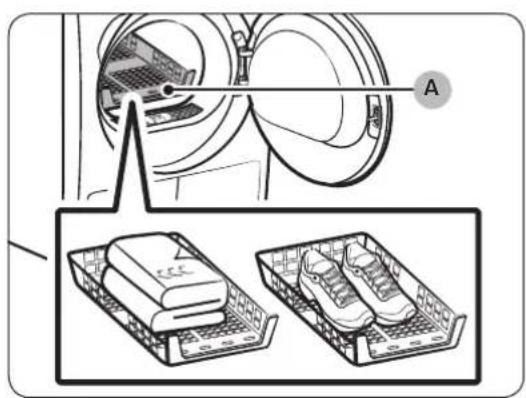
A. Kuivausteline

HUOM.
natural_image
Diagram of a car interior with a mounted device and upward arrow (no text or symbols)natural_image
Technical diagram of a mechanical device with labeled component A and directional arrows indicating motion (no text or symbols beyond labels)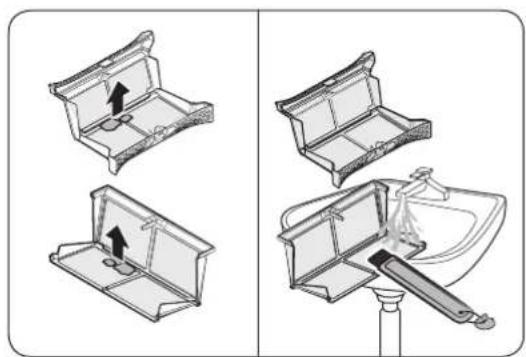
natural_image
Illustration of a bathroom sink with an open drawer and a showerhead, showing four different states of the opening (no text or symbols present)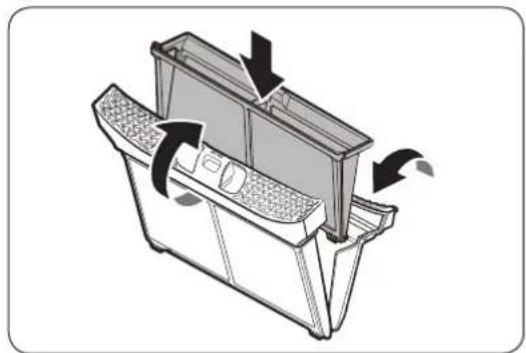
natural_image
Diagram of a mechanical device with internal components and directional arrows indicating motion (no text or symbols)natural_image
Diagram of a device component with an arrow indicating direction, no text or symbols presentnatural_image
Line drawing of a remote control box with labeled point B (no text or symbols on the device itself)natural_image
Diagram of a door panel with two hanging clips and a labeled component (B), no text or symbols present.natural_image
Diagram of a device being inserted into a tray, showing internal components and a black arrow indicating direction (no text or symbols)natural_image
Diagram of a microwave oven with a brush and handle, showing internal grating (no text or symbols)
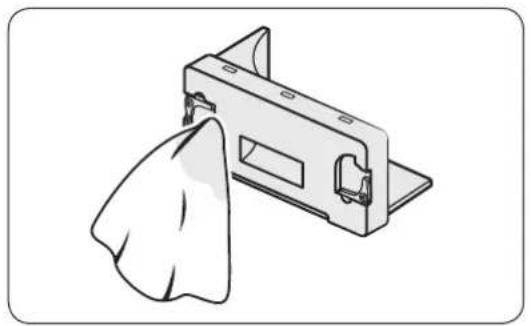
natural_image
Illustration of a mechanical component with a cloth hanging from its side (no text or symbols)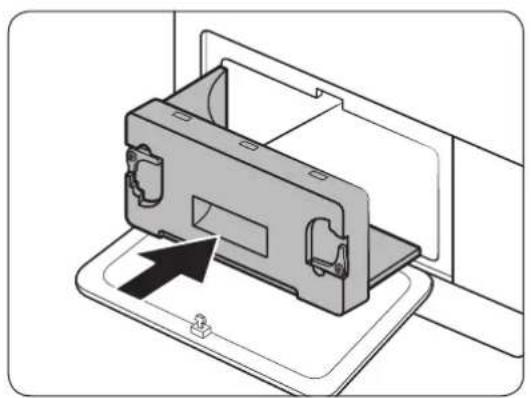
natural_image
Diagram of a device being inserted into a tray, showing internal components and a black arrow indicating the insertion direction (no text or symbols present)KYSYMYKSET JA KOMMENTIT
| MAA SOITA | TAI VIERAILE VERKKOSIVUILLAMME | |
| DENMARK 707 | 019 70 www.samsung.com/dk/support | |
| FINLAND 030 | 6227 515 www.samsung.com/fi/support | |
| NORWAY 216 | 29099 www.samsung.com/no/support | |
| SWEDEN 0771 | 726 786 www.samsung.com/se/support |
Varmepumpetørker
Brukerhåndbok
DV9*N82****/DV9*N62****/DV8*N62****
SAMSUNG
Innhold
natural_image
Symbol of a trash bin crossed with no text or numbers, representing waste sorting or restriction (no text present)natural_image
Simple line drawing of a curved mechanical component (no text or symbols)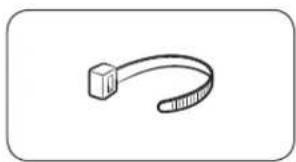
natural_image
Simple line drawing of a curved object resembling a stylized bar or ribbon (no text or symbols)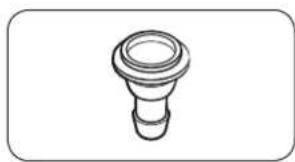
natural_image
Simple line drawing of a bulb-like object with a flared top and base (no text or symbols)Slangeholder Kabelfeste Slangekobling
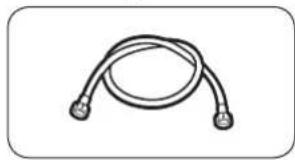
natural_image
Simple line drawing of a coiled tube or hose with two connectors (no text or symbols)natural_image
Simple line drawing of a closed book with a blank cover (no text or symbols)Brukerhändbok
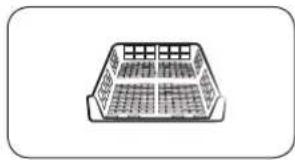
natural_image
Simple line drawing of a rectangular container with internal compartments (no text or symbols)natural_image
Simple line drawing of a pen-like object with a curved tip (no text or symbols)Rengjøringsbørste
natural_image
Simple line drawing of a mechanical component or bracket (no text or symbols)Sett for brakettstabling
(SK-DH, SK-DA, SKK-DF)
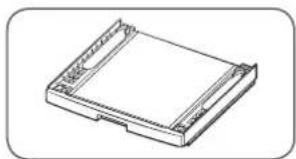
natural_image
Isometric line drawing of a rectangular electronic component with mounting holes (no text or symbols)Stablesett
(SKK-DD, SKK-DDX)
MERK
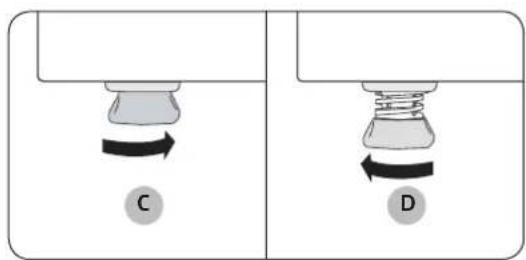
natural_image
Two mechanical components labeled C and D showing rotational motion with arrows, no text or symbols present.natural_image
Line drawing of a front view of a washing machine casing with internal components and a magnified inset showing internal wiring (no text or symbols)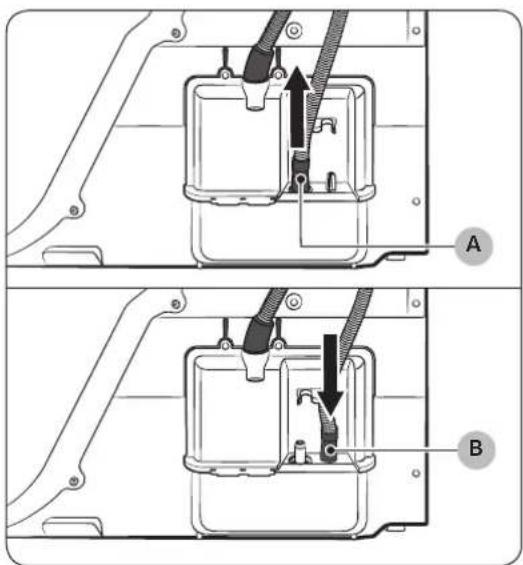
natural_image
Technical diagram of a mechanical assembly with labeled component A (no text or symbols beyond label)natural_image
Line drawing of a square sink with a pipe and valve, no text or symbols present- Koble slangeadapteren direkte til avløpsrøret på vasken.
Norsk20
natural_image
Diagram of a double door with a black arrow indicating rotation or change, showing no text or symbolsnatural_image
Diagram of a device with two circular components and an arrow indicating direction (no text or symbols)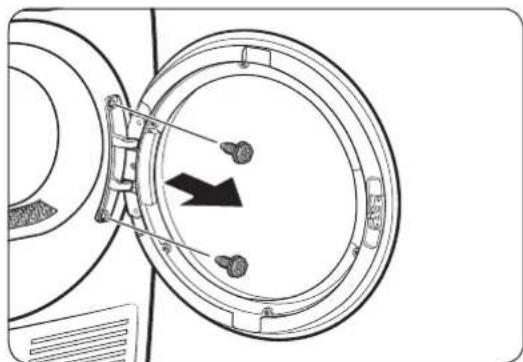
natural_image
Diagram of a door mechanism with a black arrow indicating direction (no text or symbols present)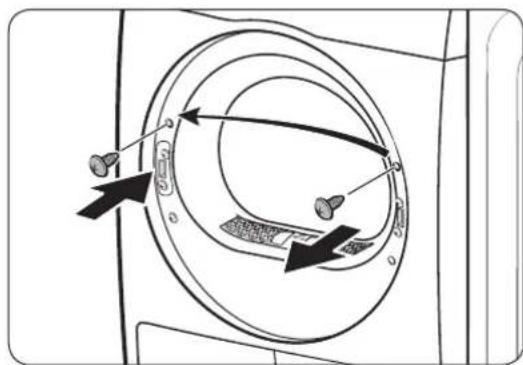
- Frakoble glassholderen.
! FORSIKTIG
natural_image
Diagram of a washing machine interior showing circular components and adjustment arrows (no text or symbols)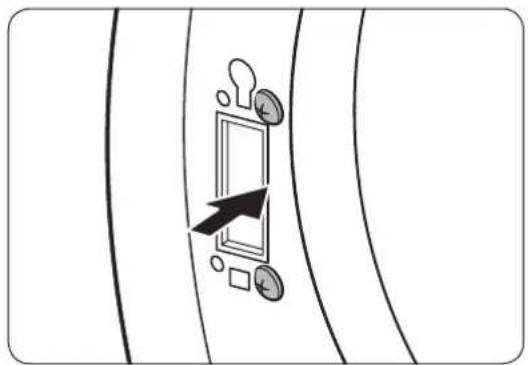
natural_image
Diagram showing a curved path with a black arrow pointing to a rectangular object, surrounded by icons (no text or symbols)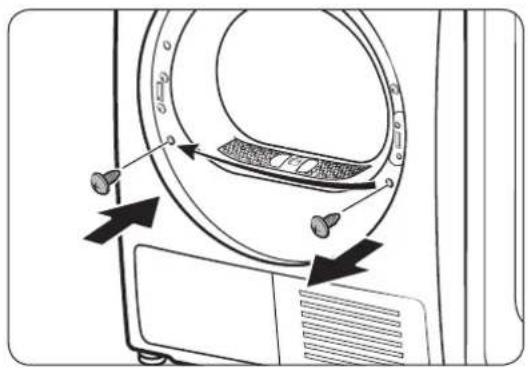
natural_image
Diagram of a device with circular components and directional arrows indicating motion or assembly (no text or symbols)natural_image
Diagram of a door handle with screws and an arrow indicating direction (no text or symbols)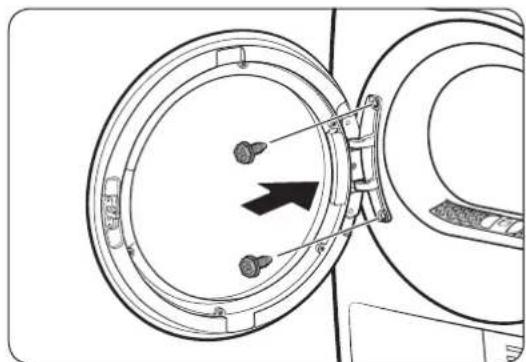
natural_image
Diagram of a circular mechanical component with internal components and an arrow indicating direction (no text or symbols)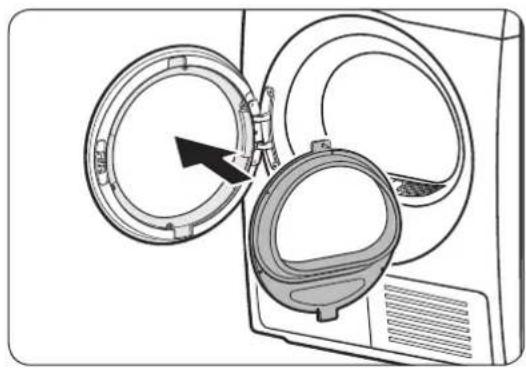
natural_image
Diagram of a washing machine with two circular washers and a handle, showing internal components (no text or labels)- Stram til de 3 festeskruene på toppen. Stram deretter til de 3 festeskruene på bunnen.
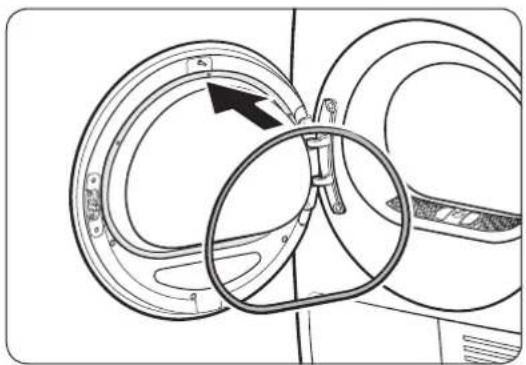
natural_image
Diagram of a mechanical assembly with circular components and a central rotating ring (no text or symbols)natural_image
Line drawing of a car rear bumper with decorative patterned seating and ventilation slots (no text or symbols)
MERK
Samsung Electronics erklærer herved at radioutstyrstypeapparatet er i samsvar med direktivet 2014/53/EU. Den fullstendige teksten for EU-erklæringen om samsvar er tilgjengelig på følgende nettadresse:
natural_image
Diagram of a car interior with a double-decker seat and upward arrow indicating motion (no text or symbols)natural_image
Technical diagram of a mechanical device with labeled component A and directional arrows indicating motion (no text or symbols beyond label)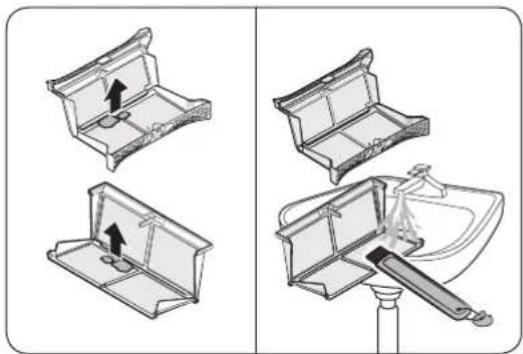
natural_image
Illustration of a bathroom sink with an open refrigerator and a showerhead, showing four different states of the operation (no text or symbols present)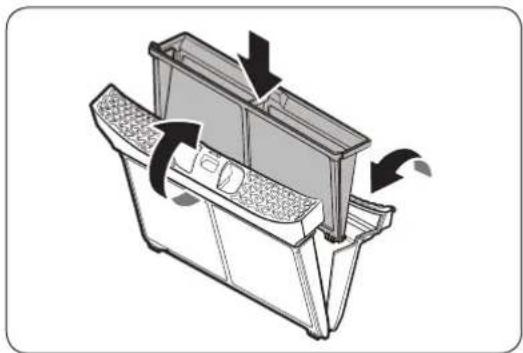
natural_image
Diagram of a mechanical device with internal components and directional arrows indicating motion (no text or symbols)natural_image
Diagram of a device component with an arrow indicating direction, no text or symbols present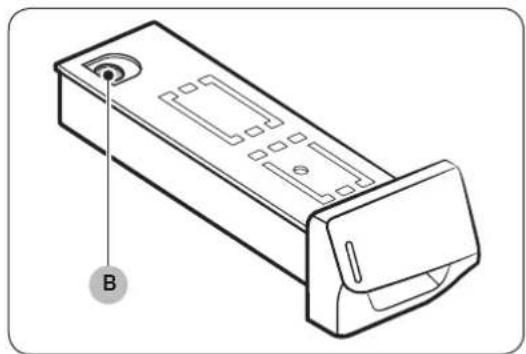
natural_image
Line drawing of a remote control box with labeled point B (no text or symbols on the device itself)natural_image
Diagram of a door panel with two hanging clips and a labeled component 'B' (no text or symbols beyond label)natural_image
Diagram of a device being inserted into a tray, showing internal components and a black arrow indicating direction (no text or symbols present)- Fjern innerdekselet (C).
vedlikehold
Norsk46
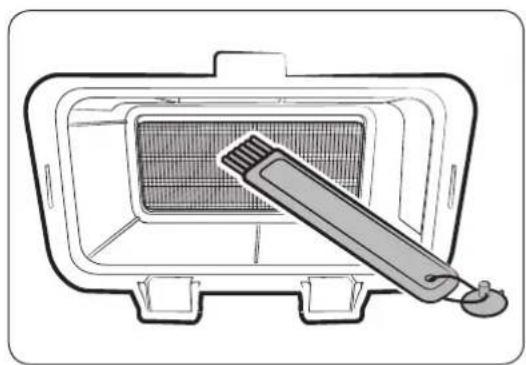
natural_image
Diagram of a grater inside a container with a toothbrush touching the interior (no text or symbols)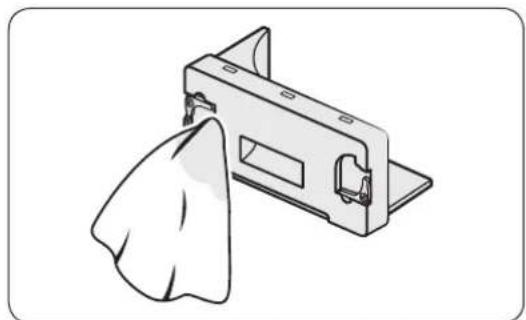
natural_image
Illustration of a mechanical component with a cloth hanging from its side (no text or symbols)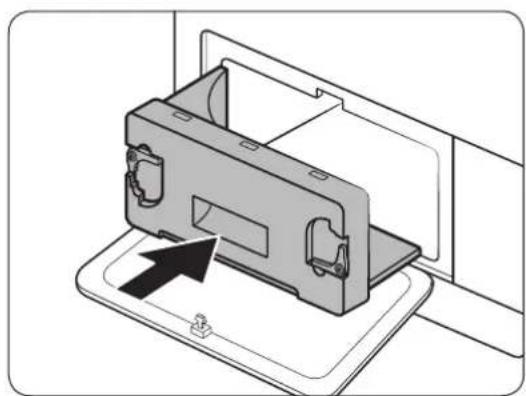
natural_image
Diagram of a device being inserted into a housing panel, showing internal components and an arrow indicating insertion (no text or symbols present)Temperaturer for stryking eller damping
 | Høy |
 | Middels |
 | Lav |
Varselssymboler for klesvask
natural_image
Line drawing of a front-loading washing machine with circular vent and side panel (no text or symbols)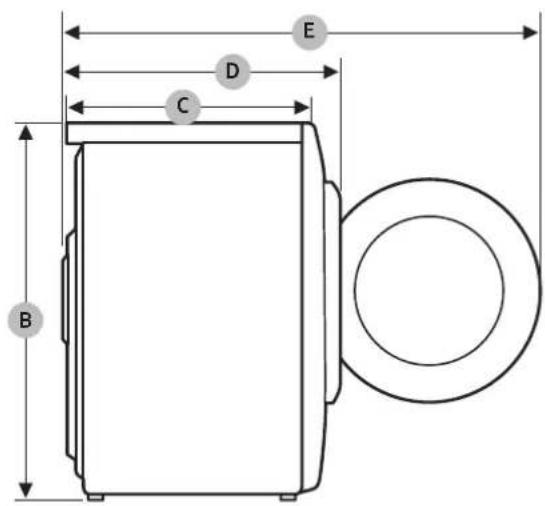
| TYPE FRONTMATET T∅RKETROMMEL | |||
| MODELLNAVN DV9*N82**** | DV9*N62****DV8*N62**** | ||
| MÅL | A 600 mm 600 mm | ||
| B 850 mm 850 mm | |||
| C 600 mm 600 mm | |||
| D 655 mm 640 mm | |||
| E 1155 mm 1095 mm | |||
| VEKT 54 kg 50 kg | |||
| ELEKTRISITETSKRAV | 220-240 V /50 Hz | 550 - 600 W 550 - 600 W | |
| TILLATT TEMPERATUR 5 - 35 °C 5 - 35 °C | |||
Vedlegg
Forbruksdata
| Modell Program Last (kg) | (1) | Energi (kWt) | Maks varighet (minutter) | |
| DV9*N82****DV9*N62**** | COTTON(BOMULL)(2) | 9 1,56 188 | ||
| 4,5 0,9 130 | ||||
| IRON DRY(STRYKET∅RT)(2) | 9 1,1 130 | |||
| SYNTHETICS(SYNTETISK) | 4,5 0,71 86 | |||
| DV8*N62**** | COTTON(BOMULL)(2) | 8 1,43 169 | ||
| 4 0,8 120 | ||||
| IRON DRY(STRYKET∅RT)(2) | 8 1,02 118 | |||
| SYNTHETICS(SYNTETISK) | 4 0,65 80 | |||
Kylmedium (typ): R-134a (GWP = 1 430)
Kylmedium (laddning): 0,37 kg, 0,529 tCO _2 e
natural_image
Symbol of a trash bin crossed with a diagonal line, no text or numbers presentnatural_image
Simple line drawing of a curved mechanical bracket or clamp (no text or symbols)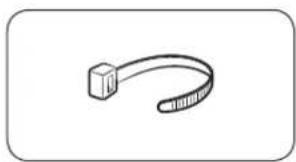
natural_image
Simple line drawing of a curved object resembling a stylized tool or connector (no text or symbols)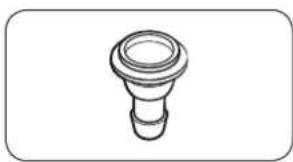
natural_image
Simple line drawing of a bulb-like object with a flared top and base (no text or symbols)natural_image
Simple line drawing of a coiled tube or hose with two connectors (no text or symbols)natural_image
Simple line drawing of a closed book with a blank cover (no text or symbols)Användarhandbok
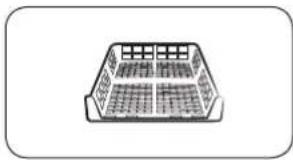
natural_image
Simple line drawing of a rectangular container with internal compartments (no text or symbols)Ställtorkning (endast tillämpliga modeller)
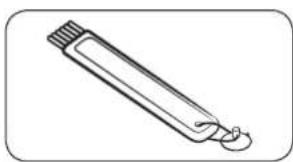
natural_image
Simple line drawing of a pen-like object with a curved tip (no text or symbols)Rengöringsborste
natural_image
Simple line drawing of a mechanical component or bracket (no text or symbols)Konsol-kombinationssats (SK-DH, SK-DA, SKK-DF)
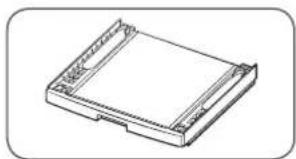
natural_image
Isometric line drawing of a rectangular electronic component with mounting holes (no text or symbols)Kombinationssats (SKK-DD, SKK-DDX)
OBS!
natural_image
Line drawing of a washing machine with labeled parts A and B (no text or symbols beyond labels)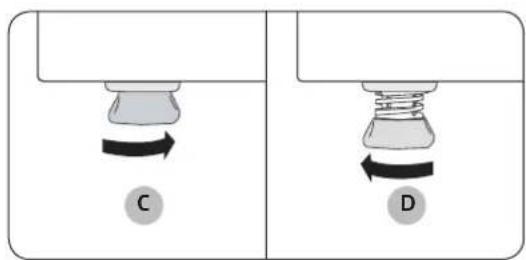
natural_image
Two identical diagrams showing a mechanical component with arrows indicating motion, labeled C and D (no text or symbols beyond labels)natural_image
Line drawing of a front view of a washing machine casing with internal components and a magnified inset showing internal structure (no text or symbols)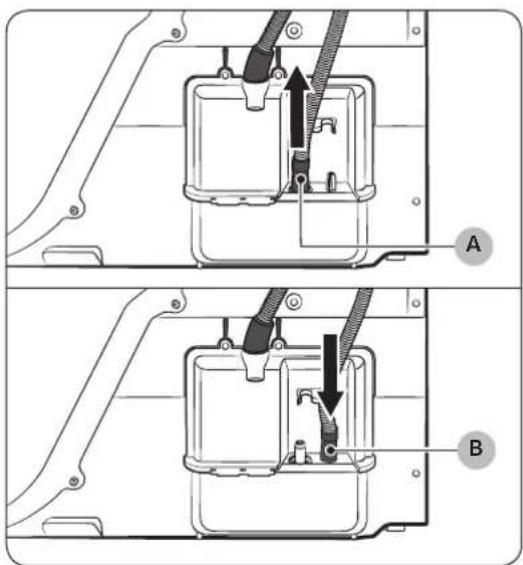
natural_image
Technical diagram of a mechanical assembly with labeled component A (no text or symbols beyond label)natural_image
Line drawing of a standard square sink with a pipe fitting and a handle, no text or symbols presentnatural_image
Diagram of a washing machine with two circular components and a black arrow indicating rotation (no text or symbols)natural_image
Diagram of a device with two circular components and an arrow indicating direction (no text or symbols)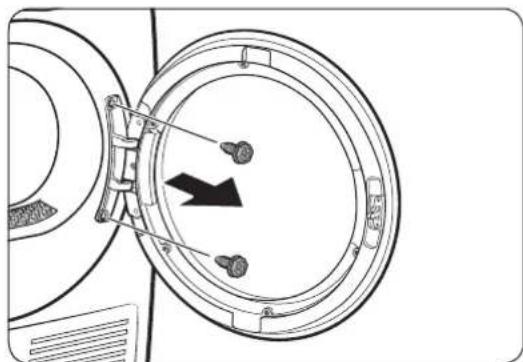
natural_image
Diagram of a door mechanism with a black arrow indicating direction (no text or symbols present)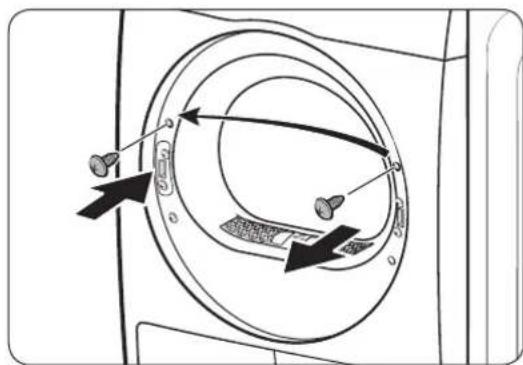
natural_image
Diagram of a washing machine interior showing a circular dial with attached clips and arrows indicating motion (no text or symbols)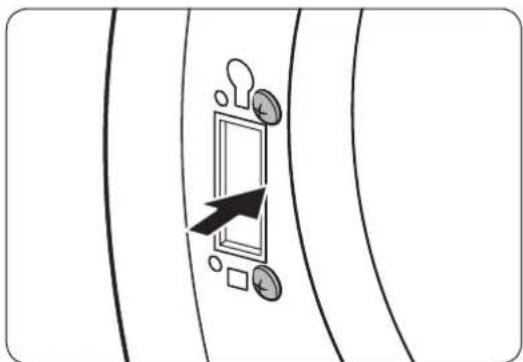
natural_image
Diagram showing a device with arrows pointing to a screen and surrounding icons, no text or symbols present.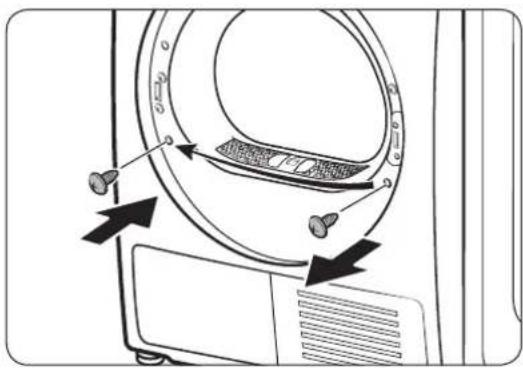
natural_image
Diagram of a washing machine with circular dial and ventilation slots, showing mechanical components (no text or symbols)natural_image
Diagram of a door handle with screws and an arrow indicating direction (no text or symbols)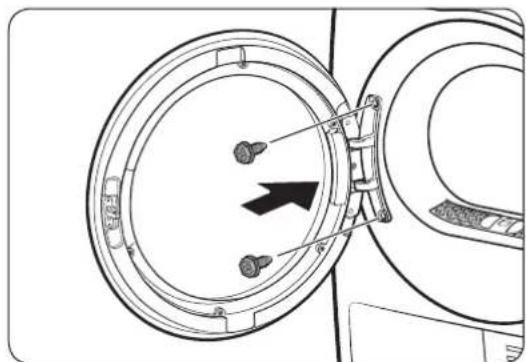
natural_image
Diagram of a circular device with internal components and an arrow indicating direction (no text or symbols)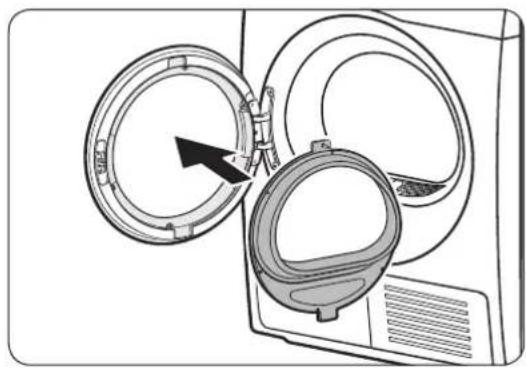
natural_image
Diagram of a washing machine with two circular components and a black arrow indicating a component (no text or symbols present)natural_image
Diagram of a mechanical assembly with circular components and a central rotating ring (no text or symbols)natural_image
Technical line drawing of a car rear bumper with decorative patterned seating and doorways (no text or symbols)
OBS!
natural_image
Diagram of a car interior with a double-decker seat and upward arrow indicating motion (no text or symbols)natural_image
Technical diagram of a mechanical device with labeled component A and directional arrows indicating motion (no text or symbols beyond labels)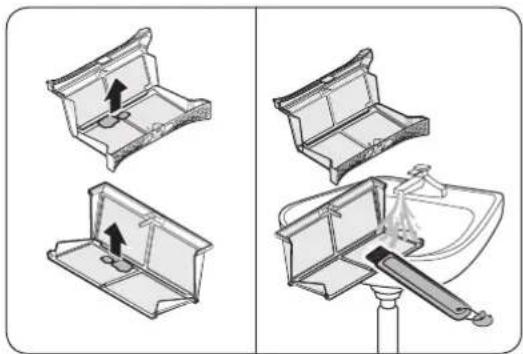
natural_image
Illustration of a kitchen sink with an open drawer and a showerhead, showing four different states of lifting or discharging (no text or symbols present)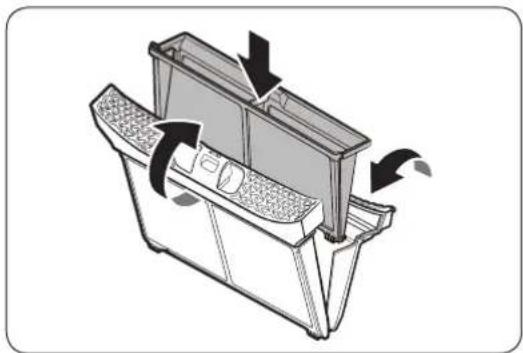
natural_image
Diagram of a mechanical device with internal components and directional arrows indicating motion (no text or symbols)natural_image
Diagram of a device component with an arrow indicating direction, no text or symbols present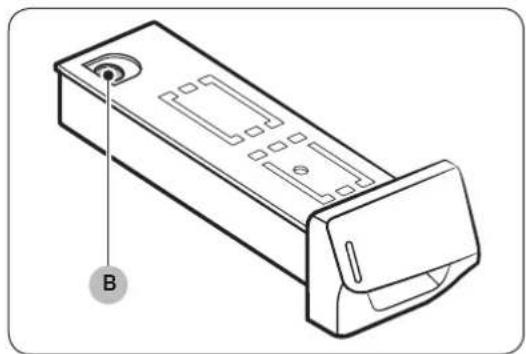
natural_image
Line drawing of a remote control box with labeled point B (no text or symbols on the device itself)natural_image
Diagram of a door panel with two hanging clips and a labeled component (B), no text or symbols present.- Lås upp läsen (B).
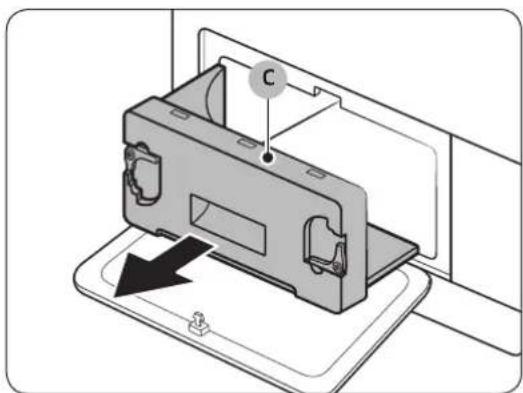
natural_image
Diagram of a device being inserted into a tray, showing internal components and a black arrow indicating direction (no text or symbols)- Ta bort den inre luckan (C).
Underhåll
Svenska46
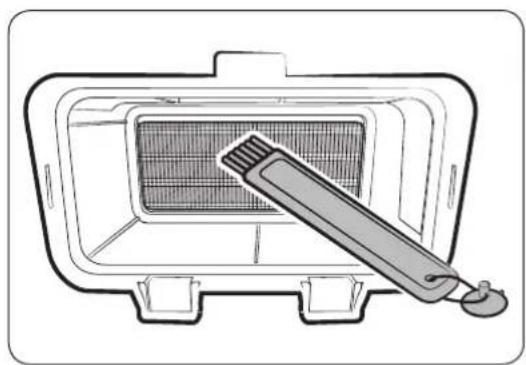
natural_image
Diagram of a gridded air vent with a toothbrush inserted, showing internal structure (no text or symbols)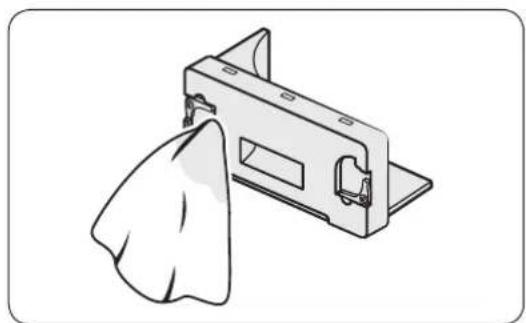
natural_image
Illustration of a metal bracket with a cloth hanging from its side (no text or symbols)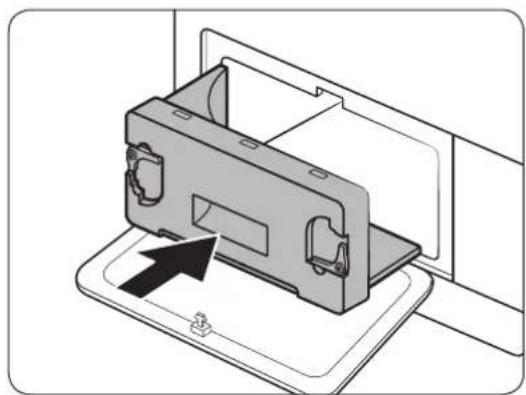
natural_image
Diagram of a device being inserted into a housing, showing internal components and an arrow indicating insertion (no text or symbols present)natural_image
Line drawing of a washing machine with circular vent and side panel (no text or symbols)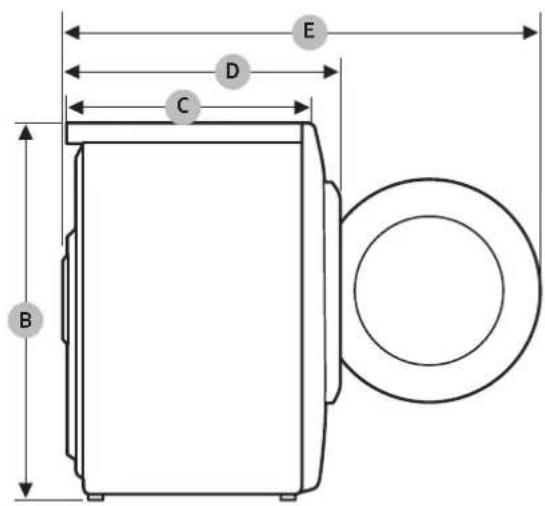
| TYP FRONTMATAD TORKTUMLARE | |||
| MODELLNAMN DV9*N82**** | DV9*N62****DV8*N62**** | ||
| MÄTT | A 600 mm 600 mm | ||
| B 850 mm 850 mm | |||
| C 600 mm 600 mm | |||
| D 655 mm 640 mm | |||
| E 1155 mm 1095 mm | |||
| VIKT 54 kg 50 kg | |||
| KRAV FÖR ELFÖRSÖRJNING | 220-240 V /50 Hz | 550-600 W 550-600 W | |
| TILLÄTNA TEMPERATURER 5-35 °C 5-35 °C | |||
Bilaga
Förbrukningsdata
| Modell Program Vikt (kg) | (1) | Energi (kWh) | Max. längd (minuter) | |
| DV9*N82****DV9*N62**** | COTTON(BOMULL)(2) | 9 1,56 188 | ||
| 4,5 0,9 130 | ||||
| IRON DRY(STRYKTORRT)(2) | 9 1,1 130 | |||
| SYNTHETICS(SYNTET) | 4,5 0,71 86 | |||
| DV8*N62**** | COTTON(BOMULL)(2) | 8 1,43 169 | ||
| 4 0,8 120 | ||||
| IRON DRY(STRYKTORRT)(2) | 8 1,02 118 | |||
| SYNTHETICS(SYNTET) | 4 0,65 80 | |||
(1) : Torr tvättvikt
(2) : EN 61121:2013 testprogram