
BE Free6 - Headphones OPTOMA - Free user manual and instructions
Find the device manual for free BE Free6 OPTOMA in PDF.


| Product Type | True Wireless Earbuds |
| Brand | Optoma |
| Model | BE Free6 |
| Driver Size | 6 mm |
| Frequency Response | 20 Hz – 20 kHz |
| Impedance | 32 Ω |
| Bluetooth Version | 5.0 |
| Bluetooth Range | 10 m (33 ft) |
| Battery Life (Earbuds) | Up to 5 hours |
| Battery Life (with Charging Case) | Up to 20 hours |
| Charging Case Battery Capacity | 300 mAh |
| Charging Time | 2 hours |
| Charging Port | USB-C |
| Water Resistance | IPX4 (sweat and splash proof) |
| Weight (per earbud) | 4.5 g |
| Weight (charging case) | 32 g |
| Dimensions (earbud) | 23 x 18 x 15 mm |
| Dimensions (charging case) | 60 x 45 x 25 mm |
| Controls | Touch controls (play/pause, call, volume) |
| Microphone | Built-in for calls |
| Noise Cancellation | Passive noise isolation |
| Ear Tips | Silicone (S, M, L included) |
| Compatibility | iOS and Android devices |
| Cleaning Instructions | Wipe with dry cloth; do not use liquids |
| Storage Temperature | -10°C to 55°C |
Frequently Asked Questions - BE Free6 OPTOMA
User questions about BE Free6 OPTOMA
0 question about this device. Answer the ones you know or ask your own.
Ask a new question about this device
Download the instructions for your Headphones in PDF format for free! Find your manual BE Free6 - OPTOMA and take your electronic device back in hand. On this page are published all the documents necessary for the use of your device. BE Free6 by OPTOMA.
USER MANUAL BE Free6 OPTOMA
natural_image
Line drawing of two electronic devices with no visible text or symbolsContents
WHAT'S IN THE BOX
• BE Free6 EARPHONES
• THE BASICS
Charging your BE Free6
Battery Low Alarm and Battery Status
Bluetooth pairing
Using your BE Free6 earbuds to have stereo sound
Using your BE Free6 right and left earbuds in mono mode
Pairing additional devices with your BE Free6
Switching between Stereo mode and Mono mode
Reset BE Free6 Right earpiece with Left earpiece
Restoring Pairing information
Power On/ Power Off
Handling phone calls and Siri/Google Assistant
Listening to music
- MISCELLANEOUS
Water resistant
Bluetooth connectivity
Voice prompts list
Disclaimer
Federal Communication Commission Interference statement
CE
NCC
IMDA
Specification
WHAT'S IN THE BOX
| Item | |
| BE Free6 earphones | 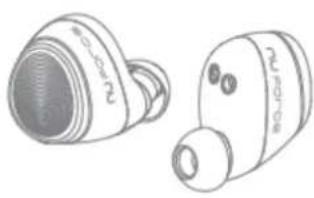 |
| Silicon tips (in L/M/S), CP350 (in S), Total of 4 pairs ear tips | 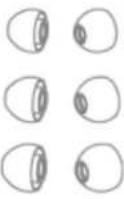 (CP350 tips already on the earbuds) (CP350 tips already on the earbuds) |
| Charging case | 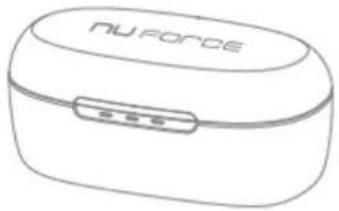 |
| USB-C Charging cable |  |
| Basic user's manual |  |
| Safety Instruction |  |
BE Free6 EARPHONES
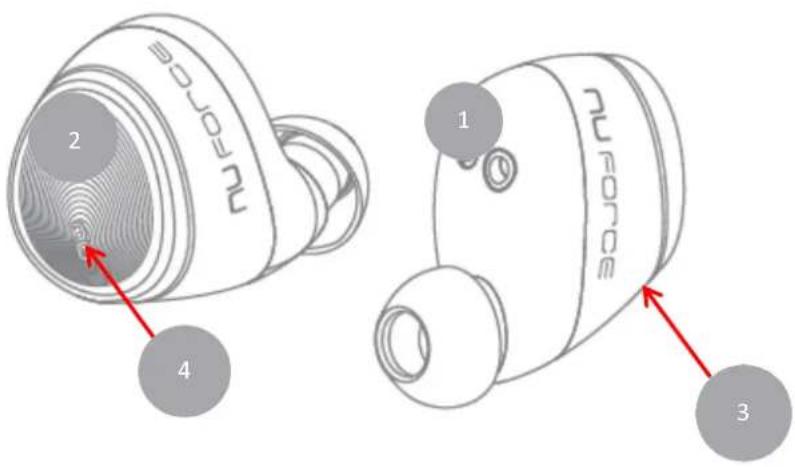
- Charging pins
- Multifunction button (MFB)
- Microphone
- LED indicator
The BASICS
Charging Your BE Free6
Although your BE Free6 come with a partially charged battery, it is recommended that you fully charge your BE Free6 and the charging case before first use.
Note: Please remove the film between charging pins and the earbuds in the case before you charge.
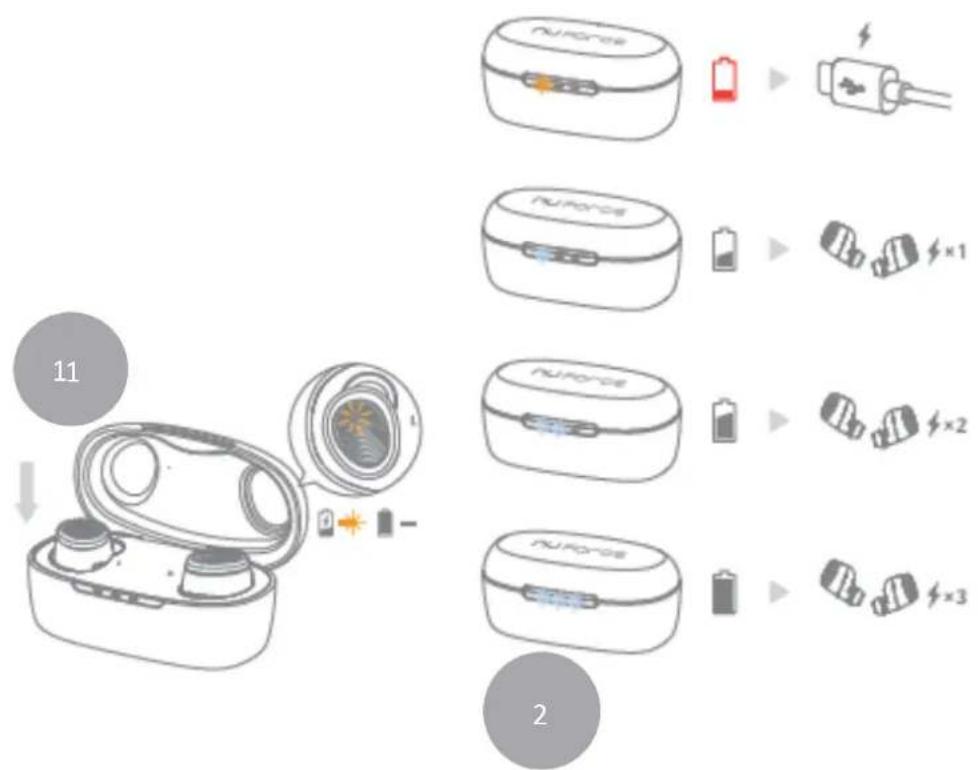
- Place the BE Free6 earbuds into the charging case (1).
The USB-C charging cable should be connected to the USB-C port on the charging case and to either a PC or a dedicated USB charger.
When charging, the LED indicator(s) on the earbuds will be in orange. Once charging is complete the LED Indicator on the earbuds' will turn off.
- When charging, the LED indicator on charging case (2) will flash white.
Once charging is complete the charging case LED indicators will be solid white to show how many cycles charge case can fully charge earbuds.
NOTE:
A. It takes up to one and a half hours to fully charge the left/right earbuds and charging case.
B. To maintain the best performance of the battery, we recommend that the battery in both the earbuds and charging case are charged regularly. Do not deplete the battery of the earbuds and charging case before charging.
C. To check the battery level of the charging case:
Open the top cover and check the number of LEDs that are solid white.
If the most left LED indicator is white, the battery can fully charge the earbuds for one cycle.
If the left and middle LED indicators are white, the battery can fully charge the earbuds for two cycles.
If all three LED indicators are white, the battery can fully charge the earbuds for three cycles
It is strongly recommended that you charge the charging case immediately when the most left LED indicator turns orange.
Please note, low battery of the charging case might cause abnormal functionality such as auto on and auto off.
Battery Low Alarm and Battery Status
When the battery level of the earbuds are low, you will hear the voice prompt “Battery Low” in your BE Free6 every 4 minutes. The estimated battery reserve remaining time is less than 15 minutes.
Users with iOS devices and some Android models will be able to view the earbuds' battery status on their device's display.
Bluetooth Pairing
Your BE Free6 can perform in stereo mode (both earbuds connect to each other), or in mono mode (Right and left earbuds in individual uses).
Earbuds behaviors are shown in steps:
| Step1, connect to Master | Step 2, connect to smartphone (BT devices, etc) | Step 3, enter to pairing mode | Step 4, enter to stand-by mode | |
| Right earpiece (Master) | (Not applied) | Perform connecting for 90 seconds, flash in orange every 2 seconds. Will skip the step if paired list is empty | In pairing mode for 180 seconds, flash in white/orange | In stand-by mode for 180 seconds, solid orange light, When overtime, will auto switch off |
| Left earpiece | Perform connecting for 30 seconds, flash in orange every 2 seconds | Perform connecting for 60 seconds, flash in orange every 2 seconds. Will skip the step if paired list is empty | 3a: Can only manually press for 4 seconds to enter pairing mode. 3b: In pairing mode for 180 seconds, flash in white/orange | In stand-by mode for 180 seconds, solid orange light, When overtime, will auto switch off |
Using your BE Free6 earbuds to have stereo sound:
flowchart
graph LR
    A["手机"] -->|1| B["手机内嵌机带"]
    B --> C["手机上充电器"]
    C --> D["手机充电器"]
    D --> E["手机充电器"]
    style A fill:#f9f,stroke:#333
    style B fill:#ccf,stroke:#333
    style C fill:#cfc,stroke:#333
    style D fill:#fcc,stroke:#333
    style E fill:#cff,stroke:#333
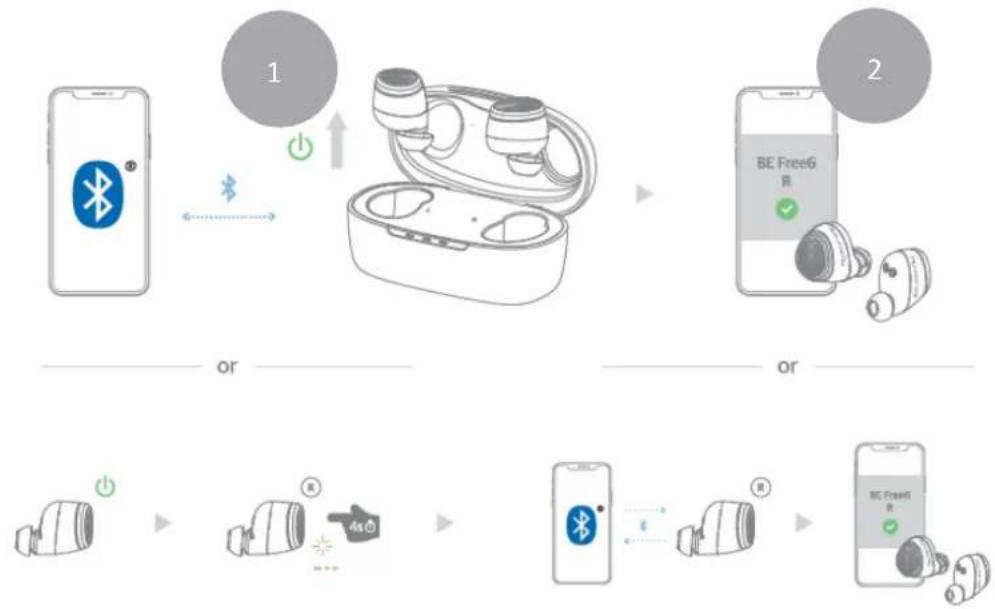
Remove both earbuds from the charging case and insert them in your ear, both earbuds will turn on automatically and connect to each other. You will hear voice prompt “Paired”.
Pairing BE Free6 earbuds with source device
- When removing the Right earbud from the charging case, press and hold the BE Free6's Power/Function button for 4 seconds until the LED indicator light flashes orange and white or you hear voice prompt "Pairing mode activated". Your BE Free6 is now in pairing mode.
- Turn on Bluetooth ^® on your source device, then select “BE Free6 R” once it appears on the device list.
- Once successfully paired, the LED indicator will flash white and you hear "Device connected" from your BE Free6.
Note:
Please be aware of press and hold power/function button for 5 seconds will turn off the earbuds.
Using your BE Free6 right and left earbuds in mono mode, by pairing to two different source devices:
To use mono mode, you will need to pair the Left earbud with the first source device and then to pair right earbud with a second source device.
- To pair the Left earbud with source device, pick up the Left earbud from the charging case, press and hold the left earpiece's Power/Function button for 4 seconds until the LED indicator light flashes orange and white or you hear voice prompt "Pairing mode activated". Your left earbud is now in pairing mode.
- Turn on Bluetooth ^® on your source device and then select “BE Free6 L (Mono)” once it appears on the device list.
- Once successfully paired, the LED indicator will flash white and you hear "Device connected" from your BE Free6.
- To pair right earpiece with a second source device, repeat the above steps 1,2 and 3. On a Bluetooth enabled device, please select "BE Free6 R" on the device list.
NOTE:
Consult your source device's user manual for instructions on activating Bluetooth.
Pairing additional devices with your BE Free6
To pair additional devices to your BE Free6 ensure that your BE Free6 is not connected to any device then repeat the steps 1,2,3 outlined above.
Note:
A. Your BE Free6 can store pairing information for up to eight devices. If your BE Free6 have already been paired with eight devices and a ninth device is paired, the stored information for the very first device will be deleted.
B. If the earbud is left inactive in pairing mode, your BE Free6 will automatically power off after 6 minutes.
Switching between Stereo mode and Mono mode
When you are switching between stereo mode and mono mode, an easy way to revert back to stereo mode is to place both earbuds back into the charging case. Once charging status is activated with orange LED lights, please remove both earbuds to revert back to stereo mode.
The BE Free6 default setting will enable stereo mode as per factory preset. Should you wish to utilize mono mode, please connect/pair the left earbud to a Bluetooth-enabled device while the right earbud is powered off (or charging within the charging case). Once paired, follow similar steps to connect the right earbud to a second Bluetooth-enabled device.
Reset BE Free6 Right earpiece with Left earpiece
Each unit of BE Free6 are paired in the factory. While stereo mode is active, you will hear “Paired” (right and left earbuds paired to each other) once both earbuds are removed from the charging case. If not, please place both earbuds back into the case. Upon seeing orange LED lights, please remove both earbuds again to check if both earbuds are paired to each other. After repeating the above steps but still unable to reach “Paired”, it means pairing information is lost. When pairing information is lost, your BE Free6 can only be used in mono mode.
Restoring Pairing information:
Please follow these procedure to restore the right/left pairing information, in order to enjoy the stereo sound:
-
From power off state, to press and hold the Power/Function button of both earbuds for 15 seconds. During the process, you will see the LED flash 3 times. Then, release the button on the earbuds.
-
Place both earbuds back in the charging case. When charging is activated the LEDs on the earbuds turn orange. Then remove the earbuds from the case and place them side by side (within 8cm).
-
Once both earbuds have completed pairing the left earbud LED will flash white, while the right earbud switches to pairing mode and the LED flashes white/orange.
Power On/Power Off
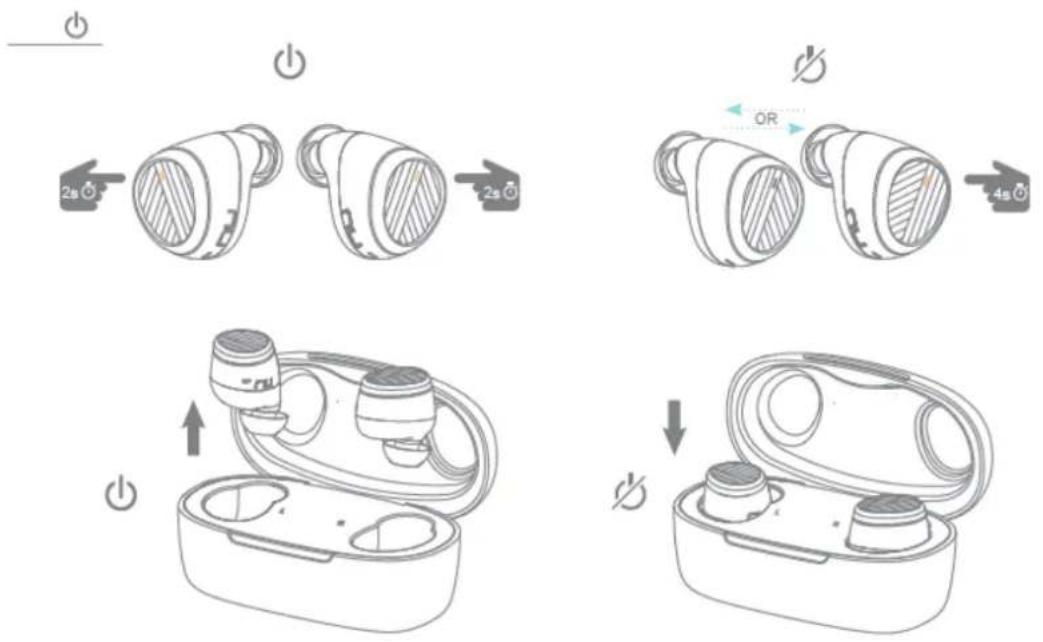
There are two ways to turn on your BE Free6
1) Pick up the earbuds from the charging case (case with sufficient power capacity), they will automatically power on.
2) When your BE Free6 are not in the charging case and are Off, press Power/Function button for 5 seconds until the LED indicator flashes white and you hear the voice prompt "Power on" on both earbuds.
NOTE:
Once you have successfully paired the BE Free6 to a Bluetooth-enabled device, the BE Free6 will automatically connect with that device once it is powered on again. For more information check “Bluetooth Pairing” section.
There are two ways to turn Off your BE Free6
To turn off the BE Free6, either place each earbud back into the charging case, or to press the Power/Function button on either the left or right earbud for 5 seconds until the LED indicator turns orange and then off or you hear the voice prompt “Power off”.
Handling Phone Calls and Siri/Google Voice
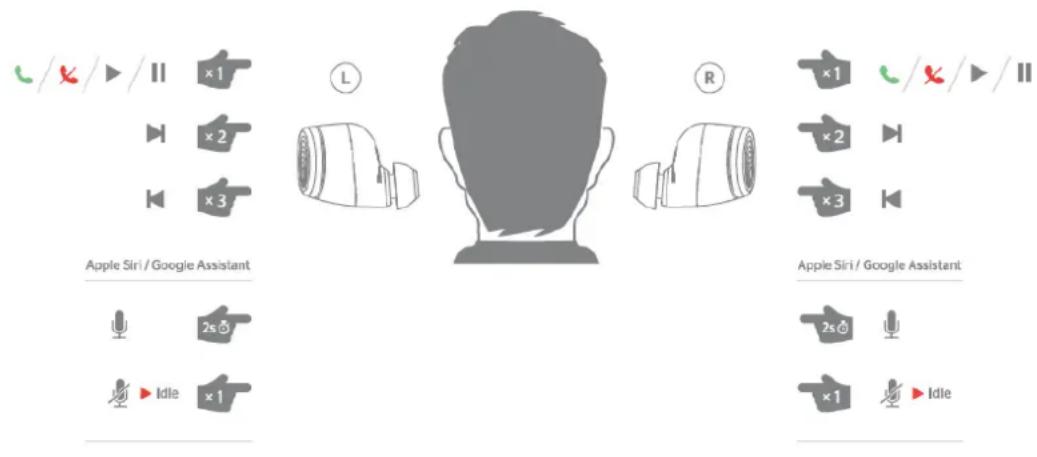
When your BE Free6 are connected to a Bluetooth-enabled smartphone, you can handle your phone calls directly using power/function button on both earbuds.
NOTE:
When on a call both earbuds handle audio.
In a noise background, you can pick right earbud and place its microphone close to your mouth to enhance your voice (to the other side of the call).
The following functions are available for calls:
| Call option | Status | Action |
| Answer a call | Incoming call | Tap the Power/Function button on both earbuds |
| End a call | In a call/outgoing call | Tap the Power/Function button on both earbuds |
| Activate Siri (iOS) or Google Voice (Android) | Standby/Connected | Press the Power/Function button on either right or left earpiece for 2 seconds, beep sound.To stop it, by clicking on Power/function button |
Listening to Music
You can enjoy and control audio through Power/Function button on your BE Free6.
| Audio option | Action |
| Play or pause audio | Tap the Power/Function button on either right or left earpiece |
| Skip to next track | Double click the Power/Function button on right or left earpiece |
| Back to previous track* | Triple click the Power/Function button on right or left earpiece |
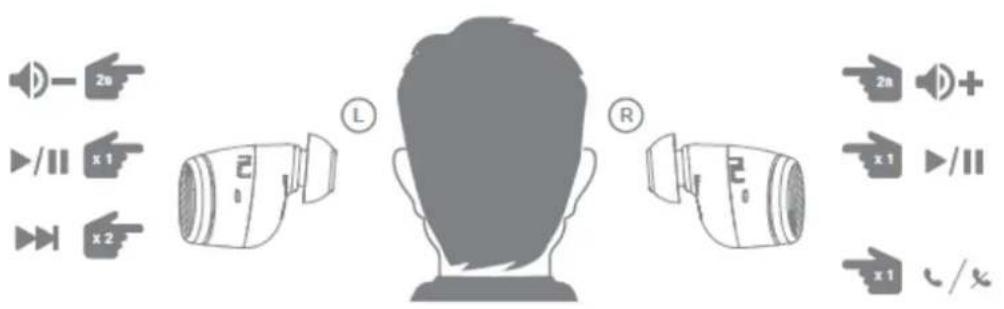
NOTE:* To operate function of "back to previous track", you can only back to start of the sound on some Android smartphones.
MISCELLANEOUS
Water Resistant
NuForce headsets with the IPX5 water ingress rating are splash-resistant and water-resistant, preventing malfunctions due to moisture entering the body of the headset. However, the splash-resistant and water-resistant qualities are non-permanent and may degrade with wear and tear from daily use. Liquid damage is not covered by the warranty.
● To prevent liquid damage, please avoid the following situations:
- Wearing the headset while swimming or showering
- Exposing the headset to pressurized or high-speed water, such as showering, water skiing, wakeboarding, surfing or riding a water scooter, etc.
• Using the headset in a sauna or steam room - Immersing the headset in water
- Operating the headset outside the recommended temperature range, or in extremely humid conditions
- Dropping the headset or any other actions that cause the headset to take impact
- Disassembling the headset, including the disassembling of screws
● Types of liquids covered by the water resistance rating:
The water resistance rating only applies to fresh water and tap water. Other liquids such as the following are not within the scope of the water resistance rating: soap water, solutions mixed with detergents, solutions mixed with bath products, shampoos, hot spring water, swimming pool water, seawater, soap water, detergents, salt water, perfumes, insect repellents, lotions, sunscreens, oils, gel removers, hair dyes, and solvents.
- If the headset has already come into contact with liquids, do not charge the headset until it is fully dry. Using or charging the headset or accessories while they are wet may damage your headset.
- The charging box (if any) containing the genuine wireless Bluetooth headset does not have a waterproof design. Any water-resistant qualities described in the product specifications are limited to the body of the headset.
If the headset is not wiped after being worn during a workout, the salt from the sweat may negatively impact the lifespan of the headset. Therefore, we recommend that you use a clean cotton cloth to wipe the headset after your workout, in order to keep the headset clean.
Bluetooth Connectivity
Bluetooth is a short-range wireless technology. Its connection quality may be interfered with metals, walls, and devices including but not limited to microwave ovens. At the same time, Bluetooth's 2.4 GHz frequency is also shared by some Wi-Fi connections, which may result in a slower connection. This technical problem cannot be completely eliminated despite Bluetooth's status as an international standard.
A Bluetooth headset's wireless transmission is not limited to the connection between the headset and the signal transmission device, but also between the main and auxiliary earbud. Therefore, when using a genuine wireless Bluetooth headset, we advise placing the signal transmitting device (such as your cellphone) on the same side as the main earbud in order to reduce the potential technical limitations of Bluetooth signal shielding to some extent.
The connection quality of the Bluetooth headset is influenced by factors such as the Bluetooth device connected to the headset, the communication environment, or the environment in which it is used. If the headset audio is intermittent, please run through the following scenarios to identify and avoid the following caused by environmental interference:
- There are obstacles such as people, metal objects, or walls between the headset and the Bluetooth device.
● There is a Wi-Fi device in use near the headset.
● There is a microwave oven in use near the headset. - There is an electromagnetic radiation generating device in use near the headset.
● The distance between the headset and Bluetooth device exceeds 10 meters
Voice Prompts list
The BE Free6 are pre-loaded with English voice prompts
"Power On"
"Power Off"
"Battery Low"
"Device connected"
"Paired"
"Pairing Mode Activated"
Disclaimer
The BE Free6 is equipped with the latest technology however functionality may vary by device.
Federal Communication Commission Interference
Statement
FCC ID: 2ABRC-APBEFREEL, 2ABRC-APBEFREELL
- This device complies with Part 15 of the FCC Rules. Operation is subject to the following two conditions:
(1) This device may not cause harmful interference.
(2) This device must accept any interference received, including interference that may cause undesired operation.
2. Changes or modifications not expressly approved by the party responsible for compliance could void the user's authority to operate the equipment.
NOTE: This equipment has been tested and found to comply with the limits for a Class B digital device, pursuant to Part 15 of the FCC Rules. These limits are designed to provide reasonable protection against harmful interference in a residential installation.
This equipment generates uses and can radiate radio frequency energy and, if not
installed and used in accordance with the instructions, may cause harmful interference to radio communications. However, there is no guarantee that interference will not occur in a particular installation. If this equipment does cause harmful interference to radio or television reception, which can be determined by turning the equipment off and on, the user is encouraged to try to correct the interference by one or more of the following measures:
Reorient or relocate the receiving antenna.
Increase the separation between the equipment and receiver.
Connect the equipment into an outlet on a circuit different from that to which the receiver is connected.
Consult the dealer or an experienced radio/TV technician for help.
FCC Radiation Exposure Statement
The device has been evaluated to meet general RF exposure requirement. The device can be used in portable exposure condition without restriction.

CE
Operating temperature: 0-45C
Operating frequency range: 2402-2480MHz
Rated Power: 7.2 dBm (Left earbud), 7.8 dBm (Right earbud)
RF exposure information: The Maximum Permissible Exposure (MPE) level has been calculated based on a distance of d=0 cm between the device and the human body.
CAUTION RISK OF EXPLOSION IF BATTERY IS REPLACED BY AN INCORRECT TYPE. DISPOSE OF USED BATTERIES ACCORDING TO THE INSTRUCTIONS
Excessive sound pressure from earphones and headphones can cause hearing loss.
natural_image
Warning symbol of an ear inside a triangle (no text or numbers)Regulatory Conformance
Hereby, Optoma Corporation declares that the radio equipment type [Bluetooth earphones APBEFREEL] is in compliance with Directive 2014/53/EU.
The full text of the EU declaration of conformity is available at the following internet address: www.optoma.com

Notice: This device may be used in each member state in EU
NCC
Administrative Regulations on Low Power Radio Waves Radiated Devices warning:
Article 12
Without permission granted by the NCC, any company, enterprise, or user is not allowed to change frequency, enhance transmitting power or alter original characteristic as well as performance to a approved low power radio-frequency devices.
Article 14
The low power radio-frequency devices shall not influence aircraft security and interfere legal communications; If found, the user shall cease operating immediately until no interference is achieved.
The said legal communications means radio communications is operated in compliance with the Telecommunications Act.
The low power radio-frequency devices must be susceptible with the interference from legal communications or ISM radio wave radiated devices.
Specification
| Connection type | Bluetooth 2.4Ghz |
| Bluetooth type | V5.0 |
| Bluetooth profile | HSP v1.2, HFP v1.7, A2DP v1.3, AVRCP v1.6, |
| Codec | SBC, AAC |
| Driver Type | Dynamic |
| Driver size | 5.6mm, Graphene diaphragm |
| Impedance | 16 Ohm |
| Battery life (estimated) | Up to 6 hours (for the earbuds) |
| Battery type | Lithium-ion battery, Typical 3.7V/ (Earbuds)50mAh, (Charging case) 500mAh |
| Microphone sensitivity | -38 +/-3 dB |
| Frequency response | 20Hz - 20kHz |
| Sensitivity | 95dB +/-3dB at 1KHz |
| Range | Up to 10m (33ft) |
| Weight | A pair of earphones (incl.CP350 tips) 10g,Charging case 53g |

- Contents
- WHAT'S IN THE BOX
- BE Free6 EARPHONES
- The BASICS
- Charging Your BE Free6
- NOTE:
- Battery Low Alarm and Battery Status
- Bluetooth Pairing
- Using your BE Free6 right and left earbuds in mono mode, by pairing to two different source devices:
- Pairing additional devices with your BE Free6
- Switching between Stereo mode and Mono mode
- Reset BE Free6 Right earpiece with Left earpiece
- Restoring Pairing information:
- Power On/Power Off
- Handling Phone Calls and Siri/Google Voice
- Listening to Music
- MISCELLANEOUS
- Water Resistant
- Bluetooth Connectivity
- Voice Prompts list
- Disclaimer
- Federal Communication Commission Interference
- Statement
- FCC ID: 2ABRC-APBEFREEL, 2ABRC-APBEFREELL
- FCC Radiation Exposure Statement
- CE
- NCC
Brand : OPTOMA
Model : BE Free6
Category : Headphones