
NuForce BE Free8 - Headphones OPTOMA - Free user manual and instructions
Find the device manual for free NuForce BE Free8 OPTOMA in PDF.


| Product Type | Truly Wireless Premium Earphones |
| Brand | Optoma |
| Model | NuForce BE Free8 |
| Regulatory Model Name | APBEFREEB |
| Connectivity | Bluetooth 2.4 GHz |
| Bluetooth Version | V4.1 |
| Bluetooth Profiles | HSP 1.2, HFP 1.6, A2DP 1.2, AVRCP 1.4, aptX low latency, AAC |
| Audio Codecs | SBC, aptX low latency, AAC |
| Driver Type | Dynamic |
| Driver Size | 5.8 mm, inner-metal coated diaphragm |
| Impedance | 32 Ohm |
| Frequency Response | 20 Hz – 20 kHz |
| Sensitivity | 92 dB +/- 3 dB at 1 kHz |
| Microphone Sensitivity | -42 +/- 3 dB |
| Battery Life (Earphones) | Up to 4 hours |
| Battery Capacity (Left Earpiece) | 80 mAh |
| Battery Capacity (Right Earpiece) | 50 mAh |
| Battery Capacity (Charging Case) | 500 mAh |
| Charging Time | Up to 2 hours |
| Charging Port | Micro-USB |
| Weight (Earphones, incl. CP350 tips) | 11 g |
| Weight (Charging Case) | 44 g |
| Bluetooth Range | Up to 10 m (33 ft) |
| Voice Prompts | English (Power On, Power Off, Battery Low, etc.) |
| Included Accessories | Charging case, Micro-USB cable, 5 pairs of silicone ear tips (SpinFit CP350 and CP100/Z) |
Frequently Asked Questions - NuForce BE Free8 OPTOMA
User questions about NuForce BE Free8 OPTOMA
0 question about this device. Answer the ones you know or ask your own.
Ask a new question about this device
Download the instructions for your Headphones in PDF format for free! Find your manual NuForce BE Free8 - OPTOMA and take your electronic device back in hand. On this page are published all the documents necessary for the use of your device. NuForce BE Free8 by OPTOMA.
USER MANUAL NuForce BE Free8 OPTOMA
natural_image
Line drawing of two identical mechanical components with circular features, no text or symbols presentUser Manual
Optoma NuForce BE Free8
Truly Wireless Premium Earphones
Regulatory model name: APBEFREEB
Version VM2.0
Contents
WHAT'S IN THE BOX
• BE Free8 EARPHONES
- THE BASICS
Charging your BE Free8
Battery Low Alarm and Battery Status
Bluetooth pairing
Power On/ Power Off
Wearing your BE Free8
Handling phone calls and Siri/Google voice
Listening to music
- MISCELLANEOUS
Restoring factory settings
Voice prompts list
Disclaimer
FCC Interference statement
CE
Trademark attribution
Specification
WHAT'S IN THE BOX
| BE Free8 earphones | 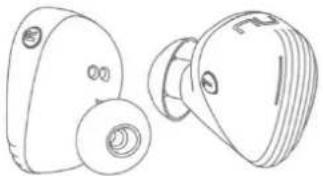 | |
| Silicon tips2 types of silicon tipsTotal of 5 pairs eartips |         | |
| Charging case | 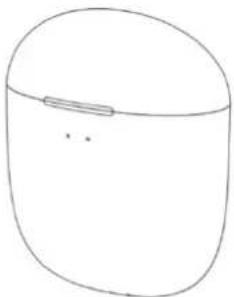 | |
| Charging cable(Micro-USB) |  | |
| Basic user's manual |  | |
| Safety Instruction |  | |
BE Free8 EARPHONES
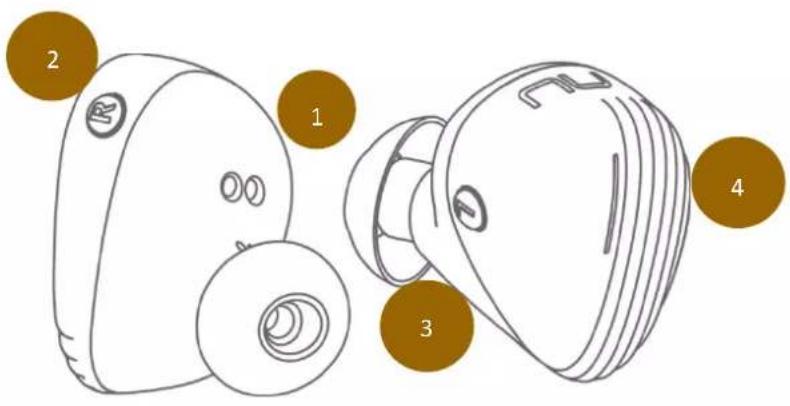
- Charge jack
- Multifunction button
- Microphone
- LED indicator
The BASICS
Charging Your BE Free8
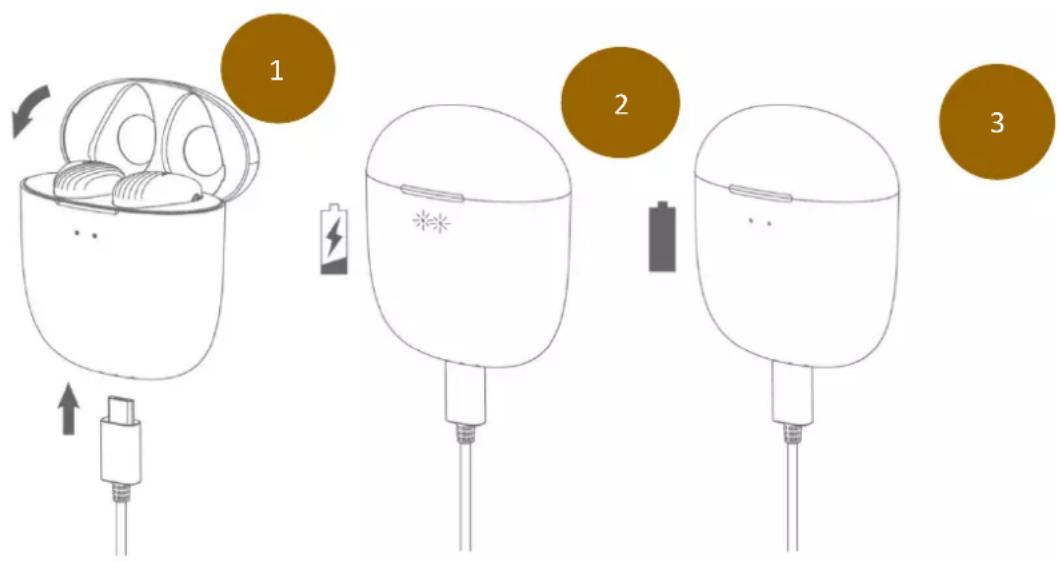
Although your BE Free8 earphones come with a partially charged battery, it is recommended that you fully charge your BE Free8 before first use.
- Put your BE Free8 into the charging case.
The charge cable should be connected to the charge port of charging case and either to a PC or a dedicated USB charger. - When charging, the LED indicator(s) on the charging case will flash every 0.5s.
- Once charging is complete, LED Indicator turns on continuously for 10 seconds and then turn off.
NOTE:
A. It takes up to 2 hours to fully charge the left and right earpiece.
B. When charging, the LED indicator on the earpiece will flash orange.
C. To maintain the best performance of the battery, we recommend that the battery in both the earpieces and charging case are charged regularly. Do not deplete the battery of the earpieces and charging case before charging.
Battery Low Alarm and Battery Status
When the battery level is very low, you will hear a “Battery Low” voice prompt from your BE Free8 every 2 minutes when the estimated battery reserve remaining time is under 15 minutes.
Users with iOS devices and some Android models will be able to view the battery status on their device's display
Bluetooth Pairing
flowchart
graph TD
    A["1: Device selection"] --> B["2: 4s timer icon"]
    B --> C["3: Wireless signal interaction with 4s timer"]
    C --> D["4: BE FreeB app activation"]
Using your BE Free8 for the first time
Pairing BE Free8 Left earpiece with source device
-
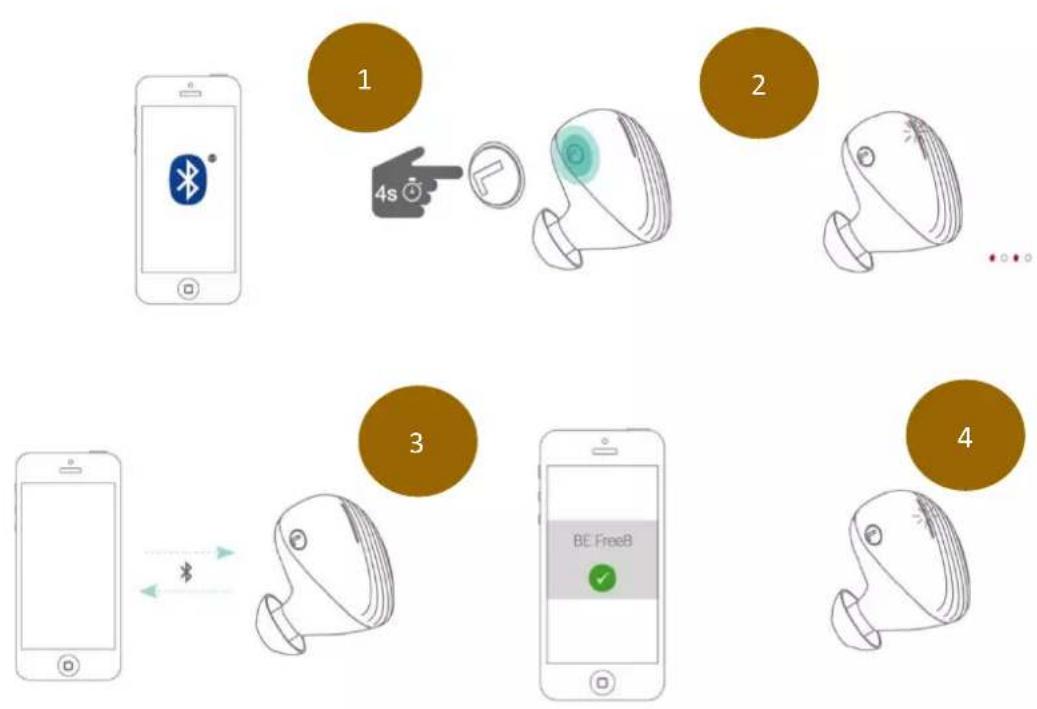
When pick up left earpiece from the charging case, press and hold the BE Free8's Power/Function button for 4 seconds until the LED indicator light flashes orange and white. Your BE Free8 is now in pairing mode.
-
Turn on Bluetooth® on your source device, then select "BE Free8" once it appears on the device list.
-
Once successfully paired, the LED indicator will flash white and you hear "Primary device connected" from your BE Free8.
NOTE: Consult your source device's user manual for instructions on activating Bluetooth.
Pairing BE Free8 Right earpiece with Left earpiece
- Turns on the right earpiece and plug both (right and left) earpieces in ear, both earpieces will automatically connected.
NOTE:
A. You must always enter "Pair" mode from a powered-off state. Otherwise, pushing the Power/Function button for more than 4 seconds from a powered-on state turns the BE Free8 off.
B. If left inactive in pairing mode, your BE Free8 will automatically power off after 5 minutes.
C. Your BE Free8 can store pairing information for up to eight devices.
To pair additional devices to your BE Free8 ensure that your BE Free8 is not concurrently connected to any device, then repeat the steps 1,2,3 outlined above.
In case your BE Free8 have already stored pairing information for eight devices and a ninth device is paired, the stored information for the very first device will be deleted.
Power On/Power Off
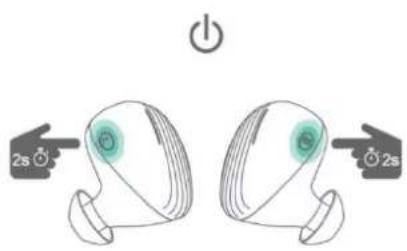
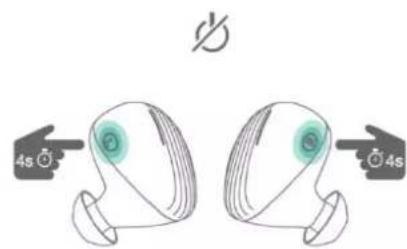
When your BE Free8 is in OFF state, press Power/Function button for about 2 seconds until the LED indicator flashes white and you hear the "Power on" on your left earpiece.
NOTE:
Once you have successfully paired the BE Free8 to a Bluetooth-enabled device, the BE Free8 will automatically connect with that device once it is powered on again. For more information check “Bluetooth Pairing” section.
To turn the BE Free8 to OFF, either place each earpiece back into the charging case (within 10 seconds after opening top cover of the charging case), or to push Power/Function button for about 4 seconds until the LED indicator turns orange and you hear the “Power off”.
Wearing Your BE Free8
flowchart
graph LR
    A["Original Eye Shape"] --> B["Anatomical Device"]
    B --> C["L-shaped Device with Internal Components"]
    C --> D["R-shaped Device with Internal Components"]
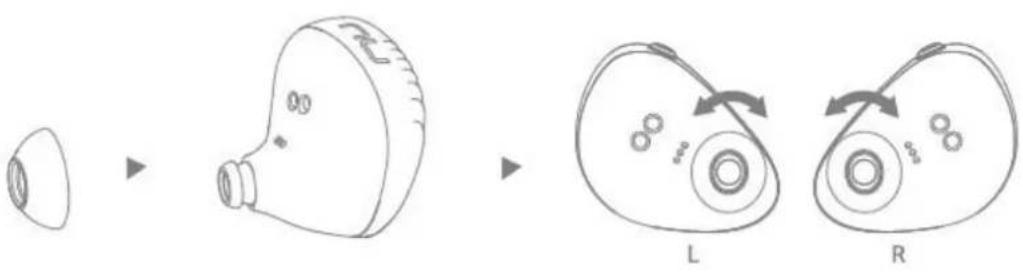
To ensure a secure and comfortable fit when wearing your BE Free8:
- Select right size of ear tips and install tips on BE Free8.*
- Rotate the SpinFit tips CP350 (if wearing this type) and place the BE Free8 into each ear so that they are positioned comfortably.
NOTE: *5 pairs of silicone (SpinFit CP350 and CP100/Z) tips are provided to offer optimal user's comfort.
Handling Phone Calls and Siri/Google voice
When your BE Free8 are connected to a Bluetooth-enabled smartphone, you can handle your phone calls directly using MFB on left earpiece.
The followings describe phone call options:
| Call option | Status | Action |
| Answer a call | Incoming call | Tap the Power/Function button on left earpiece |
| End a call | In a call/outgoing call | Tap the Power/Function button on left earpiece |
| Activate Siri (iOS) or Google Voice Search (Android) | Standby/Connected | Press the Power/Function button on left earpiece for 2 seconds.To stop it, by clicking on Power/function button |
To activate Siri and Google voice from listening music or in idle:
![[♪ /Idle] ▶ 2s](/content/2026/05/867946/images/ad5c9348ec60a3c622af2540a41ad2529a10dff3efe4c5a0a6bed01595c3fcb6.jpg)
![▶ [ ♪ /Idle ] x 1 [ 1~2s ⏻ ]](/content/2026/05/867946/images/1571f182b259823c2a675b7aa18c955ab79022deaf35254bd15f45909ce7d146.jpg)
Listening to Music
You can enjoy and control audio through the in line controller on your BE Free8.
| Audio option Action | |
| Play or pause audio | Tap the Power/Function button on left earpiece |
| Skip to next track | Double click on the Volume Up button of left earpiece |
MISCELLANEOUS
When you restore the BE Free8 to its factory settings, the paired devices stored will be deleted.
To restore factory settings:
1 Ensure that your BE Free8 are not connected to any device.
2 Put the BE Free8 in pairing mode.
3 Double click on the Power/Function button on the left earpiece until the LED indicator flashes white six times following orange/white flashes alternately, and you hear short tones from the BE Free8.
Because all pairing information is deleted after restoring factory settings, the BE Free8 will directly enter pairing mode once powered on.
Voice Prompts list
The BE Free8 are pre-loaded with English voice prompts
"Power On"
"Power Off"
"Battery Low"
"Primary device connected"
"Pairing Mode Activated"
"Device disconnected"
Disclaimer
Please be advised, the BE Free8 is equipped with the latest technology however functionality may vary by device.
Federal Communication Commission Interference
Statement
This equipment has been tested and found to comply with the limits for a Class B digital device, pursuant to two different Part 15 rules sections of the FCC. These limits are designed to provide reasonable protection against harmful interference in a residential installation.
This equipment generates, uses and can radiate radio frequency energy and, if not installed and used in accordance with the instructions, may cause harmful interference to radio communications. However, there is no guarantee that interference will not occur in a particular installation. If this equipment does cause harmful interference to radio or television reception, which can be determined by turning the equipment off and on, the user is encouraged to try to correct the interference by one of the following measures:
. Reorient or relocate the receiving antenna.
. Increase the separation between the equipment and receiver.
. Connect the equipment into an outlet on a circuit different from that to which the receiver is connected.
. Consult the dealer or an experienced radio/TV technician for help.
FCC Caution: To assure continued compliance, any changes or modifications not expressly approved by the party responsible for compliance could void the user's authority to operate this equipment. (Example - use only shielded interface cables when connecting to computer or peripheral devices).
FCC Radiation Exposure Statement
This equipment complies with FCC RF radiation exposure limits set forth for an uncontrolled environment. This equipment should be installed and operated with a minimum distance of 0.5 centimeters (.20 of an Inch) between the radiator and your body.
This transmitter must not be co-located or operating in conjunction with any other antenna or transmitter.
The antennas used for this transmitter must be installed to provide a separation distance of at least 0.5 centimeters (.20 of an Inch) from all persons and must not be co-located or operating in conjunction with any other antenna or transmitter.
This device complies with two different Part 15 rules sections of the FCC. Operation is subject to the following two conditions:
(1) This device may not cause harmful interference, and (2) This device must accept any interference received, including interference that may cause undesired operation.
CE
EU Regulatory Conformance Hereby, Optoma Corporation declares that this device is in compliance with the essential requirements and other relevant provisions of Directive 2014/53/EU.
Notice: Observe the national local regulations in the location where the device is to be used.
Trademark Attribution
Qualcomm is a trademark of Qualcomm Incorporated, registered in the United States and other countries, used with permission. aptX is a trademark of Qualcomm Technologies international, Ltd., registered in the United States and other countries, used with permission.
Specification
| Connection type | Bluetooth 2.4Ghz |
| Bluetooth type | V4.1 |
| Bluetooth profile | HSP 1.2, HFP 1.6, A2DP 1.2, AVRCP 1.4, aptX low latency, AAC |
| Codec | SBC, aptX low latency, AAC |
| Driver Type Dynamic | |
| Driver size | 5.8mm, inner-metal coated diaphragm |
| Impedance | 32 Ohm |
| Battery life (estimated) | Up to 4 hours |
| Lithium-ion battery, Typical 3.7V/(Left) | |
| Battery type | 80mAh, (Right) 50mAh, (Charging case) 500mAh |
| Microphone sensitivity | -42 +/-3 dB |
| Frequency response | 20Hz - 20kHz |
| Sensitivity | 92dB +/-3dB at 1KHz |
| Range | Up to 10m (33ft) |
| Weight | A pair of earphones(incl. CP350 tips) 11g, Charging case 44g |
Optoma

- User Manual
- Optoma NuForce BE Free8
- Truly Wireless Premium Earphones
- Contents
- WHAT'S IN THE BOX
- BE Free8 EARPHONES
- The BASICS
- Charging Your BE Free8
- NOTE:
- Battery Low Alarm and Battery Status
- Bluetooth Pairing
- Using your BE Free8 for the first time
- Power On/Power Off
- Wearing Your BE Free8
- Handling Phone Calls and Siri/Google voice
- Listening to Music
- MISCELLANEOUS
- Voice Prompts list
- Disclaimer
- Federal Communication Commission Interference
- Statement
- FCC Radiation Exposure Statement
- CE
- Trademark Attribution
- Optoma
Brand : OPTOMA
Model : NuForce BE Free8
Category : Headphones