SANDVIBE - Loudspeaker Sandstrøm - Free user manual and instructions
Find the device manual for free SANDVIBE Sandstrøm in PDF.


| Product Type | 2.1 Channel Speaker System |
| Model | SANDVIBE |
| Subwoofer Dimensions (W x H x D) | 180 x 214 x 363 mm |
| Satellite Speaker Dimensions (W x H x D) | 105 x 214 x 128 mm |
| Total Output Power (RMS) | 2 x 10W + 28W |
| Power Supply | 100 - 240V, 50/60Hz |
| Standby Power Consumption | < 0.5W |
| Bluetooth Version | Not specified (A2DP and AVRCP supported) |
| Bluetooth Range | Up to 10 meters |
| Audio Inputs | AUX IN (3.5mm to RCA), Bluetooth |
| Audio Outputs | Speaker outputs (RCA), Headphone jack (3.5mm) |
| Controls | Power button, Volume, Treble, Bass dials |
| LED Indicator | Blue (power on) |
| Eco Mode | Auto sleep after 20 minutes without signal |
| Package Includes | Subwoofer, 2 satellite speakers, 3.5mm to RCA cable, instruction manual |
| Maintenance | Wipe with slightly moist lint-free cloth; avoid alcohol, ammonia, abrasives |
| Safety | Use only specified voltage; keep away from heat sources; unplug during storms |
| Intended Use | Indoor household use only |
Frequently Asked Questions - SANDVIBE Sandstrøm
User questions about SANDVIBE Sandstrøm
0 question about this device. Answer the ones you know or ask your own.
Ask a new question about this device
Download the instructions for your Loudspeaker in PDF format for free! Find your manual SANDVIBE - Sandstrøm and take your electronic device back in hand. On this page are published all the documents necessary for the use of your device. SANDVIBE by Sandstrøm.
USER MANUAL SANDVIBE Sandstrøm
natural_image
Three black audio/video speakers with adjustable knobs and dials, no visible text or symbols on the devices themselves.Contents
GB
Safety Warnings....5
Unpacking....10
Product Overview....11
Subwoofer front and rear views 11
Connections 12
Speakers Connection.... 12
Using the AUX IN Connection 12
Connecting to the Mains Supply....13
Using Earphones....14
General Operation....15
Powering ON/OFF....15
Adjusting the Volume....15
Adjusting the Treble.... 15
Adjusting the Bass....15
Bluetooth® Operation 16
PC Speakers Fitted with Eco-Friendly
Power-Saving Technology....17
Maintenance 17
Cleaning the Unit....17
Hints and Tips.... 18
Specifications....19
Innhold
NO
Specifications....39
Sisältö
FI
Turvavaroitukset 8
Read all instructions before using these speakers and keep them for future reference.
• Use only voltage specified on the rating label of the speaker.
- Do not place speakers close to heat sources, such as radiators and heaters.
• These speakers are intended for household use only and not for commercial or industrial use.
- Use these speakers only as described in this Instruction Manual. Any other use is not recommended by the manufacturer and may cause fire, electric shock or injury.
- Always operate on a flat horizontal surface. Do not place the speakers on an unstable table, stand, tripod or bracket.
- If the mains cable is damaged, it must be replaced by a qualified electrician in order to avoid a hazard.
- Do not use these speakers outdoors, or on wet surfaces. Avoid spilling liquid on the speakers. Keep the speakers dry and avoid contact with damp or wet areas.
- Do not block the openings in the speaker cabinets, never push objects into the speaker vents or slots because of fire or electric shock hazards, and provide sufficient space around the speakers for proper ventilation.
• Only use attachments/accessories specified by the manufacturer.
- For added protection during lighting storms, unplug the speakers from the mains socket and turn off the computer.
• Unplug the speakers when not in use for a long period of time.
- Do not expose these speakers to rain or moisture to reduce the risk of electric shock.
- Place the speakers away from strong electro magnetic environments.
- These speakers are not intended for use by persons (including children) with reduced physical, sensory or mental capabilities, or lack of experience and knowledge, unless they have been given supervision or instruction concerning the use of the speakers by a person responsible for their safety.
- Children should be supervised to ensure that they do not play with the speakers.
• This appliance is intended for normal indoor, household use only.
Thank you for purchasing your new Sandstrøm speaker.
We recommend that you spend some time reading this instruction manual in order that you fully understand all the operational features it offers. You will also find some hints and tips to help you resolve any issues.
Read all the safety instructions carefully before use and keep this instruction manual for future reference.
Unpacking
Remove all packaging from the unit. Retain the packaging. If you dispose of it please do so according to local regulations.
The following items are included:
natural_image
Front view of a vintage electronic device with three circular buttons and a central indicator (no text or symbols visible)Subwoofer Satellite Speakers x 2

natural_image
Simple line drawing of a speaker with two circular components (no text or symbols)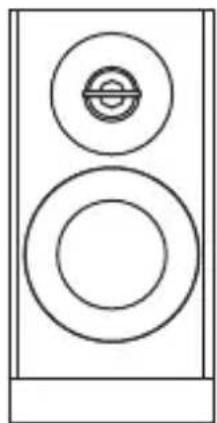
natural_image
Simple line drawing of a speaker with two circular components (no text or symbols)
natural_image
Illustration of a ribbon or cable with two connectors (no text or symbols)
Instruction Manual3.5mm to RCA Stereo Audio C
Product Overview
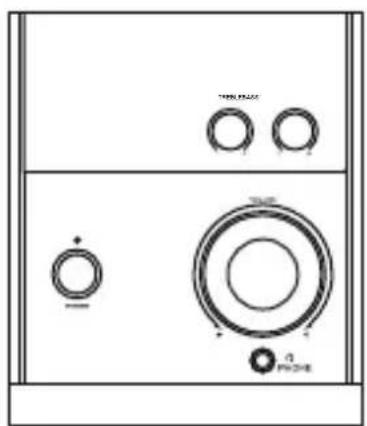
Subwoofer front and rear views

- TREBLE +/- Dial
- POWER Button
- BASS +/- Dial
- LED Indicator
- VOLUME +/- Dial
- PHONE Socket
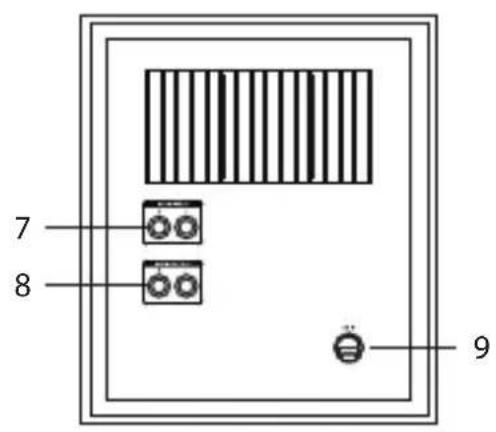
- AUDIO INPUT (L/R) Sockets
- AUDIO OUTPUT (L/R) Sockets
- AC IN Socket
Connections
GB
Speakers Connection
Connect the speaker cables at the back of the speakers to the AUDIO OUTPUT (L/R) sockets at the rear of the subwoofer.

natural_image
Pure electrical circuit lines without any symbolsUsing the AUX IN Connection
Use a 3.5mm to RCA stereo audio cable to connect the audio device's audio output sockets to the unit's AUDIO INPUT (L/R) socket.
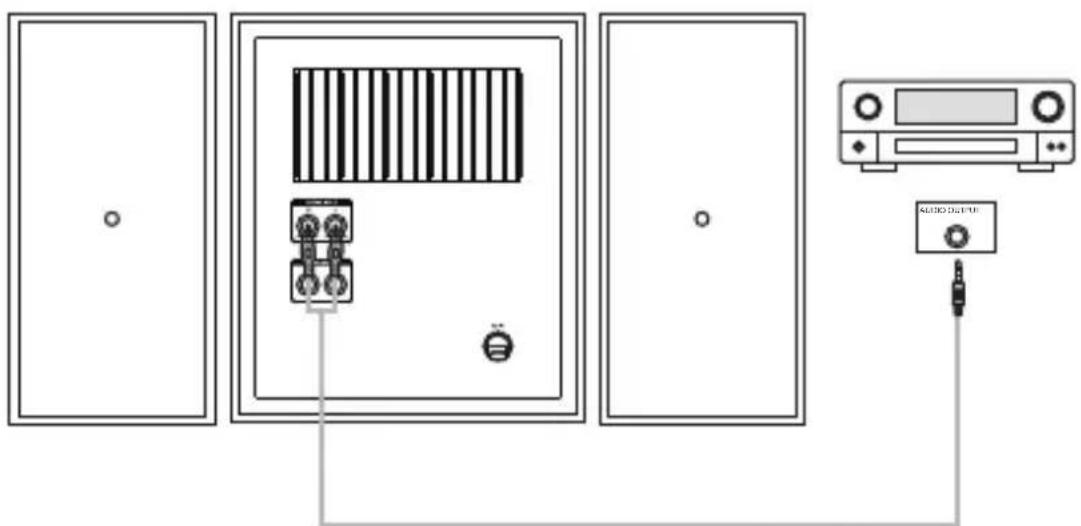
3.5mm to RCA stereo audio cable
Connecting to the Mains Supply
• This unit is designed to operate with an AC power supply.
- Connecting the unit to any other power source may cause damage to the unit. Unwind the mains cable to its full length. Connect the mains plug to a mains socket. Make sure the mains plug is fully inserted into the mains socket. The unit is now connected and ready to use.
- To switch the unit off completely, switch ON/OFF to the OFF position or unplug the mains plug from the mains socket.


Ensure all audio connections of the unit are connected before connecting to the mains power socket.
Using Earphones
Turn down the volume before connecting the earphones. Slowly raise the volume with the earphones on until you reach your desired volume. When earphones are connected, the speakers automatically mutes.

natural_image
Diagram of a audio amplifier with headphones connected to a speaker (no text or symbols present)
Long-term exposure to loud music may cause hearing damage. It is best to avoid extreme volume when using earphones, especially for extended periods.

General Operation
Powering ON/OFF
- Press POWER button to switch the unit on. The LED indicator will light up blue.
- Press POWER button again to switch the unit off. The LED indicator will turn off.
- Disconnect the mains plug from the mains socket if you want to switch the unit off completely.
Adjusting the Volume
Turn the VOLUME dial to adjust the volume.
Adjusting the Treble
Turn the TREBLE +/- dial to adjust the treble level.
Adjusting the Bass
Turn the BASS +/- dial to adjust the bass level.
Bluetooth® Operation
GB
The unit has a Bluetooth function that can receive a signal within 10 metres. Pair the unit with a Bluetooth device to listen to music:
- Activate your Bluetooth device and select the search mode.
- "SANDVIBE" will appear on your Bluetooth device.
- Select "SANDVIBE" and enter "0000" for the password if necessary.
- To disconnect the Bluetooth function, or disable the function from your Bluetooth device.

- If the signal strength is weak, your Bluetooth receiver may disconnect, but it will re-enter pairing mode automatically.
- For better signal reception, remove any obstacles between the unit and the Bluetooth device.
- This unit supports A2DP (Advanced Audio Distribution Profile) and AVRCP (Audio Video remote Control Profile) functions. This can only be paired with one Bluetooth device at one time.
- Compatibility with all devices and media types is not guaranteed.
- Some mobile phones with the Bluetooth function may connect and disconnect as you make and end calls. This is not an indication of a problem with your unit.
PC Speakers Fitted with Eco-Friendly Power-Saving Technology
GB
These PC speakers are fitted with the latest eco-friendly power-saving technology.
After approximately 20 minutes of not receiving an input signal, the unit will go into auto sleep mode to save power. You can wake it up by adjusting the volume of the media source device
To ensure the best performance from your Sandstrom speakers, always ensure the volume level on your media source device (PC, CD, MP3) is set to an adequate level (50% or more). This will also ensure the Eco power save mode does not operate during normal music play back.
Maintenance
Cleaning the Unit

- Ensure the unit is fully unplugged before cleaning.
• To clean the unit, wipe the case with a slightly moist, lint-free cloth.
- Do not use any cleaning fluids containing alcohol, ammonia or abrasives.
- Do not spray aerosol at or near the unit.
Hints and Tips
GB
| Problem Solution | |
| No power | · Ensure that all the required cables are securely connected.· Make sure that the unit is switched on. |
| No sound | · Ensure that the unit is switch on.· Check the volume level of the unit· Check the sound input source. |
| Sound is distorted | Volume is too high. Adjust the volume control. |
| I cannot find “SANDVIBE” on my Bluetooth device | Ensure the Bluetooth function is activated on your Bluetooth device. |
Specifications
| Model SANDVIBE | |
| Supply voltage: | 100 - 240V 50/60Hz |
| Output Power (Total) 2 x 10W | + 28W (RMS) |
| Dimension(W x H x D) | Subwoofer: 180 x 214 x 363mmSatellite: 105 x 214 x 128mm |
| Standby power consumption | <0.5W |
Features and specifications are subject to change without prior notice.
natural_image
Front view of a vintage electronic device with three circular buttons and a central indicator (no text or symbols visible)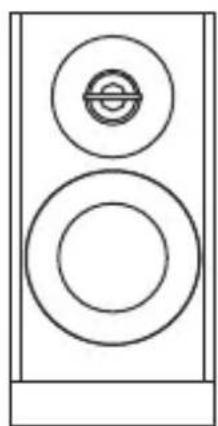
natural_image
Simple line drawing of a speaker with two circular components (no text or symbols)
natural_image
Simple line drawing of a speaker tower with two circular speakers (no text or symbols)natural_image
Illustration of a black cable with two connectors (no text or symbols)
natural_image
Pure electrical circuit lines without any symbolsnatural_image
Diagram of a audio amplifier with headphones connected to a speaker (no text or symbols present)NO

natural_image
Front view of a vintage electronic device with three circular buttons and a labeled indicator (no readable text or symbols beyond basic labels)Subwoofer Satellithögtalare x 2

natural_image
Simple line drawing of a speaker with two circular components (no text or symbols)
natural_image
Simple line drawing of a speaker tower with two circular speakers (no text or symbols)
natural_image
Black cable with two connectors, no visible text or symbols
Instruktionsbok3,5mm till RCA Stereoljudkabel
Produktöversikt
natural_image
Pure electrical circuit lines without any symbols3,5mm till RCA stereoljudkabel
natural_image
Diagram of a audio amplifier with headphones connected to a speaker (no text or labels)SE

Features and specifications are subject to change without prior notice.
Kiitos, okun ostit uuden Sandstrøm kaiutin.
natural_image
Front view of a vintage electronic device with three circular buttons and a central indicator (no text or symbols visible)natural_image
Simple line drawing of a speaker with two circular components (no text or symbols)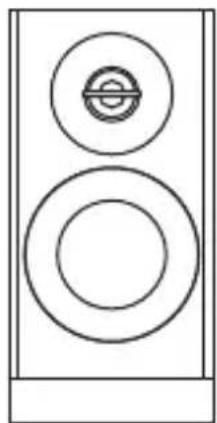
natural_image
Simple line drawing of a speaker with two circular components (no text or symbols)
natural_image
Illustration of a black cable with two connectors (no text or symbols)
natural_image
Pure electrical circuit lines without any symbolsnatural_image
Diagram of a audio amplifier with headphones connected to a speaker (no text or labels)FI

natural_image
Front view of a vintage electronic device with three circular buttons and a central indicator (no text or symbols visible)
natural_image
Simple line drawing of a speaker with two circular components (no text or symbols)
natural_image
Simple line drawing of a speaker tower with two circular speakers (no text or symbols)natural_image
Illustration of a black cable with two connectors (no text or symbols)
natural_image
Pure electrical circuit lines without any symbolsnatural_image
Diagram of a audio amplifier with headphones connected to a speaker (no text or labels)DK

The symbol on the product or its packaging indicates that this product must not be disposed of with your other household waste. Instead, it is your responsibility to dispose of your waste equipment by handing it over to a designated collection point for the recycling of waste electrical and electronic equipment. The separate collection and recycling of your waste equipment at the time of disposal will help conserve natural resources and ensure that it is recycled in a manner that protects human health and the environment.
For more information about where you can drop off your waste for recycling, please contact your local authority, or where you purchased your product.
The Bluetooth ® word mark and logos are registered trademarks owned by Bluetooth ® SIG, Inc. and any use of such marks by DSG Retail Limited is as an Affiliate under the License held by DSG International Sourcing Ltd. Other trademarks and trade names are those of their respective owners and all rights are acknowledged. All trademarks are the property of their respective owners and all rights are acknowledged.
NO
Maylands Avenue, Hemel Hempstead, Hertfordshire, HP2 7TG, UK.
- Contents
- Innhold
- Sisältö
- Unpacking
- Product Overview
- Subwoofer front and rear views
- Connections
- Speakers Connection
- Using the AUX IN Connection
- Connecting to the Mains Supply
- Using Earphones
- General Operation
- Powering ON/OFF
- Adjusting the Volume
- Adjusting the Treble
- Adjusting the Bass
- Bluetooth® Operation
- GB
- PC Speakers Fitted with Eco-Friendly Power-Saving Technology
- Maintenance
- Cleaning the Unit
- Hints and Tips
- Specifications
- Produktöversikt
- NO
Brand : Sandstrøm
Model : SANDVIBE
Category : Loudspeaker