SWKBFS16 - Keyboard Sandstrøm - Free user manual and instructions
Find the device manual for free SWKBFS16 Sandstrøm in PDF.


| Product Type | Wireless Keyboard |
| Model | SWKBFS16 |
| Brand | Sandstrøm |
| Dimensions (L x W x H) | 441 x 124 x 17.5 mm |
| Net Weight | 486 g |
| Power Source | 2 x AAA batteries |
| Wireless Technology | 2.4 GHz RF |
| Operating Range | < 6 m (open space) |
| Frequency Band | 2406 – 2476 MHz |
| Maximum RF Power | 3 dBm |
| System Requirements | Microsoft Windows 7/8/10, available USB port |
| Connection | Nano USB dongle |
| Battery Indicator | LED flashes when battery low |
| Auto Power-Off | After 15 minutes of inactivity |
| Function Keys | Media controls, volume adjustment, web browser, email, folder shortcuts |
| Nordic Language Support | Yes (specific characters via Fn key combinations) |
| Included Accessories | Keyboard, Nano dongle, 2x AAA batteries, instruction manual |
| Safety Features | Battery safety warnings, avoid water and heat, keep away from strong electromagnetic waves |
| Disposal | WEEE compliant, batteries must be recycled separately |
| Certification | Compliant with EU Directive 2014/53/EU |
Frequently Asked Questions - SWKBFS16 Sandstrøm
User questions about SWKBFS16 Sandstrøm
0 question about this device. Answer the ones you know or ask your own.
Ask a new question about this device
Download the instructions for your Keyboard in PDF format for free! Find your manual SWKBFS16 - Sandstrøm and take your electronic device back in hand. On this page are published all the documents necessary for the use of your device. SWKBFS16 by Sandstrøm.
USER MANUAL SWKBFS16 Sandstrøm
Safety Warnings....6
Unpacking....11
Product Overview....12
Top View 12
Bottom View....12
System Requirements ....12
Installing the Batteries....13
Connecting the Nano Dongle....13
Activating the Keyboard....14
Function Keys....14
Typing Language-specific Characters....15
Hints and Tips....15
Specifications....16
NO Innhold
Specifications....23
Read all the instructions carefully before using the unit and keep them for future reference.
Retain the manual. If you pass the unit onto a third party, make sure to include this manual.
Wireless Devices:
- Before boarding any aircraft or packing a wireless device in luggage that will be checked in, remove the batteries from the wireless device.
- Wireless devices can transmit radio frequency (RF) energy, whenever batteries are installed and the wireless device is turned on (If it has an On/Off switch).
Battery-Powered Devices:
- Improper use of batteries may result in battery fluid leakage, overheating, or explosion.
- Released battery fluid is corrosive and may be toxic. It can cause skin and eye burns, and is harmful if swallowed.
- Do not disassemble the keyboard or remove any parts.
- Do not immerse the keyboard in water or any liquid.
- Do not use the keyboard close to heat sources or expose to high temperatures.
- Do not use the keyboard where strong electromagnetic waves are present. Strong electromagnetic waves will cause damage to the keyboard.
- Keep the keyboard away from direct sunlight, moisture, dirt or abrasive chemical products (cleaning products etc).
To Reduce the Risk of Injury:
- Keep batteries out of the reach of children.
- Do not heat, open, puncture, mutilate, or dispose of batteries in fire.
- Do not mix new and old batteries or batteries of different types.
- Do not allow metal objects to touch the battery terminals on the device; they can become hot and cause burns.
Thank you for purchasing your new product.
We recommend that you spend some time reading this instruction manual in order that you fully understand all the operational features it offers. You will also find some hints and tips to help you resolve any issues.
Read all the safety instructions carefully before use and keep this instruction manual for future reference.
Unpacking
Remove all items from the packaging. Retain the packaging. If you dispose of it please do so according to local regulations.
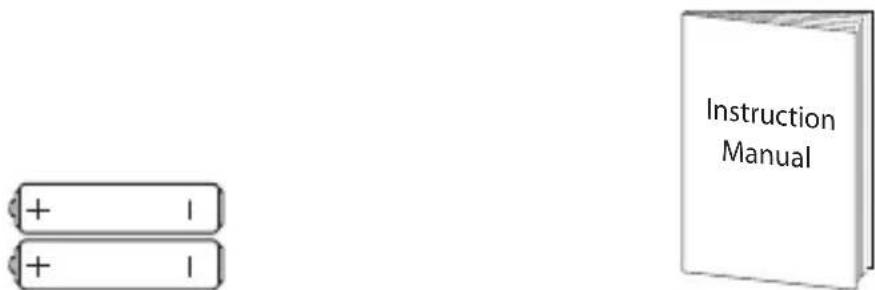
The following items are included:

natural_image
Pure diagram of a standard computer keyboard layout without any text, numbers, or symbolsMain Unit (with Nano Dongle)


AAA Size Battery x 2 Instruction Manual
Product Overview
Top View

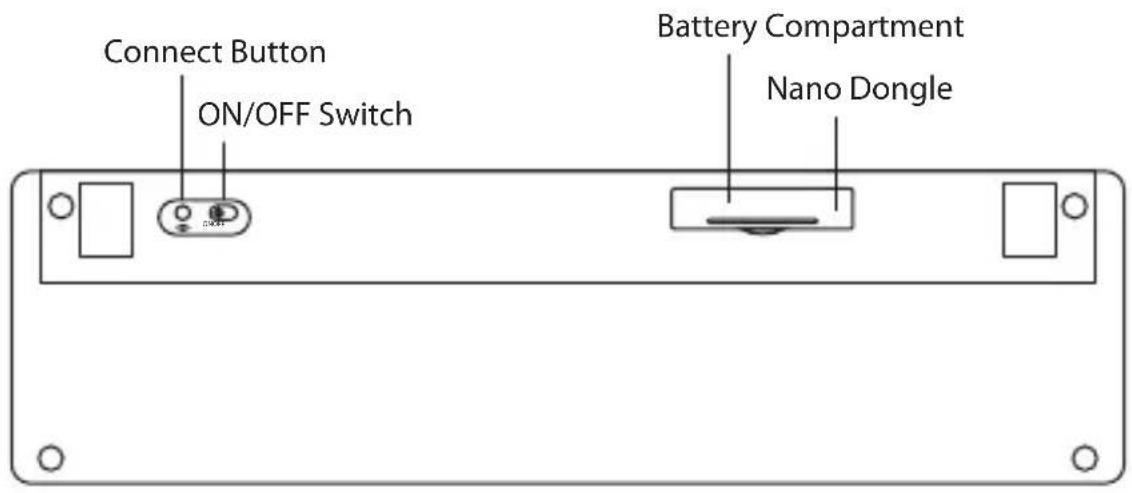
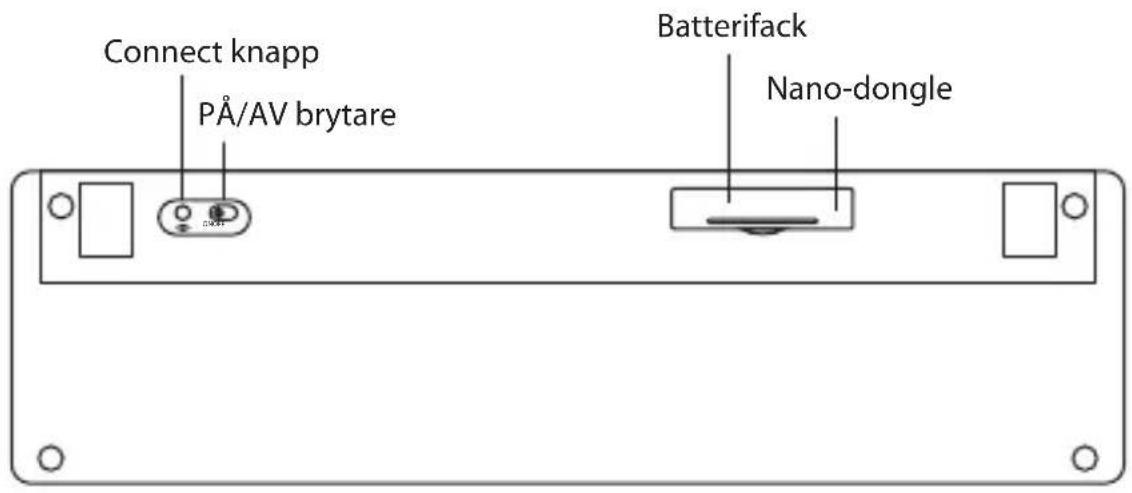
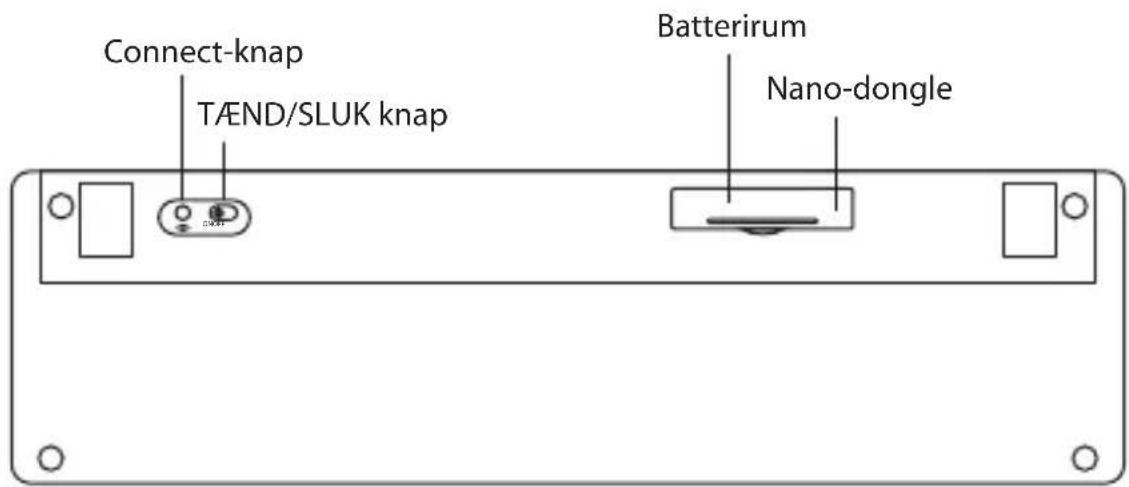
Bottom View
System Requirements
Operating Systems: Microsoft® Windows® 7 / 8 / 10
Hardware: 1 available USB port
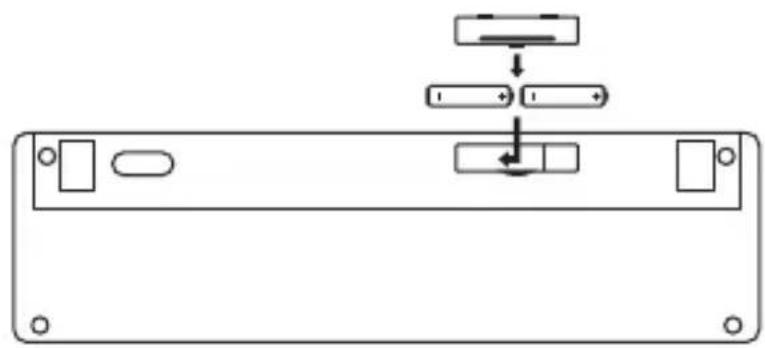
Installing the Batteries
When battery is low, the LED indicator will flash when a key is pressed.
- Lift the battery cover up.
- Insert 2 × AAA battery.
- Close the battery cover.
natural_image
Pure diagram of a device rear panel with internal components and directional arrows, no text or symbols present.GB

Please ensure the battery's polarities(+/-) match the battery compartment's polarities.
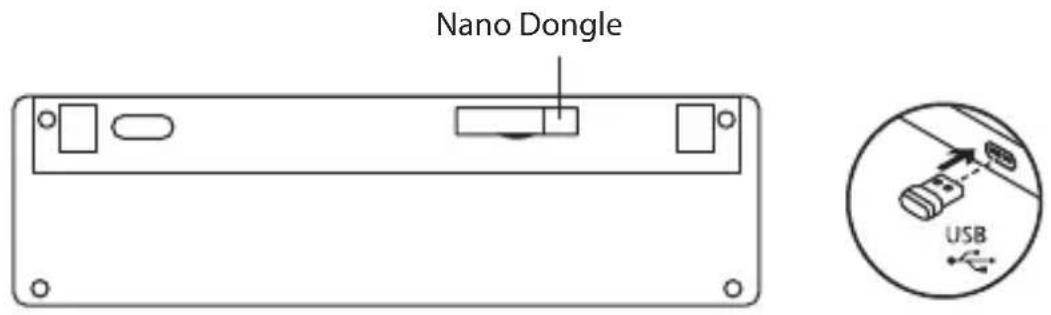
Connecting the Nano Dongle
Remove the Nano Dongle from the keyboard and then plug the Nano Dongle directly into your computer's USB port.
Activating the Keyboard
Switch the ON/OFF button to power on the keyboard and then the keyboard will automatically connect to the Nano Dongle plugged into your computer.


ONOFF

The keyboard will automatically power down when it is idled for 15 minutes. To wake it up press any key.
GB
Function Keys
The keyboard has shortcut function keys* which can be used as shortcuts when using the keyboard.
Access these functions by pressing the function keys directly.
To access F1-F12, press the Fn Key and the desired key together.
| Media | Start the default Media Player programme. |
| Decrease the Volume | |
| Increase the Volume | |
| Mute sound | |
| Back to previous track | |
| Go to next track | |
| Play/pause track | |
| Stop playback | |
| Start the default Web browser and load the Home Web page | |
| Start the default e-mail programme. | |
| Open Computer Folder | |
| Open favourite Folder |

Some function keys may not be available depending on operating system.
Typing Language- specific Characters
To type specific Nordic characters, please refer to the table below:
| NO SE FI DK | ||||||
 |  |  |  |  | ||
 + +  |  |  |  |  | ||
 |  |  |  |  | ||
 + +  |  |  |  |  | ||
 + +  |  |  |  |  | ||
 / /  / / / / |   |   |  |  |  |  |
Hints and Tips
Keyboard not working:
• Ensure the keyboard is switched on.
- Move the keyboard closer to the device.
- Restart the computer.
- Check battery installation. Replace battery if needed.
In Wireless mode:
• Make sure the Nano Dongle is plugged into a USB port and the computer is on or try the Nano Dongle in a different USB port.
- If the Nano Receiver is plugged into a USB hub, try plugging it directly into the computer.
- If keyboard performance is slow or intermittent around a wireless network, unplug the Nano Dongle from the USB port and then reinsert it. To reactivate the keyboard, switch it on, off and on again using the ON/OFF switch on the bottom of the keyboard.
If automatic pairing fails, pair the dongle with the keyboard manually.
a) Remove the dongle from your device USB port.
b) Press the CONNECT button at the bottom of the keyboard. The keyboard will enter the pairing mode and the LED indicator will flash quickly.
c) Plug the dongle into the USB port within 10 sec.
d) After successfully connecting in 2.4GHz Wireless mode, the LED indicator light will extinguish.
Specifications
| Model SWKBFS16 | |
| Operating System Microsoft® | Windows® 7 / 8 / 10 |
| Wireless Frequency 2.4GHz | |
| Operating Range < 6m (open space) | |
| Frequency Band(s) 2406 – 2476 MHz | |
| Max. Radio Frequency Power Transmitted | 3 dBm |
| Dimension (L x W x H) 441 x | 124 x 17.5 mm |
| Net Weight 486g |
Features and specifications are subject to change without prior notice.

The symbol on the product or its packaging indicates that this product must not be disposed of with your other household waste. Instead, it is your responsibility to dispose of your waste equipment by handing it over to a designated collection point for the recycling of waste electrical and electronic equipment. The separate collection and recycling of your waste equipment at the time of disposal will help conserve natural resources and ensure that it is recycled in a manner that protects human health and the environment.
For more information about where you can drop off your waste for recycling, please contact your local authority, or where you purchased your product.

Notes for battery disposal
The batteries used with this product contain chemicals that are harmful to the environment.
To preserve our environment, dispose of used batteries according to your local laws or regulations. Do not dispose of batteries with normal household waste. For more information, please contact the local authority or your retailer where you purchased the product.
Hereby, DSG Retail Limited declares that the radio equipment type is in compliance with Directive 2014/53/EU.
Windows is a registered trademark of Microsoft Corporation in the United States and other countries.
All trademarks are the property of their respective owners and all rights are acknowledged.
Takk for at du kjøpte ny produktet.
natural_image
Pure diagram of a standard computer keyboard layout without any text, numbers, or symbolsHovedenhet (Med nano-dongle)
natural_image
Pure diagram of a standard computer keyboard layout without any text, numbers, or symbolsAAA batteristorlek x 2 Instruktionsbok
Produktöversikt
Vy ovanifrån

Vy underifrån
Systemkrav
Operativsystem: Microsoft® Windows® 7 / 8 / 10
natural_image
Diagram of a device rear panel with labeled ports and directional arrows (no text or symbols)
Se till att batteriets polaritet (+/-) matchar de indikerade polariteterna i batterifacket.
SE
natural_image
Pure diagram of a standard computer keyboard layout without any text, numbers, or symbolsnatural_image
Pure diagram of a standard computer keyboard layout without any text, numbers, or symbolsProduktoversigt
Set oppefra

Set fra bunden
DK
Systemkrav
Operativsystemer: Microsoft® Windows® 7 / 8 / 10
natural_image
Diagram of a device rear panel with labeled ports and directional arrows, no readable text or symbols present.
Sørg for, at batteriets poler (+/−) passer til polerne i batteriholderen.
Sådan forbindes nano-donglen
www.lefdal.com/support
SE www.elgiganten.se/support
- NO Innhold
- Wireless Devices:
- Battery-Powered Devices:
- To Reduce the Risk of Injury:
- Thank you for purchasing your new product.
- Unpacking
- Product Overview
- System Requirements
- Installing the Batteries
- Connecting the Nano Dongle
- Activating the Keyboard
- Function Keys
- Typing Language- specific Characters
- Hints and Tips
- Specifications
- Notes for battery disposal
- Takk for at du kjøpte ny produktet.
- Produktöversikt
- Systemkrav
- Produktoversigt
- Set oppefra
- Set fra bunden
- Sådan forbindes nano-donglen
Brand : Sandstrøm
Model : SWKBFS16
Category : Keyboard