LKSB0519E - Kitchen scale Logik - Free user manual and instructions
Find the device manual for free LKSB0519E Logik in PDF.
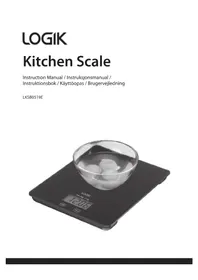


| Product Type | Digital Kitchen Scale |
| Brand | Logik |
| Model | LKSB0519E |
| Weight Range | 2 g – 5000 g |
| Power Source | CR2032 3V Lithium battery (1 x) |
| Display Type | Digital LCD |
| Measuring Units | g, kg, lb'oz, oz |
| Functions | Tare, Auto-off (60 sec), Touch-pad control, Unit selection |
| Construction | Stainless steel or plastic weighing platform |
| Dimensions | Approx. 20 x 14 x 2 cm (estimated) |
| Weight | Approx. 0.3 kg (estimated) |
| Maintenance | Clean with damp cloth; no chemical agents |
| Safety Features | Low battery indicator, overload display (EEEE), unstable surface indicator (UNST) |
| Battery Safety | Keep away from children; dispose per local regulations |
| Intended Use | Indoor, domestic kitchen use only |
| Warranty | Standard manufacturer warranty (varies by region) |
| Included Accessories | Main unit, CR2032 battery, instruction manual |
Frequently Asked Questions - LKSB0519E Logik
User questions about LKSB0519E Logik
0 question about this device. Answer the ones you know or ask your own.
Ask a new question about this device
Download the instructions for your Kitchen scale in PDF format for free! Find your manual LKSB0519E - Logik and take your electronic device back in hand. On this page are published all the documents necessary for the use of your device. LKSB0519E by Logik.
USER MANUAL LKSB0519E Logik
Contents
Safety Warnings....5
Unpacking......25
Product Overview......25
Installing the Battery 26
Turning On the Scales......27
Operating the Scales 27
Switching Off the Scales....28
Setting the Measuring Unit....28
Maintenance 28
Specifications....28
IMPORTANT SAFETY INSTRUCTIONS READ CAREFULLY AND KEEP FOR FUTURE REFERENCE
- Handle your scales with care: this is a high-precision instrument that can be easily damaged.
- Handle your scales with care: do not scratch, drop, jump up or down, or exert undue pressure on them. You may damage the unit.
- This unit is only suitable for weighing cooking ingredients.
- If the scales will not be used for a long time, remove the batteries.
- Remember that small button cell batteries, such as those used in some hearing aids, toys, games and other appliances, are easily swallowed by young children and this can be dangerous.
- Keep loose button cells away from young children.
- Keep the unit away from direct sunlight, heat sources and excessive humidity and extreme cold and hot conditions.
- Do not leave or stack any object(s) on the unit.
- Do not immerse your unit in liquid, and do not run it under water, as these actions may damage the unit.
- The weighing surface may become slippery when wet or during use. Make sure the unit is dry before the next use.
- Young children should be supervised to ensure that they do not play with the unit.
- Cleaning and user maintenance should only be performed by an adult.
- Do not exceed the maximum weight limit of the unit.
- This unit is for domestic, indoor, kitchen use only.
- Do not continue to operate the equipment if you are in any doubt about it working normally, or if it is damaged in any way. Remove the battery and contact a qualified service agent.
Batteries
- Batteries used in this unit are easily swallowed by young children and this is dangerous.
- Keep loose batteries away from young children and make sure that the battery compartment is secure in the unit. Seek medical advice if you believe a cell has been swallowed.
- Please dispose of batteries correctly by following the guidance in this manual.
- The batteries shall not be exposed to excessive heat such as sunshine, fire or the like.
Notes for Battery Disposal
- The batteries used with this product contain chemicals that are harmful to the environment. To preserve our environment, dispose of used batteries according to your local laws or regulations. Do not dispose of batteries with normal household waste.
- For more information, please contact the local authority or your retailer where you purchased the product.
IMPORTANT SAFETY INSTRUCTIONS READ CAREFULLY AND KEEP FOR FUTURE REFERENCE
Remove all items from the packaging. Retain the packaging. If you dispose of it please do so according to local regulations.
The following items are included:
- Main Unit • CR2032, 3V Lithium battery
- Instruction Manual
Product Overview
Front View
![graph TD A["1"] --> B["2"] C["3"] --> D["4"] E["开始"] --> F["处理模块"] G["结束"] --> H["结束"]](/content/2026/05/871066/images/780ad1adb632e76ba2d32923cb950db5391e7ccd65f88a8c64f38164e08a6e19.jpg)
- Weighing Platform
- Display
- Unit Button
- Tare/On/Off Button
Rear View
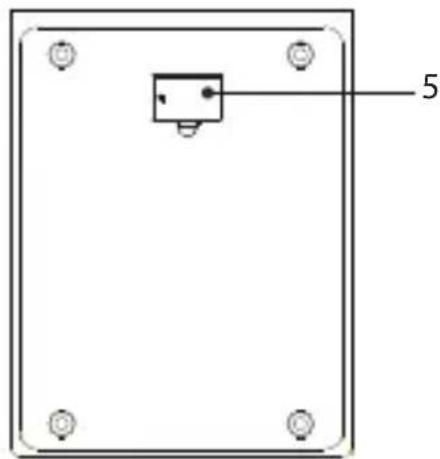
- Battery Compartment
* All images in this instruction manual are for indication only; please refer to your individual unit for details.
The unit requires a CR2032, 3V Lithium battery. When the display indicates "Lo", replace the batteries.
- Screw to open the battery compartment.
- Insert the battery into the battery compartment, with the positive polarity (+) facing upward. Make sure the battery is properly placed within the four clips in the compartment.
- Screw to close the battery compartment.

Handling the Battery
- Improper or incorrect use of batteries may cause corrosion or battery leakage, which could cause fire, personal injury or damage to property.
- Install the battery correctly in the battery compartment. Normally the battery's positive polarity (+) will face up.
- When the battery is exhausted, the unit will not function.
- Only use the battery type indicated in this manual.
- Do not dispose of the used battery as domestic waste. Dispose of it in accordance with local regulations.
- Small button cell batteries such as the one used in the unit are easily swallowed by young children and this is dangerous. Keep loose button cells away from young children and make sure that the battery is secure in the unit. Seek medical advice if you believe a battery cell has been swallowed.
- Remove the battery from the unit when not in use for a long period of time, as corrosion or battery leakage may occur and result in physical injury, and/or property damage, and/or fire.
Turning On the Scales
This unit uses a highly sensitive touch-pad control panel. Only gentle taps or light touches are required to operate the scales.
- Clean the surface of the scales using a damp cloth, then dry thoroughly.

Do NOT use any chemical cleaning agents.
- Place the scales on a flat table or counter top. Do not place anything on the scales.
- Ensure the unit is steady, then touch the Tare/On/Off button to power on. When the unit is not placed in a stable position, the display will show UNST.

Operating the Scales
- Put food on the scales, the weight will be displayed.
![graph LR A["0"] --> B["△"] B --> C["94"]](/content/2026/05/871066/images/786a50cae93fb2fb16d6c39daf7045b4af1bd04a0af616f8e0e3cc02f3dbbaea.jpg)
- Place a container on the scales, the display will show the weight of the container. Tap the Tare/On/Off button to clear the weight of the container. Pour food into the container, the display will show the weight of the food only. Repeat these steps to weigh other foods poured into the container.
![graph LR A["0.1"] --> B["0.2"] B --> C["TARE"] C --> D["0.2"] D --> E["94.0"]](/content/2026/05/871066/images/2fd26af8bf2d634b4f6aaee22811580a8bc257146b6eff06049c16dd29fa0a6f.jpg)
GB
- If the food is removed from the container, the display will show a negative value. Press the Tare/On/Off button and zero will be displayed.

If the weight on the scales exceeds the maximum supported, the display will show "EEEE".
Switching Off the Scales
- Tap and hold Tare/On/Off button for 3 seconds to turn off the scales.
- When the scales is left idle for approximately 60 seconds, it will automatically switch off.
Setting the Measuring Unit
To set the measuring unit, gently tap the Unit button. The display will change to "g", "kg", "lb'oz" or "oz".
Maintenance
- Store the scales in a flat, horizontal position.
- Clean only with a damp cloth; do not use any chemical cleaning agent.
- If there are signs of damage or cracks, remove the battery, do not use the unit and contact your qualified service agent.
Specifications
| Model LKSB0519E | |
| Weight Range 2 – 5000 g | |
| Power CR2032 lithium battery, 3V x 1 | |
Features and specifications are subject to change without prior notice.
Unpacking
- Battery compartment
* All images in this user manual are for illustration purposes only – details may differ on the individual device.
Inserting the battery
Using the scale
- Scale platform
- Display
- Unit button
- Tare/On/Off button
Back side
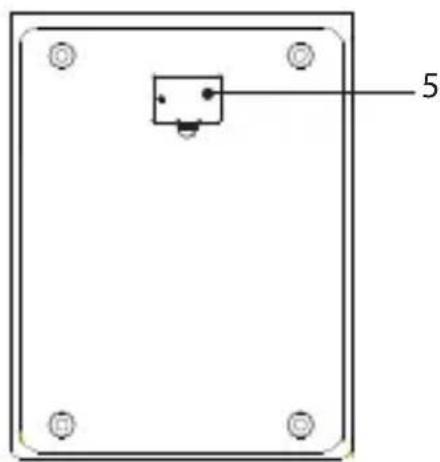
- Battery compartment
Using the scale
- Battery compartment
Using the scale
- Battery compartment
Operating the scale
The symbol on the product or its packaging indicates that this product must not be disposed of with your other household waste. Instead, it is your responsibility to dispose of your waste equipment by handing it over to a designated collection point for the recycling of waste electrical and electronic equipment. The separate collection and recycling of your waste equipment at the time of disposal will help conserve natural resources and ensure that it is recycled in a manner that protects human health and the environment.
For more information about where you can drop off your waste for recycling, please contact your local authority, or where you purchased your product.
Notes for battery disposal
The batteries used with this product contain chemicals that are harmful to the environment. To preserve our environment, dispose of used batteries according to your local laws or regulations. Do not dispose of batteries with normal household waste.
For more information, please contact the local authority or your retailer where you purchased the product.
www.lefdal.com/support
SE www.elgiganten.se/support


- CONTENTS
- IMPORTANT SAFETY INSTRUCTIONS READ CAREFULLY AND KEEP FOR FUTURE REFERENCE
- BATTERIES
- NOTES FOR BATTERY DISPOSAL
- PRODUCT OVERVIEW
- FRONT VIEW
- REAR VIEW
- HANDLING THE BATTERY
- TURNING ON THE SCALES
- OPERATING THE SCALES
- GB
- SWITCHING OFF THE SCALES
- SETTING THE MEASURING UNIT
- MAINTENANCE
- SPECIFICATIONS
- UNPACKING
- INSERTING THE BATTERY
- USING THE SCALE
- BACK SIDE
- OPERATING THE SCALE
Brand : Logik
Model : LKSB0519E
Category : Kitchen scale