
BAS-24100M - Smartphone DENVER - Free user manual and instructions
Find the device manual for free BAS-24100M DENVER in PDF.


| Product Type | Flip Smartphone |
| Brand | Denver |
| Model | BAS-24100M |
| Dimensions (approx.) | 100 x 50 x 20 mm |
| Weight (approx.) | 100 g |
| Battery | Lithium-ion, removable |
| Charging | Micro USB |
| Display | Color TFT (size not specified) |
| SIM Card | Standard SIM (1 slot) |
| Memory Card | microSD (up to 32 GB, estimated) |
| Radio | FM radio with internal antenna |
| Camera | Built-in camera (resolution not specified) |
| Torch | Yes, dedicated side button |
| Bluetooth | Yes |
| SOS Button | Yes, programmable emergency button |
| Notification LED | Yes, under camera |
| Speakerphone | Yes |
| Call Features | Speed dial, speech dial, call log |
| Messaging | SMS |
| SAR Value | 1.309 mW/g (highest) |
| Languages | Multiple (manual in English) |
| Maintenance | Wipe with dry cloth; avoid moisture |
| Safety | Lithium battery; do not disassemble, heat, or expose to water |
| Spare Parts | Not specified |
Frequently Asked Questions - BAS-24100M DENVER
User questions about BAS-24100M DENVER
0 question about this device. Answer the ones you know or ask your own.
Ask a new question about this device
Download the instructions for your Smartphone in PDF format for free! Find your manual BAS-24100M - DENVER and take your electronic device back in hand. On this page are published all the documents necessary for the use of your device. BAS-24100M by DENVER.
USER MANUAL BAS-24100M DENVER
UserGuide
English
ENG-1
Insert the SIM card: The SIM card contains your phone number, PIN code, links to operator services, contacts and SMS messages. To access the compartment containing the SIM slot, turn off the phone and lift up the cover starting from the slit on the bottom right corner. Remove the battery. Insert the SIM card into the slot with the gold contacts facing down.
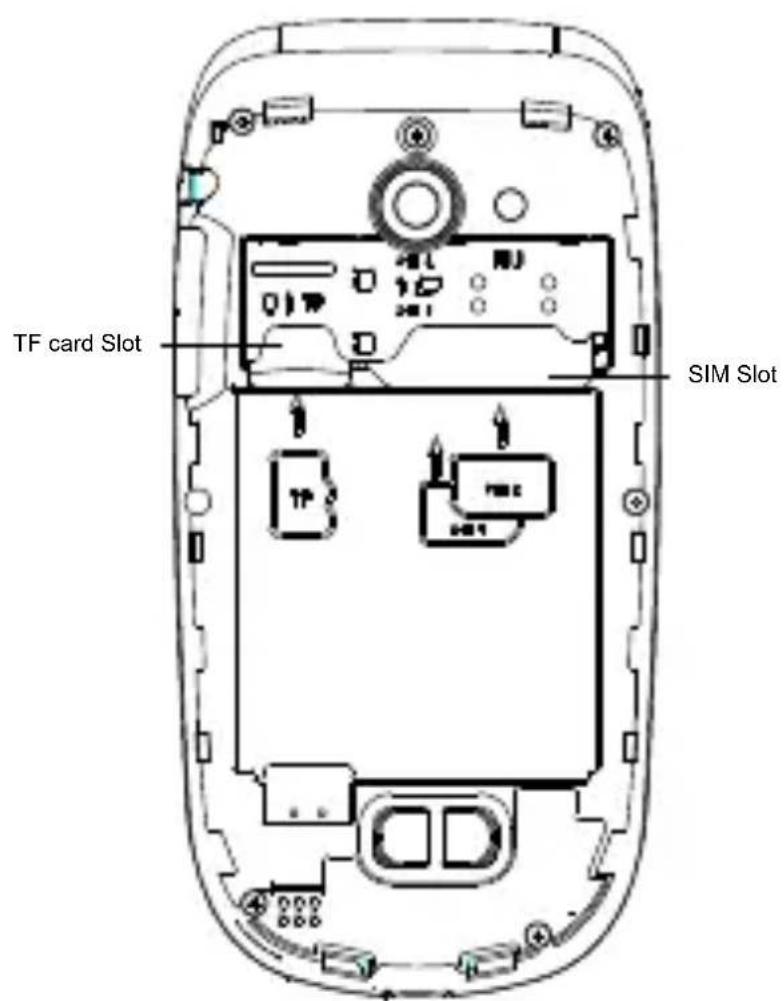
Insertingamemorycard:in order to use camera and media player functions, a micro-SD memory card is required (not
ENG-2
included in the package): the card must placed into the rear of the phone to the of the SIM slot. Insert the micro-SD card shown, with the gold contacts facing downwards: open the metal shutter by pushing it towards "open" and lock it again after inserting the card by pushing it in the opposite direction ("close").
Turn ON, Turn OFF and keypad lock: I turn on and turn off the phone, press ar hold the red end call key. The keypad lo by closing the flip.
Connecting to a PC: use the USB cable connect BAS-24100 to a computer. Select USB Storage on your phone. You can s songs to play with the music player in "Music" folder, on SD card.
Inserting the Battery: your device is provided with a lithium-ion battery and is designed to be used exclusively with original batteries and chargers. The battery must be inserted into the rear of the photo Insert the battery into the battery
compartmentwiththecontactsfacingup correspondingtothoseofthephone.When done,puttherearcoverbackintoposition asshowninthefollowingillustrations.

natural_image
Line drawing of a mobile phone casing with buttons and a scroll (no text or symbols)
Chargingthebattery:chargethebattery beforestartingtousethedevice. Connect thechargertoamainswallsocket, and thenplugthejackintothechargingbase (waitforamomentuntilanaudiofeedback notifiesthechargingstart)orputitdirectly intothemicroUSBportontherightsideof
the phone. When charging has been completed/is complete, a second audio feedback will be heard
Attention: To preserve the functionality of the product and the integrity of the warra we recommend the use of original chargers. Please charge the battery indoors, in a dry and favorable environment It's normal for the battery to get slightly warm during the charging process. The battery will reach its full capacity only aft several complete charging cycles.


FMradio:BAS-24100 has an internal radio antenna so that no headset is needed to listen to the radio. To power ON/OFF the Radio, access FMRadiofrom the main menu. By selecting Optionsyou have access to the following functions:
-AutomaticSearch:to automatically search for radio stations
-Channellisto manually browse saved channels
-Save:to save searched stations
-Manual search: for the manual search of radio channels
-Speaker: reproduces the radio with the speaker instead of the headphones
-Background: keeps playing in background even after exiting from the radio app scre
- FM Record: to record the current radio channel
- File list: List of recorded files
Use the UP and DOWN selection keys for volume, — for searching the stations and the OK button to turn ON and OFF the radio.
Camera: to activate the camera from the main menu press the OK key. Take a p by pressing the same key. By using
Options you can access various camera settings and you can switch to Recorder
Torch: to turn the torch on and off, use torch key on the right side of the phone
Shortcuts: Menu > Settings > Phone
Setting > Shortcut setting. UP and DOWI selection keys can open some shortcuts; default, the UP selection key directly ente the Music Player, while the DOWN selection key opens the alarm list.
Main menu: To access the Main Menu or your phone, press the selection key on tl top left

- Messaging: to write and read SMS tex messages
- Contacts: to manage and save contacts Calls Log: Missed Calls, dialled calls...
- Multimedia: camera, radio, gallery...
- FM Radio: to turn on and off the radi
- Settings: to customize your phone
-Tools: with Calendar, Bluetooth, Calculator, Alarms... - SOS: to enable and customize the SOS function
Answer an incoming call: respond to an incoming call simply by opening the flip. set up the answer mode select Settings
Call settings > Answer mode
Making a call: to make a call from the Home screen, select the desired number using the
keypad and then press the green call bu To end the call, press the red end call
Call a number from the contacts: from the main screen, press the upper right selection key; this will automatically open the Contacts. Scroll through contacts with the UP/DOWN keys and press the green call button to call the desired contact.
Call anumber from the call log: from the main screen, press the green call key, the missed, received, and outgoing calls will be automatically displayed.
Scroll with UP/Down keys and press the green call button when you find the num! you want to call.
Add contacts to the Contacts: Select Menu > Contacts > Options > New, an choose to save the number on the SIM the Phone. Enter the name and the new number, then press Save.
Speed dial: in Menu > Contacts > Options > More > Speed Dial > Options Edit, you can assign to keys 2-9 certain
numbers that will be called automatically in you press and hold the related button. The device has two other additional quick dial keys — , to which you can associate as many numbers in the same menu. These keys, placed to the left and to the right OK button, are activated/activate activated with a simple press.
Memory status: this feature within the contacts settings allows you to see how much free storage there is on the phone and SIM card.
Speech Dial: BAS-24100 Start speaks out loud each number you press. To activate this function, select Menu > Settings > Profiles > General > Options > More tones > Dialpad > Speech Dial
Send and read SMS
Send SMS: from the main screen, choose Menu >Messaging > Write message and write your message. Press Options > Set to > Number and enter the number using the numeric keypad or Add from contact
to select from the Contacts the contact y want to text.
Read SMS: when you receive a new tex message, the phone displays an envelope icon on the top bar(until the message is read/for as long as the message is unrea and a notification pop up appears on the main screen. Press the upper left selectio key to enter the Inbox or access it from main screen by selecting Menu >
Messages >Inbox.
Notification Led: The flash below the Camera can notify incoming or missed ca and messages,when flip is closed. You ca enable or disable thisfunction whenever you want for each event to notify in
Settings > Notification LED
Bluetooth: In Settings > Connectivity > Bluetooth >Power on you can turn on Bluetooth and search for other devices (headsets, phones...). Select the device you would like to associate with and confirm it on both devices.
S.O.S. Function: BAS-24100 is equipped with a dedicated button for fast forwarding emergency calls (*). This feature can be
turned on and off by selecting Menu> SOS > Status. SOS button is placed on the phone in case of emergency, use function to ask for help from up to five phone numbers, previously set in Menu> SOS > SOS numbers; press and hold the SOS button for 2-3 seconds. As soon as the SOS function is activated, the phone will send out a high volume alarm (that be turned on and off in SOS > SOS also On/Off). Then,
it will send a customizable SOS message the chosen SOS numbers. Afterwards, the phone will call the 5 SOS numbers, for about 25 seconds each. If there is no answer, there will be a second cycle of This procedure will be repeated for 5 times. If one of the called numbers answers, the cycle will be interrupted and the call will automatically switch to speaker phone (handsfree).
Attention: The S.O.S. calls cycle will be interrupted if the answering machine or voicemail of one of the called SOS numbers takes the call.
Set Ringtones: select Menu > Settings Profiles > General > Options > Rington Select Call Ringtone and set the desired tone from those available.
Quickly turn on/off vibration mode To quickly turn off incoming calls ringtone an messages tone, and activate vibration, press and hold #. By pressing # again, phone will enter in General mode.
Phone Settings: from Menu > Settings : Phone , you have/will have access to various settings such as Date and Time, Language, and Display. Select Restore to reset the factory settings of BAS-24100: enter the phone password 1234 to confirm the restoring.
Radio frequency (RF) exposure and SAI THIS DEVICE MEETS INTERNATIONAL GUIDELINES FOR EXPOSURE TO RADIO WAVES
Your mobile device is a radio transmitter and receiver. It is designed and manufactured not to exceed the limits for exposure to radio frequency (RF)
recommended by international guidelines (ICNIRP). These limits are part of comprehensive guidelines and establish permitted levels of RF energy for the general population. The guidelines were developed by independent scientific organizations through periodic and thorough evaluation of scientific studies. The guidelines include a substantial safety margin designed to assure the safety of persons, regardless of age and health.
The exposure standard for mobile devices employs a unit of measurement known as the Specific Absorption Rate, or SAR. The SAR limit stated in the international guidelines is 2.0 watts/kilogram (W/kg)*. Tests for SAR are conducted using standard operating positions with the device transmitting at its highest certified well below the maximum value. This is because the device is designed to operate at multiple power levels so as to use only the power required to reach the network. In general, the closer you are to base station, the lower the power output
the device. power level in all tested frequency bands.
Although the SAR is determined at the highest certified power level, the actual S of the device while operating can be well below the maximum value. This is because the device is designed to operate at multi power levels so as to use only the power required to reach the network. In general, the closer you are to a base station, the lower the power output of the device.
SAR values may vary depending on national reporting and testing requirements and the network band. Use of device accessories and enhancements may result in different SAR values.
The SAR limit for mobile devices used by the public is 2.0 W/kg averaged over 10 grams of body tissue. The guidelines incorporate a substantial margin of safety give additional protection for the public art to account for any variations in measurements. SAR values may vary depending on national reporting requirements and the network band. The highest SAR value for this model phone tested for use is 1.309 mW/g
Warning
• Lithium battery inside!
- Do not try to open the product!
- Do not expose to heat, water, moisture, direct sunlight!

CAUTION!
ALL RIGHTS RESERVED DENVER ELECTRONICS A/S
DENVER®
www.denver-electronics.com
CE
ENG-17

natural_image
Simple line drawing of a trash bin with crossed lines indicating no waste or discharge (no text or symbols)Electric and electronic equipment and included batteries contains materials, components and substances that can be hazardous to your health and the environment, if the waste material (discarded electric and electronic equipment and batteries) is not handled correctly.
Electric and electronic equipment and batteries is marked with the crossed out trash can symbol, seen below. This symb signifies that electric and electronic equipment and batteries should not be disposed of with other household waste, but should be disposed of separately.
As the end user it is important that you submit your used batteries to the approria and designated facility. In this manner you make sure that the batteries are recycled
Soeften
8382 Hinnerup
DENMAR K
www.facebook.com/denverelectronics


Brand : DENVER
Model : BAS-24100M
Category : Smartphone