MFB-FX - Network Card/Adapter Planet - Free user manual and instructions
Find the device manual for free MFB-FX Planet in PDF.


| Product Type | Fast Ethernet SFP Transceiver Module |
| Model | MFB-FX |
| Brand | Planet |
| Speed | 100 Mbps (100BASE-FX) |
| Connector Type | LC Duplex |
| Fiber Mode | Multi-Mode |
| Max Distance | 2 km |
| Wavelength | 1310 nm |
| Operating Temperature | 0°C to 60°C (32°F to 140°F) |
| Laser Safety | Class 1 Laser Product, complies with 21 CFR 1040.10 and 1040.11 |
| Regulatory Compliance | FCC Class B, CE Mark |
| WEEE Compliance | Yes (separate collection required) |
| Dimensions (Typical SFP) | 13.4 x 8.5 x 56.5 mm (0.53 x 0.33 x 2.22 in) |
| Weight (Typical) | Approx. 20 g (0.7 oz) |
| Power Consumption | < 1 W |
| Hot Pluggable | Yes |
| Digital Diagnostic Monitoring (DDM) | No (MFB-FX does not support DDM) |
| Package Contents | SFP Transceiver Module, User's Manual |
| Installation | Insert into SFP slot, snap into place. Do not force, twist, or bend. |
| Cleaning | Use appropriate fiber optic cleaning tools; avoid touching connector ends. |
| Spare Parts / Repairability | Not user-serviceable; replace entire module if faulty. |
| Warranty | Refer to dealer or manufacturer for warranty terms. |
Frequently Asked Questions - MFB-FX Planet
User questions about MFB-FX Planet
0 question about this device. Answer the ones you know or ask your own.
Ask a new question about this device
Download the instructions for your Network Card/Adapter in PDF format for free! Find your manual MFB-FX - Planet and take your electronic device back in hand. On this page are published all the documents necessary for the use of your device. MFB-FX by Planet.
USER MANUAL MFB-FX Planet
PLANET Fiber Transceiver
MFB-Series/MGB-Series/MTB-Series
User's Manual
Trademarks
Copyright © PLANET Technology Corp. 2018
Contents are subject to revision without prior notice.
PLANET is a registered trademark of PLANET Technology Corp. All other trademarks belong to their respective owners.
Disclaimer
PLANET Technology does not warrant that the hardware will work properly in all environments and applications, and makes no warranty and representation, either implied or expressed, with respect to the quality, performance, merchantability, or fitness for a particular purpose.
PLANET has made every effort to ensure that this User's Manual is accurate; PLANET disclaims liability for any inaccuracies or omissions that may have occurred.
Information in this User's Manual is subject to change without notice and does not represent a commitment on the part of PLANET. PLANET assumes no responsibility for any inaccu-racies that may be contained in this User's Manual. PLANET makes no commitment to update or keep current the information in this User's Manual, and reserves the right to make improvements to this User's Manual
and/or to the products de-scribed in this User's Manual, at any time without notice.
If you find information in this manual that is incorrect, misleading, or incomplete, we would appreciate your comments and suggestions.
FCC NOTICE (Class B)
This device complies with Part 15 of the FCC Rules. Operation is subject to the following two conditions: (1) this device may not cause harmful interference, and (2) this device must accept any interference received, including interference that may cause un-desired operation.
CE Mark Warning
Operation of this equipment in a residential environment could cause radio interference.
WEEE Warning

To avoid the potential effects on the environment and human health as a result of the presence of hazardous substances in electrical and electronic equipment, end users of electrical and electronic equipment should understand the meaning of the crossed-out wheeled bin symbol. Do not dispose of WEEE as unsorted municipal waste and have to collect such WEEE separately.
Revision
User's Manual of PLANET SFP/SFP+ Mini-GBIC Transceiver
For Models: MFB-SERIES/MGB-SERIES/MTB-SERIES
Rev: 1.97 (October, 2018)
Part No: 2010-AG0220-0A3
Table of Contents
- Overview 6
- Checklist....7
- Introduction and Model List....8
3-1 The MFB-Series Mini-GBIC Transceiver Module List....8
3-2 The MGB-Series Mini-GBIC Transceiver Module List....12
3-3 The MTB-Series Mini-GBIC Transceiver Module List....17 - Installation and Removal of Transceiver Module 20
4-1 Installing the SFP/SFP+ Mini-GBIC Transceiver Module 20
4-2 Removing the SFP/SFP+ Transceiver Module 21
4-3 Connecting the UTP Cable 21
Appendix A....23
A.1 Fiber Optic Cable Connection Parameters....23
Safety Notice 24
1. Overview
Thank you for purchasing PLANET SFP/SFP+ Mini-GBIC Transceiver which includes the Ethernet module of the MFB, MGB and MTB families.
The MFB family's Fast Ethernet SFP module can be installed into PLANET Switch products with 100BASE-FX SFP interface. The distance can be extended from 2km (multi-mode, LC) to up to 120km (sin-gle-mode, LC).
The MGB family's Gigabit Ethernet SFP module can be installed into PLANET Switch products with 1000BASE-SX/LX SFP interface. The dis-tance can be extended from 100m (TP) and 2km (multi-mode, LC) to up to 120km (single-mode, LC).
The MTB family's 10G Ethernet SFP+ module can be installed into PLAN-ET products with 10G SFP+ interface. The SFP+ transceivers can be extended from a distance of 300m (multi-mode, LC) to up to 60km (sin-gle-mode, LC). The deployment distance of 10G can be extended to 30 meters.
2. Checklist
Your SFP/SFP+ Package should contain the following items:
● The SFP/SFP+ Transceiver Module x 1
- The User's Manual x 1
If any item is missing or damaged, please consult the dealer from whom you purchased your SFP/SFP+ Mini-GBIC Ethernet transceiver module.
3. Introduction and Model List
3-1 The MFB-Series Mini-GBIC Transceiver Module List
Fast Ethernet Transceiver (100BASE-X SFP)
| Model | Speed (Mbps) | Connector Interface | Fiber Mode | Distance | Wavelength (nm) | Operating Temp. |
| MFB-FX 100 LC Multi-Mode | 2km 1310nm 0 ~ 60°C | |||||
| MFB-F20 | 100 | LC | Single Mode | 20km | 1310nm | 0 ~ 60°C |
| MFB-F40 | 100 | LC | Single Mode | 40km | 1310nm | 0 ~ 60°C |
| MFB-F60 | 100 | LC | Single Mode | 60km | 1310nm | 0 ~ 60°C |
| MFB-F120 | 100 | LC | Single Mode | 120km | 1550nm | 0 ~ 60°C |
| MFB-TFX | 100 | LC | Multi-Mode | 2km | 1310nm | -40 ~ 75°C |
| MFB-TF20 | 100 | LC | Single Mode | 20km | 1310nm | -40 ~ 75°C |
Fast Ethernet Transceiver (100BASE-BX, Single Fiber Bi-directional SFP)
| Model DDM | Speed (Mbps) | Connector Interface | Fiber Mode Distance | Wavelength (TX) | Wavelength (RX) | Operating Temp. |
| MFB-FA20 -- | 100 WDM (LC) Single Mode 20km | 1310nm 1550nm | 0 ~ 60°C | |||
| MFB-FB20 -- | 100 WDM (LC) Single Mode 20km | 1550nm 1310nm | 0 ~ 60°C | |||
| MFB-TFA20 -- | 100 WDM (LC) Single Mode 20km | 1310nm 1550nm | -40~75°C | |||
| MFB-TFB20 -- | 100 WDM (LC) Single Mode 20km | 1550nm 1310nm | -40~75°C | |||
| MFB-TFA40 -- | 100 WDM (LC) Single Mode 40km | 1310nm 1550nm | -40~75°C | |||
| MFB-TFB40 -- | 100 WDM (LC) Single Mode 40km | 1550nm 1310nm | -40~75°C | |||
| MFB-TSA YES | 100 WDM (LC) Multi-Mode 2km | 1310nm 1550nm | -40~75°C | |||
| MFB-TSB YES | 100 WDM (LC) Multi-Mode 2km | 1550nm 1310nm | -40~75°C |

natural_image
Warning symbol: white exclamation mark inside a triangle on dark background (no text or numbers)- When shorter single mode fiber cables are used, you might need to insert an in-line optical attenuator in the link to avoid overloading the receiver. Follow the I-TUT G652 document for the same fiber cable length.
- The attenuation coefficient mentioned in the following chapters is for reference only.
| Attenuation coefficient | Wavelength region Typical link value |
| 1260nm-1360nm 0.5 dB/km | |
| 1530nm-1565nm 0.4 dB/km |
| Physical Fiber Cable Length “n” km | SFP Model | MFB-F20 MFB-TF20 | MFB-F40 MFB-F60 MFB-F120 | |
| 10 < n < 20 2 dB 4-6 dB 8-10 dB | 25-27 dB | |||
| 20 < n < 40 -- 2-4 dB 6-8 dB 23-25 dB | ||||
| 40 < n < 60 -- 2-4 dB 18-20 dB | ||||
| SFP ModelPhysicalFiber Cable Length “n” km | MFB-TSAMFB-TSB | MFB-TFA10MFB-TFB10 | MFB-FA20 / MFB-FB20MFB-TFA20 / MFB-TFB20 | MFB-TFA40MFB-TFB40 |
| 0.22 < n < 2 1 dB -- -- -- | ||||
| 10 < n < 20 | -- | -- | 2 dB | 4-6 dB |
| 20 < n < 40 | -- | -- | -- | 2-4 dB |
| 40 < n < 60 | -- | -- -- -- |
3-2 The MGB-Series Mini-GBIC Transceiver Module List Gigabit Ethernet Transceiver (1000BASE-X SFP)
| Model DDM | Speed (Mbps) | Connector Interface | Fiber Mode Distance | Wavelength (nm) | Operating Temp. | |
| MGB-GT -- 1000 Copper | -- 100m -- 0 ~ 60°C | |||||
| MGB-SX(V2) YES 1000 LC | Multi Mode 550m 850nm 0 ~ 60°C | |||||
| MGB-SX2(V2) YES 1000 LC | Multi Mode 2km 1310nm 0 ~ 60°C | |||||
| MGB-LX(V2) | YES | 1000 | LC | Single Mode | 20km | 1310nm |
| MGB-L40 | YES | 1000 | LC | Single Mode | 40km | 1310nm |
| MGB-L80 | YES | 1000 | LC | Single Mode | 80km | 1550nm |
| MGB-L120(V2) | YES | 1000 | LC | Single Mode | 120km | 1550nm |
| MGB-TSX YES 1000 LC Multi Mode 550m 850nm -40 ~ 75°C | ||||||
| MGB-TSX2 YES 1000 LC Multi Mode 2km 1310nm -40 ~ 75°C | ||||||
| MGB-TLX(V2) YES 1000 LC Single Mode 20km 1310nm -40 ~ 75°C | ||||||
| MGB-TL40 YES 1000 LC Single Mode 40km 1310nm -40 ~ 75°C | ||||||
| MGB-TL80 YES 1000 LC Single Mode 80km 1550nm -40 ~ 75°C | ||||||
Gigabit Ethernet Transceiver (1000BASE-BX, Single Fiber Bi-directional SFP)
| Model DDM | Speed (Mbps) | Connector Interface | Fiber Mode Distance | Wavelength (TX) | Wavelength (RX) | Operating Temp. | ||
| MGB-LA10(V2) | YES | 1000 | WDM (LC) | Single Mode | 10km | 1310nm | 1550nm | 0 ~ 60°C |
| MGB-LB10(V2) | 1000 | WDM (LC) | Single Mode | 10km | 1550nm | 1310nm | 0 ~ 60°C | |
| MGB-LA20(V2)MGB-LB20(V2) | YES | 1000 W | DM (LC) Single Mode 20km | 1310nm 1550nm 0 ~ 60°C | ||
| 1000 W | DM (LC) Single Mode 20km | 1550nm 1310nm 0 ~ 60°C | ||||
| MGB-LA40(V2)MGB-LB40(V2) | YES | 1000 W | DM (LC) Single Mode 40km | 1310nm 1550nm 0 ~ 60°C | ||
| 1000 W | DM (LC) Single Mode 40km | 1550nm 1310nm 0 ~ 60°C | ||||
| MGB-LA80MGB-LB80 | YES | 1000 W | DM (LC) Single Mode 80km | 1490nm 1550nm 0 ~ 60°C | ||
| 1000 W | DM (LC) Single Mode 80km | 1550nm 1490nm 0 ~ 60°C | ||||
| MGB-TLA10(V2)MGB-TLB10(V2) | YES | 1000 W | DM (LC) Single Mode 10km | 1310nm 1550nm -40 ~ 75°C | ||
| 1000 W | DM (LC) Single Mode 10km | 1550nm 1310nm -40 ~ 75°C | ||||
| MGB-TLA20MGB-TLB20 | YES | 1000 W | DM (LC) Single Mode 20km | 1310nm 1550nm -40 ~ 75°C | ||
| 1000 W | DM (LC) Single Mode 20km | 1550nm 1310nm -40 ~ 75°C | ||||
| MGB-TLA40MGB-TLB40 | YES | 1000 W | DM (LC) Single Mode 40km | 1310nm 1550nm -40 ~ 75°C | ||
| 1000 W | DM (LC) Single Mode 40km | 1550nm 1310nm -40 ~ 75°C | ||||
| MGB-TLA80MGB-TLB80 | YES | 1000 W | DM (LC) Single Mode 80km | 1490nm 1550nm -40 ~ 75°C | ||
| 1000 W | DM (LC) Single Mode 80km | 1550nm 1490nm -40 ~ 75°C |
| SFP ModelPhysicalFiber Cable Length “n” km | MGB-LX MGB-L40 MGB-L80 | MGB-L120 | |
| 10 < n < 20 -- 5-7 dB 13-15 dB | 25-27 dB | ||
| 20 < n < 40 -- 3-5 dB 10-12 dB | 23-25 dB | ||
| 40 < n < 60 -- -- 5-7 dB 18-20 dB |
| Physical Fiber Cable Length “n” km\SFP Model | MGB-TLX MGB-TL40 MGB-TL80 | |
| 10 < n < 20 -- 5-7 dB 13-15 dB | ||
| 20 < n < 40 -- 3-5 dB 10-12 dB | ||
| 60 < n < 80 -- -- 5-7 dB |
| SFP ModelPhysical FiberCable Length “n” km | MGB-LA10MGB-LB10MGB-TLA10MGB-TLB10 | MGB-LA20MGB-LB20MGB-TLA20MGB-TLB20 | MGB-LA40MGB-LB40MGB-TLA40MGB-TLB40 | MGB-LA60MGB-LB60MGB-TLA60MGB-TLB60 | MGB-LA80MGB-LB80MGB-TLA80MGB-TLB80 |
| 10 < n < 20 -- 2 dB 4-6 dB 8-10 dB 13-15 dB | |||||
| 20 < n < 40 -- -- 2-4 dB 6-8 dB 10-12 dB | |||||
| 40 < n < 60 -- -- -- 2-4 dB 5-7 dB | |||||
| 60 < n < 80 -- -- -- 2-4 dB | |||||
3-3 The MTB-Series Mini-GBIC Transceiver Module List
10Gbps SFP+ (10G Ethernet/10GBASE)
| Model DDM | Speed (Mbps) | Connector Interface | Fiber Mode | Distance Wavelength (nm) | Operating Temp. | ||
| MTB-RJ -- | 10G Copper -- 30m -- 0 | ~ 70°C | |||||
| MTB-SR YES | 10G LC Multi-Mode | Up to 300m 850nm | 0 ~ 60°C | ||||
| MTB-LR | YES | 10G | LC | Single Mode | 10km | 1310nm | 0 ~ 60°C |
| MTB-TSR YES | 10G LC Multi-Mode | Up to 300m 850nm | -40 ~ 75°C | ||||
| MTB-TLR | YES | 10G | LC | Single Mode | 10km | 1310nm | -40 ~ 75°C |
10Gigabit Ethernet Transceiver (10GBASE-BX, Single Fiber Bi-directional SFP)
| Model DDM | Speed (Mbps) | Connector Interface | Fiber Mode Distance | Wavelength (TX) | Wavelength (RX) | Operating Temp. | ||
| MTB-LA20 MTB-LB20 | YES | 10G WDM (LC) Single | Mode 20km 1270nm 1330nm | 0 ~ 60°C | ||||
| 10G WDM (LC) Single | Mode 20km 1330nm 1270nm | 0 ~ 60°C | ||||||
| MTB-LA40 MTB-LB40 | YES | 10G WDM (LC) Single | Mode 40km 1270nm 1330nm | 0 ~ 60°C | ||||
| 10G WDM (LC) Single | Mode 40km 1330nm 1270nm | 0 ~ 60°C | ||||||
| MTB-LA60 MTB-LB60 | YES | 10G WDM (LC) Single | Mode 60km 1270nm 1330nm | 0 ~ 60°C | ||||
| 10G WDM (LC) Single | Mode 60km 1330nm 1270nm | 0 ~ 60°C | ||||||
| SFP ModelPhysicalFiber Cable Length “n” km | MTB-LA20MTB-LB20 | MTB-LA40MTB-LB40 | MTB-LA60MTB-LB60 |
| 10 < n < 20 2 dB 4-6 dB 8-10 dB | |||
| 20 < n < 40 -- 2-4 dB 6-8 dB | |||
| 40 < n < 60 -- 2-4 dB |
4. Installation and Removal of Transceiver Module
4-1 Installing the SFP/SFP+ Mini-GBIC Transceiver Module
Please follow these steps to install the SFP/SFP+ Mini-GBIC module:
- Power on the Switch and place the Switch on a flat surface. Install the new SFP/SFP+ Mini-GBIC module by inserting it into the slot and slid-ing it in until it stops (See Figure 1). Press it firmly until you hear the module snap into place. Never force, twist or bend the SFP/SFP+ Mini-GBIC module. The SFP/SFP+ Mini-GBIC module slides in smoothly and the Switch will automatically detect the new module.
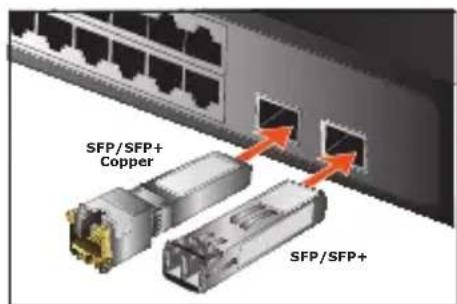
Figure 1: Inserting the SFP/SFP+ Mini-GBIC Module
- After the TP/Fiber connection is made successfully, check the LEDs to verify that if there is a link and a proper connection at the port.
Please refer to the user's manual for more about the Switch or mod-ule's management.
4-2 Removing the SFP/SFP+ Transceiver Module
- Make sure there is no network activity by consulting or checking with the network administrator.
- Remove the Fiber Optic Cable gently (See Figure 2).
- Turn the handle of the SFP/SFP+ Transceiver module to the horizontal level.
- Pull out the SFP/SFP+ Transceiver module gently through the han-dle.
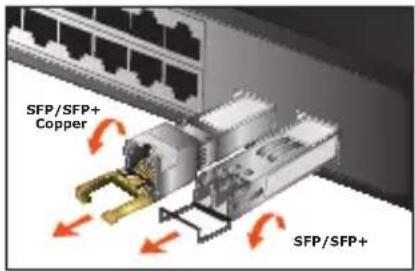
Figure 2: Removing the SFP/SFP+ Mini-GBIC Module

Warning
Never pull out the SFP/SFP+ Transceiver module without pulling the handle or the push bolts on the module. Directly pulling out the SFP/SFP+ Transceiver module would damage the SFP/SFP+ Transceiver module of the device.
4-3 Connecting the UTP Cable
The 1/2.5/5/10GBASE-T port uses RJ45 socket -- similar to phone jack -- for connection of unshielded twisted-pair cable (UTP). The 802.3ab/802.3bz/802.3ae Ethernet standard requires Category 5 UTP for 100Mbps 100BASE-TX. 1/2.5/5/10GBASE-T uses Cat5e/6/7 UTP (see table below). Maximum distance is 100 meters (328 feet).
| Standard Transfer $peed Cable Requirement 100M | ||
| 10GBASE-T 10000Mbit/s Cat | 6A/7 | |
| 5GBASE-T 5000Mbit/s Cat | 6/6A/7 | |
| 2.5GBASE-T 2500Mbit/s Cat | 5e/6/6A/7 | |
| 1000BASE-T 1000Mbit/s Cat | 5e/6/6A/7 | |

Note
Be sure the connected network devices support MDI/MDI-X. If it does not support, then use the crossover Category 5e cable.
Appendix A
A.1 Fiber Optic Cable Connection Parameters
The wiring details are shown below:
■ Fiber Optic Patch Cables:
| Standard Fiber Type | Cable Specifications | |
| 100BASE-FX Multi-mode 50/125μm or 62.5/125μm | ||
| 100BASE-FX Single mode 9/125μm | ||
| 100BASE-BX Multi-mode 50/125μm | ||
| 1000BASE-SX Multi-mode 50/125μm or 62.5/125μm | ||
| 1000BASE-LX Single mode 9/125μm | ||
| 1000BASE-BX Single mode 9/125μm | ||
| 10GBASE-SR Multi-mode 50/125μm or 62.5/125μm | ||
| 10GBASE-LR Single mode 9/125μm | ||
| 10GBASE-BX Single mode 9/125μm | ||
Safety Notice
Fiber-optic SFP modules are equipped with a Class 1 laser, which emits invisible radiation. Read the following safety warning carefully.

Note
Class 1 Laser Product
Complies with FDA Regulation 21 CFR 1040.10 and 1040.11

Warning
Class 1 radiation is present when the device or system is powered up.

Warning
Only trained and qualified personnel should be allowed to install or replace these modules.
- PLANET Fiber Transceiver
- MFB-Series/MGB-Series/MTB-Series
- Trademarks
- Disclaimer
- FCC NOTICE (Class B)
- CE Mark Warning
- WEEE Warning
- Revision
- Table of Contents
- Overview
- Checklist
- Introduction and Model List
- 3-1 The MFB-Series Mini-GBIC Transceiver Module List
- 3-3 The MTB-Series Mini-GBIC Transceiver Module List
- Installation and Removal of Transceiver Module
- 4-1 Installing the SFP/SFP+ Mini-GBIC Transceiver Module
- 4-2 Removing the SFP/SFP+ Transceiver Module
- Warning
- 4-3 Connecting the UTP Cable
- Appendix A
- A.1 Fiber Optic Cable Connection Parameters
- Safety Notice
Brand : Planet
Model : MFB-FX
Category : Network Card/Adapter