LRP-101CE - Network Card/Adapter Planet - Free user manual and instructions
Find the device manual for free LRP-101CE Planet in PDF.


| Product Type | Network Adapter |
| Brand | Planet |
| Model | LRP-101CE |
| Interface | PCI 2.2 (32-bit) |
| Network Speed | 10/100 Mbps |
| Connector | RJ-45 |
| Standards Compliance | IEEE 802.3, IEEE 802.3u |
| Data Transfer Rate | Up to 100 Mbps |
| Bus Type | PCI |
| Operating Systems Supported | Windows 98/ME/2000/XP, Linux |
| Power Consumption | 1.5 W (typical) |
| Dimensions (L x W x H) | 120 x 65 x 20 mm |
| Weight | 50 g |
| Operating Temperature | 0°C to 40°C |
| Storage Temperature | -20°C to 70°C |
| Humidity | 10% to 90% (non-condensing) |
| LED Indicators | Link/Activity, Speed |
| EMI Certifications | FCC, CE |
| Package Contents | Network adapter, driver CD, user manual |
| Maintenance | Keep clean and dry; avoid dust accumulation |
| Safety | Disconnect power before installation; avoid static discharge |
| User-Serviceable Parts | None; no internal components are replaceable |
Frequently Asked Questions - LRP-101CE Planet
User questions about LRP-101CE Planet
0 question about this device. Answer the ones you know or ask your own.
Ask a new question about this device
Download the instructions for your Network Card/Adapter in PDF format for free! Find your manual LRP-101CE - Planet and take your electronic device back in hand. On this page are published all the documents necessary for the use of your device. LRP-101CE by Planet.
USER MANUAL LRP-101CE Planet
Thank you for purchasing PLANET Long Reach PoE over Coaxial Extender, the LRP-101CE. "Long Reach PoE over Coaxial Extender" mentioned in this manual refers to the LRP-101CE.
Open the box of the Long Reach PoE over Coastal Extender and carefully unpack it. The box should contain the following items:
LRP-101CE User's Manual
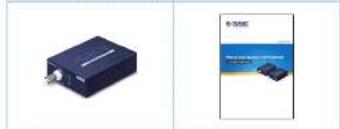
natural_image
Two product photos: one of a dark electronic device with a metallic connector, the other of a blue and white advertisement (no visible text or symbols)
If there is any item missing or damaged, please contact the seller immediately.
-1-
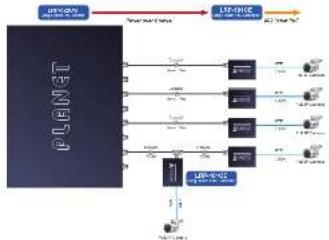
■ Point to Multi-point
flowchart
graph LR
    A["PLNET"] --> B["LSP-800C"]
    A --> C["Other Components"]
    B --> D["Node 1"]
    B --> E["Node 2"]
    B --> F["Node 3"]
    B --> G["Node 4"]
    B --> H["Node 5"]
    B --> I["Node 6"]
    B --> J["Node 7"]
    B --> K["Node 8"]
    B --> L["Node 9"]
    B --> M["Node 10"]
    B --> N["Node 11"]
    B --> O["Node 12"]
    B --> P["Node 13"]
    B --> Q["Node 14"]
    B --> R["Node 15"]
    B --> S["Node 16"]
    B --> T["Node 17"]
    B --> U["Node 18"]
    B --> V["Node 19"]
    B --> W["Node 20"]
    B --> X["Node 21"]
    B --> Y["Node 22"]
    B --> Z["Node 23"]
    B --> AA["Node 24"]
    B --> AB["Node 25"]
    B --> AC["Node 26"]
    B --> AD["Node 27"]
    B --> AE["Node 28"]
    B --> AF["Node 29"]
    B --> AG["Node 30"]
    B --> AH["Node 31"]
    B --> AI["Node 32"]
    B --> AJ["Node 33"]
    B --> AK["Node 34"]
    B --> AL["Node 35"]
    B --> AM["Node 36"]
    B --> AN["Node 37"]
    B --> AO["Node 38"]
    B --> AP["Node 39"]
    B --> AQ["Node 40"]
    B --> AR["Node 41"]
    B --> AS["Node 42"]
    B --> AT["Node 43"]
    B --> AU["Node 44"]
    B --> AV["Node 45"]
    B --> AW["Node 46"]
    B --> AX["Node 47"]
    B --> AY["Node 48"]
    B --> AZ["Node 49"]
    B --> BA["Node 50"]

It is recommended to use PLANET Long Read Ethernet coaxial extenders on the LRP Managed Switch (LRP-022CS). If you insert a coaxial extender that is not supported, the LRP Managed Switch may be damaged.
-3-
LED Descriptions

System & LRP Coax Interface
| LED | Color | Function |
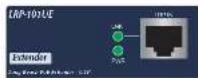
| PWR | Green | Light: Indicates the power is on. |
| LNK | Green | Light: Indicates that the coaxial link is established. |
| Off: indicates that the coaxial link is down. |

RJ45 10/100BASE-TX Interface
| LED | Color | Function |
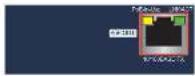
| PoE in-Use | Amber | Light: Indicates the R145 part is providing PoE power. |
| LINK/ACT | Green | Blink: Indicates the extender is actively sending or receiving data over that part. |
-5-
| Long ReachPcEInterface | MaximumDistance | Max. 200m with PoE+ output (556ft.)Max. 600m with PoE output (1,368ft.)Max. 1200m without PoE output (1,937ft.) | |||
| Long ReachEthernetStandard | IEEE 1901 | ||||
| ModulationType | Wavelet-D/OM | ||||
| Security | 128-bit AES encryption | ||||
| FrequencyBand | 2~28 MHz | ||||
| Performance | Distance | Data Rate*(Upload/Download) | LRP-101CH802.5Wt/CPeE OutputCapability** | ||
| LRP-101CHW/58VDC IN | LRP-101CHW/36WPoE IN | ||||
| 200m | 93/93 Mbps | 29W | 10W | ||
| 100m | 93/93 Mbps | 22W | 14W | ||
| 600m | 87/51 Mbps | 13W | 10W | ||
| 800m | 75/83 Mbps | 10W | 8W | ||
| 1000m | 55/73 Mbps | 8W | 7W | ||
| LRPCompatibility | With power over coastal input■ LRP-101CH - 1-Port LRP Injector■ LRP-822CS - 8-Port LRP over CoxSwitch■ LRP-1022CS - 16-Port LRP over CoxSwitch | ||||
-7-
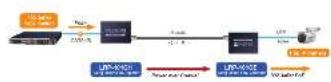
2. Application Diagram
■ Point to Point
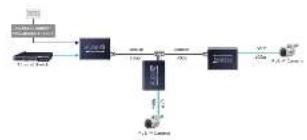
■ Single Chain, Multi-point
flowchart
graph TD
    A["Data Input"] --> B["Module 1"]
    B --> C["Server 1"]
    C --> D["Module 2"]
    D --> E["Central Processing Unit"]
    E --> F["Output Module"]
    G["External Data"] --> H["External Data"]
    H --> I["External Data"]
-2-
3. Physical Introduction
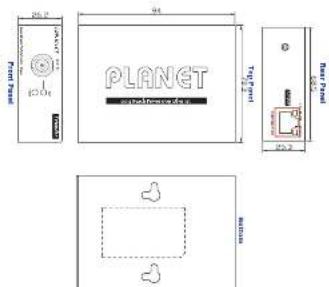
LRP-101CE Physical Dimensions
Dimensions (W x D x H): 94 x 70.3 x 26 mm
-4-
- Hardware Specifications
| Model | LRP-101CE | |
| Functions | Long Reach PoE Extender | |
| Hardware Specifications | ||
| Ethernet Interface | Copper | 10/100BASE-1X R45 Auto-negociation/Auto-MDI/MDI-X |
| Power over Ethernet Standard | IEEE 802.32/2af PoE PSF (power source equipment) | |
| PoE Output | 48~56V DC, 600mA max. | |
| PoE Budget | Up to 25 watts | |
| PoE Mode | End-spars, R145 Pn 1/2(+), 3/6(-) | |
| Data Rate | 100/100kbps | |
| Cabling | CelSe or above | |
| Maximum Distance | 100m | |
| Maximum Frame sizes | 1522bytes | |
| Long Reach PoE Interface | Connectivity | 1 x BNC female Long Reach PoE over coastal PD (powered device) ■ BNC center poor: DC+Ps ■ BNC shed: DC+Lo |
| Power Input | 44~56V DC | |
| Cabling | Coaxial cable: 75 ohm RG-6/U cable, less than 120/1000 ft RG-59/U cable, less than 30S/1000 ft. | |
-6-
| LED Indicators | ■ PWR ■ LRP LINK ■ Pol-in-use ■ LINK/ACT |
| ESD/EFT Protection | 2KW/3KV DC |
| Enclosure | Metal case |
| Installation | Well mount or DIN rel with optional kit |
| Dimensions (W×D xH) | 94 x 70 x 25 mm |
| Weight | 375g |
| Power Requirements | BNC Power over Coastal Input: 44~56V DC |
| Standards Conformance | |
| Standards Compliance | IEEE 802.3 10BASE-T Ethernet IEEE 802.3u. 100BASE=1X Fast Ethernet IEEE 802.3af Power over Ethernet (802.3at Type 1) IEEE 802.3sf Power over Ethernet (802.3sf Type 2) |
| Regulatory Compliance | FCC Part 13 Class A, CE |
| Environment | |
| Temperature | Operating: 20~70 degrees C Storage: 40~75 degrees C |
| Humidity | Operating: 5~95% (non-condensing) Storage: 5~95% (non-condensing) |
-8-
5. Package Contents
Thank you for purchasing PLANET Long Reach PoE over UTP Extender, the LRP-101UE. "Long Reach PoE over UTP Extender" mentioned in this manual refers to the LRP-101UE.
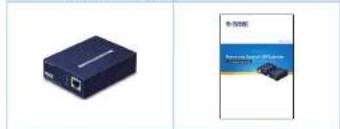
Open the box of the Long Reach PoE over VIP Extencer and carefully unpack it. The box should contain the following items:
LRP-101UE User's Manual
natural_image
Two product photos: a black USB drive and a blue car advertisement (no visible text or symbols)6. Application Diagram
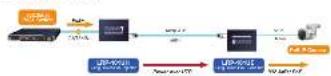
■ Point to Point
-9-
7. Physical Introduction
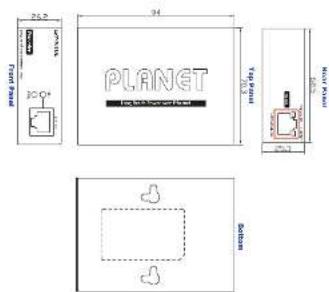
LRP-101UE Physical Dimensions
Dimensions (W x D x H): 94 x 70.3 x 26 mm
-10-
LED Descriptions
System & LRP Coax Interface
| LED Color Function | |
| PWR Green Light: Indicates the power is on. | |
| LNK Green | Light: Indicates that the UTP link is established. |
| Off: Indicates that the UTP link is down. | |
RJ45 10/100BASE-TX Interface
| LED Color Function | ||
| PoE In-Use | Amber | Light: Indicates the 2.45 port is providing PoE power. |
| LINK/ACT | Green | Blink: Indicates the extender is actively sending or receiving data over that port. |
-11-
8. Hardware Specifications
| Model | LRP-101UE | |
| Hardware Specifications | ||
| Ethernet Interface | Copper | 10/100MASE-TX RJ45Auto-regociation/Auto-MDI/MDI-X |
| PoE Standard | IEEE 802.3at/sf PoE PSE(power source equipment) | |
| PoE Output | 48~56V DC, 600mA max. | |
| PoE Budget | Up to 25 watts | |
| PoE Mode | End-spon, RJ45 Pin 1/2(+), 3/6(-) | |
| Data Rate | 100/100Mbps | |
| Cabling | Cable or above | |
| Maximum Distance | 100m | |
| Maximum Frame Size | 1522bytes | |
| Long Reach PoE Interface | Connectivity | 1 x RJ45 connectorLong Reach PoE over UTP PO(powerance device) |
| Pin Assignments | PIN 1, 3, 5, 7: VCC+PIN 2, 4, 6, 8: VCC- | |
| Power Input | 44~56V DC | |
| Cabling | 2-wire UTP4-wire UTP8-wire UTP | |
| Maximum Distance | Max. 200m with PoE+ output (658ft.)Max. 600m with PoE output (1,968ft.)Max. 1200m without PoE output (3,937ft.) | |
-12--13--14-

PLANET

PLANET
Users Manual

PLANET Technology Corp.
197, No. 36, Wissau Rd, Xerden Blvd, New York City 251, Telown
1250.463110-003
Writing The device is connected with Choice of CIPK.
UK CA CE 回
In a selected environment this follows new plan and effective
Energy Saving Index of the Mexico
The current method does not support the current mechanism. For energy storage, power release the DC plug or 100% the battery-to-temper home load in free QV position is determined. For devices from the drive cell, without measuring the DC plug form at reducing all the device, the device will be required to provide the power output for a power switch in a row of 100% the package and varying the electrical device configuration, if it is directly controlled to pass off or to reduce the power output.
| Long ReachPvEInterface | Long ReachEthomatStandard | IEEE 1901 | |||
| ModulationType | Wavelet-OFDM | ||||
| Security | 128-bit AES encryation | ||||
| FrequencyBand | 2 ~ 28 MHz | ||||
| Performance | Distance | Data Rate*(Upload/Download) | LRP-101UE802.3af/satPat OutputCapability** | ||
| LRP-101UHW/S6VDC IN | LRP-101UHW/S0WFC+IN | ||||
| 100m | 94/94 Mbps 30W | 1/W | |||
| 200m | 82/82 Mbps 30W | 1/W | |||
| 300m | 63/67 Mbps 30W | 1/W | |||
| 400m | 44/46 Mbps 22W | 1/W | |||
| 500m | 35/30 Mbps 18W | 1/W | |||
| LBPCompatibility | With screw over UTP InputLRP-101UH - 1-Port LRP Injector | ||||
| LED Indicators | ■ PWR■ LFP LNK■ FoE In-Use■ LNK/ACT | ||||
| LSD/EFT Protection | 24W/2KV DC | ||||
| Enclosure | Metal case | ||||
| Insulation | Wall mount or DIN rail with optional kit | ||||
| Dimensions (W x D xH) | 94 x 70 x 26 mm |
| Weight | 190g |
| Power Requirements | Power over RDS Input: 44~56V DC |
| Standards Conformance | |
| Standards Compliance | IEEE 802.3 10BASE-T EthernetIEEE 802.3a. 100BASE-1X Test EthernetIEEE 802.3af Power over Ethernet(802.3at Type 1)IEEE 802.3at Power over Ethernet(802.3at Type 2) |
| Regulatory Compliance | I/CC Part 13 Class A, CI |
| Environment | |
| Temperature | Dourating: 20~70 degrees CStorage: 40~75 degrees C |
| Humidity | Operating: 5~95% (non-condensing)Storage: 5~95% (non-condensing) |
- Upload: LRP-101UE to LRP-101UH. Download: LRP-101UH to LRP-101UE.
- As there are various resistance values in the category of 5/5c cable, the actual data rate may vary on the quality of the copper wire and environment factors.
** Depending on what the DC/PoE power input and the length of UIP cable are.
Brand : Planet
Model : LRP-101CE
Category : Network Card/Adapter