
TS 2222 CD - Paper Shredder Opus - Free user manual and instructions
Find the device manual for free TS 2222 CD Opus in PDF.


| Type de produit | Paper Shredder |
| Marque | Opus |
| Modèle | TS 2222 CD |
| Dimensions (L x P x H) | 350 x 200 x 300 mm |
| Poids net | 4 kg |
| Alimentation | 220-240 V, 50/60 Hz |
| Consommation électrique | 180 W |
| Capacité de coupe | 8-10 feuilles A4 (80 g/m²) par passage |
| Type de coupe | Cross-cut (particules 4 x 40 mm) |
| Niveau de sécurité | P-3 |
| Fonction CD/DVD | Oui |
| Capacité de la corbeille | 15 litres |
| Cycle de fonctionnement | 2 minutes en continu, puis 30 minutes de refroidissement |
| Niveau sonore | 55 dB |
| Entretien et nettoyage | Huiler les lames tous les mois avec de l'huile de broyeur; nettoyer la corbeille régulièrement |
| Sécurité | Arrêt automatique en cas de surchauffe, sécurité enfants (bouton de verrouillage) |
| Pièces détachées et réparabilité | Lames de rechange disponibles, huile de broyeur; réparation par service agréé |
| Informations générales | Garantie 2 ans; usage domestique et petit bureau |
Frequently Asked Questions - TS 2222 CD Opus
User questions about TS 2222 CD Opus
0 question about this device. Answer the ones you know or ask your own.
Ask a new question about this device
Download the instructions for your Paper Shredder in PDF format for free! Find your manual TS 2222 CD - Opus and take your electronic device back in hand. On this page are published all the documents necessary for the use of your device. TS 2222 CD by Opus.
USER MANUAL TS 2222 CD Opus
Health & Safety precautions
• Equipment is not designed to work constantly, only 7-10 minutes at a time.
- Before using/operating, the equipment please read the Health & Safety precautions, manufacturers' recommendations and the operating manual and used accordingly.
- The operating manual should be available at all times for the operator to read.
- The equipment can only be used in accordance with the specifications in the user guide/manual and should be placed on a sturdy and level surface near a 220/240 Volt AC socket.
- The socket must be earthed in accordance with electrical regulations.
- The equipment must be protected against moisture/damp and dust.
- Do not put the equipment near heating or ventilation units.
- The equipment must not be used in or near a room with inflammable liquids or gases.
- Do not use the equipment near aerosols of, oil or grease made from petroleum or inflammable substances.
- Do not use compressed air from a aerosol for cleaning shredder.
- The power supply cable should be protected against any damage and not be used to pull the equipment or to remove the plug from the power socket.
- Unplug the equipment from the power socket when removing the cover or cleaning the inside.
- The equipment should be kept away and out of reach of children and animal's.
- Danger! Equipment contains rotary elements. Keep away, long hair, loose jewellery, ties and other loose pieces of clothing as they can become entangled in the cutting head.
- Be careful when feeding material into the slots.
- When or if the motor overheats, it will turn off automatically without a signal only red LED flashing indication, turn off the main switch of the shredder straight away and wait for it to cool down app. 50 minutes!
- Do not put any heavy objects on the device!
- When any malfunction occurs, check that the equipment is being used correctly and then contact the dealer or service point.
- The equipment must not be put or kept outside and should be operated in a room temperature higher than +8^ .
- Any repairs must be carryout by only authorised staff.
• After using the shredder, it must be turned off by the main switch or by unplugging it from the power socket - If the equipment is not used for long periods, the power cable must be removed the wall socket.
Recommendations:
- The equipment was designed for shredding paper, credit cards and CD/DVDs.
- During longer none operation, the mains switch should be turned "OFF" and unplugged.
- Before shredding, you must remove paper clips and staples from the documents.
• Empty the shredded waste from the bin frequently. - The shredder can only be operated with the original paper bin supplied.
- To ensure long and faultless use of the equipment do not shred more than 22 sheets of 80gram/m² paper, 1 plastic credit card or 1 CD/DVD at one time.
- Do not shred computer continues printout paper, PVC foil, coated paper or cardboard as it can damage of cutting knives and mechanism and over load the electric motor.
NOTE! Not complying with the recommendations above can result,
with the guarantee/warranty being made void.
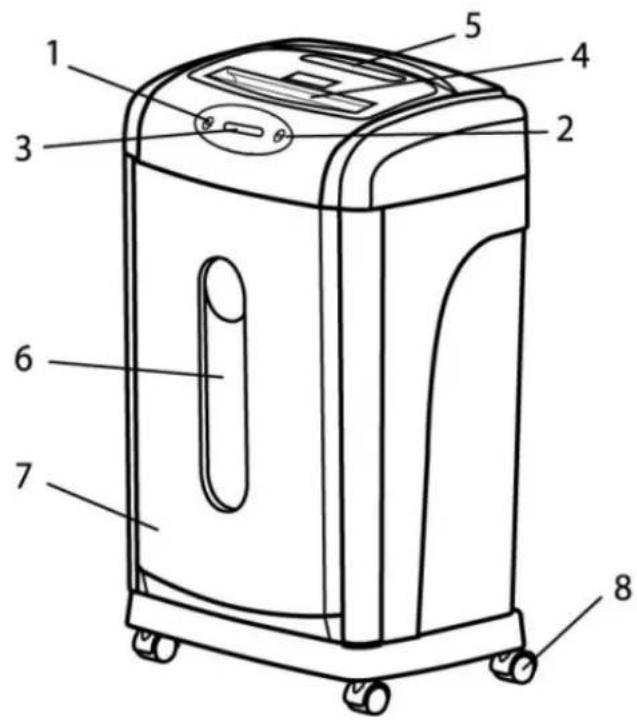
1 - REV mode (allows you to withdraw the jammed paper from the feed opening)
2 - FWD mode (runs cutting blades forward,
after passing paper through to clear
jammed documents, and clean.)
3 - Lit Display (SEE BELOW)
4 - Paper in feed
5 - Slot for 1 credit cards or 1 CD / DVD
6 - Window for viewing waste level
7 Removable Waste bin
8 - Wheels

Power

Paper jammed

Motor over heated

Waste bin full
Operation:
- The equipment should be placed on a level floor.
- Before plugging in the equipment, ensure there is nothing in the slots, like paper, cards or CD/DVDs and that the paper bin is fitted properly, there is a micro switch which if the bin is not fitted correctly the motor will not start.
- There are two push buttons on the top marked, FWD, REV, and 1 power switch on the back for on & off.
- Before plugging in the equipment, ensure that power switch is on "0" pressed in.
- To operate, switch the power on. On the top there is a small panel with the symbol ⏻ when the power is turned on the symbol goes blue, ready to work, If the unit is not used the shredder will go into standby, when you insert paper, DVD/CD or a credit card it will automatically start.
- FWD it will start the cutting blades going for 10 seconds each time you press the button. It is only for when you shred very small pieces of paper or clean out some paper that had not gone through on auto.
- Insert paper into the feed slot on the top and it will start automatically. NOTE! Paper should be only put in the middle of the slot.
- Maximum paper width of 225mm. If the pages are wider, cut or fold to fit the slot. You can only shred 22 sheets of 80 g/m ^2 paper at a time.
• If the temperature of the electric motor gets to hot the shredder will automatically turn off and the
symbol will turn Red. - When the electric motor has cooled down the red light will go off and then motor will be ready to start again.
- Shredding credit cards. The shredder shreds only one credit card or one CD/DVD at a time.
• It is impossible to shred paper and credit cards or CD/DVDs at the same time. - Turn the power switch off when shredding is finished
- If too many pages of paper are inserted into the slot, it will cause the paper to jam inside the cutting blades.
- Pull out the surplus jammed/stuck paper out and press the switch marked REV to (reverse) the paper out.
- Press "FWD" (forward) to shred any paper scraps left in the cutting blades.
- If it will not solve the problem, contact the dealer or the service team.
Cleaning:
- Before cleaning the shredder ensure that the main power is switched off, then unplug the equipment from the mains socket.
- When the shredded paper bin gets overfilled, it may cause problems and paper will go inside the mechanism feed and there is a risk of fire. Pull the bin out, remove shreds and re-install the bin under the shredder.
- To avoid problems please clean the shred bin regularly before it overfills.
- Cleaning the housing. Wipe the cover of the shredder with gentle home detergent or a damp piece of cloth.
- Do not put the equipment into water.
- Do not wipe the unit with petroleum, thinners, alcohol or solvents. They can cause permanent damage to the housing and the plastic.
Maintenance:
• To prevent reduction of efficiency, increased sound levels and to prolong the lifespan of the equipment, it is necessary to oil cutting blades regularly.
• After filling the waste bin several times, the blades should be oiled with a special oil (provided by OPUS).
- Put a little oil on a few pieces of paper and shred them so that the oil will spread on the whole cutting mechanism.
Possible malfunctions
| Malfunction Possible Cause Remedy | ||
| Equipment does not start after inserting paper into the slot | 1. Not plug in properly2. Pages to be shred are too soft3. Overheating4. Paper jam5. The basket is not installed properly | 1. Plug the equipment in correctly2. Fold pages or insert more paper in the feed opening3. Turn off the shredder, wait about 30 minCheck over heat symbol4. Remove stuck paper5. Install shred bin correctly |
| Equipment does not stop after shredding | Photo cell in the entry slot is covered by scraps of paper | Clean the photo cell |
| The shredder operates too loud | Equipment is not on sturdy and level floor | Place the machine on study and level floor and lock front wheels |
| The shredder does not operate correctly | 1. Too many pages inserted into the feed opening2. Too big paper format3. Paper is not inserted in the centre of feed opening | 1. Reduce number of pages inserted to the slot at one time2. Switch to REV button to remove paper and insert folded pages once again3. Insert paper in the middle of the feed opening |
Technical Data:
Shredder type: cross-cut
Feed opening: 1 off 225mm / 1 off, 122mm CD/DVD & Credit card
Performance: 22* sheets paper of 80g/m² or
1 credit card or 1 CD/DVD
Shred size: 4x44mm
Waste bin: 28 Litre
Voltage: 230Volt 50 Hz
Input current: 1,6 Amps
Net weight: 12 kg
Dimensions (H x W x D): 649 x 373 x 649 mm
*paper 80g/m²

Brand : Opus
Model : TS 2222 CD
Category : Paper Shredder