
profiLAM Junior A3 - Laminator Opus - Free user manual and instructions
Find the device manual for free profiLAM Junior A3 Opus in PDF.


| Product Type | Laminator |
| Brand | Opus |
| Model | profiLAM Junior A3 |
| Max Laminating Width | 325 mm |
| Laminating Speed | 520 mm/min |
| Pouch Thickness (max) | 250 microns (μm) |
| Max Document Thickness | 1 mm |
| Temperature Range | 65 °C to 145 °C |
| Heating System | Heated rollers |
| Number of Rollers | 4 |
| Preheating Time | 2 - 3 minutes |
| Power Consumption | 550 W |
| Voltage / Frequency | 220-240 V, 50/60 Hz |
| Fuse | 250 V T 6.3 A |
| Dimensions (H x W x D) | 115 x 480 x 211 mm |
| Net Weight | 10 kg |
| Gross Weight | 12 kg |
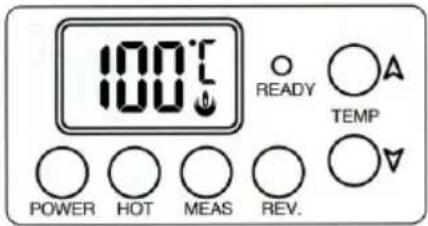
| Control Panel Features | Power button, HOT button, TEMP setting, MEAS (temperature measure), REV (reverse), LED display with READY indicator |
| Safety Features | Anti-block system lever, auto power-off after cooling, overheat protection, warning against loose clothing/jewelry |
| Compatible Pouch Sizes | A3, A4 and custom shapes with carrier envelope |
| Recommended Paper Weights | 80, 120, 200 g/m² (see temperature chart) |
| Maintenance | Use only OPUS recommended supplies; clean with non-petroleum based lubricants |
Frequently Asked Questions - profiLAM Junior A3 Opus
User questions about profiLAM Junior A3 Opus
0 question about this device. Answer the ones you know or ask your own.
Ask a new question about this device
Download the instructions for your Laminator in PDF format for free! Find your manual profiLAM Junior A3 - Opus and take your electronic device back in hand. On this page are published all the documents necessary for the use of your device. profiLAM Junior A3 by Opus.
USER MANUAL profiLAM Junior A3 Opus
1 Health & Safety precautions:
- Before operating the equipment please read the Health & Safety precautions, manufacturer's recommendations and the operation manual.
• The operation manual should be easily available at any time for the operator. -
The equipment should be installed on a sturdy level surface near a 220-240 Volt, 50 - 60 Hz AC correctly earth socket.
• The equipment: -
Should be protected against dust and moisture.
- Must not be placed near a heating or ventilation unit.
- Should not be used in vicinity of inflammable liquids or gases.
- Do not put anything on top off the equipment.
- The power supply cable must be protected against damage.
- Must not be used to pull or move the equipment or to remove the plug from the socket.
- During long standstill or moving the equipment and to ensure that it is turned off completely, remove the plug from the mains socket.
- Should be kept away and out of the reach from children and animals.
- Must not be used for any other purposes, than those indicated in the instruction manual.
- The equipment must not be located outside, should be operated in room temperature higher than +8°C.
Danger!
- The equipment contains electrically driven rollers. Ensure long hair, loose jewellery, ties and other loose clothing are kept away from the entry slot they could get entangled in the rollers.
- It is necessary to check and supervise, if the equipment is operated and used correctly, if there should be a malfunction, then you must contact the dealer or service team.
- The equipment must not be located outside and should be operated in a room temperature higher than +8 °C.
- Before removing any covers from the equipment, remove the power plug from a mains socket.
- Using inappropriate lubricants such as petroleum based cleaning materials, can cause a fire hazard.
- Only authorized and qualified staff may carry out any repairs during the Guarantee/Warranty period.
• The equipment must be operated in accordance with the general Health & Safety rules. - Do not leave the equipment operating without an operator.
- Do not turn off the Laminator until it has cooled down.
- After use turn the equipment off by the switch on unit, next remove the plug from a socket if not in regular use.
2 Manufacturer's recommendations:
- Use only recommended supplies and accessories from OPUS (see www.opus.pl)
- If the equipment is switched on and is not operated for more than one hour, it could get overheated in such an instance, to avoid bad quality laminating put 1 or 2 sheet of A3 paper through in order to cool the rollers down.
• Always insert the pouch with the closed end, first into the laminator. Putting the open end first can cause bubbling and the film may rap and get stuck round the rollers inside the laminator. - Should a document with pouch get stuck inside the laminator first use the anti-block system lever (6) the top of the unit, which separates the roller so you can pull the pouch plus document out. If unsuccessfully call your Dealer or the service team.
- When cutting tailor made shapes from the pouch it can make the rollers sticky and dirty from the glue which can cause the pouch to wind round the rollers, you must use a carrier. ASK YOUR DEALER FOR INFORMATION.
- Remove any sharp or metal elements from the document like (staples & paper clips, etc.) before laminating.
WARNING! THE EQUIPMENT CONTAINS HEATING ELEMENTS, BE AWARE OF HIGH TEMPERATURES!! BURN HAZARD !!
WARNING! NOT COMPLIANCE WITH THE RULES AND RECOMMENDATIONS ABOVE CAN VOID THE GUARANTEE/WARRANTY
3 LAMINATION GUIDE CHART
| Film/pouch Microns (μm) | Paper | Temperature in °C | |
| A3 | A4 | ||
| 80 - 100 | 80 g/m2 | 100 | 100 |
| 120 g/m2 | 110 | 105 | |
| 200 g/m2 | 115 | 110 | |
| 125 - 150 | 80 g/m2 | 120 | 115 |
| 120 g/m2 | 125 | 120 | |
| 200 g/m2 | 130 | 125 | |
| 175 - 200 | 80 g /m2 | 135 | 130 |
| 120 g/m2 | 135 | 135 | |
| 200 g/m2 | 140 | 135 | |
| 250 | 80 g /m2 | 145 | |
* If using a low temperature pouch, reduces the temperature by 15 to 20 °C (e.g. Chart 80 μm-100 °C A3. new 80 °C)
* To avoid damaging the rollers and equipment, ensure you set the correct temperature own cut shape of pouch use a carrier envelope.
4 How to Use
- Switch on using the switch at back of equipment.
- When you turn on the equipment by switch on the back you do not need to press the power button on the front panel.
When you switch off by the POWER button to standby
and then restart again using the POWER button, you need to set the temperature required, or press the HOT button which is pre set to 100 °C for 100 microns (μm).
- When ready LED goes green and you hear 3 bleeps you can start laminating.
!! Warning !!
Insert the sealed end of the pouch first. Failure to do so will damage the document and rollers, which could invalidate your Warranty / Guarantee.
4. Lamination:
When the document are not sealed together satisfactory, increase the temperature and run the pouch through again.
5. Finished lamination.
Do not turn off by the main power switch, Press the POWER button on the panel and hold till the led screen is blank and release. When the rollers are cool and have reached below 65 °C the power stops automatically.
Warning
Do not turn off the Switch as soon as finishing lamination to prevent overheating. Follow the above method. After the roller cool down, there will be beep sound for 5 times and the power will be stopped automatically.
5 Description of Control Panel

Temperature setting (65 to 145 °C)
TEMP: Modifying temperature
LED display READY: Ready to laminate
POWER
ON - Press the power button for 1 second
OFF - Press the power button for 1 second
HOT: Start Hot lamination.
MEAS: Measure the actual temperature of rollers
REVERSE: Reverse roller direction backward
6 Trouble Shooting Guide
| Malfunction | Cause | Remedy |
| Equipment has no power or rollers are not turning. | 1. Power cord is not properly plugged in.2. Power switch off.3. Temperature not reached. | 1. Check the power plug is properly plugged.2. Check the power switch is turned on.3. Check the temperature.4. Contact supplier or Service. |
| Excessive noise. | Operation of gear is not smooth. | Turn off the equipment, and then contact Supplier or Service. |
| Bad lamination. | Laminated document wrinkled, damp, or folded. | Adjust the temperature lower or higher. |
| No increase of Temp. | Check power plug. | Check if the power plug and switch is turned on or Contact supplier or Service. |
| Corner is not sealed. | Document is too thick to seal the edges of the film. | Use a thinner document or leave a larger margin round the edges approximately 5mm. |
| Emergency state. | Something may be stuck between the heated rollers or they are out of position. | Turn off the switch. Contact supplier or Service. |
If you have any problem cannot be solved, please contact service the department.
7 Specifications
• Maximum:
- laminating width
- laminating speed
- pouch thickness
- laminating thickness
- temperature
- Heating System
- Rollers
- Preheating Time
• Rated Consumption
• Voltage
- Fuse
- Dimension:
- Net weight
- Gross weight
325 mm
520 mm/min
250 microns (μm)
1 mm
145 °C
Heated rollers
4
2 - 3 minutes
550 watt
220-240 V, 50/60 Hz. 2.6 Amps,
250 VT 6.3 A
H 115 x W 480 x D 211 mm
10 kg
12 kg

Equipment and products marked with this symbol cannot be deposed together with normal or municipal waste. The user is required to take their used product to a collection point for recycling of waste electrical and electronic equipment. Proper segregation of used equipment reduces the negative impact of hazardous substances that may be in there, in to the environment which could impact, human and wild life health. For more detailed information concerning the disposal of used equipment, please contact your local authority, waste disposal service or the point of sale where you purchased the product. By ensuring proper disposal of equipment we are helping to protect the environment, humanity and wild life health.
- 1 HEALTH & SAFETY PRECAUTIONS
- DANGER
- 2 MANUFACTURER'S RECOMMENDATIONS
- WARNING! THE EQUIPMENT CONTAINS HEATING ELEMENTS, BE AWARE OF HIGH TEMPERATURES!! BURN HAZARD
- WARNING! NOT COMPLIANCE WITH THE RULES AND RECOMMENDATIONS ABOVE CAN VOID THE GUARANTEE/WARRANTY
- 4 HOW TO USE
- WARNING
- LAMINATION
- FINISHED LAMINATION
- 5 DESCRIPTION OF CONTROL PANEL
- 6 TROUBLE SHOOTING GUIDE
- 7 SPECIFICATIONS
Brand : Opus
Model : profiLAM Junior A3
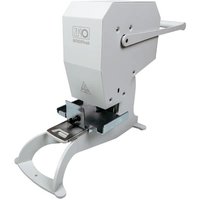
Category : Laminator