
ES-2339A-02 - Iron Clas Ohlson - Free user manual and instructions
Find the device manual for free ES-2339A-02 Clas Ohlson in PDF.


| Product Type | Steam Iron |
| Brand | Clas Ohlson |
| Model | ES-2339A-02 |
| Power Consumption | 2400 W |
| Voltage / Frequency | 220-240 V ~ 50/60 Hz |
| Water Tank Capacity | 300 ml |
| Soleplate Material | Stainless Steel |
| Cord Length | 1.9 m |
| Adjustable Temperature | Yes, with dial control |
| Steam Settings | Variable steam with burst and spray |
| Auto Shut-Off | Yes, after 8 minutes of inactivity |
| Anti-Drip System | Yes |
| Self-Cleaning Function | Yes |
| Dimensions (L x W x H) | 30 x 15 x 13 cm |
| Weight | 1.3 kg |
| Maintenance | Regular descaling and soleplate cleaning |
| Spare Parts Availability | Replacement soleplates, buttons, and water tanks available from Clas Ohlson |
Frequently Asked Questions - ES-2339A-02 Clas Ohlson
User questions about ES-2339A-02 Clas Ohlson
0 question about this device. Answer the ones you know or ask your own.
Ask a new question about this device
Download the instructions for your Iron in PDF format for free! Find your manual ES-2339A-02 - Clas Ohlson and take your electronic device back in hand. On this page are published all the documents necessary for the use of your device. ES-2339A-02 by Clas Ohlson.
USER MANUAL ES-2339A-02 Clas Ohlson
natural_image
Exterior view of a modern office iron with steam iron and handle (no text or symbols visible)Steam Iron
| Art.no | 18-4708 | Model | ES-2339A-02 |
| 44-1919 | ES-2339A-02 |
Please read the entire instruction manual before using the product and then save it for future reference. We reserve the right for any errors in text or images and any necessary changes made to technical data. In the event of technical problems or other queries, please contact our Customer Services (see address details on the back).
Safety
- The product may be used by children of 8 years and above and by persons with reduced physical, sensory or mental capability or lack of experience and knowledge provided they have been given supervision or instruction concerning use of the product in a safe way and understand the hazards involved.
- Never let children play with the product.
- The product must never be left unattended when it is plugged in.
- Unplug the product before filling or emptying the water tank.
- Unplug the product whenever it is not in use.
- Only use the product on a stable surface.
- The product should only be placed on a stable surface when not in use.
- Do not use the product if you have dropped it on the floor, if it is visibly damaged or if it is leaking.
- Only have the manufacturer, retailer or other qualified person repair or replace a damaged mains lead in order to avoid any possible danger.
-
Caution: The product will become very hot during use. Let the product cool completely before putting it away for storage.
-
Children should not be allowed to clean or maintain the product unless they are older than 8 and under adult supervision.
- The product must only be used as described in this instruction manual.
- The product must not be immersed in water or other liquid. Doing so could result in an electric shock.
- Always set the temperature to the MIN setting before unplugging the product. When unplugging, always grasp the plug and not the mains lead.
- Keep the mains lead away from hot or sharp objects. Let the product cool down completely before putting it away for storage. Wind the mains lead loosely around the product before storing it.
- Never dismantle or modify the product in any way.
- Be very careful if there are children close to where you are ironing, there is a risk of them burning themselves or pulling the iron down onto themselves.
- Hot water or steam can cause scalding injuries whenever the product is tilted or turned over.
- If the product emits smoke, an unusual odour or doesn't function normally, unplug it and have it checked by a qualified electrician.
- This product is intended for indoor use only.
Buttons and functions
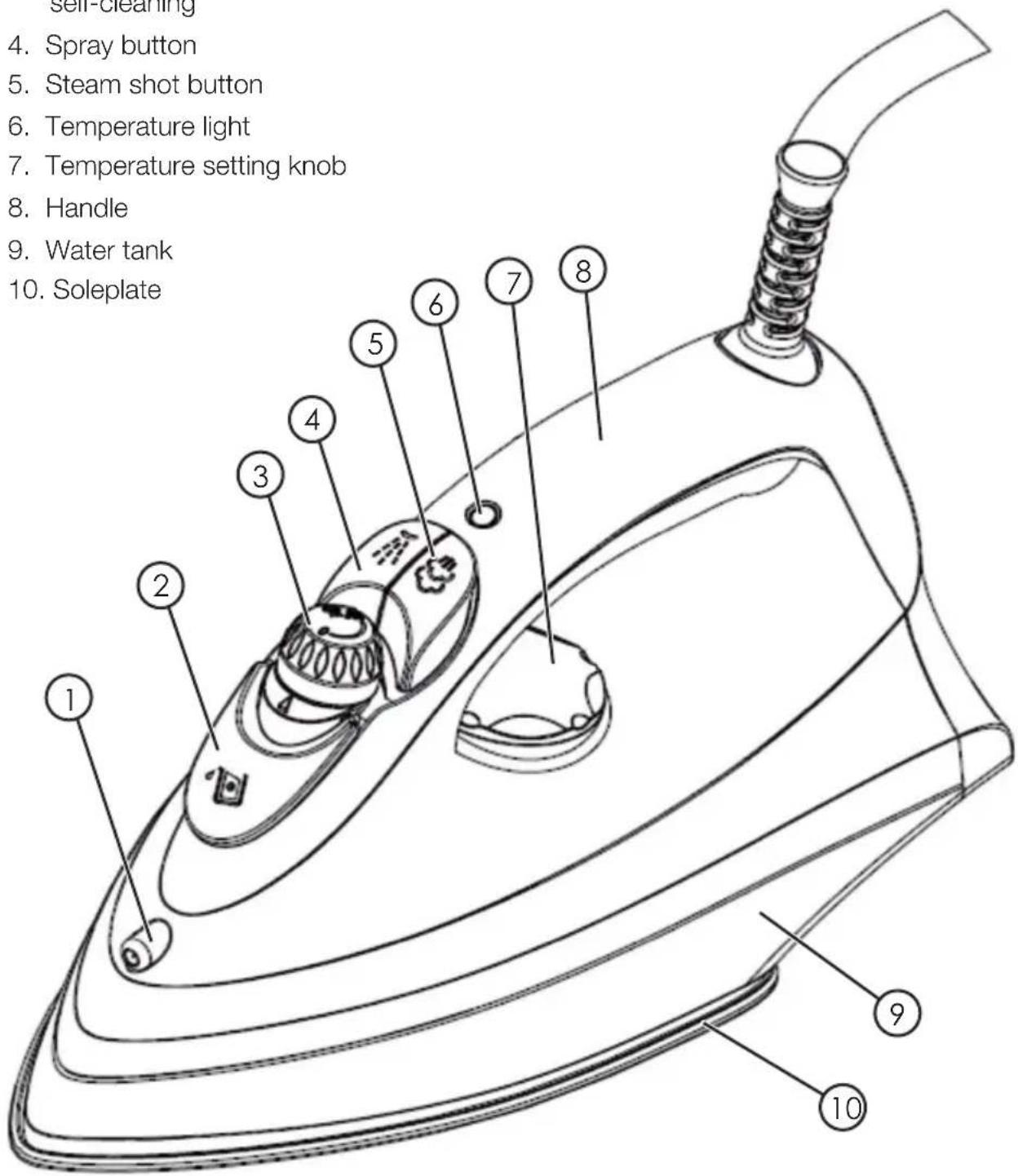
- Spray nozzle
- Water tank refill port
- Steam control knob/ self-cleaning
- Spray button
- Steam shot button
- Temperature light
- Temperature setting knob
- Handle
- Water tank
- Soleplate
Operating instructions
Before initial use
Note: Remove the protective plastic film from the soleplate before use.
Harmless smoke and odour may be emitted from the iron the first few times is used. This is a temporary condition and is completely normal. Before using the iron, test it on a spare piece of cotton cloth to check that both the soleplate and the water tank are clean.
Refilling
- Unplug the iron and let the soleplate cool down. Stand the iron upright.
- Turn the steam control knob (3) to the 0 position.
- Flip open the water tank's refill port (2).
- Use the measuring cup and fill the tank (9) up to the max mark.
- Close the lid.
Note: The water tank's filter prevents limescale deposits from forming in the iron. The filter is permanently attached and does not need changing or cleaning. Use only tap water. The filter will malfunction if distilled or demineralised water is used. Chemical additives, fragrances or descaling agents added to the water will also destroy the filter.
Temperature setting knob
- Always check the fabric care label on the piece to be ironed.
- Always use the lowest recommended temperature setting if the fabric consists of mixed materials.
- Plug in the iron and stand it upright.
- Use the temperature control knob (7) to set the desired temperature
- The temperature light (6) will be lit until the set temperature has been reached.
- The temperature light (6) will turn off once the set temperature has been reached.
The garment's care label usually has the recommended ironing setting on it:
| Symbol Material | Thermostat setting | |
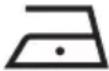 | Synthetic ○ Low temperature | |
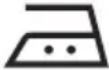 | Silk/wool ○○ Medium temperature | |
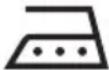 | Cotton/linen ○○○ High temperature | |
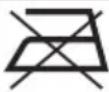 | Material not suitable for ironing. | |
Spray feature
This function can be used at any time and does not affect the temperature setting.
Slowly press the spray button (4) for a full spray or press quickly for a fine mist.
Do not use the spray function on silk or synthetic fibres.
Steam ironing
This feature only works on the higher temperature settings.
- ○○ medium heat
-
000 max heat
-
Fill the steam iron with water if you have not already done so.
- Plug the mains lead into a wall socket.
- Set the temperature to or .
- The temperature light (6) will turn off once the set temperature has been reached.
- Turn the steam control knob (3) to the ⚪️ setting so that steam begins exiting from the soleplate’s steam ports.
- Holding the iron horizontally will allow steam to exit while holding it vertically will prevent steam from exiting. To iron vertically, such as on hanging garments, use the steam shot function.
Note: Water can drip from the soleplate if the temperature setting is too low. If this happens, set the temperature to or . Steam will return once the correct temperature has been set.
Steam shot feature
The steam shot feature can be used for both dry and steam ironing. However, the temperature must then be set to high. Press the steam shot button (5) a few times to effectively smooth out wrinkles.
- Hold the iron over the piece of clothing.
- Press the steam shot button (max 2 seconds) until steam begins emitting from the soleplate.
- Release the steam shot button.
Dry ironing
- Turn the steam control knob (3) to the 0 position.
- Plug the mains lead into a wall socket.
- Set the iron to the desired temperature setting.
- The temperature light (6) will turn off once the set temperature has been reached.
Ironing tips
- Garments with embroidery, sequins, lace, etc., should be ironed on the lowest temperature setting.
- For textiles made of mixed fibres (e.g. 40% cotton/60% synthetic fibre), choose the temperature setting appropriate for the fibre with the lowest recommended ironing temperature.
- If you are not sure what the material is made of, start by ironing an inconspicuous part of the garment on the lowest temperature setting and increase the temperature gradually.
- Never iron a garment which has sweat stains or other discolouration, the heat will iron the stain into the fabric and it will be very difficult to remove.
- Ironing silk, wool and synthetic fibres can cause shiny patches to be formed. To prevent this, iron such fabrics on the reverse side.
- Velvet can also form shiny patches when ironed. Iron in the direction of the pile/nap to avoid such damage. Avoid pressing the iron down onto the fabric.
- Washing more clothes at the same time causes more wrinkles to form.
- Higher speed spin cycles also causes more wrinkles to form.
- Many types of fabric are easier to iron before they are completely dry. Silk, for example should always be steam-ironed.
Care advice
Cleaning the housing
- Note: Unplug the iron from the wall socket before cleaning.
- Wipe the exterior with a moist, soft cloth. Do not use abrasive cleaning agents or solvents.
- Note: Avoid scratching the soleplate – do not slide it over metal items such as buttons or zips.
After use
Warning: The iron becomes very hot directly after use. Remember to let it cool down completely before putting it away for storage.
- Unplug the mains lead from the wall socket.
- Empty the water tank by turning the iron upside down whilst carefully using a back and forth motion to allow any excess water to drip from the tank. Press the spray button a few times to ensure the tank is completely empty.
- Store the iron in a dry, room temperature environment.
Self-cleaning
We recommend that you use the self-cleaning function at least once a month or possibly more often depending on the water quality in your area. The self-cleaning function removes scale and dust particles from the water tank.
- Fill the water tank up to the max level mark.
- Turn the steam control knob (3) to the 0 position.
- Stand the iron upright.
- Plug the mains lead into a wall socket.
- Set the temperature to MAX using the temperature control knob (7).
-
Wait until the iron becomes hot and the temperature light (6) turns off.
-
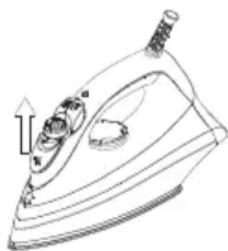
Hold the iron in the horizontal position and turn the steam control knob to the ⚙ position. The button will pop up (see illustration) and the self-cleaning feature will become active. Continue holding the iron and let it run through the self-cleaning procedure (approximately 1 min). This can be done over the basin or other appropriate location.
natural_image
Line drawing of a steam iron with an upward arrow indicating motion (no text or symbols)-
Unplug the iron and set the steam control knob to 0 so that no water comes out.
-
Let the iron cool down and then iron a spare piece of cotton fabric. This will clean the face of the soleplate from any remaining scale and dirt deposits.
Responsible disposal
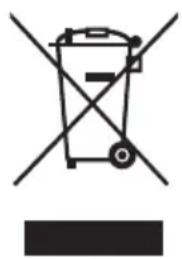
This symbol indicates that this product should not be disposed of with general household waste. This applies throughout the entire EU. In order to prevent any harm to the environment or health hazards caused by incorrect waste disposal, the product must be handed in for recycling so that the material can be disposed of in a responsible manner.
When recycling your product, take it to your local collection facility or contact the place of purchase. They will ensure that the product is disposed of in an environmentally sound manner.
natural_image
Symbol of a trash bin crossed with no visible text or labelsSpecifications
Voltage 220–240 V AC, 50/60 Hz
Power 1830-2200 W
Tank capacity 180 ml
Cable length 1.9 m
Ångstrykjärn
Art.nr 18-4708 Modell ES-2339A-02
44-1919
ES-2339A-02
natural_image
Line drawing of a steam iron with an upward arrow indicating motion (no text or symbols)natural_image
Symbol of a trash bin crossed with no text or numbers, representing waste sorting or disposal (no text present)Specifikationer
natural_image
Line drawing of a steam iron with an upward arrow indicating motion (no text or symbols)natural_image
Symbol of a trash bin crossed with no text or labels, representing waste sorting or disposal (no text present)Spesifikasjoner
Strømforsyning 220–240 V AC, 50/60 Hz
Effekt 1830–2200 W
Volum på vannbeholder 1,8 dl
natural_image
Line drawing of a steam iron with a handle and spout, showing internal components (no text or symbols)natural_image
Symbol of a trash bin crossed with no text or labels, accompanied by a black rectangular block below (no text or symbols present)Tekniset tiedot
natural_image
Line drawing of a steam iron with an upward arrow indicating motion (no text or symbols)natural_image
Symbol of a trash bin crossed with no text or numbers, representing waste sorting or disposal (no text present)Technische Daten
Postal 10 – 13 Market Place
Kingston Upon Thames
Surrey
KT1 1JZ
Deutschland
- Steam Iron
- Safety
- Buttons and functions
- Operating instructions
- Before initial use
- Refilling
- Temperature setting knob
- Spray feature
- Steam ironing
- Steam shot feature
- Dry ironing
- Ironing tips
- Care advice
- Cleaning the housing
- After use
- Self-cleaning
- Responsible disposal
- Specifications
- Ångstrykjärn
- Specifikationer
- Spesifikasjoner
- Tekniset tiedot
- Technische Daten
- Deutschland
Brand : Clas Ohlson
Model : ES-2339A-02
Category : Iron