
G Four - Loudspeaker GENELEC - Free user manual and instructions
Find the device manual for free G Four GENELEC in PDF.


| Product Type | Active Studio Monitor (Bi-amplified) |
| Woofer Size | 6.5 inches |
| Tweeter Size | 1 inch metal dome |
| Dimensions (H x W x D) | 285 x 189 x 178 mm |
| Weight | 6.4 kg |
| Amplifier Power (Woofer + Tweeter) | 90 W + 50 W |
| Frequency Response | 54 Hz - 20 kHz (-6 dB) |
| Maximum SPL (peak) | 108 dB |
| Input Connectors | Balanced XLR, Unbalanced RCA |
| Room Response Controls | Bass Tilt, Treble Tilt, Desktop Control |
| Power Supply | 100-240 V AC, 50/60 Hz |
| Power Consumption (standby) | < 0.5 W (ISS enabled) |
| Enclosure Type | Die-cast aluminum (MDE) |
| Protection Features | Overload protection, thermal shutdown |
| Mounting Options | Rubber feet, wall mount bracket (optional) |
| Finishes | Black, White |
| Operating Temperature | 0°C to 35°C |
| Maintenance | Wipe with dry cloth; do not use solvents |
| Spare Parts & Repairability | Amplifier module and drivers replaceable by authorized service |
| Certifications | CE, FCC |
| Included Accessories | Power cord, user manual, Iso-Pod stand |
Frequently Asked Questions - G Four GENELEC
User questions about G Four GENELEC
0 question about this device. Answer the ones you know or ask your own.
Ask a new question about this device
Download the instructions for your Loudspeaker in PDF format for free! Find your manual G Four - GENELEC and take your electronic device back in hand. On this page are published all the documents necessary for the use of your device. G Four by GENELEC.
USER MANUAL G Four GENELEC
natural_image
White GELEEC portable electronic device with hexagonal grille and speaker grille (no visible text or symbols on body)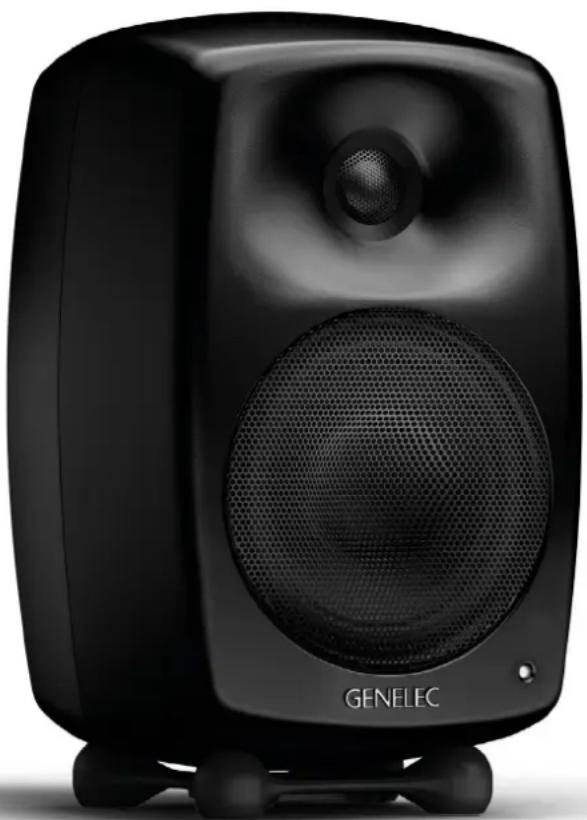
natural_image
Black GENELEC audio amplifier with visible sound waves and speaker grille (no text or symbols on body)General description
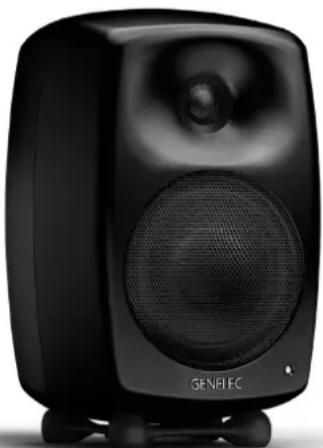
Genelec G Three, G Four and G Five are two way active loudspeakers designed to produce broad bandwidth sound with high output and low coloration.
Positioning the loudspeaker
Each loudspeaker is supplied with a built-in amplifier unit, mains cable and an operating manual. After unpacking, place the loudspeakers in their required listening positions, pointing them to the center of the listening area. If possible, place the listening position along the middle axis of the room and the loudspeakers at equal distance from the side walls.
Connections
Before connecting up, ensure that the power switches on the loudspeakers and the signal source are set to OFF. The power switch is located on the back panel of the loudspeaker. Do not connect the loudspeaker to an unearthed mains supply or using an unearthed mains cable.
Audio input is via a 10 kOhm balanced female XLR connector or unbalanced RCA connector. Only line level audio signal from a preamplifier, computer sound card or similar signal source can be connected, never a high power signal from the speaker terminals of a power amplifier. It is possible to connect two audio sources to the loudspeakers at the same time using both connectors, as long as only one source is used at a time.
Once the connections have been made, the loudspeakers are ready to be switched on.
ISS Autostart function
Genelec G Three, G Four and G Five a have a power switch on the back panel. Set this switch to "OFF" when the loudspeakers are left unused for several days or when connecting or disconnecting any cables in the system.
When the switch is set to "ON", the signal sensing ISS Autostart function of the loudspeakers powers them up when playback begins. Automatic powering down of the loudspeakers happens one hour after the playback has ended and the loudspeakers go to standby mode. The power consumption in standby mode is less than 0.5 watts. The loudspeaker will automatically and rapidly start once an input signal is detected from the source.
Model G Three has a switch that can be used to activate or deactivate the ISS function.
Setting the playback level
The playback level of the loudspeakers has two basic settings, normal and +10 dB on the G Four and Five and normal and -10 dB on G Three. The normal setting is factory default and the +10 or -10 dB setting can be selected by turning the corresponding switch on the back panel to "ON". This adjustment is used for matching the loudspeaker to the signal source so that it plays at a convenient volume.
Switching off the power indicator LED
The power indicator LED can be switched off by turning the "LED OFF" switch on the back panel to "ON".
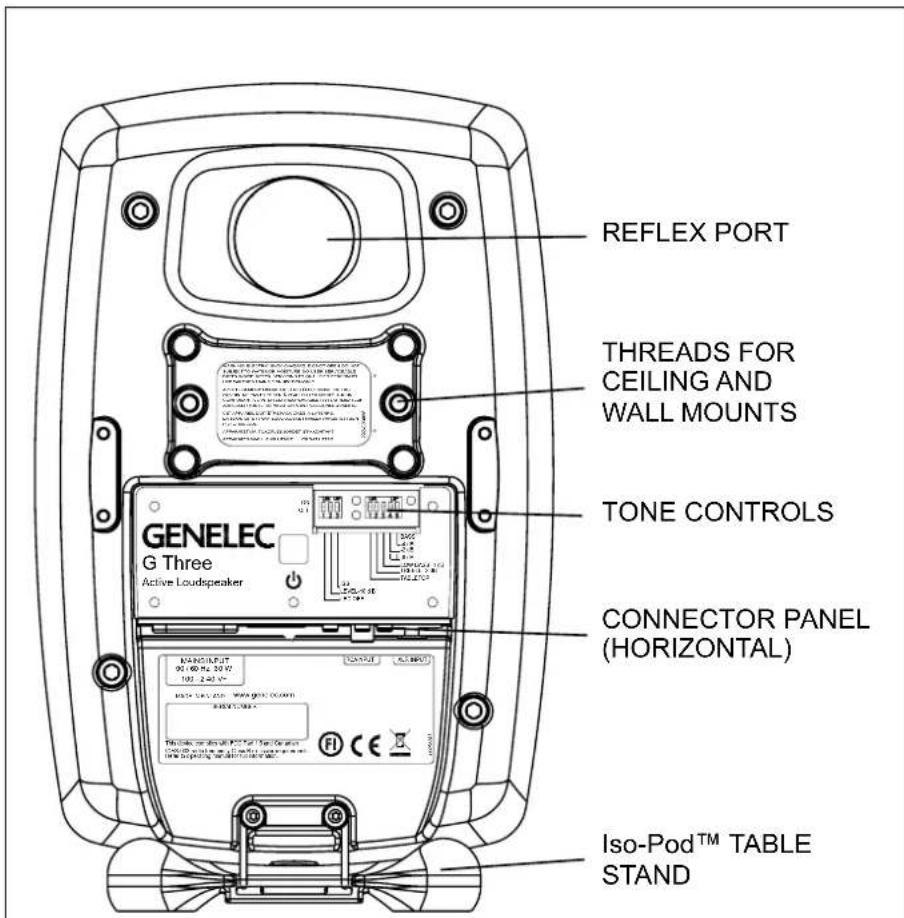
Figure 1. The back panel layout of the G Three
| Loudspeaker Mounting Position Treble Bass Low Bass Tabletop | ||||
| Flat anechoic response None None None None | ||||
| Free standing in a damped room None -2 dB None None | ||||
| Free standing in a reverberant room None -4 dB None None | ||||
| Near the listener on a table or other reflective surface | None -2 dB None | ON (-4 dB @ 160/200 Hz) | ||
| In a corner | None | -4 dB | -4 dB | None |
Table 1. Suggested tone control settings in some typical situations
Setting the tone controls
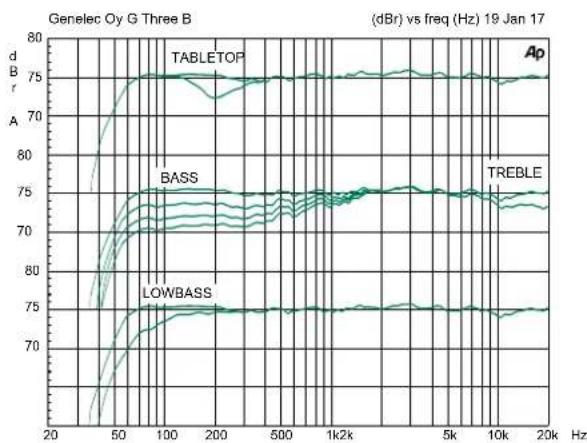
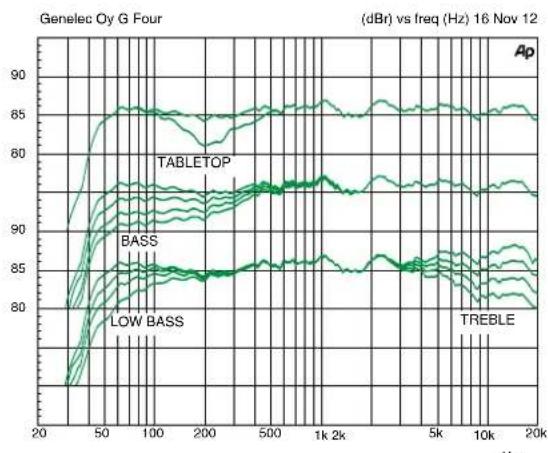
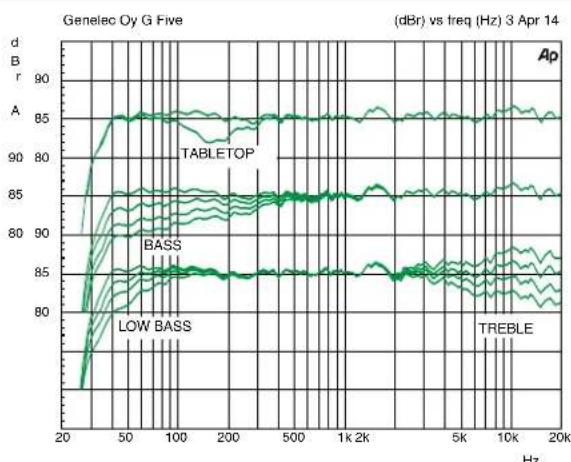
The frequency response of Genelec G Three, G Four and G Five can be adjusted to match the acoustic environment by setting the tone control switches on the rear panel. The controls are "Tabletop", "Treble", "Bass" and "Low Bass". Table 1 shows some typical settings in various situations. Figures 3, 5 and 7 show the effect of the controls on the frequency response.
Tabletop
It is recommended to activate this switch to 'ON' when the loudspeakers are placed on a table, desk or similar surface to minimise the effect of such reflective surfaces between the loudspeakers and the listener.
Such a placement typically causes a boost in one region of the bass spectrum. The "Tabletop" control compensates for this unwanted sound colouration.
Treble
The "Treble" adjustment allows modifying the high frequency response of the loudspeaker. The G Three has one setting, -2 dB for smoothening down an excessively bright sounding system, the G Four and G Five provide two attenuation levels, -2 dB and -4 dB and one boost setting, +2 dB.
Bass
The "Bass" control offers three attenuation levels for the bass response in frequencies below 1 kHz, usually necessary when the loudspeakers are placed near room boundaries or other situations when the bass sounds too dominant. The attenuation levels are -2 dB, -4 dB and -6 dB. On the G Three, the -6 dB attenuation is selected by setting both "Bass" switches to "ON".
Low Bass
The Low Bass control provides bass attenuation at the lowest frequencies of the loudspeaker's bass reproduction. This may be necessary if these deep bass frequencies sound disproportionately strong. The G Three has one setting, -4 dB and the G Four and G Five provide three attenuation levels: -2 dB, -4 dB and -6 dB.
The factory setting for all tone controls is "0" to give a flat anechoic frequency response. Always start adjustment by setting all switches to "OFF" position. Measure or listen systematically through the different combinations of settings to find the best tonal balance.
Mounting considerations
Align the loudspeakers correctly
Always place the loudspeakers so that they are aimed towards the listening position. Vertical placement is preferable, as it minimizes acoustical cancellation problems around the crossover frequency.
Maintain symmetry
Check that the loudspeakers are placed symmetrically, and at an equal distance from nearby walls. The distance between the listening position and each loudspeaker should also be identical. If possible, place the system so that the listening position is on the centerline of the room but not in the middle of the front-back room dimension.
Minimize reflections
Acoustic reflections from objects close to the loudspeakers like desks, cabinets, shelves, computer monitors etc. can cause unwanted blurring of the sound image. These can be
minimized by placing the loudspeaker clear of reflective surfaces.
Minimum clearances
Sufficient cooling for the amplifier and functioning of the reflex port must be ensured if the loudspeaker is installed in a restricted space such as a cabinet or integrated into a wall structure. The surroundings of the loudspeaker must always be open to the listening room with a minimum clearance of 5 centimeters (2 in) behind, above and on both sides of the loudspeaker. The space adjacent to the amplifier must either be ventilated or sufficiently large to dissipate heat so that the ambient temperature does not rise above 35 degrees Celsius (95°F).
Mounting options
G Three, G Four and G Five offer several mounting options: The Iso-Pod™ (Isolation Positioner/Decoupler™) vibration insulating table stand allows tilting the loudspeaker for correct vertical alignment. There are three mounting points for the Iso-Pod™ on the back of the loudspeaker cabinet allowing vertical and symmetrical horizontal positioning. On the base of the loudspeaker is a 3/8" UNC (M10 on the G Four and G Five) threaded hole compatible with a standard microphone stand. On the rear there are two sets of threaded holes for Omnimount® and König & Meyer brackets.
Maintenance
No user serviceable parts are to be found within the amplifier unit. Any maintenance or repair of the unit should only be undertaken by qualified service personnel.
Safety considerations
Although these products have been designed in accordance with international safety standards, the following warnings and cautions should be observed to ensure safe operation and to maintain the loudspeaker under safe operating conditions:
• Servicing and adjustment must only be performed by qualified service personnel.
• The loudspeaker must not be opened.
- Do not use this product with an unearthed mains cable or an unearthed mains connection as this may compromise electrical safety.
- Do not expose the loudspeaker to water or moisture. Do not place any objects filled with liquid, such as vases on the loudspeaker or near it.
- This loudspeaker is capable of producing sound pressure levels in excess of 85 dB, which may cause permanent hearing damage.
- Free flow of air behind the loudspeaker is necessary to maintain sufficient cooling. Do not obstruct airflow around the loudspeaker.
Note that the amplifier is not completely disconnected from the AC mains service unless the mains power cord is removed from the amplifier or the mains outlet.
WARNING!
This equipment is capable of producing sound pressure levels in excess of 85 dB, which may cause permanent hearing damage.
Compliance to FCC rules
This device complies with part 15 of the FCC Rules. Operation is subject to the following conditions:
• This device may not cause harmful interference, and
- This device must accept any interference received, including interference that may cause undesired operation.
Note: This equipment has been tested and found to comply with the limits for a Class B digital device, pursuant to part 15 of the FCC Rules. These limits are designed to provide reasonable protection against harmful interference in a residential installation. This equipment generates, uses and can radiate radio frequency energy and, if not installed and used in accordance with the instructions, may cause harmful interference to radio communications. However, there is no guarantee that interference will not occur in a particular installation. If this equipment does cause harmful interference to radio or television reception, which can be determined by turning the equipment off and on, the user is encouraged to try to correct the interference by one or more of the following measures:
• Reorient or relocate the receiving antenna.
- Increase the separation between the equipment and receiver.
- Connect the equipment into an outlet on a circuit different from that to which the receiver is connected.
- Consult the dealer or an experienced radio/TV technician for help.
Modifications not expressly approved by the
manufacturer could void the user's authority to operate the equipment under FCC rules.
Guarantee
This product is guaranteed for a period of two years against faults in materials or workmanship. Refer to supplier for full sales and guarantee terms.
line
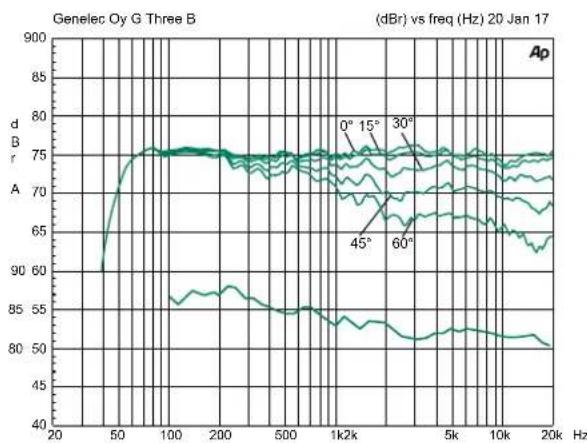
| Frequency (Hz) | dA (dB) | | -------------- | ------- | | 0 | 75 | | 15 | 75 | | 30 | 75 | | 45 | 75 | | 60 | 75 |Figure 2. The upper curve group shows the horizontal directivity characteristics of the G Three measured at 1 m. The lower curve shows the system's power response.
line
| Frequency (Hz) | TABLETOP | BASS | LOWBASS | | -------------- | -------- | ---- | ------- | | 20 | 75 | 75 | 70 | | 50 | 75 | 75 | 70 | | 100 | 75 | 75 | 70 | | 200 | 75 | 75 | 70 | | 500 | 75 | 75 | 70 | | 1k | 75 | 75 | 70 | | 5k | 75 | 75 | 70 | | 10k | 75 | 75 | 70 | | 20k | 75 | 75 | 70 |Figure 3. The curves show the effect of the "Tabletop", "Bass", "Low Bass" and "Treble" controls on the free field response of the G Three.
line
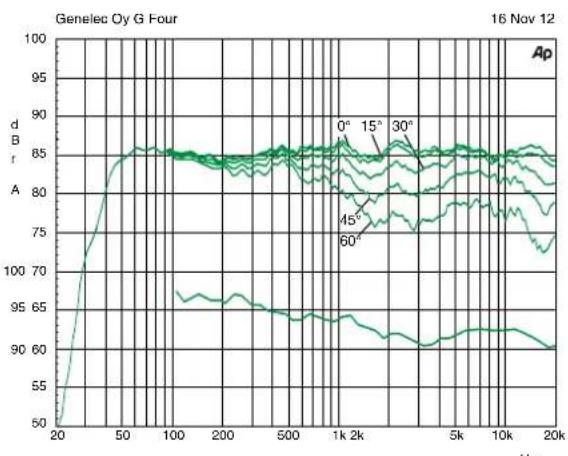
| Frequency (Hz) | Amplitude (dB) | | -------------- | -------------- | | 20 | 50 | | 50 | 85 | | 100 | 85 | | 200 | 85 | | 500 | 85 | | 1k | 85 | | 2k | 85 | | 5k | 85 | | 10k | 85 | | 20k | 85 |Figure 4. The upper curve group shows the horizontal directivity characteristics of the G Four measured at 1 m. The lower curve shows the system's power response.
line
| Frequency (Hz) | TABLETOP | BASS | LOW BASS | TREBLE | | -------------- | -------- | ---- | -------- | ------ | | 20 | 80 | 80 | 80 | 80 | | 50 | 85 | 85 | 85 | 85 | | 100 | 86 | 86 | 86 | 86 | | 200 | 85 | 85 | 85 | 85 | | 500 | 86 | 86 | 86 | 86 | | 1k | 86 | 86 | 86 | 86 | | 2k | 86 | 86 | 86 | 86 | | 5k | 86 | 86 | 86 | 86 | | 10k | 86 | 86 | 86 | 86 | | 20k | 86 | 86 | 86 | 86 |Figure 5. The curves show the effect of the "Tabletop", "Bass", "Low Bass" and "Treble" controls on the free field response of the G Four
line
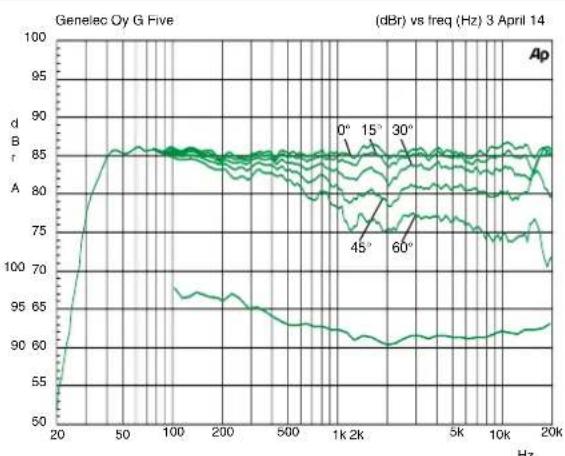
| Frequency (Hz) | dB (dB) | | -------------- | ------- | | 20 | 50 | | 50 | 85 | | 100 | 85 | | 200 | 85 | | 500 | 85 | | 1k | 85 | | 2k | 85 | | 5k | 85 | | 10k | 85 | | 20k | 85 |Figure 6. The upper curve group shows the horizontal directivity characteristics of the G Five measured at 1 m. The lower curve shows the system's power response.
line
| Frequency (Hz) | TableTOP | BASS | LOW BASS | TREBLE | | -------------- | -------- | ---- | -------- | ------ | | 20 | 85 | 85 | 80 | 80 | | 50 | 85 | 85 | 80 | 80 | | 100 | 85 | 85 | 80 | 80 | | 200 | 85 | 85 | 80 | 80 | | 500 | 85 | 85 | 80 | 80 | | 1k | 85 | 85 | 80 | 80 | | 2k | 85 | 85 | 80 | 80 | | 5k | 85 | 85 | 80 | 80 | | 10k | 85 | 85 | 80 | 80 | | 20k | 85 | 85 | 80 | 80 |Figure 7. The curves show the effect of the "Tabletop", "Bass", "Low Bass" and "Treble" controls on the free field response of the G Five
| SYSTEM SPECIFICATIONS | |||
| G Three G Four G | Five | ||
| Lower cut-off frequency, -6 dBUpper cut-off frequency, -6 dB | ≤47 Hz≥25 kHz | ≤41 Hz≥25 kHz | ≤32 Hz≥25 kHz |
| Free field frequency response of system (± 2.5 dB) 54 Hz - 20 kHz 48 Hz - | 20 kHz 38 Hz - 20 kHz | ||
| Maximum short term sine wave acoustic output on axis in half space, averaged from 100 Hz to 3 kHz@ 1 m@ 0.5 m | ≥104 dB SPL≥110 dB SPL | ≥105 dB SPL≥111 dB SPL | ≥110 dB SPL≥116 dB SPL |
| Maximum long term RMS acoustic output in same conditions with simulated programme signal according to IEC 60268-1 (limited by driver unit protection circuit) @ 1 m | ≥96 dB SPL | ≥99 dB SPL | ≥101 dB SPL |
| Self generated noise level in free field @ 1 m on axis (A-weighted) ≤ 5 dB ≤ | 10 dB ≤ 10 dB | ||
| Harmonic distortion at 1 m on axisFreq. 50 to 100 Hz>100 Hz | at 85 dB SPL< 2 %< 0.5 % | at 90 dB SPL< 2 %< 0.5 % | at 90 dB SPL< 2 %< 0.5 % |
| Drivers:BassTreble | 130 mm (5 in)19 mm (3/4 in) metal dome | 165 mm (6 1/2 in)19 mm (3/4 in) metal dome | 205 mm (8 in)25 mm (1 in) metal dome |
| Weight: 5.0 kg (11 lbs) 8.6 kg (18.9 lbs) 12.7 kg (28 lbs) | |||
| Dimensions:Height (without table support)Height (including table support)WidthDepth | 299 mm (11 13/16 in)285 mm (11 1/4 in)189 mm (7 7/16 in)178 mm (7 in) | 350 mm (13 13/16 in)365 mm (14 3/8 in)237 mm (9 3/8 in)223 mm (8 13/16 in) | 433 mm (17 1/16 in)452 mm (17 13/16 in)286 mm (11 1/4 in)278 mm (10 15/16 in) |
| CROSSOVER SECTION | |||
| G Three G Four G | Five | ||
| Input connectorsXLR femaleRCA female | 11 | 11 | 11 |
| Input impedance | 10 kOhm | 10 kOhm | 10 kOhm |
| Crossover frequency, Bass/Treble | 3.0 kHz | 3.0 kHz | 1.8 kHz |
| Treble control operating range in 2 dB steps | -2 dB @ 15 kHz | From +2 to -4 dB @ 15 kHz | From +2 to -4 dB @ 15 kHz |
| Tabletop low frequency control operating range | -4 dB @ 200 Hz | -4 dB @ 200 Hz | -4 dB @160 Hz |
| Low Bass control operating range | -4 dB @ 55 Hz | From 0 to -6 dB@ 45 Hz in 2 dB steps | From 0 to -6 dB@ 35 Hz in 2 dB steps |
| Bass control operating range in 2 dB steps | From 0 to -6 dB @ 100 Hz | From 0 to -6 dB @ 100 Hz | From 0 to -6 dB @ 100 Hz |
| AMPLIFIER SECTION | |||
| G Three G Four G | Five | ||
| Bass amplifier short term output power | 50 W | 90 W | 150 W |
| Treble amplifier short term output power | 50 W | 90 W | 120 W |
| Long term output power is limited by driver unit protection circuitry | |||
| Amplifier system distortion at nominal output | |||
| THD | ≤ 0.05 % | ≤ 0.05 % | ≤ 0.05 % |
| SMPTE-IM | ≤ 0.05 % | ≤ 0.05 % | ≤ 0.05 % |
| CCIF-IM | ≤ 0.05 % | ≤ 0.05 % | ≤ 0.05 % |
| DIM 100 | ≤ 0.05 % | ≤ 0.05 % | ≤ 0.05 % |
| Signal to Noise ratio, referred to full output | |||
| Bass | ≥ 100 dB | ≥100 dB | ≥ 100 dB |
| Treble | ≥ 100 dB | ≥100 dB | ≥ 100 dB |
| Mains voltage 100-240 V AC, 50-60 Hz 100, 120, 220 or 230 V AC fixed, according to region | |||
| Voltage operating range ±10 % | ±10 % | ||
| Power consumption | |||
| Standby | <0.5 W | <0.5 W | <0.5 W |
| Idle | 3 W | 10 W | 10 W |
| Full output | 60 W | 110 W | 170 W |
natural_image
Black studio album speaker with visible sound waves and 'GENELEC' branding (no additional text or symbols)Yleistä
natural_image
Black studio album speaker with visible grille and base, labeled 'GENELEC' (no other text or symbols)概述

- General description
- Positioning the loudspeaker
- Connections
- ISS Autostart function
- Setting the playback level
- Switching off the power indicator LED
- Setting the tone controls
- Tabletop
- Treble
- Bass
- Low Bass
- Mounting considerations
- Align the loudspeakers correctly
- Maintain symmetry
- Minimize reflections
- Minimum clearances
- Mounting options
- Maintenance
- Safety considerations
- WARNING!
- Compliance to FCC rules
- Guarantee
- 概述
Brand : GENELEC
Model : G Four
Category : Loudspeaker