
7382AP - Loudspeaker GENELEC - Free user manual and instructions
Find the device manual for free 7382AP GENELEC in PDF.


| Product Type | Active Studio Subwoofer |
| Model | Genelec 7382AP |
| Frequency Response | 19 Hz – 100 Hz (±3 dB) |
| Amplifier Power | 800 W RMS (Class D) |
| Driver Size | 18 inch (460 mm) driver |
| Dimensions (H x W x D) | 600 x 500 x 500 mm (23.6 x 19.7 x 19.7 in) |
| Weight | 32 kg (70.5 lb) |
| Input Connectors | XLR balanced (2x), XLR output (1x) |
| Power Supply | 100–240 V AC, 50/60 Hz |
| Controls | Volume, crossover frequency (19–100 Hz), phase (0–180°), bass roll-off |
| Crossover Type | Active, variable with 4th order Linkwitz-Riley filter |
| Enclosure Type | Sealed (closed box) construction |
| Protection Features | Overload protection, short-circuit protection, thermal protection |
| Standby Power Consumption | < 0.5 W (Energy Star compliant) |
| Operating Temperature | +10°C to +35°C (50°F to 95°F) |
| Humidity | 0% to 80% non-condensing |
| Cabinet Material | Aluminum with steel grille |
| Finish | Black semi-matte (RAL 9017 or similar) |
| Included Accessories | Power cable, user manual (PDF) |
| Warranty | 2 years (extendable with registration) |
| Repairability Index | Parts available from manufacturer; service by authorized technicians |
| Cleaning Instructions | Clean with a soft, dry cloth; avoid liquids |
| Safety Notes | Do not expose to rain or moisture, do not obstruct ventilation |
Frequently Asked Questions - 7382AP GENELEC
User questions about 7382AP GENELEC
0 question about this device. Answer the ones you know or ask your own.
Ask a new question about this device
Download the instructions for your Loudspeaker in PDF format for free! Find your manual 7382AP - GENELEC and take your electronic device back in hand. On this page are published all the documents necessary for the use of your device. 7382AP by GENELEC.
USER MANUAL 7382AP GENELEC
natural_image
Exterior view of a black industrial enclosure with three circular vented fans (no text or symbols visible)Genelec 7382A Smart Active Subwoofer
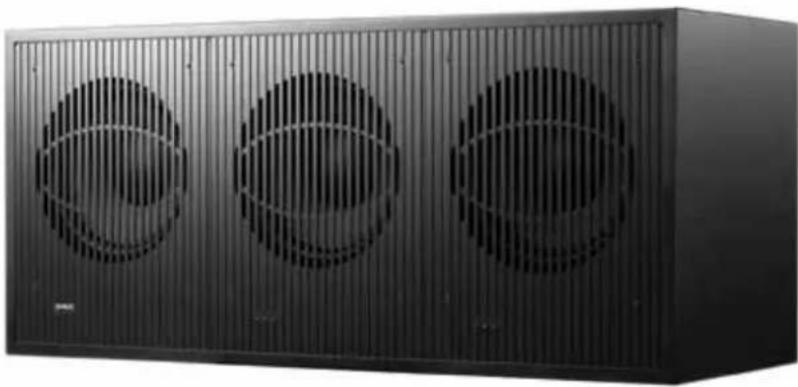
natural_image
Exterior view of a black industrial storage unit with three circular vented fans (no text or symbols visible)Introduction
Thank you for choosing a Genelec product! Fulfilling our customers' dreams by offering people the most truthful sound reproduction possible has been the source of our enthusiasm since 1978. There's already over one million Genelec monitors around the world - welcome to our story!
All Genelec monitors are designed, hand assembled and individually tested at our factory in lisalmi, Finland. Our products are designed to last for decades and we take care that our customers receive excellent support and technical services throughout the lifetime of the products.
Please register your monitor at http://www.community.genelec.com/. You will receive an extended 5 year warranty for spare parts. More information about our service and technical support: http://www.genelec.com/customer-service.
System Description
The Genelec 7382A SAM subwoofer is designed for professional use and integrates easily into environments based on analog or digital interfacing. The 7382A even introduces outstanding GLM™ features to the lower octaves of monitoring systems based on main speakers from a different vendor.
Multichannel AES/ EBU signals can be monitored by using the 9301A multichannel digital audio interface device connected to the subwoofer.
The 7382A is intended to be calibrated to the monitoring room acoustics using the Genelec Loudspeaker Manager (GLM) computer software. The GLM software runs on Mac OS and Windows computers and enables detailed acoustic calibration permanently inside the subwoofer. It is also possible to use the GLM software as a monitoring management system for more than 30 SAM monitors and subwoofers.
In its power save mode, the 7382A consumes less than 1 W of power. Energy saving Intelligent Signal Sensing (ISS) can automatically put the subwoofer into a power save mode when audio has been absent for a selected time. Upon sensing an input signal, the subwoofer wakes up to full operation. The time before entering the ISS power save mode can be configured using the GLM software.
Package content
Each subwoofer is supplied with an individually calibrated RAM-SW amplifier unit. If several 7382A subwoofers are used in the same system, it is very important not to mix the subwoofer/amplifier pairs. A mains cable, a 10 m (33.3 ft) Speakon signal cable, one 5 m GLM network cable and this operating manual are also included.
Operating Environment
This subwoofer is designed for indoor use only. The permissible ambient temperature is 15-35 degrees Celsius (50-95°F) and relative humidity 20 - 80% (noncondensing). When the product has been stored or transported in a cool environment and is taken into a warm room, wait about one hour before opening packing to prevent condensation of humidity before connecting to mains power.
Genelec Loudspeaker Manager™ (GLM™) Software And GLM User Kit
The GLM software gets the most out of 7382A and tailor-fits it to your room. GLM is available for download free of charge at www.genelec.com/glm. Check in from time to time to take advantage of new features, or consider using the cloud-based version.
A GLM User Kit comprising the necessary hardware, including the GLM Adapter and measuring microphone is needed for building and operating the GLM network. This kit can be purchased at certified Genelec dealers.
Connections
Before connecting signal cables, switch the subwoofer amplifier and monitors off.
Analog Inputs 1 and 2
The 7382A SAM subwoofer accepts balanced XLR inputs. These are the outputs typically provided in a console or a monitor controller. The maximum balanced audio signal level is +24 dBu.
LFE In
A dedicated XLR input is provided for the analog LFE signal. The bandwidth for a signal fed to the LFE input is 120 Hz. The LFE input sensitivity can be set the same as for the main channels or at +10 dB relative to the main channels. This feature is set in the GLM software.
IN Digital
One AES/EBU digital audio XLR input is available on the 7382A subwoofer. This can take a stereo digital audio signal.
Multichannel digital audio monitoring is possible with the 9301A interface device. The 9301A connects to the digital audio input in the 7382A subwoofer and expands the number of digital audio inputs to four XLR digital audio inputs. This supports a 7.1 audio system, including an LFE channel.

Figure 1. Connector panel of the RAM-SW amplifier unit.
| Cable Gauge Max. Length |
| 4 x 2.0 mm ^2 (14 AWG) 30 m / 100 ft |
| 4 x 2.5 mm ^2 (13 AWG) 40 m / 130 ft |
| 4 x 3.3 mm ^2 (12 AWG) 50 m / 165 ft |
| 4 x 4.0 mm ^2 (11 AWG) 60 m / 200 ft |
Table 1. Recommended cable gauges for different lengths of signal cable.
Analog Output 1 and 2
Analog balanced XLR connectors connect the subwoofer to the monitors.
These analog outputs carry an unfiltered copy of the inputs. The subwoofer/main monitor crossover is adjusted in the GLM software from 50 Hz to 100 Hz.
See chapter "Bass Management" for details.
THRU AES/EBU
The THRU AES/EBU is a bit-to-bit copy of the digital audio signal on the IN Digital. This output can be used for digital sharing of the audio between subwoofers in the case where multiple subwoofers are used. This output can also be used for distributing a stereo digital audio signal to monitors, creating a 2.1 digital audio stereo monitoring system.
Subwoofer Connector
This Speakon connector is used for linking the RAM-SW amplifier unit and the 7382A subwoofer enclosure. There is a corresponding connector on the reflex port end of the enclosure.
A 10 m (33.3 ft) cable is provided with the subwoofer. See Table 1 for recommended minimum gauges for different lengths of
flowchart
graph TD
    A["LISTENING POSITION"] --> B["MICROPHONE"]
    B --> C["GENELEC"]
    C --> D["USB"]
    D --> E["Laptop"]
    F["RAM-SW"] --> G["GLM NETWORK"]
    H["RAM-XL"] --> I["GLM NETWORK"]
    J["Computer"] --> K["Computer"]
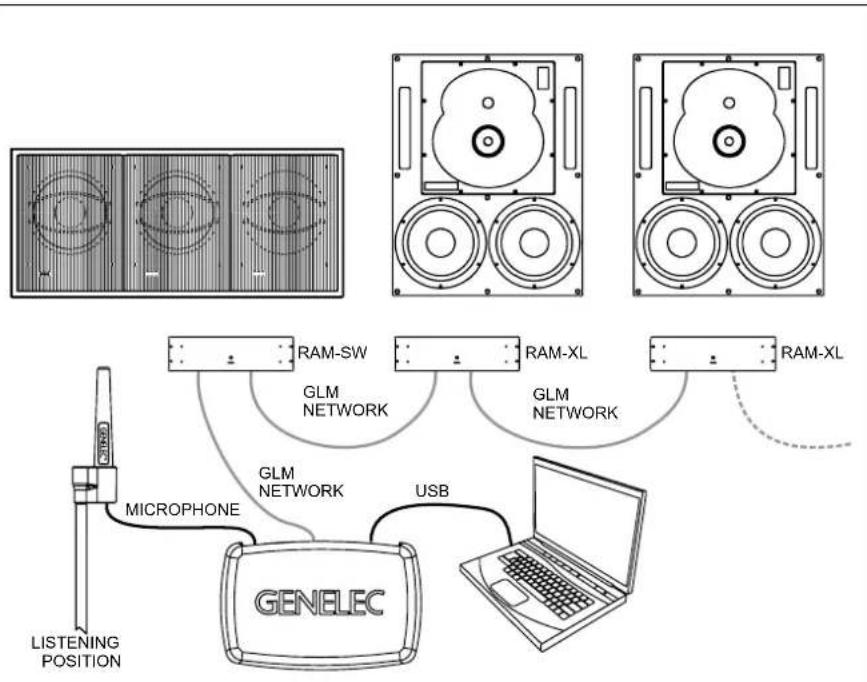
Figure 2. GLM Network cabling. Audio cabling not shown.
cable. Four pole cable is recommended. The cable connectors are connected pin to pin, with 1+ and 2+ in parallel, same as 1- and 2-.
GLM Management Network
All controls and calibration features included in the 7382A SAM subwoofer are set using the Genelec Loudspeaker Manager (GLM) software. Two GLM Network connectors are provided on the amplifier for computer control. These accept CAT5 or higher cable (RJ45 connector). Standard CAT cables can be used.
The GLM management network runs a proprietary protocol. This is not an Ethernet connection, do not connect to an Ethernet network.
LED Connector
This connector allows linking a remote status indicating light if the amplifier unit is placed so that its front panel light can not be seen.
Mains Power Input
The main power connection supports a wide mains voltage range (100-240 VAC, 50-60 Hz). This enables the RAM-SW amplifier to be plugged in anywhere globally. When the mains power is provided with a generator, inverter, or certain lower-quality UPS devices, we recommend filtering power to remove harmonics and ensuring the voltage supply is stable.
Bass Management
Bass management divides the input audio signal into low frequency and high frequency content at the subwoofer crossover frequency. The signal content below the crossover frequency is reproduced by the subwoofer. The signal content above the crossover frequency is reproduced by the monitors.
In the distributed bass management method used in the 7382A system, the monitors and the subwoofer receive full bandwidth audio signal and the filtering is done separately inside each monitor and subwoofer. The lowpass and highpass filters are set in synchrony by the GLM management network. This method is only available in systems where GLM computer management is used and with monitors supporting this method. The subwoofer crossover frequency can be adjusted from 50 Hz to 100 Hz.
The distributed bass management supports three different signal cabling configurations:
- All channels are routed through the subwoofer's IN/OUT connectors to the respective monitors.
- Y-cables split each signal to the subwoofer's IN connector and the monitor's input.
- Signal sources with dual outputs for each channel, one going to the subwoofer, the other going to the monitor.
Use With GLM Control Network
The 7382A SAM subwoofer is fully compatible with Genelec Loudspeaker Manager GLM software, the proprietary Genelec monitor management network, and all Genelec SAM monitors.
Managing the 7382A SAM subwoofer using GLM software control unleashes the full power of room compensation in the 7382A SAM subwoofer, enabling 20 parametric room compensation filters. This powerful room compensation functionality is only available when the GLM is used. Detailed information on the use with the GLM network is presented in the GLM System Operating Manual.
System Setup
The 7382A SAM subwoofer reaches its full potential when set up and calibrated using the GLM software. Genelec Loudspeaker Manager GLM and the proprietary Genelec monitor management network offer
- automated acoustic equalization individually for every monitor and subwoofer
- automated level alignment
• distance (acoustic time-of-flight) calibration - aligning of the subwoofers for bass management
for any reproduction system from stereo to complex 3D immersive setups, including one or more subwoofers. GLM setup is fast and accurate. It can precisely address the typical narrow-band low frequency modal resonances and radiation loads of a room and offers precise frequency response compensations. The settings can be controlled with a computer or the settings can be permanently stored in the monitors and subwoofers, to make the setup available at all times even when the computer is not in use. Genelec recommends setting up SAM monitoring systems using the GLM. You can find a detailed description of the setup process and the use of GLM in the GLM System Operating Manual.
The setup using GLM is fast and consists of the following steps:
- Connect a CAT5 (RJ45) cable between each monitor (and subwoofer) and finally to the control network input of the GLM Adapter device (see Figure 1).
- Connect the GLM Adapter device to computer USB connector.
- Using a microphone stand, place the Genelec measurement microphone at the listening location with the microphone pointing upwards and the microphone top at the height of the engineer's ear. The microphone is a part of the GLM User Kit.
- Connect the GLM Adapter device to the computer USB port using cable included in the GLM User Kit.
- Download the GLM software at the Genelec web site (www.genelec.com).
• Install the GLM software and follow the instructions in the software to measure and set up your system.
- If you plan to not use a computer for controlling the subwoofer, use the GLM software to write the setting into the subwoofer (use menu item "Store | Store the Current Group Settings...").
With GLM software active and controlling the 7382A SAM subwoofer, the use of analog
and digital inputs is controlled by the GLM software entirely. In the software 'Input Type' in the 'Group' definition sets this. The GLM software allows you to select and switch between the analog and digital audio inputs.
If GLM control is not used, an AES/EBU digital audio signal will override analog signal. This means, if a valid digital audio clock is detected, the digital audio is selected over the analog audio.
When the GLM acoustic settings have been stored in the 7382A SAM subwoofer and are active, the input is selected by the 'Group' settings in the GLM software when the settings are stored.
RAM-SW Power Switch Light
When used without a connection to the GLM software, the light on the power switch on the RAM-SW is green, indicating normal operational mode. A red colour indicates amplifier clipping and yellow indicates thermal overload. If the red or yellow warning light appears, turn down the level.
Additional Information
Positioning the Subwoofer in a Room
The location of the subwoofer can affect the frequency response and sound level dramatically particularly when the room acoustic effects are strong. Even small changes in a subwoofer's location can make a marked difference in the frequency response. To begin, place the subwoofer near the front wall slightly offset from the room center line. Often systematic experimentation is needed to find the location giving the flattest frequency response at the listening location. Usually the subwoofer is placed close to a wall as this creates the highest output. Positioning the subwoofer close to a corner will boost the bass level at lower frequencies and may also cause asymmetrical spatial imaging. Measured from the subwoofer's driver the recommended distance to a wall is less than 0.6 m (24 in). This avoids a loss of audio level at low frequencies created by the audio reflecting off the wall and cancelling certain frequencies radiated by the subwoofer.
Operating Environment
This subwoofer is designed for indoor use only. The permissible ambient temperature is 15-35 degrees Celsius (50-95°F) and relative humidity 20 - 80% (non-condensing). When the product has been stored or transported in a cool environment and is taken into a warm room, wait about
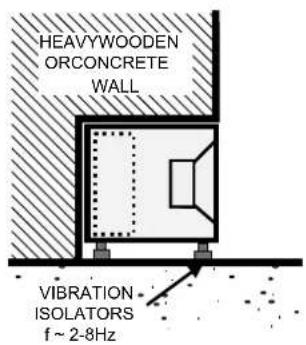
Figure 3. Flush mounting the subwoofer in a non-absorbing wall.
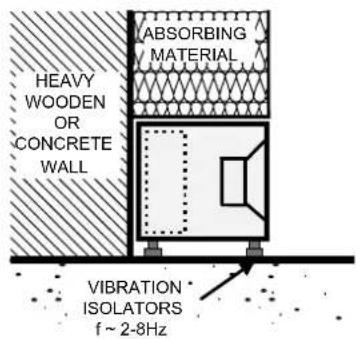
Figure 4. Flush mounting the subwoofer in a semi-absorbing wall.
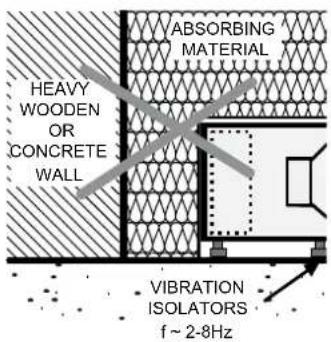
Figure 5. Incorrect flush mounting the subwoofer in a semi-absorbing wall.

Figure 6. Clearance needed on the reflex port side.
one hour before opening packing to prevent condensation of humidity before connecting to mains power.
Minimum Clearances
Do not cover the amplifier or place it in a closed cabinet. The space must be ventilated or sufficiently large to dissipate heat so that the ambient temperature does not rise above 35 degrees Celsius (95°F). The reflex port opening on the enclosure should have a clearance of at least 20 cm (8 in) to ensure functioning of the reflex port.
Flush Mounting
When the subwoofer is flush mounted in a wall or cabinet, ensure unrestricted airflow in the reflex port and amplifier cooling. Make the recess 20 cm (8 in) wider than the subwoofer. Place the subwoofer to the right side of the recess if the driver is facing the room. This leaves sufficient free space at the reflex port side. The height and depth of the recess should not be much bigger than what is needed as this may cause unwanted acoustic effects.
Using Multiple Subwoofers
Multiple Genelec 7382A subwoofers can be coupled together in high SPL applications. The necessary cabling is different for digital and analog signals. When subwoofers are close to each other, the sound level increases typically by 6 dB for each doubling of the number of subwoofers. When subwoofers are far from each other, the total increase in the sound level can be less. It is safe to assume the increase is 3 dB for each doubling of the number of subwoofers. Accurate understanding of the increase in sound level requires acoustic measurements.
Digital Cabling
Run a signal cable from the THRU AES/EBU connector of the first subwoofer in the chain to the IN Digital connector of the next subwoofer.
Analog Cabling
When daisy-chaining multiple subwoofers with analog signals, run cables from the OUT 1 and 2 connectors to the next subwoofer's IN 1 and 2 connectors. The LFE channel has
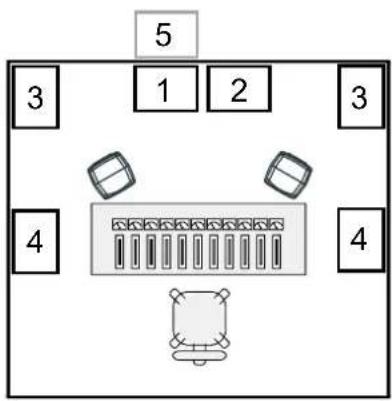
Figure 7. Examples of subwoofer positioning. 1 and 2 are good starting positions for a single subwoofer and also work well with two linked subwoofers. Position 3 causes a significant bass boost and may cause asymmetric spatial imaging if only one subwoofer is used. Position 4 also works best with two subwoofers. Flush mounting (pos. 5) generally works well.
no output connector and can not be daisy-chained.
Maintenance
There are no user serviceable parts inside the subwoofer or the amplifier unit. Maintenance or repair must only be done by Genelec certified service personnel.
Guarantee
Genelec guarantees the subwoofers for two years against manufacturing faults or defects altering performance. You can extend the guarantee to five years by registering the product at www.genelec.com. Refer to the reseller for full sales and guarantee terms.
![1400mm[551/8inch]](/content/2026/06/1194520/images/064a1e8a7fffc00043b7b4d7adfafa5cfbbd31719e69c2a6de3fc5e77e5e834b.jpg)
![558mm[2115/16inch] 136mm[53/8inch] 625mm[245/8inch] 319mm [129/16inch]](/content/2026/06/1194520/images/0f1dced9d5051417e9cb5924e4e34ab7e8685c8674804bf9e9ac2519d9120633.jpg)

natural_image
Two identical rectangular electronic components with no visible text or symbolsFigure 8. The dimensions of the 7382 enclosure and the location of the reflex port and input connector
Safety Considerations
The 7382A has been designed in accordance with international safety standards. To ensure safe operation, the following warnings and precautions must be observed:
- Servicing and adjustment must only be performed by Genelec certified service personnel.
- The subwoofer enclosure must not be opened.
- Do not use this product with a mains cable or mains outlet having no protective earth (potential equalizing) connection as doing so may result in personal injury.
• To prevent fire or electric shock, do not expose the product to water or moisture. - Do not place objects filled with liquid, such as vases, on the subwoofer or near it.
- The amplifier is not completely disconnected from the mains power unless the mains cable is removed from the amplifier or the mains outlet.
- Free flow of air behind and around the subwoofer is necessary to maintain sufficient cooling. Do not obstruct airflow around the subwoofer.
- This subwoofer is capable of producing sound pressure levels in excess of 85 dB, which may cause a permanent hearing damage.
Compliance to FCC Rules
This device complies with part 15 of the FCC Rules. Operation is subject to the following two conditions:
• This device may not cause harmful interference, and
- This device must accept any interference received, including interference that may cause undesired operation.
Note: This equipment has been tested and found to comply with the limits for a Class B digital device, pursuant to part 15 of the FCC Rules. These limits are designed to provide reasonable protection against harmful interference in a residential installation. This equipment generates, uses and can radiate radio frequency energy and, if not installed and used in accordance with the instructions, may cause harmful interference to radio communications. However, there is no guarantee that interference will not occur in a particular installation. If this equipment does cause harmful interference to radio or television reception, which can be determined by turning the equipment off and on, the user is encouraged to try to correct the interference by one or more of the following measures:
• Reorient or relocate the receiving antenna.
- Increase the separation between the
equipment and receiver.
- Connect the equipment into an outlet on a circuit different from that to which the receiver is connected.
- Consult the dealer or an experienced radio/TV technician for help.
Modifications not expressly approved by the manufacturer could void the user's authority to operate the equipment under FCC rules.
SPECIFICATIONS
| Lower cut-off frequency -6 dB 15 Hz | |
| Upper cut-off frequency -6 dB (main channel/LFE) 100 Hz/120 Hz | |
| Drivers 3 x 381 mm (15 in) | |
| Harmonic distortion at 1 m on axis in half space, 30 to 85 Hz2nd3rd | ≤ 1% @ 105 dB SPL≤ 1.5% @ 105 dB SPL |
| Maximum short term sine wave SPL output averaged from 30 to 85 Hz, measured in half space at 1 meter | ≥ 129 dB SPL |
| Maximum peak SPL output with random pink noise, measured in half space at 1 meter (Long term SPL output is limited by driver unit protection circuitry) | ≥ 133 dB SPL |
| Self generated noise at 1 m on axis (A-weighted) <5 dBA | |
| Dimensions H x W x DSubwoofer enclosureRAM-SW amplifier unit | 625 x 1400 x 558 mm ( 24^5/_8 x 55^1/_8 x 21^15/_16 in)3U 132 x 483 (front plate), 425 (casing) x 286 mm3U 5^3/_16 x19 (front plate), 16^1/_4 (casing) x 11^1/_4 in |
| WeightSubwoofer enclosureRAM-SW amplifier unit | 145 kg (320 lb)11.3 kg (25 lb) |
AMPLIFIER SECTION
| Short term amplifier output power(Long term output power is limited by driver unit protection circuitry) | 2500 W |
| Amplifier system THD at nominal output <0.01% | |
| Mains voltage 100-240 VAC 50/60 Hz | |
| Power consumptionStandby, ISS activeIdleFull output, peak | <1 W22 W1500 W |
SIGNAL PROCESSING SECTION
| Signal connectors 2 channel analog IN/OUT | Analog LFE INDigital IN/OUT |
| Analog signal input connectos XLR female, balanced 10 kOhm | pin 1 gnd, pin 2 non-inverting, pin 3 inverting |
| Maximum analog input signalAnalog input sensitivity (100 dB SPL at 1 m) | +24.0 dBu-6 dBu |
| Digital signal input connector XLR female 110 OhmDigital signal output / Thru connector XLR male 110 Ohm | AES/EBU Single WireAES/EBU Single Wire |
| Digital audio inputWord lengthSample rate | 16 - 24 bits32 - 192 kHz |
| Digital input sensitivity (100 dB SPL at 1 m)Positive input gain selection (GLM control) | -30 dBFS+6, +12, +18 dB |
| Control networkTypeConnection | Proprietary GLM network2 RJ45, CAT5 cables |
| GLMTMsoftware frequency response adjustment parametric notch filters 20 | |
| System calibration Genelec GLM AutoCalTM, GLM manual | |
| Crossover setting in subwoofer's input/output channels | GLM control, input low pass selectable 50 - 100 Hz,output no filtering |
| LFE cutoff 120 Hz | |
| Midband rejection >400 Hz ≥ 50 dB | |
| Phase matching control 15° steps with GLM control |
Genelec Document D0147R001. Copyright Genelec Oy 6.2018. All data subject to change without prior notice
www.genelec.com
GENELEC®
International enquiries:
Genelec, Olvitie 5
FIN-74100, Ilsalmi, Finland
Phone +358 17 83881
Fax +358 17 812 267
Email genelec@genelec.com
In the U.S. please contact:
Genelec, Inc., 7 Tech Circle
Natick, MA 01760, USA
In China please contact:
Beijing Genelec Audio Co, Ltd
Room 101, 1st Floor Building 71 B33
Universal Business Park
No.10 Jiuxianqiao Road, Chaoyang District,
Beijing 100015, China
Phone +86 (10) 5823 2014, Post code 100015
Email genelec.china@genelec.com
In Sweden please contact
Genelec Sverige
Ellipsvägen 10A
141 75 Kungens Kurva
Sweden
Phone +46 8 449 5220
Email info@genelec.com


- Genelec 7382A Smart Active Subwoofer
- Introduction
- System Description
- Package content
- Operating Environment
- Genelec Loudspeaker Manager™ (GLM™) Software And GLM User Kit
- Connections
- Analog Inputs 1 and 2
- LFE In
- IN Digital
- Analog Output 1 and 2
- THRU AES/EBU
- Subwoofer Connector
- GLM Management Network
- LED Connector
- Mains Power Input
- Bass Management
- Use With GLM Control Network
- System Setup
- RAM-SW Power Switch Light
- Additional Information
- Positioning the Subwoofer in a Room
- Minimum Clearances
- Flush Mounting
- Using Multiple Subwoofers
- Digital Cabling
- Analog Cabling
- Maintenance
- Guarantee
- Safety Considerations
- Compliance to FCC Rules
Brand : GENELEC
Model : 7382AP
Category : Loudspeaker