
HD4922 - Cooker PHILIPS - Free user manual and instructions
Find the device manual for free HD4922 PHILIPS in PDF.


| Product Type | Induction Cooker |
| Brand | Philips |
| Model | HD4922 |
| Dimensions (approx.) | 330 x 270 x 60 mm |
| Weight (approx.) | 2.5 kg |
| Power Supply | 220-240 V, 50/60 Hz |
| Power Consumption | 400 - 2200 W |
| Cooking Plate Material | Crystallite (glass ceramic) |
| Number of Cooking Zones | 1 |
| Cooking Modes | Quick-start (Manual), Hot Pot, Stew, Soup/Congee, Steam-Lo, Steam-Hi, Stir-fry, Boil, Keep-warm |
| Power Levels | 7 levels (400-2200 W) + temperature settings (80-240°C) |
| Cooking Time Range | 5 min - 180 min (depending on mode) |
| Timer Delay Start | Up to 24 hours (in select modes) |
| Automatic Shut-off | Yes (60 min idle in manual/hot pot; 1 min without cookware) |
| Overheat Protection | Yes (E2/E4 error codes) |
| Child Lock | Not specified |
| Cookware Compatibility | Magnetic bottom (iron, magnetic stainless steel); flat bottom; diameter 12-23 cm (12-25 cm in manual/hot pot); max weight 8 kg |
| Cleaning | Damp cloth with mild detergent; do not immerse |
| Storage | Dry, cool place; do not place heavy objects on plate |
| Warranty | Standard Philips warranty (see leaflet) |
| Accessories Included | User manual, warranty card |
Frequently Asked Questions - HD4922 PHILIPS
User questions about HD4922 PHILIPS
0 question about this device. Answer the ones you know or ask your own.
Ask a new question about this device
Download the instructions for your Cooker in PDF format for free! Find your manual HD4922 - PHILIPS and take your electronic device back in hand. On this page are published all the documents necessary for the use of your device. HD4922 by PHILIPS.
USER MANUAL HD4922 PHILIPS
ENGLISH 6
繁體中文 15
简体中文 23
Introduction
Congratulations on your purchase and welcome to Philips! To fully benefit from the support that Philips offers, register your product at www.philips.com/welcome.
The induction cooker works on the basis of an electromagnet that creates a powerful, high-frequency electromagnetic field. When cookware consisting of magnetic material (e.g., iron) is placed on the induction cooker, the electromagnetic field transfers energy to the bottom of the cookware, which causes the cookware and the food inside it to become hot. The amount of heat generated in the cookware is controlled by varying the strength of the electromagnetic field. When the strength of the electromagnetic field is changed, the temperature of the cookware changes instantly.
Advantages of the induction cooker:
- Safe: the induction cooker does not make use of an open flame or fire. It also has a number of safety features, which allow you to enjoy cooking with your family whenever you want.
- Fast: in induction cooking, the cookware serves as the heat source. This results in much faster and more even heat transfer, shortening the cooking time by more than 40% compared to conventional cooking.
- Versatile: the induction cooker has 8 preset cooking modes, each with its own optimal heating pattern. These modes allow you to prepare a great variety of nutritious meals.
- Very user friendly: the simple and interactive control panel and display allow you to easily adjust the settings at the touch of a button.
- Comfortable: the induction cooking process is smoke-free and produces less grease. Moreover, the cooker and the surrounding area stay cool. This allows you to cook in a cool and comfortable environment.
- Portable: the induction cooker has a compact design and the cooking plate stays cool. This means the appliance is always safe to use and allows you to cook anywhere in your home.
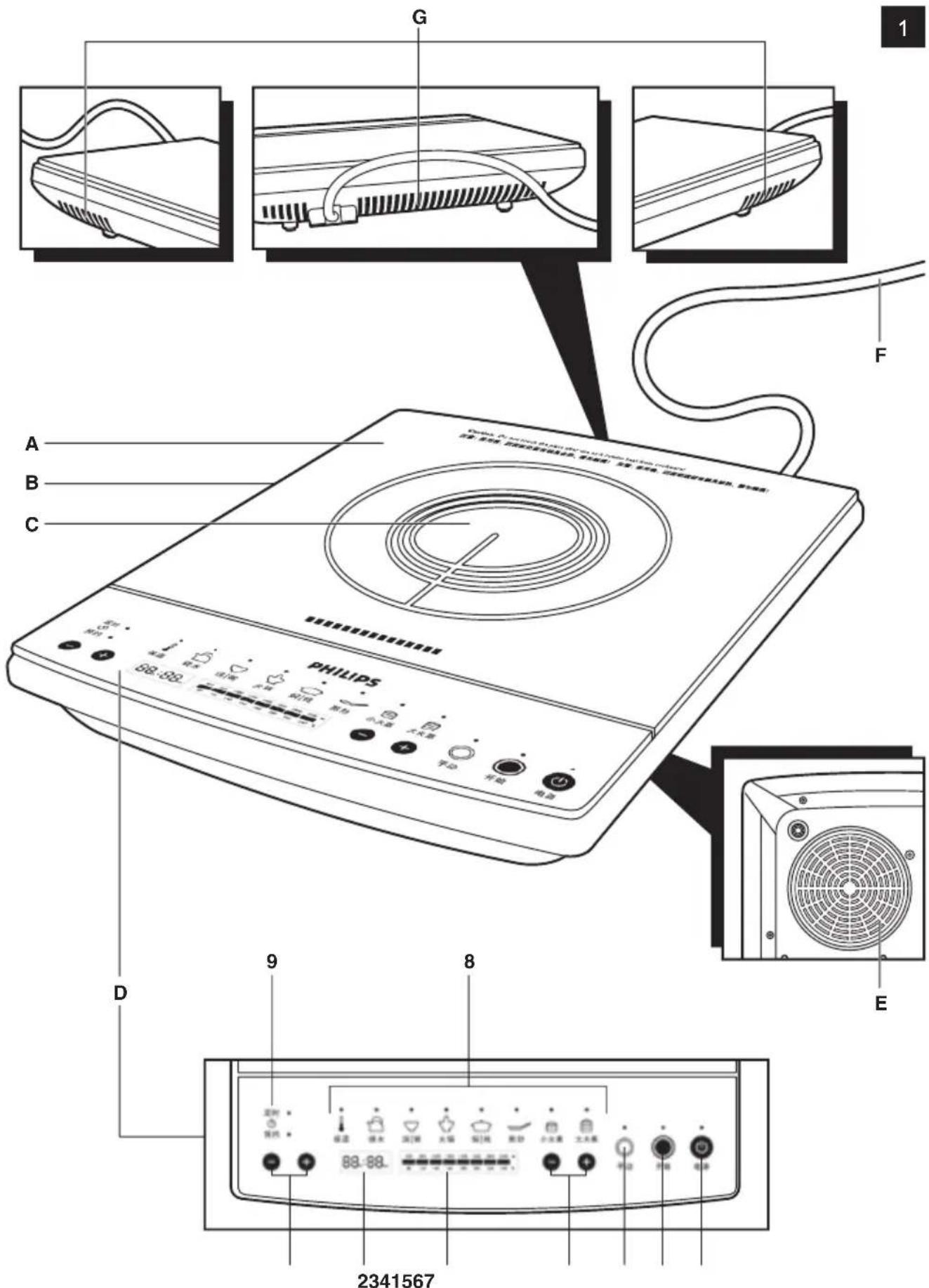
General description (Fig. 1)
A Crystallite cooking plate
B Body
C Cooking zone
D Control panel
E Air inlet
F Mains cord
G Air outlets
D Control panel
1 +/- buttons for setting the cooking time and timer
2 Time display
3 Power level/cooking temperature bar with lights
4 +/- buttons for setting the power level or cooking temperature
5 Quick-start (manual) button
6 Start button with light
7 Power on/off button with power-on light
8 Buttons with lights for preset cooking modes
9 Cooking time/timer button with cooking time light and timer light
Important
Read this user manual carefully before you use the appliance and save it for future reference.
Danger
- Never immerse the appliance in water or rinse it under the tap.
Warning
- The temperature of accessible surfaces may be high when the appliance operates.
- Check if the voltage indicated on the appliance corresponds to the local mains voltage before you connect the appliance.
- Only connect the appliance to an earthed wall socket. Always make sure the plug is inserted firmly into the socket.
- Do not use the appliance if the plug, the mains cord or the appliance itself is damaged.
- If the mains cord is damaged, you must have it replaced by Philips, a service centre authorised by Philips or similarly qualified persons in order to avoid a hazard.
- This appliance is not intended for use by persons (including children) with reduced physical, sensory or mental capabilities, or lack of experience and knowledge, unless they have been given supervision or instruction concerning use of the appliance by a person responsible for their safety.
- Children should be supervised to ensure that they do not play with the appliance.
- Keep the mains cord out of the reach of children. Do not let the mains cord hang over the edge of the table or worktop on which the appliance stands.
- Never connect this appliance to an external timer switch in order to avoid a hazardous situation.
- Never let the appliance run unattended.
- Make sure the cooking plate is clean and dry before you switch on the appliance.
- Do not cover the air outlets while the induction cooker is operating.
- Do not plug in the appliance or operate the control panel with wet hands.
- Do not touch the cooking plate after cooking, as it retains heat from the cookware.
- Metallic objects such as knives, forks, spoons and lids should not be placed on the cooking plate since they can get hot.
- Do not cover any part of the cooking plate with aluminium to prevent the risk of electric shock, short circuiting or fire.
- If the surface of the cooking plate is cracked, switch off the appliance and do not use it anymore to prevent the risk of electric shock, short circuiting or fire.
Caution
- Never use any accessories or parts from other manufacturers or that Philips does not specifically recommend. If you use such accessories or parts, your guarantee becomes invalid.
- Do not expose the induction cooker to high temperatures, hot gas, steam or damp heat. Do not place the induction cooker on or near an operating or still hot stove or cooker.
- Always switch off the appliance before you unplug it.
- Always unplug the appliance and let it cool down before you clean it.
- This appliance is intended for household use only. If the appliance is used improperly or for professional or semi-professional purposes or if it is not used according to the instructions in the user manual, the guarantee becomes invalid and Philips refuses any liability for damage caused.
- Place the induction cooker on a stable, horizontal and level surface and make sure there is at least 10cm free space around it to prevent overheating.
- For better ventilation, do not block the air inlet and outlets while the appliance is operating, e.g. do not operate the appliance on a plastic tablecloth.
- Do not place anything between the cookware and the cooking plate.
- The maximum weight that can be put on the induction cooker is 8kg.
- Beware of hot steam that comes out of the cookware during cooking or when you remove the lid.
- Do not lift and move the induction cooker while it is operating.
- Never put empty cookware on the switched-on induction cooker, as this could cause the cookware to become distorted or the heating coil to become damaged.
- Do not store flammable materials and liquids near or on the induction cooker.
- Avoid hard contact between the cookware or other objects and the crystallite cooking plate.
- Always place the cookware on the cooking zone during cooking.
ENGLISH8
- Do not use cookware with a bottom diameter of more than 16cm to deep-fry food, as this causes the appliance to malfunction.
Automatic shut-off
The appliance is equipped with automatic shut-off. It switches off automatically in two situations:
- In the quick-start (manual) mode and the hot pot mode, the appliance switches off automatically if you do not press any button for 60 minutes.
- If there is no cookware or unsuitable cookware on the cooking plate when you press the start button or if you remove cookware from the cooking plate during cooking, the cooker beeps continuously, ‘--:--’ flashes on the display and the power level/cooking temperature bar flashes. The cooker automatically switches off after 1 minute unless you put the cookware back onto the cooking plate within this minute.
Electromagnetic fields (EMF)
This Philips appliance complies with all standards regarding electromagnetic fields (EMF). If handled properly and according to the instructions in this user manual, the appliance is safe to use based on scientific evidence available today.
Before first use
Remove all packaging material from the induction cooker.
Preparing for use
1 Place the appliance on a dry, stable and level surface.
2 Make sure there is at least 10cm free space around the appliance to prevent overheating.
3 Always place the cookware on the cooking zone during cooking.
4 Make sure you use cookware of the correct type and size (see the tables below).
Recommended types and sizes of cookware
Suitable cookware for the induction cooker
Material Cookware with a bottom made of iron or magnetic stainless steel
Shape Cookware with a flat bottom
Size Cookware with a bottom diameter of 12-23cm, depending on the cooking mode (see tips below)
Weight Cookware with a weight of up to 8kg (including contents)
Cookware NOT suitable for the induction cooker
Material Cookware with a bottom made of non-iron metal, crystallite, glass, aluminium and copper
Shape Cookware with a concave or convex bottom
Size Cookware with a bottom diameter of less than 11cm
Weight Cookware with a weight over 8kg (including contents)
Tip: When you cook in the quick-start (manual) mode or hot pot mode, you can use cookware with a bottom diameter of 12-25cm.
Tip: To deep-fry food, we advise you to use cookware with a bottom diameter of 12-16cm.
Note: Cookware made of different materials may require different amounts of water.
Using the appliance
Only use cookware that is suitable for induction cooking (see chapter 'Preparing for use').
Note: Always place and use the appliance on a dry, stable and level surface.
The tables below shows the default settings in the different cooking modes and to what extent these default settings can be adjusted.
Default and adjustable settings
| Mode Default | cooking time (min) | Power (watt)/ temperature (°C) range | Adjustable cooking time (min) | Timer Indications on control panel |
| Quick-start (manual) | 5 400-2200W | 5-60 - Power bar | ||
| Remaining cooking time and power bar (if cooking time is set) | ||||
| Hot pot - 400-2200W - - Power bar | ||||
| Stew 60 400-1400W | 30-180 up to | 24hrs | Remaining cooking time and power bar | |
| Soup/congee 60 | 400-1400W | 30-180 up to | 24hrs | Remaining cooking time and power bar |
| Steam-lo | 15 2000W | 10-40 up to | 24hrs | Remaining cooking time and power bar |
| Steam-hi 20 | 2000W | 10-60 up to | 24hrs | Remaining cooking time and power bar |
| Stir-fry | 30 | 80-240°C | 5-60 | Temperature and power bar |
| Boil 9 2200W | 5-30 - Remaining cooking | time and power bar | ||
| Keep-warm | 30 80°C | 15-180 - Remaining cooking | time | |
Note: In the stew and soup/congee modes, the appliance first brings the food to the boil and then switches to a lower power level. You can only adjust the power level after the boiling stage.
Note: The steam modes allow you to steam various types of food, such as steamed rolls, egg, pork ribs or chicken. The steam-lo mode is suitable for steaming a small amount of food, like eggs or buns. The steam-hi mode is suitable for steaming a large amount of food, like ribs or chicken.
Note: The boil mode allows you to boil water or food in a fast way. The suggested boiling time for 1 litre is 3-5 minutes, for 2 litres 6-10 minutes and for 3 litres 9-14 minutes
Power/temperature settings
Low Mid High
Wattage (W) 400 800 1000 1200 1400 1600 1800 2200
Temperature 80 120 140 160 180 200 220 240
(°C)
Using the different modes
You can choose between the quick-start (manual) mode and 8 preset cooking modes.
1 Put the mains plug in the wall socket and press the power on/off button to switch on the appliance (Fig. 2).
The appliance produces a 2-second beep and the power-on light goes on.
The power bar shows the default power level (1400W) (Fig. 3).
The time display shows “- - : - -”. The light of the quick-start (manual) mode lights up to indicate that the appliance is in manual mode (Fig. 4).
2 Place the cookware on the cooking zone.
3 Press the quick-start (manual) button or the button of the preset mode you want to use. (Fig. 5)
The light of the corresponding mode lights up (Fig. 6).
The appliance is set to the default settings of the quick-start (manual) mode (5 minutes cooking time and a power level of 1400W) or to the default settings of the selected preset mode.
Note: Before you press the start button to confirm the selected mode, you can still switch to another mode. If you want to switch to a different mode after you have pressed the start button, you have to switch off the appliance by pressing the power on/off button. Then press the power on/off button again to switch the appliance back on and select the desired mode.
4 If you want to start cooking at the default setting of the selected mode, continue with step 7. See the default settings and cooking time table above for the default settings of the different cooking modes.
5 If you want to adjust the power level or cooking temperature, press the + and - buttons on the right side of the control panel. (Fig. 7)
Certain settings cannot be adjusted. See the table above for information about the settings that can or cannot be adjusted in the various modes.
Note: You can also adjust the power level or cooking temperature during cooking.
6 If you want to adjust the cooking time, press the + and - buttons on the left side of the control panel (Fig. 8).
Note: If you are in the quick-start (manual) mode, you have to press the cooking time/timer button before you can adjust the cooking time with the + and - buttons.
Note: When you press the + and - buttons briefly, the time increases or decreases by 1 minute. When you press the buttons longer, the time increases or decreases by 5 minutes.
Note: You can also adjust the cooking time during cooking.
7 Press the start button (Fig. 9).
The start light goes on.
The induction cooker automatically starts operating according to the selected mode.
Note: If you have not adjusted the cooking time, power level or cooking temperature, the induction cooker starts operating at the default settings of the selected mode.
During cooking, the fan switches on to keep the appliance cool. When you switch off the appliance, the fan remains on for approx. 1 minute and then switches off automatically.
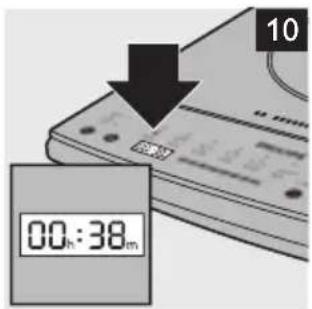
The time display shows the remaining cooking time. At the same time, the selected cooking temperature or power level light goes on (Fig. 10).
When the cooking time has elapsed, the appliance beeps a few times.
The appliance automatically switches off and the power-on light goes out.
Note: If you want to stop cooking, press the power on/off button. The appliance then switches off.
8 Unplug the appliance after use.
Using the timer
You can use the cooking time/timer button to set the time at which you want the appliance to start cooking at a preset cooking mode.
For example: if it is 14:00 hours and you want the appliance to start cooking at 18:00 hours, set the timer to 4.00 (4 hours) and press the start button. After 4 hours, at 18:00 hours, the appliance automatically starts cooking.
You can use the timer function for the stew, soup/congee, steam-lo and steam-hi modes.
You can set a start time of 5 minutes to 24 hours.
1 Follow steps 1 to 5 of section 'Using the different modes'.
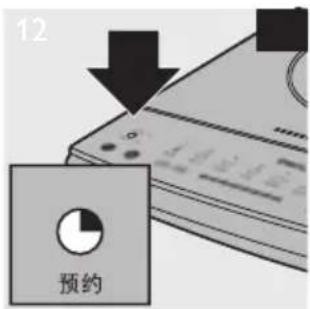
2 Press the cooking time/timer button (Fig. 11).
The timer light goes on.
Note: If you are in the quick-start (manual) mode, you have to press the cooking time/timer button twice to activate the timer.
3 Press the + and - buttons on the left side of the control panel to set the number of minutes or hours after which you want the appliance to start cooking (Fig. 8).
Note: When you press the + and - buttons briefly, the time increases or decreases by 1 minute. When you press the buttons longer, the time increases or decreases by 5 minutes.
Note: If you want to adjust the cooking time, first press the cooking time/timer button and then press the + and - buttons on the left side of the control panel.
4 Press the start button to start the timer (Fig. 9).
The start light goes on.
The time display starts counting down the time.
When the cooking process starts, the timer light goes out and the display shows that the cooking process has started.
Cleaning and maintenance
Cleaning
Never immerse the appliance in water nor rinse it under the tap.
Never use scouring pads, abrasive cleaning agents or aggressive liquids such as petrol or acetone to clean the appliance.
Do not put vinegar on the crystallite cooking plate.
1 Unplug the appliance and let it cool down.
2 Clean the appliance with a damp cloth and, if necessary, with some mild cleaning agent.
Maintenance
Improper use can lead to scratches on the cooking plate. To avoid discolouring and scratches, use the appliance according to the instructions in this user manual and always clean the appliance and cookware properly after use.
Storage
Do not place heavy objects on the crystallite cooking plate as it is breakable.
Do not store the appliance in a hot place, for example near a cooker.
If you are not going to use the appliance for a longer period of time, store the appliance in a dry and safe place.
Environment
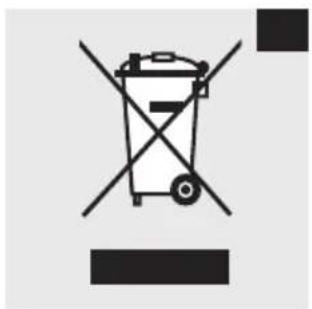
- Do not throw away the appliance with the normal household waste at the end of its life, but hand it in at an official collection point for recycling. By doing this, you help to preserve the environment (Fig. 12).
Guarantee and service
If you need service or information or if you have a problem, please visit the Philips website at www.philips.com or contact the Philips Consumer Care Centre in your country (you find its phone number in the worldwide guarantee leaflet). If there is no Consumer Care Centre in your country, go to your local Philips dealer.
Troubleshooting
If your induction cooker does not function properly or if the cooking quality is insufficient, consult the table below. If you are unable to solve the problem, contact a Philips service centre or the Consumer Care Centre in your country.
Problem Solution
| The power-on light does not go on. | There is a connection problem. Check if the induction cooker is connected to the mains and if the plug is inserted firmly into the wall socket |
| The light is defective. Take the appliance to your Philips dealer or a service centre authorised by Philips. | |
| When I press one of the cooking mode buttons, the light of the selected mode does not go on. | The light is defective. Take the appliance to your Philips dealer or a service centre authorised by Philips. |
| The cooking time light does not go on when I set the cooking time. | You have selected the hot pot mode. You can only adjust the cooking time in the quick-start (manual) mode and in the preset stew, soup/congee, steam-hi, steam-lo, stir-fry, boil, and keep-warm modes. |
The light is defective. Take the appliance to your Philips dealer or a service centre authorised by Philips.
| Problem Solution | |
| The timer light does not go on when I set the timer. | You have selected the quick-start (manual) mode or the preset hot pot, stir-fry, boil, or keep-warm mode. You can only use the timer in the stew, soup/congee, steam-hi and steam-lo modes (see the 'Default and adjustable settings' table in chapter 'Using the appliance'). |
| The light is defective. Take the appliance to your Philips dealer or a service centre authorised by Philips. | |
| I cannot change the power setting before I select the stew mode or soup/congee mode. | In the stew and soup/congee modes, the appliance first brings the food to the boil and then switches to a lower power level. You can only adjust the power level after the boiling stage. |
| The appliance beeps continuously. | You have put unsuitable cookware on the cooking plate or you have removed the cookware from the cooking plate during cooking. Place suitable cookware on the cooking plate. |
| The maximum power setting for certain cooking modes is very low. | In the stew and soup/congee modes, the appliance first brings the food to the boil and then switches to a lower power level. You can only adjust the power level after the boiling stage. |
| I cannot switch to a different cooking mode during cooking. | You cannot switch to a different cooking mode during cooking. If you want to select a different cooking mode, press the power on/off button to switch off the cooker. Then press the power on/off button again to switch the cooker back on. |
| The fan works but the appliance has not started cooking. | You have to press the start button within 1 minute after you press the power on/off button. If you do not press the start button within 1 minute, the induction cooker switches off and the fan continues to work for 1 minute to cool down the appliance. |
| Codes on the display | Message What you should do | |
| '--:' flashes on the display | There is no cookware on the cooking plate or the cookware is not suitable for the induction cooker. | Place suitable cookware on the cooking plate. |
| E1 Unstable voltage in power supply network | Check if the voltage in your home is suitable for the induction cooker. | |
| E2 The cooking plate has overheated. | Switch off the appliance and unplug it. Let it cool down for approx. 10 minutes and then switch on the appliance again. | |
| E3 The appliance malfunctions | Take the appliance to a Philips dealer or a service centre authorised by Philips. | |
| E4 The appliance has overheated | Check if the air outlets are covered. If so, remove the object or objects covering the air outlets and let the appliance cool down. Then switch on the appliance again. | |
| If the air outlets are covered, check if the fan works. Switch on the appliance and press the start button. If the fan does not work, take the appliance to your Philips dealer or a service centre authorised by Philips. | ||
Recipes
Chinese-style soup
Preparation time: 3 hours Ingredients:
- 300g chicken
- 1 carrot
- 2 potatoes
- 1 onion
- 2ltr water
1 Put all ingredients in the cookware in the same order as described above.
2 Put the lid on the cookware.
3 Place the cookware on the cooker and boil the soup in the soup/congee mode (see chapter 'Using the appliance', section 'Using the preset cooking modes').
Pork rib stew with mushrooms
Preparation time: 1 hour Ingredients:
- 800g pork ribs
- 1tbsp dark soy sauce
- 1tbsp light soy sauce
- 1 tsp salt
- 2tbsp sugar
- 2tbsp oil
- 500ml water
- 8 chinese dried mushrooms
1 Soak the dried mushrooms for 30 minutes before you use them. Set them aside to drain for a few seconds.
2 Cut the pork ribs into pieces of about 5cm.
3 Put the oil in the cookware and heat it slightly. Add the pork pieces.
4 Add soy sauce, salt, sugar and mushrooms.
5 Add the water and cook in the stew mode (see chapter 'Using the appliance', section 'Using the preset cooking modes').
6 Cook the pork ribs until the meat is tender and the sauce is glazed.
簡介
natural_image
Close-up of a CD-ROM interface with buttons and control buttons (no readable text or symbols)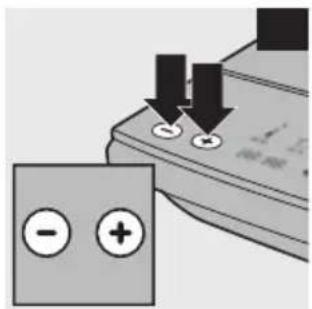
natural_image
Close-up of a computer control panel with buttons and a battery icon (no text or symbols visible)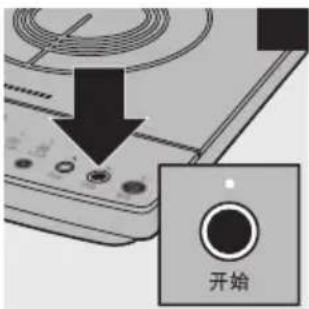
natural_image
Symbol of a trash bin crossed with no text or numbers, representing waste sorting or disposal (no text present)
- Introduction
- General description (Fig. 1)
- D Control panel
- Important
- Danger
- Warning
- Caution
- ENGLISH8
- Automatic shut-off
- Electromagnetic fields (EMF)
- Before first use
- Preparing for use
- Recommended types and sizes of cookware
- Using the appliance
- Power/temperature settings
- Low Mid High
- Using the different modes
- Using the timer
- Cleaning and maintenance
- Cleaning
- Maintenance
- Storage
- Environment
- Guarantee and service
- Troubleshooting
- Recipes
- Chinese-style soup
- Pork rib stew with mushrooms
- 簡介
Brand : PHILIPS
Model : HD4922
Category : Cooker