
NR200P MAX - Uncategorized CM Storm - Free user manual and instructions
Find the device manual for free NR200P MAX CM Storm in PDF.


| Product Type | Mini-ITX Computer Case |
| Brand | CM Storm |
| Model | NR200P MAX |
| Motherboard Support | Mini-ITX, Mini-DTX |
| PSU Support | ATX (with bracket), SFX, SFX-L |
| Drive Bays | 2x 3.5", 2x 2.5" (or 4x 2.5") |
| Expansion Slots | 3 (vertical GPU mount supported) |
| Cooling Support | Top: 2x 120mm, Bottom: 2x 120mm, Rear: 1x 92mm, Side bracket for AIO up to 280mm |
| Max GPU Length | 330mm (with front fan removed) |
| Max CPU Cooler Height | 155mm (without side bracket) |
| Dimensions (W x H x D) | 185 x 330 x 438 mm |
| Weight | Approx. 5.6 kg |
| Material | Steel, Plastic, Tempered Glass (side panel) |
| Included Fans | 2x 120mm SickleFlow (top), 1x 92mm (rear) |
| Front I/O | 2x USB 3.0, 1x USB-C (3.1 Gen2), Audio/Mic |
| Lighting | None (no RGB) |
| Power Supply Included | No (sold separately) |
| Cleaning & Maintenance | Dust filters on top, bottom, side panels; clean with dry cloth or compressed air. |
| Safety | Use only with properly grounded outlets; avoid liquid ingress. |
| Spare Parts & Repairability | Replaceable fans, dust filters, side panels; contact CM Storm for specific parts. |
Frequently Asked Questions - NR200P MAX CM Storm
User questions about NR200P MAX CM Storm
0 question about this device. Answer the ones you know or ask your own.
Ask a new question about this device
Download the instructions for your Uncategorized in PDF format for free! Find your manual NR200P MAX - CM Storm and take your electronic device back in hand. On this page are published all the documents necessary for the use of your device. NR200P MAX by CM Storm.
USER MANUAL NR200P MAX CM Storm
NR200P

BUILD GUIDE
COOLER MASTER MASTER MASTER MASTER COOLER
NR200P MAX

natural_image
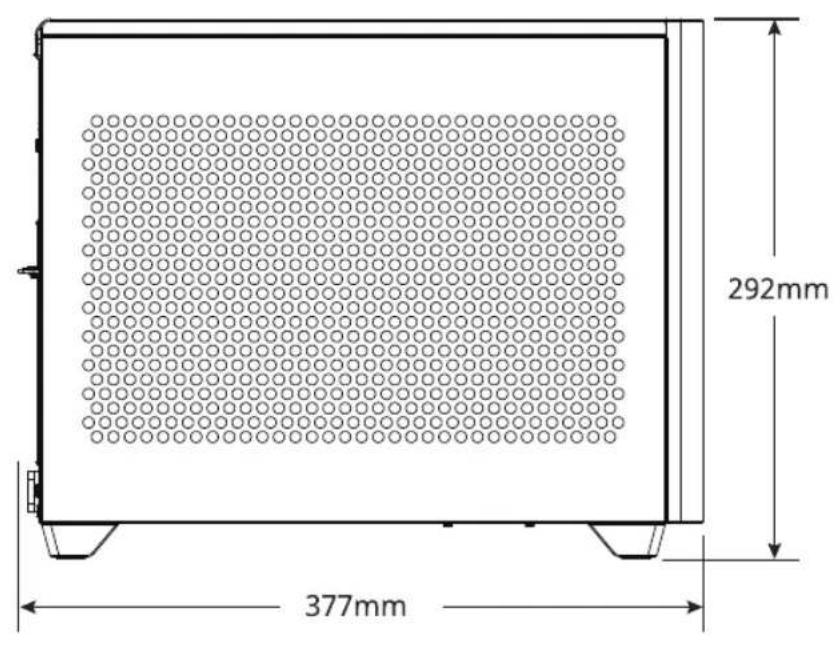
Technical line drawing of a rectangular frame with a central hexagonal hole and two side supports, labeled 185mm (no text or symbols beyond the dimension)CASE
A

x1
B

x10
C

×4
D

x8
E

x12
F

×B
G

x1
COOLING
A
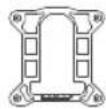
115X/1200 1700
B
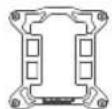
x1
C

x2
D

x2
E
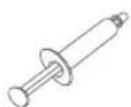
x1
F

x4
G

x4
H

x4
①

x4
PSU
A

x1
B

natural_image
Pure electrical circuit lines without any symbolsx1
C

x1
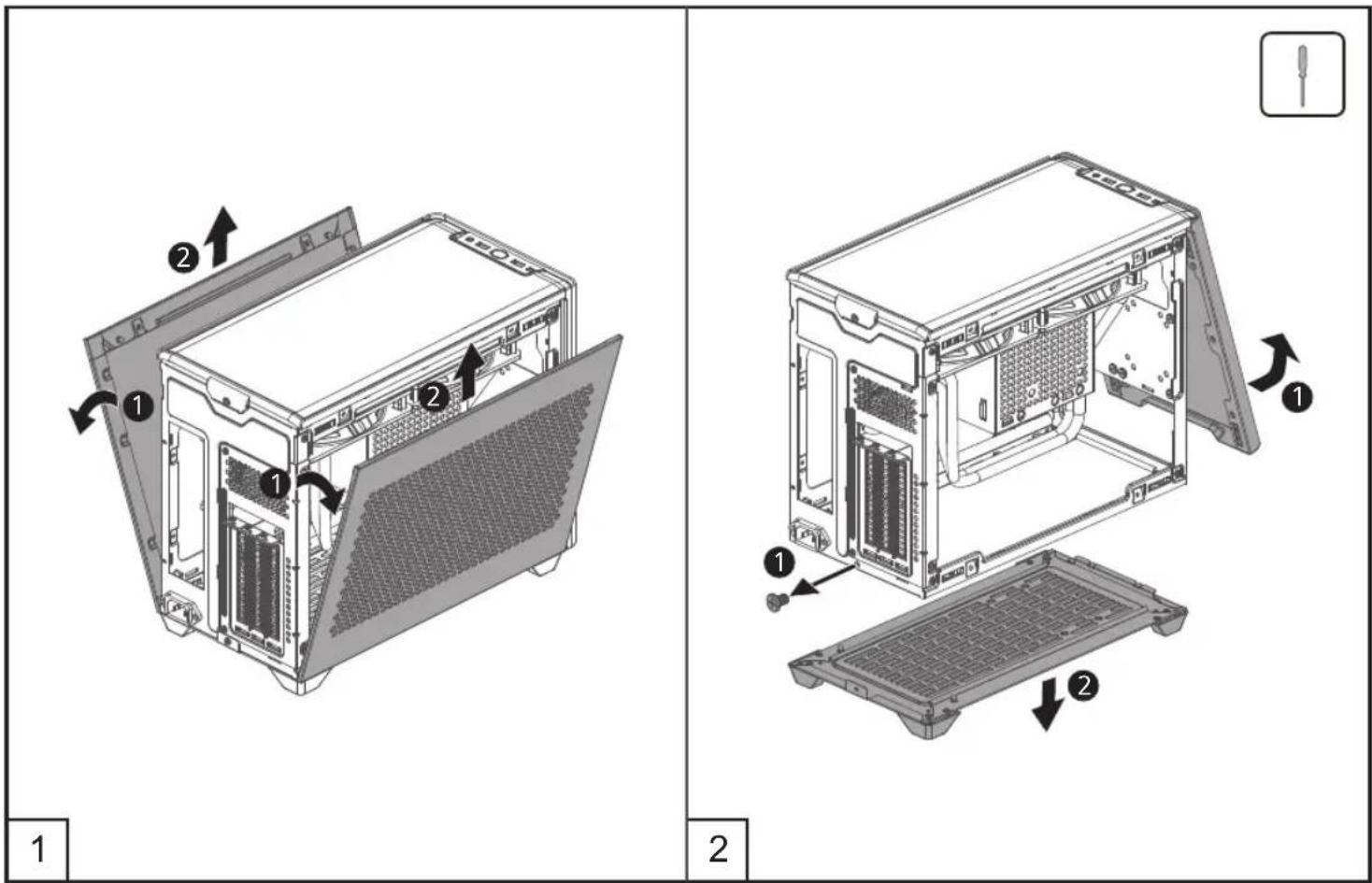
REMOVE PANELS
INSTALL MOTHERBOARD

INSTALL CPU BLOCK: INTEL & AMD
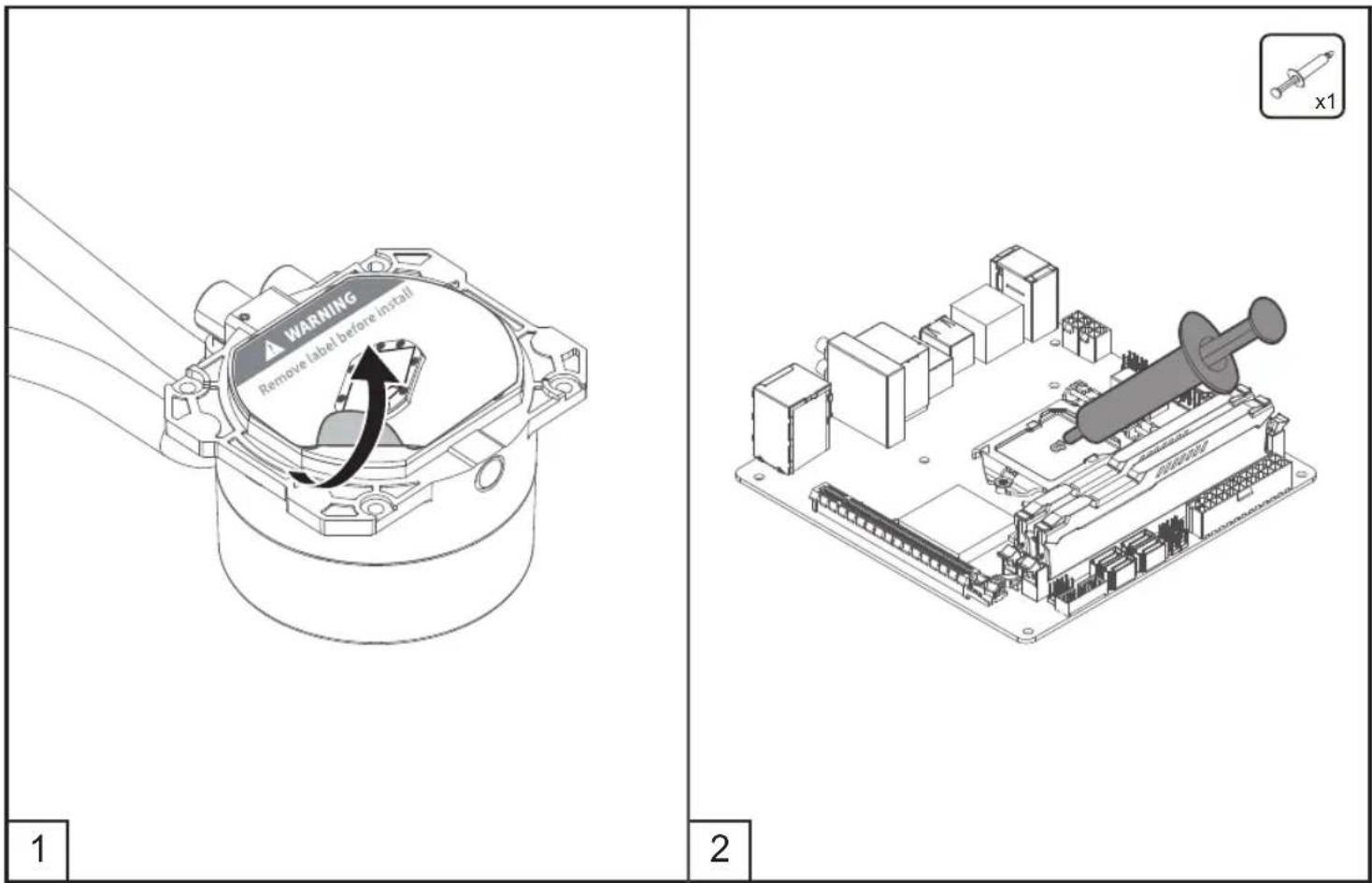
Intel - LGA 2066/2011-v3/2011/115X/1200/1700
INSTALL CPU BLOCK: INTEL

INSTALL CPU BLOCK: INTEL
Intel - LGA 115X/1200

Intel - LGA 2066/2011-v3/2011
INSTALL CPU BLOCK: INTEL
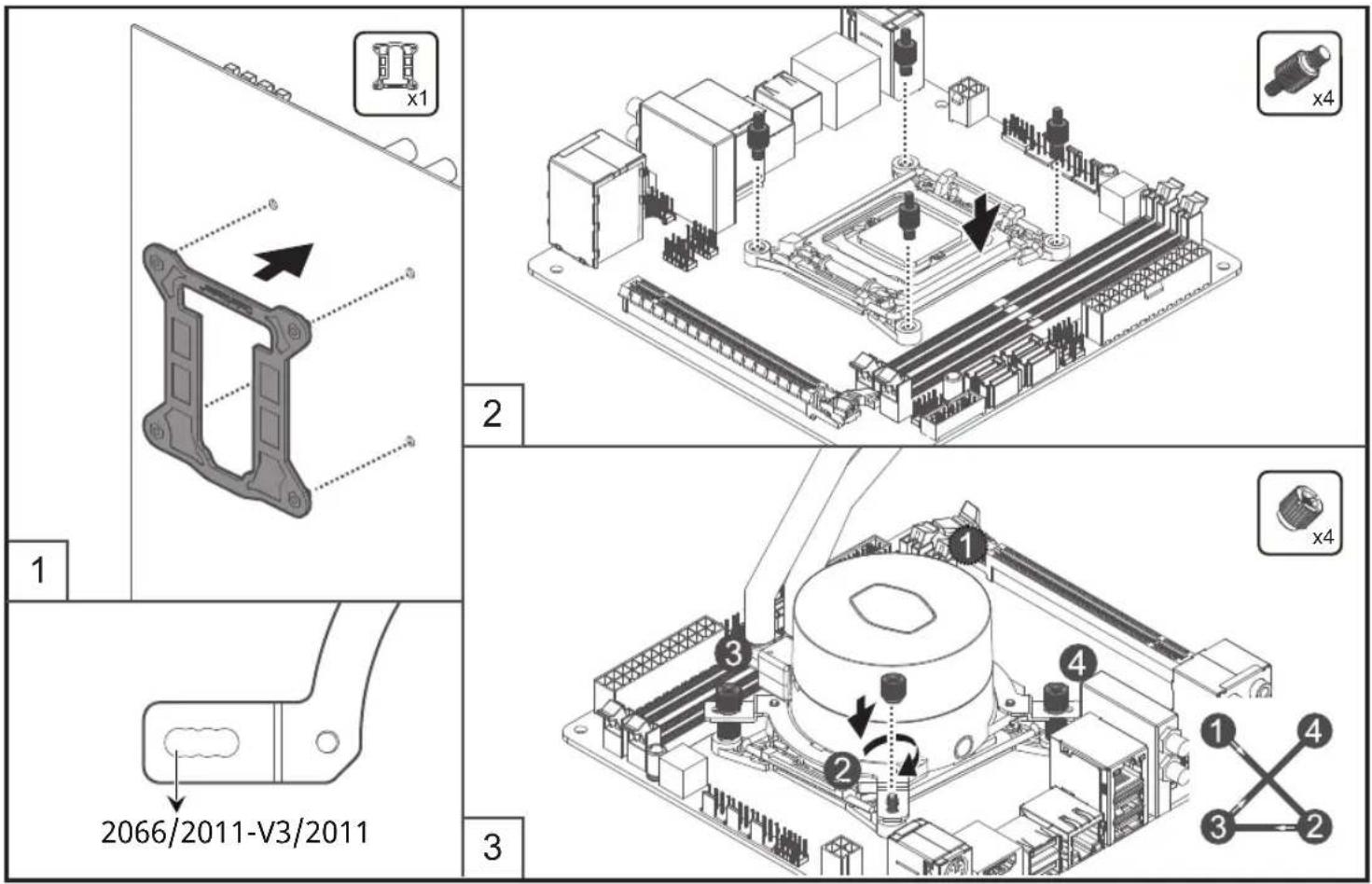
INSTALL CPU BLOCK: INTEL
Intel - LGA 1700

AMD Socket AM4/AM3+/AM3/AM2+/FM2+/FM2/FM1
INSTALL CPU BLOCK: AMD


natural_image
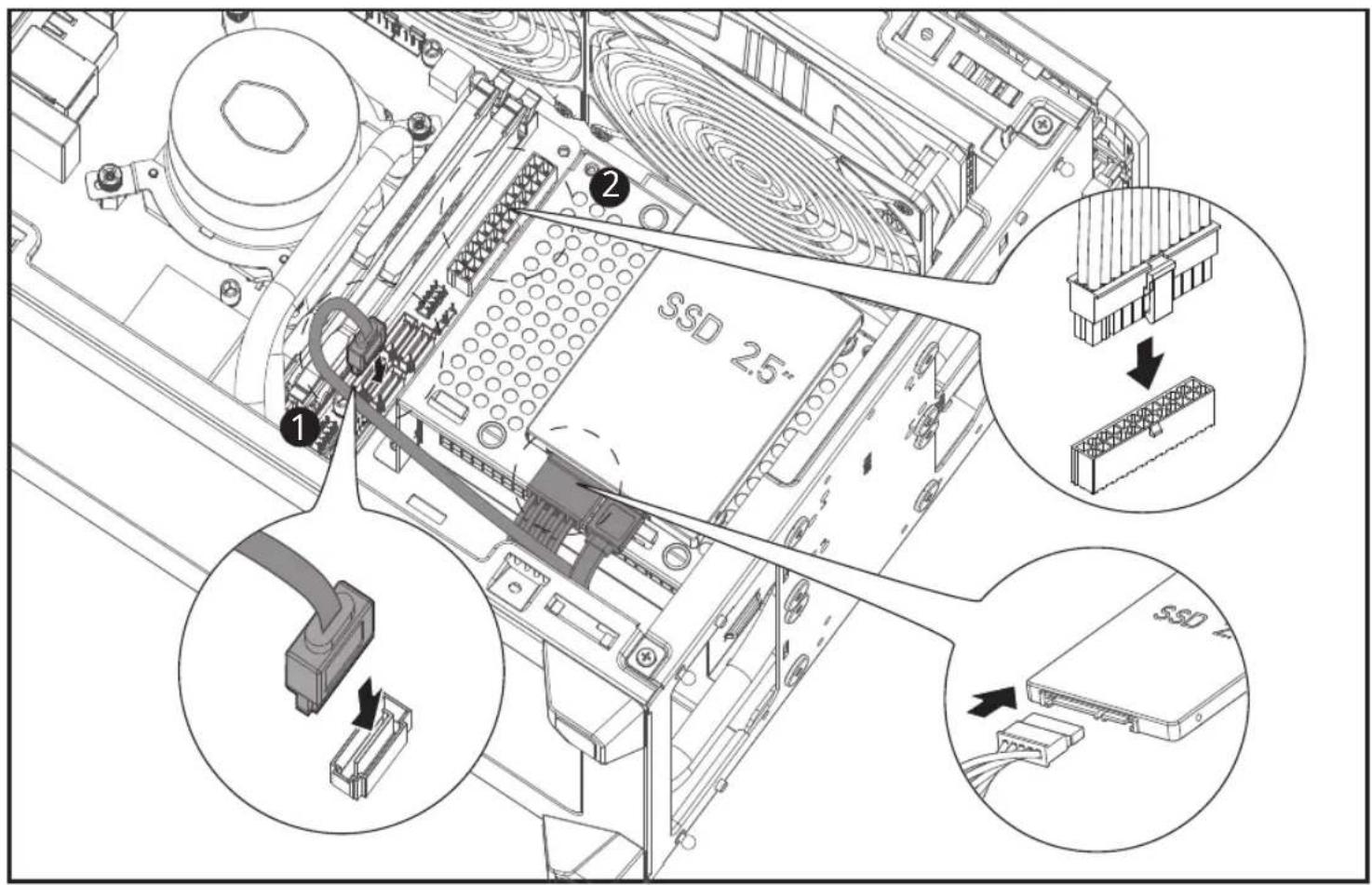
Isometric technical diagram of a mechanical assembly with labeled components and directional arrows (no text or symbols)INSTALL 2.5" & 3.5" DRIVES

INSTALL 2.5" & 3.5" DRIVES
GPU BRACKET

INSTALL GPU

INSTALL PANELS

CASE
| Dimensions (L x W x H) | 377 x 185 x 292mm | |
| 14.84 x 7.28 x 11.50 inch | ||
| Motherboard Support | Mini-ITX, Max. size: 170 x 180mm | |
| Expansion Slots | 3 | |
| Fan Support | Top | 2 x 120mm / 2 x 140mm |
| Bottom | 1 x 120mm (max 15mm, with 3.5" HDD at the bottom)2 x 120mm (max 15mm, w/o 3.5" HDD at the bottom) | |
| Liquid Cooling Support | Top | 240mm/ 280mm |
| Compatibility (maximum) | CPU Cooler | 67mm / 2.74 inch |
| Power Supply | 130mm / 5.12 inch | |
| Graphics Card | L: 336mm / 13.23 InchH: 160mm / 6.30 inchW: 75mm / 2.95 inch | |
| Power Supply | SFX,SFX-L | |
WATERCOOLING
| Exterior Color | Black | |
| CPU Socket | Intel | LGA 2066 / 2011-v3 / 2011 / 1200 / 1151 / 1150 / 1155 / 1156 / 1700 |
| AMD | AM4 / AM3+ / AM3 / AM2+ / AM2 / FM2+ / FM2 / FM1 | |
| Radiator | Material | Aluminum |
| Dimensions (L x W x H) | 318 x 140 x 27.2 mm | |
| 10.9 x 4.7 x 1.1 inch | ||
| Pump | Dimensions (L x W x H) | 79.9 x 76 x 48 mm |
| 3.15 x 3 x 1.9 inch | ||
| MTTF (Hours) | 70,000 hours | |
| Noise Level (dBA) | <10dBA | |
| Connector | 3-Pin | |
| Rated Voltage (VDC) | 12 | |
| Power Consumption (W) | 2.36 W | |
| TDP (W) | 230 | |
POWER SUPPLY
| Form Factor | SFX | |
| Fan Type | 92mm FDB Fan | |
| Efficiency | 90% | |
| Operating Temperature | 0-50°C | |
| Protections | OVP / OPP / SCP / OCP / UVP / OTP / Surge and Inrush Protection | |
| Regulatory | TUV, cTUVus, CE, BSMI, FCC, CCC, EAC, RCM, KCC, CB | |
| Connectors | ATX 24 Pin x1 | 1 |
| EPS 4+4 Pin x1 | 1 | |
| PCI-e 6+2 Pin x2 | 4 | |
| SATA x2 | 7 | |
| Peripheral 4 Pin x1 | 2 | |
| AC INPUT | 100-240V-, 12-6A, 50-60Hz | |||
| DC OUTPUT | +5V +3.3V +5VSB-12V+12V | |||
| 20A 20A 70.8A 0.3A 3A | ||||
| TOTAL POWER | 120W 849.6W 3.6W | 15W | ||
| 850W | ||||
FANS
| Dimensions (L x W x H) | 140 x 140 x 25mm/ 5.5 x 5.5 x 1 inch |
| LED Type | Non-LED |
| Speed (RPM) | 650~1400RPM ± 5% |
| Airflow (CFM) | 67 CFM (Max) |
| Noise Level (dBA) | 10~27 dBA |
| Pressure (mm H2O) | 2.25 mm H ≥O (Max) |
| Life Expectancy (Hours) | 160,000 hours |
| Power Connector | 4-PIn |
| Rated Voltage (VDC) | 12 |
| Rated Current (A) | 0.15A |
| Included Splitter Cable | 2to1 4pin PWM splitter |
English (EN)
Cooler Master guarantees that this device is free of defect in material and workmanship, and provides a two-year limited hardware warranty for the device commencing from the date of purchase. Please keep your receipt for proof of purchase.
This product is designed for computer usage only. Using this device in any other capacity voids the warranty. If you are not familiar with computer hardware installation, please ask for professional assistance.
The warranty offered covers normal use. Defect or damage that result from improper operation, storage, misuse or abuse, accident or neglect, which are not the fault of Cooler Master, are exclude from warranty coverage.
Note: the warranty is voided by removal or alternation of product or parts identification labels.
*All OEM/bulk packaging product come with one year limited warranty
*In case of conflict between the warranty provided by the country of point of sale and this manual, the warranty of the actual country of point of sale shall be the prevailing document.
*In case of malfunction of electronic components or need of accessories purchase during the warranty period, please return to the original store of purchase.
Türkçe (TR)
Note: The form is only applied to China law.
Note: The form is only applied to China law.
繁體中文(ZHT)
Cooler Master Products: Limited Warranty
This document describes the warranty terms for all Cooler Master product sold in Australia
For Australia only:
Our goods come with guarantees that cannot be excluded under the Australian Consumer Law. You are entitled to a replacement or refund for a major failure and for compensation for any other reasonably foreseeable loss or damage. You are also entitled to have the goods repaired or replaced if the goods fail to be of acceptable quality and the failure does not amount to a major failure. ( Cooler Master Technology Inc., 8F., No. 788-1, Zhongzheng Rd., Zhonghe Dist., New Taipei City 23586, Taiwan (R.O.C.).) Telephone: +886-2-2225-3517 (standard international call charges apply.)
Who the Warranty Protects: This Warranty is valid to the original purchaser only.
What the warranty protects:
This warranty is valid only for the Cooler Master Products distributed by authorized dealer(s) in Australia. Please contact Cooler Master for warranty information and services:
• Cooler Master Support: account.coolermaster.com
What Is and Is Not Covered
It is important to note that our warranty is not an unconditional guarantee for the duration of the Program. Any replaced parts become the property of Cooler Master. The Program does not apply to the software component of a product or a product which has been damaged due to accident, misuse, abuse, improper installation, usage not in accordance with product specifications and instructions, natural or personal disaster, or unauthorized alterations, repairs or modifications.
The Program does not cover any events such as below:
- Any damages unrelated to manufacturing defects.
- Any unsuitable environment or use of the product in Cooler Master Opinion.
- Any product which has been modified without official permission from Cooler Master, or on which the serial number or warranty sticker has been defaced, modified, or removed.
Damage, deterioration or malfunction resulting from:
- Accident, abuse, misuse, neglect, fire, water, lightning, or other acts of nature, commercial or industrial use, unauthorized product modification or failure to follow instructions included with the product.
- Third party products using Cooler Master Components will not be covered by warranty. See your vendor or the manufacturer for information about servicing. - Repair or attempted repair by anyone not authorized by Cooler Master, Inc.
- Any shipment damages (claims must be made with the carrier).
- Unauthorized repairs to a Cooler Master product will void the warranty offered by the Program. Cooler Master reserves the right to refuse to service any product which has been altered, modified or repaired by non- Cooler Master Service personnel.
- Cooler Master does not warrant that this product will meet your requirements. It is your responsibility to determine the suitability of this product for your purpose. - Removal or installation charges.
- You are responsible for the cost of shipping the product to Cooler Master. Cooler Master pays the cost of returning a product to you.
- Cooler Master reserves the right to replace the product with a service product at their sole discretion at any time.
- Product malfunction or damage resulting from liquids or moisture.
- All accessories that malfunction due to physical damage such as: USB cables, extension cables, adapter cables, adapters, power cords, screws, retention brackets, ear cups, and all other similar accessories.
Limitation of implied warranties:
THERE ARE NO WARRANTIES, EXPRESS OR IMPLIED, WHICH EXTEND BEYOND THE DESCRIPTION CONTAINED HEREIN INCLUDING THE IMPLIED WARRANTY OF MERCHANTABILITY AND FITNESS FOR A PARTICULAR PURPOSE.
Exclusion of damages
COOLER MASTER'S LIABILITY IS LIMITED TO THE COST OF REPAIR OR REPLACEMENT OF THE PRODUCT. COOLER MASTER SHALL NOT BE LIABLE FOR:
• DAMAGE TO OTHER PROPERTY CAUSED BY ANY DEFECT IN THE PRODUCT, DAMAGES BASED UPON INCONVENIENCE, LOSS OF USE OF THE PRODUCT, LOSS OF TIME, LOSS OF PROFITS, LOSS OF BUSINESS OPPORTUNITY, LOSS OF GOODWILL, INTERFERENCE WITH BUSINESS RELATIONSHIPS OR OTHER COMMERCIAL LOSS, EVEN IF ADVISED OF THEIR POSSIBILITY OF SUCH DAMAGES.
- ANY OTHER DAMAGES, WHETHER INCIDENTAL, CONSEQUENTIAL OR OTHERWISE
- ANY CLAIM AGAINST THE CUSTOMER BY ANY OTHER PARTY
Warranty Information:
If the goods is found with reasonable defect within the period of (refer to Table A.,) starting on the first day of purchase (with proof of invoice), this is what you must do, to claim the warranty from the above address.
Procedures:
- Consumers should return to the shop where he/she has bought the goods, After confirming with the shop with a valid invoice, they may approach the distributor for RMA claim.
- After confirmed by the distributor that the goods was damaged due to natural causes, replacement and repair will be done by distributor (including brand new or refurbished goods)
- All faulty goods must return to the distributor, expenses for returning the faulty goods will be covered by the consumer, and distributor will cover the cost involved in the transporting of parts or repaired goods to the consumer.
Regarding all the expenses incurred in making the claim, and this is how you would claim:
- Within the valid warranty date, starting from the first day of issuing invoice, Retail shops will assist in confirmation with distributor for the consumer for the following.
A. If the damage was caused by the consumer, then the consumer should cover all expenses in fixing the product, if the product still can't be fixed, we would suggest consumer in buying a brand new product.
B. Product defect caused under natural use, expenses will be covered by the distributor. - Faulty products with expired warranty dates, we would suggest consumer to purchase a brand new products, without undergoing for repairs.
Table A:
Cooler Master Products
Please check your user manual for the exact warranty period terms for products that are not shown below.
For more warranty information, please visit our official website: http://www.coolermaster.com/service/warranty.html
Chassis
| Product Name | Warranty Term |
| All Chassis Series (Only Electronic Parts) | 2 year |
| C+P ( Chassis + PSU ) | 1 year |
English (EN)
Safety Instructions
- Do not open the power supply unit as this can lead to serious injury or death.
- Do not insert objects into spinning fan. This will damage the power supply unit and can lead to injuries.
- Do not use excessive force when attaching the power connectors to the power supply unit. When correct connectors are used, excessive force is not need to install them.
- Keep power supply unit in dry environments away from humidity. If the power supply unit gets wet, immediately remove the AC power plug from the wall and the power supply unit. For your own safety, it is recommended that you do not use the power supply unit again after getting it wet.
- Avoid using low quality extension cables for the power supply side connectors as this can cause the cables to melt and even lead to fire.
- This power supply unit has been tested for PC usage only. We cannot guarantee operation or safety performance when used for other applications.
Installing the Power Supply Unit
- Make sure the main power switch is turned off before installing the power supply unit.
- Secure the power supply unit within the PC case enclosure with 3 or 4 screws for grounding and stability purposes.
- Connect the power connectors according to the motherboard, graphics card, and other device user guides that will be used in the system.
- Connect the AC power connector.
- Switch on the power switch.
Troubleshooting
If your system does not turn on after installing the power supply, please follow the troubleshooting guide as listed below:
-
Make sure the AC power cord is correctly and firmly connected on both sides.
-
Make sure the power switch is turned on.
-
Make sure the main power connector and +12V power connectors are correctly connected to the motherboard.
-
If the power supply does not function properly, please contact our customer support immediately.
Warranty
Cooler Master guarantees this device to be free of defects in material and workmanship and provide a minimum 10-year hardware limited warranty for the power supply on the date of purchase. Please register on our official website to activate your limited warranty. This product was designed and intended for computer usage only. Using this device for other applications will void the warranty. If you are not familiar with computer hardware installation, please ask a professional for assistance.
This warranty only applies to the power supply unit and does not include accessories or connected components.
This warranty only applies to damage caused by normal use and is void if it is determined that the device was damaged because of abuse, alteration, misuse, negligence, incorrect voltage supply, air/water pollution, accidents, or natural disasters.
In the event of any defects within the warranty period, please return product to the dealer or retailer from whom you purchased for a replacement/repair.
Please contact our customer service team for any technical or product related questions.
Türkçe (TR)
参考1:“超出0.1wt%”及“超出0.01wt%”係指常用物質之百分比含量超出百分比含量基準值Note 1: “Exceeding 0.1wt%” and “exceeding 0.01wt%” indicate that the percentage content of the restricted substance exceeds the reference percentage value of presence condition.
参考2.“○”係由該項限用物質之百分比含量未超出百分比含量基準值。
Note 2: "☐" indicates that the percentage content of the restricted substance does not exceed the percentage of reference wine of presence.
投资者1“一”等风险因素出现异常过账项目
Note 3: The “-” indicates that the restricted substance corresponds to the exemption.
WARRANTY INFORMATION
(EN) Limited warranty period: http://www.coolermaster.com/service/warranty.html
(AR) المحدود الصين فنترة : http://www.coolermaster.com/service/warranty.html
(BG) Период на ограничена гаранция: http://www.coolermaster.com/service/warranty.html
(CS) Období omezené záruky: http://www.coolermaster.com/service/warranty.html
(DA) Begrænset garanti: http://www.coolermaster.com/service/warranty.html
(DE) Beschränkter Garantiezeitraum: http://www.coolermaster.com/service/warranty.html
(EL) Περίοδος περιορισμένης εγγύησης: http://www.coolermaster.com/service/warranty.html
(ES) Periodo de garantía limitada: http://www.coolermaster.com/service/warranty.html
(FA) http://www.coolermaster.com/service/warranty.html: مدت زمان گارانتی
(FI) Rajoitettu takuujakso: http://www.coolermaster.com/service/warranty.html
(FR) Période de garantie limitée: http://www.coolermaster.com/service/warranty.html
(HU) Korlátozott jótállási időszak: http://www.coolermaster.com/service/warranty.html
(HR) Razdoblje ograničenog jamstva: http://www.coolermaster.com/service/warranty.html
(ID) Masa garansi terbatas: http://www.coolermaster.com/service/warranty.html
(IT) Periodo di garanzia limitata: http://www.coolermaster.com/service/warranty.html
(JA)限定保證期間:http://www.coolermaster.com/service/warranty.html
(KO)제한 보증 기간:http://www.coolermaster.com/service/warranty.html
(KK) Кепілдік мерзімі: http://www.coolermaster.com/service/warranty.html
(NL) Beperkte garantieperiode: http://www.coolermaster.com/service/warranty.html
(NO) Garantiperiode, begrenset garanti: http://www.coolermaster.com/service/warranty.html
(PL) Okres ograniczonej gwarancji: http://www.coolermaster.com/service/warranty.html
(PT) Período de garantia limitada: http://www.coolermaster.com/service/warranty.html
(RU) Ограниченный гарантийный срок: http://www.coolermaster.com/service/warranty.html
(SR) Period ograničene garancije: http://www.coolermaster.com/service/warranty.html
(SV) Begränsad garantiperiod: http://www.coolermaster.com/service/warranty.html
(TR) Sınırlı garanti süresi: http://www.coolermaster.com/service/warranty.html
(UK) Обмежений гарантійний термін: http://www.coolermaster.com/service/warranty.html
(ZHT) 有限保固期間:http://www.coolermaster.com/service/warranty.html

Make It Yours.
Asia Pacific - Cooler Master Technology Inc. 8F., No. 788-1, Zhongzheng Rd., Zhonghe Dist., New Taipei City 23586, Taiwan (R.O.C.). Tel: +886-2-2225-3517
China - Cooler Master China Room 2062, Floor 6, No. 421, Weiqing Rd., Jinshan District, Shanghai City, China Tel: +86-21-51872177
Europe - Cooler Master Europe B.V. Lodewijkstraat 1b, 5652AC Eindhoven, The Netherlands Tel: +31-(0)40-702-0900
North America - Cooler Master NA 2929 E Imperial Hwy., Suite#110, Brea, CA 92821, USA Tel: +1-888-624-5099
South America E-mail: Soporte_Latam@coolermaster.com.tw

CoolerMaster website For the most updated information, Please visit our official website: www.coolermaster.com

Technical Support account.coolermaster.com

Product Page and Manual Visit the Product Page for information, manual and other downloads
512004800-GP Ver 1.0: 2021/07

The color and specification are subject to be changed without further notification. Please visit our website for updated information: www.coolermaster.com ©2021 Cooler Master Technology Inc. All Rights Reserved. All trademarks are registered to their respective owners.
COOLER MASTER MASTER

Brand : CM Storm
Model : NR200P MAX
Category : Uncategorized