
ABTS-V30 - Uncategorized AKAI - Free user manual and instructions
Find the device manual for free ABTS-V30 AKAI in PDF.


| Product Type | Portable Bluetooth Speaker |
| Brand | AKAI |
| Model | ABTS-V30 |
| Bluetooth Version | 5.0 |
| RMS Power | 40W |
| PMPO Power | 400W |
| Frequency Response | 20Hz – 20kHz |
| Power Supply (Charging) | DC 5V / 2A |
| Battery Type & Capacity | 7.4V, 3600mAh (rechargeable) |
| Charging Time | Approx. 6 hours |
| Playback Time | Up to 4 hours at 50% volume |
| Speaker Drivers | 1 × 8" woofer + 1 × 1.5" tweeter |
| Impedance (Woofer) | 4 ohms |
| Impedance (Tweeter) | 8 ohms |
| Signal-to-Noise Ratio | ≥ 60 dB |
| Distortion | ≤ 10% (max) |
| Audio Inputs | USB-A, TF Card, 3.5 mm Aux, Microphone (6.3 mm) |
| Wireless Connectivity | Bluetooth 5.0; TWS (True Wireless Stereo) for pairing two speakers |
| Controls | On-unit control panel + infrared remote control |
| Included Accessories | USB-C charging cable, wired microphone, remote control, instruction manual, warranty card |
Frequently Asked Questions - ABTS-V30 AKAI
User questions about ABTS-V30 AKAI
0 question about this device. Answer the ones you know or ask your own.
Ask a new question about this device
Download the instructions for your Uncategorized in PDF format for free! Find your manual ABTS-V30 - AKAI and take your electronic device back in hand. On this page are published all the documents necessary for the use of your device. ABTS-V30 by AKAI.
USER MANUAL ABTS-V30 AKAI
natural_image
Black Akai audio amplifier with a colorful circular backdrop and digital display (no text or symbols on the device body)PortableSpeaker
ABTS-V30

AKAI
NOTE:
This unit may be submitted to changes in specifications, characteristics, or operation without notice to the user, in order to continue improving and developing its technology.
Do not play music at excessive levels as damage to hearing and / or equipment may resu. Do not use outdoors in wet or in a wet environment.
Box content:
1 x Speaker
1 x Instruction manual
1 x Warranty card
1 x USB-Type-C charging cable
1 x Wired microphone
1 x Remote Control
Specifications:
Bluetooth version 5.0
Bluetooth channel emission power ± 2dbm
Bluetooth frequency 2.4 - 2.483GHz
RMS Power: 40W
PMPO power: 400W
Frequency Response 20Hz-20KHz
Power Supply: 5V/2A
Battery: 7.4V, 3600mAh
Speakers no & size 1* 8" speaker + 1 * 1.5" tweeter
Charging time 6 hours
Playing time 4h (50% volume)
Power Source DC5V
Power Consumption 60W
Impedance
S/N Ratio
Distortion
4ohm (speaker) & 8ohm (tweeter)
≥60dB
10% max
AKAI

AKAI
Control Panel:
- Long press to switch between operating modes: BT mode, TF card mode, U disk mode AUX mode. Short press to switch between volume control of microphone, Treble, Bass, E
- : Short press the button to select the LED light mode; long press to turn OFF the light press to turn on the light again.
- : Previous song.
- : Short press to play/pause music; long press to connect TWS.
- Next song.
- : Long press the button to POWER ON/OFF.
- To increase volume;
- : To reduce volume;
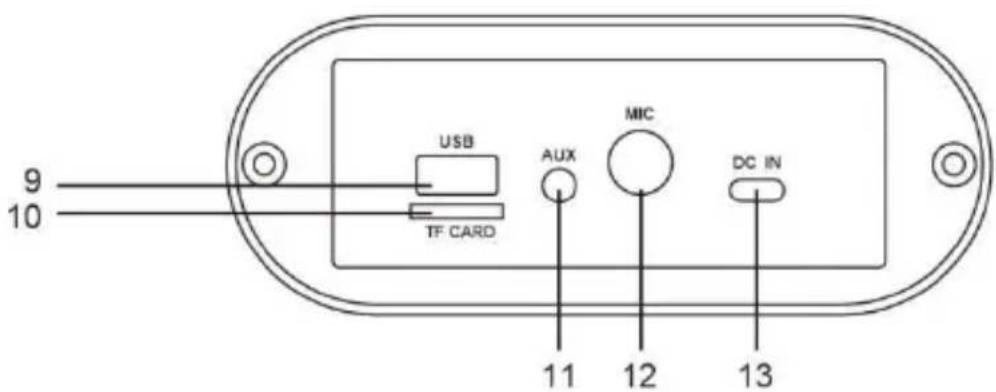
- : USB jack.
- :TF card jack.
- : Aux Input.
- : Microphone input.
- : Charging port.
AKAI
Remote control:
-
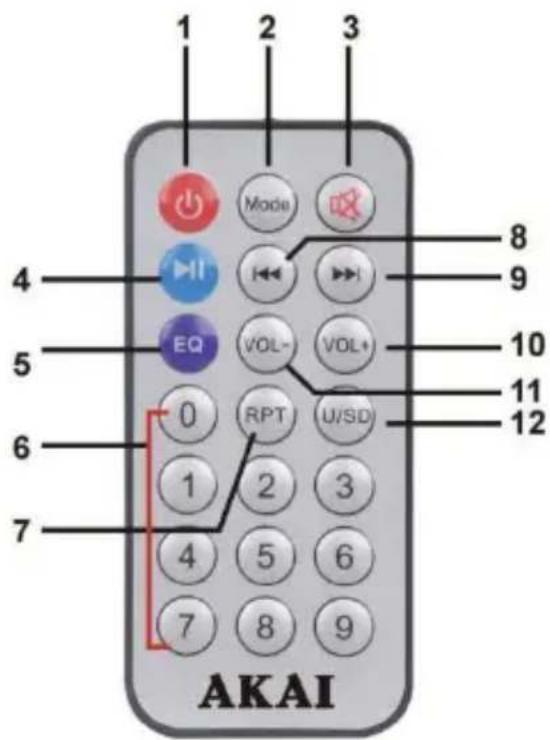
On/Off Switch;
-
MODE: Long press to switch between operating modes: BT mode, TF card mode, U dis AUX mode. Short press to switch between volume control of microphone, Treble, Bass, E
-
MUTE: to mute;
-
Short press to play/pause music; long press to connect AWS
-
EQ: to set equalizer variants;
-
0-9: to select a song directly;
-
RPT: to repeat the song;
-
to select the previous song from USB / TF/ BT;
-
to select the next song from USB/TF / BT;
AKAI
- VOL+: to increase volume:
- VOL-: to reduce volume:
- Switch between USB and SD card.:
FUNCTION DESCRIPTION
1. Charge the speaker
To charge the speaker's built-in battery, connect power adaptor (not supplied) to the charging. Please make sure a DC 5V proper adaptor will be used, otherwise the battery will be over and will be damaged. The battery icon on LED will flash when charging, and will stop flash when fully charged. The battery will be fully charged after 6 hours.
2. Bluetooth function
- Power on the product then long press MODE button to enter BT mode.
- Put your mobile device (cell phones, computers, etc.) into BT pairing mode, search for BT devices, and select the item name (ABTS-V30) when it appears.
- After the device has been paired successfully for the first time, it will connect automatically in around 10 seconds to the device last connected when next time use. (Note: The product connect to only one Bluetooth device at a time.).
3. AWS Function (AKAI wireless connection)
Power on two speakers and enter Bluetooth mode.
Turn off the Bluetooth function on your phone or other Bluetooth device. Long press the PI Pause button of either speaker, the display will show "t-ON" and then the "BLUE." A voice will then be heard to signify that the two speakers have connected via Bluetooth.
Turn on Bluetooth on the mobile phone and search for "ABTS-V30" and connect.
A voice prompt will then be heard signifying that the mobile has connected to the speakers can now enjoy music from the two speakers.
AKAI
4. USB mode
- Insert a USB device into the speaker's USB port. USB mode will start automatically.
- Or long press MODE to switch to USB mode ("USB" on display).
- Short press the PLAY / PAUSE button to play or pause the music.
5. Auxiliary input mode
- Connect a 3.5 mm audio cable to the unit's auxiliary input.
- Long press MODE to switch to auxiliary input mode ("LINE" on display).
- Short press the PLAY / PAUSE button to play or pause the music.
6. TF card mode
- Insert an SD card, SD card mode will start automatically.
- Or long press MODE to switch to TF card mode ("SD" on display).
- Short press the PLAY / PAUSE button to play or pause the music.
DISPOSAL OF ELECTRICAL AND ELECTRONIC EQUIPMENT

This symbol on the product or packaging means that the product should not be tre household waste. Do not throw garbage at the end of its life, but take it to a co for recycling. in this way you will help to protect the environment and be able to
negative
consequences that it would have on the environment and human health.
To find your nearest collection center:
-Contact local authorities
- Access the website: www.mmediu.ro
- Request additional information from the store where you purchased the product.
AKAI

natural_image
Black Akai audio amplifier with a colorful circular backdrop and digital display (no readable text or symbols)Boxă portabilă
ABTS-V30

AKAI
NOTĂ:
4ohm (boxă) & 8ohm (tweeter)
10% max
natural_image
Black Akai audio amplifier with a colorful circular cover and digital display (no text or symbols on the device itself)Φορητό ηχείο
ABTS-V30

AKAI
ΣΗΜΕΙΩΣΗ:
natural_image
Symbol of a trash bin with crossed lines indicating no waste, and a solid black rectangle below (no text or labels)natural_image
Black Akai portable electronic device with a colorful circular backdrop and digital display (no readable text or symbols)Преносима тонколона
ABTS-V30

AKAI
ЗАБЕЛЕЖКА:
natural_image
Black Akai audio amplifier with a colorful circular backdrop and digital display (no text or symbols on the device body)Przenośny głośnik
ABTS-V30

AKAI
UWAGA:
natural_image
Black Akai audio amplifier with a colorful circular backdrop and digital display (no text or symbols on the device body)natural_image
Black Akai audio amplifier with a colorful circular backdrop and digital display (no text or symbols on the device body)


Brand : AKAI
Model : ABTS-V30
Category : Uncategorized