
MX5 - Uncategorized AKAI - Free user manual and instructions
Find the device manual for free MX5 AKAI in PDF.


| Product Type | Portable PA Speaker System (Dual Speaker System) |
| Brand | AKAI |
| Model | MX5 |
| Driver Configuration | LF: 2 x 12" Subwoofer, MF: 6.5", HF: 1" + 3" |
| RMS Power Output | 200 W |
| PMPO Power | 6000 W |
| Frequency Response | 30 Hz - 20 kHz |
| Impedance | 4 Ω |
| Signal-to-Noise Ratio | 78 dB |
| Total Harmonic Distortion | 1% at 5 W |
| Bluetooth Version | 5.3 |
| Bluetooth Transmission Power | 0.2 dBm |
| FM Radio Frequency Range | 87.5 - 108 MHz |
| Supported Audio Formats (USB) | MP3, AAC, WAV, FLAC, WMA |
| Power Supply | AC 100-240 V ~50/60 Hz |
| Battery Type | Li-ion 12 V, 2400 mAh |
| Charging Time | Approx. 2 hours |
| Playback Time (Battery) | 2-3 hours (at moderate volume) |
| Microphone Inputs | 2 x 1/4" (6.35 mm) Jack |
| Audio Inputs | 1/8" (3.5 mm) Line-In, Digital Coaxial, Digital Optical, USB |
| Speaker Output | Speaker output jacks for passive speakers (optional) |
| Effects & EQ | X-Drive bass boost, Mic echo, 6 EQ presets (Normal, Rock, Pop, Classic, Jazz, Country) |
| Lighting Modes | LED1, LED2, LED3, LED4, Off |
| Accessories Included | Remote control, FM antenna, Power cable, Wireless microphone |
| Cleaning Instructions | Use a clean, dry cloth. Avoid chemical solvents. |
| Safety | Do not open. Keep away from moisture and heat. Refer servicing to authorized center. |
Frequently Asked Questions - MX5 AKAI
User questions about MX5 AKAI
0 question about this device. Answer the ones you know or ask your own.
Ask a new question about this device
Download the instructions for your Uncategorized in PDF format for free! Find your manual MX5 - AKAI and take your electronic device back in hand. On this page are published all the documents necessary for the use of your device. MX5 by AKAI.
USER MANUAL MX5 AKAI
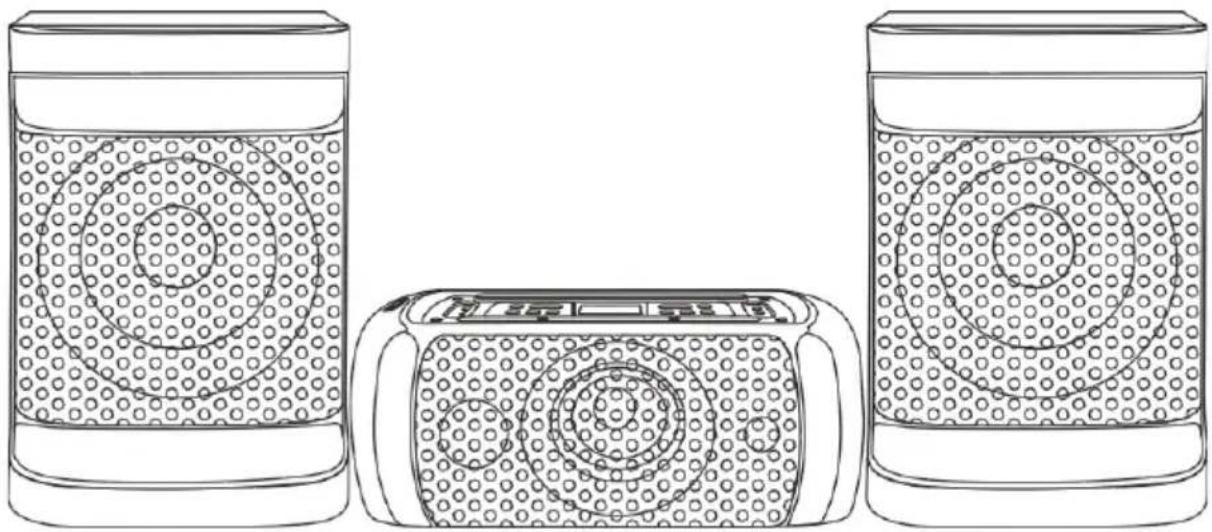
Dual speaker system MX5
USER MANUAL

natural_image
Simple line drawing of a container with a dotted pattern and a circular pattern inside (no text or symbols)
natural_image
Line drawing of a portable electronic device with circular patterns on its surface (no text or symbols)
natural_image
Line drawing of a container with a dotted pattern inside, showing internal structure (no text or symbols)- To assure the finest performance, please read this manual carefully. Keep it in a safe place for future reference.
- Install this sound system in a well-ventilated, cool, dry, clean place - away from direct sunlight, heat sources, vibration, dust, moisture, and/or cold. For proper ventilation, allow the following minimum clearances around this unit.
Top: 10 cm (4 inch)
Rear: 10 cm (4 inch)
Sides: 10 cm (4 inch) - Locate this unit away from other electrical appliances, motors, or transformers to avoid humming sounds.
- Do not expose this unit to sudden temperature changes from cold to hot. Do not locate this unit in an environment with high humidity (i.e. a room with a humidifier) to prevent condensation inside this unit, which may cause an electrical shock, fire, damage to this unit, and/or personal injury.
- Avoid installing this unit where foreign objects may fall into this unit and/or this unit may be exposed to liquid dripping or splashing.
Never place objects on top of this unit as they may cause damage to the unit or discolor it.
Never place candles, lit objects or containers with liquids such as vases on the unit, as doing so is extremely hazardous, may cause personal injury and/or major damage to the unit. - Do not cover this unit with a newspaper, tablecloth, curtain, etc. in order not to obstruct heat radiation. If the temperature inside this unit rises, it may cause fire, damage to this unit, and/or personal injury.
- Do not plug this unit into a wall outlet until all connections are complete.
- Do not operate this unit upside down as it may overheat and cause damage.
- Do not use force on switches, knobs and/or cords.
- When disconnecting the power cable from the wall outlet, grasp the plug; do not pull the cable.
- Do not clean this unit with chemical solvents as these may damage the finish. Use a clean, dry cloth.
- Only the voltage specified on this unit may be used. Using this unit with a higher voltage than specified is dangerous and may cause fire, damage to this unit and/or personal injury. We will not assume any liability for damage resulting from use of this unit with a voltage other than specified.
- To prevent damage by lightning, keep the power cable and outdoor antennas disconnected from a wall outlet or this unit during a lightning storm.
- CAUTION: NEVER attempt to open this unit to modify, fix or repair this unit! Refer all service, repairs and maintenance to an authorized service center.
- When not planning to use this unit for long periods of time, disconnect the AC power plug from the wall outlet.
- Before moving this unit, disconnect the AC power plug from the wall outlet.
- Condensation may form when the surrounding temperature changes suddenly. Disconnect the power cable from the outlet and leave the unit alone until the condensation has fully dried up.
- When using this unit for a long time, this unit may become warm. Turn the power off, then leave this unit to cool.
- Install this unit near the AC outlet, where the AC power plug can be reached easily.
- The batteries must not be exposed to excessive heat such as sunshine, fire or the like. When you dispose of batteries, follow your regional regulations.
- Excessive sound pressure from earphones and headphones can cause hearing loss.
- This product is not intended for use by persons (including children) with reduced physical, sensory or mental capabilities, or lack of experience and knowledge, unless they have been given supervision or instruction concerning use of the product by a person responsible for their safety. Children must be supervised to ensure that they do not play with the product.
- This product is not intended to be operated by means of an external timer or separate remote control system.
Pan el
- USB: USB drive port. Charge USB devices or play audio files.
2.STANDBY: To suspend operations and save power when not in use, press to enter STANDBY mode. Press again to resume operation. - SOURCE: Press this key to change the sources between BT, LINE, COAXIAL, OPTICAL, FM, USB.
- LED DISPLAY: Displays speaker status.
5.X DRIVE: Press the key to turn X DRIVE bass boost ON/OFF.
6.-/+: Adjusts Volume & FX Parameters.
7.MIC1 IN: 1/4" Mic input socket
- MIC2 IN: 1/4" Mic input socket
9.EFFECTS: Press this key to toggle the menu between MIC VOLUME, ECHO EFFECT, BASS, TREBLE, Adjust with +/- keys
- LIGHT: Press to toggle through lighting modes: LED1, LED2, LED3, LED4, OFF
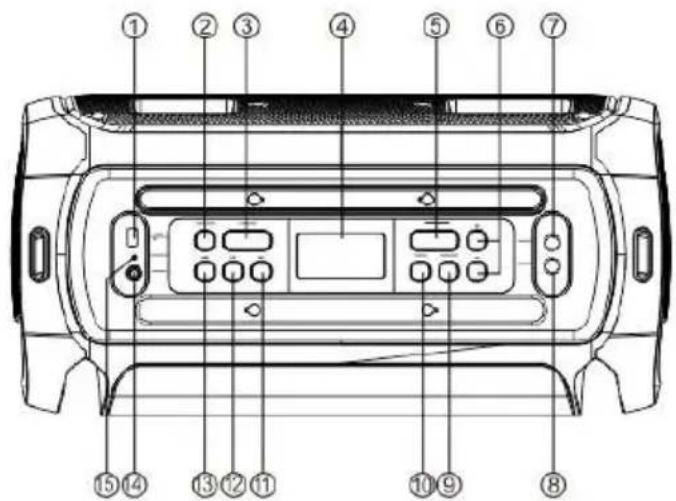
11.▶▶: Skip to the next song in USB/BT mode. Skip to next station in FM mode.
12. ▶||: In USB/BT input mode: Press to PLAY/PAUSE a track. In FM mode: Press to scan FM frequencies.
13. Skip to previous song at USB/BT input mode. Skip to previous station in FM mode.
-
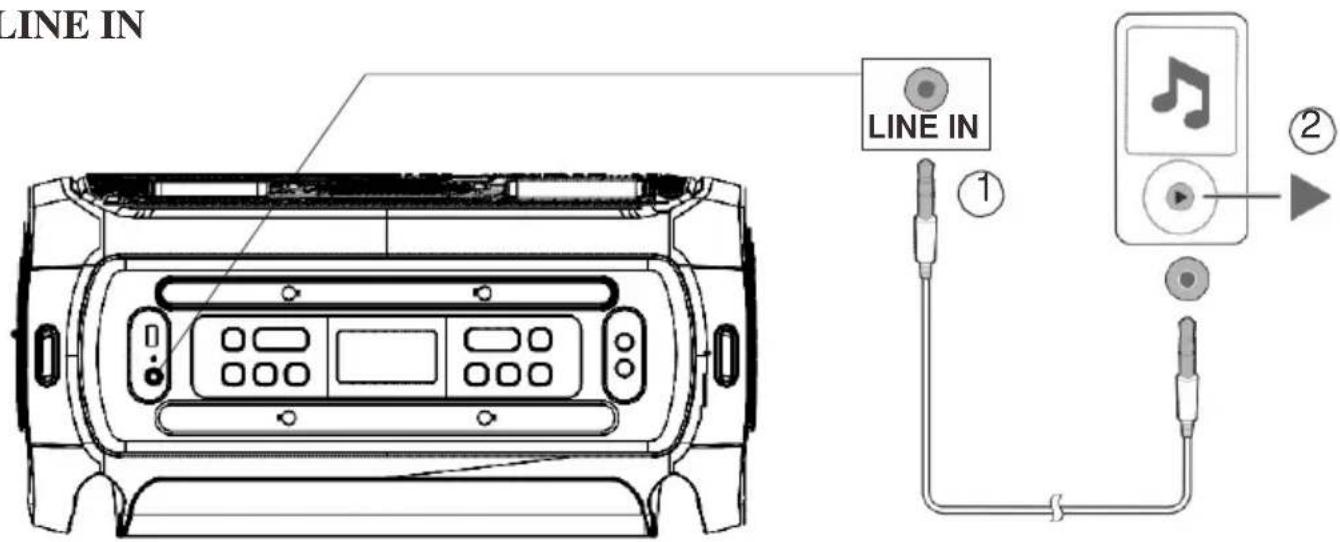
LINE-IN: 1/8" Auxiliary audio input
-
CHARGING INDICATOR LED
-
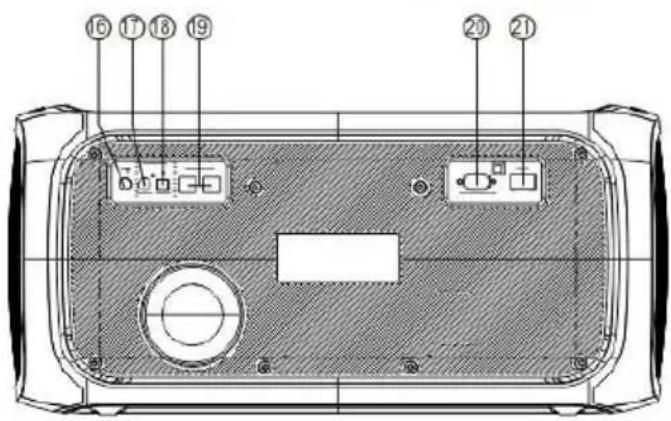
FM Antenna Port
-
DIGITALAUDIO COAXIAL INPUT
-
DIGITAL AUDIO OPTICAL INPUT
-
SPEAKER OUTPUT JACK
-
AC INPUT: AC 100V-240V\~,50/60Hz.
-
POWER SWITCH: Press this switch to turn the unit ON or OFF
1) STANDBY: Standby ON/OFF.
2) 0\~9 NUMERIC KEYS: These keys are used to play a track directly in USB source mode or a frequency directly in FM mode. Eg: To play 12th track in the USB playlist press the numeric key"1" followed by"2".
3) VOL-: To decrease the volume.
4) |CH-: Play the previous song by pressing " |CH-" in USB/BT input mode. Choose previous channel by pressing " |CH-" in FM input mode.
5) ▶||Play / pause in USB/BT mode. In FM mode press for full automatic search.
6) ◀◀/TU-: Fast rewind a song by pressing "◀/TU-" in USB input mode. Choose tuning channel by pressing "◀/TU-" in FM input mode.
7) ▶▶/TU+: Fast forward song by pressing "▶▶/TU+" in USB input mode. Choose tuning channel by pressing "▶▶/FU+" in FM input mode.
8) ▶▶|/CH+ : Play the next song by pressing "▶▶|/CH+" in USB/BT input mode. Choose next channel by pressing "▶▶|/CH+" in FM input mode.
9) VOL+ : To increase the volume.
10) MUTE : Press to switch audio mute ON/OFF.
11) EQUALIZER: Press to change the equalizer between EQ 1(NORMAL), EQ2(ROCK), EQ 3(POP), EQ 4(CLASSIC), EQ 5(JAZZ), EQ 6(COUNTRY)
12) SOURCE : Press to change the source between BT, LINE, COAXIAL, OPTICAL, FM, USB.

Bluetooth

natural_image
Top-down technical line drawing of a vehicle front panel with control buttons and display (no text or symbols)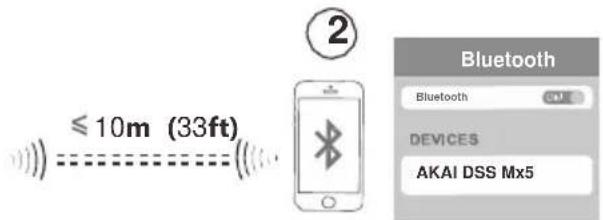
Press the SOURCE button, display will flash “BT” while searching for devices. On your Bluetooth media player, select “AKAI DSS MX5” to establish connection. You will hear a beep and “BT” on display will stop flashing once connection is successful.
USB

This unit will automatically go to USB mode when USB stick is inserted or you can use SOURCE button to toggle through modes, display will read “USB” for USB mode. Supported Audio File types: MP3, AAC, WAV, FLAC, WMA
LINE IN
Mixing sound with microphone

Connect dynamic microphone to 1/4" input. To adjust Mic volume, press EFFECT button once, display will read "2U**". Use the + & - buttons to adjust microphone volumes
FM Radio Operation
-
Before using the radio functions, you must attach the supplied antenna. Adjust the antenna to obtain optimum reception.
-
Press [SOURCE] to select FM mode.
-
Press the CH+/CH- key on the remote control or Hold the [|◀◀/▶▶] key on the top panel to skip to the preset station.
-
Press the TU+/TU- key on the remote control or press the [|◀◀▶▶] | key on the top panel to adjust the radio frequency manually.
(The number key on the remote control can directly select the frequency. Such as enter "8,8,1" keys for 88.1 MHz, "1.0,4.0" keys for 104.0MHz.)
Press the PLAY key on the remote control or Press the [▶] key on the top panel, the machine will scan radio channels from low-frequency to high-frequency by itself and memorize the channels one by one.
Battery
In AC (power) mode the battery will automatically charge. A slow red flashing light indicates that the battery is charging. When fully charged a green light will be displayed.
In DC (battery) mode a green light indicates that the battery level is full. If the battery level is low a red light will be displayed. This indicates that the battery must immediately be charged or the speaker will turn off.
Note:
- Always unplug the unit from power when making connections.
- Check all connections are firmly secured.
- Confirm both speakers are connected to their correct designated position.
FM Antenna

natural_image
Diagram of a device with two speakers and an internal panel, showing no text or symbolsSpecifications
LF Driver Size (Subwoofer) 2 x 12"
MF Driver Size(main speaker) 6.5"
HF Driver Size(main speaker) 1"+3"
Power Consumption
Frequency Response
Power Source
Bluetooth version
Bluetooth channel emission power
Battery voltage
Battery type
PMPO power
RMS power
FM Radio function/ frequency
Supported audio formats
Charging time
Playing time
Frequency Response
Impedance
S/N Ratio
Distortion
180W
30Hz-20KHz
100-240V\~50/60Hz
5.3
0.2dBm
12V
Li-ion 2400mAh
6000 W
200 W
87.5-108MHz
MP3/WMA
2h
2-3h
30HZ-20KHz
4ohm
78dB
1%(5W)
Access o ries
Instruction Manual----1 pc
Remote control---- 1 pc
FM Antenna----1 pc
Power cable----1 pc
Wireless microphone----1 pc
natural_image
Symbol of a trash bin crossed with a diagonal line and a black rectangular block below (no text or labels)Disposal of electrical and electronic equipment
This symbol on the product or packaging means that the product should not be treated as household waste. Do not throw garbage at the end of its life, but take it to a collection center for recycling. In this way you will help to protect the environment and be able to prevent any negative consequences that it would have on the environment and human health.
To find your nearest collection center:
-Contact local authorities
- Access the website: www.mmediu.ro
- Request additional information from the store where you purchased the product.
IMPORTATOR: SC INTERVISION TRADING-RO SRL
Pitesti, Bd I.C. Bratianu, nr. 48-52, corp A, et. 5, Cam 504-
505, Jud. Arges, Romania,
cod postal: 110121
AKAI
Sistem audio MX5
MANUALUL UTILIZATORULUI

natural_image
Simple line drawing of a container with a dotted pattern inside, no text or symbols present.
natural_image
Line drawing of a portable electronic device with circular patterns on its body (no text or symbols)
natural_image
Simple line drawing of a container with a dotted pattern inside, no text or symbols present.
natural_image
Top-down technical line drawing of a vehicle front panel with control buttons and display (no text or symbols)
natural_image
Diagram of a device rear panel connected to two speakers, showing internal components and wiring (no text or labels)Specificatii
Dimensiune driver LF (Subwoofer) 2 x 12"
Dual speaker system MX5
ΟΔΗΓΙΕΣ ΧΡΗΣΗΣ
natural_image
Line drawing of three containers with circular patterns, no text or symbols presentwww.akai.gr

natural_image
Technical line drawing of a device with two speakers and an internal panel, no text or symbols presentΧαρακτηριστικά
natural_image
Line drawing of three containers with circular patterns, no text or symbols present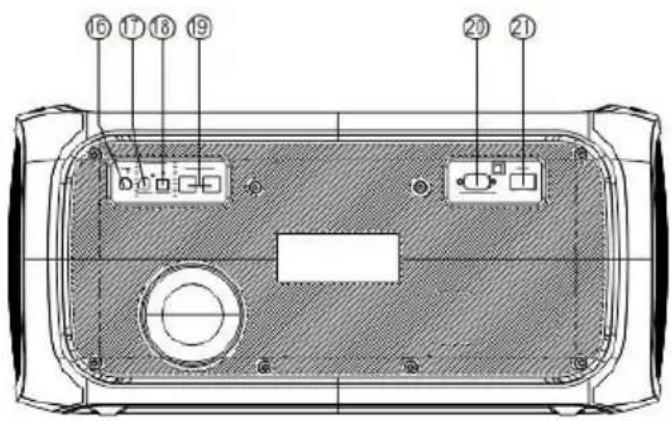
natural_image
Top-down line drawing of a vehicle front panel with control buttons and display (no text or symbols)
natural_image
Simple line drawing of a trash bin with no text or symbols
natural_image
Line drawing of three containers with circular patterns, no text or symbols present
natural_image
Top-down technical line drawing of a vehicle front panel with control buttons and display (no text or symbols)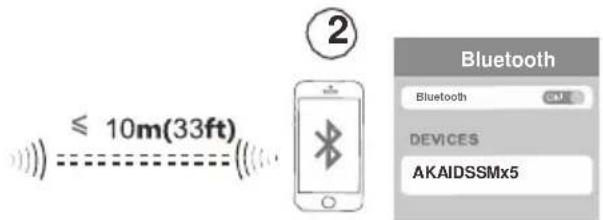
Müszaki adatok
natural_image
Simple line drawing of a trash bin with no text or symbols
natural_image
Line drawing of three containers with different patterns and circular patterns, no text or symbols present
natural_image
Top-down technical line drawing of a vehicle front panel with control buttons and display (no text or symbols)
natural_image
Technical line drawing of a device rear panel with two speakers and a central display unit (no text or symbols)natural_image
Simple line drawing of a trash bin with two crossed lines indicating no waste or restriction (no text or symbols)
natural_image
Line drawings of three containers with different patterns and circular patterns, no text or symbols present
natural_image
Line drawing of a device with two speakers and a central display unit connected to a speaker (no text or symbols)Techni ckéúdaje
Velikost driver-u LF (subwoofer) 2 x 12"
natural_image
Simple line drawing of a trash bin with no text or symbols
natural_image
Simple line drawing of a container with a dotted liquid and a circular pattern inside (no text or symbols)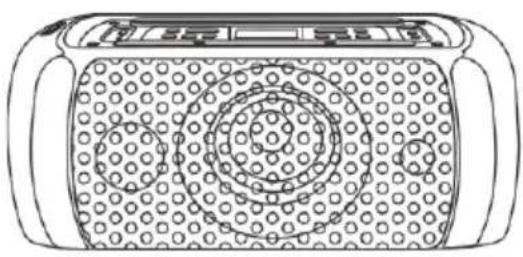
natural_image
Line drawing of a portable radio with patterned cover and buttons (no text or symbols)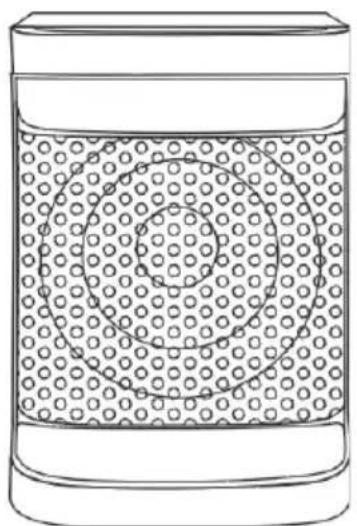
natural_image
Simple line drawing of a container with a dotted pattern and a circular pattern inside (no text or symbols)
Dial'kové ovládanie
natural_image
Diagram of a device with two speakers and a central display panel, connected by a cable (no text or symbols present)Techn i cké ú daje
| Vel'kost' driver-u LF (Subwoofer) | 2 x 12" |
| Vel'kost' driver-u MF (hlavný reproduktor) 6,5 " | |
| Vel'kost' driver-u HF (hlavný reproduktor) | 1" + 3" |
| Spotreba energie | 180W |
| Frekvenčná odozva | 30Hz-20KHz |
| Napájanie | 100-240V~50/60Hz |
| Bluetooth verzia | 5.3 |
| Vysielací výkon kanála Bluetooth | 0,2 dBm |
| Napätie batérie | 12V |
| Typ batérie | Li-ion 2400mAh |
| Výkon PMPO | 6000 W |
| RMS výkon | 200 W |
| Funkcia FM rádia/ frekvencia | 87,5-108MHz |
| Podporované audio formáty | MP3/WMA |
| Doba nabíjania | 2 hodiny |
| Doba prehrávania | 2-3 hodiny |
| Frekvenčná odozva | 30 Hz - 20 kHz |
| Impedancia | 4 ohm |
| Pomer S/N | 78dB |
| Skreslenie | 1 % (5 W) |
natural_image
Simple line drawing of a trash bin with no text or symbols


- Dual speaker system MX5
- Pan el
- Bluetooth
- USB
- LINE IN
- Mixing sound with microphone
- FM Radio Operation
- Battery
- Note:
- Specifications
- Access o ries
- Disposal of electrical and electronic equipment
- AKAI
- Sistem audio MX5
- Specificatii
- Χαρακτηριστικά
- Müszaki adatok
- Techni ckéúdaje
- Dial'kové ovládanie
- Techn i cké ú daje
Brand : AKAI
Model : MX5
Category : Uncategorized