
ACRS-4000 - Wristwatch AKAI - Free user manual and instructions
Find the device manual for free ACRS-4000 AKAI in PDF.


| Brand | AKAI |
| Model | ACRS-4000 |
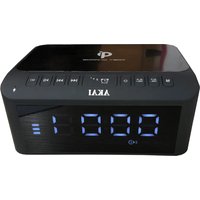
| Product Type | Bluetooth Radio Alarm Clock |
| Power Supply | DC 5V adaptor (included) |
| Power Consumption | Maximum: 7W, Minimum: 0.3W |
| Speaker | 1.75 inches, 4-ohm dynamic speaker |
| Power Output | 2.5W RMS |
| Frequency Range (FM) | 87.5 - 108 MHz |
| Bluetooth Version | 5.1 |
| Bluetooth Range | Up to 10 meters (no obstacles) |
| Preset Stations | Up to 50 |
| Alarm Modes | Buzz, Radio, USB |
| Snooze Duration | 9 minutes |
| Sleep Timer | 15, 30, 45, 60, 75, 90 minutes |
| Display | LCD with dimmer (3 levels) |
| Media Playback | USB, Micro SD (MP3) |
| Signal-to-Noise Ratio (USB) | 50 dB |
| Signal-to-Noise Ratio (FM) | 43 dB |
| Distortion (USB) | 18% |
| Distortion (FM) | 12% |
| Accessories Included | 5V1A Power adaptor with Type-C plug cord, instruction manual |
| Weight | Not specified |
Frequently Asked Questions - ACRS-4000 AKAI
User questions about ACRS-4000 AKAI
0 question about this device. Answer the ones you know or ask your own.
Ask a new question about this device
Download the instructions for your Wristwatch in PDF format for free! Find your manual ACRS-4000 - AKAI and take your electronic device back in hand. On this page are published all the documents necessary for the use of your device. ACRS-4000 by AKAI.
USER MANUAL ACRS-4000 AKAI
Please read this manual carefully so you can have a better understanding of performance and features of this clock radio.
AC Adaptor Operation
Insert one end of the AC/DC 5V adaptor to the adaptor port (Location 16) of the unit, and the other end to the power supply. The unit will be automatically in standby mode when connecting to AC power.
Warning! Before using the unit, check if the local mains supply is compatible with the unit. Do not plug or unplug the adaptor when your hands wet.
When the unit will not be used for long periods of time (e.g., vacation etc.) disconnect the adaptor from the wall outlet.
Normal Operation
- Press POWER to switch on the radio.
- Press MODE once or more to select mode (Bluetooth / FM / USB / Card).
- Adjust the sound with VOLUME button.
- To switch to standby mode, press POWER once.
Setting Time
Auto update
After a short time under FM RDS radio signal, the current time will appear on the display.
Manual Setting
- Check the radio if it is switched off or in standby mode.
- Press and hold PROG for 3 seconds on the panel to start clock setting.
- Press PREVIOUS or NEXT button for 12-hours/24-hours selection.
- Press PROG to hour setting.
- To set the hours, press PREVIOUS or NEXT while the display is still flashing.
- Press PROG to minute setting.
- To set the minutes, press PREVIOUS or NEXT while the display is still flashing.
- Press PROG to complete the clock setting.
Setting The Alarm
- Check the radio if it is switched off or in standby mode.
- Press the ALARM once to preview the alarm time AL1 and AL2.
- Press ALARM for 3 seconds to start alarm setting.
- To set the hours, press PREVIOUS or NEXT while the display is still flashing.
- Press ALARM to minute setting.
- To set the minutes, press PREVIOUS or NEXT while the display is still flashing.
- Press ALARM and press PREVIOUS or NEXT to select the alarm sound as Buzz (bb), Radio (rad) or USB (usb).
- Press ALARM and press PREVIOUS or NEXT to select the volume of alarm sound.
- Press ALARM to complete the alarm setting.
Remark: When the alarm rings, the volume of the alarm will gradually increase. Press ALARM to stop the ringing.
\*During standby mode\*
Press ALARM once: preview AL1.
Press ALARM twice: preview AL2.
Press ALARM three times: you will see two dots (:) in front of the time shown on the screen, which indicates the alarm is switched on.
Press ALARM four times: the dots (:) no longer shown on the screen in front of the time, which indicates the alarm is turned off.
Snooze Function
-
When your alarm rings, you can press the SNOOZE button to temporarily suspend the alarm. The alarm will ring again 9 minutes later. (The Snooze interval time is 9 minutes).
-
Snooze will be repeated until the ALARM is pressed.
Sleep Function
- When listening to radio, press the SLEEP button to select a time. For example, when the LED display shows 15, the radio will turn off automatically after 15 minutes.
- To select a longer playing time, press the SLEEP button to select 15 / 30 / 45 / 60 / 75 / 90 minutes.
- To turn off the radio at any time, press the POWER ON OFF button.
Volume
Adjust the sound with the VOLUME button.
Radio
- Please make sure the FM antenna is completely extended to have the best FM reception.
- Press POWER to switch on the radio.
- Press MODE once or more to select FM mode (rad)
4 Press and hold down TUNING + or TUNING – until the display frequency starts to run. It stops automatically when it finds the next/previous available station.
5 Press TUNING + or TUNING – briefly, once or more until the right frequency is found.
6 Adjust the sound with VOLUME button.
7 To switch off the radio, press POWER once.
Remark: Ensure that the FM antenna is completely unrolled and extended to have the best FM reception.
Presets
You can store up to 50 preset radio stations. To erase a stored station, simply store another station to the preset number you previously saved.
Automatic Preset
- Continually press and hold down PROG until the display frequency starts to run.
Manual Preset
- Tune to your desired station.
- Press PROG once to enter programming mode.
- Press PREVIOUS or NEXT to select the desired memory location.
- Press TIME PROG once again to confirm the selected station.
- To listen to a preset station:
- select your waveband;
- press the PREVIOUS or NEXT for selecting your desired station.
Bluetooth Function
- Press MODE to Bluetooth function.
- Activate the Bluetooth function in your Bluetooth device.
- Select "ACRS-4000" on your Bluetooth device for pairing. The speakers will have a pop sound to confirm if successfully connect with your Bluetooth device.
- Start music play on your Bluetooth device.
-
After connected, you can control the playback, pause, next, previous function by both your Bluetooth device or the unit directly.
-
Hold PLAY button for 3 seconds to disconnect the pairing of Bluetooth function. The Bluetooth indicator will be flashing after pairing disconnected.
Note:
The operational range between this unit and a Bluetooth device is approximately 10 meters. Any obstacle between this unit and a Bluetooth device can reduce the operational range. The device will be disconnected when the device is moved beyond the operational range.
Before you connect a Bluetooth device to this unit, familiarize yourself with the Bluetooth capabilities of the device. Compatibility with all Bluetooth devices is not guaranteed.
Keep this unit away from any other electronic device that may cause interference.
USB, MICRO SD CARD PLAYBACK
Able to decode and playback all MP3 files which stored in the memory media with USB connector, MICRO SD Card Slot.
- Select MODE to USB / Card.
- Insert USB storage media or MICRO SD card correctly.
- The system will automatically start reading the MP3 files in the USB Storage Media, MICRO SD Card.
- Press USB MICRO SD PREVIOUS / PLAY PAUSE / NEXT buttons for Previous / Play & Pause / Next functions.
Wrongly connect the USB Storage Media or MICRO SD Card upside down could damage the unit or the USB Storage Media or MICRO SD Card. If you misplaced the MICRO SD card, it cannot be detected or playback.
Dimmer
Press the SLEEP/ SNOOZE to set the brightness of LCD display (Highest / Medium / Low)
SPECIFICATIONS
| Frequency range: | FM :87.5-108MHz |
| Speaker: | 1.75 inches, 4-ohm dynamic speaker |
| Power Output: | 2.5W RMS |
| Power consumption: | Maximum: 7W, Minimum: 0.3W |
| AC Operate: | DC 5V adaptor |
| Multimedia interface | Micro SD / USB |
| S/N ratio | USB: 50dB, FM: 43dB |
| Distortion | USB: 18%, FM: 12% |
| BT Version | Bluetooth 5.1 |
| BT Frequency | 2.402GHz--2.48GHz |
| BT channel emission power | +6 dBm |
| BT action range | 10 Meter (No obstacles to the environment) |
ACCESSORIES: 5V1A Power adaptor with Type-C plug cord, instruction manual.
PRECAUTIONS:
- For AC operation, make sure the voltage is compatible. Always use the supplied AC Adaptor; never use another AC Adaptor.
- Always disconnect the AC Adaptor from the AC power source when it is not in use.
- Do not expose the unit to extreme temperature nor high humidity to ensure normal functionality for a long lifetime.
For instance, never place the unit in bathing areas nor around stoves and radiators.
- If you find the unit is not working properly, please contact the service representative. Do not attempt to repair by yourself.
WARNING:
To prevent fire or shock hazard, do not expose the unit to rain or moisture.
To avoid electrical shock, do not open the cabinet, refer to service agent or qualified engineer only.
DISPOSAL OF ELECTRICAL AND ELECTRONIC EQUIPMENT
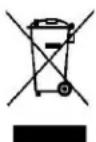
This symbol on the product or packaging means that the product should not be treated as household waste. Do not throw garbage at the end of its life, but take it to a collection center for recycling. In this way you will help to protect the environment and be able to prevent any negative consequences that it would have on the environment and human health.
To find your nearest collection center:
* Contact local authorities
* Access the website: www.mmediu.ro;
.* Request additional information from the store where you purchased the product.
IMPORTATOR: SC INTERVISION TRADING-RO SRL
Bld. I.C Bratianu, nr. 48-52, corp A, etaj. 5,
camera 504-505, oras Pitesti, judet Arges, Romania
Cod postal: 110121
AKAI

RADIO CEAS CU BLUETOOTH
ACRS-4000
MANUAL DE INSTRUCTIUNI
RO – ROMÂNĂ


- AC Adaptor Operation
- Normal Operation
- Setting Time
- Auto update
- Manual Setting
- Setting The Alarm
- \*During standby mode\*
- Snooze Function
- Sleep Function
- Volume
- Radio
- Presets
- Automatic Preset
- Manual Preset
- Bluetooth Function
- Note:
- USB, MICRO SD CARD PLAYBACK
- Dimmer
- PRECAUTIONS:
- WARNING:
- DISPOSAL OF ELECTRICAL AND ELECTRONIC EQUIPMENT
- AKAI
Brand : AKAI
Model : ACRS-4000
Category : Wristwatch