
Sonicare Cordless Power Flosser 3000 HX3801 - Dental floss PHILIPS - Free user manual and instructions
Find the device manual for free Sonicare Cordless Power Flosser 3000 HX3801 PHILIPS in PDF.


| Product Type | Cordless Power Flosser (Oral Irrigator) |
| Brand | Philips |
| Model | Sonicare Cordless Power Flosser 3000 HX3801 |
| Series | 2000 Series (per manual) / 3000 Series (per product name) |
| Intended Use | Remove plaque and food debris between teeth and on tooth surface to reduce tooth decay and improve gum health |
| Power Source | Rechargeable lithium-ion battery; USB-A charging with 5V adapter (IPX4 rated) |
| Charging Time | Up to 8 hours for full charge |
| Battery Life | At least 25 flossing sessions (1 minute each) per full charge |
| Auto Shut-off | After 2 minutes of continuous use |
| Modes | Clean mode (with pacer) and Deep Clean mode (Pulse Wave technology) – specific models only |
| Intensity Levels | 3 levels (low, medium, high) |
| Pacer | 15-second intervals; can be activated or deactivated |
| Nozzle Types | Standard (F1), Comfort (F2), Quad Stream (F3) |
| Nozzle Replacement | Every 6 months or immediately if damaged |
| Reservoir Capacity | Approx. 200 ml (estimated) |
| Weight | Approx. 0.5 kg (estimated) |
| Dimensions (approx.) | 25 x 8 x 8 cm (height x width x depth) |
| Water Resistance | Handle can be wiped; charging port must be dry before charging; not submersible |
| Cleaning | Weekly: hand wash reservoir, wipe handle, rinse nozzles; deep clean with vinegar solution |
| Safety | Keep charger away from water; do not charge outdoors; use only original accessories; consult doctor if medical concerns |
| Battery Disposal | Contains lithium-ion cell; must be recycled; remove by qualified professional |
| Warranty | See international warranty leaflet; does not cover reservoir, nozzles, normal wear, misuse |
| Included Accessories | Nozzle case, travel pouch (specific models), USB cable, USB power adapter (specific models) |
| Model Number Location | On the product box |
Frequently Asked Questions - Sonicare Cordless Power Flosser 3000 HX3801 PHILIPS
User questions about Sonicare Cordless Power Flosser 3000 HX3801 PHILIPS
0 question about this device. Answer the ones you know or ask your own.
Ask a new question about this device
Download the instructions for your Dental floss in PDF format for free! Find your manual Sonicare Cordless Power Flosser 3000 HX3801 - PHILIPS and take your electronic device back in hand. On this page are published all the documents necessary for the use of your device. Sonicare Cordless Power Flosser 3000 HX3801 by PHILIPS.
USER MANUAL Sonicare Cordless Power Flosser 3000 HX3801 PHILIPS

English 6
Indonesian 20
Malay 35
Thai 51
Korean 64
Important safety information
Only use the product for its intended purpose. Read this important information carefully before you use the product and its batteries and accessories, and save it for future reference. Misuse can lead to hazards or serious injuries.
Warnings
- Keep the charger away from water.
- After cleaning, make sure the charger is completely dry before you connect it to the wall socket.
- This appliance can be used by children and persons with reduced physical, sensory or mental capabilities or lack of experience and knowledge if they have been given supervision or instruction concerning use of the appliance in a safe way and understand the hazards involved. Cleaning and user maintenance shall not be made by children without supervision.
- Children shall not play with the appliance.
- Only use original Philips accessories or consumables. Only use the USB charger provided with the product.
- Do not charge the product outdoors or near heated surfaces.
- Do not clean any part of the product in the dishwasher.
- To avoid physical injury, do not fill the reservoir with hot water. Do not put foreign objects in the reservoir.
- The maximum altitude of use is 4500 meters.
- This product has only been designed for cleaning teeth and gums. Do not use it for any other purpose. (for e.g. eyes, nose and ears).
MEDICAL WARNINGS
- Stop using the appliance and consult your dentist/doctor if excessive bleeding occurs after use, if bleeding continues to occur after 1 week of use or if you experience discomfort or pain.
- If you have had oral or gum surgery in the previous 2 months, consult your dentist before you use this appliance.
- If you have a pacemaker or other implanted device, contact your doctor or the manufacturer of the implanted device prior to use.
- If you have medical concerns, consult your doctor before you use this appliance.
- This appliance is a personal care device and is not intended for use on multiple patients in a dental practice or institution.
- Charge and use the product at a temperature between 5 °C and 40 °C (41 °F and 104 °F).
Battery safety instructions
- This appliance contains batteries that are only to be removed by skilled persons
- Only use the product for its intended purpose. Read this information carefully before you use the product and its batteries and accessories, and save it for future reference. Misuse can lead to hazards or serious injuries. Accessories supplied may vary for different products.
- Only use original Philips accessories and consumables. Only use detachable supply unit WAAxxxx.
- Keep product and batteries away from fire and do not expose them to direct sunlight or high temperatures.
- If the product becomes abnormally hot or smelly, changes color or if charging takes longer than usual, stop using and charging the product and contact Philips.
- Do not place products and their batteries in microwave ovens or on induction cookers.
- Do not open, modify, pierce, damage or dismantle the product or battery to prevent batteries from heating up or releasing toxic or hazardous substances. Do not short-circuit, overcharge or reverse charge batteries.
- This appliance contains batteries that are non-replaceable. When the battery is at end of life, the appliance shall be properly disposed of, see section on recycling.
- To avoid accidental short-circuiting of batteries after removal, do not let battery terminals come into contact with metal object (e.g. coins, hairpins, rings). Do not wrap batteries in aluminium foil. Tape battery terminals or put batteries in a plastic bag before you discard them.
Electromagnetic fields (EMF)
This Philips appliance complies with all applicable standards and regulations regarding exposure to electromagnetic fields.
Introduction
Welcome to Philips! Congratulations on your new Sonicare Cordless Power Flosser. To fully benefit from the support that Philips offers, register your product at philips.com/welcome.
Intended Use
The Philips Sonicare Cordless Power Flosser is an oral irrigator intended to remove plaque and food debris between teeth and on the tooth surface in order to reduce tooth decay and improve and maintain gum health. This product is intended for consumer home use, normally used at least once a day. Use by children should be with adult supervision.
Your Philips Sonicare Power Flosser
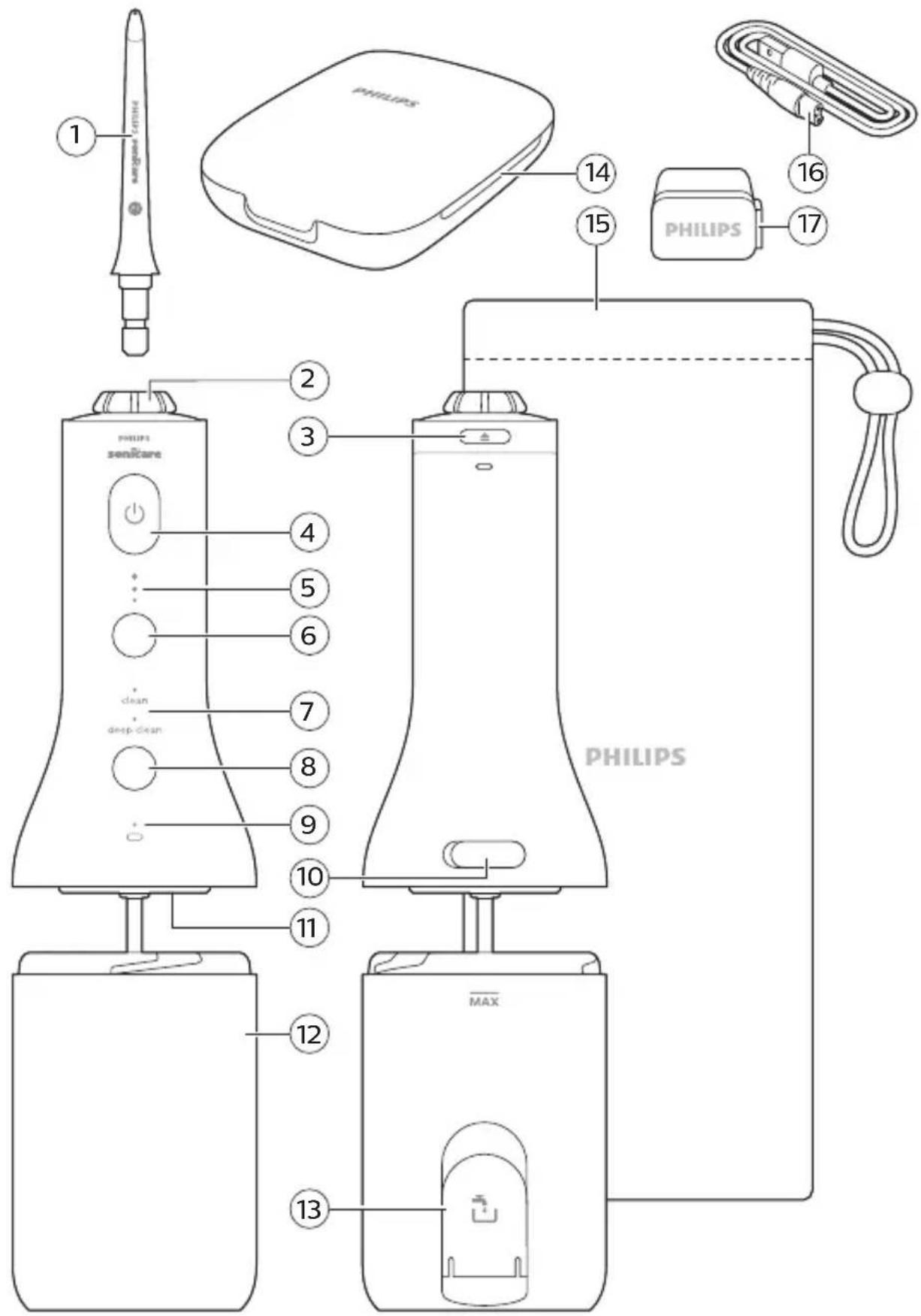
1 Nozzle 2 Nozzle rotator 3 Nozzle release button 4 On/off button 5 Intensity indicator 6 Intensity button 7 Mode indicator (Specific models only) 8 Mode button (Specific models only) 9 Battery indicator light 10 Charging port/cover 11 In-Reservoir Nozzle Storage 12 Reservoir 13 Reservoir fill door
14 Nozzle case (Specific models only)
15 Travel pouch (Specific models only)
16 USB-A to small plug
17 USB-A power adapter (Specific models only)
Note: The contents of the box may not include all items shown depending on the product configuration purchased.
Nozzles
To see what type of nozzles you have, check the code at the base of the nozzle. Each nozzle type provides different benefits.
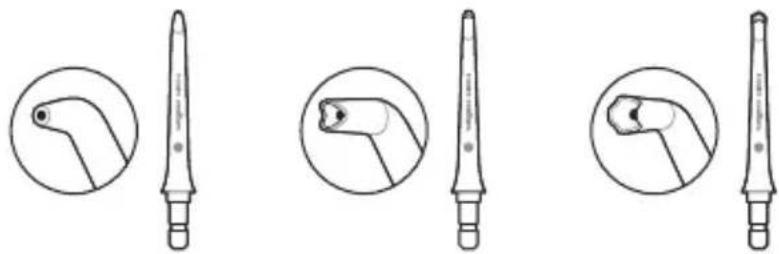
Nozzle label F1 F2 F3
| Nozzle Name Standard nozzle Comfort nozzle Quad Stream | ||
| nozzle | ||
| Benefit Standard nozzle with a single stream of water for removing debris and plaque. | Soft rubber nozzle for comfort and ease of positioning for those with sensitive gums. | Soft rubber nozzle that directs water into a cross-shaped stream that gently removes plaque for an effortlessly thorough clean. |
Note: The contents of the box may not include all items shown depending on the product configuration purchased.
Modes and intensities
Modes (Specific models only)
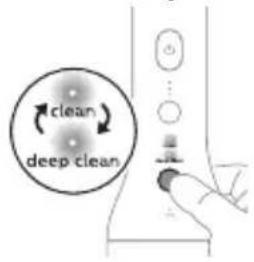
Depending on your model, your Cordless Power Flosser is equipped with either one or two different modes. If you have a device with two modes, press the mode button to toggle between standard clean mode and deep clean mode to select your desired mode. If you have a device with one mode, it is already in the clean mode.
Clean (2000 and 3000 Series)
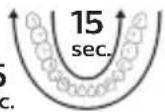
This mode, with pacer, provides constant water pressure for a great clean.
![graph TD A["Top Path"] -->|15 sec.| B["Bottom Path"] B -->|15 sec.| A](/content/2026/05/855648/images/d76052297f3065886660c6ae116fc6936317450c7a13c810e0850368cbd8fef4.jpg)
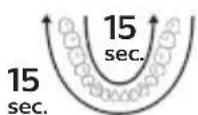
The pacer indicates when you are supposed to move to the next section of your mouth via a short pause in the waterfall every 15 seconds.
This Cordless Power Flosser comes with the pacer activated.
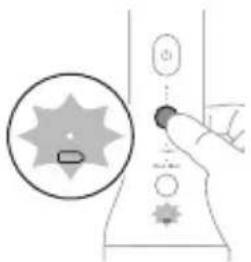
To activate or deactivate the pacer
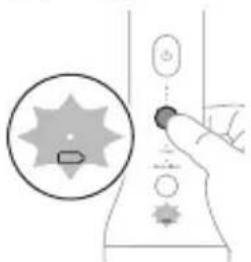
With the Cordless Power Flosser off, press and hold the intensity selection button for 3 seconds.
- When deactivated, the battery indicator light will flash amber once.
- When activated, the battery indicator light will flash green twice.
Deep clean (3000 Series)
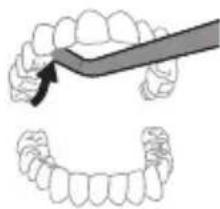
This mode utilizes Pulse Wave technology, to guide you tooth by tooth, using strong and gentle pulses of water for a thorough clean.
With Pulse Wave technology the flow of the water increases and decreases in intensity, providing a brief pause during which you can move the nozzle to the next space between your teeth.
Intensities
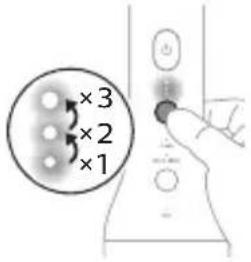
Your Cordless Power Flosser comes with three different intensity settings. To change the intensity to the setting you prefer, press the intensity button.
Note: It is recommended to start using this Power Flosser on the lowest intensity and increase the intensity over the course of a few weeks.
Getting Started
Charging your Cordless Power Flosser
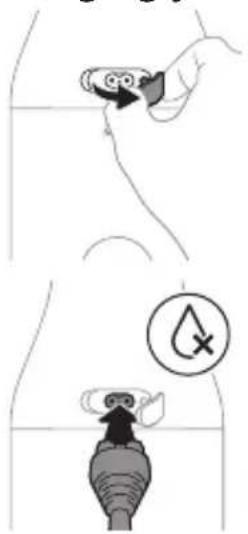
1. Gently pull and rotate the charging port cover on the back of the Cordless Power Flosser to expose the charging port.
2. Plug the USB-A cable into the charging port on the back of the Cordless Power Flosser. Note: Make sure the handle is completely dry before you connect the USB-A cable.
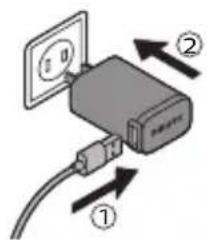
3 Connect the USB-A cable into a 5V USB wall adapter. Note: Wall adapter not included in all models. Only use a 5V IPX4 adapter.
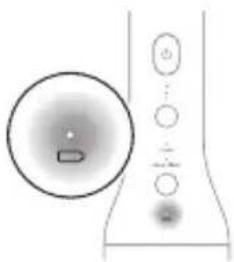
4 The battery indicator flashes while charging (see 'Charging').
Note: It can take up to 8 hours to fully charge the battery, but you can use the Cordless Power Flosser before it is fully charged.
Note: Replace the charging port cover on the Cordless Power Flosser when not actively charging.
Filling the Reservoir
Fill the reservoir with lukewarm water. There are two easy ways to fill the reservoir.
Note: When filling reservoir, do not exceed the max fill line.
Note: Remove the charger from the Cordless Power Flosser prior to filling the reservoir and using the device.
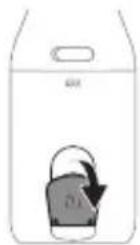
Option 1:
Lift the flip top to the side of the reservoir and fill the reservoir through the quick side fill port.
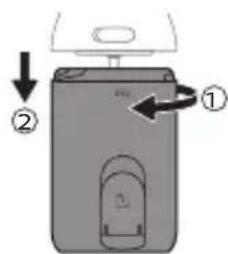
Option 2:
1 Twist to detach the reservoir and fill the reservoir through the wide mouth opening.
2 Fill the reservoir.
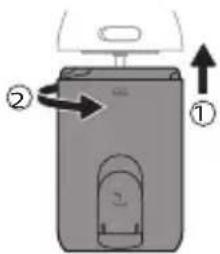
3 Twist the reservoir to reattach.
Inserting and removing nozzles
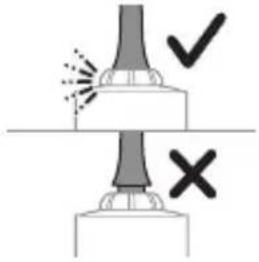
Insert your preferred nozzle into the handle. Press the nozzle down until you hear a "click".
Note: Ensure the nozzle is fully inserted and flush with the top of the device.
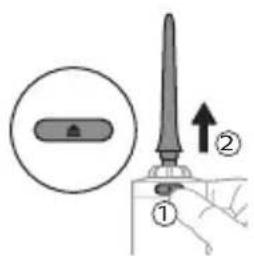
To remove the nozzle, press the nozzle release button and pull the nozzle from the handle.
Using your Cordless Power Flosser
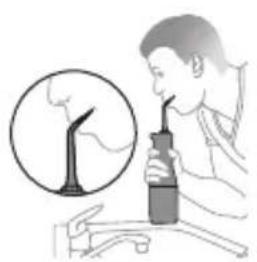
1 Before turning on the device, point the nozzle tip at the sink. Press the on/off button on the handle to turn on the Cordless Power Flosser. Allow water to spray into the sink. Turn off the device once water dispenses from the device.
2 Place the nozzle tip in your mouth. Lean over the sink and partially close your lips over the nozzle tip to avoid splashing. Leave enough space to allow water to flow from your mouth into the sink.
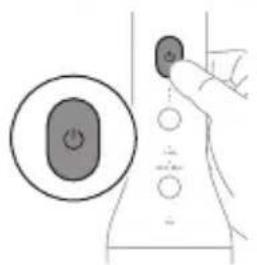
3 Press the on/off button on the handle to turn on the Cordless Power Flosser.
4 With the Cordless Power Flosser turned on:
Note: Do not press nozzle release button while using.
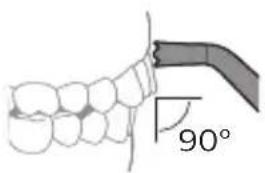
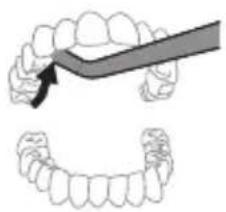
a Position the nozzle tip just above the gum line at a 90° angle.
Note: For the Quad Stream nozzle press gently so that the nozzle tip is in contact with the gum line and the teeth.
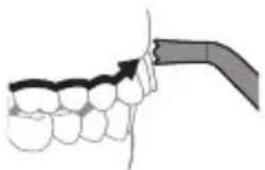
b Starting from your back teeth in your upper or lower jaw, slide the nozzle tip along the gum line and pause briefly between each tooth.
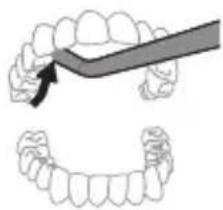
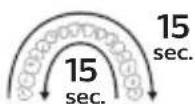
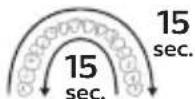
c Continue to clean both inside (15 seconds) and outside (15 seconds) of your teeth for a total of 30 seconds in one arch of your mouth.
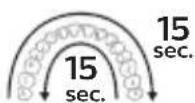
Note: Remember to clean the insides of your teeth.
Note: You can use the Nozzle Rotator to turn and position the nozzle tip to clean the insides of your teeth.
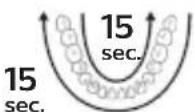
d Repeat in the other arch of your mouth for another 15 seconds on the inside and 15 seconds on the outside until all spaces around and between your teeth have been cleaned for a total of at least one minute.
Note: You can stop the water flow during use by pressing the on/off button on the Cordless Power Flosser.
Note: The Cordless Power Flosser switches off automatically after 2 minutes.
Note: If you choose to refill the reservoir during use, turn the device off while refilling the reservoir and then pick up where you left off until all spaces around and between your teeth have been cleaned for a total of at least one minute.
Cleaning Orthodontic Brackets with the Quad Stream Nozzle
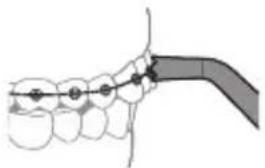
1 To clean around orthodontic brackets, place the nozzle tip over each bracket.
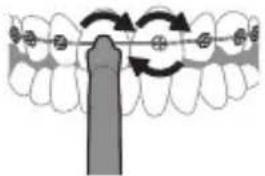
2 Gently rotate the nozzle tip around the bracket in a small circle before moving to the bracket on the next tooth.
After each use
1 Turn off the Cordless Power Flosser. 2 Detach and Empty the reservoir 3 Remove the nozzle from the handle by pushing the nozzle release button on the top of the handle 4 Rinse the nozzle under the tap 5 Dry any excess water from the nozzle, the outside of the handle, and the reservoir 6 Insert the nozzle back into the handle or utilize the in-reservoir nozzle storage feature (see 'Storage').
Note: To facilitate drying, keep the reservoir side fill port door open or leave the Cordless Power Flosser disassembled between uses.
Charging
Battery Status
This Cordless Power Flosser is designed to provide at least 25 flossing sessions, each session lasting 1 minute.
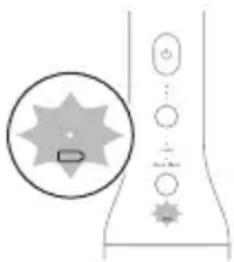
The battery indicator shows the battery status when you complete the flossing session, or when you pause the Power Flosser.
Note: The device will shut off after 2 minutes of use.
When the Power Flosser is charging
Battery status Battery indicator
| Full Solid green | |
| Charging Flashing green | |
| Note: The battery indicator will flash until fully charged. When it becomes fully charged while plugged in, the light will turn solid green for 30 seconds and then it will turn off | |
| When the Power Flosser is not charging | |
Battery status Battery indicator
| Full Solid green | |
| Medium Flashing green | |
| Low Flashing amber | |
| Empty Flashing amber for 5 seconds and thePower Flosser turns off automatically | |
| Note: When the low battery indicator appears, the Power Flosser is designed to provide at least 3 flossing sessions, each session lasting 1 minute. | |
Cleaning
The Cordless Power Flosser needs to be cleaned once a week. Clean the device and the accessories as follows. Accessories may vary by model.
Warning: Do not clean the Cordless Power Flosser while the charging cord and adapter are attached. Unplug the device and close the charging port cover before cleaning.
Reservoir
Gently remove the reservoir from the Cordless Power Flosser by twisting. The reservoir can be hand washed with warm water and mild soap or cleaned in the top rack of the dishwasher.
Handle
When necessary, you can clean the handle by wiping with a soft cloth and mild soap.
Nozzles
- Regular cleaning: Remove the nozzle from the handle. Rinse the tip under warm water.
- Every few months, or if your nozzle becomes clogged: Soak the nozzle in a container of 2 parts water and 1 part vinegar for 5 minutes. Rinse the nozzle with warm water.
Internal components, hose and handle
Fill the reservoir with warm water and add 1-2 tablespoons of white vinegar. Point the nozzle at the sink and turn on the Cordless Power Flosser to run the solution through the Cordless Power Flosser until the reservoir is empty. Rinse by repeating with a full reservoir of clean warm water.
Nozzle Storage Case
The storage case can be hand washed in warm water with mild soap or cleaned in the top rack of the dishwasher.
Travel pouch
Clean the travel pouch by wiping with a soft cloth and a mixture of warm water with mild soap. Wipe the travel pouch with cloth to dry.
Storage
In-Reservoir Nozzle Storage
Your Cordless Power Flosser is designed such that you can store one nozzle suspended from the bottom of the Cordless Power Flosser handle into the reservoir. To use this functionality:
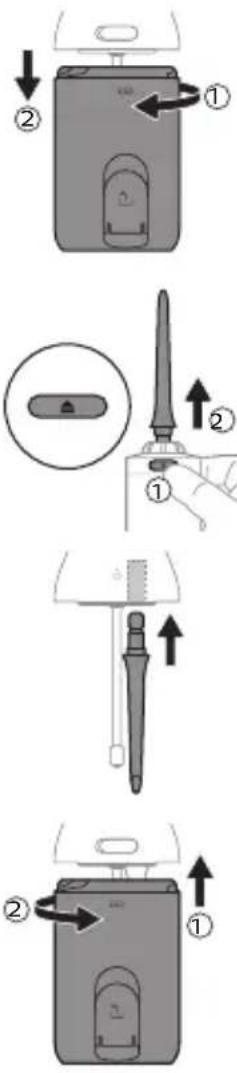
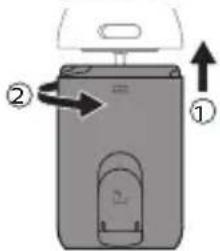
1 Twist reservoir to detach.
2 Remove the nozzle by pressing the nozzle eject button on the back of the handle.
3 Insert bottom of nozzle into the bottom of the Power Flosser.
4 Twist the reservoir to reattach.
Note: Be sure to dry the inside of the reservoir and the nozzle prior to using this functionality.
Note: To facilitate drying, keep the reservoir side fill port door open or leave the Cordless Power Flosser disassembled between uses.
Note: If you are not going to use the product for an extended period of time, unplug it from the electrical outlet, clean it and store it in a cool and dry place away from direct sunlight.
Warning: Do not place other items in the reservoir. In particular, do not store the charging cord or wall adapter in the reservoir.
Replacement
Replace nozzles every 6 months or immediately when damaged. To buy accessories or spare parts, visit philips.com or go to your local Philips Sonicare dealer.
Locating the model number
Look on the box for the model number of your device. 2000 Series - (for all HX3801, HX3822 models) 3000 Series - (for all HX3804, HX3805, HX3806, HX3824, HX3825, HX3826 models)
Warranty and support
For product information, support and online user instructions, please visit: www.philips.com/support or read the international warranty leaflet.
Warranty restrictions
The terms of the international warranty do not cover the following:
- Reservoir
- Nozzles
- Damage caused by use of unauthorized replacement parts or unauthorized nozzles
- Damage caused by misuse, abuse, neglect, alterations or unauthorized repair
- Normal wear and tear, including chips, scratches, abrasions, discoloration or fading
Recycling
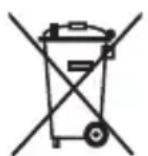
- This symbol means that electrical products and batteries shall not be disposed of with normal household waste.
- Follow your country's rules for the separate collection of electrical products and batteries.
Removal of built-in rechargeable battery
CONTAINS LITHIUM-ION RECHARGEABLE CELL. MUST BE RECYCLED OR DISPOSED OF PROPERLY.
The built-in rechargeable battery must be removed by a qualified professional when the product is discarded. Instructions for removal of built-in rechargeable batteries can be found on www.philips.com/support.
Important safety information
Nozzle labels F1 F2 F3
Name Nozzle Standard nozzle Comfort nozzle Quad Stream nozzle
Charging the Cordless Power Flosser
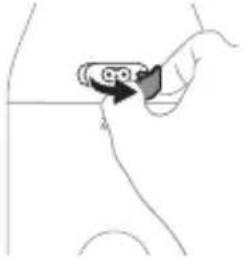
2 Plug the USB-A cable into the charging port on the back of the Cordless Power Flosser.
3 Connect the USB-A cable to a 5V USB wall adapter.
4 During charging, the battery indicator will blink (see "Charging").
Nozzle labels F1 F2 F3
Deep clean (3000 Series)
1 Gently pull and rotate the charging port cover on the back of the Cordless Power Flosser to open the charging port.
2 Connect the USB-A cable to the charging port on the back of the Cordless Power Flosser.
1 Before turning on the device, point the nozzle tip toward the sink. Press the on/off button on the handle to turn on the Cordless Power Flosser. Let the water spray into the sink. Turn off the device after water is expelled from the device.
![graph TD A["15 sec."] --> B["15 sec."] B --> C["15 sec."] C --> D["15 sec."] D --> E["15 sec."] E --> F["15 sec."] F --> G["15 sec."] G --> H["15 sec."] H --> I["15 sec."] I --> J["15 sec."] J --> K["15 sec."] K --> L["15 sec."] L --> M["15 sec."] M --> N["15 sec."] N --> O["15 sec."] O --> P["15 se…](/content/2026/05/855648/images/0ae505409843ade610247545dcfa3e5b21b593e27bcc0ebdbe3d7859519fd72b.jpg)
The battery indicator shows the battery status when you finish a flossing session or when you pause the Power Flosser.
Deep clean (3000 Series)
15 sec.
Cordless Power Flosser
www.philips.com/Sonicare
©2023 Koninklijke Philips N.V. (KPNV). All rights reserved. Philips and the Philips shield are trademarks of KPNV. Sonicare and the Sonicare logo are trademarks of Philips Oral Healthcare, LLC and/or KPNV.
300009920881(04/04/2023)

- IMPORTANT SAFETY INFORMATION
- WARNINGS
- MEDICAL WARNINGS
- BATTERY SAFETY INSTRUCTIONS
- ELECTROMAGNETIC FIELDS (EMF)
- INTRODUCTION
- INTENDED USE
- YOUR PHILIPS SONICARE POWER FLOSSER
- NOZZLES
- MODES AND INTENSITIES
- MODES (SPECIFIC MODELS ONLY)
- CLEAN (2000 AND 3000 SERIES)
- TO ACTIVATE OR DEACTIVATE THE PACER
- DEEP CLEAN (3000 SERIES)
- INTENSITIES
- GETTING STARTED
- CHARGING YOUR CORDLESS POWER FLOSSER
- FILLING THE RESERVOIR
- OPTION
- INSERTING AND REMOVING NOZZLES
- USING YOUR CORDLESS POWER FLOSSER
- CLEANING ORTHODONTIC BRACKETS WITH THE QUAD STREAM NOZZLE
- AFTER EACH USE
- CHARGING
- BATTERY STATUS
- CLEANING
- RESERVOIR
- HANDLE
- INTERNAL COMPONENTS, HOSE AND HANDLE
- NOZZLE STORAGE CASE
- TRAVEL POUCH
- STORAGE
- IN-RESERVOIR NOZZLE STORAGE
- REPLACEMENT
- LOCATING THE MODEL NUMBER
- WARRANTY AND SUPPORT
- WARRANTY RESTRICTIONS
- RECYCLING
- REMOVAL OF BUILT-IN RECHARGEABLE BATTERY
- CHARGING THE CORDLESS POWER FLOSSER
Brand : PHILIPS
Model : Sonicare Cordless Power Flosser 3000 HX3801
Category : Dental floss