
Sound BS70 - Loudspeaker TESLA - Free user manual and instructions
Find the device manual for free Sound BS70 TESLA in PDF.


| Product Type | Wireless Bluetooth Speaker |
| Model | TESLA Sound BS70 |
| Waterproof | Yes (Waterproof rating not specified) |
| Bluetooth Version | Not specified (assumes standard) |
| Wireless Range | Not specified |
| Connectivity | Bluetooth, USB, 3.5mm Jack, FM Radio |
| Power Source | Built-in rechargeable battery (USB-C charging) |
| Battery Indicator | LED: Red <25%, stops flashing when fully charged |
| TWS Function | Yes (pair two BS70 speakers) |
| Hands-Free | Yes (via Bluetooth) |
| Power Bank | Yes (charge other devices via USB-A) |
| Music Playback | From Bluetooth, USB disk, Audio cable, FM radio |
| Controls | Power, Bluetooth, Source, Volume +/- (also track skip) |
| Charging Cable | USB-A to USB-C (included) |
| Accessories Included | USB cable, 3.5mm Jack cable, Strap, Manual |
| Warranty | 24 months from purchase |
| Manufacturer | TESLA Electronics LTD., Blucina 704, 664 56, Czech Republic |
| Compliance | EU Directive 2014/53/EU, RoHS |
Frequently Asked Questions - Sound BS70 TESLA
User questions about Sound BS70 TESLA
0 question about this device. Answer the ones you know or ask your own.
Ask a new question about this device
Download the instructions for your Loudspeaker in PDF format for free! Find your manual Sound BS70 - TESLA and take your electronic device back in hand. On this page are published all the documents necessary for the use of your device. Sound BS70 by TESLA.
USER MANUAL Sound BS70 TESLA
FUNKCE TWS
PŘEHRÁVÁNÍ HUDBY
natural_image
Line drawing of a cylindrical device connected to a smartphone via USB and battery (no text or symbols)NABÍJENÍ ZAŘÍZENÍ
natural_image
Black Tesla vehicle head panel with visible grille and side brackets (no text or symbols on body)Verzia 1.0
www.tesla-electronics.eu
BEZPEČNOSTNÉ POKYNY

FUNKCIA TWS
PREHRÁVANIE HUDBY
natural_image
Line drawing of a cylindrical device connected to a smartphone via USB and battery (no text or symbols)www.tesla-electronics.eu
NABÍJANIE ZARIADENIA
Wireless Bluetooth speaker waterproof
User manual EN
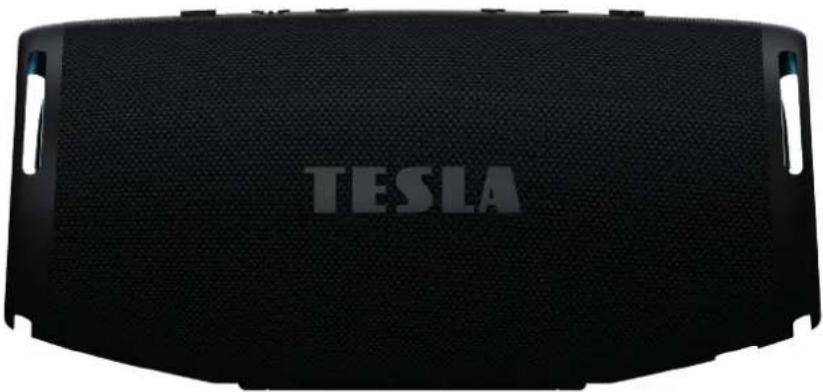
natural_image
Front view of a Tesla vehicle head panel with visible grille and side slots (no text or symbols on the panel itself)Version 1.0
www.tesla-electronics.eu
SAFETY INSTRUCTIONS

Dear Customer, Thank you for purchasing a product from the proven TESLA brand.
Please read these instructions carefully before using it for the first time. It will be a good guide for you to get acquainted with your new instrument. The data and advice used in this manual may be subject to future changes and improvements and is valid as of the release of the first version, June 2024.
Thank you for your understanding.
Please read this manual carefully before use.
Technical specifications and operating procedures listed in this manual are subject to change without notice. Please contact the manufacturer for any questions regarding shelf life.
PACKAGING CONTENT
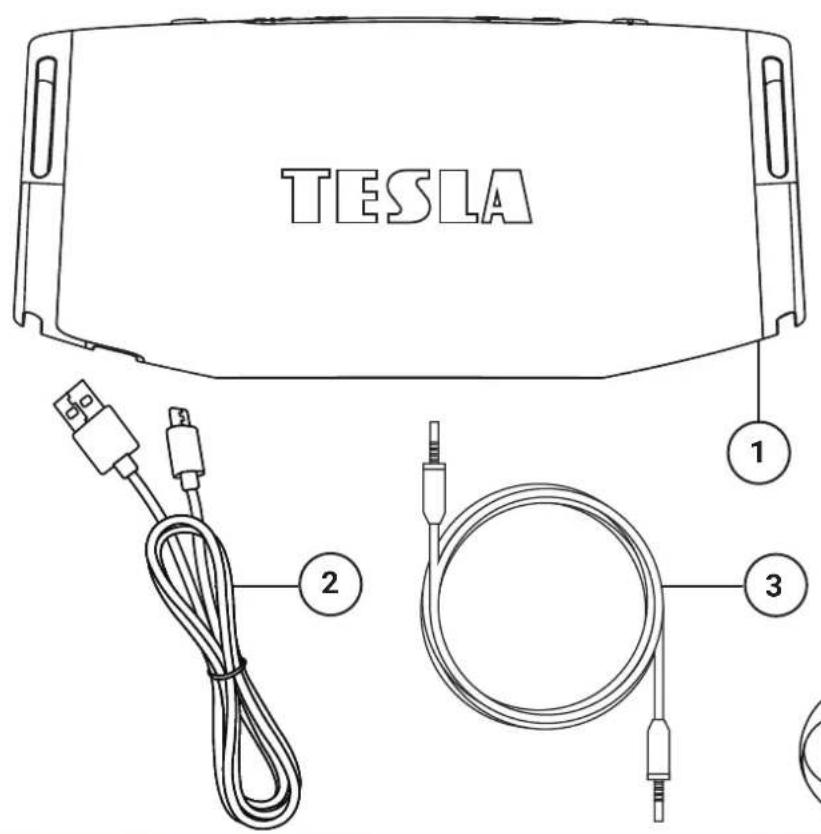
- TESLA Sound BS70
- USB A-C cable
- 3.5 mm Jack cable
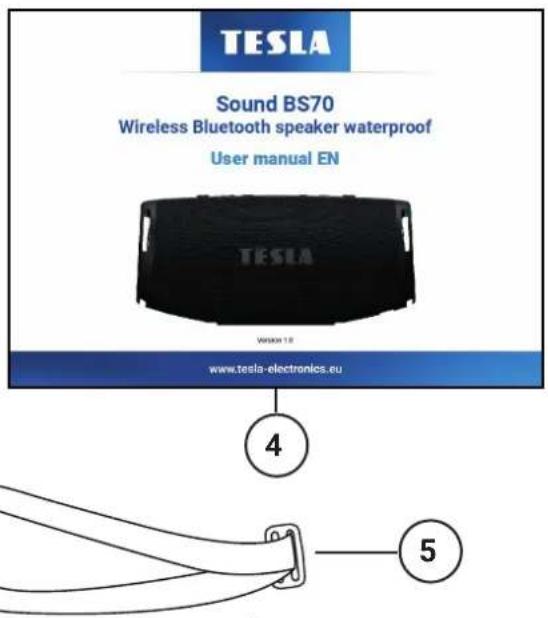
- User manual
- Strap
DESCRIPTION
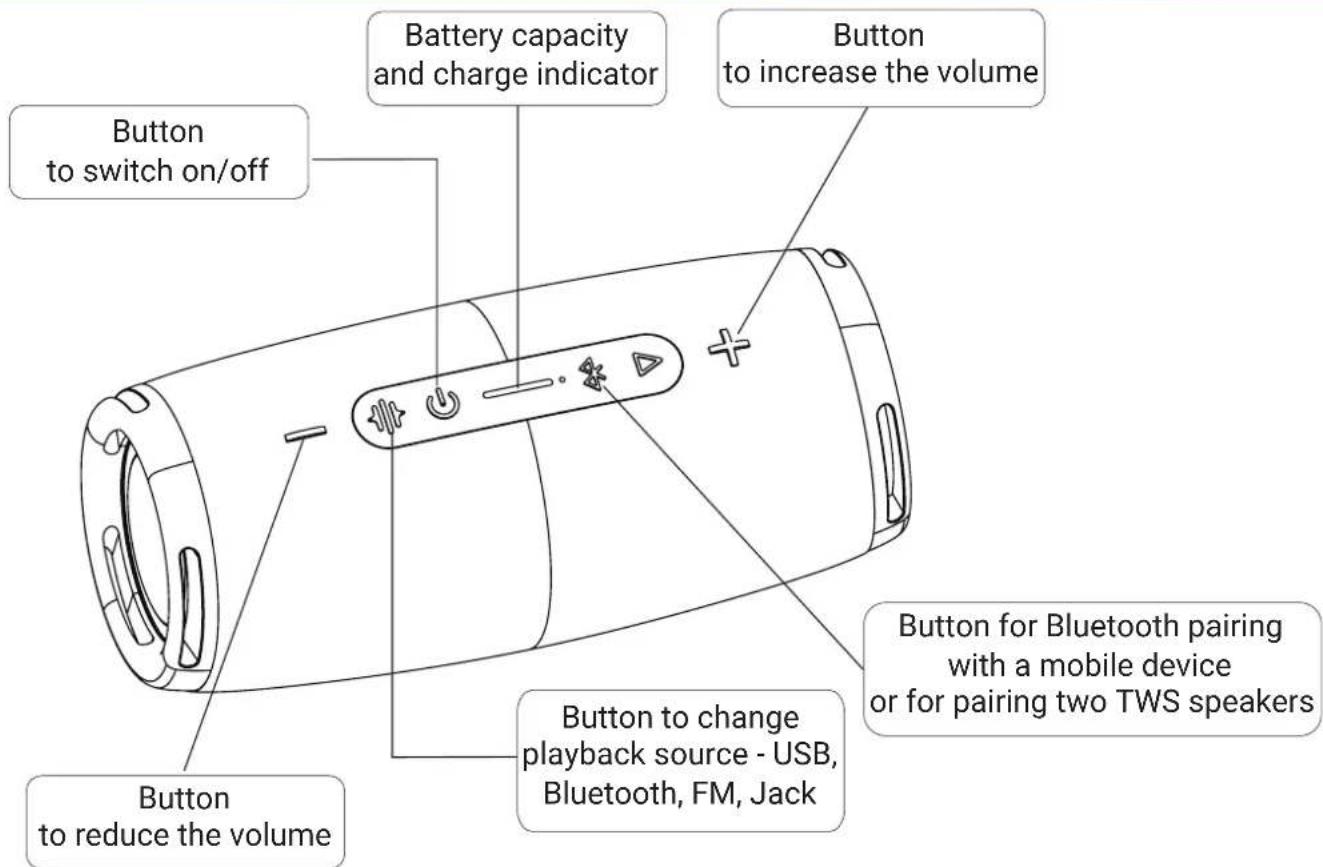
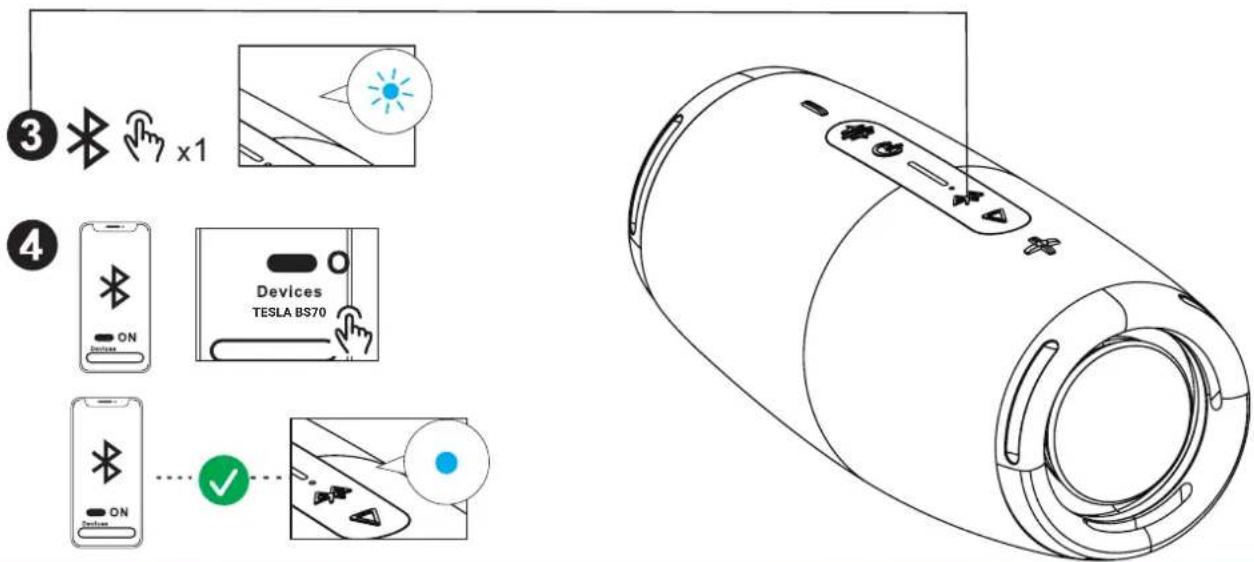
FIRST LAUNCH
OFF/ON
- Long press (more than 3 seconds) long press the power button ⏻ to turn the device on or off.
- When you turn on the device for the first time, check your mobile device whether it supports the Bluetooth function and whether the function is active.
- Press the Bluetooth pairing button ✗to activate the device to search for a mobile device.
- The device will appear as TESLA BS70 on your mobile device and confirm the connection. If the device turns on again, it will connect to the last paired device in range.
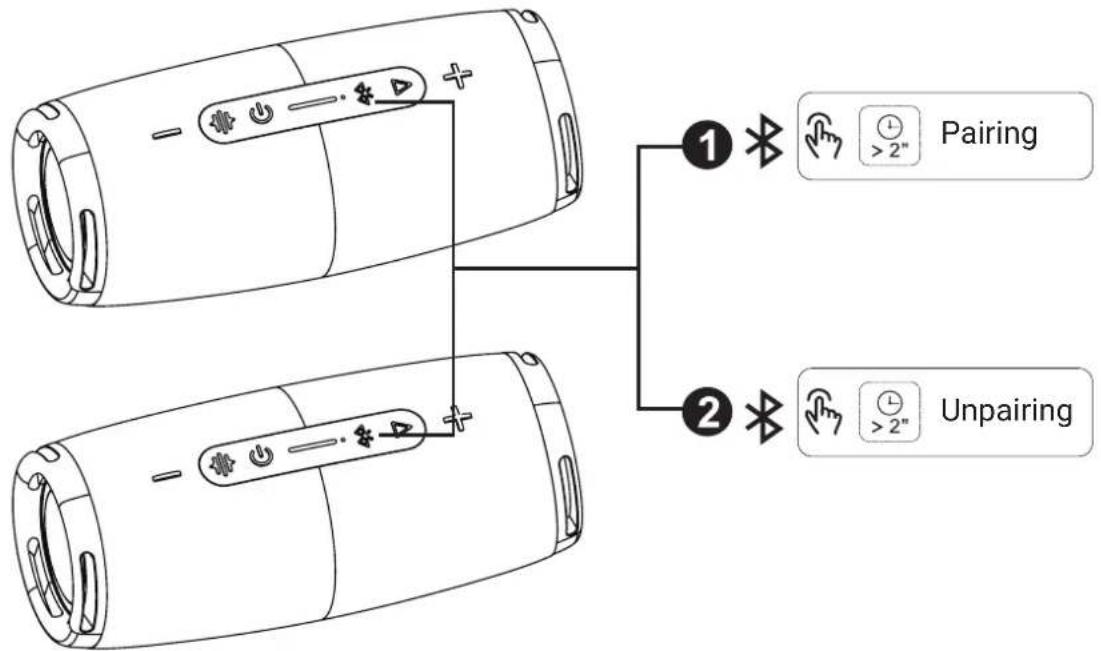
TWS FUNCTIONS
Pairing function of two devices using TWS function.
- To connect two TESLA BS70 devices, turn on both devices and simultaneously hold the Bluetooth button ⚙ on both devices for about 2 seconds. Successful pairing of two devices will be signaled by an audio accompaniment.
- Follow the same procedure to cancel the TWS function.
flowchart
graph TD
    A["Device 1: Pairing"] --> B["Device 2: Unpairing"]
    style A fill:#f9f,stroke:#333
    style B fill:#ccf,stroke:#333
DEVICE MODES
The TESLA BS70 device has other modes in addition to the Bluetooth connection.
With the button to change the source 🔊, it is possible to switch between Bluetooth, USB, Jack and FM functions.
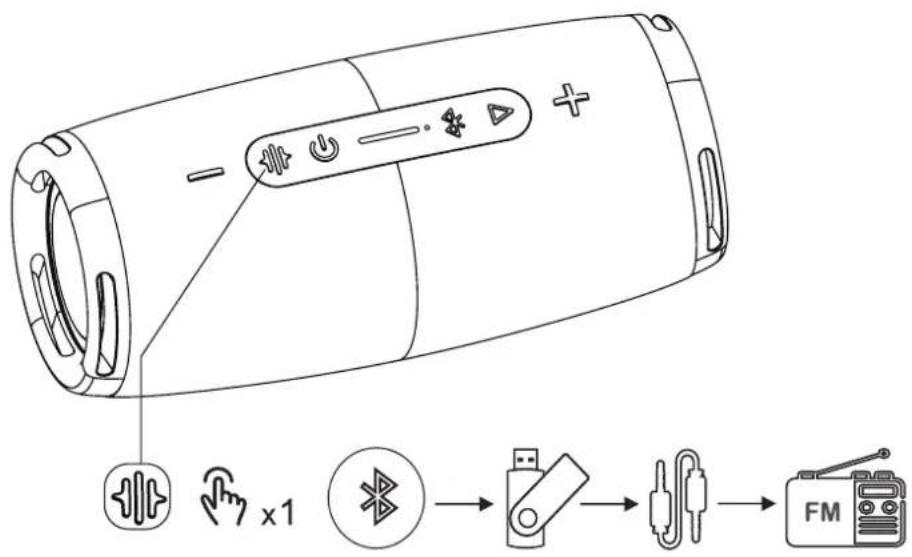
PLAYING MUSIC
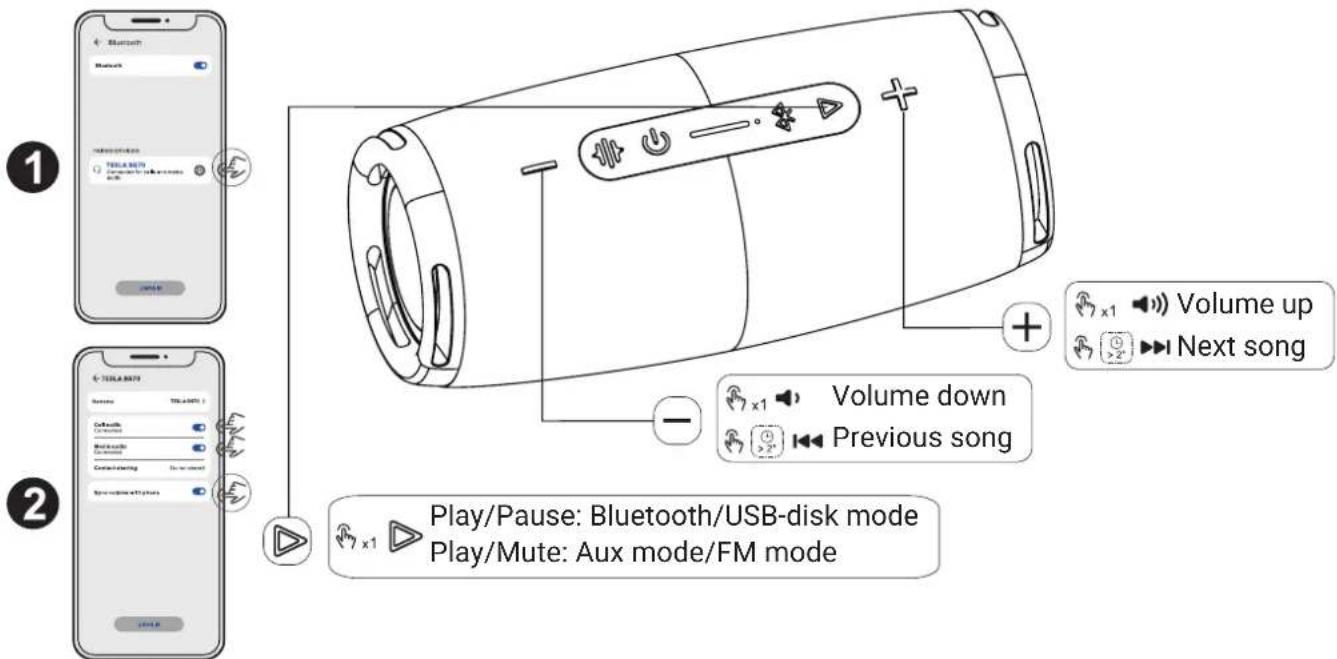
Music volume can be controlled via your mobile device. For iOS automatically, for Android OS, enter the TESLA BS70 settings via Bluetooth and confirm the desired functions.
In addition to the mobile device, the volume can also be controlled using the volume up/down buttons directly on the device. The volume up/down buttons also have the function of switching to the next/previous track when held down for a long time.
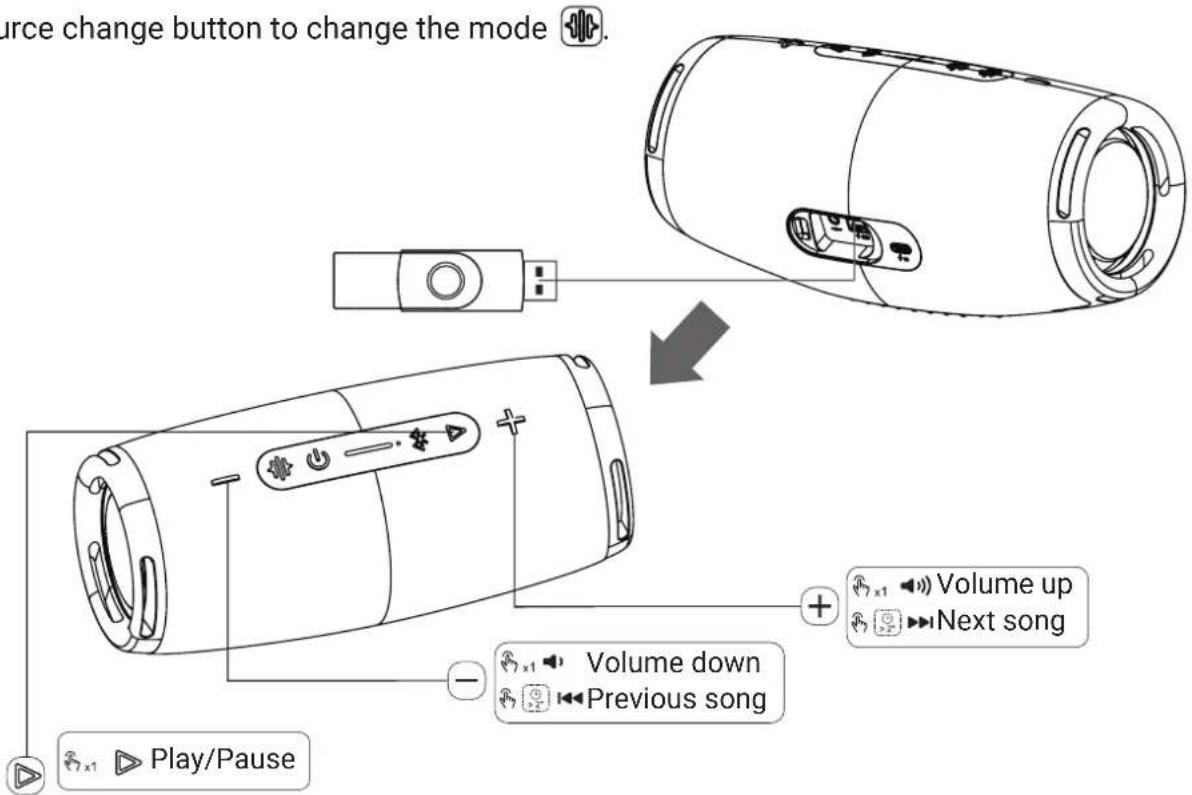
- Insert the USB disk into the USB port, the device will immediately identify the USB disk and start the music.
- Use the source change button to change the mode 🔊.
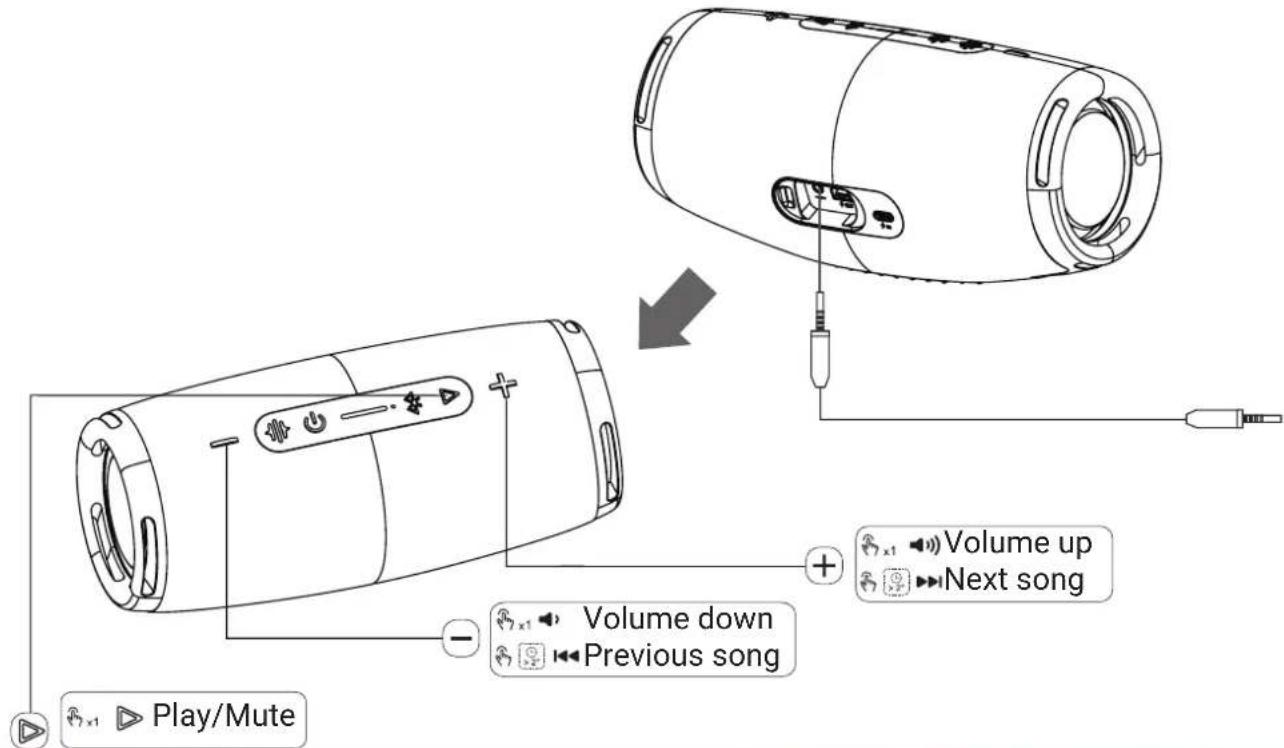
PLAYING MUSIC USING AN AUDIO CABLE CONNECTION
- By connecting the device with a Jack 3.5 mm audio cable, you can achieve the production of a soundtrack using the TESLA BS70 speaker.
- Use the source change button to change the mode 🔊.
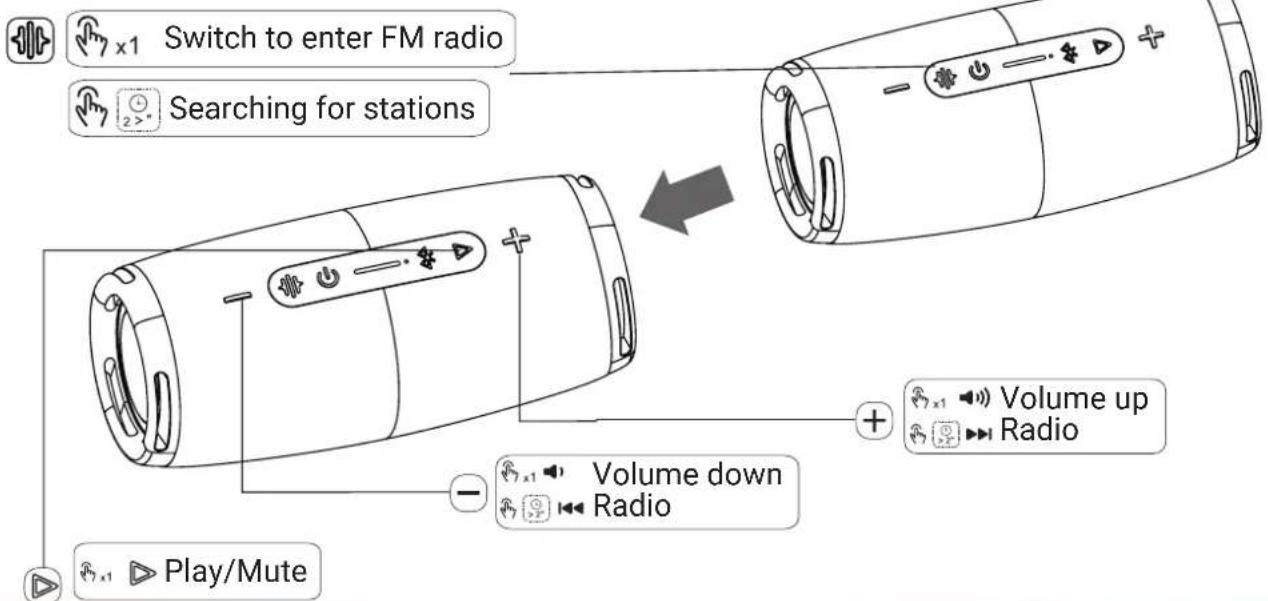
FM RADIO
- Use the source change button to change the mode 📋.
- To search for stations, hold down the source change button for more than 2 seconds. Searched stations are saved automatically.
- To move between stations, use the + and - buttons for more than 2 seconds.
- Short press + and - to control the volume.
- By connecting an audio cable, you will get better FM radio reception, when the audio cable will serve as an antenna.
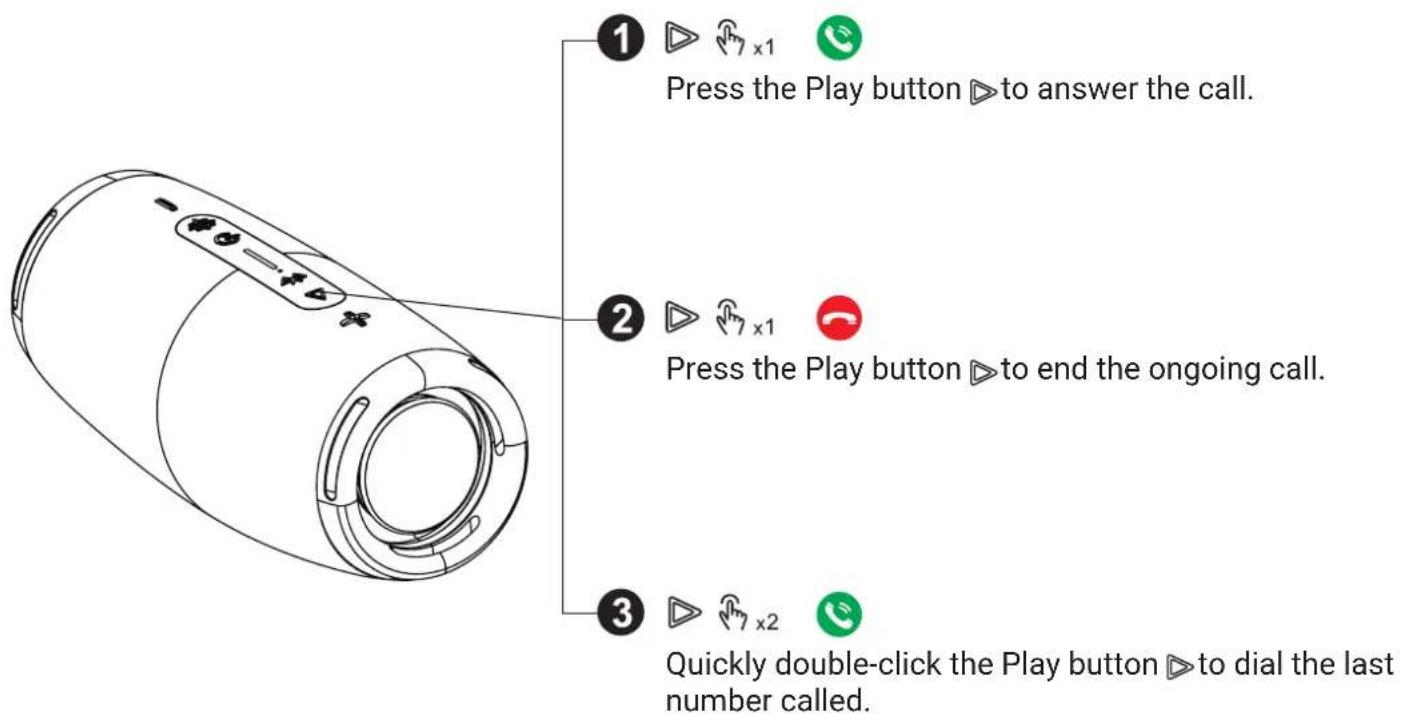
HANDS FREE FUNCTION
TESLA BS70 can also be used as a hands-free device. If the device is connected via Bluetooth to your mobile device, it can be used in several ways.
POWER BANK FUNCTIONS
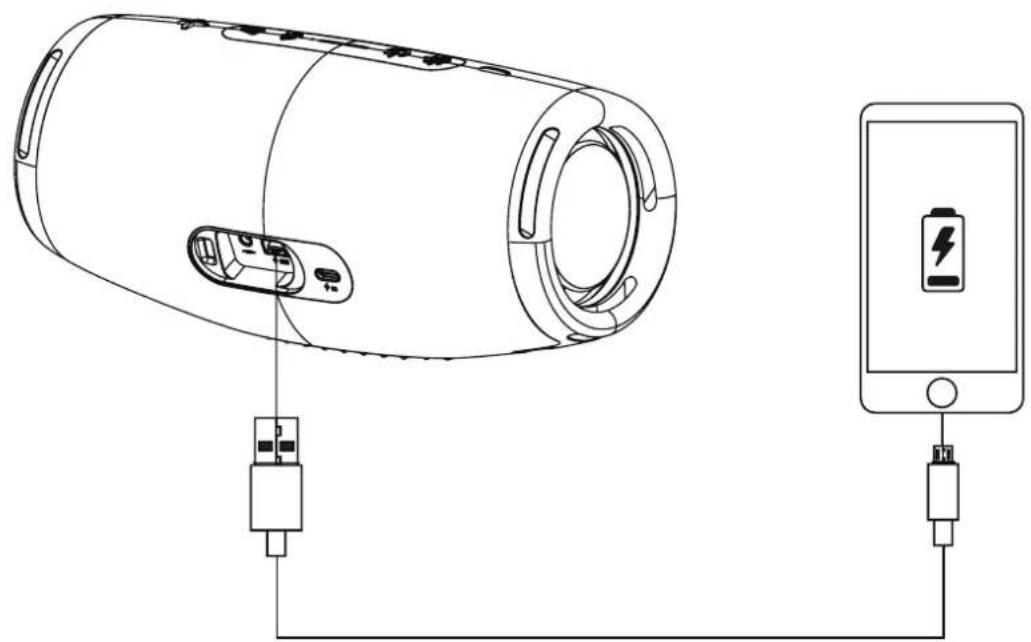
The advantage of the TESLA BS70 device is the possibility of using the battery capacity for charging a mobile device using the included USB cable. The USB cable has a USB-C end, for devices with a different input for charging, it is possible to use your existing cable.
natural_image
Line drawing of a cylindrical device connected to a smartphone via USB and battery (no text or symbols)CHARGING THE DEVICE
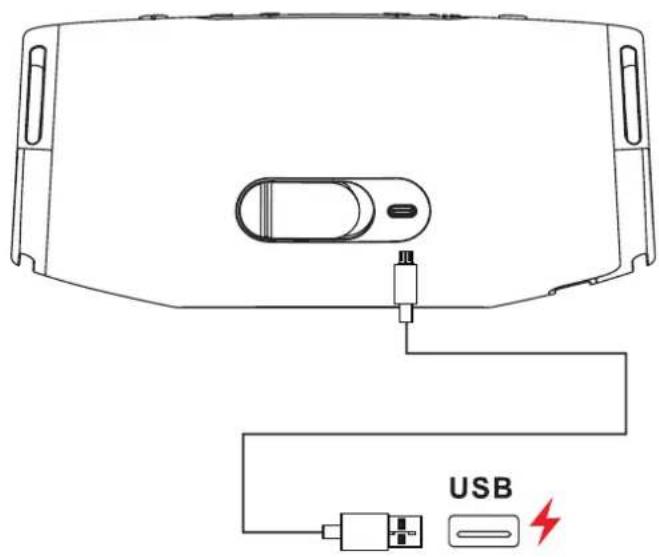
The LED indicator on the top of the device is used to check the battery status. During charging, the LED indicator flashes. It will stop flashing when fully charged.
Use the included USB-C cable for charging.
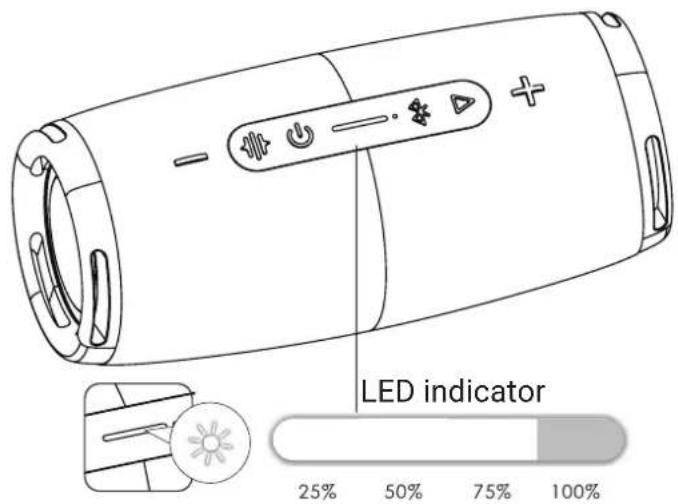
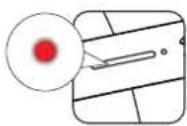
Battery capacity less than 25%: red light is on
GUARANTEE
1. Warranty period
The manufacturer provides a warranty for this product for a period of 24 months from the date of purchase by the consumer. The warranty period is extended by the time during which the product was under warranty repair, or could not be used during the warranty period, or if the nature of the defect prevented its use. The warranty only applies to defects caused by a manufacturing error or material defect.
2. Warranty card
Free warranty service is only provided if proof of purchase of the product (receipt) and a correctly completed warranty card is presented - it must contain the production number, date of sale and stamp of the store (assembly company). Copies and incorrectly completed warranty forms will not be considered.
3. Repairs during the warranty and post-warranty period
Warranty service must be claimed at the organization where the product was purchased or at the assembly company that performed the installation.
4. Scope of warranty
The warranty is void if the defect is caused by mechanical damage (except for damage during transport), improper use, carelessness, unavoidable event (natural disaster), if the product was connected to a different supply voltage as stated in the technical specification, and also in the case of modifications or repairs performed outside the distributor's service. The warranty cannot also be applied if the consumer requires modification or adaptation to extend the functions of the product (or a system made up of several components) compared to the standard design.
DECLARATION OF CONFORMITY AND OTHER IMPORTANT INFORMATION
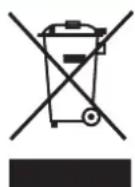
This device and all its accessories fall into the category of electronic waste.
This device must be properly handed over to the collection yards for the reception of electrical waste. The device cannot be disposed of together with municipal waste.
Proper disposal of the old product helps prevent potential negative consequences for the environment and human health.
The user is not authorized to disassemble the device, in case of interference with the device, it is not possible to apply the statutory warranty period. In case of any problems or questions, please contact our service department or technical support. For complaints, contact your dealer.
TESLA Electronics LTD, as the manufacturer of this device, declares that the Sound BS70
Waterproof Bluetooth Speaker is in compliance with Directive 2014/53/EU.
The full text of the EU declaration of conformity is available on the website:
https://eshop.tesla-electronics.eu/

RoHS: this device meets the requirements for the restriction of the use of certain hazardous substances in electrical and electronic equipment (NV No. 481/2012 Coll., NV No. 391/2016 Coll.) and thus also the requirements of the Directive of the European Parliament and the EC Council 2011/65/ EU on the restriction of the use of certain hazardous substances in electrical and electronic equipment. The RoHS declaration is part of the declaration of conformity published https://eshop.tesla-electronics.eu/
Manufacturer:
TESLA Electronics LTD., Blucina 704, 664 56, Czech Republic
TESLA
natural_image
Black Tesla vehicle head panel with visible grille and side slots (no text or symbols on body)Version 1.0
www.tesla-electronics.eu
SICHERHEITSHINWEISE

FUNKTIONEN VON TWS
GERÄTEMODI
MUSIK-WIEDERGABE
natural_image
Line drawing of a cylindrical device connected to an ATM via USB and battery (no text or symbols)www.tesla-electronics.eu
AUFLADEN DES GERÄTS
natural_image
Black Tesla vehicle head panel with visible grille and side brackets (no text or symbols on the panel itself)Wersja 1.0
www.tesla-electronics.eu
INSTRUKCJE BEZPIECZEŃSTWA

FUNKCJE TWS
ODTWARZANIE MUZYKI
natural_image
Line drawing of a cylindrical device connected to a smartphone via USB and battery (no text or symbols)www.tesla-electronics.eu
ŁADOWANIE URZĄDZENIA
DEKLARACJA ZGODNOŚCI I INNE WAŻNE INFORMACJE
Producent: TESLA Electronics LTD., Blucina 704, 664 56, Czech Republic
- FUNKCE TWS
- PŘEHRÁVÁNÍ HUDBY
- NABÍJENÍ ZAŘÍZENÍ
- BEZPEČNOSTNÉ POKYNY
- FUNKCIA TWS
- PREHRÁVANIE HUDBY
- NABÍJANIE ZARIADENIA
- Wireless Bluetooth speaker waterproof
- User manual EN
- SAFETY INSTRUCTIONS
- Dear Customer, Thank you for purchasing a product from the proven TESLA brand.
- Please read this manual carefully before use.
- PACKAGING CONTENT
- DESCRIPTION
- FIRST LAUNCH
- OFF/ON
- TWS FUNCTIONS
- Pairing function of two devices using TWS function.
- DEVICE MODES
- PLAYING MUSIC
- PLAYING MUSIC USING AN AUDIO CABLE CONNECTION
- FM RADIO
- HANDS FREE FUNCTION
- POWER BANK FUNCTIONS
- CHARGING THE DEVICE
- GUARANTEE
- Warranty period
- Warranty card
- Repairs during the warranty and post-warranty period
- Scope of warranty
- DECLARATION OF CONFORMITY AND OTHER IMPORTANT INFORMATION
- TESLA
- SICHERHEITSHINWEISE
- FUNKTIONEN VON TWS
- GERÄTEMODI
- MUSIK-WIEDERGABE
- AUFLADEN DES GERÄTS
- INSTRUKCJE BEZPIECZEŃSTWA
- FUNKCJE TWS
- ODTWARZANIE MUZYKI
- ŁADOWANIE URZĄDZENIA
- DEKLARACJA ZGODNOŚCI I INNE WAŻNE INFORMACJE
Brand : TESLA
Model : Sound BS70
Category : Loudspeaker