
WAM 10 - Mètre PCE Instruments - Free user manual and instructions
Find the device manual for free WAM 10 PCE Instruments in PDF.


| Product Type | Water Activity Meter |
| Brand | PCE Instruments |
| Model | WAM 10 |
| Display | 6-bit backlit LCD (3 digits humidity, 3 digits temperature) |
| Measurement Range | 0 to 1.0 aw |
| Resolution | 0.01 aw |
| Accuracy | ±0.03 aw |
| Sensor Type | Non-conductive humidity sensor |
| Sampling Time | Max. 10 minutes (typical stable reading after 5 minutes) |
| Power Supply | 2 x 1.5V AAA (UM-4) batteries |
| Dimensions | 148 x 65 x 65 mm |
| Weight | 235 g (without batteries) |
| Data Output | USB data output (standard), Bluetooth (optional) |
| Automatic Shutdown | Yes |
| Low Battery Indication | Yes (battery symbol on display) |
| Correction Adjustment | Yes, range -0.14 to 0.14 aw |
| Included Accessories | Main unit, sample plate, carrying case, operation manual |
| Optional Accessories | USB data output cable, Bluetooth module |
| Cleaning | Clean sample plate after each use; wipe device with dry cloth |
| Battery Replacement | Replace with 2 x AAA batteries when low battery symbol appears |
| Operating Conditions | Not specified; typical room temperature and humidity |
Frequently Asked Questions - WAM 10 PCE Instruments
User questions about WAM 10 PCE Instruments
0 question about this device. Answer the ones you know or ask your own.
Ask a new question about this device
Download the instructions for your Mètre in PDF format for free! Find your manual WAM 10 - PCE Instruments and take your electronic device back in hand. On this page are published all the documents necessary for the use of your device. WAM 10 by PCE Instruments.
USER MANUAL WAM 10 PCE Instruments
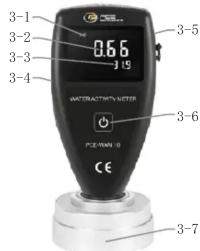
WATER ACTIVITY METER PCE-WAM 10
3-1 Display
3-2 Water Activity Value
3-3 Temperature Value
3-4 Data Cable Interface
3-5 Battery Cover on the Back
3-6 Power key
3-7 Sensor
- FRONT PANEL DESCRIPTIONS
4
1. APPLICATIONS & FEATURES
* The Water Activity, mainly reflects the amount of free water in the state of food balance, the stability of food and the possibility of microbial reproduction, and the chemical, enzyme and physical changes that can cause the change of food quality. It is often used to measure the dryness enduring ability of the microorganisms. By measuring the water activity of food and selecting reasonable packing and storage methods, the use of preservatives can be reduced and the shelf life of food, grain and fruits and vegetables can be judged.
* The PCE-WAM 10 can be used to measure the water activity of foods. No matter when and where you need to measure water activity, PCE-WAM 10 water activity meter is your unique choice. This is a real portable
1
4. MEASUREMENT PROCEDURE
4.1 Press the power key to switch on the power and the gauge enters the auto mode which can automatically test the water activity.
4.2 Put the samples into the sample plate, and then cover the sensor of the gauge onto the sample plate. Lay aside for about 5 minutes, when the reading gets stable, the water activity can be obtained.
4.3 After testing, press and hold the power key for about 3 seconds to turn off the gauge. Clean the sample plate for next use.
water activity meter, with a weight of only 100 grams, lighter than a mobile phone, and a precision of 0.03 aw, easy to measure water activity anytime and anywhere.
* Sensors and readings are integrated.
* Easy reading, water activity and temperature of the samples displayed together.
* It has automatic shutdown, manual shutdown function and undervoltage alarm indication function.
* Use USB data output to connect with PC.
* Provide Bluetooth data output choice.
2. TECHNICAL PARAMETERS
Display: 6 bit backlight LCD digital display,
3 bit humidity aw,
3 bit temperature display
Range: 0\~1.0aw
Resolution: 0.01aw
Accuracy: ±0.03aw
2
5. READING CORRECTION
5.1 When it is necessary to correct the reading value, press and hold the Power Key for about 7 seconds. Then release the key when the signal 'Cor', comes out on the display. There will be a decimal number with two places, which is the correction value.
5.2 Then open the battery cover on the back, there are 2 small hole below the battery slot. Use a small hard bar(such as screwdriver) to slightlytouch the key inside, the correction value will be increased or decreased. The value increases when touching the right hole, while the value decreases when touching the left hole. Each time the key is touched, the correction value changes by 0.01. The correction value can be set from -0.14 to 0.14.
6
Sensor: Non conductive humidity sensor Sampling Time: Max. 10 minutes (Record the response value of the water activity meter every 5 minutes, when the between the two adjacent response values is small At 0.01AW, is the measured value.
Operating condition:
Power supply: 2x1.5V AAA Um-4 Battery
Size: 148x65x65mm
Weight: 235g (Not including batteries)
Standard Accessories
* Main Unit
* Sample Plate
* Carrying Case
* Operation Manual
Accessories
* USB data output
* Bluetooth data output
3
5.3 After the adjustment, press the Power Key to quit.
6. BATTERY REPLACEMENT
6.1 When it is necessary to replace the battery, the battery symbol “-+” will appear on the Display.
6.2 Slide the Battery Cover (Fig.1,) away from the instrument and remove the batteries.
6.3 Install the batteries (2x1.5vAAA UM-4) correctly into the case.
6.4 If the gauge is not to be used for any extended period, remove batteries.
7
7. Operation procedure
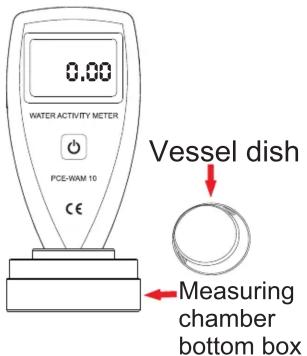
- Take out the instrument
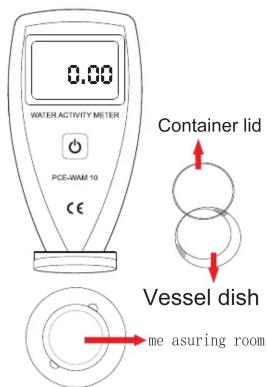
- Open the instrument measuring room
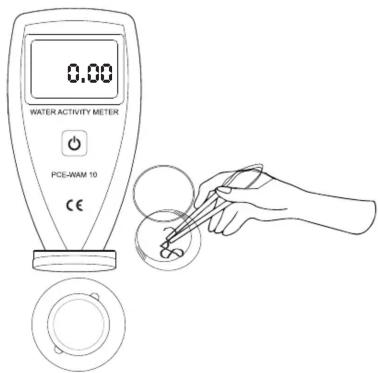
- Open the container dish and put the test sample into the container dish
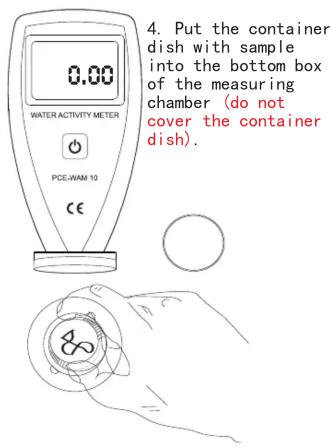
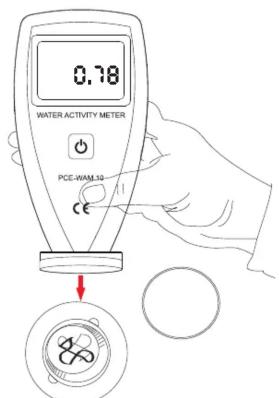
- Start the instrument and combine the measuring chamber
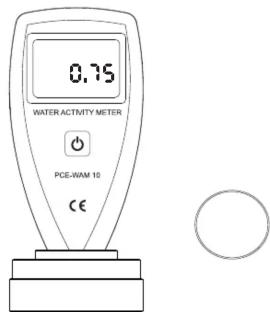
- Let the device measure for about 5 minutes.


Brand : PCE Instruments
Model : WAM 10
Category : Mètre