
MPC 15 - Meter PCE Instruments - Free user manual and instructions
Find the device manual for free MPC 15 PCE Instruments in PDF.


| Product Type | Particle Counter |
| Brand | PCE Instruments |
| Model | MPC 15 |
| Category | Meter |
| Dimensions | 222 x 80 x 46 mm / 8.7 x 3.1 x 1.8" |
| Weight | 320 g / 11.2 oz |
| Power Supply | Mains adaptor: 100-240 V AC, 50/60 Hz, 0.3 A; Output: 5 V DC, 2 A |
| Battery Type | 18650 rechargeable lithium-ion, 3.7 V, 8.14 Wh |
| Battery Life | Approx. 9 hours |
| Display | 3.2" LC color display |
| Measurable Particle Sizes | 0.3 μm, 0.5 μm, 10 μm |
| Mass Concentration | PM2.5 and PM10 (0-1000 μg/m³, resolution 1 μg/m³) |
| Temperature Measurement Range | -10 to 60 °C (14 to 140 °F) |
| Humidity Measurement Range | 0 to 100% RH |
| Response Time | 1 second |
| Warm-up Time | 10 seconds |
| Data Memory | Flash memory for approx. 12 measurement cycles (999 measuring points per cycle) |
| Storage Interval | 10, 30 seconds; 1, 5, 10, 30, 60 minutes |
| Automatic Power Off | Off, 15, 30, 45 minutes; 1, 2, 4, 8 hours |
| Scope of Delivery | Particle counter, carrying case, 18650 battery, mini tripod, Micro-USB cable, USB mains adaptor, user manual |
| Functions | Particle count, mass concentration, graphical view, alarm limit setting, data records, settings (backlight, interval, brightness, time/date, auto shutdown, language, reset) |
| Safety | Use only as described; avoid extreme temperatures, shocks, moisture; clean with damp cloth and pH-neutral cleaner; no modifications; use only PCE accessories |
| Maintenance | Clean case with damp cloth and pH-neutral cleaner; replace battery when depleted; charge via Micro-USB with 5 V DC 2 A source |
| Spare Parts and Repairability | Battery (18650) user-replaceable; internal service only by PCE personnel; accessories available from PCE Instruments |
| Languages | English, French, Italian, Spanish, Portuguese, Dutch, Turkish, Polish, Russian, Chinese (selectable in settings) |
Frequently Asked Questions - MPC 15 PCE Instruments
User questions about MPC 15 PCE Instruments
0 question about this device. Answer the ones you know or ask your own.
Ask a new question about this device
Download the instructions for your Meter in PDF format for free! Find your manual MPC 15 - PCE Instruments and take your electronic device back in hand. On this page are published all the documents necessary for the use of your device. MPC 15 by PCE Instruments.
USER MANUAL MPC 15 PCE Instruments
natural_image
Yellow curved arrow pointing upward next to a blue circular logo with 'PCE' and battery icons (no text or symbols on the arrow itself)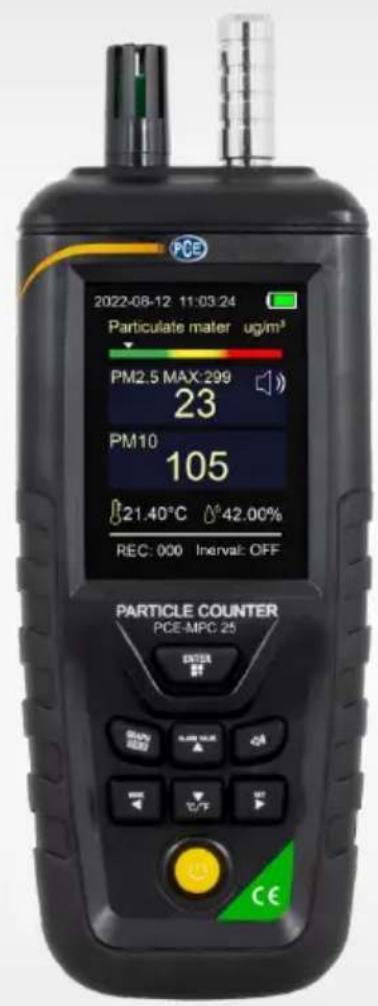
User Manual
PCE-MPC 15 / PCE-MPC 25 Particle Counter

User manuals in various languages (français, italiano, español, português, nederlands, türk, polski, русский, 中文) can be found by using our product search on: www.pce-instruments.com
Last change: 7 November 2022
v1.0
Contents
1 Safety notes....1
2 Specifications.... 2
3 Scope of delivery 2
4 Device description .... 3
5 Switching the meter on and off 4
6 View structure 4
6.1 Measuring window 5
6.2 Records 5
6.3 Settings....5
6.4 Export of measurement data "PDF" (PCE-MPC 25 only)....6
7 Battery....6
8 Contact....6
9 Disposal 6
1 Safety notes
Please read this manual carefully and completely before you use the device for the first time. The device may only be used by qualified personnel and repaired by PCE Instruments personnel.
Damage or injuries caused by non-observance of the manual are excluded from our liability and not covered by our warranty.
- The device must only be used as described in this instruction manual. If used otherwise, this can cause dangerous situations for the user and damage to the meter.
- The instrument may only be used if the environmental conditions (temperature, relative humidity, ...) are within the ranges stated in the technical specifications. Do not expose the device to extreme temperatures, direct sunlight, extreme humidity or moisture.
- Do not expose the device to shocks or strong vibrations.
- The case should only be opened by qualified PCE Instruments personnel.
- Never use the instrument when your hands are wet.
- You must not make any technical changes to the device.
- The appliance should only be cleaned with a damp cloth. Use only pH-neutral cleaner, no abrasives or solvents.
- The device must only be used with accessories from PCE Instruments or equivalent.
- Before each use, inspect the case for visible damage. If any damage is visible, do not use the device.
- Do not use the instrument in explosive atmospheres.
- The measurement range as stated in the specifications must not be exceeded under any circumstances.
- Non-observance of the safety notes can cause damage to the device and injuries to the user.
We do not assume liability for printing errors or any other mistakes in this manual.
We expressly point to our general guarantee terms which can be found in our general terms of business.
2 Specifications
| Mass concentration | |
| Measurable particle sizes | PM2.5 / PM10 |
| Measurement range PM 2.5 | 0 ... 1000 μg/m3 |
| Resolution | 1 μm |
| Accuracy PM 2.5 | 0 ... 100 μg/m3: ±10 μg/m3101 ... 1000 μm/m3: ±10 % of rdg. |
| Particle counter | |
| Measurable particle sizes (PCE-MPC 15) | 0.3 / 0.5 and 10 μm |
| Measurable particle sizes (PCE-MPC 25) | 0.3 / 0.5 / 1.0 / 2.5 / 5.0 and 10 μm |
| Resolution | 1 |
| Accuracy | indicative measurements only |
| Maximum number of particles | 2,000,000 particles/l |
| Temperature | |
| Measurement range | -10 ... 60 °C, 14 ... 140 °F |
| Resolution | 0.01 °C, °F |
| Accuracy | ±2 °C, ±3.6 °F |
| Humidity (RH) | |
| Measurement range | 0 ... 100 % |
| Resolution | 0.01 % |
| Accuracy | ±3 % |
| Further specifications | |
| Response time | 1 second |
| Warm-up phase | 10 seconds |
| Mounting connection | 1/4" tripod connection |
| Intake dimensions | outside: 13 mm / 0.51"inside: 7 mm / 0.27"height: 35 mm / 1.37" |
| Display | 3.2" LC colour display |
| Power supply (mains adaptor) | primary: 100 ... 240 V AC, 50 / 60 Hz, 0.3 A secondary: 5 V DC, 2 A |
| Power supply (rechargeable battery) | 18650, 3.7 V, 8.14 Wh |
| Battery life | approx. 9 hours |
| Automatic power off | off15, 30, 45 minutes1, 2, 4, 8 hours |
| Data memory | flash memory for approx. 12 measurement cyclesOne measuring cycle contains 999 measuring points |
| Storage interval | 10, 30 seconds1, 5, 10, 30, 60 minutes |
| Dimensions | 222 x 80 x 46 mm / 8.7 x 3.1 x 1.8" |
| Weight | 320 g / 11.2 oz |
3 Scope of delivery
1 x particle counter PCE-MPC 15 or PCE-MPC 25
1 x carrying case
1 x 18650 rechargeable battery
1 x mini tripod
1 x Micro-USB cable
1 x USB mains adaptor
1 x user manual
4 Device description
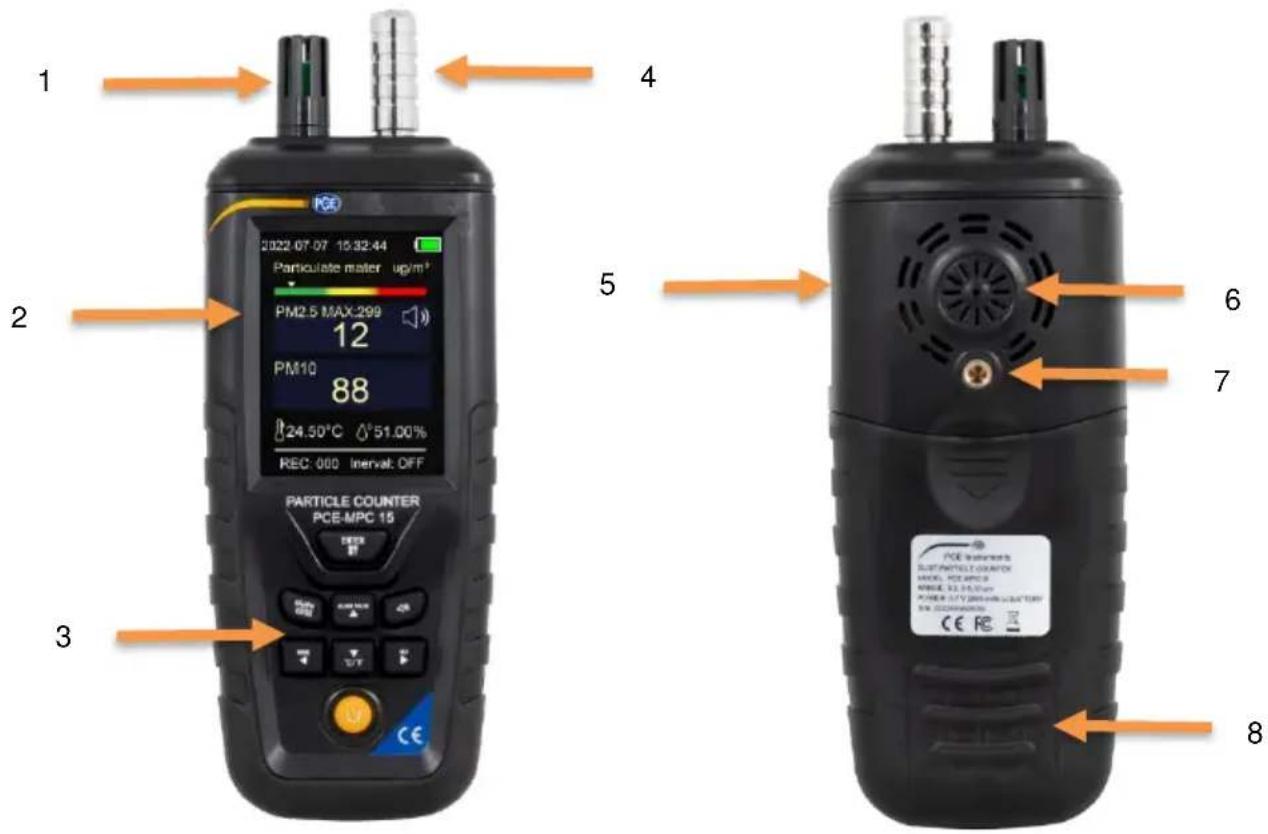
| No. | Description |
| 1 | Temperature and humidity sensor |
| 2 | Display |
| 3 | Keyboard |
| 4 | Intake |
| 5 | Micro-USB interface |
| 6 | Air outlet |
| 7 | Tripod connection |
| 8 | Battery compartment |
flowchart
graph TD
    A["ENTER"] --> B["GRAPH"]
    A --> C["ALARM VALUE"]
    A --> D["MODE"]
    A --> E["°C/°F"]
    A --> F["SET"]
    style A fill:#f9f,stroke:#333
    style B fill:#ccf,stroke:#333
    style C fill:#cfc,stroke:#333
    style D fill:#fcc,stroke:#333
    style E fill:#cff,stroke:#333
    style F fill:#ffc,stroke:#333
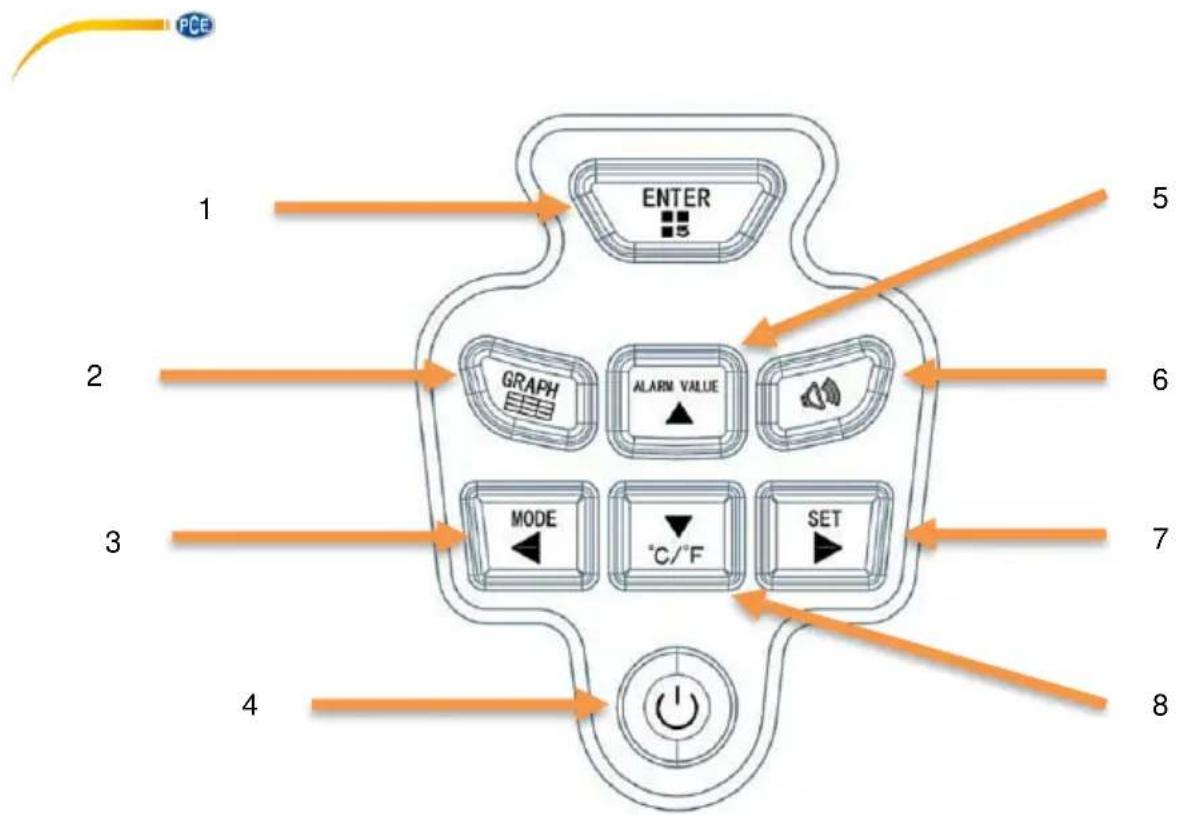
| No. | Description |
| 1 | "ENTER" key to confirm the entry and open menu items |
| 2 | "GRAPH" key to switch to graphical view |
| 3 | "MODE" key to switch the mode and to navigate left |
| 4 | On/off key to turn the meter on and off and exit parameter setting. |
| 5 | "ALARM VALUE" key to set the alarm limit and to navigate up |
| 6 | Speaker key to enable and disable the acoustic alarm |
| 7 | "SET" key to open parameters and navigate right |
| 8 | "°C/°F" key to select the temperature unit and to navigate down |
5 Switching the meter on and off
To switch the meter on and off, press and release the on/off key once. After the start-up process, the measurement starts immediately. To obtain current measured values, let the meter draw in the current room air for the first 10 seconds.
6 View structure
To select between the individual views, press the "SET" key repeatedly. The different views are as follows.
| View | Description |
| Measuring window | The measured values are displayed here |
| "Records" | The saved measurement data can be viewed here |
| "Settings" | Settings |
| "PDF" (PCE-MPC 25 only) | The saved data can be organised here |
6.1 Measuring window
6.1.1 Graphical view
To switch to the graphical view, press the "GRAPH" key. Here, the course of the PM2.5 concentration is displayed. Use the up/down arrow keys to scroll between the individual pages. Press the "GRAPH" key again to return to the numerical view.
Note: To access a specific measuring point, go to the "Records" view, see 6.2 Records.
6.1.2 Number of particles and mass concentration
To switch between particle count and mass concentration, press the "MODE" key.
6.1.3 Set alarm limit
To set the alarm limit value, press the "ALARM VALUE" key in the measuring window. The value can be changed with the arrow keys. Press the "ENTER" key to accept the set value. To activate or deactivate the alarm, press the speaker key. If a speaker is displayed for PM2.5, the acoustic alarm is active.
Note: This alarm limit value only refers to the PM2.5 value.
6.2 Records
In the "Records" view, the currently recorded measuring points can be viewed. To select between the individual measuring points, first press the "ENTER" key. Then use the arrow keys to move to the desired measuring point.
Press the "ENTER" key again to be able to select between the views again.
6.3 Settings
To make settings, first press the "ENTER" key. A parameter can now be selected with the up/down arrow keys. Use the left and right arrow keys to change the respective parameter. Press the "ENTER" key to confirm the setting.
| Setting | Meaning |
| OFF Backlight | Setting the backlight |
| Record interval | Setting the recording interval.Note: when an interval is set, recording starts immediately. The quantity of recorded measurement data can be seen in the measurement window. |
| Brightness | Setting the brightness |
| Data Clear | Deleting recorded measurement data.Note: This has no effect on the memory space for the PDFs that are already saved. |
| Time & Date | Setting the date and time |
| Auto shutdown | Set automatic power off |
| Language | Set language |
| Reset | Reset the meter to factory settings |
6.3.1 Factory settings
If the meter has been reset as described in 6.3 Settings, the language will automatically change to Chinese. To change the menu language back to English, switch on the meter, press the "SET" key twice, select the second last setting item and press the "SET" key again.
6.4 Export of measurement data "PDF" (PCE-MPC 25 only)
Open the "PDF" view by repeatedly pressing the "SET" key. To export the recorded measurement data, first select "Export PDF". The recorded data is then combined into a PDF file. Then connect the meter to a computer and select "Connect to USB" in the device to connect to the computer.
On the computer, the meter is then displayed as a mass data storage device and the PDFs can be downloaded.
Via "Formatted Disk", the mass data memory can be cleared. This has no effect on the currently recorded measurement data.
To return to the selection of views, go back to the "Shift" button with the arrow keys.
7 Battery
The current battery charge can be read from the battery level indicator. If the battery is flat, it must be replaced or charged via the Micro-USB interface. A 5 V DC 2 A power source should be used to charge the battery.
To replace the battery, first switch off the meter. Then open the battery compartment on the back and replace the battery. Ensure correct polarity.
8 Contact
If you have any questions, suggestions or technical problems, please do not hesitate to contact us. You will find the relevant contact information at the end of this user manual.
9 Disposal
For the disposal of batteries in the EU, the 2006/66/EC directive of the European Parliament applies. Due to the contained pollutants, batteries must not be disposed of as household waste. They must be given to collection points designed for that purpose.
In order to comply with the EU directive 2012/19/EU we take our devices back. We either re-use them or give them to a recycling company which disposes of the devices in line with law.
For countries outside the EU, batteries and devices should be disposed of in accordance with your local waste regulations.
If you have any questions, please contact PCE Instruments.


PCE Instruments contact information
Germany France Spain
PCE Deutschland GmbH PCE Instruments France EURL PCE Ibérica S.L.
Im Langel 26 23, rue de Strasbourg Calle Mayor, 53
D-59872 Meschede 67250 Soultz-Sous-Forets 02500 Tobarra (Albacete)
Unit 11 Southpoint Business Park
Ensign Way, Southampton
Hampshire
United Kingdom, SO31 4RF
Tel: +44 (0) 2380 98703 0
Fax: +44 (0) 2380 98703 9
info@pce-instruments.co.uk
www.pce-instruments.com/english
Italy
PCE Italia s.r.l.
Via Pesciatina 878 / B-Interno 6
55010 Loc. Gragnano Pehlivan Sok. No.6/C
Capannori (Lucca)
Italia
www.pce-instruments.com/dutch Fax: +1 (561) 320-9176
info@pce-americas.com
www.pce-instruments.com/us
United States of America
PCE Americas Inc.
1201 Jupiter Park Drive, Suite 8
Jupiter / Palm Beach
33458 FL
USA
Tel: +1 (561) 320-9162
info@pce-iberica.es
www.pce-instruments.com/espanol
Turkey
www.pce-instruments.com/turkish
Denmark
PCE Instruments Denmark ApS
Birk Centerpark 40
7400 Herning
Denmark


- User Manual
- Contents
- Safety notes
- Scope of delivery
- Switching the meter on and off
- View structure
- Measuring window
- Graphical view
- Number of particles and mass concentration
- Set alarm limit
- Records
- Settings
- Factory settings
- Export of measurement data "PDF" (PCE-MPC 25 only)
- Battery
- Contact
- Disposal
- PCE Instruments contact information
- Germany France Spain
- Italy
- United States of America
- Turkey
- Denmark
Brand : PCE Instruments
Model : MPC 15
Category : Meter