
A 430 - Mètre PCE Instruments - Free user manual and instructions
Find the device manual for free A 430 PCE Instruments in PDF.


| Product Type | Digital Multimeter |
| Model | A 430 |
| Brand | PCE Instruments |
| Dimensions | Approx. 180 x 85 x 55 mm |
| Weight | Approx. 350 g (with battery) |
| Power Supply | 9V battery (6LR61 or 6F22) |
| Display | LCD, 3 3/4 digits, 4000 counts |
| AC Voltage Range | 0.1 mV to 600 V |
| DC Voltage Range | 0.1 mV to 600 V |
| AC Current Range | 0.1 μA to 10 A |
| DC Current Range | 0.1 μA to 10 A |
| Resistance Range | 0.1 Ω to 40 MΩ |
| Capacitance Range | 1 pF to 100 μF |
| Frequency Range | 10 Hz to 10 MHz |
| Duty Cycle | 1% to 99% |
| Diode Test | Yes |
| Continuity Test | Yes, audible buzzer < 50 Ω |
| Safety Rating | CAT III 600 V, CAT II 1000 V |
| Maintenance | Replace battery when low; clean with dry cloth; no user serviceable parts inside |
| Accessories Included | Test leads, 9V battery, carrying case, manual |
| Spare Parts / Reparability | Contact PCE Instruments for spare parts; device not user-serviceable |
| General Information | Digital multimeter with auto-ranging, data hold, and backlight |
Frequently Asked Questions - A 430 PCE Instruments
User questions about A 430 PCE Instruments
0 question about this device. Answer the ones you know or ask your own.
Ask a new question about this device
Download the instructions for your Mètre in PDF format for free! Find your manual A 430 - PCE Instruments and take your electronic device back in hand. On this page are published all the documents necessary for the use of your device. A 430 by PCE Instruments.
USER MANUAL A 430 PCE Instruments
User Manual
PCE-A 430 | Anemometer

User manuals in various languages (français, italiano, español, português, nederlands, türk, polski, русский, 中文) can be found by using our product search on: www.pce-instruments.com
Last change: 3 May 2024
v1.0
Contents
1 Safety notes....1
2 Technical specifications .... 2
3 Delivery scope.... 3
4 Device description .... 3
4.1 Device....3
4.2 Screen 4
5 Operation .... 5
5.1 Power supply 5
5.2 Switch on the meter.... 5
5.3 Switch off the meter.... 5
5.4 Automatic power off.... 5
5.5 Backlight 5
5.6 Low battery 5
5.7 MAX/AVG function 5
5.8 Temperature units 5
5.9 Air velocity units 5
5.10 Overrange or underrange 5
6 Contact....6
7 Disposal 6
1 Safety notes
Please read this manual carefully and completely before you use the device for the first time. The device may only be used by qualified personnel and repaired by PCE Instruments personnel. Damage or injuries caused by non-observance of the manual are excluded from our liability and not covered by our warranty.
- The device must only be used as described in this instruction manual. If used otherwise, this can cause dangerous situations for the user and damage to the meter.
- The instrument may only be used if the environmental conditions (temperature, relative humidity, ...) are within the ranges stated in the technical specifications. Do not expose the device to extreme temperatures, direct sunlight, extreme humidity or moisture.
- Do not expose the device to shocks or strong vibrations.
• The case should only be opened by qualified PCE Instruments personnel.
- Never use the instrument when your hands are wet.
- You must not make any technical changes to the device.
- The appliance should only be cleaned with a damp cloth. Use only pH-neutral cleaner, no abrasives or solvents.
• The device must only be used with accessories from PCF Instruments or equivalent.
- Before each use, inspect the case for visible damage. If any damage is visible, do not use the device.
- Do not use the instrument in explosive atmospheres.
- The measurement range as stated in the specifications must not be exceeded under any circumstances.
- Non-observance of the safety notes can cause damage to the device and injuries to the user.
We do not assume liability for printing errors or any other mistakes in this manual.
We expressly point to our general guarantee terms which can be found in our general terms of business.
2 Technical specifications
| Air velocity in m/s | |
| Measurement range | 0.7 m/s ... 30 m/s |
| Resolution | <20: 0.1 m/s / >20: 1 m/s |
| Accuracy | ±(4 % +2 digits) |
| Air velocity in km/h | |
| Measurement range | 2.5 km/h ... 105 km/h |
| Resolution | <20: 0.1 km/h / >20: 1 km/h |
| Accuracy | ±(4 % +2 digits) |
| Air velocity in mph | |
| Measurement range | 1.5 mph ... 67 mph |
| Resolution | <20: 0.1 mph / >20: 1 mph |
| Accuracy | ±(4 % +2 digits) |
| Air velocity in knots | |
| Measurement range | 1.3 knots ... 58.3 knots |
| Resolution | <20: 0.1 knots / >20: 1 knot |
| Accuracy | ±(4 % +2 digits) |
| Temperature in °C | |
| Measurement range | -20 °C ... +50 °C |
| Resolution | 0.1 °C |
| Accuracy | ±1.5 °C |
| Temperature in °C | |
| Measurement range | -4 °F ... +122 °F |
| Resolution | 0.1 °F |
| Accuracy | ±2.7 °F |
| General technical data | |
| Measuring functions | MAX, average value |
| Units | m/s, km/h, kn, mph |
| Display type | LCD with backlight |
| Sensor | cup cross |
| Automatic power off | 15 min |
| Menu language | English |
| Protection class (device) | IP20 |
| Weight | 36.5 g |
| Dimensions (L x W x H) | 145 x 55 x 48 mm |
| Operating conditions | -20 ... 60 °C, 10 ... 90 % RH |
| Storage conditions | -20 ... 60 °C, 10 ... 75 % RH |
3 Delivery scope
1 x PCE-A 430 anemometer
1 x 9V block battery
1 x device bag
1 x user manual
4 Device description
4.1 Device
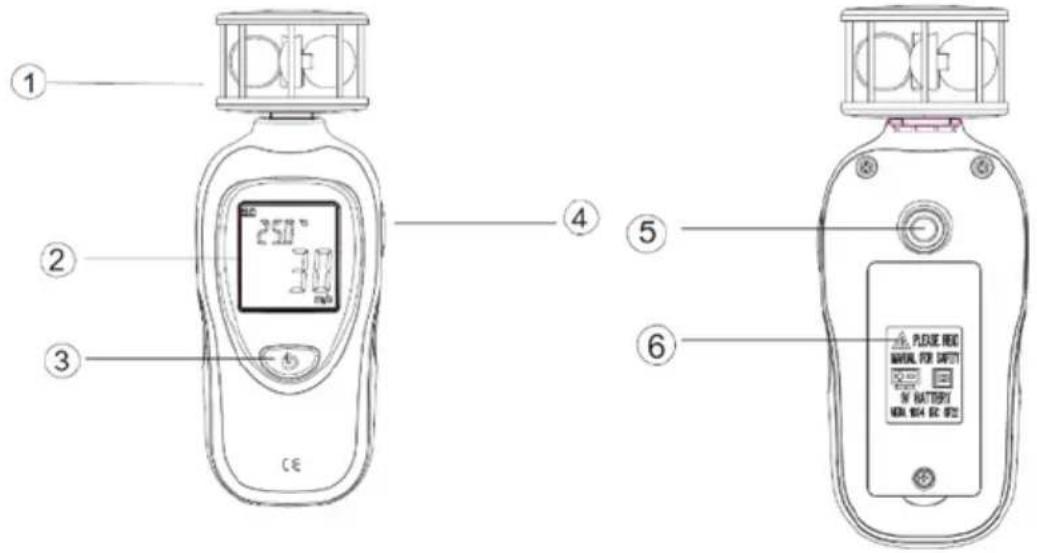
| 1 | Vane sensor |
| Display | |
| ON/OFF key | |
| MAX/AVG key | |
| 5 | Thread for tripod mounting |
| Battery compartment |
4.2 Screen
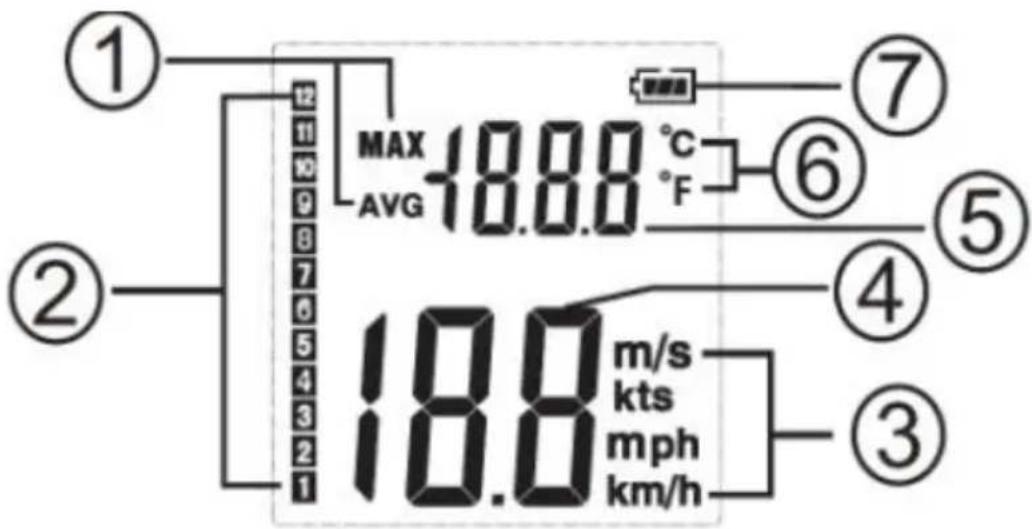
| 1 | Display of the maximum value (MAX) / average value (AVG) |
| 2 | Beaufort scale |
| 3 | Air velocity unit |
| 4 | Air velocity reading |
| 5 | Temperature reading |
| 6 | Temperature unit |
| 7 | Battery level |
5 Operation
5.1 Power supply
Open the battery compartment and insert a 9 V battery.
5.2 Switch on the meter
Press and hold the ON/OFF key for about 3 seconds until the LCD has switched on. You can then release the key.
5.3 Switch off the meter
Press and hold the ON/OFF key for about 3 seconds until the LCD has switched off. You can then release the key.
5.4 Automatic power off
The anemometer switches off automatically after about 15 minutes of inactivity.
5.5 Backlight
After starting the anemometer, press any key to activate the display backlight. The backlight switches off automatically after about 30 seconds of inactivity.
5.6 Low battery
If the low battery icon appears, replace the battery.
5.7 MAX/AVG function
Press the MAX/AVG key to display the maximum value on the screen. Press the MAX/AVG key again to display the average value on the screen.
5.8 Temperature units
You can display the temperature value in the units ^ C and ^ F. To change the unit, press and hold the MAX/AVG key for 3 seconds.
5.9 Air velocity units
You can display the air speed value in the units m/s, km/h, mph and kn (knots). To change the unit, briefly press the ON/OFF key.
5.10 Overrange or underrange
Temperature
If the measured temperature value is below the measurement range, "OL" is displayed. If the measured temperature value is higher than the measurement range, "OH" is displayed.
Air velocity
If the measured air velocity value is above the measurement range, "OL" is displayed.
6 Contact
If you have any questions, suggestions or technical problems, please do not hesitate to contact us. You will find the relevant contact information at the end of this user manual.
7 Disposal
For the disposal of batteries in the EU, the 2006/66/EC directive of the European Parliament applies. Due to the contained pollutants, batteries must not be disposed of as household waste. They must be given to collection points designed for that purpose.
In order to comply with the EU directive 2012/19/EU we take our devices back. We either re-use them or give them to a recycling company which disposes of the devices in line with law.
For countries outside the EU, batteries and devices should be disposed of in accordance with your local waste regulations.
If you have any questions, please contact PCE Instruments.




PCE Instruments contact information
Germany France Spain
PCE Deutschland GmbH PCE Instruments France EURL PCE Ibérica S.L.
Im Langel 26 23, rue de Strasbourg Calle Mula, 8
D-59872 Meschede 67250 Soultz-Sous-Forets 02500 Tobarra (Albacete)
Chester Rd, Old Trafford
Manchester M32 0RS
United Kingdom
Tel: +44 (0) 161 464902 0
Fax: +44 (0) 161 464902 9
info@pce-instruments.co.uk
www.pce-instruments.com/english
Italy
PCE Italia s.r.l.
Via Pesciatina 878 / B-Interno 6
55010 Loc. Gragnano Pehlivan Sok. No.6/C
Capannori (Lucca)
Italia
www.pce-instruments.com/turkish
The Netherlands
PCE Brookhuis B.V.
Institutenweg 15
7521 PH Enschede
Nederland
Telefoon: +31 (0)53 737 01 92
info@pcebenelux.nl
www.pce-instruments.com/dutch Fax: +1 (561) 320-9176
info@pce-americas.com
www.pce-instruments.com/us
United States of America
PCE Americas Inc.
1201 Jupiter Park Drive, Suite 8
Jupiter / Palm Beach
33458 FL
USA
Tel: +1 (561) 320-9162
Denmark
PCE Instruments Denmark ApS
Birk Centerpark 40
7400 Herning
Denmark


- User Manual
- Contents
- Safety notes
- Delivery scope
- Device description
- Screen
- Operation
- Power supply
- Switch on the meter
- Switch off the meter
- Automatic power off
- Backlight
- Low battery
- MAX/AVG function
- Temperature units
- Air velocity units
- Overrange or underrange
- Temperature
- Air velocity
- Contact
- Disposal
- PCE Instruments contact information
- Germany France Spain
- Italy
- The Netherlands
- United States of America
- Denmark
Brand : PCE Instruments
Model : A 430
Category : Mètre