
BOB AQUA FOTO - Uncategorized GoGen - Free user manual and instructions
Find the device manual for free BOB AQUA FOTO GoGen in PDF.


| Product Type | Digital Camera |
| Model | BOB AQUA FOTO |
| Brand | GoGen |
| Dimensions (W x H x D) | 94 x 72 x 25 mm |
| Weight | 79 g |
| Power Source | DC 5 V / 1 A |
| Built-in Battery | 3.7 V / 1000 mAh Li-ion |
| Battery Charging Time | Approx. 2 hours |
| Supported Memory Card | MicroSD up to 32 GB |
| Photo Resolution | Up to 12 MP (JPG) |
| Video Resolution | Up to 1920x1080 px (AVI) |
| Main Functions | Photo, Video, Playback, Game, MP3, Settings |
| Zoom | 0-5x digital zoom |
| Fill Light | Yes (LED) |
| Waterproof Case | Included |
| Display | LCD screen (auto-off) |
| Language Support | Multiple (English, Czech, Slovak, etc.) |
| Self-Timer | Off / 2s / 5s |
| Loop Recording | Off / 1 / 2 / 3 / 5 min |
| Timestamp | On/Off |
| Auto Power Off | Off / 1 / 2 / 3 / 5 min |
| Safety | Keep dry, avoid water while charging, supervise children |
| Package Contents | Camera, Waterproof case, USB cable, Lanyard, Manual |
| Maintenance | Clean with soft cloth, charge every 3 months |
Frequently Asked Questions - BOB AQUA FOTO GoGen
User questions about BOB AQUA FOTO GoGen
0 question about this device. Answer the ones you know or ask your own.
Ask a new question about this device
Download the instructions for your Uncategorized in PDF format for free! Find your manual BOB AQUA FOTO - GoGen and take your electronic device back in hand. On this page are published all the documents necessary for the use of your device. BOB AQUA FOTO by GoGen.
USER MANUAL BOB AQUA FOTO GoGen
natural_image
Line drawing of a digital camera module with no visible text or symbolsZAPNUTÍ/VYPNUTÍ
natural_image
Symbol of a trash bin crossed with a diagonal line, no text or numbers presentDÔLEŽITÉ BEZPEČNOSTNÉ POKYNY
natural_image
Line drawing of a digital camera module with no visible text or symbolsZAPNUTIE/VYPNUTIE
natural_image
Symbol of a trash bin with crossed lines and a solid black rectangle below (no text or labels)Thank you for buying our product. Please read through these operating instructions, so you will know how to operate your equipment properly. After you finished reading the instructions manual, put it away in a safe place for future reference.
IMPORTANT SAFETY PRECAUTIONS
When using your Camera, basic safety precautions should always be followed, including the following:
✗ Children should be supervised to ensure that they do not play with the device.
✗ Keep this device and its accessories away from excessive heat.
✗ Do not use the device in water or wet in a humid environment without waterproof case. Keep the device dry.
✗ Only use a soft cloth, no harsh abrasives or chemicals to clean, as it may damage the surface finishing.
✗ NEVER expose the device to water while charging, as doing so may result in damage to the device or the power source.
✗ NEVER operate this device with a damaged cable or after it has malfunctioned or has been damaged in any manner.
✗ NEVER leave the device unattended while charging. If the device becomes hot, smokes, or gives off an odor during charging, terminate charging immediately.
PRODUCT OVERVIEW AND CONTROL BUTTONS
- TF card slot
- Fill light
- button press to take photo
- Lens
- button press to start recording video
- Speaker
- Mounting nut for holders, tripods, etc.
- Microphone
- Work LED indicator (Blue)
- Charge LED indicator (Red)
-
Power Button long press to turn camera on/off
-
Slide show button
- UP button
- OK button
- DOWN button
- DELETE button
- USB Port / Main Switch
CHARGING YOUR CAMERA
The charger is not included in the package, please charge the camera via a standard 5 V / 1 A charger or via a PC. The LED indicator will glow red during charging and switch to green when is full charged.
IMPORTANT: Please make a complete charge every three months to avoid shortening the battery lifespan.
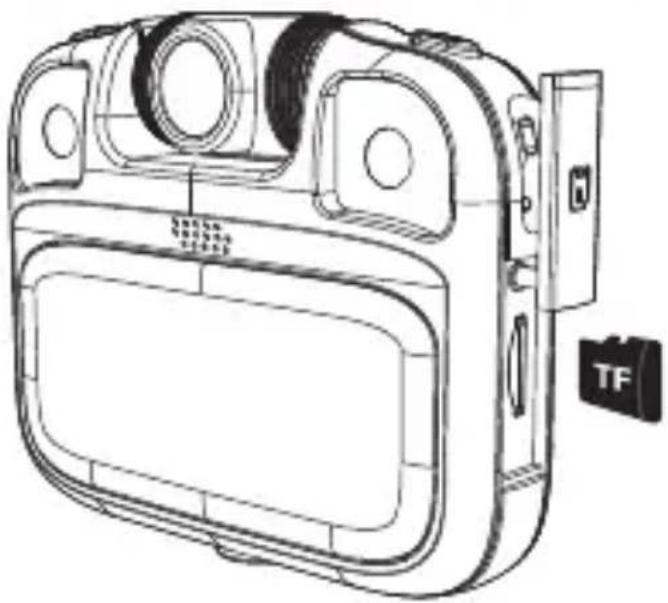
Properly insert the TF card into the card holder as you can see on the picture.
To remove the TF card, press the end of memory card gently, the card will be ejected.
natural_image
Line drawing of a digital camera module with no visible text or symbolsPOWER ON/OFF
The camera has the main switch. Is it located on the side, under the cover, next to the USB port. Turn it on before first use.
Power on: Short-press the button, the screen will be on.
Power off: Hold on button for 3 seconds when the camera is in the idle state to turn it off.
Auto screen off: The screen will be turned off automatically when the time that the camera is in the idle state for automatic screen off to save power.
Function introduciton
There are 6 icons on the main interface. Each icon corresponds to a different function.
Using _ to select the function and to confirm the entry into the function screen.
PHOTO MODE
✗ Short press button to take a picutre.
✗ Press to change funny photo frames or color filters.
× Long press to open 0-5x zoom, long press to exit 0-5x zoom.
× Long press: to turn on the fill light, long press to turn off the fill light. It's the same in any interface.
✗ Short press button to quickly view photos.

VIDEO MODE
✗ Short press button to take a video.
✗ Short press button to exit video mode to back main menu. It's the same in any interface.

PLAYBACK
✗ Short press to switch to view photos/videos.
✗ Short press button to delete the video / photo.
✗ Short press button in any interface to quickly enter the playback/photo mode.

SETTING MODE
After open setting mode, you can set different options:
✗ Photo size: 12M /10M /8M /5M /3M
✗ Language: English / Czech / Slovak etc.
× Time photo: Off / 2S / 5S .
× System volume: 0 / 1 / 2 / 3 / 4 / 5 / 6 / 7 / 8
✗ Resolution: 1080p FHD / 1080P / WVGA / VGA
✗ Format: Cancel / Confirm
✗ Loop record: Off / 1 min / 2 min / 3 min / 5 min
× Date / time:
✗ Timestamp: On /off
× Reset: Cancel / Confirm
✗ Screen off: Off / 1 min / 2 min / 3 min
× Version:
✗ Auto off: Of /1 min /2 min /3min /5min
× Background:

GAME MODE
✗ Short Press to select the game and button to enter the game.
✗ Short Press button to exit the game.

MP3 MODE
Select the MP3 icon to play music.
Please note:
- The file must be in MP3 format.
- Files must be placed in MP3 or STORY directory.
- Please try to set file name in English, it does not support Arabic.

RESET
✗ If the camera develops a frozen screen or it crashes, perform a factory reset: Next to the charging port there is a black switch - flip it to the 'on' position. If it is already on, turn it off and on again.
NOTICE
Before using the camera, make sure of the following: Micro SD card is inserted and power switch is switched "ON". To avoid the leakage of water, check whether the waterproof ring has dropped or is disturbed or distorted.
✗ If the SD card cannot be read, or an empty card indicates full memory, please format and re-insert the SD card, or replace it.
✗ Don't loosen the USB connection or remove the Micro SD card while downloading files from the camera. It is also not recommended to use the camera while charging.
Specifications
Power source: DC 5 V / 1 A
Built-in battery: 3,7 V / 1000 mAh
Battery Charging Time: approx. 2 hours
Supported Micro SD card 32 GB (max)
Photo type file/resolution: JPG / up to 12 Mega Pixels
Video type file/resolution: AVI / up to 1920 x 1080 pxl
Product size: 94 x 25 x 72 mm / Weight: 79 g
We reserve the right to change technical specifications.
Package contents: Camera, Waterproof case, USB Charging cable, Lanyard, User manual
Warranty
The capacity of the product battery decreases over time. Decreasing of battery capacity occurs during normal use of the appliance and is considered usual wear and tear of the appliance. Decreasing battery capacity is not a defect of the appliance.


To avoid danger of suffocation, keep the plastic bag away from babies and children. Do not use this bag in cribs, beds, carriages or playpens. This bag is not a toy.
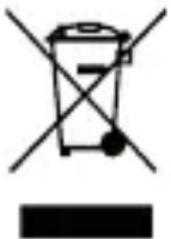
Disposal of old Electrical & Electronic Equipment (Applicable in the European Union and other European countries with separate collection systems)
natural_image
Symbol of a trash bin with crossed lines indicating no waste or discharge (no text or labels)This symbol on the product or on its packaging indicates that this product shall not be treated as household waste. Instead it shall be handed over to the applicable collection point for the recycling of electrical and electronic equipment. By ensuring this product is disposed of correctly, you will help prevent potential negative consequences for the environment and human health, which could otherwise be caused by inappropriate waste handling of this product. The recycling of materials will help to conserve natural resources. For more detailed information about recycling of this product, please contact your local Civic Office, your household waste disposal service or the shop where you purchased the product.
WPROWADZENIE
natural_image
Line drawing of a digital camera module with no visible text or symbolsWŁĄCZANIE/WYŁĄCZANIE ZASILANIA
natural_image
Symbol of a trash bin with crossed lines indicating no waste or discharge (no text or labels)natural_image
Line drawing of a camera module with no visible text or symbolsBE/KIKAPCSOLÁS
natural_image
Symbol of a trash bin with crossed lines indicating no waste or discharge, and a solid black rectangle below (no text or labels)natural_image
Line drawing of a vintage camera module with front panel and display (no text or symbols)EIN- / AUSSCHALTEN
natural_image
Symbol of a trash bin with crossed lines and a solid black rectangle below (no text or labels)natural_image
Simple line drawing of two rabbits, one with a circular logo above and the other with a smiling face (no text or symbols)


- ZAPNUTÍ/VYPNUTÍ
- DÔLEŽITÉ BEZPEČNOSTNÉ POKYNY
- ZAPNUTIE/VYPNUTIE
- IMPORTANT SAFETY PRECAUTIONS
- PRODUCT OVERVIEW AND CONTROL BUTTONS
- CHARGING YOUR CAMERA
- POWER ON/OFF
- Function introduciton
- PHOTO MODE
- VIDEO MODE
- PLAYBACK
- SETTING MODE
- GAME MODE
- MP3 MODE
- RESET
- NOTICE
- Specifications
- Warranty
- Disposal of old Electrical & Electronic Equipment (Applicable in the European Union and other European countries with separate collection systems)
- WPROWADZENIE
- WŁĄCZANIE/WYŁĄCZANIE ZASILANIA
- BE/KIKAPCSOLÁS
- EIN- / AUSSCHALTEN
Brand : GoGen
Model : BOB AQUA FOTO
Category : Uncategorized