
DECKO FOTO - Uncategorized GoGen - Free user manual and instructions
Find the device manual for free DECKO FOTO GoGen in PDF.


| Product Type | Digital camera for kids with photo effects and selfie mode |
| Brand | GoGen |
| Model | DECKO FOTO |
| Dimensions | 99 x 62 x 45 mm |
| Weight | 100 g |
| Power Supply | DC 5 V / 1000 mA (via Micro USB, charger not included) |
| Battery Type | Built-in Li-ion 3.7 V, 800 mAh |
| Charging Time | Approximately 2 hours |
| Storage Media | Micro SD card (FAT32, up to 32 GB) |
| Photo Resolution | JPG, up to 8160 x 6120 pixels |
| Video Resolution | AVI, 1920 x 1080 pixels |
| Photo Modes | Single, 3 images burst, 5s timer, time lapse |
| Photo Filters | Black & white, Sepia, Red, Blue |
| Photo Effects | Stamps, frames, funny face effects |
| Selfie Camera | Yes, with dedicated button to switch |
| LED Lights | Yes, can be turned on/off |
| Auto Focus | On/Off (available in settings) |
| Languages | English, Czech (default), Slovak, Hungarian, Polish, German |
| Display | Built-in screen (size not specified) |
| Reset | Yes, via reset button (use a pin) |
| Package Contents | Camera, USB charging cable, lanyard, user manual |
| Safety | Keep away from water, heat, and children under 3 (choking hazard) |
| Cleaning | Use a soft dry cloth; no harsh abrasives or chemicals |
| Battery Maintenance | Fully charge every 3 months to prolong lifespan |
Frequently Asked Questions - DECKO FOTO GoGen
User questions about DECKO FOTO GoGen
0 question about this device. Answer the ones you know or ask your own.
Ask a new question about this device
Download the instructions for your Uncategorized in PDF format for free! Find your manual DECKO FOTO - GoGen and take your electronic device back in hand. On this page are published all the documents necessary for the use of your device. DECKO FOTO by GoGen.
USER MANUAL DECKO FOTO GoGen
natural_image
Illustration of a blue camera with cartoon characters and a rainbow, accompanied by a cartoon insect and cloud icons (no text or symbols)NÁVOD K POUŽITÍ / NÁVOD NA POUŽITIE INSTRUKCJA OBSŁUGI / HASZNÁLATI UTASÍTÁS USER MANUAL / BEDIENUNGSANLEITUNG
DECKO FOTO
VYOBRAZENÍ VÝROBKU A OVLÁDACÍ TLAČÍTKA / VYOBRAZENIE VÝROBKU A OVLÁDACIE TLAČÍDLÁ WYGLĄD URZĄDZENIA I PRZYCISKI KONTROLNE / KÉSZÜLÉK LEÍRÁSA ÉS VEZÉRLŐ GOMBOK PRODUCT OVERVIEW AND CONTROL BUTTONS / PRODUKTABBILDUNG UND STEUERTASTEN
ÚVOD
natural_image
Illustration of a cow, a pig, and a hedgehog under a bright sun with 'H' and 'YES' text above (no symbolic or textual content)
natural_image
Simple grayscale illustration of a rabbit head with ears (no text or symbols)
natural_image
Silhouette of a person diving in underwater gear with fish nearby (no text or symbols)PROHLÍŽENÍ FOTOGRAFIÍ A VIDEÍ
natural_image
Symbol of a trash bin with crossed lines indicating no waste or discharge (no text or labels)DÔLEŽITÉ BEZPEČNOSTNÉ POKYNY
natural_image
Illustration of a cow, an octopus, and a pig under a full moon with 'YES' text (no other symbols or text)
natural_image
Simple illustration of a stylized animal head with ears and a ring (no text or symbols)
natural_image
Illustration of a person in a diving suit with fish swimming nearby (no text or symbols)PREHLIADANIE FOTOGRAFIÍ A VIDEÍ
natural_image
Symbol of a trash bin with crossed lines indicating no waste or discharge (no text or labels)natural_image
Illustration of a cow, pig, and a bee under a bright sun with 'HI YES' text (no other symbols or readable text)
natural_image
Simple grayscale illustration of a stylized animal head with ears (no text or symbols)
natural_image
Silhouette of a person in a diving suit with fish swimming nearby (no text or symbols)Press the button to view photos and videos.
natural_image
Simple line drawing of a trash bin with crossed lines indicating no waste or discharge (no text or symbols)natural_image
Illustration of a cow, a pig, and a bee under a full moon with 'H' and 'YES' text above (no symbolic or textual content)
natural_image
Simple grayscale illustration of a stylized animal head with ears (no text or symbols)
natural_image
Silhouette of a person in diving suit with fish swimming nearby (no text or symbols)KÉPEK ÉS VIDEÓK MEGJELENÉSE
natural_image
Symbol of a trash bin with crossed lines indicating no waste or discharge (no text or labels)Thank you for buying our product. Please read through these operating instructions, so you will know how to operate your equipment properly.
After you finished reading the instructions manual, put it away in a safe place for future reference.
IMPORTANT SAFETY PRECAUTIONS
When using your Camera, basic safety precautions should always be followed, including the following:
✗ Children should be supervised to ensure that they do not play with the device.
✗ Keep this device and its accessories away from excessive heat.
✗ Do not use the device in water or wet in a humid environment. Keep the device dry.
✗ Only use a soft cloth, no harsh abrasives or chemicals to clean, as it may damage the surface finishing.
✗ NEVER expose the device to water while charging, as doing so may result in damage to the device or the power source.
✗ NEVER operate this device with a damaged cable or after it has malfunctioned or has been damaged in any manner.
✗ NEVER leave the device unattended while charging. If the device becomes hot, smokes, or gives off an odor during charging, terminate charging immediately.
CHARGING YOUR CAMERA
The charger is not included in the package, please charge the camera via a standard 5 V / 1 A charger or via a PC. The LED indicator will glow red during charging. The LED indicator turns off when the camera is fully charged.
IMPORTANT: Please make a complete charge every three months to avoid shortening the battery lifespan.
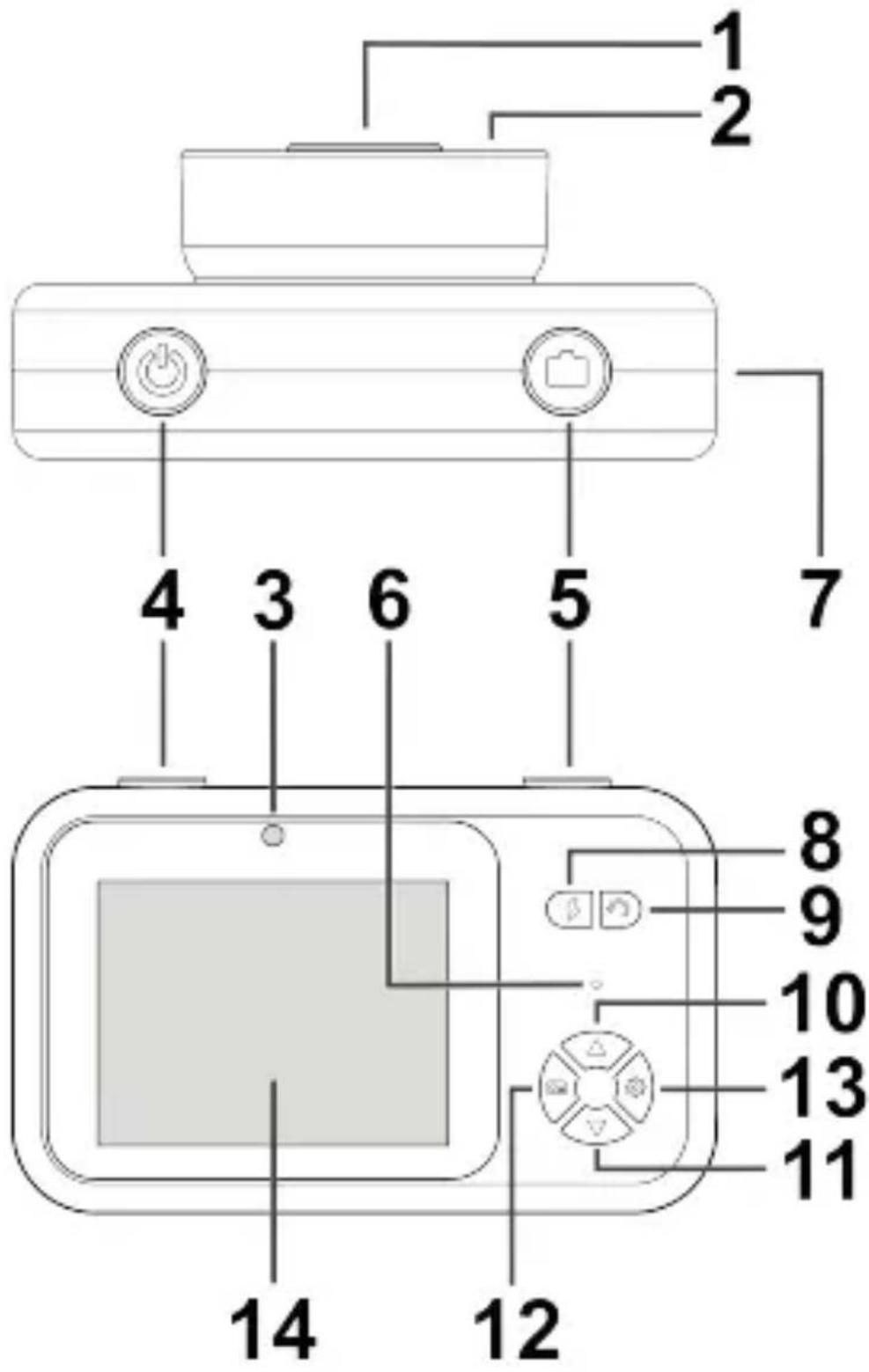
PRODUCT OVERVIEW AND CONTROL BUTTONS
- Front lens
- LED lights
- Selfie camera
-
button
Press and hold to turn on/off the camera. -
button
Press to take a photo.
Press and hold to record a video. -
LED indicator
-
Micro SD Card slot / Micro USB charging port / Reset button
-
button
Press to turn on/off the LED lights.
- button
Press to switch between front lens and selfie camera.
- △button
Press to select photo mode/photo filter/photo effects.
- button
Press to select photo mode/photo filter/photo effects.
- button
Press to view photos and videos.
- button
Press to open the settings menu.
- Display
BASIC FUNCTIONS
Photo mode
These modes are available: Single image, [ ] 3 images, [ ] 5s timer, [ ] time lapse.
Photo filter
These filters are available: [BW] black and white; [Sep] Sepia; [Red] Red; [Blu] Blue.
Photo effects
There are several effects. You can add stamps, frames, and funny face effects to your photo.
natural_image
Illustration of a cow, an octopus, a hedgehog, and a large sun with 'YES' text (no other symbols or text)
natural_image
Simple illustration of a stylized animal head with round ears (no text or symbols)
natural_image
Illustration of a person diving in underwater gear with fish nearby (no text or symbols)VIEWING PHOTOS AND VIDEO FILES
Press the button to view photos and videos.
× Use the △ / ▽ buttons to skip to the next/previous file.
✗ Press the button to play/pause video playback.
✗ Press the button to stop video playback.
Deleting files
Select the file you want to delete and press the button.
Select [Confirm], and press the button to confirm the deletion of the file.
CAMERA SETTINGS
Press the button to open the settings menu. Use the /buttons to move through the menu, and the button to confirm the selection. Press the button to exit the menu.
[Image Size] Set the photo resolution.
[Auto Focus] On/Off the auto focus function.
NOTE: If auto focus function is activated, it will take longer to take a photo after pressing the button.
[Language] Set the language.
NOTE: The default language is Czech. Available languages: English, Slovak, Hungarian, Polish, and German.
[Date, Time] Use the 📄 / 📍 buttons to set the time/date.
[Date Stamp] Set the date stamp format.
[Screen Protect] Set the time to turn off the display.
[Power Save] Set the time to turn off the camera.
[Volume] Set the desired volume level.
[Format] Format the Micro SD card.
Reset
Use a pin to press the Reset button if the camera does not work properly.
SPECIFICATIONS
Power source: DC 5 V / 1000 mA
Built-in battery: Li-ion 3,7 V / 800 mAh
Battery Charging Time: approx. 2 hours
Supported Micro SD card: FAT32; 32 GB (max)
Photo type file/resolution: JPG / up to 8160 x 6120 pxl
Video type file/resolution: AVI / 1920 x 1080 pxl
Product size: 99 x 62 x 45 mm / Weight: 100 g
We reserve the right to change technical specifications.
Package contents: Camera, USB Charging cable, Lanyard, User manual
Warranty
The capacity of the product battery decreases over time. Decreasing of battery capacity occurs during normal use of the appliance and is considered usual wear and tear of the appliance. Decreasing battery capacity is not a defect of the appliance.


To avoid danger of suffocation, keep the plastic bag away from babies and children. Do not use this bag in cribs, beds, carriages or playpens. This bag is not a toy.
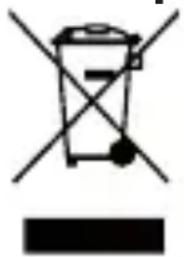
Disposal of old Electrical & Electronic Equipment (Applicable in the European Union and other European countries with separate collection systems)
natural_image
Symbol of a trash bin with crossed lines indicating no waste or discharge (no text or labels)This symbol on the product or on its packaging indicates that this product shall not be treated as household waste. Instead it shall be handed over to the applicable collection point for the recycling of electrical and electronic equipment. By ensuring this product is disposed of correctly, you will help prevent potential negative consequences for the environment and human health, which could otherwise be caused by inappropriate waste handling of this product. The recycling of materials will help to conserve natural resources. For more detailed information about recycling of this product, please contact your local Civic Office, your household waste disposal service or the shop where you purchased the product.
EINLEITUNG
IMPORTANT: Please make a complete charge every three months to avoid shortening the battery lifespan.
natural_image
Illustration of a cow, pig, and a bee under a bright sun (no text or symbols)
natural_image
Simple grayscale illustration of a rabbit head with ears (no text or symbols)
natural_image
Silhouette of a person wearing a diving suit with fish swimming in the background (no text or symbols)FOTOS UND VIDEOS ANSEHEN
natural_image
Symbol of a trash bin with crossed lines indicating no waste or discharge (no text or labels)


- ÚVOD
- PROHLÍŽENÍ FOTOGRAFIÍ A VIDEÍ
- DÔLEŽITÉ BEZPEČNOSTNÉ POKYNY
- PREHLIADANIE FOTOGRAFIÍ A VIDEÍ
- KÉPEK ÉS VIDEÓK MEGJELENÉSE
- IMPORTANT SAFETY PRECAUTIONS
- CHARGING YOUR CAMERA
- PRODUCT OVERVIEW AND CONTROL BUTTONS
- BASIC FUNCTIONS
- Photo mode
- Photo filter
- Photo effects
- VIEWING PHOTOS AND VIDEO FILES
- Deleting files
- CAMERA SETTINGS
- Reset
- SPECIFICATIONS
- We reserve the right to change technical specifications.
- Warranty
- Disposal of old Electrical & Electronic Equipment (Applicable in the European Union and other European countries with separate collection systems)
- EINLEITUNG
- FOTOS UND VIDEOS ANSEHEN
Brand : GoGen
Model : DECKO FOTO
Category : Uncategorized