
DANCEE BS 350B - Pregnant GoGen - Free user manual and instructions
Find the device manual for free DANCEE BS 350B GoGen in PDF.


| Product Type | Portable Bluetooth Speaker |
| Brand | GoGen |
| Model | DANCEE BS 350B |
| Dimensions (approximate) | 20 cm x 10 cm x 10 cm |
| Weight | Approximately 500 g |
| Power Source | Rechargeable lithium-ion battery, USB charging |
| Battery Capacity | 2000 mAh |
| Playback Time | Up to 6 hours at medium volume |
| Connectivity | Bluetooth 5.0 |
| Output Power | 10W (RMS) |
| Frequency Response | 100 Hz - 20 kHz |
| Impedance | 4 ohms |
| Waterproof Rating | IPX5 (splash resistant) |
| Controls | Power, Volume +/-, Play/Pause, Next/Previous, Pairing button |
| Charging Port | USB-C |
| Functions | Bluetooth streaming, hands-free calling, microSD card playback (if available), FM radio (if available) |
| Care and Cleaning | Wipe with a soft dry cloth; do not use abrasive cleaners |
| Safety Precautions | Keep away from extreme heat, water immersion, and children under 3 years |
| Spare Parts Availability | Not provided separately |
| Repairability | Device is not user-serviceable; contact support for issues |
Frequently Asked Questions - DANCEE BS 350B GoGen
User questions about DANCEE BS 350B GoGen
0 question about this device. Answer the ones you know or ask your own.
Ask a new question about this device
Download the instructions for your Pregnant in PDF format for free! Find your manual DANCEE BS 350B - GoGen and take your electronic device back in hand. On this page are published all the documents necessary for the use of your device. DANCEE BS 350B by GoGen.
USER MANUAL DANCEE BS 350B GoGen
natural_image
Black cylindrical electronic device with textured body and attached strap, no visible text or symbols on bodyBS 350 B
DANCEE
ÚVOD
DÔLEŽITÉ BEZPEČNOSTNÉ POKYNY
Thank you for buying our product. Please read through these operating instructions, so you will know how to operate your equipment properly. After you finished reading the instructions manual, put it away in a safe place for future reference.
IMPORTANT SAFETY PRECAUTIONS
When using your Bluetooth Speaker, basic safety precautions should always be followed, including the following:
- Children should be supervised to ensure that they do not play with the device.
- Keep this speaker and its accessories away from excessive heat.
- No sharp object should be subjected to the speaker/speaker-drivers as it may damage the speakers.
- Only use a soft cloth, no harsh abrasives or chemicals to clean, as it may damage the surface finishing.
- Ensure the speaker is waterproof by removing all the connected cables and the cap is tightly closed before exposing the speaker to liquid.
- NEVER expose the speaker to water while charging, as doing so may result in damage to the speaker or the power source.
- NEVER operate this speaker with a damaged cable or after it has malfunctioned or has been damaged in any manner.
- NEVER leave the speaker unattended while charging. If the speaker becomes hot, smokes, or gives off an odor during charging, terminate charging immediately.
The charger is not included in the package, please charge the speaker via a standard 5 V / 2 A charger or via a PC. The LED indicator will glow red during charging. The LED indicator turns off when the speaker is fully charged.
IMPORTANT: Please make a complete charge every three months to avoid shortening the battery lifespan.
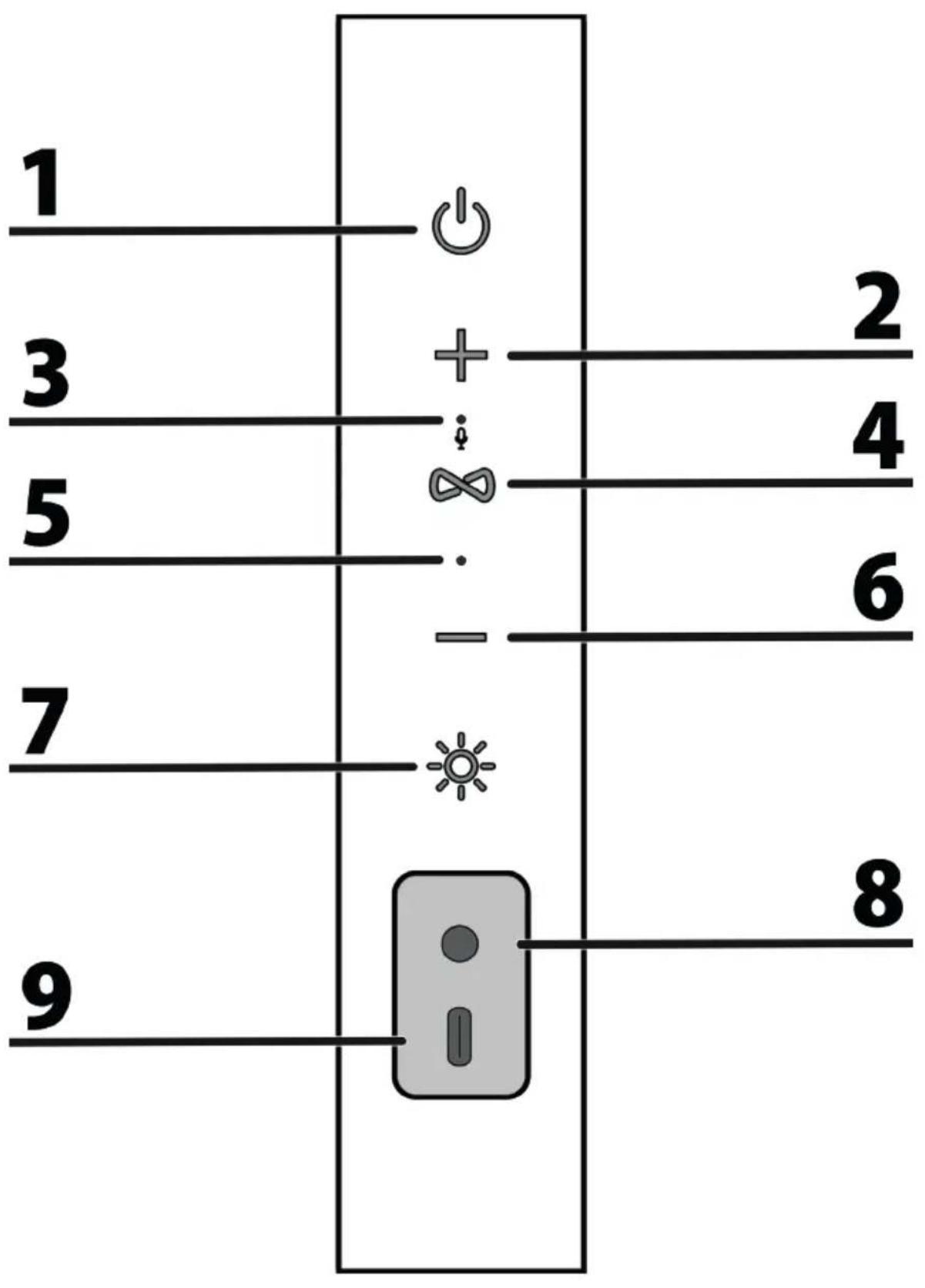
CONTROL BUTTONS AND CONNECTORS
-
Power On/Off button
Press and hold to turn on/off the speaker.
Press during playback to pause/resume playback. -
Next song / Vol + button
Press to increase the volume.
Press and hold to skip to the next track.
-
Microphone
-
TWS/HANDS-FREE button
-
LED indicator
-
Previous song / Vol - button
Press to decrease the volume.
Press and hold to skip to the previous track.
- LED lights button
Press to change the LED lights mode.
Blinks to the rhythm of the music/Choice of one of six colors/Breathing Color/Off
8. AUX IN input
9. USB-C charging port
Use the USB charging cable (included) for charging.
BLUETOOTH MODE
- Press and hold the 1 button to turn on the speaker.
- The speaker is ready to pair if the LED light flashes blue.
- Activate Bluetooth of mobile phone and search for device name "GoGEN DANCEE" then connect it. If the pairing is successful, the LED light will be solid and you can use the speaker to listen to audio from your mobile phone.
Note: For more information, see your mobile phone's user manual. If you are asked to enter a passcode, enter 0000. After you've paired a mobile phone, the speaker remembers it for the next time.
Disconnecting the paired mobile phone
Press the 1 button twice to disconnect your mobile phone from the speaker.
Note: The speaker will auto power off after 10 minutes if there is no operate.
TWS (TRUE WIRELESS STEREO) MODE
- Turn on both speakers. Make sure both speakers are without any Bluetooth connection.
- Press the 4 button on one of the speakers, the second speaker will connect automatically.
The first speaker LED light flashes blue and the LED light of the second speaker one keeps solid, which means both speakers are connected successfully. - Pair your mobile phone with the first speaker, the blue LED light of both speakers will be solid.
- Press and hold the 4 button on one of the speakers to cancel the TWS connection.
Note: Press and hold 1 button on one of the speakers, both speakers will be power off.
HANDS-FREE FUNCTION
When phone or other smartphone is connected to your speaker, follow the steps below to take calls hands-free.
- Press the 4 button to pick up the call.
- Press and hold the 4 button to reject the call.
- During a call, press the 4 button to hang up the call.
AUX IN MODE
The speaker automatically switches to AUX IN mode when you connect your device with the audio cable (included). When using an external device, all functions can only be controlled by the external device.
NOTE: The LED indicator will light blue after connection and during playback.
TROUBLE SHOOTING
A tone is heard every few seconds
The speaker needs to be charged.
The speaker will not power on
The speaker needs to be charged.
The speaker doesn't control track(s) volume
The speaker needs to be in Bluetooth mode for full control.
The speaker distorts the sound at high volume
The speakers' volume needs to be lowered.
SPECIFICATIONS
Bluetooth version: 5.0
IPX6 Waterproof Bluetooth Speaker
Built-in battery: Li-ion 7,4 V / 2500 mAh
Battery Charging Time: approx. 4,5 hours
Battery Playback Time: 15 hours (50 % Volume)
Bluetooth Frequency: 2402 - 2480 MHz, EIRP -0,37 dBm
Bluetooth connecting range: 10 m
Frequency Response: 50 Hz – 20 kHz
Power output: 2 x 10 W
Product size: 203 x 80 x 80 mm / Weight: 700 g
We reserve the right to change technical specifications.
Package contents: Speaker, USB Charging cable, Audio cable, Strap, User manual
Warranty
The warranty does not apply to a decrease in the accumulator's effective capacity caused by its use or age. Effective capacity gradually decreases depending on the method of use of the accumulator.


To avoid danger of suffocation, keep the plastic bag away from babies and children.
Do not use this bag in cribs, beds, carriages or playpens. This bag is not a toy.
Disposal of old Electrical & Electronic Equipment
(Applicable in the European Union and other European countries with separate collection systems)
This symbol on the product or on its packaging indicates that this product shall not be treated as household waste. Instead it shall be handed over to the applicable collection point for the recycling of electrical and electronic equipment. By ensuring this product is disposed of correctly, you will help prevent potential negative consequences for the environment and human health, which could otherwise be caused by inappropriate waste handling of this product. The recycling of materials will help to conserve natural resources. For more detailed information about recycling of this product, please contact your local Civic Office, your household waste disposal service or the shop where you purchased the product.
Hereby, ETA a.s. declares that the radio equipment type BS350B is in compliance with Directive 2014/53/EU. The full text of the EU declaration of conformity is available at the following internet address: www.gogen.cz/declaration_of_conformity
WPROWADZENIE
TWS (TRUE WIRELESS STEREO) MÓD
natural_image
Abstract black and white circular logo with stylized white lines inside (no text or symbols)- ÚVOD
- DÔLEŽITÉ BEZPEČNOSTNÉ POKYNY
- IMPORTANT SAFETY PRECAUTIONS
- CONTROL BUTTONS AND CONNECTORS
- AUX IN input
- USB-C charging port
- BLUETOOTH MODE
- Disconnecting the paired mobile phone
- TWS (TRUE WIRELESS STEREO) MODE
- HANDS-FREE FUNCTION
- AUX IN MODE
- TROUBLE SHOOTING
- A tone is heard every few seconds
- The speaker will not power on
- The speaker doesn't control track(s) volume
- The speaker distorts the sound at high volume
- SPECIFICATIONS
- We reserve the right to change technical specifications.
- Warranty
- Disposal of old Electrical & Electronic Equipment
- (Applicable in the European Union and other European countries with separate collection systems)
- WPROWADZENIE
- TWS (TRUE WIRELESS STEREO) MÓD
Brand : GoGen
Model : DANCEE BS 350B
Category : Pregnant