
SEP 570BT - Headphones SENCOR - Free user manual and instructions
Find the device manual for free SEP 570BT SENCOR in PDF.


| Brand | Sencor |
| Model | SEP 570BT |
| Product Type | Wireless earbuds with microphone |
| Bluetooth Version | 5.3 |
| Audio Codecs | SBC, AAC |
| Maximum Transmitter Power | 100 mW @ 2.4-2.4835 GHz |
| Controls | Touch pad on each earbud |
| Microphone | Yes, built-in |
| Charging Case | Yes, with battery level display (%) |
| Charging Connector | USB-C |
| Charging Indicators | LED per earbud and case display |
| Battery Life | Several hours at normal volume |
| Pairing | Automatic when removed from case; name "SEP 570BT" |
| Operating Range | Up to 10 meters |
| Voice Assistant | Supports Siri/Google Assistant (long touch) |
| Game/Music Mode | Switchable (4 short touches) |
| Volume Control | Left: volume down; Right: volume up (1 short touch) |
| Track Control | Left: previous (3 touches); Right: next (3 touches) |
| Call Control | Answer/end: 2 short touches; Reject: long touch (3 sec) |
| Weight (per earbud) | Approx. 4.5 g (typical) |
| Safety Features | Low volume recommendation; do not disassemble; keep away from water |
Frequently Asked Questions - SEP 570BT SENCOR
User questions about SEP 570BT SENCOR
0 question about this device. Answer the ones you know or ask your own.
Ask a new question about this device
Download the instructions for your Headphones in PDF format for free! Find your manual SEP 570BT - SENCOR and take your electronic device back in hand. On this page are published all the documents necessary for the use of your device. SEP 570BT by SENCOR.
USER MANUAL SEP 570BT SENCOR
natural_image
Line drawing of three wireless earbuds with open case (no text or symbols)USER'S MANUAL
NÁVOD K OBSLUZE
NÁVOD NA OBSLUHU
INSTRUKCJA OBSŁUGI
HASZNÁLATI ÚTMUTATÓ
UPUTSTVO ZA UPOTREBU
KORISNIČKI PRIRUČNIK
ΕΓΧΕΙΡΙΔΙΟ ΧΡΗΣΗΣ
Wireless earpods with a microphone
1. Supply content
"L" and "R" earphone
Charging case
User's manual
USB-C charging cable
2. SEP 570 BT Bluetooth earphones description
|1| Charging case
|2| LED indicator of the left earphone being charged
| 3 | Charging case information indicator – battery level value is displayed in %
|4| LED indicator of the right earphone being charged
|5|USB-C charging connector
|6| Earphone contacts for recharging from the charging case
|7| Microphone
|8| Earphone LED indicator
|9 | Touch pad for earphones control
|R| Right earphone storage space, right earphone
IL Left earphone storage space, left earphone
Left and right earphone function
2× short touch during an incoming call - answer the call
1× long touch (3 seconds) during an incoming call – call rejection
2× short touch during an ongoing call - end call
2× short touch - play function
2× short touch - pause function
1× long touch - launch SIRI/Google assistant
4× short touch - change GAME / MUSIC mode
Left earphone
1× short touch in music mode - volume down
3× short touch - previous track
Right earphone
1× short touch in music mode - volume up
3× short touch - next track
3. Putting into operation
Before first use, be sure to read the safety instructions contained in this user's manual carefully.
Before using the earphones for the first time, remove the protective film from the charging contacts on the bottom of the earphones and
return them to the charging case. Start charging the charging case and the earphones to the maximum level.
Opening and closing the case – the case is opened and closed by flipping the top lid from front to back. The picture shows an open case.
Turning on the earphones – Taking the earphones out of the case will automatically switch them on. When the earphones are in the off state outside the charging case. Press and hold the touch pad on each earphone and wait for the earphones to switch on.
Turning off the earphones – Inserting the earphones into the charging case will automatically turn off the earphones. Long press and hold the touch pad of the earphones until the earphones turn off.
Pairing the earphones with each other – The earphones are already paired from the factory and do not need to be paired with each other. (If pairing to TWS mode fails, return the earphones to the charging case and repeat the above instructions).
Warning: To prevent damage to your hearing, always keep the volume level of your device to a minimum before connecting BT headphones to your mobile device. Keep the touch pad clean and avoid touching other objects or body parts such as hair.
Note: If the BT earphones are not paired with any device, they will turn off when left idle for a long time. Put them in the case.
4. Pairing your earphones via Bluetooth
To pair the BT headphones with your mobile device, do the following: Remove the earphones from the charging case and search for the Bluetooth earphones name "SEP 570BT" on the device you want to pair and start the pairing process. If you are requested to enter a pairing code while your device and the BT headphones are pairing, use the following code: "0000".
To cancel the pairing process, disconnect the BT earphones from your mobile device (cancel the Bluetooth pairing).
Note: To ensure a stable Bluetooth connection, make sure that the distance between the BT headphones and your paired device is kept within 10 meters. Depending on ambient interference, in some cases it may be necessary to maintain a shorter distance between the BT headphones and the paired device.
5. Charging
A charged battery provides power for several hours of operation at normal volume levels. A high volume consumes more battery power;
therefore, we recommend listening at normal volume levels.
When the BT earphones are placed in the charging case, the case LEDs show the charging status of the BT earphones and the charging case:
a. The LED indicator of the left "2" and right "4" earphone being charged shows the increasing status – the earphones are being charged
b. The LED indicator of the left "2" or right "4" earphone being charged is lit – the earphone charging complete
c. Left "2" and right "4" LED indicator is not lit - earphones are charged
d. Charging case information indicator "3" – at 5%, the value flashes to indicate a low battery.
e. Charging case information indicator "3" – the charging process is shown by a gradually increasing value from 0% to 100%.
f. Earphone LED indicator "8" – slow intermittent LED indication – the earphone is ready for pairing.
g. Earphone LED indicator "8" – continuous LED indication – inserted earphones in the charging case show the recharging process
Attention: For charging, use only the original accessories supplied with the appliance. To achieve maximum battery life, it is advisable to start charging the battery only when the battery is low (10% – 20%). Charge continuously until fully charged. If the battery life is already very short, it is exhausted and we recommend you contact an authorised service centre for more information.
Recommendation: If your headphones are not to be used for an extended period of time, we recommend to fully charge the batteries once every two to three months. We recommend to store the BT earphones and the charging case with the battery charged to prevent irreparable damage to the battery (loss of capacity).
Specification:
- Bluetooth Version 5.3
• Maximum Transmitter Power 100mW @ 2.4GHz-2.4835GHz - Codes: SBC, AAC
Safety Notice:
Please observe the rules of the Country or Region which you are in while driving.
Do not disassemble or modify the headset at any reason, otherwise, it may damage or burn the headset.
If there is any quality problem, please send headset to authorized service center for repairing.
Please keep the equipment along with all the accessories out of the reach of children and pets.
Extreme temperatures will cause the device deformation, reduce the charging capacity and shorten the working life.
Please do not immerse the earphone into water. Guarantee will be lost if damage is caused by immersed into water.
It will damage your hearing if you listen with high volume for a long time.
It is recommended that only use the lowest volume which is necessary for speaking and listening to music.
Instructions and information regarding the disposal of used packaging materials
Dispose of packaging material at a public waste disposal site.
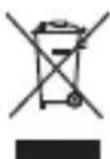
Disposal of used electrical and electronic appliances
The meaning of the symbol on the product, its accessory or packaging indicates that this product shall not be treated as household waste. Please, dispose of this product at your applicable collection point for the recycling of electrical & electronic equipment waste. Alternatively in some states of the European Union or other European states you may return your products to your local retailer when buying an equivalent new product. The correct disposal of this product will help save valuable natural resources and help in preventing the potential negative impact on the environment and human health, which could be caused as a result of improper liquidation of waste. Please ask your local authorities or the nearest waste collection centre for further details. The improper disposal of this type of waste may fall subject to national regulations for fines.
For business entities in the European Union
If you wish to dispose of an electrical or electronic device, request the necessary information from your seller or supplier.
Disposal in other countries outside the European Union
If you wish to dispose of this product, request the necessary information about the correct disposal method from local government departments or from your seller.
This appliance complies with EU rules and regulations regarding electromagnetic and electrical safety. Changes to the text, design and technical specifications may occur without prior notice and we reserve the right to make these changes.
Hereby, FAST CR, a.s. declares that the radio equipment type SEP 570 BT is in compliance with Directive 2014/53/EU.
The full text of the EU declaration of conformity is available at the following internet address: www.sencor.eu
1. Obsah balení
„L“ a „R“ sluchátko
Dobljecí krabička
Manufacturer: FAST CR, a.s.
U Sanitasu 1621
25101 Ricany
Czech Republic


- Supply content
- SEP 570 BT Bluetooth earphones description
- Left and right earphone function
- Left earphone
- Right earphone
- Putting into operation
- Pairing your earphones via Bluetooth
- Charging
- Specification:
- Safety Notice:
- Instructions and information regarding the disposal of used packaging materials
- Disposal of used electrical and electronic appliances
- For business entities in the European Union
- Disposal in other countries outside the European Union
- Obsah balení
Brand : SENCOR
Model : SEP 570BT
Category : Headphones