
BC5BTS2012DT - Loudspeaker Be Cool - Free user manual and instructions
Find the device manual for free BC5BTS2012DT Be Cool in PDF.


| Product Type | Speaker |
| Brand | Be Cool |
| Model | BC5BTS2012DT |
| Dimensions | 50 x 113 mm |
| Weight | 320 g |
| Battery Type | Lithium-Ion |
| Output Power | 5W |
| Charging Input | 5V, 500mA |
| Charging Time | 2.5 hours |
| Playtime | 6-8 hours (at 50% volume) |
| Bluetooth Range | Up to 33 ft (10 m) |
| IP Rating | IPX6 (waterproof) |
| Frequency Range | 60Hz - 20KHz |
| Connectivity | Bluetooth, AUX-In, TF Card, USB, FM Radio |
| Dual Pairing | Yes (pair two speakers for stereo) |
| Handsfree Function | Yes |
| Auto Power Off | After 15 minutes of inactivity |
| Controls | Multifunction button, Volume +/-, Power button |
| LED Indicator | Red (charging), Green (charged), Blue (Bluetooth) |
| Included Accessories | USB charging cable, 3.5mm AUX cable |
| Warranty | 2 years (valid in Austria) |
Frequently Asked Questions - BC5BTS2012DT Be Cool
User questions about BC5BTS2012DT Be Cool
0 question about this device. Answer the ones you know or ask your own.
Ask a new question about this device
Download the instructions for your Loudspeaker in PDF format for free! Find your manual BC5BTS2012DT - Be Cool and take your electronic device back in hand. On this page are published all the documents necessary for the use of your device. BC5BTS2012DT by Be Cool.
USER MANUAL BC5BTS2012DT Be Cool
natural_image
Close-up of a black and orange circular object with 'BE COOL' branding, no readable text or symbols beyond the label.HERZLICHEN GLÜCKWUNSCH!
IMPORTANT INFORMATION ON SAFETY, LOCATION AND ELETRICAL CONNECTION.



- Use this device exclusively in accordance with the guidelines in the instruction manual. Any use other than that recommended by the manufacturer, may result in fire, electrical shock or injury to persons.
- Remove the packaging and ensure the device is not damaged. In case of any doubt do not use the device and contact the service point or your dealer.
- Keep children away from packaging materials. There is a risk of choking if swallowed!
- If the cable is damaged it must be replaced by the manufacturer or an authorized service point, in order to avoid all potential risks.
- Before connecting to a charging adapter, you must check whether the type of current and the mains voltage comply with the information given on the device nameplate.
- It is strictly forbidden to modify the properties of this device in any form or manner and you must only use replacement parts or accessories recommended by the manufacturer (failure to do so will invalidate the warranty and guarantee).
- If the device has a defect, switch it off and contact your dealer or the customer hotline.
- For any possible repairs to the device and the mains plug or power cable you must always refer exclusively to the customer service points recommended by the manufacturer. You can view our customer service points online at www.becool.at.
- Do not twist or bend the cable.
- Do not touch the charging adapter with wet hands to avoid electric shock.
- The device is waterproof to IPX6. How ever is not suitable to put in water or to keep it under water.
- Please do not put open flames, such as candles on the device
- The function of the device may be affected by strong electromagnetic interference. If you notice that this happens, place the device in a different location and reset it by reviewing the entire manual.
RECYCLING

The device's packaging materials can be recycled. It is therefore recommended to dispose of them through sorted waste collection.
DISPOSAL
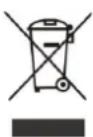
The “crossed-out bin” symbol indicates that electrical and electronic devices (WEEE) must be disposed of separately. Electrical and electronic devices can contain hazardous substances and environmental pollutants. Therefore do not dispose of them in unsorted residual waste but at a designated collection point for electrical and electronic devices. You will thus contribute to resource and environmental protection.
For more information please contact your dealer or the local authorities.
DECLARATION OF CONFORMITY

We hereby confirm that this item complies with the basic requirements, regulations and directives of the EU.
You can view the detailed Declaration of Conformity by clicking on the following link: www.becool.at/downloads/doc/bc5bts2012dt.pdf
Subject to errors and technical changes.
www.becool.at
DELIVERY CONTENT
• BE COOL SOUNDTRIP
- USB-Charging cable
• 3.5mm AUX-IN cable
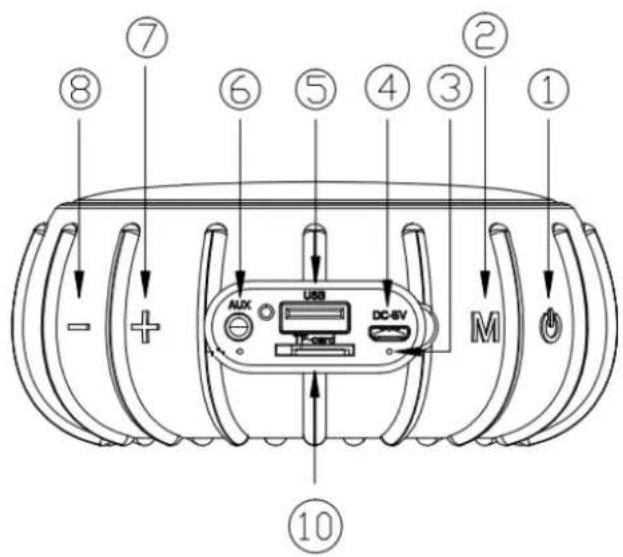
DESCRIPTION
- On/OFF
- Multifunction-button
- LED-Indicator
- Mikro-USB Port
- USB-Port
- AUX-In
- VOL +/Next Track
- VOL -/Prev Track
- TF Card Slot
START UP
Charging
To charge the BECOOL Sound Dot please follow these steps:
-
Use the USB charge cable connecting to the item from its micro charging socket to your computer or charger.
-
Please note that the charging input is 5V 500mA.
-
During the charging process, the LED indicator lights up red – as soon as the charging process is complete, the indicator lights up green.
NOTE
The sound trip should be supplied with sufficient power so that you can couple the device. If you have trouble pairing or turning on the device, make sure it is fully charged.
! ATTENTION ! IMPORTANT!
The Sound Dot has a lithium-Ion battery inside.
Compared to other battery models, lithium-Ion batteries have a very low self-discharge and must be charged periodically.
If you don't use your Sound Dot, the battery must be charged every 2 months, otherwise it will lose its capacity.
Regular charging protects the battery from deep discharge.
Please note that a deeply discharged battery is irreparably destroyed and must be replaced at a charge, which is why the battery should never be completely discharged during operation!
NOTE
The item will be shutoff automatically in 15mins if there is no connection or music playing.
Turn on & off
- Push the -button for 2 seconds, to turn the Sound Dot on.
- Push the -button for 2 seconds, to turn the Sound Dot off.
BLUETOOTH-MODE
- Turn on the Sound Dot.
- Once the power is on, the unit turns default into Bluetooth mode, while there is no other connection.
- The blue LED will light up blue, which means, that the connection is ready to be paired.
- On the Bluetooth device, switch on Bluetooth setting and search for "Sound Dot". For the first-time connection, select the item to start connection. If necessary, enter the pass code 0000.
- You can also control the playback of your music from the Sound Dot:
○ PLAY MUSIC and STOP MUSIC → Short press the ⏻-button.
- MUSIC FORWARD OR RETURN → Press and hold the + or — -buttons for 2 seconds.
- REGULATE VOLUME → Short press the + and —-buttons.
- To disconnect the item from current Bluetooth device, choose to "Disconnect" on the connected Bluetooth device.
NOTE
The item can be connected with Bluetooth devices wirelessly (< 33 ft.) The music streaming may be interrupted by obstacles between the device and the item, such as walls, metallic casing that covers the device, or other devices nearby that operate in the same frequency.
AUX-IN MODE
- Connect the item and the Sound Dot with the 3,5mm AUX-In cable.
- Push the Multifunction-button once, to change into AUX-IN Mode.
- Control the music playback as follows:
- MUSIC FORWARD OR RETURN → Press and hold the + or — -buttons for 2 seconds.
- REGULATE VOLUME Short press the + and - buttons.
TF-CARD MODE
- Insert a TF and push the Multifunction-button once, to change into TF-CARD Mode.
-
Control the music playback as follows:
-
PLAY MUSIC and STOP MUSIC → Short press the ⏻-button.
- MUSIC FORWARD OR RETURN → Press and hold the + or — -buttons for 2 seconds.
- REGULATE VOLUME Short press the + and - buttons.
USB MODE
- Insert a USB-Stick and push the Multifunction-button once, to change into USB Mode.
-
Control the music playback as follows:
-
PLAY MUSIC and STOP MUSIC → Short press the ⏻-button.
- MUSIC FORWARD OR RETURN → Press and hold the + or — -buttons for 2 seconds.
- REGULATE VOLUME Short press the + and —-buttons.
DUAL PAIRING MODE
The dual pairing feature allows you to connect two Sound Dot-speakers to one device. As soon as you play music from your device, the two paired speakers play the left and right audio channels, so you can enjoy stereo music.
Please proceed as follows:
- Switch on both Sound Dots and check that there is no existing Bluetooth connection.
- Then press the M-button twice to switch to dual pairing mode.
- A signal tone sounds, signaling that the two sound dots are connecting.
- Switch to the Bluetooth settings of your smartphone, tablet or Bluetooth device to connect the devices via Bluetooth (only one sound dot is displayed)
- As soon as you have paired the Sound Dots with your Bluetooth device, the indicators of both light up constantly.
- You can now start playing the music - you can also control this using the sound dots:
a. PLAY MUSIC and STOP MUSIC → Short press the ⏻-button.
b. MUSIC FORWARD OR RETURN → Press and hold the + or — -buttons for 2 seconds.
c. REGULATE VOLUME → Short press the + and —-buttons.

FM RADIO MODE
- Connect the Line in cable to use it as an antenna.
- Press the ⏻-button twice to switch to radio mode.
- Then press the multifunction button to automatically search for and store all possible FM channels. The LED indicator flashes during the search process.
- To select or switch channels, press and hold the + or — button.
HANDSFREE EQUIPMENT
You have the option to use the Sound Dot as a hands-free device.
- When a call comes in, the music is automatically interrupted. Answer by pressing the - 🔊 key once and hang up the call by pressing the 🔊 key twice.
- Music playback will resume when your call ends.
- For redial the last number, press the -key twice.
NOTE
Handsfree is only available in Bluetooth mode.
Technical information
| Battery-Type: | Lithium-Ion |
| Watt: | 5W |
| Battery Charging time: | 2.5 Hours |
| Playtime: | 6-8 Hours (50% Soundvolume) |
| Bluetooth transmitter frequency range: | 60Hz- 20KHz |
| IP Standard: | IPX6 |
| Measurments: | 50x113mm |
| Weight: | 320 gramm |
| Contact address for further information and service line: | Schuss Home Electronic GmbHScheringgasse 3, A-1140 WienTel: +43 (1) 97 0 21 – 0Serviceline: +43 (1) 97 0 21 – 544www.becool.atFB-Nr: 236974 t / FB-Gericht: Wien |
By purchasing a BECOOL quality product you have acquired an innovative, long lasting and reliable item.
For this BECOOL device we grant a warranty of 2 years from the date of purchase, valid in Austria only.
If, contrary to expectations, service work on your device is nevertheless necessary, we hereby guarantee you a free repair (spare parts and working hours) or (at the discretion of the company Schuss) replace the product. If repair or exchange is not possible for economic reasons, we reserve the right to issue a current value credit.
In the case of Bluetooth speakers, please contact your specialist dealer or us directly as a first step. We would like to point out that repair work that has not been carried out by the authorized workshop in Austria will immediately terminate the validity of this guarantee.
This warranty does not include:
• Repair of replacement of parts due to normal wear
- Damage due to non-compliance with the instruction manual
• Devices that are used commercially – even in part
- Devices damaged by external forces (falling, impact, cracking, improper use etc.) as well as aesthetic wear
• Devices that have been used improperly
• Devices that were not opened by our authorised workshop.
- Unfulfilled customer expectations.
- Damage caused by force majeure, water, lightning and overvoltage.
- Devices on which type denomination and/or serial number on the device have been erased, rendered illegible or removed.
- Service work not performed by our authorised workshops, transport costs to an authorised workshop or us and back as well as associated risks.
Please note that within the warranty period we charge a flat rate of 30 € (indexed as per consumer price index 2010, June 2015) in case of operating errors or if no fault can be found.
The total warranty period of 2 years is not extended if warranty service is performed (repair or device replacement).
The 2 year warranty is only valid if the original invoice (must contain name and address of the dealer as well as full device name) and the respective warranty certificate are produced, on which the device type and serial number (can be found on the box and the device's rear or bottom) are to be noted! Only the statutory warranty coverage applies if the warranty certificate cannot be produced!
Please note that the statutory warranty coverage is not altered by this warranty and that it applies in full regardless.
Schuss Home Electronic GmbH and its vicarious agents are only liable for damages in case of gross negligence or intent. Liability for loss of profit, expected but not incurred savings, consequential damages and damages from third party claims is excluded in any case. Damages to or for recorded data are always excluded from the liability for damages.
Congratulations on your choice. We hope you will enjoy using your BECOOL device!
ADDRESS
BE COOL Sales
Schuss Home Electronic GmbH
A-1140 Vienna, Scheringgasse 3
Tel.: +43 (0)1/ 970 21
Type designation:
Serial Number: ....
Together with the device, this warranty certificate must be handed to the authorised workshop or dealer you bought the device from in the event of a warranty.
- HERZLICHEN GLÜCKWUNSCH!
- IMPORTANT INFORMATION ON SAFETY, LOCATION AND ELETRICAL CONNECTION.
- RECYCLING
- DISPOSAL
- DECLARATION OF CONFORMITY
- DELIVERY CONTENT
- DESCRIPTION
- START UP
- Charging
- NOTE
- ! ATTENTION ! IMPORTANT!
- Turn on & off
- BLUETOOTH-MODE
- AUX-IN MODE
- TF-CARD MODE
- USB MODE
- DUAL PAIRING MODE
- FM RADIO MODE
- HANDSFREE EQUIPMENT
- For this BECOOL device we grant a warranty of 2 years from the date of purchase, valid in Austria only.
- This warranty does not include:
- ADDRESS
Brand : Be Cool
Model : BC5BTS2012DT
Category : Loudspeaker