
UT333 - Mètre Uni-T - Free user manual and instructions
Find the device manual for free UT333 Uni-T in PDF.


| Product Type | Mini Temperature & Humidity Meter |
| Brand | Uni-T |
| Model | UT333 |
| Measurement Range (Humidity) | 0~100%RH |
| Measurement Range (Temperature) | -10~60°C (14~140°F) |
| Humidity Accuracy | ±5%RH (at 23°C±5°C) |
| Temperature Accuracy | ±1.0°C (at 40%RH~75%RH) |
| Resolution (Humidity) | 0.1%RH |
| Resolution (Temperature) | 0.1°C / 0.2°F |
| Sampling Rate | 1 time per second |
| Display | 4-digit LCD |
| Backlight | Yes, manually controlled |
| Data Hold | Yes |
| MAX/MIN Recording | Yes |
| Auto Power Off | After 5 minutes (can be disabled) |
| Low Battery Indication | Yes (battery icon) |
| Overload Indication | "OL" for temperature out of range, "100.0%RH" for humidity |
| Power Supply | 3 × AAA 1.5V batteries |
| Dimensions | 155 × 50 × 28 mm |
| Weight | 102 g |
| Operating Environment | 0°C to 40°C, ≤90%RH |
| Storage Environment | -20°C to 60°C, ≤75%RH |
| Safety Standards | EN61326-1, Pollution Degree 2 |
| Sensor Type | High-accuracy digital temperature and humidity module |
| Maintenance | Clean with soft cloth and neutral detergent; do not use abrasive or solvent |
| Battery Replacement | User-replaceable (3xAAA) |
| Included Accessories | Main unit, operating manual |
Frequently Asked Questions - UT333 Uni-T
User questions about UT333 Uni-T
0 question about this device. Answer the ones you know or ask your own.
Ask a new question about this device
Download the instructions for your Mètre in PDF format for free! Find your manual UT333 - Uni-T and take your electronic device back in hand. On this page are published all the documents necessary for the use of your device. UT333 by Uni-T.
USER MANUAL UT333 Uni-T
Mini Temperature & Humidity Meters Operating Instruction
1. Introduction
UT 333 is a stable, safe, reliable mini digital temperature humidity meter, which is widely used in grain storage and transportation, file management, material management, forestry and animal husbandry, health care, teaching experiment, public sector, home, and others. This operating manual includes relevant safety information and warnings. Please read this manual carefully and observe all the cautions strictly.
Warning:
Before using the product, please read the operation safety rules carefully.
2. Out of Box Checking
Open the packing box and take out the meter. Please check carefully if items are missing or damaged.
- Main unit ____ 1
- Operating manual—1
3.Operation Safety
- Please check the meter and the accessories before using and beware of any damage or abnormal phenomenon. If you find the case is damaged or the LCD shows nothing, or you consider that the meter could not work properly anymore, please stop using it.
- Observe the operating instructions while measuring.
- Do not open the meter at will or change internal wiring to avoid damages to the mater.
- When the LCD displays "☐", replace the battery timely. Remove the battery if the meter is not used for a long time.
- Do not store or use the meter in high temperature, high humidity, flammable, combustible, or strong electromagnetic environment.
- Please use soft cloth and neutral detergent to clean the case for maintenance. Do not use grinding agent and solvent to avoid case corrosion and damaging the meter.
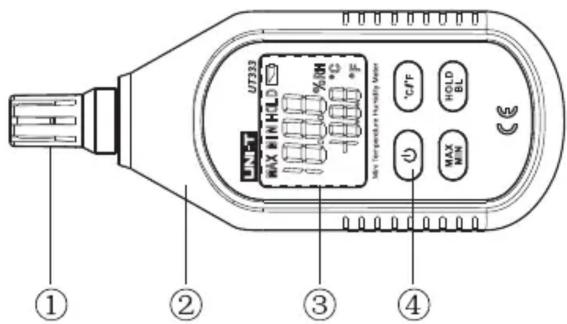
4.Product Outlook
- Temperature and humidity sensing module
- Meter case
- LCD display
- Function keys
- Display Interface
5. Display Interface
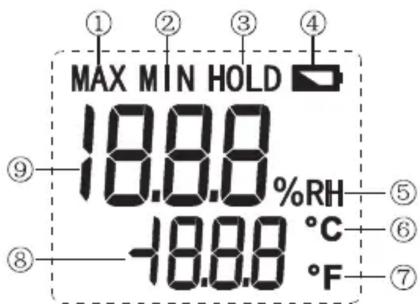
| 1 | Maximum measurement | 5 | Relative humidity |
| 2 | Minimum measurement | 6 | Celsius |
| 3 | Data hold | 7 | Fahrenheit |
| 4 | Low battery | 8 | Temperature value |
| 9 | Humidity value | ||
6. Key Functions and Setup
1. ON/OFF:
Short press once to start up; short press again to power off.
Note: Product's auto power off feature can be disabled: Press and hold "HOLD" and then press "ON/OFF" key to enable/disable auto power off, LCD will display "APO OFF" to indicate status.
2. ℃/°F:
Unit conversion key: Short press this key to select Celsius or Fahrenheit at the time of measuring.
3. MAX/MIN:
Pressing this key can select maximum, minimum or normal value measurement; select maximum and the meter will always show the maximum reading; select minimum and the meter will show minimum reading.
4. HOLD/BL:
HOLD: Short press this key once to hold the measurement; short press this key again to exit data hold and continue normal measurement.
BL: Long press this key to turn on backlight; long press this key again to turn off backlight.
7.Technical Specification
1. Temperature and Humidity
| Function | Range | Resolution | Accuracy | Description |
| Humidity | 0~100.0%RH | 0.1%RH | ±5%RH | Under normal temperature condition (23°C ±5°C) |
| Temperature | -10~60°C | 0.1°C | ±1.0°C | Under normal humidity condition(40%RH~75%RH) |
| 14~140°F | 0.2°F | ±2.0°F | ||
| Sampling Rate | 1/s | Sampling rate is once per second. | ||
| Overload Indication | 100%RH/OL | Maximum displayed humidity is 100%RH; if the temperature is lower than 20°C or higher than 60°C, “OL” will be displayed | ||
| MAX/MIN Measurement | MAX/MIN | Shows “MAX/MIN” | ||
| Data Hold | HOLD | Shows “HOLD” | ||
| Unit | °C/°F | Shows “°C/°F” | ||
| Backlight | BL | Manually turn on or off backlight | ||
| Auto Power Off | 5mins | Automatically power off after 5mins without operating; function can be turned off | ||
| Low Battery | 3.0~3.5V | Shows low battery prompt when power is 3.0~3.5V |
2. General Type
a. LCD: 4 digit LCD display
b. Overload indication: When humidity is greater than 99.99%RH, "100.0%RH" will be displayed; when temperature is greater than 60°C or lower than -20°C, "OL" will be displayed.
c. Low battery indication: Prompt "☐". The new battery should be replaced in time.
d. Sampling rate: 1/s
e. Sensor type: High-accuracy digital temperature and humidity module.
f. Impact strength: Can withstand the impact of landing from 1 meter's height.
g. Power requirement: 1.5V batteries (AAA) ×3
h. Product size: 155×50×28mm
i. Weight: 102g
3. Environment Specification
a. Indoor use
b. Altitude height: 2000m
c. Safety: EN61326-1
d. Pollution level: 2
e. Working temperature and humidity: 0°C\~40°C (not greater than 90%RH)
f. Storage temperature and humidity: -20°C\~60°C (not greater than 75%RH)
4. Electrical Specifications
a. Accuracy: humidity: ±5%RH (normal temperature condition) temperature: ±1.0°C (normal temperature condition)
b. Environment temperature: 23°C ±3°C
c. Environment humidity: ≤90%RH
- General Maintenance Warning: please do not open the case of meter to avoid affecting device accuracy or damage to the meter.
a. Maintenance and service of the meter should be accomplished by professional personnel or designated maintenance department.
b. Clean the case by dry cloth periodically, but detergent with abrasive or solvent composition shall not be used.
6. Battery Installation and Replacement
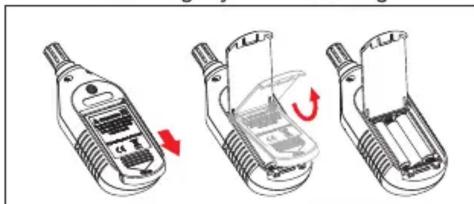
a. The meter uses 3 pieces of AAA 1.5V batteries. Please see figure below for steps of battery installation and replacement.
b. Turn the panel down, push the battery cover open in the direction of the arrow, lift the cover and remove the batteries; install new batteries in accordance of polarity indications.
c. Please use batteries of same type instead of improper ones.
d. Close the cover tightly after installing new batteries.
natural_image
Three-step diagram showing a mobile phone adapter with a red arrow indicating rotation (no text or symbols)UNI-T®
UNI-TREND TECHNOLOGY (CHINA) CO., LTD.
No6, Gong Ye Bei 1st Road,
Songshan Lake National High-Tech Industrial
Development Zone, Dongguan City,
Guangdong Province, China
Tel: (86-769) 8572 3888
http://www.uni-trend.com




- Mini Temperature & Humidity Meters Operating Instruction
- Introduction
- Out of Box Checking
- 3.Operation Safety
- 4.Product Outlook
- Display Interface
- Key Functions and Setup
- ON/OFF:
- ℃/°F:
- MAX/MIN:
- HOLD/BL:
- 7.Technical Specification
- Temperature and Humidity
- General Type
- Environment Specification
- Electrical Specifications
- Battery Installation and Replacement
- UNI-T®
- UNI-TREND TECHNOLOGY (CHINA) CO., LTD.
Brand : Uni-T
Model : UT333
Category : Mètre