
UT12C - Mètre Uni-T - Free user manual and instructions
Find the device manual for free UT12C Uni-T in PDF.


| Product Type | Laser Distance Meter |
| Model | UT12C |
| Brand | Uni-T |
| Measuring Range | Up to 40 m (131 ft) |
| Accuracy | ± 1.5 mm |
| Laser Class | Class II, <1 mW, 635 nm |
| Units | m, ft, in |
| Functions | Single distance, area, volume, Pythagorean (indirect), addition/subtraction |
| Display | Backlit LCD, 4-line display |
| Power Supply | 2 x AAA batteries (1.5 V) |
| Battery Life | Up to 5000 measurements |
| Auto Shutdown | After 30 seconds of inactivity |
| Dimensions | 115 x 50 x 25 mm |
| Weight | 100 g (incl. batteries) |
| Operating Temperature | 0°C to 40°C |
| Storage Temperature | -20°C to 60°C |
| Housing Material | ABS plastic, rubber grip |
| Water/Dust Protection | IP54 (splash proof, dust resistant) |
| Accessories Included | Carrying pouch, batteries, user manual, wrist strap |
| Cleaning | Wipe with a soft, dry cloth; do not use solvents |
| Repairability | Battery compartment user-accessible; no other user-serviceable parts. Contact Uni-T for repairs. |
| Safety Certifications | CE, FDA 21 CFR 1040.10 |
Frequently Asked Questions - UT12C Uni-T
Ensure the battery contacts are clean.
User questions about UT12C Uni-T
0 question about this device. Answer the ones you know or ask your own.
Ask a new question about this device
Download the instructions for your Mètre in PDF format for free! Find your manual UT12C - Uni-T and take your electronic device back in hand. On this page are published all the documents necessary for the use of your device. UT12C by Uni-T.
USER MANUAL UT12C Uni-T
Thank you for purchasing the UT12C and for probe the full use of the product, please:
----Read the user manual carefully. ----strictly observe the safety rules and notes listed in the manual
Please note the following items to guard against electric shocking or personal injury:
If any damage about the detector or failure to operate, please do not use it. If any doubt, please deliver the probe for repair.
Please do not impose voltage exceeding the rating voltage on probe.
There may be a danger of electric shocking for voltage higher than 30V (AC), please pay attention to that in operation and observe local and national safety code of the country you are in.
I. Electric symbol
| Double insulation | |
| Be careful! Electric shocking | |
| Dangerous! Important information, reference manual |
CAT IV equipment is intended for protecting from transient voltage injury resulted by first level power source such as meter or overhead wires or ground wires infrastructure. The product meets:
EMC: EN55022:2006+A1:2007
EN61326-1:2006
LVD: EN61010-1:2010 EN61010-031:2002+A1:2008
UL: UL61010-1, 2nd Edition, 2005-07-22
CAN/CSA-C22.2 No.61010-1,2nd Edition,2004-07
Notes:
no contact with the white part of front end of detector body for your finger!
II. Working voltage and working condition
Working voltage: 90V-1000V AC
Working condition:
1) Working Temperature: 0°C\~40°C Storage Temperature: -10°C\~50°C Humidity: ≤95%
2) Altitude: ≤2000m
III. Operation instructions
| Activate probe | Press once gently the button labeled with power symbol, buzzer, LED and motor will work concurrently for 0.5 second, indicating detector is activated successfully. While entering the test standby status, LED will flicker two times continuously with the interval of 1.5 seconds. |
| AC voltage test | 1) Under non-vibration mode, put tip of detector close to the object being tested with AC voltage, LED will flick and buzz.2) Under vibration mode, put tip of detector close to the object being tested with AC voltage, LED will flick and buzz and motor vibrate. |
| Power off automatically | Battery will power off automatically for energy saving if do not use detector about 3 minutes. Buzzer and LED will work concurrently 1 second, indicating power off successfully. |
| Stop using motor | Press button gently after power on, LED flicker buzzer works, but motor fails to vibrate, a mode called non-vibration (shifting between vibration) and non-vibration mode with button after power on). |
| Stop using probe | Press button about 2 second to power off the detector with 1 second of buzzer and LED alight 1 second. |
IV. Indication for low electricity of battery
Indication for low electricity of battery When battery voltage is lower than 1.75V, LED will flicker 5 times slowly after power on, and buzzer, if any signal, may sound faintly, and motor vibrates weakly. Please replace battery immediately for the test accuracy.
V. Battery replacement
Battery: 2×1.5V AAA
(1). with one hand holding detector body, and thumb of other hand pressing the control position of detector head and extending it backward.
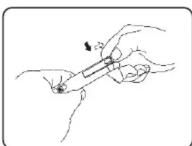
(2). Please take out the upper cover of detector according to the direction as shown in the picture, replace the battery. (See the following picture)
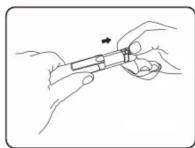
Cleaning
Periodically wipe the case with a dry cloth do not use abrasives or solvents.
*END*
This operating manual is subject to change without notice.
UNI-T®
UNI-TREND TECHNOLOGY (CHINA) CO., LTD.
No6, Gong Ye Bei 1st Road,
Songshan Lake National High-Tech Industrial
Development Zone, Dongguan City, Guangdong Province, China
Guangdong Province, Ch Tel: (86-769) 8572 3888
http://www.uni-trend.com




Brand : Uni-T
Model : UT12C
Category : Mètre