
UT12B - Mètre Uni-T - Free user manual and instructions
Find the device manual for free UT12B Uni-T in PDF.


| Product Type | Non-Contact AC Voltage Detector |
| Brand | Uni-T |
| Model | UT12B |
| Voltage Range | 90 VAC to 1000 VAC |
| Detection Method | Non-contact proximity |
| Indicators | Red LED and audible beep |
| Safety Rating | CAT IV 1000V |
| Pollution Degree | 2 |
| Operating Temperature | -10 °C to 50 °C |
| Storage Temperature | 10 °C to 50 °C |
| Humidity | 5% (operating) |
| Altitude | 2000 m maximum |
| Battery Type | 2 x 1.5V AAA alkaline |
| Auto Power Off | After approx. 3 minutes of inactivity |
| Beeper Mute Function | Yes, toggle via power button |
| Standards Compliance | EN61010-1, UL61010-1, CASC 22.1 No. 61010-1, CE |
| Protection Level | Double insulation (Class II) |
| Material | Plastic housing |
| Cleaning | Wipe with damp cloth and mild detergent; no abrasives |
Frequently Asked Questions - UT12B Uni-T
User questions about UT12B Uni-T
0 question about this device. Answer the ones you know or ask your own.
Ask a new question about this device
Download the instructions for your Mètre in PDF format for free! Find your manual UT12B - Uni-T and take your electronic device back in hand. On this page are published all the documents necessary for the use of your device. UT12B by Uni-T.
USER MANUAL UT12B Uni-T
natural_image
Close-up of a hand using a tool to adjust or install electrical components on an electrical panel (no visible text or symbols)Overview
This Operating Manual covers information on safety and cautions. Read and understand all of the instructions and safety information in this manual before operating or servicing this tool. Failure to understand how to safely operate this tool could result in an accident causing serious injury or death.
UT12B is intended to check for the presence of AC voltage, signaling the user with a beep and a flashing LED.
Safety Information
This unit complies with the standards EN61010-1, UL61010-1 and CASC 22.1 No. 61010-1 safety measurement requirement: in pollution degree 2, overvoltage category (CAT. IV 1000V)
CAT.IV: Primary supply level, overhead lines, cable systems etc. Some examples include cables,
meters, transformers, and other exterior equipment owned by the power utility.
Use the unit only as specified in this operating manual, otherwise the protection provided by the unit may be impaired.
- Do not use the unit if it is wet, damaged or cannot operate correctly.
- Do not apply more than the rated voltage between the probe tip and earth ground.
- When the unit working at voltage over 30V in AC, special care should be taken for there is danger of electric shock.
- Follow the local countries safety requirements and standards.
Warning
● This unit is only designed for the specialist who has certain technical knowledge to use
- This unit is intended to check for the presence of AC voltage, the voltage range is 90\~1000V. Make sure the tested inductor possible voltage range before carrying out checking.
- When you cannot sure the tested inductor voltage range, the unit does not have any response. It does not mean the tested inductor does not have dangerous voltage, do not use any part of the body to touch the tested inductor.
- When carrying out checking, keep your fingers behind the probe tip finger guards.
International Electrical Symbols
Symbols used on the Meter and in this manual are explained below:
| Double Insulated | |
| Warning. Refer to the Operating Manual | |
| Danger of electric shock | |
| CE | Conforms to Standards of European Union |
Specifications
● Indicators: LED and Beep
● Voltage range: 90VAC \~ 1000VAC
● Measurement Category IV 1000V per IEC61010
- Temperature:
Operating: -10\~50°C
Storage: 10\~50°C
● Humidity: 95%
- Altitude: 2000m
- Pollution Degree 2
● Battery: 2 x 1.5V AAA
1) Turn the unit on by pressing the power button once, the unit beeps and LED flashes two times. When the unit is under standby mode, the LED keeps flashing two times in every 1.5 seconds.
2) Place the probe tip on or near the circuit or unit to be tested. Beep and flashing LED indicate the presence of voltage (90VAC to 1000VAC).
3) To turn off the beeper, you could press the power button once after turning on the unit, then you will hear a beep sound indicating the beeper is off. After the beeper is off, only LED will flash during checking. This way could save battery.
Press power button to toggle between beeper mode and silent mode. Beep two times enters beeper mode, while beep one time enters silent mode.
4) In order to save battery, the unit will auto power off when it is not used for around 3 minutes.
The beeper sounds 2 times continuously and then one long beep means the unit is power off.
5) Press and hold the power button for two seconds to turn the unit off, there will be one second long beep.
Operation
Battery Indication
The LED will not flash when you turn the unit on or during checking if the battery is less than 2V. The beep sounds will still have but may be weaker.
Maintenance
Battery Replacement
1) Disconnect the unit from the circuit.
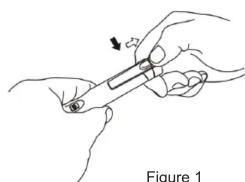
2) One hand holds the unit. Place another hand's thumb on the probe cap as the figure below
natural_image
Illustration of a hand holding a pen or tool, with an arrow indicating motion (no text or symbols)Figure 1
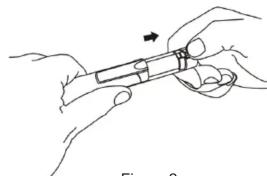
3) Pull back the back housing as the figure below
natural_image
Illustration of two hands holding a tool with an arrow indicating direction (no text or symbols)Figure 2
4) Replace the batteries (observe polarity). 2 x1.5V AAA
5) Push back the back housing.
Cleaning
Periodically wipe the case with a damp cloth and mild detergent; do not use abrasives or solvents.
\*END\*
This operating manual is subject to change without notice.
UNI-T®
UNI-TREND TECHNOLOGY (CHINA) CO., LTD.
No6, Gong Ye Bei 1st Road,
Songshan Lake National High-Tech Industrial
Development Zone, Dongguan City, Guangdong Province, China
Guangdong Province, Ch
Tel: (86-769) 8572 3888
http://www.uni-trend.com




Brand : Uni-T
Model : UT12B
Category : Mètre