
XME PRO - FM Transmitter Xblitz - Free user manual and instructions
Find the device manual for free XME PRO Xblitz in PDF.


| Product Type | FM Transmitter |
| Brand | Xblitz |
| Model | XME PRO |
| Dimensions (approx.) | 10 x 5 x 2 cm |
| Weight | 50 g |
| Power Source | 12V car cigarette lighter (DC) |
| Output Frequency | 87.5 - 108.0 MHz |
| Audio Input | USB, microSD card, AUX (3.5mm) |
| Supported Audio Formats | MP3, WMA, WAV |
| Hands-free Calling | Built-in microphone and speaker |
| Display | LED digital display (frequency/status) |
| Control | Buttons on device, remote control included |
| USB Charging | USB output for charging devices (5V/1A) |
| Maintenance | Clean with a soft dry cloth; avoid liquids |
| Safety | Do not expose to moisture or extreme temperatures; use in well-ventilated area |
| Compatibility | Universal for most car cigarette lighters (12V) |
| Package Contents | FM transmitter, remote control, user manual |
Frequently Asked Questions - XME PRO Xblitz
User questions about XME PRO Xblitz
0 question about this device. Answer the ones you know or ask your own.
Ask a new question about this device
Download the instructions for your FM Transmitter in PDF format for free! Find your manual XME PRO - Xblitz and take your electronic device back in hand. On this page are published all the documents necessary for the use of your device. XME PRO by Xblitz.
USER MANUAL XME PRO Xblitz
natural_image
Black X-ray flash drive with visible ports and branding (no readable text beyond branding)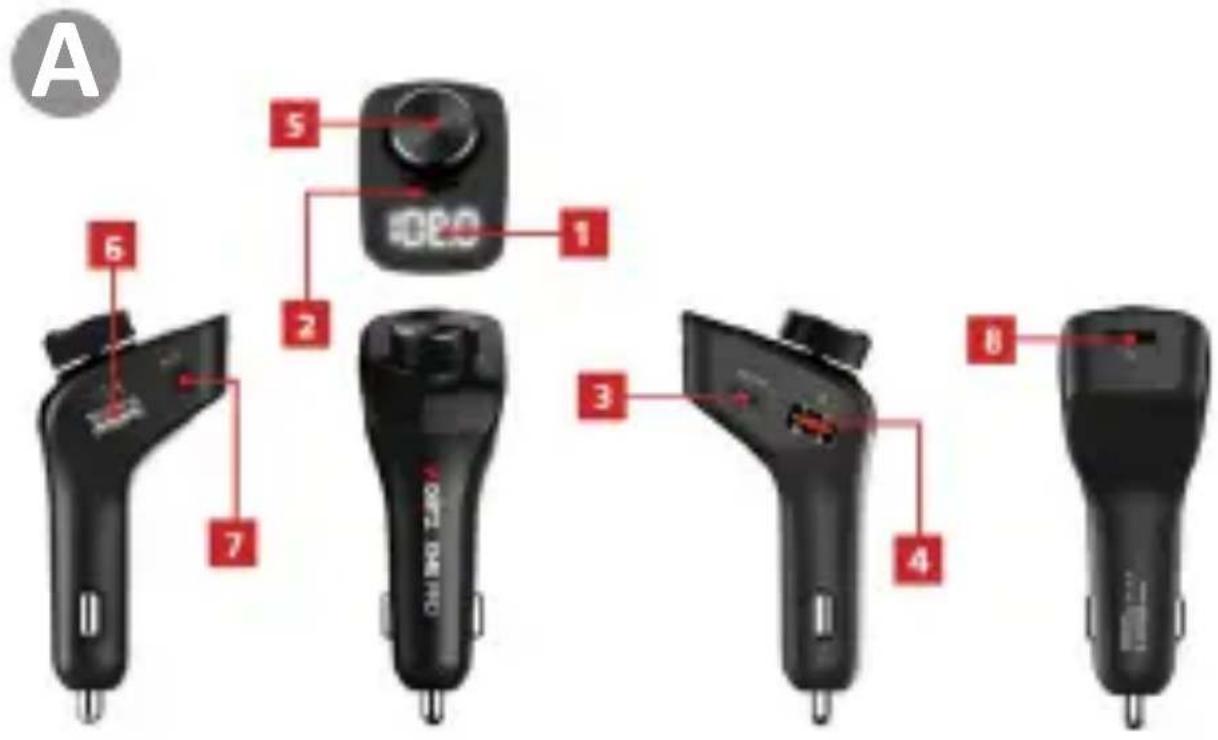
INSTRUKCJA OBSŁUGI
Thank you for purchasing the Xblitz XME PRO hands-free FM transmitter. The device will enable you to play and transmit music (from SD memory cards, memory sticks, smartphones) to the car audio system via the car radio signal. The device is dedicated to cars, equipped with a professional Bluetooth
module and MP3 decoder.
The product connects to a smartphone via Bluetooth. It can also be used as a car kit for hands-free calls.
Please read the enclosed instructions and safety precautions before use.
01. PRODUCT DESCRIPTION
SEE FIG. A
- LED
- Microphone
- USB-C slot (charging) PD27W
- USB-A slot (charging) QC 3.0
- Knob - button
- USB slot for music playback
- AUX input
- SD card input
02. FM SETTINGS
- The device switches on automatically when connected to the cigarette lighter socket.
- Switch on the car speakers, enter FM radio mode and manually adjust the frequency to an empty space where there is no signal.
- Long press the transmitter knob and the LED screen will flash, then turn the knob clockwise/anticlockwise to adjust the transmit frequency. Make sure the transmit frequency of the device matches the audio reception frequency of the car.
03. BLUETOOTH CONNECTION
- The device enters Bluetooth pairing mode automatically when switched on.
-
Turn on the Bluetooth connection on your phone, look for the name „Xblitz XME PRO” from the list, and click on it to connect.
-
Once the device has successfully connected to the phone via Bluetooth, the Xblitz XME PRO will transmit audio via FM radio waves. When the device is started a second time, the phone connected to the device will automatically connect, without the need to re-establish the connection on the phone.
04. DEVICE FUNCTIONS
- Music playback/wireless calling
While playing music on your phone, you can listen to it on your car speakers. Insert a USB stick into the appropriate input, the device will automatically identify the music files and start playing the songs from the USB stick.
- SD memory card
Insert the SD card into the appropriate input, the device will automatically identify the music files and start playing the songs.
- AUX
You can also connect the XME PRO to your car audio system via an AUX cable (provided your car audio system has this capability).
- Hands-free car kit
In any playback state: Bluetooth, USB, or SD card, the device recognizes the priority of an incoming call. A short press of the dial will answer the call. While the call is in progress, a short press of the dial will end the call. When the call ends, the last music played will resume.
- Dialing the last number
Press the dial twice to call the last number dialed.
- Adjusting the volume
Turn the knob to the left and hold to decrease the volume. Turn the knob to the right and hold to increase the volume.
- Moving between tracks
In music playback mode, turn the knob counterclockwise
to go to the previous track. Turn the knob clockwise to go to the next track.
- Moving between playback modes
Press the knob for 3 seconds to switch to FM broadcast mode, then press it for 3 seconds to switch between Bluetooth, SD and USB mode.
- The USB-C port is a PD (Power Delivery) port, for the charging function to work properly the cable must be compatible with this technology.
05. TECHNICAL SPECIFICATIONS
Dimensions: 95x45x36 mm | Bluetooth version: 5.0 (range 10m) | Weight: 45g | Frequency: 87.5-108.0 MHz | Charging: PD ports 27W, QC 3.0, 5V 1A | Ports: 2xUSB-A, 1x USB-C, micro SD memory card slot (max 64GB), AUX, | Supported formats: MP3 APE FLAC WAV WMA | Power supply: 12-24V | FM transmission: 87.5 -108 MHz | Maximum radio frequency power emitted in the frequency range: 3.35 dBm | Frequency range: 2.402-2.480GHz
06. FAQ
-
Why doesn't the device turn on/steam automatically? Some lighter models have a fixed electrical design. The device cannot detect a change in voltage, so it cannot be switched on. If this happens, simply remove the Xblitz XME PRO and reinsert it into the cigarette lighter.
-
Why is the music/sound from the phone poorly audible?
Turn up the Bluetooth volume on your phone or increase the volume of your car radio when playing music/calls.
- Why can't the device be switched on or it make a loud noise after being used for a while?
Check if the contact point of the device and the lighter are dirty, which can cause a weak signal. Remove the
dirt and use the Xblitz XME PRO.
- Why does the volume of the device decrease by itself after using it for a long while?
Check the microphone input next to the front button.
Clean it and use the product again.
CAUTION: Do not connect the device directly to
220/230V power supply. Failure to do so will result in damage to the device and other dangerous situations.
07. TIPS
The principle of this device is wireless transmission. When driving, the different power of external radio signals in different regions will cause interference with the device. Therefore, you will sometimes hear a slight noise at low volume or in a muted state. This is a normal occurrence. We recommend setting the volume of this product or mobile phone below 90% for better sound quality. If you need a higher volume, adjust it using the vehicle's volume control. If you are not playing music, lower the volume by adjusting the volume in the car to avoid noise.
08. WARRANTY/COMPLAINT CARD
The product is covered by a 24-month warranty. Warranty conditions can be found at: https://xblitz.pl/gwarancja/Complaints should be reported using the claim form found at: http://reklamacje.kgktrade.pl/
Details, contact and service address can be found at: www.xblitz.pl.
Technical specifications and kit contents are subject to change without notice, we apologise for any inconvenience.
KGK Trade declares that the Xblitz XME PRO device complies with the essential requirements of Directive 2014/53/EU. The text of the declaration can be found at the link: https://xblitz.pl/download/DOC/deklaracja-CE-Xblitz-XMEPRO.pdf
BEDIENUNGSANLEITUNG
01. PRODUKTA APRAKSTS SKATIT A FIG.
- LED
- Mikrofons
- USB-C slots (uzlāde) PD27W
- USB-A slots (uzlāde) QC 3.0
- Pogas - poga
- USB slots mūzikas atskaņošanai
- AUX ieeja
- SD kartes ievade
02. FM IESTATĪJUMI
The crossed out trash can symbol indicates that unusable electrical or electronic devices, its accessories (such as power supplies, cords) or components (for example batteries, if included) cannot be disposed of alongside with household waste. In order to dispose of the devices or its components (for example, batteries) deliver the device to the collection point, where it will be accepted free of Disposal is subject to the recast version of the WEEE Directive 19/ EU] and the Directive on batteries and accumulators [2006/86 / oper disposal of the device prevents degradation of the natural ment. Information about the collection points of the facilities is by the competent local authorities. Incorrect disposal of waste is to penalties provided for by the law in force in the given area.
DE
Brand : Xblitz
Model : XME PRO
Category : FM Transmitter