
EW1213 - Dental floss PANASONIC - Free user manual and instructions
Find the device manual for free EW1213 PANASONIC in PDF.
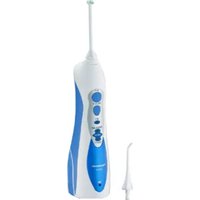


| Product Type | Water Flosser |
| Brand | Panasonic |
| Model | EW1213 |
| Dimensions (with tip) | Approximately 2.5 x 1.5 x 10 inches |
| Weight | Approximately 8 oz (227 g) |
| Power Source | Rechargeable Ni-MH battery (1.2 V) |
| Charging Time | 8 hours |
| Water Tank Capacity | 150 ml |
| Water Pressure Settings | 3 levels (Soft, Normal, Strong) |
| Waterproof Rating | IPX7 (waterproof up to 1 meter for 30 minutes) |
| Usage Time (full charge) | Approximately 15 minutes |
| Motor Type | Pulsation motor |
| Pulse Rate | Approximately 1,400 pulses per minute |
| Water Jet Mode | Continuous stream |
| Included Tips | 2 standard tips |
| Additional Tips Compatible | Orthodontic tip (sold separately) |
| Tip Replacement Interval | Every 6 months |
| Cleaning Method | Remove water tank and rinse under running water |
| Storage | Store in a dry place; avoid direct sunlight |
| Battery Type | Built-in rechargeable Ni-MH |
| Charging Indicator | LED light on handle |
| Safety Features | Auto shut-off after 2 minutes, overcharge protection |
| Warranty | 1 year limited |
Frequently Asked Questions - EW1213 PANASONIC
User questions about EW1213 PANASONIC
0 question about this device. Answer the ones you know or ask your own.
Ask a new question about this device
Download the instructions for your Dental floss in PDF format for free! Find your manual EW1213 - PANASONIC and take your electronic device back in hand. On this page are published all the documents necessary for the use of your device. EW1213 by PANASONIC.
USER MANUAL EW1213 PANASONIC
Operating Instructions (Household use) Oral Irrigator Model No. EW1213
English....3
Español.... 19


2


Panasonic®
Operating Instructions
(Household use) Oral Irrigator
Model No. EW1213
Contents
Safety precautions...... 5
Important information......8
Parts identification....9
Charging....9
How to use ....10
Tips on usage ......12
After use....12
Cleaning 13
Frequently asked questions......14
Troubleshooting 14
Battery life....15
Removing the built-in rechargeable
battery....15
Specifications 16
Changing the nozzle
(Sold separately)....16
Thank you for purchasing this Panasonic product.
Before operating this unit, please read these instructions completely and save them for future use.
IMPORTANT SAFEGUARDS
When using electrical products, especially when children are present, basic safety precautions should always be followed, including the following: READ ALL INSTRUCTIONS BEFORE USING.
DANGER
To reduce the risk of electrocution:
- Always unplug this product immediately after using.
- Do not use while bathing.
- Do not place or store product where it can fall or be pulled into a tub or sink.
- Do not place in or drop into water or other liquid.
- Do not reach for a product that has fallen into water. Unplug immediately.
WARNING
To reduce the risk of burns, electrocution, fire or injury to persons:
- Close supervision is necessary when this product is used by, on, or near children or invalids.
- Use this product only for its intended use as described in this manual. Do not use attachments not recommended by the manufacturer.
- Never operate this product if it has a damaged cord or plug, if it is not working properly, if it has been dropped or damaged, or dropped into water. Return the product to a service center for examination and repair.
- Keep the cord away from heated surfaces.
- Never block the air openings of the product or place it on a soft surface, such as a bed or couch, where the air openings may be blocked. Keep the air openings free of lint, hair, and the like.
- Never use while sleeping or drowsy.
- Never drop or insert any object into any opening or hose.
- Do not use outdoors or operate where aerosol (spray) products are being used or where oxygen is being administered.
- Fill water tank with water only unless otherwise specified by manufacturer.
SAVE THESE INSTRUCTIONS

Safety precautions
To reduce the risk of injury, loss of life, electric shock, fire, and damage to property, always observe the following safety precautions.
Explanation of symbols
The following symbols are used to classify and describe the level of hazard, injury, and property damage caused when the denotation is disregarded and improper use is performed.

DANGER
Denotes a potential hazard that will result in serious injury or death.

WARNING
Denotes a potential hazard that could result in serious injury or death.

CAUTION
Denotes a hazard that could result in minor injury or property damage.
The following symbols are used to classify and describe the type of instructions to be observed.

This symbol is used to alert users to a specific operating procedure that must not be performed.

This symbol is used to alert users to a specific operating procedure that must be followed in order to operate the unit safely.


WARNING
▶ Preventing accidents
Do not store within the reach of children or infants. Do not let them use it.
- Doing so may cause an accident or injury due to accidental ingestion of removable parts.
▶ Power supply

Do not connect or disconnect the power plug to a household outlet with a wet hand.
- Doing so may cause electric shock or injury.
Do not immerse the charger in water or wash it with water.
Do not place the charger over or near water filled sink or bathtub.
Do not use when the cord or the power plug is damaged or when the fitting into the household outlet is loose.
Do not damage the cord or the power plug.
- Do not deface, modify, forcefully bend or pull the cord or the power plug. Also, do not place anything heavy on, twist or pinch the cord.
- Doing so may cause electric shock or fire due to a short circuit.

Do not use anything other than the supplied charger for any purpose. Also, do not use any other product with the supplied charger. (See page 9.)
- Doing so may cause burn or fire due to a short circuit.

WARNING
Do not use in a way exceeding the rating of the household outlet or the wiring.
- Exceeding the rating by connecting too many power plugs to one household outlet may cause fire due to overheating.
Always ensure the appliance is operated on

an electric power source matched to the rated voltage indicated on the charger.
Fully insert the power plug.
- Failure to do so may cause fire or electric shock.
▶ In case of an abnormality or malfunction Immediately stop using and remove the power plug if there is an abnormality or malfunction.
- Failure to do so may cause fire, electric shock, or injury.
•The main unit or charger is deformed or abnormally hot.
•The main unit or charger smells of burning.
- There is abnormal sound during use or charging of the main unit or charger.
- Immediately request inspection or repair at an authorized service center.
▶This product
This product has a built-in rechargeable battery. Do not throw into flame or heat.
- Doing so may cause fluid leak, overheating, or explosion.
Do not modify or repair.
- Doing so may cause fire, electric shock, or injury. Contact an authorized service center for repair (replacement of battery etc).
Never disassemble except when disposing of the product.
- Doing so may cause fire, electric shock, or injury.
▶ Cleaning
Always unplug the power plug from a household outlet when cleaning the charger.
-Failure to do so may cause electric shock or injury.
Regularly clean the power plug to prevent dust from accumulating (once every half a year).
- Failure to do so may cause fire due to insulation failure caused by humidity.
Disconnect the power plug and wipe with a dry cloth.
▶ Note the following precautions
This appliance is not intended for use by persons (including children) with reduced physical, sensory or mental capabilities, or lack of experience and knowledge, unless
they have been given supervision or instruction concerning use of the appliance by a person responsible for their safety. Children should be supervised to ensure that they do not play with the appliance.
- Failure to do so may cause an accident or injury.
The supply cord cannot be replaced. If the cord is damaged, the charger should be scrapped.
- Failure to do so may cause an accident or injury.


CAUTION
▶ Preventing damage to teeth and gums
Do not allow those that cannot operate the appliance to use this appliance.

People with weak oral senses should not use this appliance.
- Doing so may cause injury or damage to teeth and gums.
People who may have periodontal disease, have teeth being treated, or concerned about symptoms within their mouth should consult a dentist before use.
- Failure to do so may cause injury or damage to teeth and gums.
▶ This product
Never use for a purpose other than oral cleaning.

- Doing so may cause an accident or injury when the stream of water is pointed toward the eyes, nose, ears, or throat.

Do not fill the tank with water warmer than 40 °C (104 °F).
- Doing so may cause burns.

Do not share nozzle with your family or other people.
- Doing so may cause infection or inflammation.

Do not place a metallic object such as a coin or a clip on top of the charger.
- Doing so may cause burns due to excessive heat.
▶ Note the following precautions
Do not allow metal objects or trash to adhere to the power plug.
- Doing so may cause electric shock or fire due to a short circuit.

Do not drop or subject to shock.
- Doing so may cause injury.

Do not wrap the cord around the charger when storing.
- Doing so may cause the wire in the cord to break with the load, and may cause fire due to a short circuit.

Disconnect the power plug from the household outlet when not using for extended period of time.
- Failure to do so may cause electric shock or fire due to electrical leakage resulting from insulation deterioration.

Disconnect the power plug by holding onto it instead of the cord.
- Failure to do so may cause electric shock or fire due to a short circuit.

After use, always care for and clean the appliance. (See page 13.)
- Failure to do so may cause damage to your health due to propagation of mold and bacteria.

Handling of the removed battery when disposing

DANGER
•The rechargeable battery is exclusively for use with this appliance. Do not use the battery with other products.
- Do not charge the battery after it has been removed from the product.
- Do not throw into fire or apply heat.
- Do not solder, disassemble, or modify the battery.
- Do not let the positive and negative terminals of the battery get in contact with each other through metallic objects.
- Do not carry or store the battery together with metallic jewellery such as necklaces and hairpins.
- Never peel off the tube.
- Doing so may cause fluid leak, overheating, or explosion.
The battery contains alkaline fluid. If it comes in contact with the eyes, do not rub the eyes, and thoroughly rinse with clean water, such as tap water.
- Failure to do so may cause loss of vision. Consult a physician immediately.

The battery contains alkaline fluid. If it comes in contact with the eyes, do not rub the eyes, and thoroughly rinse with clean water, such as tap water.

- Failure to do so may cause loss of vision. Consult a physician immediately.


WARNING

After removing the rechargeable battery, do not keep it within reach of children and infants.
- The battery will harm the body if accidentally swallowed.
If this happens, consult a physician immediately.

The battery contains alkaline fluid. If it comes in contact with the skin or clothes, rinse off with clean water, such as tap water.
- Failure to do so may cause skin injury.
Important information
- Do not put salt, mouthwash or other chemicals into the water tank. Doing so may cause malfunction.
- Do not dry the main unit with a dryer or a fan heater. Doing so may cause malfunction or deformation of the parts.
- Do not wipe with thinners, benzine, alcohol etc. Doing so may cause malfunction, cracking or discoloration of the parts.
- Store the appliance in a place with low humidity after use. Leaving the appliance in a bathroom may cause malfunction.
- Charge the appliance correctly according to these Operating Instructions. (See page 9 "Charging".)
- This appliance contains a battery that is only replaceable by skilled persons. Please contact an authorized service center for repair details.

Parts identification
A
A Main unit
① Nozzle release button ② Power switch [0/1] ③ Mode switch ④ Mode indicator ⑤ Charging indicator ⑥ Ventilation hole ⑦ Suction hose ⑧ Filter ⑨ Water tank ⑩ Water tank cap
B Charger (RE8-53)
⑪ Charging section ⑫ Cord ⑬ Power plug


⑭ Nozzle stands ⑮ Screw holes for wall mounting The charger can be mounted on a wall using two wood screws
C Nozzle (for general use)
⑯ Nozzle ⑰ Nozzle handle ⑱ Identification ring
D Orthodontic nozzle
Accessories E2 screws
Note
There may be moisture inside the main unit (water tank and suction hose) left from the distilled water used for product testing.
Charging
▶ On the bathroom countertop or a shelf
- Place the cord in the right, left, or center cord guide, depending on where the charger will be placed.
- Place the charger on a secure, level surface.
- Plug in the power plug.

1 Insert main unit so it stands upright in the charging section.
The charging indicator will light up.
- Be sure to place the main unit upright. If the main unit is tilted or not in direct contact with the charger, the main unit may not charge properly.
- Charging is completed in about 15 hours.
- The lamp does not go off even when charging ends.
- The main unit will provide an operation time of approximately 15 minutes of use when the battery is fully charged. (The operating duration will become shorter as the batteries get older.)
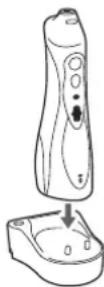

2 Disconnect the power plug after charging is completed.
(for safety and to reduce energy usage)
- The battery performance will not be affected even if it is charged for more than 15 hours.
Notes
- When using the appliance for the first time or if it has not been used for more than half a year, the charging indicator may not light up for several minutes after charging starts or the operating time may become shorter. In such cases, charge the battery for 23 hours or more.
- Recommended ambient temperature for charging is 0°C - 35°C (32°F - 95°F). Battery performance may decrease outside of the recommended temperature.
How to use
1. Attach the nozzle firmly onto the main unit.

2. Open the water tank cap, hold the main unit so it is level, and fill the tank with water.
• Always use new tap water or lukewarm water. - If the water feels cold, use lukewarm water with a temperature of 40°C (104°F) or less.
3. Close the water tank cap, making sure it locks in place.

4. Press the mode switch and select the desired water jet mode.
- The mode indicator will glow the previously selected mode. If the appliance is not used for more than 30 days, or after the appliance has been fully charged from its fully discharged state, the mode is initialized to AIR IN (SOFT). (When the battery is drained, the mode will be reset but this is not a fault.)
- If you want to use a different mode, press the mode switch until it changes to the desired setting. Pressing the mode switch will change the mode from AIR IN (SOFT) to AIR IN (REGULAR) to JET.

| Mode Description | |
 | JET modeThis mode is for removing food particles trapped between the teeth. |
| [SKK] | AIR IN (REGULAR) modeThis mode is for periodontal pocket cleaning and gum care. |
 | AIR IN (SOFT) modeThis mode is for gently massaging the gums. |
Notes
- When you use the appliance for the first time, press the power switch to turn the appliance on and test each of the water jet modes with the tank filled with water. • The appliance may not operate in an ambient temperature approximately 5°C (41°F) or lower.
- Do not hold the tip of the nozzle firmly against the teeth or gums. (Except orthodontic nozzle)
- Since plaque adhering to the surface of teeth cannot be removed only with water flow, brushing is always necessary. It is recommended to clean inside your mouth with water flow after brushing your teeth.
- Do not operate the main unit when empty other than when pouring out any remaining water after use. Operating the main unit without water may result in a malfunction.
5 Place the nozzle in your mouth and close your mouth gently before pressing the power switch.
• To use, place your face over a sink, and with the main unit upright and the nozzle at the top, raise your elbow.

- Pressing the mode switch during use will change the mode.
- A fully filled water tank provides approximately 35 seconds of use. (When using the nozzle (for general use))
- If the nozzle is inclined too much, water will come out of the ventilation hole instead of the nozzle. (The ventilation hole in the rear of the main unit allows for easier water suction of the hose.)
Turn the nozzle handle to adjust the direction of the water flow.

6 After use, press the power switch to turn off the main unit.
- Stop operation with the nozzle still in the mouth to prevent water from splashing.
Tips on usage
Nozzle (for general use)
When cleaning with water flow
▶ Cleaning the space between the teeth
In the JET mode
- Direct the water flow onto the triangle zone between the teeth.
- Direct from the front and rear sides of the teeth.

▶ Periodontal pocket cleaning
In the AIR IN (REGULAR) mode
- Aim the water flow at the space between the teeth and gum.
- Slowly shift the water flow along the gum.
- Clean the front and back of the teeth and behind the molars as well.
- Clean the areas of concern in the gum in the AIR IN (SOFT) mode. * Do not clean the periodontal pocket in JET mode, since the strength of water flow is too strong.
▶ Gum care
In the AIR IN (REGULAR) mode
• Stimulate the gum. • Gently stimulate the areas of concern in the gum in the AIR IN (SOFT) mode.
Orthodontic nozzle
When cleaning crooked teeth and orthodontic bracket area with the brush and water flow
Lightly place the brush tip on the teeth and wiggle the brush.
▶ For crooked teeth
- Place the brush tip on the area that is difficult for a toothbrush to reach and tends to remain unpolished.
- Wiggle the brush mainly in interdental spaces.

▶ For orthodontic bracket area
- Insert the brush into the gap between the teeth and the orthodontic bracket.
- Wiggle the brush tip.

After use
- Open the water tank cap and discard the water.
- Be sure to discard the water in the water tank every time.
- Turn on the power switch and drain out the water.
- Operate until no more water appears and then turn off the power switch.

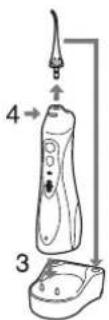
- Stand the main unit in the charger.
- While pressing the nozzle release button, remove the nozzle from the main unit and place it on the nozzle stand.
Cleaning
- Pull out the water tank downwards.

- Clean with water.
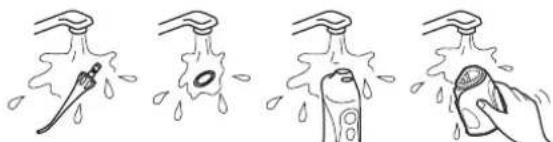
- Remove the identification ring and clean with water.
- Do not wash with hot water exceeding 50°C (122°F).
- If using a detergent, use one that is suitable for dishwashing. Rinse well with water to ensure no detergent remains after cleaning.
- Wipe away moisture with a towel and leave to dry in a well-ventilated area.
Scrub the filter at the tip of the suction hose lightly with a soft brush.

- Wipe away the water with a towel etc. and dry.
- Align and slide the water tank along the groove and install it securely.

Use a cloth to wipe away the stains on the charger.
- Never use thinners, benzine, or alcohol since it may cause malfunction or cracking/discoloration of the parts.
- Do not clean the charger with water.
- About once every six months wipe the prongs of the power plug with a dry cloth.

Frequently asked questions
Question Answer
Will the battery life be reduced if not used for a long period?
Can the battery be charged before every use?
When the appliance is not used for 6 months or more, the battery will weaken (leak battery fluid, etc.). Fully charge the battery once every 6 months.
Yes, but it is recommended that you charge the battery when it is empty. The life of the battery will vary depending upon usage and storage conditions.
Troubleshooting
Problem Possible cause Action
The appliance does not operate.
You have just purchased the product or it has not been used for more than 6 months.
▶ Charge the unit for at least 23 hours. (See page 10.)
The appliance can be used only for several minutes, even if it is charged.
▶ The charging time is short.
The main unit is not standing upright on the charger. (See page 9.)
▶ Stand the main unit upright so that its base contacts the charging section of the charger.
▶ Battery life is over (approx. 3 years).
The battery has reached the end of its life. (See page 15.)
Water pressure is low.
The nozzle is clogged.
The mouth of the nozzle is squashed.
Replace the nozzle.
The filter is clogged. Clean the filter. (See page
13.)
Water does not come out.
The main unit is tilted too much while in use.
Use with the main unit in a vertical state. (See page 11.)
If the problems still cannot be solved, contact the store where you purchased the unit or a service center authorized by Panasonic for repair.
Battery life
The battery life is about 3 years when charged about once a week (when used by one person). If the operating time is significantly shorter even after a full charge, the battery has reached the end of its life. (The operating life of the battery may differ depending on usage or storage conditions.) Have the battery replaced by an authorized service center.
Removing the built-in rechargeable battery
ATTENTION:
A nickel metal hydride battery that is recyclable powers the product you have purchased. Please call 1-800-8-BATTERY for information on how to recycle this battery.

Remove the built-in rechargeable battery before disposing of the appliance.
The battery is to be disposed of safely. Please make sure that the battery is disposed of at an officially designated location if there is one.
This figure must only be used when disposing the appliance, and must not be used to repair it. If you dismantle the appliance yourself, it will no longer be waterproof, which may cause it to malfunction.
- Remove the appliance from the charger when removing the battery.
- Press the power switch to turn on the power and then keep the power on until the battery is completely discharged.
- Perform steps ① to ⑥ and lift the battery, and then remove it.
- Take care not to short circuit the positive and negative terminals of the removed battery, and insulate the terminals by applying tape to them.
![graph TD A["Step ①: Disassembly with housing component"] --> B["Step ②: Disassembly with housing component"] B --> C["Step ③: Disassembly with housing component"] C --> D["Step ④: Disassembly with housing component"] D --> E["Step ⑤: Disassembly with housing component"] E --> F["Step ⑥: Disassembly…](/content/2026/05/852576/images/4d2a6f327b9e6b418a8de9467ca11b1a178b7786bb4ad8696b989bd0e6e44e01.jpg)
Specifications English
| Power source | See the name plate on the product (Automatic voltage conversion) |
| Charging time | Approx. 15 hours |
| Power consumption | Approx. 1 W |
| Operating time | Approx. 15 minutes* (at 20 °C (68 °F) when fully charged) |
| Tank volume | Approx. 130 mL (Nozzle (for general use): approx. 35 seconds*) (Orthodontic nozzle: approx. 30 seconds*) |
| Dimensions | Main unit: 197 (H) x 59 (W) x 75 (D) mm (7.75 (H) x 2.32 (W) x 2.95 (D) in) (Not including nozzle) Charger: 40 (H) x 93 (W) x 98 (D) mm (1.57 (H) x 3.66 (W) x 3.85 (D) in) |
| Mass | Main unit: Approx. 305 g (Including nozzle) Charger: Approx. 180 g |
* When using AIR IN (REGULAR) mode This product is intended for household use only.
Changing the nozzle (Sold separately)
- Optional nozzles with identification ring to allow several persons to share the main unit.
▶ Nozzle (for general use)
- If the tip of nozzle (for general use) gets deformed, please replace with a new nozzle.
- The nozzle is a consumable. The nozzle (for general use) should be replaced with a new one every 6 months or so due to hygiene reasons, even if its shape is unchanged.

New nozzle (tip)
Deformed (worn) nozzle (tip)
Orthodontic nozzle
Replace the orthodontic nozzle approximately every 3 months. If the brush bristles are bent out, replace it even within 3 months.
New nozzle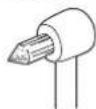
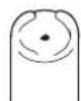
Nozzle with bent out bristles
| Part number | Replacement Nozzle for EW1213 | |
| EW0950 Nozzle (for general use) | ||
| WEW0984 Orthodontic nozzle | ||
Federal Communication Commission Interference Statement
This equipment has been tested and found to comply with the limits for a Class B digital device, pursuant to Part 15 of the FCC Rules and the limits for ISM equipment, pursuant to Part 18 of the FCC Rules. These limits are designed to provide reasonable protection against harmful interference in a residential installation. This equipment generates, uses and can radiate radio frequency energy and, if not installed and used in accordance with the instructions, may cause harmful interference to radio communications. However, there is no guarantee that interference will not occur in a particular installation. If this equipment does cause harmful interference to radio or television reception, which can be determined by turning the equipment off and on, the user is encouraged to try to correct the interference by one of the following measures:
- Reorient or relocate the receiving antenna.
- Increase the separation between the equipment and receiver.
- Connect the equipment into an outlet on a circuit different from that to which the receiver is connected.
- Consult the dealer or an experienced radio/TV technician for help.
FCC Caution: To assure continued compliance, install and use in accordance with provided instructions. Any changes or modifications not expressly approved by the party responsible for compliance could void the user's authority to operate this equipment.
This device complies with Part 15 and Part 18 of the FCC Rules. Operation is subject to the following two conditions: (1) This device may not cause harmful interference, and (2) this device must accept any interference received, including interference that may cause undesired operation.
Personal Care & Beauty Care Products
FOR USA ONLY
30-Day Quality Satisfaction Guarantee
If you are dissatisfied with any Panasonic Personal Care & Beauty Care Products for any reason, simply return it to the place of purchase with a dated proof of purchase, in the original packaging, with all accessories, parts and instructions, within 30 days of the date of purchase, for a full refund, or call Panasonic at 1-800-338-0552. Abuse or misapplication of this product voids the guarantee.
PRODUCT REGISTRATION
(U.S. customers only)
Go to www.panasonic.com/register and register your product now to receive these benefits:
Safety Notification
We contact our customers in case of recall
Owner Verification
Proof of purchase in case of product theft or loss
Efficient Warranty Service
In case there is a problem with your product
Special Offers and Promotions from Panasonic
FOR YOUR CONVENIENCE, WE HAVE ESTABLISHED A TOLL-FREE (IN USA ONLY) NATIONAL ACCESSORY PURCHASE HOT LINE AT 1-800-332-5368.
Panasonic®

Cleaning
Panasonic Corporation of North America Two Riverfront Plaza, Newark, NJ 07102-5490
Service • Assistance • Accessories
Call 1-800-338-0552 (In USA)
http://shop.panasonic.com/personal-care
http://shop.panasonic.com/support
http://www.panasonic.com
Panasonic Manufacturing (Thailand) Co., Ltd.
Navanakorn Industrial Estate, Zone 3, No.106 Moo 18,
Khlong 1, Khlong Luang, Pathum thani 12120, Thailand
© Panasonic Corporation 2020
⑤ EN, ES
EW1213_US.indb
36 2020/06/22
16:53:11

Printed in Thailand
- PANASONIC®
- CONTENTS
- IMPORTANT SAFEGUARDS
- DANGER
- TO REDUCE THE RISK OF ELECTROCUTION
- WARNING
- TO REDUCE THE RISK OF BURNS, ELECTROCUTION, FIRE OR INJURY TO PERSONS
- SAVE THESE INSTRUCTIONS
- SAFETY PRECAUTIONS
- EXPLANATION OF SYMBOLS
- CAUTION
- IMPORTANT INFORMATION
- PARTS IDENTIFICATION
- A MAIN UNIT
- B CHARGER (RE8-53)
- C NOZZLE (FOR GENERAL USE)
- D ORTHODONTIC NOZZLE
- NOTE
- CHARGING
- ON THE BATHROOM COUNTERTOP OR A SHELF
- INSERT MAIN UNIT SO IT STANDS UPRIGHT IN THE CHARGING SECTION
- DISCONNECT THE POWER PLUG AFTER CHARGING IS COMPLETED
- NOTES
- HOW TO USE
- OPEN THE WATER TANK CAP, HOLD THE MAIN UNIT SO IT IS LEVEL, AND FILL THE TANK WITH WATER
- PRESS THE MODE SWITCH AND SELECT THE DESIRED WATER JET MODE
- PLACE THE NOZZLE IN YOUR MOUTH AND CLOSE YOUR MOUTH GENTLY BEFORE PRESSING THE POWER SWITCH
- AFTER USE, PRESS THE POWER SWITCH TO TURN OFF THE MAIN UNIT
- TIPS ON USAGE
- NOZZLE (FOR GENERAL USE)
- CLEANING THE SPACE BETWEEN THE TEETH
- IN THE JET MODE
- PERIODONTAL POCKET CLEANING
- IN THE AIR IN (REGULAR) MODE
- GUM CARE
- ORTHODONTIC NOZZLE
- FOR CROOKED TEETH
- FOR ORTHODONTIC BRACKET AREA
- AFTER USE
- CLEANING
- FREQUENTLY ASKED QUESTIONS
- QUESTION ANSWER
- TROUBLESHOOTING
- PROBLEM POSSIBLE CAUSE ACTION
- BATTERY LIFE
- REMOVING THE BUILT-IN RECHARGEABLE BATTERY
- ATTENTION
- REMOVE THE BUILT-IN RECHARGEABLE BATTERY BEFORE DISPOSING OF THE APPLIANCE
- CHANGING THE NOZZLE (SOLD SEPARATELY)
- FEDERAL COMMUNICATION COMMISSION INTERFERENCE STATEMENT
- PERSONAL CARE & BEAUTY CARE PRODUCTS
- FOR USA ONLY
- DAY QUALITY SATISFACTION GUARANTEE
- PRODUCT REGISTRATION
- SAFETY NOTIFICATION
- OWNER VERIFICATION
- EFFICIENT WARRANTY SERVICE
Brand : PANASONIC
Model : EW1213
Category : Dental floss