
XS-E643B - Loudspeaker JVC - Free user manual and instructions
Find the device manual for free XS-E643B JVC in PDF.


| Product Type | Portable Bluetooth Speaker |
| Brand | JVC |
| Model | XS-E643B |
| Dimensions (W x H x D) | 336 x 146 x 172 mm |
| Weight | 2650 ± 50 g |
| Rated Power Output | 60 W (RMS) |
| Bluetooth Version | 5.3 |
| Bluetooth Profiles | A2DP 1.2, AVRCP 1.4, HFP 1.6, HSP 1.2 |
| Bluetooth Range | 10 meters |
| Frequency Range | 2402 - 2480 MHz |
| Battery Type | Lithium-ion (3.7V / 10800mAh) |
| Charging Time | Approx. 6 hours |
| Playback Time | 15 hours (at 50% volume) |
| IP Rating | IPX5 (water-resistant) |
| Frequency Response | 70 Hz - 20 kHz |
| Signal-to-Noise Ratio | > 70 dB |
| USB Playback | Supports USB drives up to 128 GB (FAT32/exFAT), MP3/WAV |
| AUX Input | Yes (3.5mm audio cable included) |
| TWS (True Wireless Stereo) | Yes, pair two speakers for stereo sound |
| LED Light Modes | 10 different modes, can be turned off |
| EQ Modes | 3 different EQ presets |
| Charging Input | DC 5V/2A via USB-C (charger not included) |
| Hands-Free Calling | Yes, with built-in microphone |
| Warranty | Standard warranty; battery wear is not a defect |
Frequently Asked Questions - XS-E643B JVC
User questions about XS-E643B JVC
0 question about this device. Answer the ones you know or ask your own.
Ask a new question about this device
Download the instructions for your Loudspeaker in PDF format for free! Find your manual XS-E643B - JVC and take your electronic device back in hand. On this page are published all the documents necessary for the use of your device. XS-E643B by JVC.
USER MANUAL XS-E643B JVC
BLUETOOTH SPEAKER
XS-E643B
INTRODUCTION
Thank you for buying our product. Please read through these operating instructions, so you will know how to operate your equipment properly. After you finished reading the instructions manual, put it away in a safe place for future reference.
IMPORTANT SAFETY PRECAUTIONS
When using your Speaker, basic safety precautions should always be followed, including the following:
- Children should be supervised to ensure that they do not play with the device.
- Keep this Speaker and its accessories away from excessive heat.
- No sharp object should be subjected to the speaker/speaker-drivers as it may damage the speakers.
- Only use a soft cloth, no harsh abrasives or chemicals to clean, as it may damage the surface finishing.
- Keep away from dripping or splashed fluids.
- Ensure the speaker is waterproof by removing all the connected cables and the cap is tightly closed before exposing the speaker to liquid.
- NEVER expose the speaker to water while charging, as doing so may result in damage to the speaker or the power source.
- NEVER operate this speaker with a damaged cable or after it has malfunctioned or has been damaged in any manner.
- NEVER leave the speaker unattended while charging. If the speaker becomes hot, smokes, or gives off an odor during charging, terminate charging immediately.


TO AVOID DANGER OF SUFFOCATION, KEEP THE PLASTIC BAG AWAY FROM BABIES AND CHILDREN. DO NOT USE THIS BAG IN CRIBS, BEDS, CARRIAGES OR PLAYPENS. THIS BAG IS NOT A TOY.
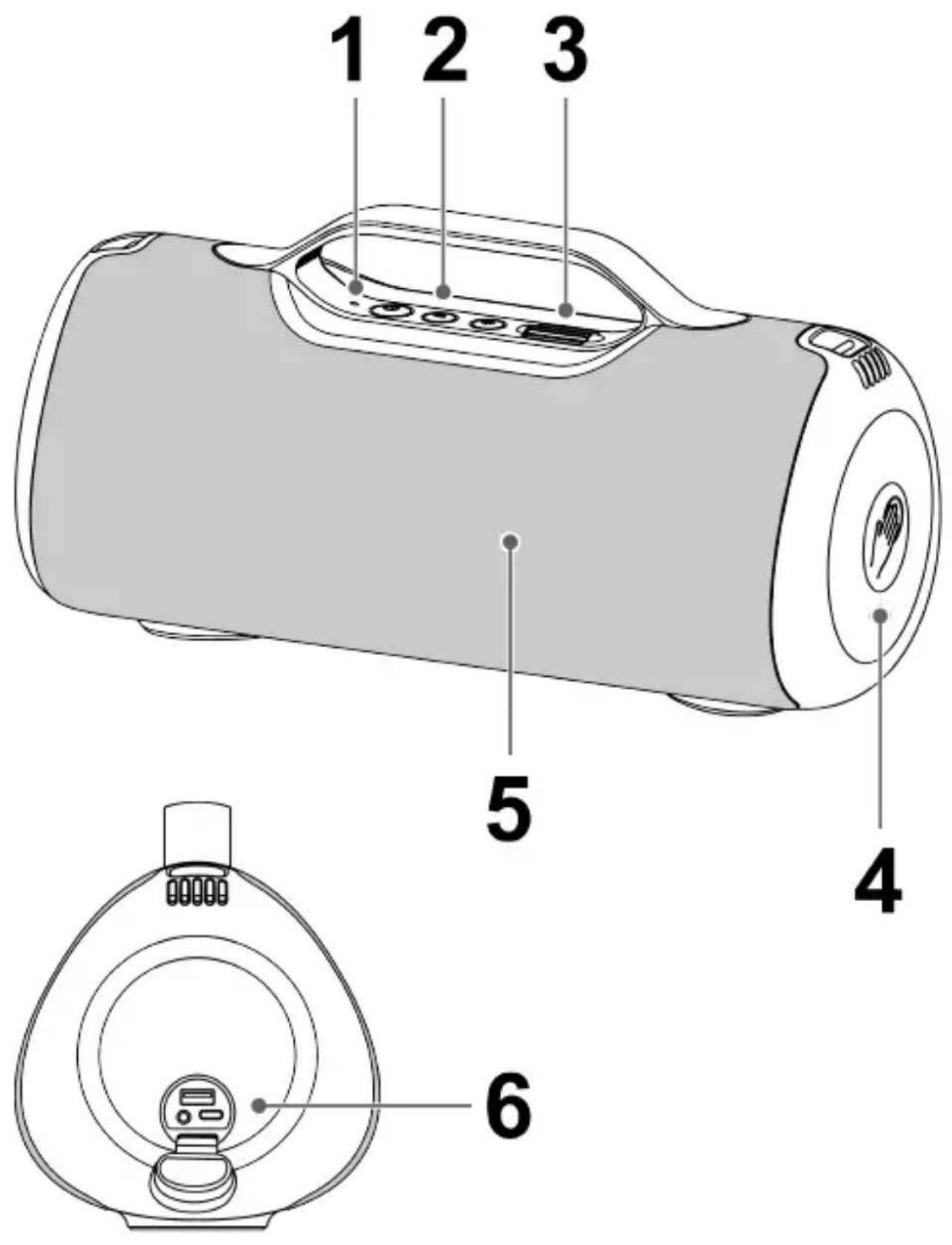
PRODUCT OVERVIEW AND CONTROL BUTTONS
- LED indicator
- button
Long press to turn on/off the speaker.
Press 3 times to delete speaker's Bluetooth connection history information.
button
Press to perform TWS connection.
Long press to disconnect Bluetooth device.
button
Press to switch LED light mode (10 different LED lights modes).
Long press to turn off/on LED light.
- Volume control
- Touch control area
- LED light
- USB port / AUX in / USB-C™ charging port
USB Type-C™ and USB-C™ are trademarks of USB Implementers Forum.
TOUCH CONTROL
- Short tap 1 time > Pause/Play music; Pick up/hang up call; Mute/Unmute under AUX mode.
- Short tap 2 times > Next song.
- Short tap 3 times > Previous song.
- Long tap 2s: > Reject call.
- Long tap 4s > Switch EQ mode (3 different EQ modes).
NOTE: When a phone or other smartphone is connected to the speaker, follow the steps above to make hands-free calls.
CHARGING
Before first-time use, fully charge the built-in battery. The charger is not included in the package, please charge the speaker via a standard 5 V / 2 A charger or via a PC. The LED indicator will glow red during charging. The LED indicator turns off when the speaker is fully charged.
NOTE: The LED indicator will flash when the battery is low.
IMPORTANT: Please make a complete charge every three months to avoid shortening the battery lifespan.
BLUETOOTH
- Long press the ⏻ button to turn on the speaker. The LED indicator will flash blue and hear a tone. The speaker is in pairing mode.
- Activate Bluetooth on your mobile phone and search for the device name "XS-E643B", then connect to it. If the pairing is successful, the LED indicator will turn solid blue.
NOTE: The speaker will automatically shut down after 10 minutes in pairing mode if no devices are paired. When the volume reaches the maximum level, you will hear a "Beep" sound.
Disconnecting the paired mobile phone
- Long press the button to disconnect the current device. The LED indicator will flash blue and the speaker will enter pairing mode.
TWS (TRUE WIRELESS STEREO)
The TWS technology enables you to use two speakers paired via Bluetooth to create a wireless dual-channel system that delivers a true stereo sound effect.
- Turn on both speakers. Make sure both speakers are not connected to any Bluetooth device.
- Press the button on one of the speakers, and the second speaker will connect automatically.
- The first speaker's LED indicator flashes blue, and the LED indicator of the second one stays solid blue, which means both speakers are connected successfully.
- Pair your mobile phone with the first speaker, and the LED indicators of both speakers will be solid blue.
Disconnecting the TWS connection
Press the button on one of the speakers to disconnect the TWS pairing.
USB
Insert a USB drive into the speaker. The speaker will play the stored music automatically.
NOTE: The speaker supports USB drives (FAT32 / exFAT) with up to 128 GB of memory.
The speaker supports MP3 / WAV audio formats.
Do not use any USB extension cable for connecting the USB drive.
The LED indicator will be solid green after connection and during playback.
The external devices can be charged via this USB port (5V / 1A).
AUX IN
The speaker automatically switches to AUX IN mode when you connect your device with the audio cable (included). When using an external device, all functions can only be controlled by the external device.
NOTE: The LED indicator will be solid green after connection and during playback.
SPECIFICATION
BT Version 5.3
BT profiles A2DP1.2 / AVRCP1.4
HFP1.6 / HSP1.2
BT connecting range 10 meters
BT Frequency 2402 - 2480 MHz
EIRP -1,16 dBm
DC input voltage/current 5V / 2A
Battery type Lithium-ion (3.7V / 10800mAh)
Battery Charging Time approx. 6 hours
Battery Playback Time 15 hours (50% Volume)
Signal-to-noise ratio > 70 dB
Frequency response 70 Hz - 20 kHz
Rated Power 60 W (RMS)
IP code IPX5
Dimensions 336 x 146 x 172 mm
Weight 2650 ± 50 g
Package Contents: Portable Bluetooth speaker, Charging cable, Audio cable, User manual
We reserve the right to change technical specifications.
WARRANTY
The capacity of the product battery decreases over time. Decreasing of battery capacity occurs during normal use of the appliance and is considered usual wear and tear of the appliance. Decreasing battery capacity is not a defect of the appliance.
Disposal of old Electrical & Electronic Equipment (Applicable in the European Union and other European countries with separate collection systems)
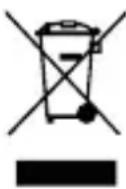
This symbol on the product or on its packaging indicates that this product shall not be treated as household waste. Instead it shall be handed over to the applicable collection point for the recycling of electrical and electronic equipment. By ensuring this product is disposed of correctly, you will help prevent potential negative consequences for the environment and human health, which could otherwise be caused by inappropriate waste handling of this product. The recycling of materials will help to conserve natural resources. For more detailed information about recycling of this product, please contact your local Civic Office, your household waste disposal service or the shop where you purchased the product.
Hereby, ETA a.s. declares that the radio equipment type XS-E643B is in compliance with Directive 2014/53/EU. The full text of the EU declaration of conformity is available at the following internet address: www.JVCAUDIO.cz/doc
The Bluetooth® word mark and logo are registered trademarks owned by Bluetooth SIG, Inc. and any use of such marks by Shenzhen Trendwoo Tech. Co., Ltd. is under license. Other trademarks and trade names are those of their respective owners.
INTRODUCTION
IMPORTANT SAFETY INSTRUCTIONS
This product is manufactured and distributed exclusively by ETA a.s., serviced and warranted by its designated partner. "JVC" is the trademark of JVCKENWOOD Corporation, used by such company under license.
- INTRODUCTION
- IMPORTANT SAFETY PRECAUTIONS
- PRODUCT OVERVIEW AND CONTROL BUTTONS
- TOUCH CONTROL
- CHARGING
- BLUETOOTH
- DISCONNECTING THE PAIRED MOBILE PHONE
- TWS (TRUE WIRELESS STEREO)
- DISCONNECTING THE TWS CONNECTION
- USB
- AUX IN
- SPECIFICATION
- WARRANTY
- DISPOSAL OF OLD ELECTRICAL & ELECTRONIC EQUIPMENT (APPLICABLE IN THE EUROPEAN UNION AND OTHER EUROPEAN COUNTRIES WITH SEPARATE COLLECTION SYSTEMS)
- IMPORTANT SAFETY INSTRUCTIONS
Brand : JVC
Model : XS-E643B
Category : Loudspeaker