
SDF 874 - Digital photo frame SENCOR - Free user manual and instructions
Find the device manual for free SDF 874 SENCOR in PDF.


| Product Type | Digital Photo Frame |
| Brand | Sencor |
| Model | SDF 874 |
| Display Size | 8 inches (diagonal) |
| Display Resolution | 800 x 600 pixels |
| Aspect Ratio | 4:3 |
| Supported Image Formats | JPEG, BMP, PNG, GIF |
| Internal Memory | 128 MB |
| Memory Card Slots | SD, SDHC, MMC, MS, xD |
| USB Port | USB 2.0 for PC connection |
| Power Supply | 5 V DC, 1.5 A (adapter included) |
| Dimensions (W x H x D) | 210 x 170 x 25 mm |
| Weight | 450 g |
| Slideshow Features | Transition effects, adjustable interval, shuffle |
| Clock & Calendar | Built-in clock and calendar display |
| Remote Control | Infrared remote included |
| Material | Plastic frame with acrylic cover |
| Color | Black |
| Warranty | 2 years |
Frequently Asked Questions - SDF 874 SENCOR
User questions about SDF 874 SENCOR
0 question about this device. Answer the ones you know or ask your own.
Ask a new question about this device
Download the instructions for your Digital photo frame in PDF format for free! Find your manual SDF 874 - SENCOR and take your electronic device back in hand. On this page are published all the documents necessary for the use of your device. SDF 874 by SENCOR.
USER MANUAL SDF 874 SENCOR
Thanks you for buying your new digital photo frame. We wish you enjoy using it. It is a multimedia photo frame with ultra slim design and 8" high resolution IPS LED screen for exceptional picture quality. You can enjoy and share your photos, music and video from a pendrive USB or memory cards.
We recommend that you fully read this user manual in order to enjoy the product in a safe way and with the best results.
CARE AND MAINTENANCE
▶ Do not expose your Photo Frame to collisions, violent shakes, dust, direct sun light, moisture or extreme temperatures.
▶ Do not use abrasive or corrosive cleansers.
▶ Keep the device clean and dust free with a soft and dry cloth. We recommend you to use the provided cleaning cloth.
▶ Clean the unit while it is turned off and unplugged from electric power.
▶ Do not disassemble the device.
MAIN FEATURES
▶ 8" high resolution IPS LED backlight screen.
1024x600 pixels resolution, 300cd / m2, 500:1.
▶ Reproduce JPEG pictures of the majority of the digital cameras with maximum resolution 8000 x 8000 pixels.
▶ Plays audio with MP3 files.
Plays video with MPEG1/2/4, AVI (Divx and Xvid) and M-JPEG files.
▶ Compatible with memory cards: MMC / SDHC / SDXC (up to 32 Gb).
▶ Built-in speaker 1W.
▶ Selection of pictures by miniatures on screen and starting Slide Show from the selected picture.
Several time intervals for the Slide Show (5/15/30 sec., 1/15 min.).
▶ 4 modes for music playing and 3 modes for pictures and videos playing.
▶ 11 different transition effects for the Slide Show.
▶ Functions of calendar with photo Slide Show, clock and alarm.
▶ Auto ON/OFF function.
▶ Automatic image fit.
▶ Brightness, contrast and hue adjustments.
▶ Allows 90°, 180° and 270° picture rotation.
▶ 6 levels of zoom available.
▶ File browser function.
▶ Information of each file is shown.
▶ Slim remote control featuring all the frame functions.
▶ OSD languages: EN/CZ/SK/HU/PL/GR/HR/RS/DE/ES/FR/PT/RU
AC/DC power adapter (Europlug). 100-240V 50/60Hz; 5.0V/1.2A.
PRODUCT CONTENT
▶ Photo Frame.
▶ User manual.
▶ Remote control.
▶ AC/DC power adapter (Europlug).
Stand.
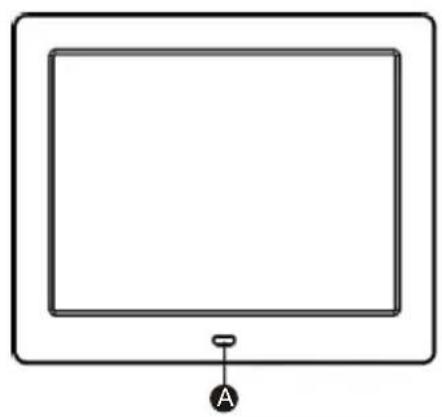
natural_image
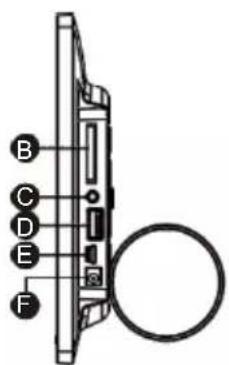
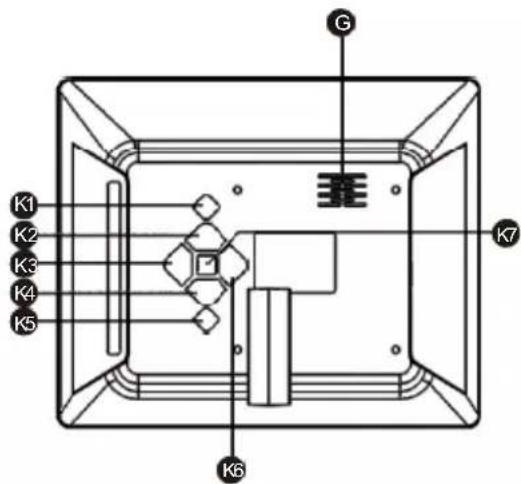
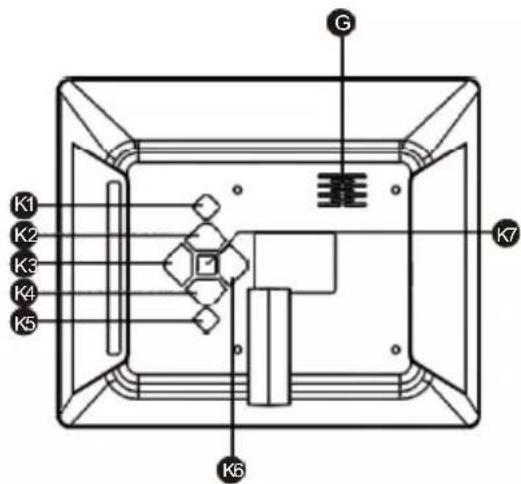
Simple line drawing of a rectangular frame with a small labeled tag 'A' at the bottom (no text or symbols on the frame itself)A. Remote sensing
B. Card
C. 3.5MM headphone output port
D. USB 2.0 port
E. Mini USB2.0 port
F. DC power input port
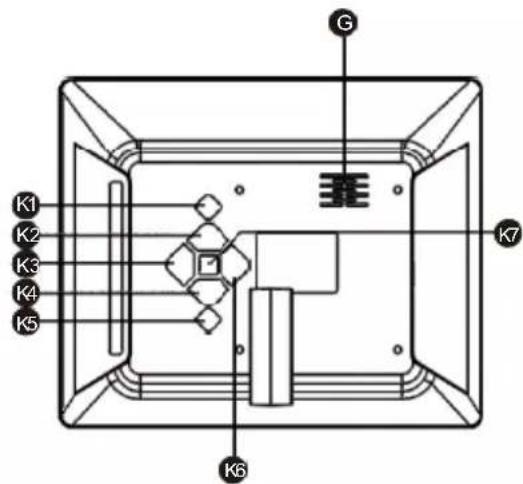
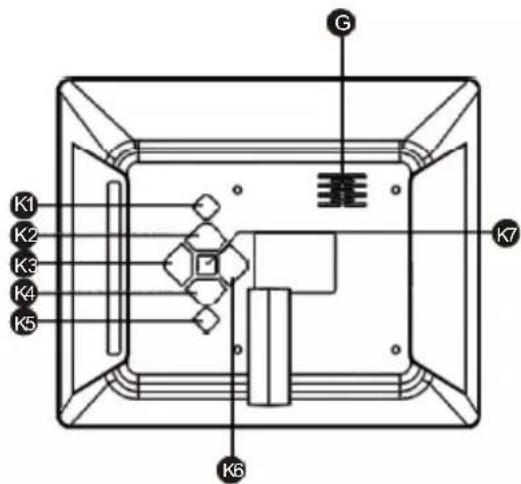
G. speaker
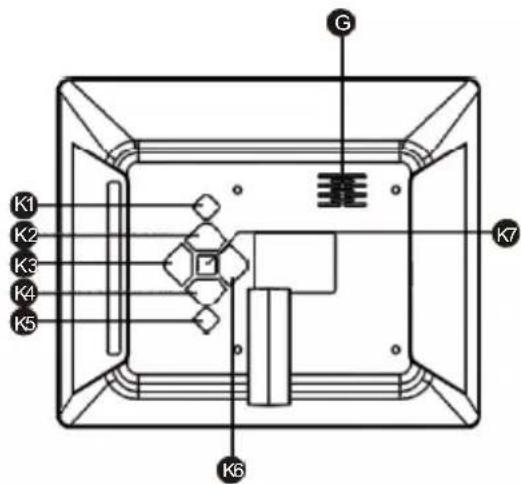
K1. Power
K2. Forward
K3. Volume+ (right)
K4. Next (down)
K5. Return
K6. Volume- (Left)
K7. Play/Pause (confirm)
REMOTE CONTROL
flowchart
graph TD
    1["1"] --> 动量器["按钮图标"]
    动量器 --> SETTIN["SETTIN图标"]
    SETTIN --> MENU["MENU图标"]
    MENU --> 2["2"]
    2 --> 3["3"]
    3 --> 4["4"]
    4 --> PHOTO["PHOTO图标"]
    PHOTO --> MUSIC["MUSIC图标"]
    MUSIC --> VIDEO["VIDEO图标"]
    VIDEO --> 5["5"]
    5 --> 6["6"]
    6 --> 7["7"]
    7 --> CALENDAR["CALENDAR图标"]
    CALENDAR --> 9["9"]
    9 --> 8["8"]
    8 --> 10["10"]
    10 --> ENTER["ENTER图标"]
    ENTER --> 12["12"]
    12 --> 11["11"]
    11 --> 13["13"]
    13 --> VOL-1["VOL-图标"]
    VOL-1 --> VOUT["▼"]
    VOUT --> VOUTA["▼"]
    VOUTA --> VOUTB["▼"]
    VOUTB --> VOUTC["▼"]
    VOUTC --> VOUTD["▼"]
    VOUTD --> VOUTE["▼"]
    VOUTE --> VOUTF["▼"]
    VOUTF --> VOUTG["▼"]
    VOUTG --> VOUTH["▼"]
    VOUTH --> VOUTI["▼"]
    VOUTI --> VOUTJ["▼"]
    VOUTJ --> VOUTK["▼"]
    VOUTK --> VOUTL["▼"]
    VOUTL --> VOUTM["▼"]
    VOUTM --> VOUTN["▼"]
    VOUTN --> VOUTO["▼"]
    VOUTO --> ROTATE["ROTATE图标"]
    ROTATE --> 21["21"]
    21 --> 20["20"]
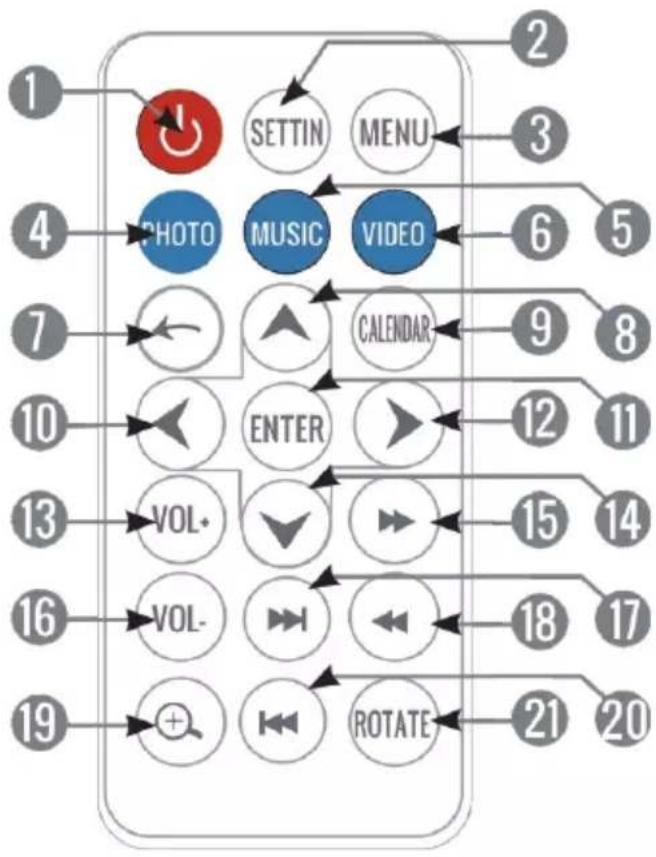
- ON/OFF: turn on/off the digital photo frame.
- SETTING: Access to the settings menu.
- MENU: Access to the main menu from everywhere.
- PHOTO: Access to the Picture player.
5.MUSIC: Access to the Music player.
6.VIDEO: Access to the Video player. - RETURN: Returns to the previous menu.
- UP: Goes up one position in the current menu / Moves the current view up when applying zoom to an image.
- CALENDAR: Access to the calendar option.
- LEFT: Reduces values on settings menu / Moves the current view left when applying zoom to an image.
- ENTER: Accepts one option in the menu / Enters into a folder / Changes the view mode / Play or pause.
-
RIGHT: Increases values on settings menu / Moves the current view right when applying zoom to an image.
-
VOL+: Volume up.
- DOWN: Goes down one position in the current menu / Moves the current view down when applying zoom to an image.
- FAST FORWARD: Makes a video or a song play faster.
16.VOL -: Volume down. - NEXT: Shows the following picture or track.
- REWIND: Moves the current video or song move to an early position.
19.ZOOM: Performs a zoom to the current image (up to 6 zoom levels are available). - PREVIOUS: Shows the previous picture or track.
- ROTATE: Rotates the current image 90°, 180° ó 270°.
SWITCHING ON / OFF
To power on your Photo Frame just plug in the provided power adapter to a 100-240V AC source. To turn off your photo frame, simply press the ON/OFF button on the back side of the frame or press the ON/OFF button from remote control.
MAIN MENU
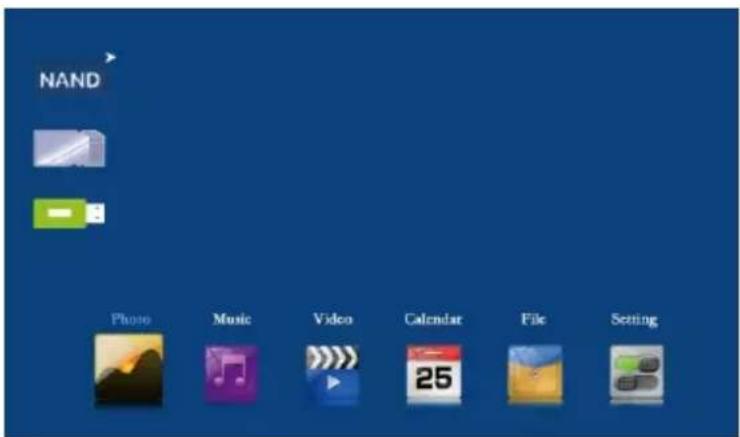
PHOTO
You can use 4 display modes: "Slideshow", "Slideshow + Music", "Browse mode" and "Thumbnail".
SLIDESHOW
This is the display mode by default (it is automatically activated when inserting a SD card or a pendrive containing pictures) playing the pictures in full screen mode. You can also start the Slide show by pressing the ENTER button from the THUMBNAIL list.
SLIDESHOW + MUSIC
From the “Photo setup” menu, you can select playing or not the music when pictures are being reproduced, choosing “Enable” or “Disable” in the “Music” option.
BROWSE MODE
To change the display mode to "BROWSE MODE", you can press the ENTER button and you can manually move to the next pictures, using the PREVIOUS and NEXT buttons. In this display mode, you can rotate and make zoom on the currently selected photo with the "RORATE" and "ZOOM" buttons.
VIDEO
You can access directly to this function from the main menu, by selecting the "VIDEO" icon or pressing the "VIDEO" button in the remote control. The Photo Frame will show a video files list loaded from the memory device (SD card or pendrive). Pressing the PREVIOUS / NEXT buttons for selecting file or folder and pressing the ENTER button to play or pause the video.
MUSIC
You can access directly to this function from the main menu, by selecting the “MUSIC” icon or pressing the “MUSIC” button in the remote control. The Photo Frame will show an audio files list loaded from the memory device (SD card or pendrive). Pressing the PREVIOUS / NEXT buttons for selecting file or folder and pressing the ENTER button to play or pause the music.
CALENDAR
You can access this function from the main menu, selecting the “CALENDAR” icon or by pressing the CALENDAR button in your remote control. When showing calendar, a slideshow of pictures loaded from the memory device will be shown.
File
This function you can explore the folders and the multimedia files stored in the memory device.
SETTINGS
To modify the system settings just select the “SETTINGS” option from the main menu, by using the PREVIOUS / NEXT buttons and the PLAY/PAUSE button.
When entering this function, the current month calendar will be shown on the screen with the current time indication, along with a slideshow using the pictures loaded from the memory.
PHOTO SETUP
▶ Play mode: Slideshow, Thumbnail and Browse mode.
*Original Size: The image is shown in the screen respecting the original proportions.
*Full screen: The image expands horizontally to fit the (full) screen.
▶ Background Music: Enable or disable, it allows you to choose if music is played at the same time than pictures or not.
▶ Cycle repeat: You can select between “Repeat” and “Once” for repeat the slideshow as you desire.
▶ Slide Internal: from this option it is possible to choose the time each picture will be shown in the slideshow mode before changing to the next picture. You can choose 5/15/30 seconds or 1/15 minutes.
▶ Effect Setting: This option allows choosing the type of effect desired during the transition between pictures when the slideshow mode is activated. There are 10 available effects and it is possible to alternate between all of them by choosing the “Random” option.
DATE&TIME
▶ Set Date: Allows updating the date used by the system.
▶ Clock mode: Allows setting the time format between 12 hours and 24 hours.
▶ Set Time: Allows updating the clock time used by the system.
▶ Alarm Set: Allows setting ON/OFF the alarm.
▶ Alarm Tone: Allows choosing the melody reproduced when the alarm is activated.
▶ Alarm Frequency: Allows choosing the alarm frequency between 4 modes: Once, Every day, Mon. to Fri. and Weekend.
VIDEO SETUP
▶ Cycle Mode: Allows selecting the mode (order) of reproduction among options of “Repeat”, “Random” and “Once|.
Display Mode: Allows choosing between 3 modes to play video:
*Full screen: The image expands horizontally to fit the (full) screen.
*Original Size: The image is displayed in the screen respecting the original proportions.
*Scale: The image is cut in top and bottom side to fit the screen, without modifying the original appearance.
MUSIC SETUP
▶ Cycle mode: Allows selecting the mode (order) of reproduction among options of “Repeat ALL”, “Repeat ONE”, “SEQUENCE”.
▶ Display Mode: Allowsselecting" Spectrum", "Lyric" during playback.
SYSTEM SETUP
▶ Language: Shows the available languages for the different menus and information, and allows choosing the one we prefer.
▶ Brightness: Allows modifying the value of display brightness.
▶ Contrast: Allows modifying the value of display contrast.
▶ Saturation: Allows modifying the value of display saturation.
▶ Power ON: Allows enabling or disabling the automatic turning ON of digital photo frame.
▶ Auto Boot Time: Allows choosing the Time for Auto-ON.
▶ Power OFF: Allows enabling or disabling the automatic turning OFF of digital photo frame.
▶ Auto Shut Time: Allows choosing the Time for Auto-OFF.
▶ Auto-Power Frequency: Allows adjusting what frequency (days of the week) the Auto- ON/OFF is activated with.
▶ Volume: Allows setting the volume by default.
Auto copy: Allows setting auto copy.
Start up Mode: Allows setting start up default as" Photo",Music","Video".
▶ Reset Default Settings: Allows resetting the digital photo frame to the default values.
▶ Version: Shows the current version of firmware.

Is in compliance with the essential norms and standards of the Directive of the European Parliament and of the Council.

This symbol on the product or the instructions means that your electrical and electronic equipment should be disposed at the end of life separately from your household waste. For more information, please contact the local authority or dealer where you purchased the product.
| Adapter technical specifications: | |
| Manufacturer's name or trade mark, commercial registration number and address: | FAST ČR, a.s., U Sanitasu 1621, 251 01 Ríčany, Czech Republic |
| Model identifier: | KH0502000EW-M |
| Input voltage: | AC 100-240 V |
| Input AC frequency: | 50-60Hz |
| Output voltage: | 5,0 V DC |
| Output current: | 1,2 A |
| Output power: | 6,0 W |
| Average active efficiency: | 76,30% |
| No-load power consumption: | 0,04 W |
SENCOR®
SDF 874 Korisničko uputstvo
UVOD
▶ Hvala za kupovinu novog digitalnog rama za fotografije. Želimo da uživate u njegovom korišćenju.
To je multimedijalni ram za fotografije s ultra tankim dizajnom i IPS LED ekranom visoke rezolucije od 8" za izuzetan kvalitet slike. Možete uživati i deliti vaše fotografije, muziku i video snimke od USB fleške ili memorijske kartice.
natural_image
Simple line drawing of a rectangular frame with a small hanging knob at the bottom (no text or symbols)A.Senzor za daljinski
B.Kartica
natural_image
Simple line drawing of a rectangular frame with a small labeled tag 'A' at the bottom (no text or symbols on the frame itself)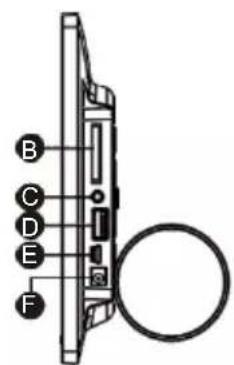
natural_image
Simple line drawing of a rectangular frame with a small labeled tag 'A' at the bottom (no text or symbols on the frame itself)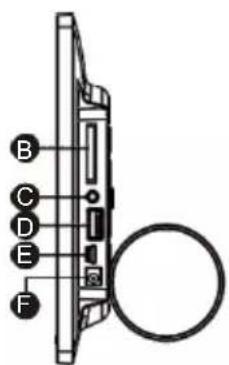
natural_image
Simple line drawing of a rectangular frame with a small labeled tag 'A' at the bottom (no text or symbols on the frame itself)natural_image
Simple line drawing of a rectangular frame with a small labeled tag 'A' at the bottom (no text or symbols on the frame itself)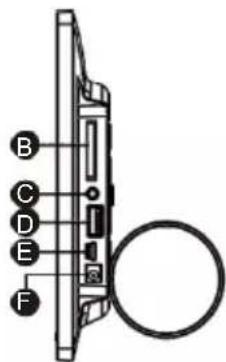
natural_image
Simple line drawing of a rectangular frame with a small labeled tag 'A' at the bottom (no text or symbols on the frame itself)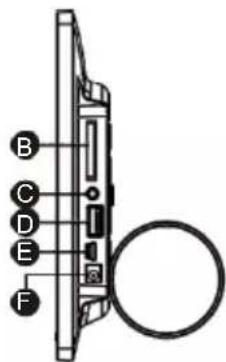



Brand : SENCOR
Model : SDF 874
Category : Digital photo frame