
HLP 24T539 - TV HYUNDAI - Free user manual and instructions
Find the device manual for free HLP 24T539 HYUNDAI in PDF.


| Product Type | LED TV |
| Screen Size | 24 inches (diagonal) |
| Resolution | 1366 x 768 pixels (HD) |
| Dimensions (without stand) | 55.4 x 35.5 x 8.5 cm (21.8 x 14.0 x 3.3 in) |
| Weight (without stand) | 3.5 kg (7.7 lbs) |
| Power Consumption | 30 W (typical) |
| Standby Power Consumption | < 0.5 W |
| Power Supply | AC 100-240 V, 50/60 Hz |
| Video Inputs | 1 x HDMI, 1 x VGA (D-Sub), 1 x Composite (AV) |
| Audio Inputs | 1 x PC Audio, 1 x Composite Audio (L/R) |
| USB Port | 1 x USB 2.0 (for media playback) |
| Audio Output | 1 x Headphone jack, 1 x Coaxial Digital Out |
| Media Playback (USB) | Photo (JPEG), Music (MP3), Video (AVI, MP4, MKV) |
| Teletext | Yes (1000 pages) |
| Sleep Timer | Yes (Off/30/60/90/120 min) |
| Parental Lock | Yes (channel and input restriction) |
| Cleaning Instructions | Wipe with a soft, dry cloth. Do not use liquid cleaners. |
| Safety Precautions | Do not block ventilation slots. Keep away from heat sources. |
| Spare Parts Available | Remote control, stand base, power cord, screws |
| Brand | Hyundai |
| Model | HLP 24T539 |
| Category | Television |
Frequently Asked Questions - HLP 24T539 HYUNDAI
User questions about HLP 24T539 HYUNDAI
0 question about this device. Answer the ones you know or ask your own.
Ask a new question about this device
Download the instructions for your TV in PDF format for free! Find your manual HLP 24T539 - HYUNDAI and take your electronic device back in hand. On this page are published all the documents necessary for the use of your device. HLP 24T539 by HYUNDAI.
USER MANUAL HLP 24T539 HYUNDAI
natural_image
Line drawing of a flat-screen monitor with a stand (no text or symbols)HLP24T539
Návod k použití Návod na použitie Instrukcja obsługi Instruction Manual Használatı utasítás
Licensed by Hyundai Corporation, Korea
Obsah
provozu.
H.264/VP6: 1920x1080 @ 30P
Sorenson
Sorenson: 352x288 @ 30P
.mp4, .mov,
.3gpp, .3gp,
MPEG
datový
HEVC/H.265 1080P@60fps - 50Mbps
přenos,
.ts,.trp,.tp,
.mkv
.3gp, MPEG4, H.264 1920x1080 @ 30P
.mp3, MPEG1 Layer
Layer2: 32Kbps \~ 448Kbps (Přenosová rychlost) / 32kHz, 44.1kHz, 48kHz, 16kHz, 22.05kHz, 24kHz (vzorkovací frekvence)
Layer3: 32Kbps \~ 320Kbps (Přenosová rychlost)) / 32kHz, 44.1kHz, 48kHz, 16kHz, 22.05kHz, 24kHz, 8kHz, 11.025kHz, 12kHz (vzorkovací frekvence)
LPCM Unsigned 8bit PCM, Signed/Unsigned 16bit PCM (big / little endian), 24bit PCM (big endian), DVD LPCM 16/20/24bit (Bit rate)
/ 6kHz, 8kHz, 11.025kHz, 12kHz, 16kHz, 22.05kHz, 24kHz, 32kHz, 44.1kHz, 48kHz, 88.2kHz, 96kHz, 176.4kHz, 192kHz (vzorkovací frekvence)
prevádzky.
Environmental Information.... 3
Standby Notifications....4
TV Control Switch & Operation.... 4
Using Main TV Menu....5
Inserting the Batteries into the Remote 5
Power Connection 5
Antenna Connection....5
Disposal Information....6
Remote Control 7
Connections......8
Switching On/Off....9
First Time Installation.... 9
Media Playback via USB Input 9
Media Browser.... 10
CEC....10
Settings Menu Contents 11
Using the Channel List 14
Configuring Parental Settings....14
Electronic Programme Guide 14
Teletext Services 15
Software Upgrade.... 15
Troubleshooting & Tips....15
AV and HDMI Signal Compatibility 16
Supported File Formats for USB Mode 17
Supported DVI Resolutions 18
Safety Information

CAUTION
RISK OF ELECTRIC SHOCK DO NOT OPEN

CAUTION: TO REDUCE THE RISK OF ELECTRIC SHOCK DO NOT REMOVE COVER (OR BACK). NO USER-SERVICEABLE PARTS INSIDE. REFER SERVICING TO QUALIFIED SERVICE PERSONNEL
In extreme weather (storms, lightning) and long inactivity periods (going on holiday) disconnect the TV set from the mains.
The mains plug is used to disconnect TV set from the mains and therefore it must remain readily operable. If the TV set is not disconnected electrically from the mains, the device will still draw power for all situations even if the TV is in standby mode or switched off.
Note: Follow the on screen instructions for operating the related features.
IMPORTANT - Please read these instructions fully before installing or operating

WARNING: This device is intended to be used by persons (including children) who are able / experienced of operating such a device supervised, unless they have been given orvision or instruction concerning the use of device by a person responsible for their safety.
- Use this TV set at an altitude of less than 2000 meters above the sea level, in dry locations and in regions with moderate or tropical climates.
- The TV set is intended for household and similar general use but may also be used in public places.
- For ventilation purposes, leave at least 5cm of free space around the TV.
- The ventilation should not be impeded by covering or blocking the ventilation openings with items, such as newspapers, table-cloths, curtains, etc.
- The power cord plug should be easily accessible. Do not place the TV, furniture, etc. on the power cord. A damaged power cord/plug can cause fire or give you an electric shock. Handle the power cord by the plug, do not unplug the TV by pulling the power cord. Never touch the power cord/plug with wet hands as this could cause a short circuit or electric shock. Never make a knot in the power cord or tie it with other cords. When damaged it must be replaced, this should only be done by qualified personnel.
- Do not expose the TV to dripping or splashing liquids and do not place objects filled with liquids, such as vases, cups, etc. on or over the TV (e.g., on shelves above the unit).
-
Do not expose the TV to direct sunlight or do not place open flames such as lit candles on the top of or near the TV.
-
Do not place any heat sources such as electric heaters, radiators, etc. near the TV set.
- Do not place the TV on the floor and inclined surfaces.
- To avoid danger of suffocation, keep plastic bags out of the reach of the babies, children and domestic animals.
- Carefully attach the stand to the TV. If the stand is provided with screws, tighten the screws firmly to prevent the TV from tilting. Do not over-tighten the screws and mount the stand rubbers properly.
- Do not dispose of the batteries in fire or with hazardous or flammable materials.
WARNING - Batteries must not be exposed to excessive heat such as sunshine, fire or the like.
WARNING - Excessive sound pressure from earphones or headphones can cause hearing loss.
ABOVE ALL - NEVER let anyone, especially children, push or hit the screen, push anything into holes, slots or any other openings in the case.
 Caution Caution | Serious injury or death risk |
 Risk of electric shock Risk of electric shock | Dangerous voltage risk |
 Maintenance Maintenance | Important maintenance component |
Markings on the Product
The following symbols are used on the product as a marker for restrictions and precautions and safety instructions. Each explanation shall be considered where the product bears related marking only. Note such information for security reasons.

Class II Equipment: This appliance is designed in such a way that it does not require a safety connection to electrical earth.

Hazardous Live Terminal: The marked terminal(s) is/are hazardous live under normal operating conditions.

Caution, See Operating Instructions: The marked area(s) contain(s) user replaceable coin or button cell batteries.

Class 1 Laser Product: This product contains Class 1 laser source that is safe under reasonably foreseeable conditions of operation.
of
WARNING
Do not ingest the battery, Chemical Burn Hazard This product or the accessories supplied with the product may contain a coin/button cell battery. If the coin/button cell battery is swallowed, it can cause severe internal burns in just 2 hours and can lead to death.
Keep new and used batteries away from children. If the battery compartment does not close securely, stop using the product and keep it away from children.
If you think batteries might have been swallowed or placed inside any part of the body, seek immediate medical attention.
A television may fall, causing serious personal injury or death. Many injuries, particularly to children, can be avoided by taking simple precautions such as:
- ALWAYS use cabinets or stands or mounting methods recommended by the manufacturer of the television set.
- ALWAYS use furniture that can safely support the television set.
- ALWAYS ensure the television set is not overhanging the edge of the supporting furniture.
- ALWAYS educate children about the dangers of climbing on furniture to reach the television set or its controls.
- ALWAYS route cords and cables connected to your television so they cannot be tripped over, pulled or grabbed
- NEVER place a television set in an unstable location.
- NEVER place the television set on tall furniture (for example, cupboards or bookcases) without anchoring both the furniture and the television set to a suitable support.
- NEVER place the television set on cloth or other materials that may be located between the television set and supporting furniture.
- NEVER place items that might tempt children to climb, such as toys and remote controls, on the top of the television or furniture on which the television is placed.
- The equipment is only suitable for mounting at heights ≤ 2 m.
If the existing television set is going to be retained and relocated, the same considerations as above should be applied.
Apparatus connected to the protective earthing of the building installation through the MAINS connection or through other apparatus with a connection to protective earthing – and to a television distribution system using coaxial cable, may in some circumstances create a fire hazard. Connection to a television distribution system has therefore to be provided through a device providing electrical isolation below a certain frequency range (galvanic isolator)
WALL MOUNTING WARNINGS
- Read the instructions before mounting your TV on the wall.
- The wall mount kit is optional. You can obtain from your local dealer, if not supplied with your TV.
- Do not install the TV on a ceiling or on an inclined wall.
- Use the specified wall mounting screws and other accessories.
- Tighten the wall mounting screws firmly to prevent the TV from fall. Do not over-tighten the screws.
Environmental Information
This television is designed to be environment friendly. To reduce energy consumption, you can follow these steps:
If you set the Energy Saving to Minimum, Medium, Maximum or Auto the TV will reduce the energy consumption accordingly. If you like to set the Backlight to a fixed value set as Custom and adjust the Backlight (located under the Energy Saving setting) manually using Left or Right buttons on the remote. Set as Off to turn this setting off.
Note: Available Energy Saving options may differ depending on the selected Mode in the Settings>Picture menu.
The Energy Saving settings can be found in the Settings>Picture menu. Note that some picture settings will be unavailable to be changed.
If pressed Right button or Left button consecutively, "Screen will be off in 15 seconds." message will be displayed on the screen. Select Proceed and press OK to turn the screen off immediately. If you don't press any button, the screen will be off in 15 seconds. Press any button on the remote or on the TV to turn the screen on again.
Note: Screen Off option is not available if the Mode is set to Game.
When the TV is not in use, please switch off or disconnect the TV from the mains plug. This will also reduce energy consumption.
Features
- Remote controlled colour TV
- Fully integrated digital terrestrial/cable/satellite TV (DVB-T-T2/C)
- HDMI inputs to connect other devices with HDMI sockets
- USB input
- OSD menu system
- Scart socket for external devices (such as DVD Players, PVR, video games, etc.)
-
Stereo sound system
-
Teletext
• Headphone connection
• Automatic programming system - Manual tuning
• Automatic power down after up to eight hours - Sleep timer
- Child lock
• Automatic sound mute when no transmission - NTSC playback
• AVL (Automatic Volume Limiting) - PLL (Frequency Search)
- PC input
• Game Mode (Optional)
• Picture off function
Accessories Included
- Remote Control
- Batteries: 2 x AAA
- Instruction Book
Standby Notifications
If the TV does not receive any input signal (e.g. from an aerial or HDMI source) for 3 minutes, it will go into standby. When you next switch-on, the following message will be displayed: "TV switched to stand-by mode automatically because there was no signal for a long time."
The Auto TV OFF option(in the Settings>System >More menu) could have been set to a value between 1 and 8 hours by default. If this setting is not set as Off and the TV has been left on and not been operated during the set time, it will switch into standby mode after the set time has expired. When you next switch-on the TV, the following message will be displayed. "TV switched to stand-by mode automatically because no operation was made for a long time." Before the TV switches into standby mode a dialogue window will be displayed. If you do not press any button the TV will switch into the standby mode after a waiting period of about 5 minutes. You can highlight Yes and press OK to switch the TV into standby mode immediately. If you highlight No and press OK, the TV will remain on. You can also choose to cancel the Auto TV OFF function from this dialogue. Highlight Disable and press OK, the TV will remain on and the function will be cancelled. You can enable this function again by changing the setting of the Auto TV OFF option from the Settings>System>More menu.
TV Control Switch & Operation
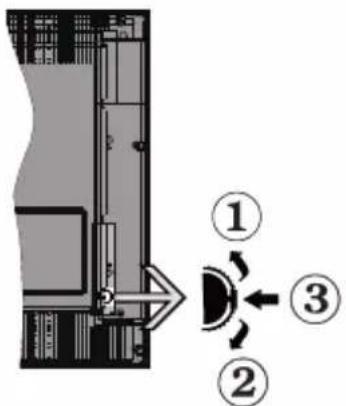
- Up direction
- Down direction
- Volume / Info / Sources List selection and Standby-On switch
The Control button allows you to control the Volume / Programme / Source and Standby-On functions of the TV.
To change volume: Increase the volume by pushing the button up. Decrease the volume by pushing the button down.
To change channel: Press the middle of the button in, the information banner will appear on the screen. Scroll through the stored channels by pushing the button up or down.
To change source: Press the middle of the button in twice(for the second time in total), the source list will appear on the screen. Scroll through the available sources by pushing the button up or down.
To turn the TV off: Press the middle of the button in and hold it down for a few seconds, the TV will turn into standby mode.
To turn on the TV: Press the middle of the button in, the TV will turn on.
Notes:
If you turn the TV off, this cycle starts again beginning with the volume setting.
Main menu OSD cannot be displayed via control button.
Operation with the Remote Control
Press the Menu button on your remote control to display main menu. Use the directional buttons and OK button to navigate and set. Press Return/Back or Menu button to quit a menu screen.
Input Selection
Once you have connected external systems to your TV, you can switch to different input sources. Press the Source button on your remote control consecutively to select the different sources.
Changing Channels and Volume
You can change the channel and adjust the volume by using the Programme +/- and Volume +/- buttons on the remote.
Using Main TV Menu
When the Menu button is pressed, the main TV menu will appear at the bottom of the screen. You can navigate through the menu items using the directional buttons on the remote. To select an item or see the sub-menu options of the highlighted menu press OK button. When you highlight a menu option some of the sub-menu items of this menu may appear on the upper side of the menu bar for quick access. To use a quick access item highlight it, press OK and set as desired using the Left/Right directional buttons. When finished press OK or Back/Return button to exit.
Press Exit button to close the main menu.
1. Home
When main menu is opened Home menu bar will be highlighted. The content of the Home menu can be customised by adding options from other menus. Just highlight an option and press the Down direction button on the remote. If you see Add to Home option you can add it to the Home menu. Same way you can delete or change the position of any item in the Home menu. Press the Down direction button and select Delete or Move option and press OK. In order to move a menu item use the Right and Left direction buttons to select the position that you want the item to move to and press OK.
2. IV
2.1. Guide
You can access the electronic programme guide menu using this option. Refer to Electronic Programme Guide section for more information.
2.2. Channels
You can access the Channels menu using this option. Refer to Using the Channel List section for more information.
2.3. Timers
You can set timers for future events using the options of this menu. You can also review the previously created timers under this menu.
To add a new timer select the Add Timer tab using the Left/Right buttons and press OK. Set the sub-menu options as desired and when finished press OK. A new timer will be created.
To edit a previously created timer, highlight that timer, select the Edit Selected Timer tab and press OK. Change the sub-menu options as desired and press OK to save your settings.
To cancel an already set timer, highlight that timer, select Delete Selected Timer tab and press OK. A confirmation message will be displayed. Highlight Yes and press OK to proceed. The timer will be cancelled. It is not possible to set timers for two or more events that will broadcasted in different channels at the same time interval. In this case you will be asked to choose one of these timers and cancel others. Highlight the timer you want to cancel and press OK, Options menu will be displayed. Then highlight Set/Cancel and press OK to cancel that timer. You will have to save changes after that. In order to do that press OK, highlight Save Changes and press OK again.
3. Settings
You can manage the settings of your TV using the options of this menu. Refer to Settings Menu Contents section for more information.
4. Sources
You can manage your input source references using the options of this menu. To change the current source highlight one of the options and press OK.
4.1. Source Settings
Edit the names, enable or disable selected source options.
Inserting the Batteries into the Remote
Remove the back cover to reveal the battery compartment. Insert two size AAA batteries. Make sure the (+) and (-) signs match (observe correct polarity). Do not mix old and new batteries. Replace only with same or equivalent type. Place the cover back on.
A message will be displayed on the screen when the batteries are low and must be replaced. Note that when the batteries are low, the performance of the remote control may be impaired.
Batteries should not be exposed to excessive heat such as sunshine, fire or the like.
Power Connection
IMPORTANT: The TV set is designed to operate on a 220-240V AC, 50 Hz supply. After unpacking, allow the TV set to reach the ambient room temperature before you connect the set to the mains. Plug the power cable to the mains socket outlet.
Antenna Connection
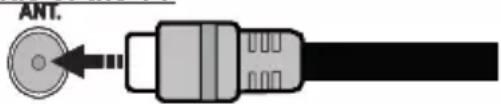
Connect the aerial or cable TV plug to the AERIAL INPUT (ANT.) socket located on the rear side of the TV.
Rear side of the TV
natural_image
Pure electrical connector diagram without any text or symbols
If you want to connect a device to the TV, make sure that both the TV and the device are turned off before making any connection. After the connection is done, you can turn on the units and use them.
License Notification
The terms HDMI, HDMI High-Definition Multimedia Interface, and the HDMI Logo are trademarks or registered trademarks of HDMI Licensing Administrator, Inc.

Manufactured under license from Dolby Laboratories. Dolby, Dolby Audio, and the double-D symbol are trademarks of Dolby Laboratories Licensing Corporation.
The "CI Plus" Logo is a trademark of CI Plus LLP.
Disposal Information
[European Union]
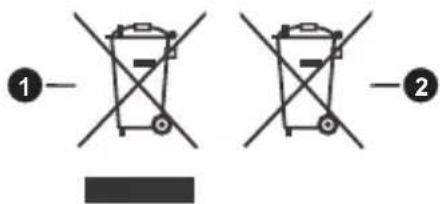
These symbols indicate that the electrical and electronic equipment and the battery with this symbol should not be disposed of as general household waste at its end-of-life. Instead, the products should be handed over to the applicable collection points for the recycling of electrical and electronic equipment as well as batteries for proper treatment, recovery and recycling in accordance with your national legislation and the Directive 2012/19/EU and 2013/56/EU.
By disposing of these products correctly, you will help to conserve natural resources and will help to prevent potential negative effects on the environment and human health which could otherwise be caused by inappropriate waste handling of these products.
For more information about collection points and recycling of these products, please contact your local municipal office, your household waste disposal service or the shop where you purchased the product.
Penalties may be applicable for incorrect disposal of this waste, in accordance with national legislation.
[Business users]
If you wish to dispose of this product, please contact your supplier and check the terms and conditions of the purchase contract.
[Other Countries outside the European Union]
These symbols are only valid in the European Union.
Contact your local authority to learn about disposal and recycling.
The product and packaging should be taken to your local collection point for recycling.
Some collection points accept products free of charge.
Note: The sign Pb below the symbol for batteries indicates that this battery contains lead.
-
Products
-
Battery
Specification
| TV Broadcasting | PAL BG/I/DKSECAM BG/DK |
| Receiving Channels | VHF (BAND I/III) - UHF(BAND U) - HYPERBAND |
| Digital Reception | Fully integrated digital terrestrial-cable TV(DVB-T2-C)(DVB-T2 compliant) |
| Number of Preset Channels | 1 000 |
| Channel Indicator On Screen Display | |
| RF Aerial Input 75 Ohm (unbalanced) | |
| Operating Voltage 220-240V AC, 50Hz. | |
| Audio German+Nicam Stereo | |
| Audio Output Power (WRMS.) (10% THD) | 2 x 2,5 |
| Power Consumption (W) | 45 W |
| TV Dimensions DxLxH (with stand) (mm) | 135 x 553 x 365 |
| TV Dimensions DxLxH (without stand) (mm) | 41/63 x 553 x 334 |
| Display | 24" |
| Operation temperature and operation humidity | 0°C up to 40°C, 85% humidity max |
-
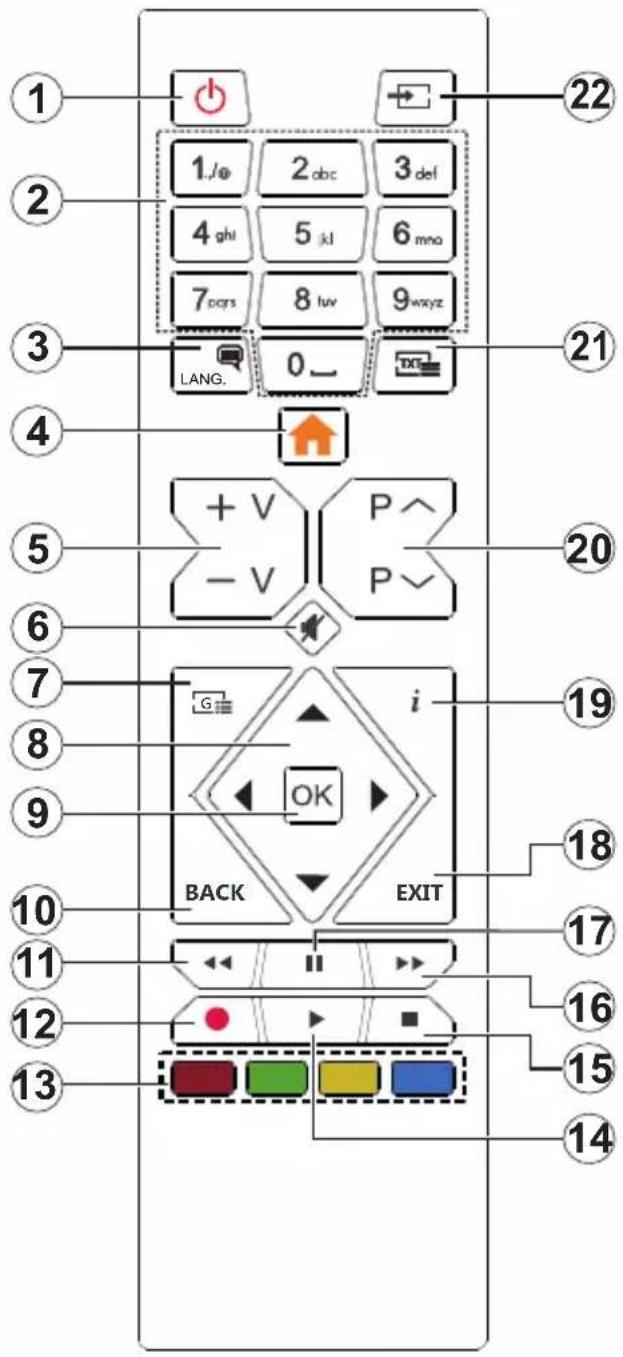
Standby: Switches On / Off the TV
-
Numeric buttons: Switches the channel, enters a number or a letter in the text box on the screen.
-
Language: Switches among sound modes (analogue TV), displays and changes audio/subtitle language and turns subtitles on or off (digital TV, where available)
-
Menu: Displays TV menu
-
Volume +/-
-
Mute: Completely turns off the volume of the TV
-
Guide: Displays the electronic programme guide
-
Directional buttons: Helps navigate menus, content etc. and displays the subpages in TXT mode when pressed Right or Left
-
OK: Confirms user selections, holds the page (in TXT mode), views Channels menu (DTV mode)
-
Back/Return: Returns to previous screen, previous menu, opens index page (in TXT mode). Quickly cycles between previous and current channels or sources (depends on the model)
-
Rewind: Moves frames backwards in media such as movies
-
No function
-
Coloured Buttons: Follow the on-screen instructions for coloured button functions
-
Play: Starts to play selected media
-
Stop: Stops the media being played
-
Fast Forward: Moves frames forward in media such as movies
-
Pause: Pauses the media being played
-
Exit: Closes and exits from displayed menus or returns to previous screen
-
Info: Displays information about on-screen content, shows hidden information (reveal - in TXT mode)
-
Programme +/-
-
Text: Displays teletext (where available), press again to superimpose the teletext over a normal broadcast picture (mix)
-
Source: Shows available broadcast and content sources
| Connections | |||
| Connector Type Cables Device | |||
![HYUNDAI HLP 24T539 - [Other Countries outside the European Union] - 3](/content/2026/05/851684/images/8ff3ae593f10cf0ee2fe9b5cd6d53fc636bf04eee5584650297ef47b336cc177.jpg) | VGA Connection (back) | ![HYUNDAI HLP 24T539 - [Other Countries outside the European Union] - 4](/content/2026/05/851684/images/821838f2a729ac390ca576a1bbd4b35a1614b438e0d352d23ed1c58c4f83bd6f.jpg) | ![HYUNDAI HLP 24T539 - [Other Countries outside the European Union] - 5](/content/2026/05/851684/images/c8a59f40ab515f6349c72f56c0ae1fdf59ef71314bd843f40c0aac0c7cf822e3.jpg) |
AUDIO IN ![HYUNDAI HLP 24T539 - [Other Countries outside the European Union] - 6](/content/2026/05/851684/images/73e0bad19e11de1575c9219b2a388b742e0438a15271033ab207d9ec95ff3908.jpg) ![HYUNDAI HLP 24T539 - [Other Countries outside the European Union] - 7](/content/2026/05/851684/images/1415f615db54e43c47dd2000ca8236cda2c7df50f68925d832527454b9ead1e2.jpg) | PC/YPbPr Audio Connection (side) | ![HYUNDAI HLP 24T539 - [Other Countries outside the European Union] - 8](/content/2026/05/851684/images/a343128bdde9780272396efa472410a875f91cd74237d4edad476b31ae7d6ab9.jpg) YPbPr/PC Audio Cable YPbPr/PC Audio Cable | |
![HYUNDAI HLP 24T539 - [Other Countries outside the European Union] - 9](/content/2026/05/851684/images/b35bb609504a4f38701d5e1297d2dbcd28f3d80621a658f6b3a5803acd19b498.jpg) | HDMI Connection (back) | ![HYUNDAI HLP 24T539 - [Other Countries outside the European Union] - 10](/content/2026/05/851684/images/e78a775054c0a4edcc6a8719b4cf2d3e8e26e2584a84a55f9661486dcc1850d7.jpg) | ![HYUNDAI HLP 24T539 - [Other Countries outside the European Union] - 11](/content/2026/05/851684/images/a7cd102fc97b4d0f21231b50f7f51e011b1c6b4cc6b8585fcd45e3178dc52412.jpg) |
![HYUNDAI HLP 24T539 - [Other Countries outside the European Union] - 12](/content/2026/05/851684/images/e2fb681cb8c5faee45c20637836ad388e0a075de3d7af47fe63ae6cf773b0a47.jpg) | Scart Connection (back) | ![HYUNDAI HLP 24T539 - [Other Countries outside the European Union] - 13](/content/2026/05/851684/images/8cde9722635669f74194a624a217d39e0072baf383f594fd4d385aaa957e1f00.jpg) | |
YPBPR ![HYUNDAI HLP 24T539 - [Other Countries outside the European Union] - 14](/content/2026/05/851684/images/46f19c8d944b7619107a55590de10e3bb1ee6d998a78c46db294aed4500149d3.jpg) | YPbPr Video Connection (back) | ![HYUNDAI HLP 24T539 - [Other Countries outside the European Union] - 15](/content/2026/05/851684/images/049b454a811d6617681c38cf8e7f86ef818a2422e56be058eecac7d399ca08f7.jpg) PC to YPbPr Connection Cable PC to YPbPr Connection Cable | |
SIDE AV ![HYUNDAI HLP 24T539 - [Other Countries outside the European Union] - 16](/content/2026/05/851684/images/1211ea5150eae70fb431c538b07d18064dcc7b3c31cb7ca58e3e53c761caf0f4.jpg) ![HYUNDAI HLP 24T539 - [Other Countries outside the European Union] - 17](/content/2026/05/851684/images/b4fd83a676a4f4d03e52967dc173d6af810bb358eca835a95cb7955b22101ef0.jpg) ![HYUNDAI HLP 24T539 - [Other Countries outside the European Union] - 18](/content/2026/05/851684/images/1335ce50776fcd6c7e945d4cedec79e869409a50d37d7cf9096959c19f417455.jpg) | Side AV (Audio/Video) Connection (side) | ![HYUNDAI HLP 24T539 - [Other Countries outside the European Union] - 19](/content/2026/05/851684/images/b0ca01b6f1d0de715dee5ea253661dc70e6a53d0b2c6c641dfb80732984d87da.jpg) Audio/Video Cable Audio/Video Cable | ![HYUNDAI HLP 24T539 - [Other Countries outside the European Union] - 20](/content/2026/05/851684/images/51dea25e5486afdfa0c0e3ebedbfc76be74c541087f01861d5af42a0e768eac8.jpg) |
![HYUNDAI HLP 24T539 - [Other Countries outside the European Union] - 21](/content/2026/05/851684/images/ae412a5a0df6680ce124c9412d8b3b58ce659f68db64e809242fb96b7732ffd7.jpg) ![HYUNDAI HLP 24T539 - [Other Countries outside the European Union] - 22](/content/2026/05/851684/images/033d936dce7497e82999758239c0d03bfa75c723a14786b6e5c2115caddc0b59.jpg) | SPDIF (Coaxial Out) Connection (back) | ![HYUNDAI HLP 24T539 - [Other Countries outside the European Union] - 23](/content/2026/05/851684/images/40cbeb2859392b2111ddc687f4cd7eaa21e5a8ebe67ede7b588b26e94c29eea7.jpg) | ![HYUNDAI HLP 24T539 - [Other Countries outside the European Union] - 24](/content/2026/05/851684/images/920fb82caae1b291f388e7f089ee58c716d44140c5a69338cf2660cb8360ed47.jpg) |
![HYUNDAI HLP 24T539 - [Other Countries outside the European Union] - 25](/content/2026/05/851684/images/2518ef07a517aa1fe5a733944559c3e176ec61b2f1bc896e568d2d2768c3fdc0.jpg) ![HYUNDAI HLP 24T539 - [Other Countries outside the European Union] - 26](/content/2026/05/851684/images/42ab32b4dd437562e1e6fb4da848c57d664742512423fb31f2b377c5c258f1e1.jpg) | Headphone Connection (side) | ![HYUNDAI HLP 24T539 - [Other Countries outside the European Union] - 27](/content/2026/05/851684/images/ccfafcc5ff647d9336814daa4e47300552f3775db0000222c859798554e77223.jpg) | |
![HYUNDAI HLP 24T539 - [Other Countries outside the European Union] - 28](/content/2026/05/851684/images/794cbfe8842f11cb6bc12470a7d2f14a346f8cb138dda3c2c36407fdd39b15b2.jpg) | USB Connection (side) | ![HYUNDAI HLP 24T539 - [Other Countries outside the European Union] - 29](/content/2026/05/851684/images/2d2879bd484a06860707eda4d335e806ecdacca9146ef56a585a1c8e3db72d5a.jpg) | ![HYUNDAI HLP 24T539 - [Other Countries outside the European Union] - 30](/content/2026/05/851684/images/a37dcb992cb4850b1b0527a12d83b1907d338ba275bd94d1676b2308f442ae29.jpg) |
![HYUNDAI HLP 24T539 - [Other Countries outside the European Union] - 31](/content/2026/05/851684/images/6069a9ddad602f6ddca3ae0e8180fc361aaaf35d3be3075a099a72eb3d711389.jpg) | CI Connection (side) | ![HYUNDAI HLP 24T539 - [Other Countries outside the European Union] - 32](/content/2026/05/851684/images/2483d4904857e5bd442d66917bb23e78010c144d434f7b61b0a59a02fdbad15c.jpg) | ![HYUNDAI HLP 24T539 - [Other Countries outside the European Union] - 33](/content/2026/05/851684/images/e665ed26abf09934e16d83cbacdddebb079f395f2c31345313c3e0d90b17a00b.jpg) |
![HYUNDAI HLP 24T539 - [Other Countries outside the European Union] - 34](/content/2026/05/851684/images/08e6909ccb7ee065729535b86010d5882ff4555ce478ed5c4b336f3cc740cfaf.jpg)
If you want to connect a device to the TV, make sure that both the TV and the device are turned off before making any connection. After the connection is done, you can turn on the units and use them.
Switching On/Off
To Switch the TV On
Connect the power cord to a power source such as a wall socket (220-240V AC, 50 Hz).
To switch on the TV from standby mode either:
- Press the Standby button, Programme +/- or a numeric button on the remote control.
- Press the middle of the side function switch on the TV in.
To Switch the TV Off
Press the Standby button on the remote control or press the middle of the side function switch on the TV in and hold it down for a few seconds, the TV will switch into standby mode.
To power down the TV completely, unplug the power cord from the mains socket.
Note: When the TV is switched into standby mode, the standby LED can blink to indicate that features such as Standby Search, Over Air Download or Timer is active. The LED can also blink when you switch on the TV from standby mode.
First Time Installation
When turned on for the first time, the language selection screen is displayed. Select the desired language and press OK. In the following steps of the installation guide, set your preferences using the directional buttons and OK button.
On the second screen set your country preference. Depending on the country selection you may be asked to set and confirm a PIN at this point. The selected PIN cannot be 0000. You have to enter it if you are asked to enter a PIN for any menu operation later.
You can activate Store Mode option in the next step. This option will configure your TV's settings for store environment and depending on the TV model being used, the supported features of it may be displayed on the side of the screen as an info banner. This option is intended only for store use. It is recommended to select Home Mode for home use. This option will be available in Settings>System>More menu and can be turned off/on later. Make your selection and press OK to continue.
On next screen you can set broadcast types to be searched, set your encrypted channel searching and time zone (depending on the country selection) preferences. Additionally you can set a broadcast type as your favourite one. Priority will be given to the selected broadcast type during the search process and the channels of it will be listed on the top of the channel list. When finished, highlight Next and press OK to continue.
About Selecting Broadcast Type
To turn a search option for a broadcast type highlight it and press OK. The checkbox next to the selected option will be checked. To turn the search option off clear the checkbox by pressing OK after moving the focus on the desired broadcast type option.
Digital Aerial: If D. Aerial broadcast search option is turned on, the TV will search for digital terrestrial broadcasts after other initial settings are completed.
Digital Cable: If D. Cable broadcast search option is turned on, the TV will search for digital cable broadcasts after other initial settings are completed.
A message will be displayed before starting to search asking if you want to perform cable network search. If you select Yes and press OK you can select Network or set values such as Frequency, Network ID and Search Step on the next screen. If you select No and press OK you can set Start Frequency, Stop Frequency and Search Step on the next screen. When finished, highlight Next and press OK button to continue.
Note: Searching duration will change depending on the selected Search Step.
Analogue: If Analogue broadcast search option is turned on, the TV will search for analogue broadcasts after other initial settings are completed.
After the initial settings are completed TV will start to search for available broadcasts of the selected broadcast types.
While the search continues current scan results will be displayed at the bottom of the screen. After all the available stations are stored, Channels menu will be displayed. You can edit the channel list according to your preferences using the Edit tab options or press the Menu button to quit and watch TV.
While the search continues a message may appear, asking whether you want to sort channels according to the LCN(*). Select Yes and press OK to confirm.
(*) LCN is the Logical Channel Number system that organizes available broadcasts in accordance with a recognizable channel number sequence (if available).
Note: Do not turn off the TV while initializing first time installation. Note that, some options may not be available depending on the country selection.
Media Playback via USB Input
You can connect 2.5" and 3.5" inch (HDD with external power supply) external hard disk drives or USB memory stick to your TV by using the USB inputs of the TV.
IMPORTANT! Back up the files on your storage devices before connecting them to the TV. Manufacturer will not be responsible for any file damage or data loss. Certain types of USB devices (e.g. MP3 Players) or USB hard disk drives/memory sticks may not be compatible with this TV. The TV supports FAT32 and NTFS disk formatting
While formatting USB hard drives which have more than 1TB (Tera Byte) storage space you may experience some problems in the formatting process.
Wait a little while before each plugging and unplugging as the player may still be reading files. Failure to do so may cause physical damage to the USB player and the USB device itself. Do not pull out your drive while playing a file.
You can use USB hubs with your TV's USB inputs. External power supplied USB hubs are recommended in such a case.
It is recommended to use the TV's USB input(s) directly, if you are going to connect a USB hard disk.
Note: When viewing image files the Media Browser menu can only display 1000 image files stored on the connected USB device.
Media Browser
You can play back music and movie files and display photo files stored on a USB storage device by connecting it to your TV. Connect a USB storage device to one of the USB inputs located on the side of the TV.
After connecting a USB storage device to your TV
Media Browser menu will be displayed on the screen. You can access the content of the connected USB device any time later from the Sources menu. Select the related USB input option from this menu and press OK. Then select the file of your choice and press OK to display or play it back.
You can set your Media Browser preferences by using the Settings menu. Settings menu can be accessed via the information bar which is displayed on the bottom of the screen when pressed the Info button while playing back a video file or displaying a picture file. Press the Info button, highlight the gear wheel symbol positioned on the right side of the information bar and press OK. Picture Settings, Sound Settings, Media Browser Settings and Options menus will be available. The contents of these menus may change according to the type of the currently open media file. Only Sound Settings menu will be available while playing back audio files.
| Loop/Shuffle Mode Operation | |
| Start playback and activate | All files in the list will be continuously played in original order |
| Start playback and activate | The same file will be played continuously (repeat) |
| Start playback and activate | All files in the list will be played once in random order |
| Start playback and activate | All files in the list will be continuously played in the same random order |
To use the functions on the information bar highlight the symbol of the function and press OK. To change the status of a function highlight the symbol of the function
and press OK as much as needed. If the symbol is marked with a red cross, that means it is deactivated.
CEC
This function allows to control the CEC-enabled devices, that are connected through HDMI ports by using the remote control of the TV.
The CEC option in the Settings>System>More menu should be set as Enabled at first. Press the Source button and select the HDMI input of the connected CEC device from the Sources List menu. When new CEC source device is connected, it will be listed in source menu with its own name instead of the connected HDMI ports name(such as DVD Player, Recorder 1 etc.).
The TV remote is automatically able to perform the main functions after the connected HDMI source has been selected. To terminate this operation and control the TV via the remote again, press and hold the "0-Zero" button on the remote control for 3 seconds.
You can disable the CEC functionality by setting the related option under the Settings>System>More menu accordingly.
The TV supports ARC (Audio Return Channel). This feature is an audio link meant to replace other cables between the TV and an audio system (A/V receiver or speaker system).
When ARC is active, the TV does not mute its other audio outputs automatically. You will need to decrease TV volume to zero manually if you wish to hear the ARC audio only (same as optical or co-axial digital audio outputs). If you want to change connected device's volume level, you should select that device from the source list. In that case volume control keys are directed to connected audio device.
Note: ARC is supported only via the HDMI1 input.
System Audio Control
Allows an Audio Amplifier/Receiver to be used with the TV. The volume can be controlled using the remote control of the TV. To activate this feature set the Speakers option in the Settings>System>More menu as Amplifier. The TV speakers will be muted and the sound of the watched source will be provided from the connected sound system.
Note: The audio device should support System Audio Control feature and CEC option should be set as Enabled.
Settings Menu Contents
| Picture Menu Contents | ||
| Mode | You can change the picture mode to suit your preference or requirements. Picture mode can be set to one of these options: Cinema, Game(optional), Sports, Dynamic and Natural. | |
| Contrast | Adjusts the light and dark values on the screen. | |
| Brightness | Adjusts the brightness values on the screen. | |
| Sharpness | Sets the sharpness value for the objects displayed on the screen. | |
| Colour | Sets the colour value, adjusting the colours. | |
| Energy Saving | For setting the Energy Saving to Custom, Minimum, Medium, Maximum, Auto, Screen Off or Off.Note: Available options may differ depending on the selected Mode. | |
| Backlight | This setting controls the backlight level. The backlight function will be inactive if the Energy Saving is set to an option other than Custom. | |
| Advanced Settings | ||
| Dynamic Contrast | You can change the dynamic contrast ratio to desired value. | |
| Noise Reduction | If the signal is weak and the picture is noisy, use the Noise Reduction setting to reduce the amount of noise. | |
| Colour Temp | Sets the desired colour temperature value. Cool, Normal, Warm and Custom options are available. | |
| White Point | If the Colour Temp option is set as Custom, this setting will be available. Increase the ‘warmth’ or ‘coolness’ of the picture by pressing Left or Right buttons. | |
| Picture Zoom | Sets the desired image size format. | |
| Picture Shift | This option may be available depending on the Picture Zoom setting. Highlight and press OK, then use directional buttons to shift the picture upwards or downwards. | |
| Film Mode | Films are recorded at a different number of frames per second to normal television programmes. Turn this feature on when you are watching films to see the fast motion scenes clearly. | |
| Skin Tone | Skin tone can be changed between -5 and 5. | |
| Colour Shift | Adjust the desired colour tone. | |
| HDMI Full Range | While watching from a HDMI source, this feature will be visible. You can use this feature to enhance blackness in the picture. | |
| PC Position | Appears only when the input source is set to VGA/PC. | |
| Autoposition | If the image is not centered in VGA mode use this option to automatically adjust the position of the image. Press OK to start the auto adjustment. | |
| H Position | This item shifts the image horizontally to the right hand side or left hand side of the screen. | |
| V Position | This item shifts the image vertically towards the top or bottom of the screen. | |
| Dot Clock | Dot Clock adjustments correct the interference that appear as vertical banding in dot intensive presentations like spreadsheets or paragraphs or text in smaller fonts. | |
| Phase | Depending on the input source(computer etc.) you may see a hazy or noisy picture on the screen. You can use phase to get a clearer picture by trial and error. | |
| Reset | Resets the picture settings to factory default settings (except Game mode). | |
| While in VGA (PC) mode, some items in Picture menu will be unavailable. Instead, VGA mode settings will be added to the Picture menu while in PC mode. | ||
| Sound Menu Contents | ||
| Volume | Adjusts the volume level. | |
| Equalizer | Selects the equalizer mode. Custom settings can be made only when in User mode. | |
| Balance | Adjusts whether the sound comes from the left or right speaker. | |
| Headphone | Sets headphone volume.Please ensure before using headphones that the headphone volume is set to a low level, to prevent damage to your hearing. | |
| Sound Mode | You can select a sound mode (If the viewed channel supports). | |
| AVL (Automatic Volume Limiting) | Sets the sound to obtain fixed output level between programmes. | |
| Headphone/Lineout | When you connect an external amplifier to your TV using the headphone jack, you can select this option as Lineout. If you have connected headphones to the TV, set this option as Headphone.Please ensure before using headphones that this menu item is set to Headphone. If it is set to Lineout, the output from the headphone socket will be set to maximum which could damage your hearing. | |
| Dynamic Bass | Enables or disables the Dynamic Bass. | |
| Surround sound | Surround sound mode can be changed as On or Off. | |
| Digital Out | Sets digital out audio type. | |
| Installation Menu Contents | |
| Automatic channel scan (Retune) | Displays automatic tuning options. D. Aerial: Searches and stores aerial DVB stations. D. Cable: Searches and stores cable DVB stations. Analogue: Searches and stores analogue stations. |
| Manual channel scan | This feature can be used for direct broadcast entry. |
| Network channel scan | Searches for the linked channels in the broadcast system. D. Aerial: Searches for aerial network channels. D. Cable: Searches for cable network channels. |
| Analogue fine tune | You can use this setting for fine tuning analogue channels. This feature is not available if no analogue channels are stored and if currently watched channel is not an analogue channel. |
| Installation Settings (optional) | Displays installation settings menu. Standby Search (*): Your TV will search for new or missing channels while in standby. Any new found broadcasts will be shown. Dynamic Channel Update(*): If this option is set as Enabled, the changes on the broadcasts such as frequency, channel name, subtitle language etc., will be applied automatically while watching. (*) Availability depends on model. |
| Clear Service List | Use this setting to clear channels stored. This setting is visible only when the Country option is set to Denmark, Sweden, Norway or Finland. |
| Select Active Network | This setting allows you to select only the broadcasts within the selected network to be listed in the channel list. This feature is available only for the country option of Norway. |
| Signal Information | You can use this menu item to monitor signal related information such as signal level/quality, network name etc for available frequencies. |
| First time installation | Deletes all stored channels and settings, resets TV to factory settings. |
| System Menu Contents | ||
| Conditional Access | Controls conditional access modules when available. | |
| Language | You may set a different language depending on the broadcaster and the country. | |
| Parental | Enter correct password to change parental settings. You can easily adjust Menu Lock, Maturity Lock, Child Lock or Guidance in this menu. You can also set a new PIN or change the Default CICAM PIN using the related options.Note: Some menu options may not be available depending on the country selection in the First Time Installation. Default PIN could have been set to 0000 or 1234. If you have defined the PIN(is requested depending on the country selection) during the First Time Installation use the PIN that you have defined. | |
| Date/Time | Sets date and time. | |
| Sources | Edit the names, enable or disable selected source options. | |
| Accessibility | Displays accessibility options of the TV. | |
| Hard of Hearing | Enables any special feature sent from the broadcaster. | |
| Audio Description | A narration track will be played for the blind or visually impaired audience. Press OK to see all available Audio Description menu options. This feature is available only if the broadcaster supports it. | |
| More | Displays other setting options of the TV. | |
| Menu Timeout | Changes timeout duration for menu screens. | |
| Standby LED | If set as Off the standby LED will not light up when the TV is in standby mode. | |
| Software Upgrade | Ensures that your TV has the latest firmware. Press OK to see the menu options. | |
| Application Version | Displays current software version. | |
| Subtitle Mode | This option is used to select which subtitle mode will be on the screen (DVB subtitle / Teletext subtitle) if both is available. Default value is DVB subtitle. This feature is available only for the country option of Norway. | |
| Auto TV OFF | Sets the desired time for the TV to automatically go into standby mode when not being operated. This option can be set from 1 to 8 hours in steps of 1 hour. You can also disable this option by setting as Off. | |
| Store Mode | Select this mode for store display purposes. Whilst Store Mode is enabled, some items in the TV menu may not be available. | |
| Power Up Mode | This setting configures the power up mode preference. Last State and Standby options are available. | |
| CEC | With this setting you can enable and disable CEC functionality completely. Press Left or Right button to enable or disable the feature. | |
| CEC Auto Power On | This function allows the connected HDMI-CEC compatible device to turn on the TV and switch to its input source automatically. Press Left or Right button to enable or disable the feature. | |
| Speakers | To hear the TV audio from the connected compatible audio device set as Amplifier. You can use the remote control of the TV to control the volume of the audio device. | |
| OSS | Displays Open Source Software license information. | |
General TV Operation
Using the Channel List
The TV sorts all stored stations in the channel list. You can edit this channel list, set favourites or set active stations to be listed by using the Channels menu options. Press the OK button to open the channel list. You can filter the listed channels or make advanced changes in the current list using the Filter and Edit tab options. Highlight the tab you want and press OK to see available options.
Managing the Favourite Lists
You can create four different lists of your favourite channels. Enter the TV>Channels menu or press the OK button in order to open the Channels menu. Highlight the Edit tab and press OK to see the editing options and select the Tag/Untag channel option. Select the desired channel on the list by pressing the OK button while the channel is highlighted. You can make multiple choices. You can also use the Tag/Untag all option to select all channels on the list. Then press Back/Return button to return to the Edit menu options. Select Add/Remove Favourites option and press the OK button again. Favourite channel list options will be displayed. Set the desired list option to On. The selected channel/s will be added to the list. In order to remove a channel or channels from a favourite list follow the same steps and set the desired list option to Off.
You can use the filtering function in the Channels menu to filter the channels in the channel list permanently according to your preferences. For instance, using the options of the Filter tab, you can set one of your four favourite lists to be displayed every time the channel list is opened.
Configuring Parental Settings
The Parental menu options can be used to prohibit users from viewing of certain programmes, channels and using of menus. These settings are located in the Settings> System>Parental menu.
To display parental lock menu options, a PIN should be entered. After coding the correct PIN, Parental menu will be displayed.
Menu Lock: This setting enables or disables access to all menus or installation menus of the TV.
Maturity Lock: If this option is set, TV gets the maturity information from the broadcast and if this maturity level is disabled, prohibits access to the broadcast.
Note: If the country option in the First Time Installation is set as France, Italy or Austria, Maturity Lock's value will be set to 18 as default.
Child Lock: If this option is set to On, the TV can only be controlled by the remote control. In this case the control buttons on the TV will not work.
Set PIN: Defines a new PIN number.
Default CICAM PIN: This option will appear as greyed out if no CI module is inserted into the CI slot of the TV. You can change the default PIN of the CI CAM using this option.
Note: Default PIN could have been set to 0000 or 1234. If you have defined the PIN(is requested depending on the country selection) during the First Time Installation use the PIN that you have defined.
Some options may not be available depending on the model and/or on the country selection in the First Time Installation.
Electronic Programme Guide
By means of electronic programme guide function of your TV you can browse the event schedule of the currently installed channels on your channel list. It depends on the related broadcast whether this feature is supported or not.
To access the programme guide, press the Guide button on your remote. You can also use the Guide option under TV menu.
There are 2 different types of schedule layouts available, Timeline Schedule and Now/Next. To switch between these layouts highlight the tab with the name of the alternative layout on the upper side of the screen and press OK.
Use the directional buttons to navigate through the programme guide. Use the Back/Return button to use the tab options on the upper side of the screen.
Timeline Schedule
In this layout option, all events of the listed channels will be displayed by timeline. You can use the directional buttons to scroll through the list of the events. Highlight an event and press OK to display event options menu.
Press Back/Return button to use available tab options. Highlight Filter tab and press OK to see the filtering options. To change the layout highlight Now/Next and press OK. You can use the Previous Day and Next Day options to display the events of the previous and next day.
Highlight Extras tab and press OK to access below options.
Highlight Genre: Displays Highlight Genre menu. Select a genre and press OK. The events in the programme guide matching the selected genre will be highlighted.
Guide Search: Displays searching options. Using these options, you can search the programme guide database in accordance with the selected criteria. Matching results will be listed.
Now: Displays current event of the highlighted channel.
Zoom: Highlight and press OK to see events in a wider time interval.
Now/Next Schedule
In this layout option, only the current and next events of the listed channels will be displayed. You can use the directional buttons to scroll through the list of the events.
Press Back/Return button to use available tab options. Highlight Filter tab and press OK to see the filtering options. To change the layout highlight Timeline Schedule and press OK.
Event Options
Use the directional buttons to highlight an event and press OK button to display Options menu. The following options are available.
Select Channel: Using this option, you can switch to the selected channel in order to watch it. The programme guide will be closed.
More Info: Display detailed information on the selected event. Use up and down directional buttons to scroll through the text.
Set Timer on Event / Delete Timer on Event: Select Set Timer on Event option and press OK. You can set timers for future events. To cancel an already set timer, highlight that event and press the OK button. Then select Delete Timer on Event option. The timer will be cancelled.
Notes: You cannot switch to any other channel while there is an active timer on the current channel.
It is not possible to set timer for two or more individual events at the same time interval.
Teletext Services
Press the Text button to enter. Press again to activate mix mode, which allows you to see the teletext page and the TV broadcast at the same time. Press once more to exit. If available, sections in the teletext pages will become colour-coded and can be selected by pressing the coloured buttons. Follow the instructions displayed on the screen.
Digital Teletext
Press the Text button to view digital teletext information. Operate it with the coloured buttons, cursor buttons and the OK button. The operation method may differ depending on the contents of the digital teletext. Follow the instructions displayed on the digital teletext screen. When the Text button is pressed again, the TV returns to television broadcast.
Software Upgrade
Your TV is capable of finding and updating the firmware automatically via the broadcast signal.
Software upgrade search via user interface
On the main menu select Settings>System and then More. Navigate to Software upgrade and press the OK button. Then select Scan for upgrade and press OK button to check for a new software upgrade.
If a new upgrade is found, it starts to download the upgrade. After the download is completed, a warning will be displayed, press OK button to complete software upgrade process and restart TV.
3 AM search and upgrade mode
Your TV will search for new upgrades at 3:00 o'clock if Automatic scanning option is set to Enabled and if the TV is connected to an aerial signal. If a new software is found and downloaded successfully, it will be installed at the next power on.
Note: Do not unplug the power cord while led is blinking during the reboot process. If the TV fails to come on after the upgrade, unplug, wait for two minutes then plug it back in.
All updates are automatically controlled. If a manual search is carried out and no software is found then this is the current version.
Troubleshooting & Tips
TV will not turn on
Make sure the power cord is plugged in securely to a wall outlet. Press the Power button on the TV.
Poor picture
- Check if you have correctly tuned the TV.
- Low signal level can cause picture distortion. Please check antenna connections.
- Check if you have entered the correct channel frequency if you have performed manual tuning.
No picture
- TV is not receiving any signal. Make sure the correct source has been selected.
• Is the antenna connected properly?
• Is the antenna cable damaged? - Are suitable plugs used to connect the antenna?
- If you are in doubt, consult your dealer.
No sound
- Check if the TV sound is muted. Press the Mute button or increase the volume to check.
- Sound may be coming from only one speaker. Check the balance settings from Sound menu.
Remote control - no operation
- The batteries may be exhausted. Replace the batteries.
- The batteries maybe inserted incorrectly. Refer to the section "Inserting the Batteries into the Remote".
No signal on an input source
- It is possible that no device is connected.
- Check the AV cables and connections from your device.
- Check the device is switched on.
The Image is not centered in VGA source
To have your TV automatically center the image, enter the PC Position menu in Picture menu, highlight Autoposition and press OK. Wait for it to finish. In order to set the position of the image manually you can use H Position and V Position options. Select the desired option and use Left and Right directional buttons on the remote to set.PC Input Typical Display Modes
The following table is an illustration of some of the typical video display modes. Your TV may not support all resolutions.
| Index Resolution Frequency | ||
| 1 | 480 60 Hz | |
| 2 | 600 56 Hz | |
| 3 | 600 60 Hz | |
| 4 | x768 60 Hz | |
| 5 | 24x768 66 Hz | |
| 6 | x768 60 Hz | |
| 7 | x960 60 Hz | |
| 8 | x1024 60 Hz | |
| 9 | x768 60 Hz | |
| 10 | 0x1050 60 Hz | |
| 11 | 0x1200 60 Hz | |
| 12 | 0x1080 60 Hz | |
AV and HDMI Signal Compatibility
| Source Supported Signals Available | |||
| EXT(SCART) | PAL 50/60 | O | |
| NTSC 60 | O | ||
| RGB 50 | O | ||
| RGB 60 | O | ||
| Side AV | PAL 50/60 | O | |
| NTSC 60 | O | ||
| PC/YPbPr | 480I, 480P | 60Hz | O |
| 576I, 576P | 50Hz | O | |
| 720P | 50Hz,60Hz | O | |
| 1080I | 50Hz,60Hz | O | |
| 1080P | 50Hz,60Hz | O | |
| HDMI | 480I 60Hz | O | |
| 480P | 60Hz | O | |
| 576I, 576P | 50Hz | O | |
| 720P | 50Hz,60Hz | O | |
| 1080I | 50Hz,60Hz | O | |
| 1080P | 24Hz, 25Hz30Hz, 50Hz,60Hz | O | |
(X: Not Available, O: Available)
In some cases a signal on the TV may not be displayed properly. The problem may be an inconsistency with standards from the source equipment (DVD, Set-top box, etc.). If you do experience such a problem please contact your dealer and also the manufacturer of the source equipment.
Supported File Formats for USB Mode
| Media Extension Format Notes | |||
| Video | g,.mpeg | MPEG1-2 MPEG1: | 768x576 @ 30P, MPEG2:1920x1080 @ 30P |
| .vob MPEG2 | 1920x1080 @ 30P | ||
| .mp4 MPEG4, Xvid,H.264 | |||
| .mkv H.264, | MPEG4,VC-1 | ||
| .avi MPEG2 | MPEG4, Xvid,H.264 | ||
| .flv H.264/VP6/Sorenson | H.264/VP6: 1920x1080 @ 30PSorenson: 352x288 @ 30P | ||
| .mp4, .mov,.3gpp, .3gp,MPEGtransportstream,.ts,.trp, .tp,.mkv | HEVC/H.265 1080P | @60fps - 50Mbps | |
| .3gp MPEG4, H.264 1920x1080 @ 30P | |||
| Audio | 3 MPEG1 Layer | 2/3 | Layer2: 32Kbps ~ 448Kbps (Bit rate) / 32kHz, 44.1kHz, 48kHz, 16kHz,22.05kHz, 24kHz (Sampling rate)Layer3: 32Kbps ~ 320Kbps (Bit rate) / 32kHz, 44.1kHz, 48kHz, 16kHz,22.05kHz, 24kHz, 8kHz, 11.025kHz, 12kHz (Sampling rate) |
| (worksonly withvideofiles) | AC3 32Kbps ~ 640 | Kbps (Bit rate) / 32kHz, 44.1kHz, 48kHz (Sampling rate) | |
| AAC | 16Kbps ~ 576Kbps (Bit rate) / 48kHz, 44.1kHz, 32kHz, 24kHz, 22.05kHz,16kHz, 12kHz, 11.025kHz, 8kHz (Sampling rate) | ||
| EAC3 | 32Kbps ~ 6Kbps (Bit rate) / 32kHz, 44.1kHz, 48kHz (Sampling rate) | ||
| LPCM | Unsigned 8bit PCM, Signed/Unsigned 16bit PCM (big / little endian), 24bitPCM (big endian), DVD LPCM 16/20/24bit (Bit rate)/ 6kHz, 8kHz, 11.025kHz, 12kHz, 16kHz, 22.05kHz, 24kHz, 32kHz,44.1kHz, 48kHz , 88.2kHz, 96kHz, 176.4kHz, 192kHz (Sampling rate) | ||
| IMA-ADPCM/MS-ADPCM | 384Kbps (Bit rate) / 8KHz ~ 48Khz (Sampling rate) | ||
| LBR 32Kbps ~ 96Kbps (Bit rate) / 32kHz, 44.1kHz, 48kHz (Sampling rate) | |||
| Picture | .jpeg | Baseline | Resolution(WxH): 17000x10000 |
| Progressive | Resolution(WxH): 4000x4000 | ||
| .bmp | - | Resolution(WxH): 5760x4096 | |
| Subtitle | .sub, .srt | - | - |
Supported DVI Resolutions
When connecting devices to your TV's connectors by using DVI converter cable(DVI to HDMI cable - not supplied), you can refer to the following resolution information.
| 56Hz 60 Hz 66Hz 70Hz 72Hz 75Hz | ||||||
| 640x400 | ||||||
| 640x480 | × | |||||
| 800x600 | × × | |||||
| 832x624 | ||||||
| 1024x768 | × × × | |||||
| 1152x864 | ||||||
| 1152x870 | ||||||
| 1280x768 | ||||||
| 1360x768 | ||||||
| 1280x960 | ||||||
| 1280x1024 | ||||||
| 1400x1050 | ||||||
| 1440x900 | ||||||
| 1600x1200 | ||||||
| 1680x1050 | ||||||
| 1920x1080 | ||||||
Tartalomjegyzék
| A | Product Fiche | ||
| B | Commercial Brand:HYUNDAI | ||
| C | Product No. | 10130254 | |
| D | Model No. | HLP24T539 | |
| E | Energy efficiency class | A+ | |
| F | Visible screen size (diagonal,approx.) (inch/cm) | 24 inches | 60 cm |
| G | On mode average power consumption (Watt) | 19,0 | |
| H | Annual energy consumption (kWh/annum) (*) | 27 | |
| I | Standby power consumption (Watt) | 0,50 | |
| J | Off mode power consumption (Watt) | N/A | |
| K | Display resolution (px) | 1366x768 | |
| A | B | C | D | E | F | ||
| English Product Fiche Commercial Brand Product No. Model No. Energy efficiency class Visible screen size(diagonal, a prox.) (inch/cm) | |||||||
| Deutsch | Produkt-Datenblatt Markenzeichen Produkt-Nr. Modell-Nr. Energieeffizienzklasse Sichtbare Bildschirmgröße(diagonal.ca) (Zoll /cm) | ||||||
| عربية | فابس المنتج | العلامة التجارية: تليو pneن | رقم المنتج | رقم الموديل | فقطةية الطاقة | (بوبص/م) | |
| Български | Справочен лист с техническите́д анни | Търговска марка | Продукт No | Модел No | Клас на енергийна ефективност | Видим размер на екрана (диагонал.прибл.) (инча /см | |
| čeština | Produktový list | Značka výrobce | Číslo produktu | Model č. | Energetická třída | Viditelná velikost obrazovsky (ühlopříčka.přibl.) (palcú /cm) | |
| Dansk | Produktoplysningsskema | Varemærke | Produktnr. | Model nr. | Energieffektivitetsklasse | Synlig skærmstørrelse (diagonalt.ca.) (HK/cm) | |
| Suomi | Tuote fiche | Kaupallinen merkki | Tuote nro. | Malli nro. | Virran tehokkuusluokka | Nákyván kuvaruudun koko (diagonaalinen.n.) (tuumaa/cm) | |
| Français | Fiche du produit | Marque commerciale | Produit N° | Modèle N° | Classe d'efficacité énergétique | Taille d'écran visible (diagonale,approx.) (pouces/cm) | |
| Hrvatski | SAŽETAK PROIZVODA | Trgovačka marka | Br. proizvoda | Br. modela | Klasa energetske učinkovitosti | Vidljiva veličina ekran (diagonala, pibližno) (inča/cm | |
| Nederlands | Productfiche | Commercieel merk. | Productnr. | Modelnr. | Energie efficiëntie klasse | Zichtbare schermgrootte (diagonaal.ca.) (inches/cm) | |
| Español | Ficha del Producto | Marca Comercial | N° de Producto | N° de Modelo | Clasificación Energética | Tamaño de pantalla visible (diagonal. aprox. yrubadas/cm | |
| Svenska | Produktspecifikation | Varumärke | Produktnr. | Modellnr. | Energiklass | Synlig skärmstorlek (diagonal. umpefärlig) (tum/cm) | |
| Italiano | Scheda prodotto | Marchio commerciale | Numero prodotto | Numero modello | Classe di efficienza energetica | Dimensioni visibili dello schermo (diagonale, circaip ollici/cm) | |
| Polski | KARTA PRODUKTU | Marka produktu | Nr produktu | Nr modelu | Klasa efektywności energetycznej | Widoczny obraz ekranu (przekâ tna.okolo) (cali/cm) | |
| Magyar | Termékismertető adatlap | Kereskedelmi marka | Termékszám | Modellszám | Energiahatékonysági osztály | Latható képtartomány (diagonális.kb.) (inches/cm) | |
| Norsk | Produktinformasjon | Kommersiell merkevare | Produkt nr. | Modell nr. | Energieffektivitet klasse | Synlig skjermstørrelse (diagonal, ca.) (tommer/cm) | |
| Português | Ficha do produto | Marca Comercial | Produto N° | Modelo N° | Classificação eficiência energética | Tamanho ecră visível (diagonal, aprox.) (polegadas/cm) | |
| Română | Fişá produs | Marcà comercială | Nr. Produs | Nr. Model | Clasa de eficiență energetică | Dimensiunea ecranului vizibil (diagonal, 4 rox.) (inch/cm) | |
| Русский | Справочный листок технических данных изделия | Торговая марка | Номер изделия | Номер модели | Класс энергопотребления | Видимый размер экрана (по диагонали, Около) (дюймов/см) | |
| беларуская | Справочный листок технических данных изделия | Торговая марка | Номер изделия | Номер модели | Класс энергопотребления | Видимый размер экрана (по диагонали, Около) (дюймов/см) | |
| македонски | Технички податоци | Комерцијална марка | Производ бр. | Модел бр. | Класа на енергетска ефикасност | Големина на видлив екран (диагонала.окол у) (инчи/cm) | |
| український | Технічні дані | Кормеційна марка | Артикул | Модель | Клас енергоспоживання | Видимий розмір екрана (диагональ, Приблизно) (д юймів/см) | |
| Srpski | Tehničke odlike | Komercijalna marka | Proizvod br. | Model br. | Klasa energetske efikasnosti | Veličina vidljivog ekran (diagonala, tokom) (inča/cm) | |
| Slovenčina | Produktový list | Značka výrobcu | Číslo produktu | Model č. | Energetická trieda | Viditelná velikost obrazovsky (uhlopriečka.zhruba) (palcov/cm) | |
| Slovenščina | Opis izdelka | Komercialna znamka | Št. Izdelka | Št. Modela | Razred energetske učinkovitosti | Vidna velikost zaslona (diagonala, pribl.) (palcev/cm) | |
| Еллнікі | Делтіо троїо́вто́с | Емторіко σήμα | Ар. Проїо́вто́с | Ар. Моті́елоу | Катногоріа еверyeιακής ατάδοσης | Орато́ мэ́yeво́ овóvńς (диагу́вню́ς, пір.)(ντσε/см) | |
| Bosanski | Tehnički podaci | Komercijalna marka | Produkt br. | Model br. | Klasa energetske efikasnosti | Vidljiva veličina ekran (diagonala, mibližno.) (inča/cm) | |
| لاوي | لاوي عُلَّد | لاوي عُلَّد | لاوي عُلَّد | لاوي عُلَّد | لاوي عُلَّد | (о/уди)(لاوي, مосты) (لاوي) | |
| Türkçe | Ürün fişi | Ticari Marka | Ürün No. | Model No. | Enerji verimliliği simfi | Görülen ekran boyutu (çapraz, yakışk.) (in c/cm) | |
| Shqip | Tê dhénat e produktit | Marka tregtare | Nr. i produktit. | Nr. i modelit. | Klasa e eficiencäs sé energjisë | Madhésia e ekranit té dukshëm (diagonal, afërsish) (inc/m) | |
| Lietuvlu | Gaminio etiketé | Gamintojas | Gaminio Nr. | Modelio Nr. | Energetinio efektyvumo klasé | Matomas ekran odydis (istrižainé, a pprox.) (col) (cm) | |
| Latviešu | Produkta apraksts | Marka | Produkta nr. | Modela nr. | Energoefektivitätes klase | Ekrána izmërs (pa diognali, apmçram) (collas/cm) | |
| Eesti | TOOTEKIRJELDUS | Tootja firma | Toote nr. | Mudeli nr. | Energiaklass | Vaadatava ekraani suurus (diagonaal, umbeş) (tolli/cm) | |
| فارسی | مشخصات محصول | مزک تجاری | شماره محصول | شماره Montreal | گروه کزایی ایرزی | (انازه صفحه قابل مشاهده (هنسی, کتریا) (ایچ) (سندی متر) | |
| G | H | I | J | K | |
| English On mode average power consumption (Watt) | Annual energy consumption (kWh/annum) | Standby power consumption (Watt) | Off mode power consumption (Watt) | Display resolution (px) | |
| Deutsch | Durchschnittlicher Stromverbrauch im eingeschaltetem Zustand (Watt) | Jährlicher Energieverbrauch (kWh/Jahr) | Standby-Stromverbrauch (Watt) Stromverbrauch im ausgeschaltetem Zustand (Watt) | Standby-Stromverbrauch (Watt) Stromverbrauch im ausgeschaltetem Zustand (Watt) | Display-Auflösung (px) |
| عربية | منوسط استهلاك الملكة Estonia तिकार्या (Watt) | (الاس milk الم parties) | (الاس milk الم parties) | (الاس milk الم parties) | (الاس milk الم parties) |
| Български | Средна консумация на електроенергия във включено състояние (Watt) | Годиша консумация на електроенергия (kWh/Годиша) | Консумация на електроенергия в режим на готовност (Watt) | Консумация на електроенергия в изключено състояние (Watt) | Разделителна способност на дисплея(пиксела) |
| čeština | Prüměrná spotřeba elektrické energie v zap nutém režimu (Watt) | Roční spotřeba energie (kWh/Roční) | Spotřeba elektrické energie v pohotovostím režimu (Watt) | Spotřeba elektrické energie ve wpnutém režimu (Watt) | Rozilšení displeje (px) |
| Dansk | Gennemsnitligt stromforbrug i tændt liistand (Watt) | Arligt energiforbrug (kWh/Arligt) | Stromforbrug (standby)(Watt) | Stromforbrug i slukket tilstand (Watt) | Skærmopłosning (px) |
| Suomi | Păällă-tilan keskimääräinen virankulutus (Watt) | Vuositainen sähkönkulutu (kWh/Vuosittainen) | Vakovirran kulutus (Wattia) Pois-tilan virrankulutus (Wattia) | Vakovirran kulutus (Wattia) Näytön erottelukyky (pikselia) | |
| Français | Consommation énergétique moyenne en mode "marche"(Watt) | Consommation énergétique annuelle (kWh/annuel ) | Consommation d'énergie en veille (Watt) | Consommation d'énergie en mode "arrêt" (Watt) | Résolution de l'écran (px) |
| Hrvatski | Prosječna potrošnja el. energija kada je proizvod uključeni (Watt) | Godišnja potrošnja el. Energije (kWh/Godišn â) | Potrošnja el. energija u modu prigravnosti (Watt) | Potrošnja el. energije kada je proizvod isključen (Watt) | Rezolucija zaslona (piksela) |
| Nederlands | Aan-modus gemiddeld stroomverbruik (Watt) | Jaarlijs energieverbruik (kWh/Jaarliks ) | Stand-by stroomverbruik (Watt) Uit-modus stroomverbruik (Watt) Schemresolutie (px) | ||
| Español | Consumo eléctrico medio, en funcionamiento(Vatio ) | Consumo eléctrico anual (kWh/anual) | Consumo en modo en espera (Vatio) (Vatio) | Consumo eléctrico modo apagado (Vatio) | Resolución de pantalla (px) |
| Svenska | Stromkonsumtion i PA-läge (Watt) Energism | Konsumtion per ár (kWh/Arlig) | Strömkonsumtion i viloläge (Watt) Strömkonsumtion i AV-läge (Watt) Skårmupplösning (pixlar) | ||
| Italiano | Consumo di corrente medio da acceso (Watt) | Consumo annuale di energia (kWh/annuo) | Consumo di corrente in modalità standby y (Watt) | Consumo di corrente da spenta (Watt) Risoluzione del display (px) | |
| Polski | Srednie zużycie energii w trybie wrazon y m(Watów) | Roczne zużycie energii (kWh/Roczne) | Srednie zużycie energii w trybie oczekiwania(Watów ) | Zużycie energii w trybie wyłączonym (Watów) | Rozdzielczość obrazu (piksell) |
| Magyar | Energiafogyasztás bekapcsolva havott üzemmódban (Watt) | Eves energiafogyasztás (kWh/Eves) | Energiafogyasztás standby üzemmódban (Watt) | Energiafogyasztás kikapcsolt üzemmódban (Watt) | Képernyőfelbontás (px) |
| Norsk | Pàmodus gjennomsnittlig stromforbruk (Watt) | Arlig stromforbruk (kWh/Arlig) | Hvilemodus stromforbruk (Watt) | Av-modus stromforbruk (Watt) | Skjermopplösning (piksel) |
| Português | Consumo energia em modo medio (Watt) | Consumo annual energia (kWh/anual) | Consumo energia em stand-by (Watt) | Consumo energia em modo alimentação (Watt) | Resolução do visor (pixel) |
| Română | Consum electric mediu in modul pornit (Watt) | Consum anual de energie (kWh/anual) | Consum electric in stare de repaus (Watt) | Consum electric in modul oprit (Watt) | Rezolutja ecranului (pixel) |
| Русский | Средний расход энергии в режиме работы (Вт ) | Ежегодный расход энергии (кВт/Год ) | Расход энергии в режиме ожидания (Вт) | Расход энергии в выключенном режиме (Вт) | Разрешение экрана (пикселей) |
| беларуская | Средний расход энергии в режиме включения (ватт) | Ежегодный расход энергии (kWh/гаювое) | Расход энергии в режиме ожидания (ватт) | Расход энергии в режиме выключения (ватт) | Разрешение экрана (пикселей) |
| македонски | Просечна потрошувачка кога е вклчен | Годиша потрошувачка на енергия (kWh/Го дишина) | Потрошувачка во мирување (вати) | Потрошувачка кога е исклучен (вати) | Резолуција на екран (пиксели) |
| український | Середня споживана потужність у рабочомум ежими (Вт) | Середньорічна споживана потужність (kWh/Річне) | Споживана потужність у режимі очіування (Вт) | Споживана потужність у вимкненому стані (Вт) | Роздільна здатність экрана (пикселів) |
| Srpski | Prosečna potrošnja kada je uključeni (Watt) | Godišnja potrošnja energije (kWh/Godišn â) | Potrošnja tokom mirovanja (Watt) | Potrošnja kada je isključeni (Watt) | Rezolucija displeja (piks.) |
| Slovenčina | Priemerná spotreba elektrickej energie v zaputom režime(Wattov) | Ročná spotreba energie (kWh/Ročná) | Spotreba elektrickej energie v pohotovostnom režime(Wattov) | Spotreba elektrickej energie vo wprutom režime (Wattov) | Rozlíšenie displeja (piks.) |
| Slovenščina | Poraba električne energije v ровречнем načinu (Wattov) | Letna poraba energije (kWh/Letna) | Poraba energije v stanju prigravljenosti (Wattov) | Poraba energije načinu izklopa (Wattov) | Resolucija zaslona (piks.) |
| Еллэнvikó | Месяг котаволшог резуматос лотоғу іс (Watt) | Етнгіа котаволшог етіргеніа (kWh/Етіді) | Котаволшог резуматос стотн ауамоғн (Watt) | Котаволшог резуматос статеру оттоі рін (Watt) | Аνάλιση οδόνης (Пізел) |
| Bosanski | Prosječna potrošnja kada je uključen (Watt) | Godišnja potrošnja energije (kWh/Godišn â) | Potrošnja tokom mirovanja (Watt) Potrošnja kada je isključen (Watt) | Potrošnja kada je isključen (Watt) Rezolucija ekrana (piks.) | |
| Түйкçe | (оки)''(звит до 10000000000000000000000000000000000000000000000000000000000000000000000000000000000000000000000000000 | (подів'єдні юмен непы топы) | (оки)''(подів'єдні юмен непы топы) | (оки)''(подів'єдні юмен непы топы) | (подів'єдні юмен непы топы) |
| Shqip | Açık moddaki ortalama güç tüketimi (Watt) | Yillik enerji tüketimi (kWh/yillik) | Bekleme durumunda enerji tüketimi (Watt) | Kapali moddaki güç tüketimi (Watt) Ekran çözünürlüğü (piks.) | |
| Lietuviių | Konsumi mesatar i energijše si i ndezur (Watt) | Konsumi vjetor i energijše (kWh/vjetoi) | Konsumi i energijše si ně gatishměri (Watt) | Konsumi i energijše si i fikur (Watt) Rezolucioni i ekranit (piks.) | |
| Latviešu | Vidutinês energijos sānaudos jungus (Wattai) | Metinês energijos sānaudos (kWh/Melinês) | Energijos sānaudos budčjimo režimu (Wattai) | Energijos sānaudos išjungus (Wattai) | Ekranо skinamoji gebe (pikselių) |
| Eesti | Energijas patērinš aktívă režimā (Watt) | Gada energijas patērinš (kWh/a da) | Energijas patērinš gaidīšanas režimā (Watt) | Energijas patērinš izslēgtă stāvokli (Watt) | Displeja rezolúcija (pikseiem) |
| Keskmine energiakulu töörežilimil (Watt) | Aastane energiakulu (kWh/aastane) | Energiakulu ooterežilimil (Watt) | Energiakulu väljalülitatud olekus (Watt) | Ekraani resolutsioon (pikslit) | |
| طازسی | (مYZAN متوسط مصرف بويّ در حات فعل (Оват) | (مYZAN نززی مصرفي در ساز(کلارωات سناعابتر ساز) | (مصرف بويّ خات اماده به کار (Оват) | (مYZAN مصرف بويّ در حات عيرгеал (Оват) | (مYZAN لامبیش(حناگر) |
(*) English Energy consumption kWh per year, based on the power consumption of the television operating 4 hours per day for 365 days. The actual energy consumption will depend on how the television is used.
(*) Deutsch Energieverbrauch kWh/Jahr, auf der Grundlage eines täglich vierstündigen Betriebs des Fernsehgerätes an 365 Tagen. Der tatsächliche Energieverbrauch hängt von der Art der Nutzung des Fernsehgerätes ab.
(*) عریبی
(*) Български Консумация на енергия kWh годишно, изчислена на базата на 4 работни часа дневно при 365 дни. Действително консумираната енергия ще зависи от начина на употреба на телевизора.
(*) čeština Spotřeba elektrické energie kWh za rok vycházející ze spotřeby elektrické energie televizního přijímače, kter ý je v provozu 4 hodiny denně po dobu 365 dní. Skutečná spotřeba elektrické energie závisi na způsobu pužití televizního p římače.
(*) Dansk Energiforbrug: kWh om äret, beregnet som fjemsynets effektforbrug, hvis det er laandt 4 timer om dagen i 365 dage. Det faktiske energiforbrug vil bere på, hvordan fjemsynet bruges.
(*) Suomi Energiankulutus kWh:a vuodessa, kun oletetaan, että televisiota käytetään 4 tuntia päivässä 365 pälvän ajan. Todellinen energiankulutus rippuu television käyttötavasta.
(*) Français Consommation d'énergie de kWh par an, sur la base de la consommation électrique d'un téléviseur fonctionnant quatre heures par jour pendant trois cent soixante-cinq jours. La consommation réelle dépend des conditions d'utilisation du téléviseur.
(*) Hrvatski Utrošak energije iznosi kWh godišnije na temelju utroška energije televizora koji radi četiri sata dnevno 365 dana u godini. Stvarni utrošak energije ovisit će o tome kako se upotrebljava televizor.
(*) Nederlands Energieverbruik kWh per jaar, gebaseerd op het elektriciteitsverbruik van de televisie wanneer deze gedurende 365 dagen 4 uur per dag aanstaat. Het feitelijke energieverbruik is afhankelijk van de manier waarop de televisie wordt gebruikt.
(*) Español Consumo de energía: kWh al año, suponiendo cuatro horas de funcionamiento diario durante 365 días. El consumo efectivo dependerá de las condiciones reales de uso de la televisión.
(*) Svenska Energiförbrukning kWh per år, beräknad utifrån effektförbrukningen för en tv-mottagare som används fyra timmar per dygn under 365 dygn. Den faktiska energiförbrukningen kommer att bero på hur tv-mottagaren används.
(*) Italiano Consumo di energia kWh/anno calcolato sulla base del consumo di un televisore in funzione per 4 ore al giorno per 365 giorni. Il consumo effettivo di energia dipende dall'utilizzo reale del televisore.
(*) Polski Zużycie energii kWh/rok na podstawie zużycia energii przez telewizor działający 4 godziny dziennie przez 365 dni. Rzeczywiste zużycie energii zależy od sposobu użytkowania telewizora.
(*) Magyar A televíziókészülék napi 4 órás üzem mellett az év 365 naniára vetilve évente kWh menniséo ü enermiát fovaszt. A ténvlenes enermiafovasztás a készülék üzemeltelési módiától fúon
(*) Norsk Energiforbruk kWh per år, strømforbruket er basert på bruk av TV-en for 4 timer per dag for 365 dager. Det faktiske energiforbruket vil være avhengig av hvordan TV-en brukes.
(*) Português Consumo de energia de kWh por ano, baseado no consumo, em termos de potência, do televisor a funcionar 4 horas por dia durante 365 dias. O consumo de energia real dependerá do modo como o televisor é utilizado.
(*) Română Consumul de energie de kWh pe an, pe baza puterii consumate de aparatul TV atunci când este în funcțiune 4 ore pe zi timp de 365 de zile : consumul real de energie depinde de condițiile de utilizare a aparatului
(*) Русский Энерготопребление кВт-ч в год приводится из расчета потребления энергии телевизором при работе 4 часа в день на протяжении 365 дней. Фактическое потребление электроэнергии будет зависеть от того, как используется телевизор.
(*) беларуская Энергаспажыванне квт-г у год прыводзіца з разпіку спажывання энергії тәлевізарам при працы 4 гадзіны ў дзень на працягу 365 дз їн. Фактычнае спажыванне электраэнергії будзе запежаць ад таго, як выкарьстоўваєцца тәлевізар.
(*) македонски Евенгретската потрошувачка е kWh годишно, врз основа на потрошувачката на телевизиски уред што работи 4 часа дневно, 365 денови. Реалната енергетска потрошувачка їе зависи од тоа како се користи телевизискют уред.
(*) український Значенняння енергоспоживання кВт-год на рік базується на потужності, споживаної телевізором, що працюс протягом 4 годин на день впродовж 365 днів. Фактичне споживання електроенергії запежить від способу використання телевізора.
(*) Srpski Potrašnja struje od kWh na godišnjem nivou zasnovana je na potrošnji televizora koji je uključen 4 sala dnevno 365 dana godišnje. Stvarna potrošnja struje zavisiće o načina korišćenja televizora.
(*) Slovenčina Spotreba energie kWh za rok na základe spotreby elektrickej energie televízora, ktor ŷ je v činnosti 4 hodiny denne počas 365 dní. Skutočná spotreba energie závisí od toho, ako sa televízor použiva.
(*) Slovenščina Poraba energije je kWh na leto, glede na napajalno energije televizorja, ki deluje 4 ure na dan v vseh 365 dneh. Dejanska poraba energije je odvisna od načina uporabe televizorja
(*) Ελληνικά Κατανάλωση ενέργειος κWh ανά έτος, με βάση την κατανάλωση ισχύος από την τηλεόραση για τετράωρη λειπουργία ανά ημέρα επί 365 ημέρες. Η πραγωματική κατανάλωση ενέργειας εξαρτάται από τον τρόπο χρήσης της συσκευής.
(*) Bosanski Energetska potrošnja je XYZ kWh na godišnjem nivou, na osnovu potrošnje TV-a koji radi 4 h dnevno, 365 dana. Stvarna energetska potrošnja zavisi od toga koliko e TV koristi.
(*) הַרָה. מִיְבָרִים לְאֹתָה אֶלְרִים לְאֹתָה אֶלְרִים לְאֹתָה אֶלְרִים לְאֹתָה אֶלְרִים לְאֹתָה אֶלְרִים לְאֹתָה אֶלֵם, 365 לְאֹת 4 לְאֹת 4 לְאֹת 4 לְאֹת 4 לְאֹת 4 לְאֹת 4 לְאֹת 4 לְאֹת 4 לְאֹת 4 לְאֹת 4 לְאֹת 4 לְאֹת 4冻
(*) Türkçe 365 gün boyunca günde 4 saat çalı şan televizyonun tükettiği güç referans alınarak yılda kWh enerji tüketimi. Güncel enerji tüketimi televizyonun nasıl kullanıldığına bağlı olacaktır.
(*) Shqip Konsumi i energjisë kWh në vit, bazuar në konsumin e energjisë së televizorit kur punon për 4 orë në ditë për 365 ditë. Konsumi aktual i energjisë varet nga mënyra e përdorimit të televizorit.
(*) Lietuvlių kWh energijos sunaudojimas per metus nurodomas atsižvelgus į tai, kiek energijos sunaudojama televizoriui veikiant 4 valandas per dieną 365 dienas iš eilės. Faktinį energijos sunaudojimą lems tai, kiek laiko bus naudojamas televizorius.
(*) Latviešu Enerģijas patērinš kWh gadā, ŋnemot vērā televizora elektroenerģijas patērinu, darbojoties 365 dienas, četras stundas dienā. Faktiskais enerģijas patērinš būs atkarīgs no tā, kā televizors tiks izmantots.
(*) Eesti Energiatarbimine kWh aastas, eeldusel et televiisor töötab neli tundi päevas ja 365 päeva aastas. Tegelik energiatarbimine oleneb televiisoni kasutusviisist
(*) قارسى
میزان مصرف الرزی به میزان 365 کWh در هر سال بر اساس میزان مصرف تلاويزین به میزان 4 ساعت در روز برای 5 روز مسال. موزان اصلای مصرف الرزی به میزان لستنقد از تلاويزین بستنگی دارد.
| A VESA WALL MOUNT MEASUREMENTS | |||
| B | Hole Pattern Sizes (mm) | W H | |
| 75 | 75 | ||
| C | Screw Sizes | ||
| D | Length (X) | min. (mm) | 5 |
| max. (mm) | 8 | ||
| E | Thread (Y) | M4 | |
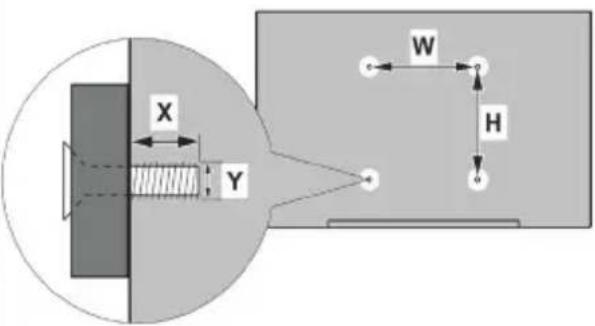
| A B C D E | ||||||
| English | VESA WALL MOUNT MEASUREMENTS | Hole Pattern Sizes (mm) Screw Sizes Length (X) Thread (Y) | ||||
| Deutsch | MASSANGABEN FÜR VESA-WANDMONTAGE | Lochmustergrößen (mm) | Schraubengrößen | Länge (X) | Gewinde (Y) | |
| Français | DIMENSIONS DU SUPPORT DE FIXATION MURALE VESA | Dimensions des modèles de trous de montage (mm) | Dimensions des vis | Longueur (X) | Filetage (Y) | |
| Italiano | Misurazioni installazione a parete VESA | Dimensioni schema foro (mm) | Dimensioni vite | Lunghezza (X) | Filettatura (Y) | |
| Português | MEDIÇÕES DE MONTAGEM MURAL VESA | Dimensões do molde de furação (mm) | Tamanhos do parafuso | Comprimento (X) | Rosca (Y) | |
| Español | MEDIDAS DEL MONTAJE DE PARED VESA | Tamaños de patrón para agujero (mm) | Tamaños de tornillo | Longitud (X) | Rosca (Y) | |
| Türkçe | VESA DUVARA MONTAJ APARATI ÖLÇÜLERİ | Açılacak Delik Ölçüleri (mm) | Vida Ölçüleri | Uzunluk (X) | Yüzey (Y) | |
| Еллэнvik | ΔΙΑΣΤΑΣΕΙΣ ΒΑΣΗΣ ΤΟΙΧΟΥ VESA | Μεγέθη σχήματος οπών (mm) | Μεγέθη βιδών | Μήκος (X) | Σπείρωμα (Y) | |
| Polski | WYMIARY DO MONTAŻU NAŚCIENNEGO VESA | Rozmiary szablonu otworów (mm) | Rozmiary wkrętów | Długość (X) | Gwint (Y) | |
| čeština | ROZMĚRY DRŽÁKU NA ZEŐ VESA | Rozměry velikosti děr (mm) | Rozměry šroubů | Délka (X) | Závit (Y) | |
| Magyar | VESA FALI TARTÓ MÉRETEK | Lyukak méretének nagysága(mm) | Csavar méret | Hossz (X) | Menet (Y) | |
| Română | MĂSURĂTORI SUPORT PERETE VESA | Dimensiuni tipar gaură (mm) | Dimensiuni şuruburi | Lungime (X) | Filet (Y) | |
| Svenska | VESA VÄGGMONTERINGSMÄTT | Hålmönsterstorlear (mm) | Skruvstorlekar | Längd (X) | Trád (Y) | |
| Nederlands | VESA WANDMONTAGE METINGEN | Grootte booropening (mm) | Schroefgroote | Lengte (X) | Draad (Y) | |
| Suomi | VESA-SEINĂASENNUKSEN MITAT | Reikäkuvion koot (mm) | Ruuvinkoot | Pituus (x) | Kierre (Y) | |
| Norsk | VESA VEGGMONTERINGSMÄL | Hullmønster størrelser (mm) | Skruestørrelser | Lengde (x) | Trád (Y) | |
| Dansk | VESA VÆGMONTERINGS-MÄL | Hulmønster-størrelser (mm) | Skruestørrelser | Længde(X) | Trád (Y) | |
| Русский | РАЗМЕРЫ НАСТЕННОГО КРЕПЛЕНИЯ VESA | Размеры системы отверстий | Размеры винтов | Длина(X) | Резьба (Y) | |
| беларуская | ПАМЕРЫ НАСЦЕННАГА МАЦАВАННЯ VESA | Памеры сістэмы адтулин | Памеры вінтоў | Дайжыня (X) | Разьба (Y) | |
| македонски | МЕРКИ ЗА МОНТИРАЊЕ НА СИД ЗА „BECA” | Шема на големини на дупката (мм) | Големина на шрафот | Должина (X) | Навој (Y) | |
| українська | РОЗМИРИ НАСТИННОГО КРИПЛЕННЯ VESA | Відстань між кріпильними отворами, мм | Розміри гвинтів | Довжина (X) | Діаметр різьби (Y) | |
| Srpski | DIMENZIJE VESA ZIDNOG NOSAČA | Dimenzije šablona za bušenje | Dimenzije zavrtnjeva | Dužina (X) | Navoj (Y) | |
| Slovenčina | ROZMERY DRŽIAKA NA STENU VESA | Rozmery velkosti dier (mm) | Rozmery skrutiek | Dížka (X) | Závit (Y) | |
| Slovenščina | MERE STENSKEGA NOSILCA VESA | Velikosti vzorca lukeni (mm) | Velikosti vijakov | Dolžina (X) | Navoi (Y) | |
| Hrvatski | VESA MJERE ZIDNOG DRŽAČA | Veličine uzorka otvora (mm) | Veličine vijka | Dužina (X) | Navoji (Y) | |
| Bosanski | DIMENZIJE VESA ZIDNOG NOSAČA | Dimenzije šablona za bušenje | Dimenzije vijaka | Dužina (X) | Navoj (Y) | |
| Български | РАЗМЕРИ ЗА КОМПЛЕКТ ЗА МОНТАЖ НА СТЕНА VESA | Размери на отвора (mm) | Размер на болта | Дължинат (X) | Резба (Y) | |
| Lietuvių | VESA TVIRTINIMO PRIE SIENOS MATAVIMAI | Angos šablono dydis (mm) | Varžtu dydis | Igis (X) | Sriegis (Y) | |
| Latviešu | VESA SIENAS STIPRINĀJUMA IZMĚRI | Caurumu šablona izmērs (mm) | Skrūyju izmēri | Garums (X) | Vitne (Y) | |
| Eesti | VESA SEINALE KINNITAMISE MÖÖDUD | Kruvi suuruse mõõt (mm) | Kruvi suurus | Körgus(x) | Keere (Y) | |
| Shqip | PĚRMASAT E NJĘSISĘ SĘ MONTIMIT NĘ MUR VESA | Madhësitę modele të vrimave (mm) | Madhësitę e vidhave | Gjatësia (X) | Filetimi (Y) | |
| عربية | مfaceيسي للتشبیت على الجدار | (م) أffects Animation TNOW (م) | أffects Animation TNOW (م) | (Х) الطول (X) | (У) اсен (Y) | |
| النام | VESA विद्यारी प्रत्यारी प्रत्यारी प्रत्यारी प्रत्यारी प्रत्यारी प्रत्यारी प्रत्यारी प्रत्यारी प्रत्यारी प्रत्यारी प्रत्यारी प्रत्यारी प्रत्यामी | (م) (م) (م) (م) (م) (م) (م) (م) (م) (م) (م) (م) (م) (م) (م) (م) (م) (م) (م) (م) (م) (م) (م) (م) (م) (م) (م) (م) (م) (م) (م) (م) (م) (م) (м) (م) (م) (م) (م) (م) (م) (م) (م) (م) (م) (م) (م) (م) (م) (م) (م) (م) (م) (م) (م) (م) (م) (م) (م) (م) (م) (م) (م) (م) (م) (م) (م) (م 1) (م) (م) (م) (م) (م) (م) (م) (م) (م) (م) (م) (م) (م) (م) (م) (م) (م) (م) (م) (م) (م) (م) (م) (م) (م) (م) (م) (م) (م) (م) (م) (م) (م.)(م) (م) (م) (م) (م) (م) (م) (م) (م) (م) (م) (م) (م) (م) (م) (م) (م) (م) (م) (م) (م) (م) (م) (م) (م) (م) (م) (م) (م) (م) (م) (م) (م) (ر) (م) (م) (م) (م) (م) (م) (م) (م) (م) (م) (م) (م) (م) (م) (م) (م) (م) (م) (م) (م) (م) (م) (م) (م) (م) (م) (م) (م) (م) (م) (م) (م) (م). | ||||
TR: İşbu belgede; ETA, a.s., telsiz ekipmanı tipi TFT IDTV'nin 2014/53/AB sayılı direktife uygun olduğunu beyan eder. AB uygunluk beyanının tam metni internet adresinde mevcuttur: doc.vosshub.com
EN: Hereby, ETA, a.s., declares that the radio equipment type TFT IDTV is in compliance with Directive 2014/53/EU. The full text of the EU declaration of conformity is available at the following internet address: doc.vosshub.com
BG: С настоящото ETA, a.s., декларира, че този тип радиосъоръжение TFT IDTV е в съответствие с Директива 2014/53/EC. Цялостният текст на EC декларацията за съответствие може да се намери на следния интернет адрес: doc.vosshub.com
CZ: Tímto ETA, a.s., prohlašuje, že typ rádiového zařízení TFT IDTV je v souladu se směrnící 2014/53/EU. Úplné znění EU prohlášení o shodě je k dispozici na této internetové adrese: doc.vosshub.com
DA: Hermed erklærer ETA, a.s., at radioudstyrstypen TFT IDTV er i overensstemmelse med direktiv 2014/53/EU. EU-overensstemmelseserklæringens fulde tekst kan findes på følgende internetadresse: doc.vosshub.com
DE: Hiermit erklärt ETA, a.s., dass der Funkanlagentyp TFT IDTV der Richtlinie 2014/53/EU entspricht. Der vollständige Text der EU-Konformitätserklärung ist unter der folgenden Internetadresse verfügbar: doc.vosshub.com
EL: Με την παρούσα ο/η ETA, a.s., δηλώνει ότι ο
ραδιοεξοπλισμός TFT IDTV πληροί την οδηγία
2014/53/ΕΕ. Το πλήρες κείμενο της δήλωσης
συμμόρφωσης ΕΕ διατίθεται στην ακόλουθη
ιστοσελίδα στο διαδίκτυο: doc.vosshub.com
ES: Por la presente, ETA, a.s., declara que el tipo de equipo radioeléctrico TFT IDTV es conforme con la Directiva 2014/53/UE. El texto completo de la declaración UE de conformidad está disponible en la dirección Internet siguiente: doc.vosshub.com
ET: Käesolevaga deklareerib ETA, a.s., et käesolev raadioseadme tüüp TFT IDTV vaštab direktiivi 2014/53/EL nõuetele. ELi vaštavusdeklaratsiooni täielik tekst on kättesaadav järgmisel internetiaadressil: doc.vosshub.com
FI: ETA, a.s., vakuuttaa, että radiolaitetyyppi TFT IDTV on direktiivin 2014/53/EU mukainen. EU-vaatimustenmukaisuusvakuutuksen täysimittainen teksti on saatavilla seuraavassa internetosoitteessa: doc.vosshub.com
FR: Le soussigné, ETA, a.s., déclare que l'équipement radioélectrique du type TFT IDTV est conforme à la directive 2014/53/UE. Le texte complet de la déclaration UE de conformité est disponible à l'adresse internet suivante: doc.vosshub.com
HR: ETA, a.s., ovime izjavljuje da je radijska oprema tipa TFT IDTV u skladu s Direktivom 2014/53/EU. Cjeloviti tekst EU izjave o sukladnosti dostupan je na sljedećoj internetskoj adresi: doc.vosshub.com
HU: ETA, a.s., igazolja, hogy a TFT IDTV típusú rádióberendezés megfelel a 2014/53/EU irányelvnek. Az EU-megfelelőségi nyilatkozat teljes szövege elérhető a következő internetes címen: doc.vosshub.com
IT: Il fabbricante, ETA, a.s., dichiara che il tipo di apparecchiatura radio TFT IDTV è conforme alla direttiva 2014/53/UE. Il testo completo della dichiarazione di conformità UE è disponibile al seguente indirizzo Internet: doc.vosshub.com
LT: Aš, ETA, a.s., patvirtinu, kad radijo jrenginių tipas TFT IDTV atitinka Direktyvą 2014/53/ES. Visas ES atitikties deklaracijos tekstas prieinamas šiuo interneto adresu: doc.vosshub.com
LV: Ar šo ETA, a.s., deklarē, ka radioiekārta TFT IDTV atbilst Direktīvai 2014/53/ES. Pilns ES atbilstības deklarācijas teksts ir pieejams šādā interneta vietnē: doc.vosshub.com
MT: B'dan, ETA, a.s., niddikjara li dan it-tip ta' taghmir tar-radju TFT IDTV huwa konformi mad-Direttiva 2014/53/UE. It-test kollu tad-dikjarazzjoni ta' konformità tal-UE huwa disponibbli f'dan l-indirizz tal-Internet li ğej: doc.vosshub.com
NL: Hierbij verklaar ik, ETA, a.s., dat het type radioapparatuur TFT IDTV conform is met Richtlijn 2014/53/EU. De volledige tekst van de EU-conformiteitsverklaring kan worden geraadpleegd op het volgende internetadres: doc.vosshub.com
PL: ETA, a.s., niniejszym oświadcza, że typ urządzenia radiowego TFT IDTV jest zgodny z dyrektywą 2014/53/UE. Pełny tekst deklaracji zgodności UE jest dostępny pod następującym adresem internetowym: doc.vosshub.com
PT: O(a) abaixo assinado(a) ETA, a.s., declara que o presente tipo de equipamento de rádio TFT IDTV está em conformidade com a Diretiva 2014/53/UE. O texto integral da declaração de conformidade está disponível no seguinte endereço de Internet: doc.vosshub.com
RO: Prin prezenta, ETA, a.s., declară că tipul de echipamente radio TFT IDTV este în conformitate cu Directiva 2014/53/UE. Textul integral al declarației UE de conformitate este disponibil la următoarea adresă internet: doc.vosshub.com
SK: ETA, a.s., týmto vyhlasuje, že rádiové zariadenie typu TFT IDTV je v súlade so smernicou 2014/53/EÚ. Úplné EU vyhlásenie o zhode je k dispozícii na tejto internetovej adrese: doc.vosshub.com
SL: ETA, a.s., potrjuje, da je tip radijske opreme TFT IDTV skladen z Direktivo 2014/53/EU. Celotno besedilo izjave EU o skladnosti je na voljo na naslednjem spletnem naslovu: doc.vosshub.com
SV: Härmed försäkrar ETA, a.s., att denna typ av radioutrustning TFT IDTV överensstämmer med direktiv 2014/53/EU. Den fullständiga texten till EU-försäkran om överensstämmelsefinns på följande webbadress: doc.vosshub.com