
FMT 350 CHARGE - FM Transmitter HYUNDAI - Free user manual and instructions
Find the device manual for free FMT 350 CHARGE HYUNDAI in PDF.


| Product Type | FM Transmitter |
| Brand | Hyundai |
| Model | FMT 350 CHARGE |
| Power Supply | 12-24V DC from car cigarette lighter socket |
| Output | 5V/1A for charging external devices |
| Frequency Range | 87.6 MHz - 107.9 MHz |
| Preset Channels | 204 |
| Supported Audio Formats | MP3, WMA |
| Playback Sources | SD Card (max 32GB), USB Flash Drive (max 32GB), Line-in |
| Play Modes | Repeat All, Random, Intro, Normal, Repeat One, Folder, Repeat Folder |
| Equalizer Modes | Natural, Rock, Pop, Classic, Soft, Jazz, DBB |
| Display | Large LCD showing frequency, track info, song name and lyrics |
| Remote Control | Infrared remote included |
| Additional Functions | SD card reader (via USB to PC), folder navigation, multi-language display |
| Dimensions (approx) | 10 x 5 x 3 cm |
| Weight (approx) | 100 g |
| Safety | Keep away from water; no user-serviceable parts; plastic bag suffocation hazard |
| Maintenance | Wipe with dry cloth; do not use near water |
| Spare Parts / Repairability | No consumer-replaceable parts; contact authorized service |
Frequently Asked Questions - FMT 350 CHARGE HYUNDAI
User questions about FMT 350 CHARGE HYUNDAI
0 question about this device. Answer the ones you know or ask your own.
Ask a new question about this device
Download the instructions for your FM Transmitter in PDF format for free! Find your manual FMT 350 CHARGE - HYUNDAI and take your electronic device back in hand. On this page are published all the documents necessary for the use of your device. FMT 350 CHARGE by HYUNDAI.
USER MANUAL FMT 350 CHARGE HYUNDAI
- Play & Transmit music from SD CARD & USB Disk into your Car FM Radio or other FM Radios.
- Support Playback of MP3/WMA format files directly from your SD Card (Max32GB, Not Included), USB Flash Drive (Max 32GB, Not included).
- With Line-in function.
- Car charger, output 5V/1A. Compatible with iPod/iPhone, USB cell phone or other USB devices.
- 204 Preset FM Channel Stations can be set within the frequency range from 87.6 MHz to 107.9 MHz; E.i.r.p -54.dBm.
- Support Folder function (you can save your music files in different folders on your memory card/stick). 7 kinds of play modes (Repeat all, Random, Intro, Normal, Repeat one, Folder, Repeat folder. The songs can be played under the specified mode).
• Support 7 kinds of EQ: Natural, Rock, Pop, Classic, Soft, Jazz, DBB.
• Support Multi-Languages display. - Large LCD Display indicates the frequency, track numbers, names of song and lyrics.
- With SD card reader function, you can download or delete files via computer after connected this device to computer by universal USB cable (Not included).
- Powered by 12-24V DC power supply from your Car Cigarette Lighter Socket.
- Fully Adjustable joint for Flexible use.
- With Infrared Remote Control.
INSTRUCTIONS ON HOW TO USE YOUR FM TRANSMITTER:
- Insert this FM transmitter into your vehicle's cigarette lighter or power port.
- Tune to your radio to a desired FM frequency, then match that same frequency on to the FM transmitter by using the buttons on the unit or on the remote control.
- Plug your compatible SD Card(Max 32GB, Not Included) into the SD port or USB Flash Drive (Max 32GB, Not Included) into the USB port of your FM Transmitter.
- One key operation on REPEAT MODE and FOLDER SELECTION Function. Under playing music, press one key, which on the left side, It shifts to kinds of repeat mode; Under pause music, press one key, which on the left side, you can select the folder music directly for playing.
QUICK GUIDE:
| OPERATION GUIDE | FM TRANSMITTER REMOTE CONTROLLER | |
| 1.How to play and stop the music | Press “PLAY” Button : Play the music.Second Press “PLAY” Button: Stop. | Press PLAY/PAUSE Button. |
| 2.How to adjust the Volume | Long Press “▶button: Increase the Volume; Long press “◀Button: Decrease the Volume | Press “+” Increase the Volume;Press “-” reduce the Volume |
| 3.How to change the frequency | Press “CH” button first, then press “▶increase the frequency.Press “◀decrease the frequency. | Press “CH+” button: Increase 0.1MHZ ; Press “CH-” button: reduce 0.1MHZ; Or press the number of the frequency what you desired and then press “CH+” to confirm. |
| 4.How to choose music | Short Press “▶Button: Play the next song; Short Press “◀Button: Play the previous song; | Press “▶Button: Play the next song; Press “◀Button: Play the previous song; Or press the serial number of the song ,3seconds later it will be player automatic. |
| 5.How to set EQ | Cannot be controlled by the Transmitter, only from the remote. | Press “EQ” button to switch your favorite EQ. |
| 6.How to change repeat mode | Under playing music, press one key ,which on the left side, It shifts to kinds of repeat mode. | Press “◀button. |
| 7.How to change language | Long press “CH”, then choose “Language” option by pressing “▶and “◀Short press “Language” to choose desired language by pressing “▶and “ ”, then press “CH” to confirm. | Cannot be controlled by the remote, only from the Transmitter. |
| 8.How to change contrast | Long press “CH”, then choose “Contrast” option by pressing “▶and “◀Short press “Contrast” to adjust the extent by pressing “▶and “ ”, then press “CH” to confirm. | Cannot be controlled by the remote, only from the Transmitter. |
| 9.How to switch folder | Under pause music ,press one key ,which on the left side , you can select the folder music directly for playing. | Press “folder+” or “folder -”. |
WE RESERVE THE RIGHT TO CHANGE TECHNICAL SPECIFICATIONS.
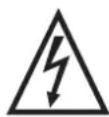
WARNING: DO NOT USE THIS PRODUCT NEAR WATER, IN WET AREAS TO AVOID FIRE OR INJURY OF ELECTRIC CURRENT. ALWAYS TURN OFF THE PRODUCT WHEN YOU DON'T USE IT OR BEFORE A REVISION. THERE AREN'T ANY PARTS IN THIS APPLIANCE WHICH ARE REPARABLE BY CONSUMER. ALWAYS APPEAL TO A
QUALIFIED AUTHORIZED SERVICE. THE PRODUCT IS UNDER A DANGEROUS TENTION.


TO AVOID DANGER OF SUFFOCATION, KEEP THE PLASTIC BAG AWAY FROM BABIES AND CHILDREN. DO NOT USE THIS BAG IN CRIBS, BEDS, CARRIAGES OR PLAYPENS. THIS BAG IS NOT A TOY.
Disposal of old Electrical & Electronic Equipment (Applicable in the European Union and other European countries with separate collection systems)
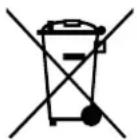

This symbol on the product or on its packaging indicates that this product shall not be treated as household waste. Instead it shall be handed over to the applicable collection point for the recycling of electrical and electronic equipment. By ensuring this product is disposed of correctly, you will help prevent potential negative consequences for the environment and human health, which could otherwise be caused by inappropriate waste handling of this product. The recycling of materials will
help to conserve natural resources. For more detailed information about recycling of this product, please contact your local Civic Office, your household waste disposal service or the shop where you purchased the product.
Hereby, ETA a.s. declares that the radio equipment type FMT350CHARGE is in compliance with Directive 2014/53/EU. The full text of the EU declaration of conformity is available at the following internet address: http://www.hyundai-electronics.cz/declaration_of_conformity
HASZNÁLATI UTASÍTÁS
JELLEMZÖK:
ISMÉTLÉS MÓD ÉS MAPPA KIVÁLASZTÁS FUNKCIÓ EGY GOMB HASZNÁLATÁVAL 1.4" MÉRETÜ KIJELZÖ A ZENE SZÁM NEVÉNEK ÉS SZÖVEGÉNEK MEGJELENÉSÉVEL
Licensed by Hyundai Corporation, Korea.