
SSS 3400K - Speaker SENCOR - Free user manual and instructions
Find the device manual for free SSS 3400K SENCOR in PDF.


Pick your language and provide your email: we'll send you a specifically translated version.
| Product Type | Wireless Karaoke Speaker |
| Brand | Sencor |
| Model | SSS 3400K |
| Color | Black and Red |
| Dimensions (approx.) | 300 x 200 x 150 mm |
| Weight (approx.) | 2.1 kg |
| Power Source | AC Adapter / Built-in Rechargeable Battery |
| Battery Life (approx.) | 4-6 hours at medium volume |
| Speaker Type | Full-range stereo with bass reflex |
| Output Power | 20W RMS |
| Wireless Connectivity | Bluetooth 5.0 |
| Inputs | 3.5mm AUX, Coaxial (RCA), Microphone (6.3mm), USB, SD Card |
| Media Playback | MP3 via USB/SD Card up to 32GB |
| Microphone Included | Yes, 2 wireless microphones |
| Controls | Volume, Echo, Mic Volume, Playback, Mode |
| Additional Features | TWS pairing, FM radio, LED light effects |
| Waste Disposal | Do not dispose with household waste; recycle at designated collection points |
Frequently Asked Questions - SSS 3400K SENCOR
How do I pair my phone with the speaker via Bluetooth?
Turn on the speaker and set it to Bluetooth mode by pressing the Mode button. On your phone, enable Bluetooth and search for SSS 3400K. Select it to pair. If prompted, enter PIN 0000.
What is the maximum SD card capacity supported?
The speaker supports SD cards up to 32GB formatted in FAT32, with MP3 files only.
Can I connect two speakers together?
Yes, this speaker supports TWS (True Wireless Stereo) pairing. Enable TWS on both speakers (usually by double-pressing the Pair button) to create a stereo pair.
How do I use the microphone?
Insert the included wireless microphones' receivers into the microphone input jacks (6.3mm). Turn on the microphones and adjust the Mic Volume and Echo knobs on the speaker to your preference.
How long does the battery last?
The built-in rechargeable battery provides approximately 4-6 hours of playtime at medium volume. Charging time is about 3-4 hours.
Can I use the speaker while charging?
Yes, you can use the speaker while it is connected to the AC adapter. However, continuous use while charging may prolong charging time.
What should I do if there is no sound?
Check that the volume is turned up on both the speaker and your source device. Ensure the correct input mode is selected (Bluetooth, AUX, etc.). If using a microphone, check that the microphone is turned on and the Mic Volume is not at minimum.
How do I clean and maintain the speaker?
Wipe the speaker with a soft, dry cloth. Do not use abrasive cleaners or solvents. Avoid exposing the speaker to extreme temperatures or moisture.
What is the warranty period?
Sencor typically offers a 2-year warranty for this product. Keep your receipt for warranty claims.
Where can I dispose of this product at end of life?
Do not dispose of this product with household waste. Please recycle it at an appropriate WEEE collection point in your area.
User questions about SSS 3400K SENCOR
0 question about this device. Answer the ones you know or ask your own.
Ask a new question about this device
No questions yet. Be the first to ask one.
Download the instructions for your Speaker in PDF format for free! Find your manual SSS 3400K - SENCOR and take your electronic device back in hand. On this page are published all the documents necessary for the use of your device. SSS 3400K by SENCOR.
USER MANUAL SSS 3400K SENCOR
natural_image
Black and red portable water heater with red earbuds, plus a pair of red microphones (no visible text or symbols)EN User Manual Wireless karaoke speaker
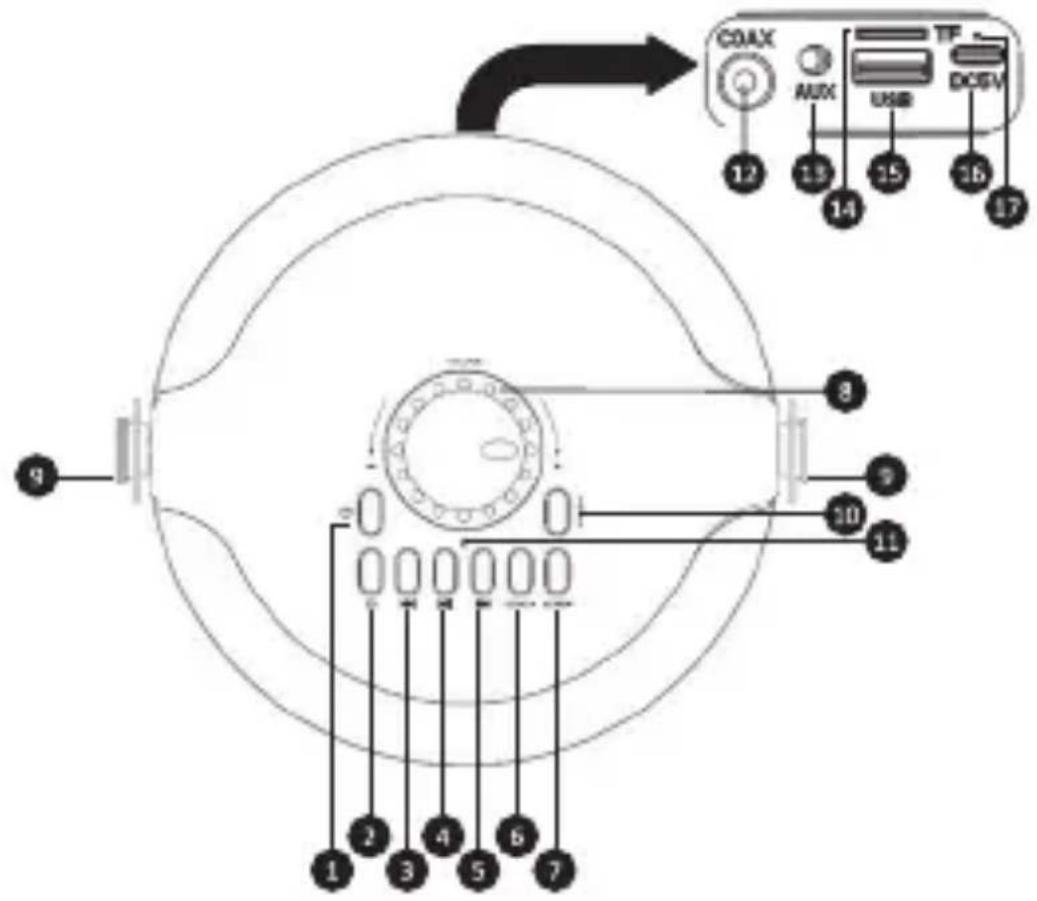
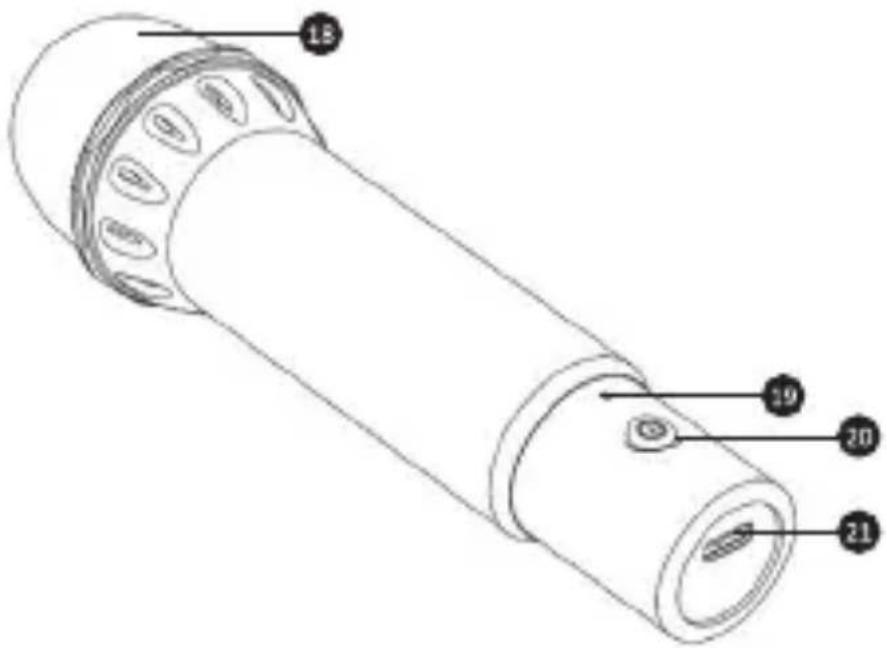
CZ - 5
Card Slot (up to 32GB / MP3)
Koaxiální vstup
Ostatní:
natural_image
Symbol of a trash bin crossed with no text or numbers, representing waste sorting or disposal (no text present)


Table of contents
Click a title to access it
Manual assistant
Powered by Anthropic
Waiting for your message
Product information
Brand : SENCOR
Model : SSS 3400K
Category : Speaker