
RESONEX MAXI - Speaker SENCOR - Free user manual and instructions
Find the device manual for free RESONEX MAXI SENCOR in PDF.


| Product Type | Water-resistant Bluetooth speaker with IPX7 protection class |
| Dimensions | 340 x 164 x 154 mm |
| Weight | 2.8 kg |
| Battery | Built-in rechargeable Li-Ion 10,000 mAh (36 Wh) |
| Charging Time | Up to 3 hours (with PD 30W adapter recommended) |
| Playback Time | Up to 10 hours at 50% volume |
| Bluetooth Version | 5.3 |
| Bluetooth Range | Up to 10 meters |
| Bluetooth Codec | SBC |
| Bluetooth Profiles | AVRCP, A2DP, HFP |
| Maximum Output Power | 100 W (impedance 4 Ω) |
| Speakers | 4 speakers + 2 passive radiators |
| Frequency Response | 20 Hz – 20 kHz |
| Total Harmonic Distortion | ≤ 1% |
| Water Resistance | IPX7 (immersible up to 1 m for 30 minutes) |
| True Wireless Party Mode (TWPM) | Connect up to 99 RESONEX speakers |
| Inputs | Bluetooth, AUX 3.5 mm, USB-A playback, USB-C charging |
| Power Bank Function | USB-A output 5 V / 2 A |
| LED Lighting | Speaker and ambient effects, multiple modes |
| Accessories Included | USB-C charging cable, detachable strap, user manual |
| Cleaning Instructions | Disconnect power, clean with a soft dry cloth only |
| Safety Notes | Keep away from heat sources, do not disassemble, use only original accessories |
Frequently Asked Questions - RESONEX MAXI SENCOR
User questions about RESONEX MAXI SENCOR
0 question about this device. Answer the ones you know or ask your own.
Ask a new question about this device
Download the instructions for your Speaker in PDF format for free! Find your manual RESONEX MAXI - SENCOR and take your electronic device back in hand. On this page are published all the documents necessary for the use of your device. RESONEX MAXI by SENCOR.
USER MANUAL RESONEX MAXI SENCOR
Water-resistant Bluetooth speaker with IPX7 protection class
This product has been designed with the utmost safety in mind. However, incorrect use may lead to electric shock or fire. This is why users should observe the following instructions when using this device.
This device uses a semiconductor unit and contains no user serviceable parts. Do not disassemble this device, otherwise you are exposed to the risk of electric shock. If any damage to this product occurs, please have this product repaired by a qualified service technician.
Power Supply
Power supply of this unit must be match the serial plate data.
Heat Source
Keep this unit out of heat sources like stove or direct sunlight.
Cleaning
Before cleaning, please disconnect the power supply. For cleaning, don't use liquid detergents or caustic liquids - just clean the unit with a soft cloth.
Heavy Objects
Do not place heavy objects on the unit, otherwise damage might occur.
Connecting Other Devices
Before connecting other devices to this unit, please make sure to disconnect power. Otherwise damage to the unit or personal injury might occur.
Faults Requiring Repair
If any of the following problems occurs, please disconnect power to the unit and contact a qualified service technician.
EN-2
A. Power cord or plug is damaged.
B. Liquids or other foreign objects have penetrated inside the product.
C. If the unit does not work even if it's being operated according to the instructions, don't press any buttons other than those described in these instructions.
Otherwise, damage to this unit may occur along with a more demanding repair.
D. This unit has fallen on the ground from a big height.
E. There is a burnt smell emanating from the device.
Maintenance
If you lack the technical knowledge necessary for maintenance, do not attempt to repair the device yourself. By removing the cover, you are exposed to a risk of electric shock. If needed, please contact a qualified service technician.
Replacement of Parts
If you need to replace any part of this unit, ask your service technician to make a replacement for equal spare part models. If other spare part models are used for replacement, serious damage, electric shock or shortening the unit's lifetime may occur.
Safety Check
After completing maintenance, ask the service technician to perform an on-site safety check to ensure that the unit is operating safely.
Note:
Before using this product, read these instructions carefully and keep it well for future use.
PACKAGE CONTENTS
1x BT speaker RESONEX MAXI
1x USB-C charging cable
1x user's manual
1x detachable strap
BT SPEAKER DESCRIPTION
EN-4
BT SPEAKER DESCRIPTION
EN - 5
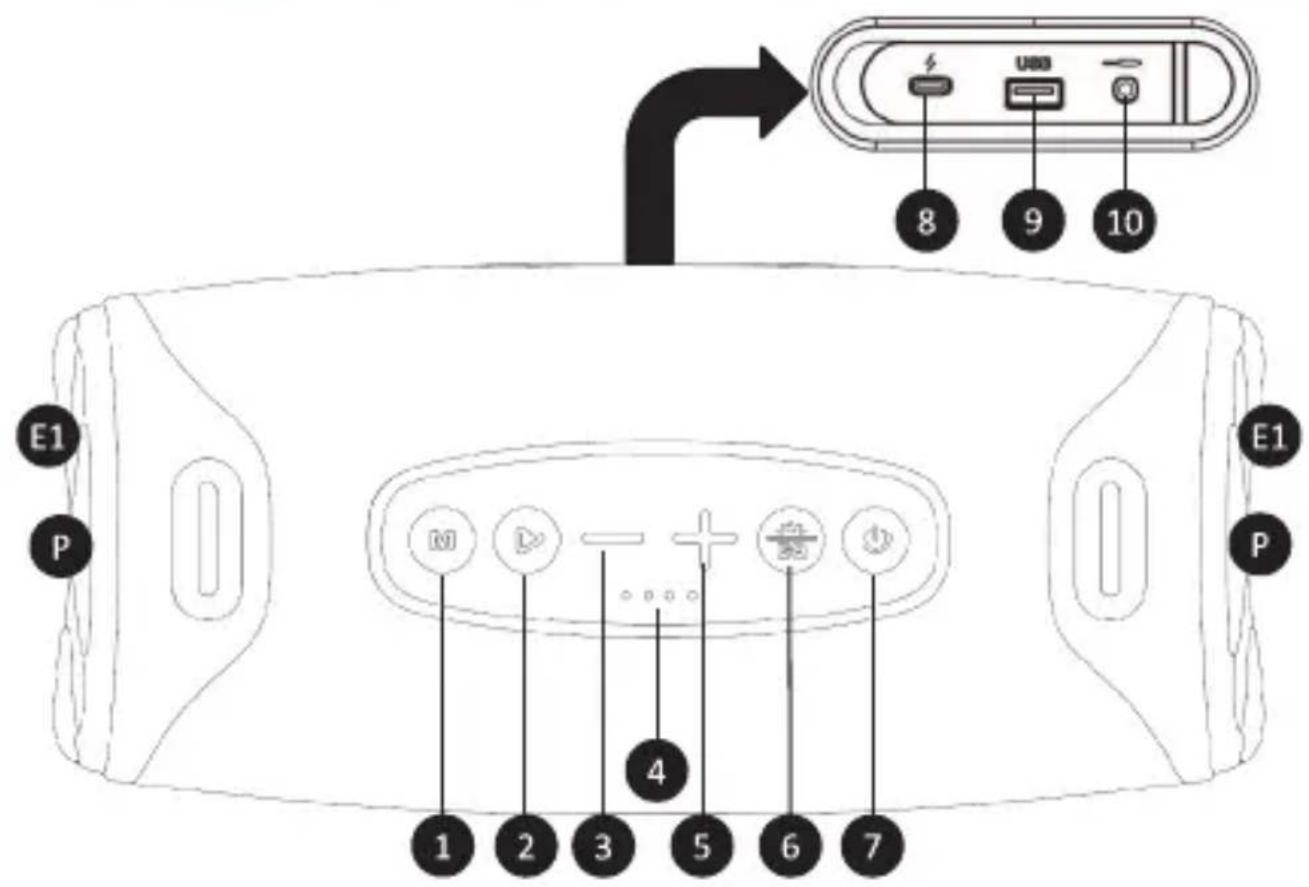
| 1 | “M” button, audio input change |
| 2 | PLAY/PAUSE button (1x press), RESET Bluetooth function (long press) |
| 3 | Previous track button (long press), volume down button (1x press) |
| 4 | Battery status LED |
| 5 | Next track button (long press), volume up button (1x press) |
| 6 | Off/on/change LED effect button (1x press), change equalizer (2x press) |
| 7 | BT speaker ON/OFF button (long press), start TWPM function (1x press) |
| 8 | Charging socket (USB-C) |
| 9 | USB-A for playback from memory device, power bank function |
| 10 | Socket for audio AUX IN mini jack (3.5 mm) |
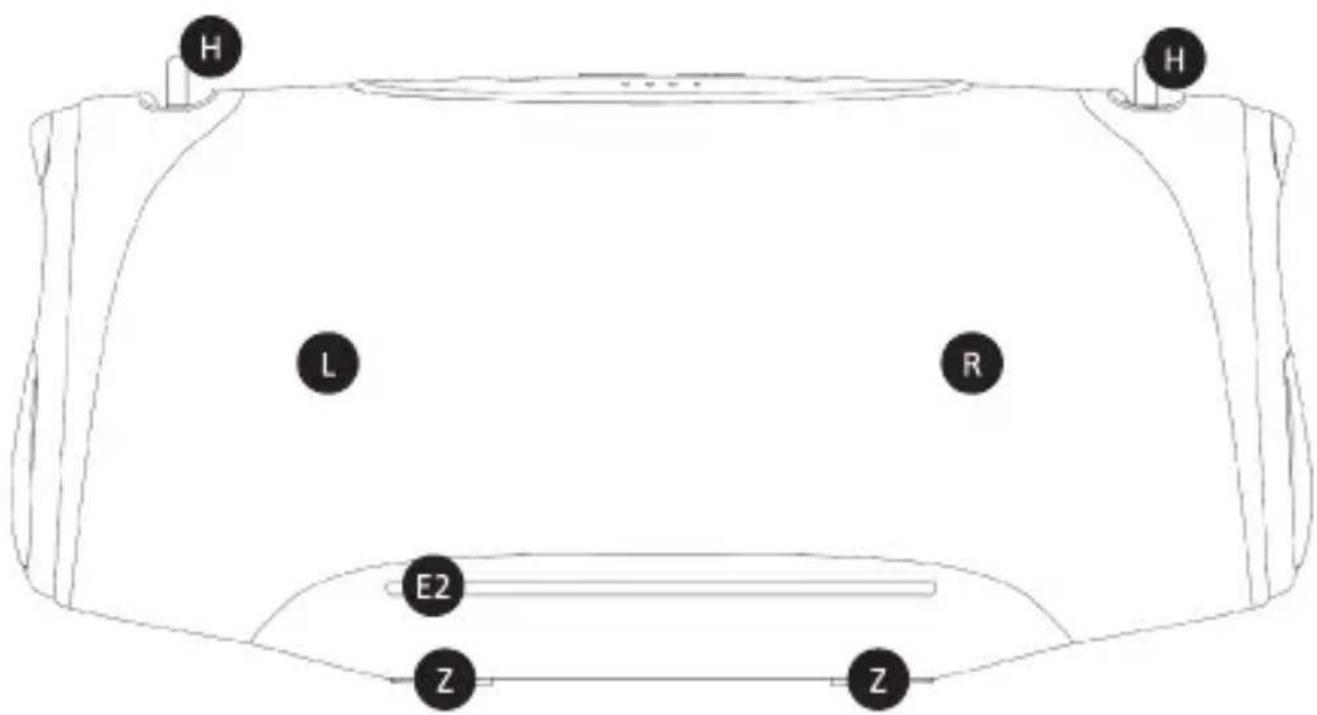
| L | Left channel |
| R | Right channel |
| P | Passive radiator |
| E1, E2 | LED effect |
| H | Device carrying strap grip |
| Z | BT speaker central leg |
Before first use, be sure to read the safety instructions contained in this user's manual carefully.
Before first use, please charge the BT speaker to a maximum level. Hold down the power on button to turn on the BT speaker. Turning on/off is indicated by a sound signal. To turn the BT speaker off, hold down the power on button. Changing the source of the music being played is done by briefly pressing the button "M" when the power is on.
Caution: After a longer period of inactivity, the appliance will turns itself off.
POSITION A - BT SPEAKER TRANSPORT
The speaker offers a horizontal position of placement on a flat surface. The main figure shows the underside of the BT speaker "Z – BT speaker central leg". To carry the BT speaker, use the strap that you attach to the "H" eyelets.
Caution: Always position the device so that it does not endanger the health of persons in the vicinity or cause damage to property.
PAIRING DEVICES VIA BLUETOOTH
Turn on the BT speaker and search for its Bluetooth name "RESONEX MAXI" in the device to be paired, then start the pairing process. If you are requested to enter a pairing code while your device and the BT speaker are pairing, use the code: "0000". To disconnect a paired device, end the pairing session on your mobile device or long press the "M" button. Disconnection will be confirmed by an acoustic signal. Note: To ensure a stable Bluetooth connection, maintain a distance of up to 10 metres between the BT speaker and the connected device. To reset the Bluetooth
function, press and hold the "PLAY/PAUSE" button until the BT speaker switches off. Resetting the Bluetooth function is used when a Bluetooth connection cannot be established.
Caution: Some connected devices support common volume setting. If some of the connected devices do not support this feature, the volume setting will operate separately on each device.
TRUE WIRELESS PARTY MODE "TWPM"
The TWPM broadcast function allows you to connect up to 99 BT speakers of the RESONEX series. Connect your mobile phone to the BT speaker and briefly press the power button. The TWPM function that is running will be announced with a notification tone. On the other BT speakers, press the button to start TWPM and wait until the other BT speakers are connected. All participating BT speakers will transmit sound in STEREO mode, so it is advisable to place them far enough apart within the room. To cancel the function, briefly press the power button again.
Note: For optimum sound quality and room sound, always use the same RESONEX BT speaker models.
Note: The TWPM feature is only available in the Bluetooth mode. It is not possible to pair the device with any other type of BT speaker with TWPM function or within re-editions of products with a different name than RESONEX MIDI, RESONEX MAXI, RESONEX MEGA.
PLAY/PAUSE BUTTON
Press the Play/Pause button to start or pause music playback during Bluetooth connection or while a memory media is inserted.
VOLUME AND TRACK PLAYBACK CONTROL
To control the BT speaker's volume (+/- buttons), use the buttons on the BT speaker. During music playback, you can press and hold the "+" button to jump to the next track playback. To select the previous track, press and hold the "-" button.
LIGHT EFFECTS
The BT loudspeaker is equipped with light effects in the area of passive light emitters "E1" and on the underside "E2". To turn off/on or change the lighting effects, briefly press the "turn off/on/change LED effect" button. In TWPM mode, the LED effects are unified and controlled on a BT speaker that is connected to the mobile device. Other BT speakers do not have the button to change the LED effect active.
TURNING OFF BT SPEAKER NOTIFICATIONS AND ALERTS
The BT speaker has the option of setting two volume levels of alert tones or turning them off. Press the "+" and "-" (volume down and up) buttons simultaneously to activate/deactivate or change the volume of the BT speaker notification and alert tones. When turned off and on, the BT speaker will remember the last selected mode.
Caution: in the off state, no tones will indicate the status of the BT speaker. Charge the BT speaker as a preventive measure. Avoid using the sound at a maximum level.
RESET BUTTON
To reset the BT speaker, press and hold the power button for 8 seconds.
RECOMMENDATION: If there is an unexpected problem with the BT speaker connection or its functions. Reset the BT speaker.
AUDIO AUX IN
The BT speaker is equipped with a 3.5mm jack. Your device can be connected to a BT speaker using an audio cable. First connect the audio plug to your device and then to the BT speaker's jack.
Caution: before connecting your device and BT speaker, make sure that the output signal from your device is at the minimum level (minimum output volume). This will prevent the BT speaker from damage. When the audio cable is connected, the BT speaker does not meet the water ingress protection class.
Note: In this mode, not all functions of the BT speaker are available. The Bluetooth function is not active if the audio jack is connected to the BT speaker.
USB-A PLAYBACK
Insert a USB-A storage device with audio content in the USB slot. When the USB storage device is inserted, the songs are automatically loaded and played. Press the "M"
"change source" button briefly to switch to USB playback mode. Music from the connected storage device will start playing automatically. Please record your music on the storage in the same order as it's to be played back from the BT speaker.
EN - 10
Caution: Due to the variety of devices on the market, compatibility and playback support for all media are not guaranteed. The memory devices you want to connect should be tested in advance and/or formatted as FAT32. The playback of protected media, files or content stored inside them may fail.
POWER BANK FEATURE
The BT speaker can be also used as a Power bank to charge another portable devices. Lift the protective cover of the sockets at the BT speaker's rear and connect your portable device's charging cable to the USB-A port. The charging will take place automatically as long as the BT speaker is turned on. This is a feature that does not replace charging as effective as charging from the original charger adapter.
Caution: for charging, use only charging cables without data transfer capability.
CHARGING THE BT SPEAKER
A fully charged battery provides power for several hours of operation at normal volume levels. A high volume consumes more battery power; therefore, we recommend listening at normal volume levels. To charge the BT speaker, please connect the charging adapter to the mains and then to the BT speaker. The battery status indicator will gradually indicate the battery status during charging. A low battery level will be indicated by an audible alert and LED status indicator.
Recommended charging adapter:
For optimal charging of the RESONEX BT speaker, use a PD charging adapter with a minimum of 30 W. A QC 2.0/3.0 20 W charging adapter can also be used. If you use a normal 5 V, 2 A charging adapter, the BT speaker will also charge, but at a significantly slower rate.
LED charging indicator:
| LED indicator | Battery charge level |
| 1 | 0 % – 25 % |
| 2 | 25 % – 50 % |
| 3 | 50 % – 75 % |
| 4 | 75 % – 100 % |
Caution: For charging, use only the original accessories supplied with the appliance. To achieve the maximum battery lifetime, it is best not to start charging until the low battery audible alert is output. Charge continuously until fully charged. If the battery's operating time is very short, the battery life is consumed, and we recommend having the battery replaced at an authorised service centre. The LED battery indicator on the BT speaker is indicative and depends on the condition of the battery.
Recommendation: If the device is not to be used for an extended period of time, we recommend to fully charge the battery once every two to three months. Store the device with a charged battery to prevent irreversible damage to the battery (loss of capacity).
INGRESSION PROTECTION (IPX7)
The unit is resistant against water thus allowing you to listen to your music in bath, shower, on the beach or by the pool. IPX7 water resistance guarantees the unit's function with slight splashing or immersing in water 1 m deep for up to 30 minutes. Full immersion is not recommended because of possible loss of the audio playback signal.
Note: Always remember to seal the BT speaker inputs (No. 8–10 in the picture "BT speaker description") with the original gasket and make sure that the gasket is not damaged. Never charge the unit during possible contact with fluids. The unit is designed for contact with clean water only without any additives. Avoid exposing the device to contaminated or industrially treated liquids (such as lemonade, sea/salt water, oils, etc.).
TECHNICAL SPECIFICATIONS
Features:
Water-resistant speaker with IPX7 protection class The speaker cover is made of premium fabric Broadcast function with up to 99 devices connected LED speaker lighting and ambient lighting LED volume and battery indication BASS BOOST button (EQ)
Sound:
Maximum speaker output 100 W (Impedance: 4 Ω) 4 speakers + 2 passive radiators Frequency response: 20 Hz – 20 kHz Total harmonic distortion: ≤ 1%
EN - 13
Inputs:
Bluetooth Audio 5.3
AUX audio input (3.5mm stereo connector)
USB playback
Power bank function 5V/2A
Other:
Built-in rechargeable battery: 10,000 mAh Li-Ion (36 Wh)
Playback time up to 10 hours (at 50% volume)
USB-C charging (PD support)
Max. charging time 3 hours
Accessories: USB-C charging cable, strap, user manual
Dimensions: 340 x 164 x 154 mm
Weight: 2.8 kg
| Bluetooth | Version | 5.3 |
| Maximum Transmitter Power | 100 mW at 2.4 GHz – 2.4835 GHz | |
| Codec | SBC | |
| Profiles | AVRCP,A2DP,HFP |
INSTRUCTIONS AND INFORMATION ON THE DISPOSAL OF PACKAGING MATERIALS
Take the packaging to a collection centre for recycling.
DISPOSAL OF DISCARDED ELECTRICAL AND ELECTRONIC EQUIPMENT
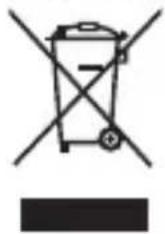
This symbol on the product, accessory or packaging means that the product must not be disposed of in normal household waste. Please dispose of this product in a collection yard designated for the recycling of electrical and electronic equipment. In some EU countries or other European countries, you can return the old product to your local retailer when you buy a new equivalent product. Proper disposal of this product helps to conserve valuable natural resources and prevent potential negative impacts on the environment and human health that could result from improper disposal. For more information, contact your local authorities or the nearest collection centre. You may be fined by law for improper disposal of this type of waste.
For companies in the EU
If you need to dispose of electrical or electronic equipment, ask your dealer or supplier for the necessary information.
Disposal in Countries Outside the European Union
Ask your local authorities or your dealer for information on proper disposal.

This product meets the EU requirements.
FAST ČR, a.s. hereby declares that the type of radio equipment RESONEX MAXI complies with the Directive 2014/53/EU. The full text of the EU Declaration of Conformity is available at the following web address: www.sencor.com.
Text, design and technical data are subject to change without notice; we reserve the right to make such changes.
The original version is in Czech.
Manufacturer: FAST ČR, a. s., U Sanitasu 1621, Říčany 251 01, Czech Republic
SENCOR®
EN Warranty conditions
Warranty card is not a part of the device packaging.
This product is warranted for the period of 24 months from the date of purchase to the end-user. Warranty is limited to the following conditions, Warranty is referred only to the customer goods using for common domestic use. The claim for service can be applied either at dealer's shop where the product was bought, or at below mentioned authorized service shops. The end-user is obligated to set up a claim immediately when the defects appeared but only till the end of warranty period. The end user is obligated to cooperate to certify the claiming defects. Only completed and clean according to hygienic standards product will be accepted. In case of eligibility warranty claim the warranty period will be prolonged by the period from the date of claim application till the date of taking over the product by end-user, or the date the end-user is obligated to take it over. To obtain the service under this warranty, end-user is obligated to certify his claim with duly completed following documents: receipt, certificate of warranty, certificate of installation.
This warranty is void especially if apply as follows:
■ Defects which were put on sale.
■ Wear-out or damage caused by common use.
The product was damaged by unprofessional or wrong installation, used in contrary to the applicable Instruction manual, used in contrary to legal enactment and common process of use or used for another purpose which has been designed for.
■ The product was damaged by uncared-for or insufficient maintenance.
■ The product was damaged by dirt, accident of force majeure (natural disaster, fire, and flood).
■ Defects on functionality caused by low duality of signal, electromagnetic field interference etc.
■ The product was mechanically damaged (e.g. broken button, fall).
■ Damage caused by use of unsuitable media, fillings, expendable supplies (batteries) or by unsuitable working conditions (e.g. high temperatures, high humidity, quakes).
■ Repair, modification or other failure action to the product by unauthorized person.
■ End-user did not prove enough his right to claim (time and place of purchase)
■ Data on presented documents differs from data on products.
■ Cases when the claiming product cannot be identified according to the presented documents (e.g. the serial number or the warranty seal has been damaged).
Manufacturer:
FAST ČR, a.s., U Sanitasu 1621, Řltany 251 01, Czech Republic
Visit: www.sencor.com for detailed information about authorized service centers.
The original version of the instructions is in the Czech language, other language versions are made by the appropriate translation.
FAST ČR, a.s., U Sanitasu 1621, Ričany CZ-251 01


- Power Supply
- Heat Source
- Cleaning
- Heavy Objects
- Connecting Other Devices
- Faults Requiring Repair
- Maintenance
- Replacement of Parts
- Safety Check
- Note:
- PACKAGE CONTENTS
- POSITION A - BT SPEAKER TRANSPORT
- PAIRING DEVICES VIA BLUETOOTH
- TRUE WIRELESS PARTY MODE "TWPM"
- PLAY/PAUSE BUTTON
- VOLUME AND TRACK PLAYBACK CONTROL
- LIGHT EFFECTS
- TURNING OFF BT SPEAKER NOTIFICATIONS AND ALERTS
- RESET BUTTON
- AUDIO AUX IN
- USB-A PLAYBACK
- POWER BANK FEATURE
- CHARGING THE BT SPEAKER
- Recommended charging adapter:
- INGRESSION PROTECTION (IPX7)
- TECHNICAL SPECIFICATIONS
- Features:
- Sound:
- Inputs:
- Other:
- INSTRUCTIONS AND INFORMATION ON THE DISPOSAL OF PACKAGING MATERIALS
- DISPOSAL OF DISCARDED ELECTRICAL AND ELECTRONIC EQUIPMENT
- For companies in the EU
- Disposal in Countries Outside the European Union
- SENCOR®
- EN Warranty conditions
- Warranty card is not a part of the device packaging.
- This warranty is void especially if apply as follows:
- Manufacturer:
Brand : SENCOR
Model : RESONEX MAXI
Category : Speaker