KR-8000 - Air-conditioner Ravanson - Free user manual and instructions
Find the device manual for free KR-8000 Ravanson in PDF.


| Product type | Air conditioner (evaporative cooler) |
| Model | KR-8000 |
| Brand | Ravanson |
| Power supply | 220-240V ~ 50Hz |
| Nominal power consumption | 65 W |
| Fan power | 54.21 W |
| Maximum fan flow rate | 2.09 m³/min |
| Maximum air speed | 3.57 m/s |
| Fan sound power level | 60.4 dB(A) |
| Standby power consumption | 0 W |
| Protection class | Class II |
| Remote control battery | CR2025 (3V DC) |
| Cooling method | Water evaporation (supports ice packs) |
| Functions | Speed (mid/high/low), Mode (normal/natural/sleep), Swing, Timer (0-8h), Cooling, Humidification, Anion |
| Water tank capacity | Not specified (fill above min. line) |
| Air filter | Removable, clean with neutral detergent |
| Wetted pad | Removable, clean with neutral detergent |
| Ice box included | Yes, 2 pieces |
| Safety features | Thermal cut-off, child safety warnings |
Frequently Asked Questions - KR-8000 Ravanson
User questions about KR-8000 Ravanson
0 question about this device. Answer the ones you know or ask your own.
Ask a new question about this device
Download the instructions for your Air-conditioner in PDF format for free! Find your manual KR-8000 - Ravanson and take your electronic device back in hand. On this page are published all the documents necessary for the use of your device. KR-8000 by Ravanson.
USER MANUAL KR-8000 Ravanson
ENG User's manual The climator
natural_image
White industrial air conditioner unit with digital display and wheels (no visible text or symbols)MODEL:
KR-8000
Producent/Manufacturer/ Výrobce:
Ravanson®
RAVANSON LTD Sp. z o.o.
flowchart
graph LR
    A --> B["MID"]
    B --> C["HIGH"]
    C --> D["LOW"]
    D --> E
Panel sterowania
Before first use, always read the safety instructions and warnings included in this guide.
Failure to observe the below mentioned safety warnings and safety guidelines for may cause to electric shock, fire and/or serious injuries
Keep safety instructions and warnings at hand for future reference.
GENERAL SAFETY GUIDELINES
This appliance is not intended for use by children under the age of 8 or other persons, without assistance or supervision, if their physical, sensory or mental capabilities prevent them from using it safely or by persons without experience and knowledge on the use thereof. People using this product must understand the risks related to the use of the appliance. Do not allow children to use the appliance as a toy. Cleaning and maintenance by children without supervision is not allowed.
Children are not aware of dangers that may arise during the use of electric devices. Keep the appliance and corresponding cord out of the reach of children under the age of 8.
Children should be supervised to ensure that they do not play with the appliance.
Do not operate the appliance with a damaged cord.
Damaged power cord must be replaced by manufacturer, authorized service centre or other qualified persons in order to avoid risk.
The plug must fit the socket.
The plug must not be modified in any way.
Do not allow the power cord to touch sharp edges or hot surfaces.
Damaged cord poses a risk of electric shock.
Do not place the appliance on hot surfaces.
Do not use outside. Do not expose to rain. Protect against humidity.
Do not operate with wet hands.
During operation keep clothing8 long hair away from the moving parts of the appliance.
Do not plug the device in unless it is fully assembled.
Do not remove any parts of the housing.
Do not use the device in the immediate vicinity of a bathtub8 shower or swimming pool.
Prevent the cord and plug from any contact with water or moisture.
Do not spray any liquid on the device.
Unplug the device holding the plug; do not pull the cord.
Unplug the device if it is to be moved or is not going to be used for a longer time.
Do not use the device with the protection grid removed.
Transport in an original package protecting from mechanical damages.
The appliance must be repaired by a qualified person using only original spare parts.
Despite operating the unit in accordance with its intended use and in accordance with all safety guidelines8 it is impossible to eliminate all residual risk factors.
The appliance is intended for home use only.
The appliance should only be used for private use8 as intended for the appliance. This appliance is not intended for commercial use.
Unplug the device before cleaning8 maintenance and filling the tank with water.
5t is recommended to connect the device to the power supply network equipped with a residual current device (RCD) with a switch-off current of 30mA or less.
NOTE! Do not cover the mesh cover of the climator unit.
NOTE! Do not put anything into the protection grid.
!EÚIGNATIŽN
The climator unit is designated for ensuring temperature comfort in a room by means of air blow. The climator unit is a fan-like device.
Thermal comfort is improved by water evaporation. Cooling the air by evaporation is a natural cooling method resembling the effect of wind at a water reservoir which lowers temperature and has a relaxing8 cooling impact on people.
When cold water enters the air, the result is a mixture of air and water particles. This change requires a higher temperature which is why energy or latent heat are taken from water particles that lower the existing air temperature.
Thanks to this function, it is possible also to remove any dust, pollen and other pollutants, ensuring cool, fresh and clean air.
A stronger cooling effect can be obtained by using freezer packs.
The packs should be filled with water in the amount marked on the packaging. Freeze the water (pack) in a household refrigerator and then insert it in cold water in the device tank.
It is also possible to add ice cubes into the device water tank.
OPERATING INSTRUCTIONS
Start-up
ATTENTION!
Make sure that the power source to which the appliance is to be connected is accordant with the parameters specified on the rating plate.
Attention!
Before every use, inspect the device for any signs of mechanical damage. Inspect the power cord. If the power cord is damaged, do not plug the device in.
Attention: cut the power when you pour the water into the tank.
OPERATION
Put plug in the socket, Power indicator light reminding this products in standby mode. Turn on "Button, default setting is in middel speed, Turn it again, products in standby.
- Speed key : Press this key, automatically starting from mid ,high ,low

flowchart
graph LR
    A --> B["MID"]
    B --> C["HIGH"]
    C --> D["LOW"]
    D --> E
-
Mode key “”, default setting is in normal wind. Press this key, automatically setting from normal wind, natural wind, sleep wind
-
Swing key : press this key, the wind direction can swing flatly, and the swing indicator light is on. Press again to cancel the function
Swing the blades transversely by your hands, choosing the wind direction up an down.
-
Timer key: press this key, the timer from 0 to 8 hours, each pressing 1 hour.
-
Cooling key : press this key, start this function, and if you add the freezing ice crystal box in the water tank, air blow out temperature will much more cooling. It cancels this function when you press again.(make sure water level is above min.line)
-
Humidification :press this key, it only can start cool air under low air speed(make sure water level is above min.line)
-
Anion key : Press it to make the room air fresh, if no need this function ,press it again .
THE USE OF REMOTE CONTROL
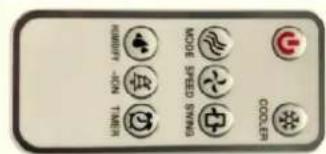
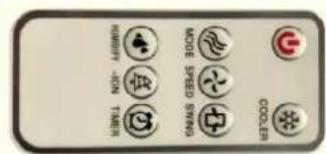
Same operation for remote control
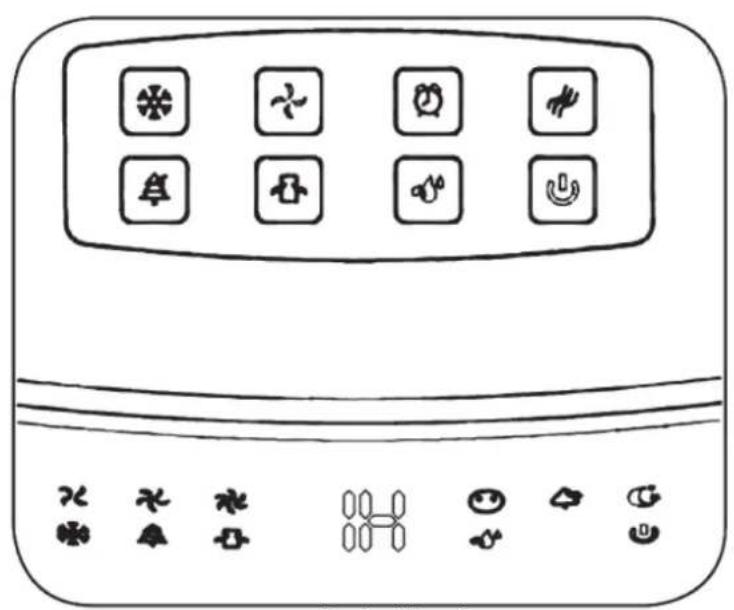
Control Panel
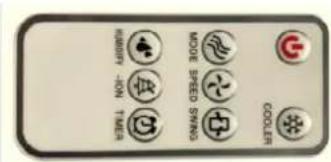
Remote control
The remote control use one button cells8 model No. CR2025 (3V). We recommend the use of Lithium type battery for longer use.

flowchart
graph LR
    A["Device Placement"] --> B["Placement"]
    B --> C["Adjustment"]
    C --> D["Assembly"]
    D --> E["SN"]
    E --> F["CR2025"]
    F --> G["OPEN"]
    F --> H["PUSH"]
Note: Please follow battery disposal instruction on battery packaging8 or contact your local councils for safely disposal of batteries.
THE USE OF ICE BOX
The ice crystal has a particular feature of keeping cool8 it can absorb heat from water and reduce water temperature in the water tank to below environmental temperature8 so the air will be much cooler.
Using methods:
a. Add water to the ICE BOX under not full situation and put it into the refrigerating chamber of refrigerator to make sure that it icing absolutely.
b. Ice crystal put the ICE BOX in the water tank.
c. There have two 5CE BOX8 can use circularly.
Note: the ice box should be far way from children to avoid eating
CLENNING AND MANTENANCE
1. Clean the air filter screen
Unplug the power plug8 pull the air filter screen up8 remove it from appliance. Clean the air filter screen with neutral detergent and banister brush. Then clean it with clear water and reinstall to appliance.
2. Clean the wetted pad
Unplug the power plug8 take down the air filter screen8 then draw the wetted pad from support. Clean the wetted pad with neutral detergent and banister brush. Then clean it with clear water and reinstall to the appliance.
Attention: the wetted pad must be installed flatly8 in order to avoid leaking.
3. Clean the water tank
Unplug the power plug 8draw out the tank8 pull the water and use soft brush clean it, use neutral detergent and soft cloth rub inside of the tank.
Note: if you need to clean the tank completely8you should unscrew the screw under the base8also should unscrew the screw of water pump inside the tank.
4. Clean the shell
Clean with neutral detergent and soft cloth.
Attention: unplug the power plug when clean the appliance 8 since there have high pressure in the body. Do not leave any water on the control panel.
Attention:
Must unplug the power plug when cleaning.
Don't make the water into the control panel.
| Malfunction Possible reasons Solution | ||
| No action | 1.Power off or poor connection2.Not press the power at the back of body.3.Not Press the 6ON/OFF6 key on the control panel. | 1.Plug the power cord and make sure it connects well.2.Press the power at the back of body.3.Press the 6ON/OFF6 key on the control panel. |
| Poor result of dedusting | 1. Block the air filter screen with dust.2. Block the air inlet with corpus alien. | 1.Remove and clean the air filter screen.2.Remove corpus alien from the air inlet. |
Clean the climator with moist (never wet) cloth with a neutral detergent. Do not use petrol or other solvents. Clean the air filter with moist (never wet) cloth with a neutral detergent. Do not use petrol or other solvents.
PLEASE NOTE! Dry the air filter before installing.
Clean the water filter (draining unit) under clean tap water.
Clean the tank with moist (never wet) cloth with a neutral detergent. Do not use petrol or other solvents.
TROUBLESHOOTING
5f the climator does not start8 check the power supply in the mains. Repairs must be carried out solely by the authorised personnel.
TRANSPORTATION AND STORAGE
Before putting the device away8 wait until it cools down. Transporting and store in a package protecting from humidity and mechanical damages
Technical parameters
| Voltage 220–240 V | |
| Frequency 50 Hz | |
| Class: II | |
| Nominal power consumption 65 W | |
Remote control:
3 V d.c. 1 x CR2025
The manufacturer reserves the right to introduce technical modifications!
The symbol presented below indicates that the used equipment cannot be placed together with other household waste. The user is obliged to bring this item to the waste electrical and electronic equipment collection point where a suitable system is created to allow safe disposal of these items.
Dangerous components present in electrical and electronic equipment have negative consequences for the environment and human health therefore correct handling of the equipment is very important. Certain substances which may adversely affect the environment over the life of the product and after use have been limited in this device.
Technical parameters
| Model | KR-8000 | ||
| Description | Symbol | Unit | Value |
| Maximum fan flow rate | [F] | m^3/min | 2,09 |
| Fan power | [P] | W | 54,21 |
| Service value | [SV] | (m^3/min)/W | 0.04 |
| Power consumption in standby mode | [P_SB] | W | 0 |
| Fan sound power | [L_WA] | dB(A) | 60,4 |
| Maximum air speed | [c] | m/s | 3,57 |
| Standard for measuring the service value | IEC 60879 | ||
| Further information can be obtained from | RAVANSON LTD Sp. z o.o.ul. Mazowiecka 6, 09-100 Płońsk | ||


flowchart
graph LR
    A --> B["MID"]
    B --> C["HIGH"]
    C --> D["LOW"]
    D --> E
Ovládací panel
Dálkový ovládač
- Ravanson®
- GENERAL SAFETY GUIDELINES
- !EÚIGNATIŽN
- OPERATING INSTRUCTIONS
- Start-up
- ATTENTION!
- OPERATION
- THE USE OF REMOTE CONTROL
- THE USE OF ICE BOX
- CLENNING AND MANTENANCE
- Clean the air filter screen
- Clean the wetted pad
- Clean the water tank
- Clean the shell
- Attention:
- PLEASE NOTE! Dry the air filter before installing.
- TROUBLESHOOTING
- TRANSPORTATION AND STORAGE
Brand : Ravanson
Model : KR-8000
Category : Air-conditioner