
SWM 3777 - FM Transmitter SENCOR - Free user manual and instructions
Find the device manual for free SWM 3777 SENCOR in PDF.


| Product Type | FM Transmitter for Car |
| Brand | Sencor |
| Model | SWM 3777 |
| Input Voltage | DC 12V - 24V |
| FM Frequency Range | 87.5 MHz - 108.0 MHz |
| Bluetooth Version | V4.2 |
| Bluetooth Range | Up to 5 m |
| Bluetooth Transmitter Power | 100 mW at 2.4-2.4835 GHz |
| USB Charging Port | DC 5V / 2.4A max. |
| Supported Audio Formats | MP3, WMA, AAC, WAV |
| External Memory | Micro SD card / USB drive |
| Operating Temperature | -10°C to +40°C |
| Functions | FM transmission, Bluetooth streaming, hands-free calling, USB charging, media playback |
| Display | Digital display for frequency and voltage |
| Controls | Previous/Next track, Playback/Pause, frequency change |
| Installation | Plug into car cigarette lighter socket (12-24V) |
| Safety | Ensure same frequency on car radio; do not insert/remove media while powered |
| Maintenance | Clean with soft dry cloth |
| Package Contents | FM transmitter, user manual |
| Compatibility | Works with most car radios with FM tuner |
Frequently Asked Questions - SWM 3777 SENCOR
User questions about SWM 3777 SENCOR
0 question about this device. Answer the ones you know or ask your own.
Ask a new question about this device
Download the instructions for your FM Transmitter in PDF format for free! Find your manual SWM 3777 - SENCOR and take your electronic device back in hand. On this page are published all the documents necessary for the use of your device. SWM 3777 by SENCOR.
USER MANUAL SWM 3777 SENCOR
natural_image
Black SENCOR electric vehicle charging station with digital display showing 107.9 (no text or symbols on device body)USER'S MANUAL
NÁVOD K OBSLUZE
NÁVOD NA OBSLUHU
HASZNÁLATI ÚTMUTATÓ
INSTRUKCJA OBSŁUGI
EN CZ SK HU PL
MP3/BT FM Modulator
MP3/BT FM modulátor
MP3/BT FM modulátor
MP3/BT FM modulátor
Modulator MP3/BT FM
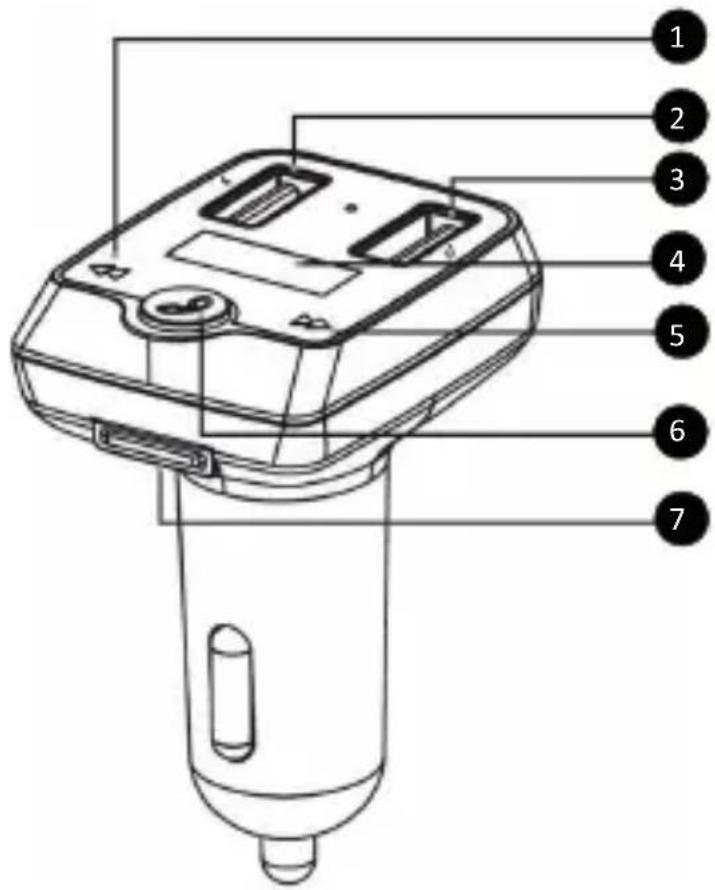
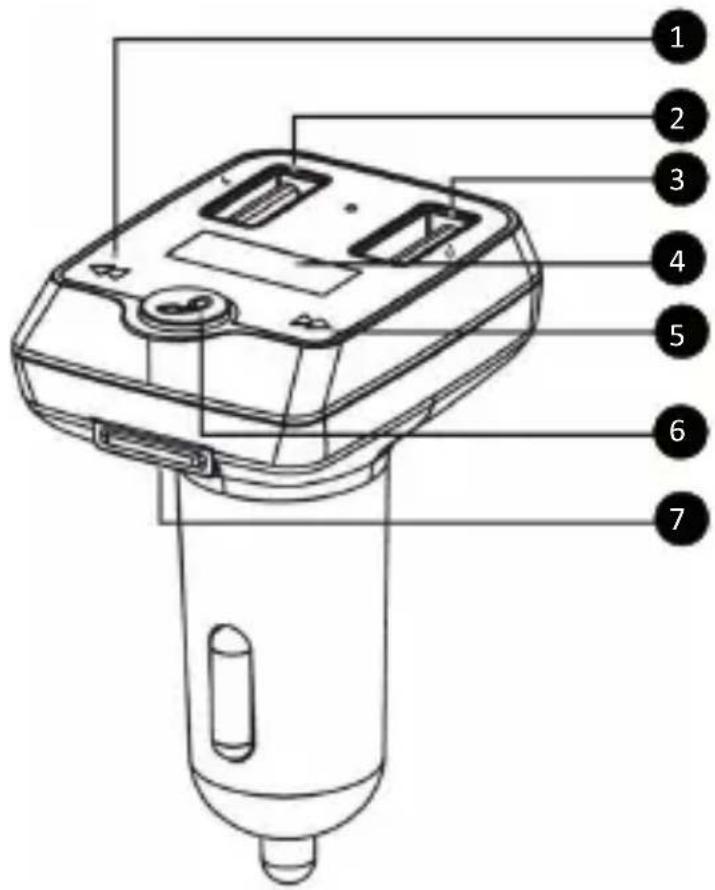
DESCRIPTION OF EQUIPMENT
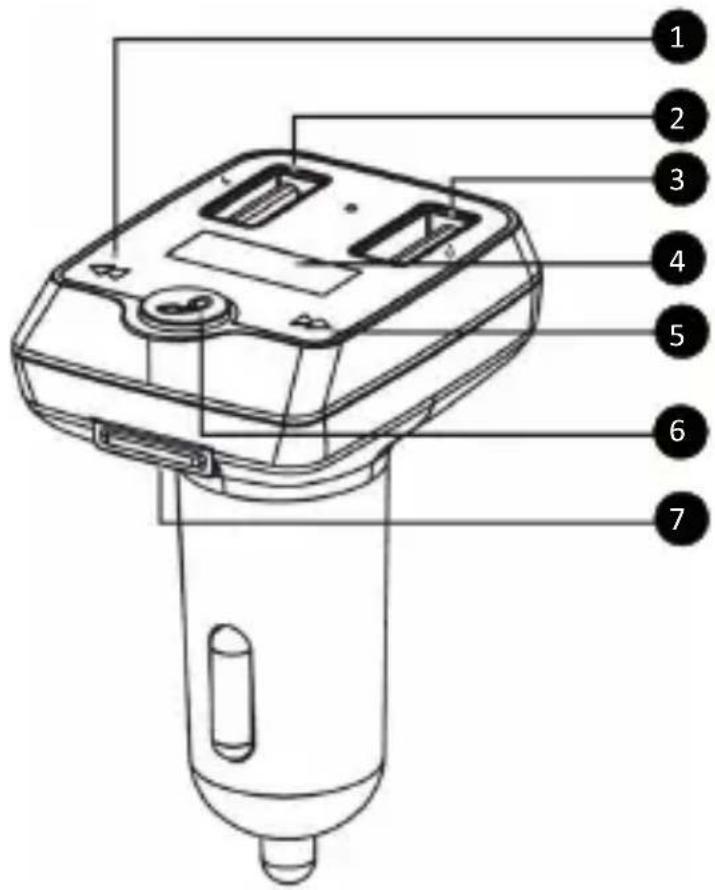
| 1 Previous track | |
| 2 USB charging port (max. 2.4A) | |
| 3 USB port for portable devices | |
| 4 Display panel | |
| 5 Next track | |
| 6 | Playback/pause/call answer/call back/change frequency |
| 7 TF memory card slot | |
EN - 1
SETTING UP AND PAIRING WITH FM RADIO
Before fi rst use, be sure to read the safety instructions contained in this user's manual carefully. Connect the modulator to the car socket power supply (12 - 24V). The fi rst displayed value on the display panel indicates the voltage in the on-board network of a car, such as 12V. Tune any vacant frequency on your car stereo and then press the “Change frequency and mode” button to tune the same frequency on the modulator (No.6 on the fi gure). When this button is pressed, the frequency number on the modulator display will start fl ashing, the press the arrow buttons (No.1 and 5 in the fi gure) to set the desired frequency matching the one of your FM car stereo. Hold down the button (No.1 and 5) to increase the speed of searching for the desired frequency.
PAIRING VIA BLUETOOTH
Find the Bluetooth modulator name “SWM 3777” on your Bluetooth portable device to be paired (such as a mobile phone) and start the pairing process. If you are requested to enter a pairing code while your device and the modulator are being paired, use the following code: “0000”.
Note: To ensure a stable Bluetooth connection, make sure that the distance between the modulator and your connected device is kept within 5m.
Attention: Some connected devices support common volume setting. If some of the connected devices do not support this feature, the volume setting will operate separately on each device.
USB CHARGING INPUT
This input (No.2 on the figure "Device description") is designed for connecting and charging portable devices. Maximum USB port load is 2.4 A.
EN - 2
Note: Power supply cables of lower quality may cause play-back interference when connected.
INSERTING THE TF MEMORY CARD
Insert the TF memory card in the relevant slot (No.7 on the fi gure) so that the contacts face the control buttons and the modulator display. Carefully push the TF memory card with your nail or a fl at tool until it clicks gently in place. To release the TF memory card, press it gently into the modulator with your fi ngernail or a fl at tool and the card will release. While removing the TF memory card, hold it gently so that you can catch it after being released from the modulator.
USB INPUT FOR PORTABLE DEVICES AND TF MEMORY CARD PLAYBACK
Once the USB flash drive is connected to the USB playback input (No.3 on the fi gure) or the memory card is connected to the relevant slot (No.7 on the fi gure), the modulator will recognize the device connection and search it for playable MP3 tracks. If it finds them, it will select this input and start to playback these tracks. To select from the tracks being played, press the “Previous track” or “Next track” button (No.1 and 5 on the fi gure). To pause/start playback, briefly press the “Playback/pause” button (No.5 on the fi gure).
Attention: With respect to the variety of devices on the market, the compatibility and playability of all media is not guaranteed. Memory devices that you wish to connect should be tested in advance or formatted to the FAT32 file format. It may not be possible to playback protected media, files or content contained on them. Playback tested and unprotected media and content.
Note: Media with a power consumption greater than flash memory should only be connected only if the have a separate power supply. If the USB flash drive is bigger than 32 GB, e.g. 64 GB, format it to FAT32 and verify its compatibility and recognition by this device before use. If the device does not read the memory even though it should contain playable content, use a different card or memory/media type.
If you connect a mobile device to the modulator via Bluetooth and then insert a memory card or USB flash drive, the music will automatically start from the last inserted media. An incoming call interrupts music playing on the active media.
CALLING
If your mobile phone is paired to the modulator via Bluetooth connection, an incoming call will interrupt the music play-back, then press the “Playback/pause” button (No.3 on the figure) shortly to accept/end the call. To reject the incoming call, long-press the “Playback-pause” button. To start dialling the last call number, press the “Playback/pause” button twice shortly.
VOLUME CONTROL
Hold down the "Previous track" or "Next track" button (No.4 and 6 on the fi gure) to change the playback volume level.
Note: The resulting playback volume is influenced by the current volume setting on the modulator, car stereo and your portable device. To set optimal volume, it may be necessary to adjust the volume level on each of these devices.
TECHNICAL PARAMETERS
Large range of input voltages: DC 12V - 24V
Music formats: MP3/WMA/AAC/WAV
FM frequency on the transmitter: 87.5 MHz - 108.0 MHz
USB charging port: DC 5V / 2.4A max.
External memory expansion: Micro SD card / USB drive
Operating temperature: -10 °C to +40 °C
Transmission range: Up to 5 m
Bluetooth: V4.2
Maximum power of Bluetooth
transmitter:
100 mW at frequency
range of 2.4–2.4835 GHz
NOTE
- This device's operating voltage is 12V \~ 24V. If the voltage is too high or too low, damage or failure to the device may occur.
- For safety reasons, always connect the USB flash drive or the memory card to the unit before connecting the unit to the car's cigarette lighter socket.
- This unit may not support all types of USB flash discs or memory cards.
-
If the unit fails to read data from the USB flash drive or the memory card, please try to reinsert the USB flash drive/memory card or reconnect the unit to the lighter socket. If the problem persists, please use other USB flash drive or card.
-
The car FM tuner frequency should be the same as the unit's frequency.
- Do not pull out or insert the USB flash drive/memory card while the unit is powered from the lighter. If you want to do so, first disconnect the unit from the socket and insert or remove the drive/card before reconnecting the unit to the power supply.
- If there are too many audio fi les stored on the USB fl ash drive or the memory card, their processing may be slow.
INSTRUCTIONS AND INFORMATION REGARDING THE DISPOSAL OF USED PACKAGING MATERIALS
Dispose of packaging material at a public waste disposal site.
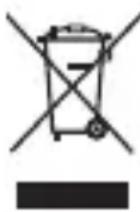
DISPOSAL OF USED ELECTRICAL AND ELECTRONIC APPLIANCES
The meaning of the symbol on the product, its accessory or packaging indicates that this product shall not be treated as household waste. Please, dispose of this product at your applicable collection point for the recycling of electrical & electronic equipment waste. Alternatively in some states of the European Union or other European states you may return your products to your local retailer when buying an equivalent new product. The correct disposal of this product will help save valuable natural resources and help in preventing the potential negative impact on the environment and human health, which could be caused as a result of improper liquidation of waste. Please ask your local authorities or the nearest waste collection centre for further details. The improper disposal of this type of waste may fall subject to national regulations for fines.
For business entities in the European Union
If you wish to dispose of an electrical or electronic device, request the necessary information from your seller or supplier.
Disposal in other countries outside the European Union
If you wish to dispose of this product, request the necessary information about the correct disposal method from local government departments or from your seller.

The product meets EU requirements.
Hereby, FAST ČR, a.s. declares that the radio equipment type SWM 3777 is in compliance with Directive 2014/53/EU.
For full version of the EU declaration of conformity, please refer to www.sencor.com website.
Changes to the text, design and technical specifications may occur without prior notice and we reserve the right to make these changes.
The original version is in Czech.
Address of the manufacturer:
FAST ČR, a. s., U Sanitasu 1621, Říčany CZ-251 01
Copyright © 2019, Fast ČR, a. s. Revision 09/2019
EN - 7
SENCOR®
EN Warranty conditions
Warranty card is not a part of the device packaging.
This product is warranted for the period of 24 months from the date of purchase to the end-user. Warranty is limited to the following conditions. Warranty is referred only to the customer goods using for common domestic use. The claim for service can be applied either at dealer's shop where the product was bought, or at below mentioned authorized service shops. The end-user is obligated to set up a claim immediately when the defects appeared but only till the end of warranty period. The end user is obligated to cooperate to certify the claiming defects. Only completed and clean (according to hygienic standards) product will be accepted. In case of eligible warranty claim the warranty period will be prolonged by the period from the date of claim application till the date of taking over the product by end-user, or the date the end-user is obligated to take it over. To obtain the service under this warranty, end-user is obligated to certify his claim with duly completed following documents: receipt, certifi cate of warranty, certifi cate of installation.
This warranty is void especially if apply as follows:
■ Defects which were put on sale.
■ Wear-out or damage caused by common use.
The product was damaged by unprofessional or wrong installation, used in contrary to the applicable instruction manual, used in contrary to legal enactment and common process of use or used for another purpose which has been designed for.
The product was damaged by uncared-for or insufficient maintenance.
The product was damaged by dirt, accident of force majeure (natural disaster, fire, and flood).
■ Defects on functionality caused by low duality of signal, electromagnetic field interference etc.
■ The product was mechanically damaged (e.g. broken button, fall).
■ Damage caused by use of unsuitable media, fillings, expendable supplies (batteries) or by unsuitable working conditions (e.g. high temperatures, high humidity, quakes).
■ Repair, modification or other failure action to the product by unauthorized person.
■ End-user did not prove enough his right to claim (time and place of purchase).
■ Data on presented documents differs from data on products.
Cases when the claiming product cannot be identified according to the presented documents (e.g. the serial number or the warranty seal has been damaged).
Authorized service centers
Visit www.sencor.com for detailed information about authorized service centers.
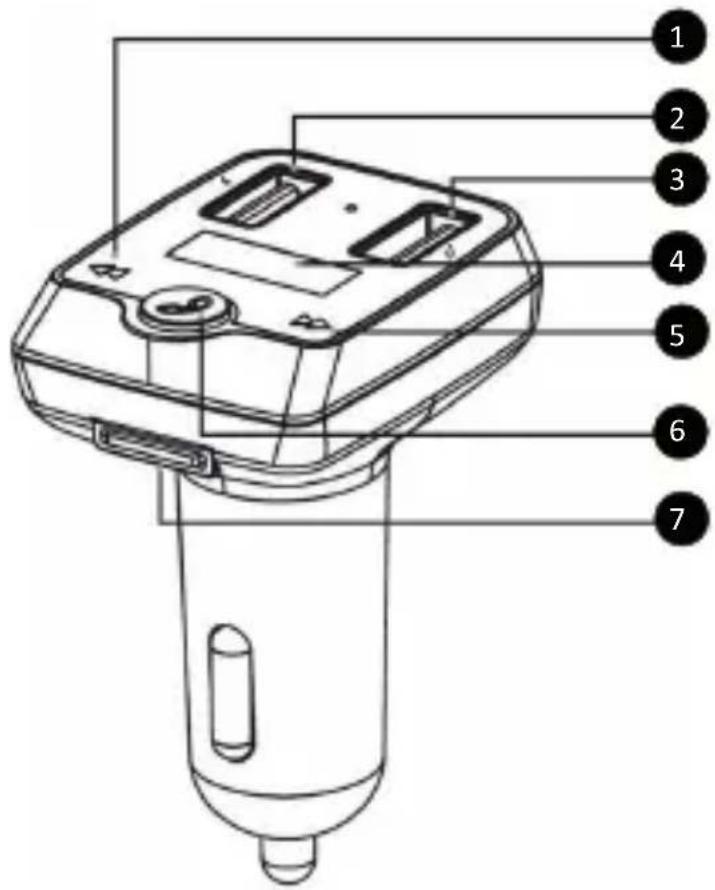
POPIS ZAŘÍZENÍ
natural_image
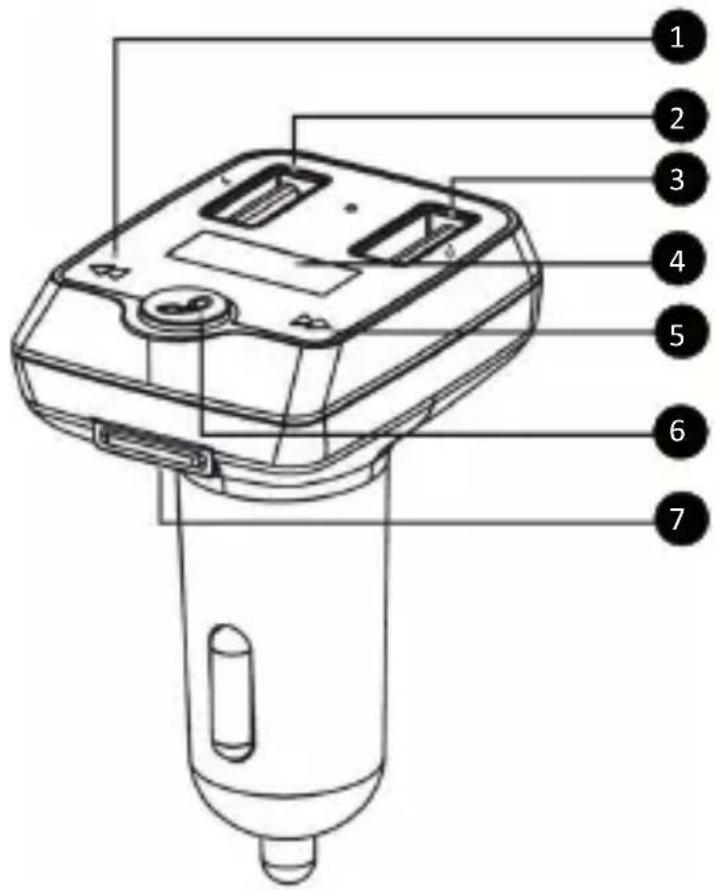
Pure geometric lines forming a V-shape on white background (no text or symbols)OPIS ZARIADENIA
natural_image
Pure geometric lines forming a V-shape on white background (no text or symbols)A KÉSZÜLÉK LEÍRÁSA
100 mW 2,4–2,4835 GHz
natural_image
Pure geometric lines forming a V-shape on white background (no text or symbols)OPIS URZĄDZENIA
| 2017 | 2016 | |
| Cost of sales | 3.5 | 3.4 |
| Gross profit | 1.8 | 1.9 |

natural_image
Completely blank white image with no visible content, text, or symbols.
- DESCRIPTION OF EQUIPMENT
- SETTING UP AND PAIRING WITH FM RADIO
- PAIRING VIA BLUETOOTH
- USB CHARGING INPUT
- INSERTING THE TF MEMORY CARD
- USB INPUT FOR PORTABLE DEVICES AND TF MEMORY CARD PLAYBACK
- CALLING
- VOLUME CONTROL
- TECHNICAL PARAMETERS
- NOTE
- INSTRUCTIONS AND INFORMATION REGARDING THE DISPOSAL OF USED PACKAGING MATERIALS
- DISPOSAL OF USED ELECTRICAL AND ELECTRONIC APPLIANCES
- For business entities in the European Union
- Disposal in other countries outside the European Union
- SENCOR®
- EN Warranty conditions
- Warranty card is not a part of the device packaging.
- This warranty is void especially if apply as follows:
- Authorized service centers
- POPIS ZAŘÍZENÍ
- OPIS ZARIADENIA
- A KÉSZÜLÉK LEÍRÁSA
- OPIS URZĄDZENIA
Brand : SENCOR
Model : SWM 3777
Category : FM Transmitter