
SCOOTER S70 - Scooter SENCOR - Free user manual and instructions
Find the device manual for free SCOOTER S70 SENCOR in PDF.


| Product Type | Electric scooter |
| Brand / Model | Sencor SCOOTER S70 |
| Dimensions (Unfolded) | 112 x 44 x 118 cm |
| Dimensions (Folded) | 112 x 44 x 51 cm |
| Weight | 16 kg |
| Maximum Load | 120 kg |
| Motor Power | 400 W |
| Maximum Speed | 25 km/h (Sport mode) |
| Range (55 kg rider) | Up to 50 km |
| Range (90 kg rider) | Up to 45 km |
| Battery Type | Li-ion 15 Ah, 37 V |
| Charging Time | Max 9 hours |
| Charger Input | 100–240 V AC, 50/60 Hz, 2 A |
| Charger Output | 42 V DC, 2 A |
| Brake System | Dual: electronic front brake + mechanical disc rear brake |
| Tires | 10-inch tubeless, front and rear |
| Suspension | Front and rear (factory preset) |
| Riding Modes | Walk (6 km/h), Eco (10 km/h), Drive (20 km/h), Sport (25 km/h) |
| App Compatibility | Sencor Scooter app (iOS/Android) via Bluetooth 4.0 |
| Lighting | Front LED flashlight, rear LED brake light |
| Water Resistance | IPX4 (splash resistant) |
| Folding Mechanism | Yes, with locking hook |
| Maintenance | Clean with damp cloth; lubricate gliders with preservative oil; check bolt tightness; adjust brake cable with 4mm Allen key |
| Safety | Always wear helmet; check brake before ride; avoid water and steep slopes; max 15° climb angle |
| Spare Parts / Repairability | Brake pads (consumable), battery replacement at authorized center; do not repair protection mechanisms |
| Warranty | 24 months from purchase date for domestic use |
Frequently Asked Questions - SCOOTER S70 SENCOR
User questions about SCOOTER S70 SENCOR
0 question about this device. Answer the ones you know or ask your own.
Ask a new question about this device
Download the instructions for your Scooter in PDF format for free! Find your manual SCOOTER S70 - SENCOR and take your electronic device back in hand. On this page are published all the documents necessary for the use of your device. SCOOTER S70 by SENCOR.
USER MANUAL SCOOTER S70 SENCOR
natural_image
Technical line drawing of a fully extended electric scooter with visible wheels and suspension components (no text or symbols)Electric scooter
SCOOTER S70
USER'S MANUAL
EN
Table of Contents
- Contents of the Package and Scooter Description ....4
1.1. Supply Content ....4
1.2. SCOOTER S70 Description ....4
- Controls ....5
2.1. Control Panel and Application ....5
2.2. Multifunction Button....5
2.3. Riding Modes ....6
2.4. Starting the Operating Mode ....6
-
SCOOTER S70 Assembly 7
-
Charging 8
-
Protecting the Battery Against Excessive Discharging ....10
-
Folding and Transport 10
-
SCOOTER S70 Driving....12
-
Safety Instructions ....13
-
Maintenance and Adjustment ....14
-
Technical Specifications .... 16
1. Contents of the Package and Scooter Description
1.1. Supply Content
1x Electric scooter SCOOTER S70
1x Charging adapter
1x Allen key
4x Handlebar fastening bolt
1x User's manual
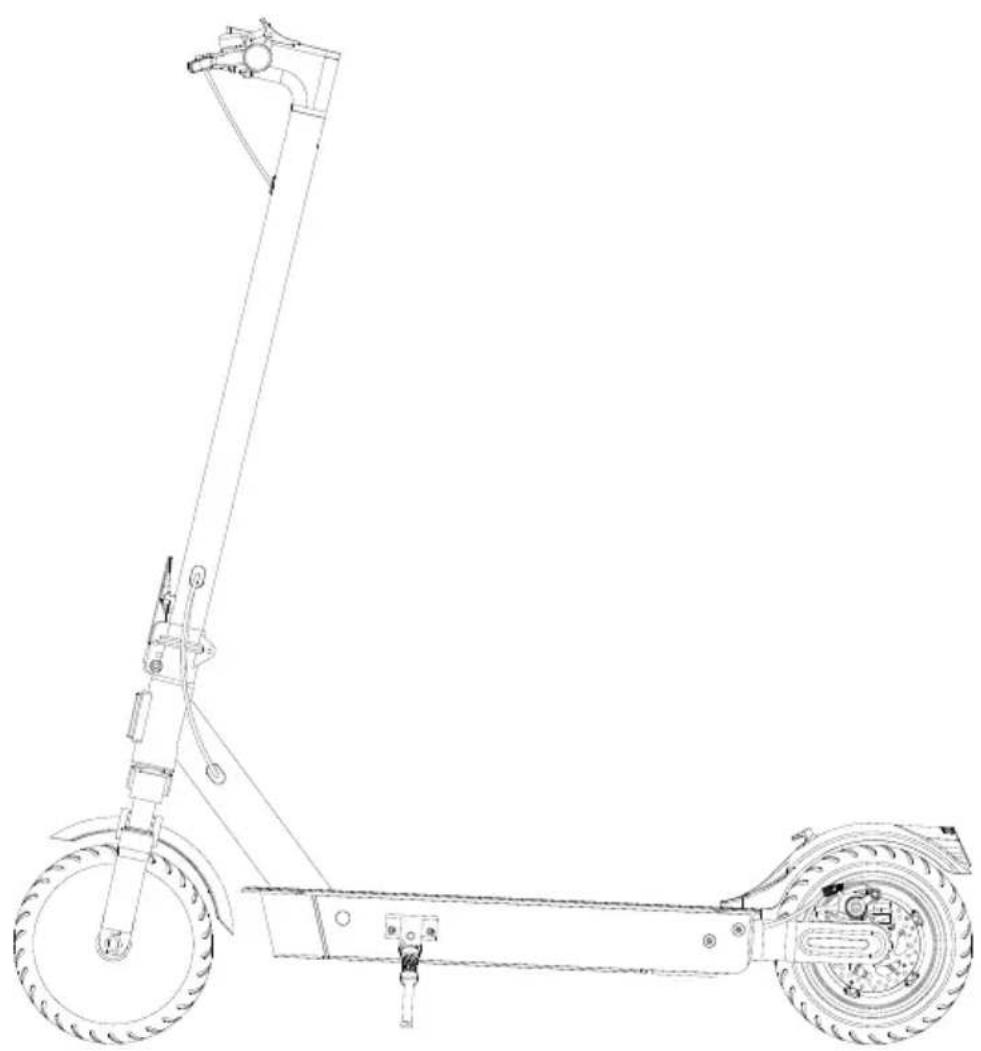
1.2. SCOOTER S70 Description
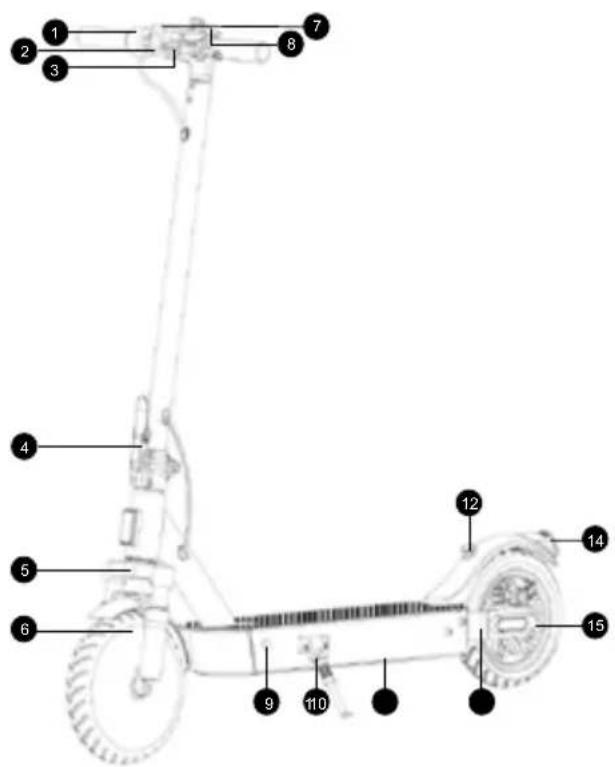
Speed control
LED light
Mechanical brake and bell
Folding mechanism release lever
Front suspension fork
Electric motor / front electric brake
Power on/off/control panel
Transport mode lock hook
Charging connector
Stand
⑪ Battery compartment
⑫ Notch to retain the handlebar
in folded mode
⑬ Rear swing arm
14 Rear LED light/brake light
15 Mechanical disc brake
2. Controls
2.1. Control Panel and Application
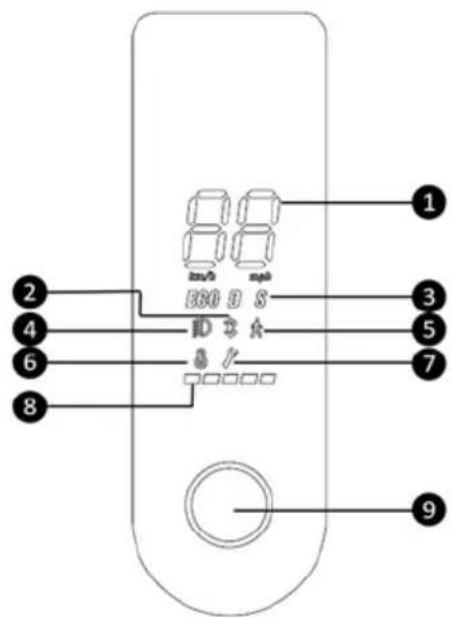
Current speed Bluetooth connected device indicator Riding modes ( ECO - economy; D - drive; S - sport) Flashlight on Walk mode (speed reduction) Scooter overheat indicator - when the temperature exceeds 90°C Device fault indicator - contact service centre Battery level indicator Multifunction button
While using your SCOOTER S70, you can also use “SENCOR SCOOTER” mobile app available for download at Google Play a and Apple APP Store. This app offers users for example number of kilometres ridden, cruise control setting function and many others. For more information about the app / user's manual, please refer to www.sencor.cz website.
2.2. Multifunction Button

CAUTION: The adjustment of riding properties should always be performed before starting the ride.
1) Short press the multifunction button while the power is off to turn the SCOOTER S70 on.
2) Hold down the multifunction button for 2 seconds while the power is on to turn the SCOOTER S70 off.
3) Short press the multifunction button while the power is on to turn on the LED flashlight.
4) Double tap the multifunction button while the power is on to switch the mode between riding modes.
2.3. Riding Modes
Switching between riding modes is done by double-clicking the multi-function button.
Walk up to 6 km/h
Eco up to 10 km/h
Drive up to 20 km/h
Sport up to 25 km/h
2.4. Starting the Operating Mode
1) Turn on the scooter.
2) Fully press and hold down the speed control until the display shows
a value of 16.
3) Keep holding down the speed control and press the brake lever simultaneously.
4) Release the brake lever.
5) This will switch into the last set riding mode.
3) Keep holding down the speed control and press the brake lever simultaneously. 4) Release the brake lever. 5) This will switch into the last set riding mode.

CAUTION:
Always start the operating mode when the SCOOTER S70 is not in motion. Start up to the operating mode gradually and slowly according to the instructions.
3. SCOOTER S70
Assembly
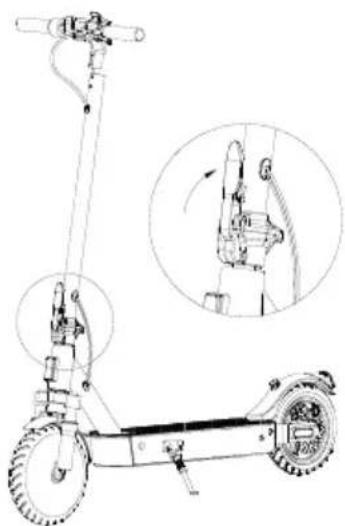
- Unfold the handlebar rod and secure it firmly with the lock lever.
natural_image
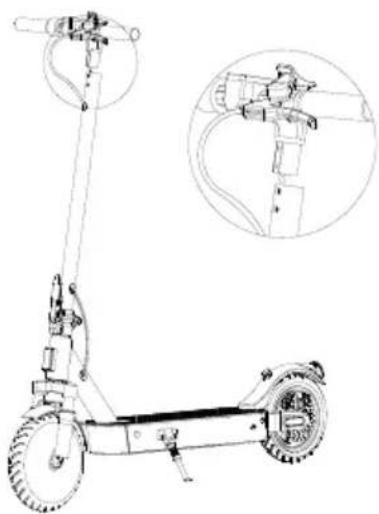
Line drawing of an electric scooter with a hand gesture and side-mounted sensors (no text or symbols)- Make sure that the control unit connectors are connected to the control panel. The connector with the cords must be connected properly to avoid loosing later on.
natural_image
Line drawing of a multi-wheeled electric scooter with attached suspension components, shown with an inset close-up of the engine (no text or symbols present)-
Carefully connect the handlebar with the handlebar tube. Take care to avoid damage to the connecting wire while it's being inserted into the steering tube. The LED flashlight must point in the ride direction.
-
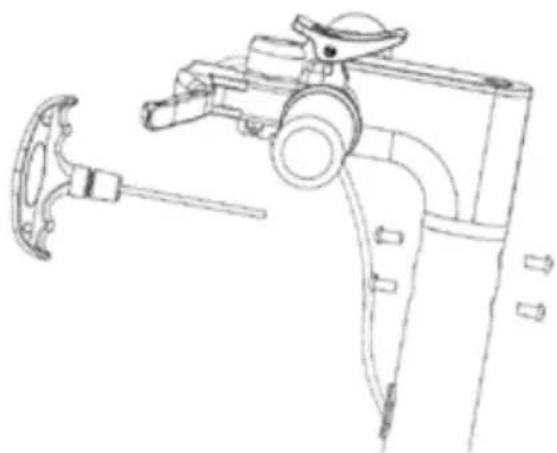
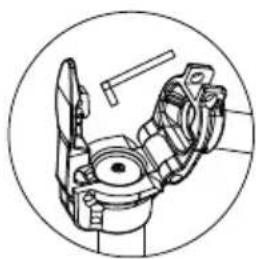
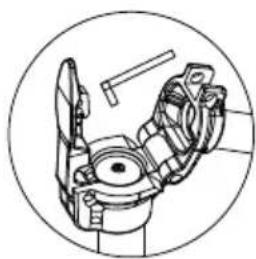
Screw the handlebar and the handlebar tube together. Insert two Allen bolts from the front and two Allen bolts from the opposite side as shown. Tighten the bolts firmly. Regularly check if the bolts don't get loose while using the product.
natural_image
Technical line drawing of a mechanical device with a hammer and lever (no text or symbols)- Turn on the SCOOTER S70
4. Charging
Check if the battery is fully charged before starting your ride. Switch on the Control Panel
and check the battery level.
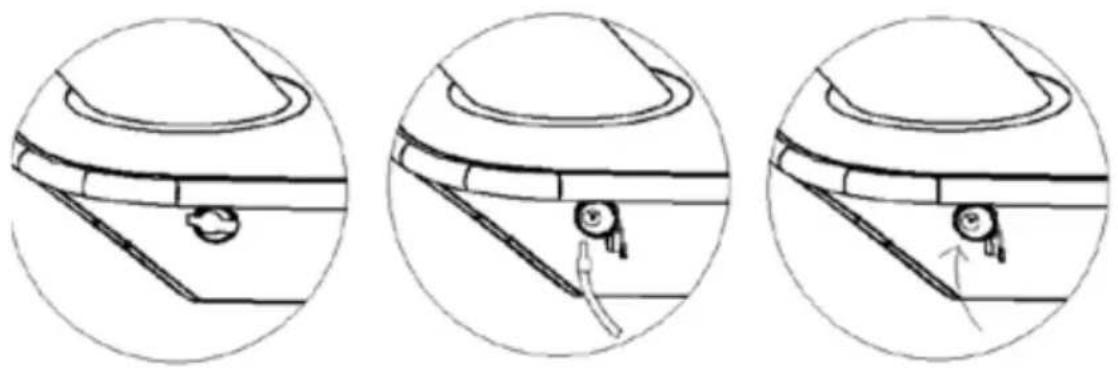
The charging is performed with the supplied charging adapter. First remove the rubber cap of the charging connector in the SCOOTER S70 and connect the charging adapter. Then connect the adapter to your power outlet. When the charging process is finished and the charging adapter is disconnected, cover the charging connector opening again with the rubber cap. Regularly check if the protective cap covers the charging connector when charging is not in progress.
natural_image
Three circular diagrams showing mechanical components with arrows indicating motion or movement, no text or symbols present.The charging indicator is located on the charging adapter and shows 2 statuses as follows:
-
Red LED: Indicates the battery charging process
-
Green LED: Indicates the battery is fully charged

CAUTION:
For charging, use only the original accessories supplied with the appliance. When the battery operating time becomes very short, the battery lifetime has been used up; we recommend that you have the battery replaced at your authorised centre.
Recommendation:
If the unit is not to be used for an extended period of time, we recommend to fully charge the battery once every two to three months. We do not recommend storing the unit with a flat battery to prevent irreparable damage to the battery (loss of capacity).
5. Protecting the Battery Against Excessive Discharging
The electric scooter is equipped with the protection of each component against damage due to operational overload and lower battery charging level.
-
If the scooter is subject to a higher load for example due to frequent riding uphill or riding up a steep hill, the control unit/battery overheating protection will be enabled, limiting the power for a necessary period of time. The speed will be reduced to a maximum of 15 km/h.
-
If the battery level drops below 30%, the maximum scooter speed will be limited to 15 km/h. If the battery level drops below 25%, the maximum speed will be limited to 10 km/h.

CAUTION:
Do not repair and/or tamper with the electric scooter (SCOOTER S70) protection mechanisms. This will prevent the damage to the individual components of the electric scooter (SCOOTER S70).
6. Folding and Transport
- The scooter must be turned off. Hold the scooter, unlock the folding mechanism release lever at the bottom of the handlebar tube and push the released level in the ride direction.
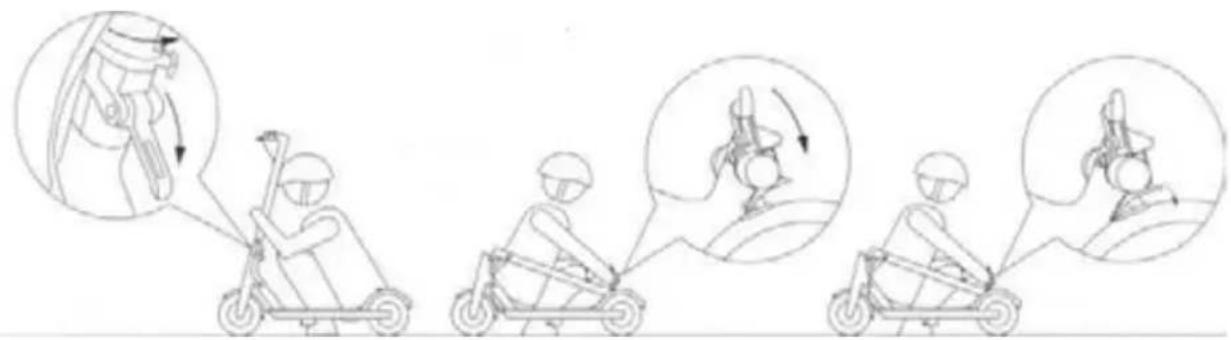
- Fold the released handlebar tube towards the rear mudguard and lock it using the hook on the handlebar and notch on the rear mudguard. Correct transport mode folding
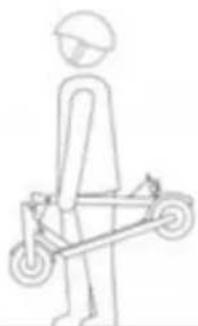
- To carry, grasp the SCOOTER S70 by the handlebar tube. For more convenient transport, we recommend to hold the handlebar tube in one third of its length on the side near front wheel.
natural_image
Simple line drawing of a person standing with a wheeled cart (no text or symbols)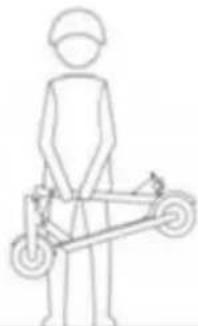
natural_image
Simple line drawing of a person standing with a bicycle (no text or symbols)Suspension
The scooter is equipped with front and rear suspension that is optimally preset from the factory and cannot be changed.
Front suspension fork:
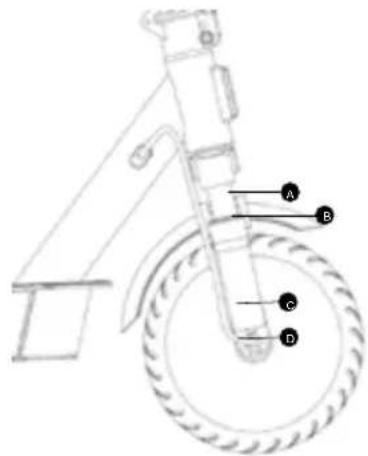
| A - glider |
| B - scraper shaft seal |
| C - lower part of the suspension fork |
| D - motor supply lead |
Keep the sliders and scraper shaft seals of the front suspension fork clean and dry. Take care to avoid excessive wear and damage to the glider surface. Use a dampened cloth for cleaning. After wiping off the dirt, use preservative oil to wipe the gliders. For long life we recommend cleaning and preserving the front gliders after every ride.
In the lower right part of the suspension fork there are the motor supply wires. Take extra care when riding and transporting your electric scooter to avoid mechanical damage to the supply wires.
Rear suspension fork:
Before riding, check that all bolts and nuts are tightened. Clean the suspension mechanism regularly with a damp cloth and then treat with preservative oil. Taking proper care of the rear suspension will avoid premature wear.
7. SCOOTER S70 Driving

CAUTION:
- Before each ride, use helmet and protectors to prevent injury in case of falling.
-
Before each ride, please check if the mechanical brake is fully functional.
-
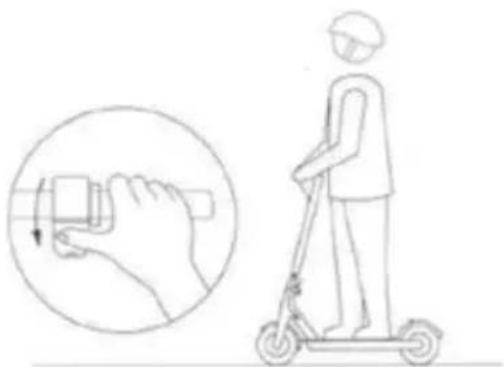
Place one foot on the scooter tread and gently bounce off the ground with the other foot.

CAUTION:
Always push off on the side where the scooter stand is not located.
natural_image
Illustration of a person using a scooter with a hand gesture and circular motion indicator (no text or symbols)- Once the scooter is in motion, press the speed control lever to start the motor. As soon as the scooter starts on its own, place the other foot on the scooter surface.
Remark:
Motor starting and speed control of your electric scooter can be performed when 5 km/h speed is reached.
natural_image
Illustration of a person riding a scooter with motion arrows indicating speed (no text or symbols)-
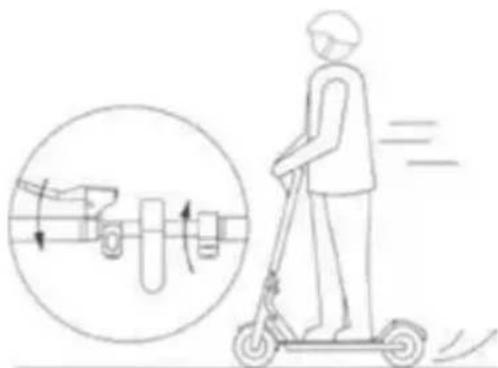
Stopping is essential for safe driving. First release the speed control and then push the mechanical hand brake on the left side of the handlebar.
-
Try the first turns on a flat surface and at slow speed. To turn, shift your centre of gravity slightly. By gently leaning into the desired direction of travel and slowly turning the handlebars.
8. Safety Instructions
This electric SCOOTER S70 is designed for entertainment and recreational use. This is not a means of transport. Observe the safety of everyone in both private and public areas, follow the instructions below as well as local traffic regulations.
When meeting pedestrians, pay close attention to your ride and make sure pedestrians are aware of your presence. If you are outside their angle of view, ring the bell, slow down and overtake (overtake from the left in case of right-hand traffic).
Higher driving speed means automatically a longer braking path. Keep safe speed in case of unexpected need to stop and keep a safe distance from others. Even on a flat surface,
you may encounter situations or terrain that cause you to lose balance, skid or other unexpected situations that can cause you to fall. Always pay close attention to driving.
Check the mechanical brake, battery charge status, wear of components and wheels before each ride. In case of loose parts or unusual noises, carry out a thorough check and contact an authorised service centre if necessary.
Neither the manufacturer nor the distributor are liable for any financial damages, injuries, accidents, legal disputes or conflicts resulting from non-observance of the safety instructions.
- Do not drive in the rain and avoid slippery surfaces.
- If you encounter an obstacle on your way, stop and carry the scooter over the obstacle.
• Exercise caution when passing through low ceilinged areas. - Do not accelerate downhill and always brake well in advance. If you encounter a steep descent (e.g. a steep hill), stop and guide your scooter.
- Do not add speed while pushing the scooter.
• Always avoid obstacles. - Avoid carrying heavy luggage on the handlebar.
• Always keep both feet on the scooter tread while riding. - Operate SCOOTER S70 in designated driving areas. Observe the local regulations of the regions, parks, cities and states where you want to operate the scooter.
- Do not turn sharply at high speeds.
- Do not ride through puddles, water or in rain.
- Do not ride with other person even in case of children.
- Do not step on the mudguards.
- Do not touch the brake components.
• Always hold on the handlebar. - Do not try to ride up the stairs, down the stairs or jump with your scooter.
9. Maintenance and Adjustment
Regular maintenance and correct adjustment of all parts of the electric scooter prolongs its life. Clean the individual parts of the scooter with a damp cloth and then use preservative oil (except for the brake disc and brake pads).
Before each ride, check the tightening and fixing of all detachable parts. If any of the bolts, Allen bolts or nuts are loose, tighten them with the appropriate tool.
The brake mechanism must be adjusted before the first ride. Contact a specialised provider (e.g. a bike service) for proper adjustment. Adjustments cannot be made under warranty or post-warranty service at the manufacturer or distributor.

WARNING: Never use a high-pressure water wash to clean the electric scooter.
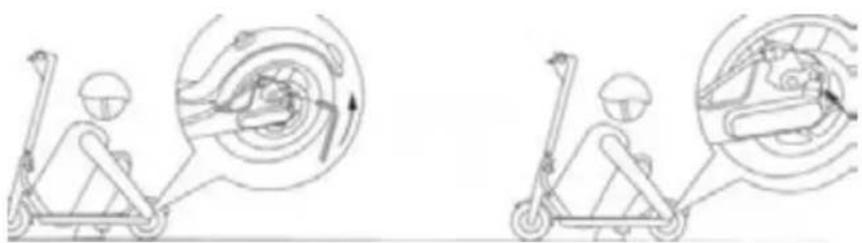
Brake adjustment – if the brakes are too tight or too loose, use a 4mm Allen key and loosen the brake bolt anticlockwise to adjust the brake cable length. Then tighten the bolt firmly. To fine tune, adjust the brake cable tension by turning the nut on the mechanical brake attached to the handlebar. Brake pads should be checked continuously and replaced according to the level of wear. This is a consumable spare part that diminishes with braking. Keep the entire brake system clean and avoid greasy deposits on the brake disc and brake pads.
natural_image
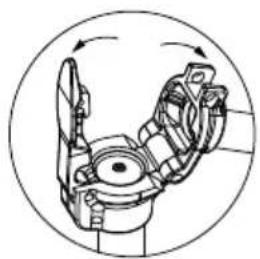
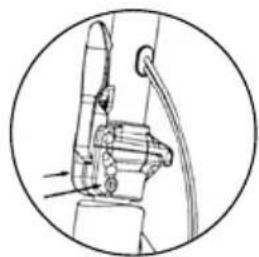
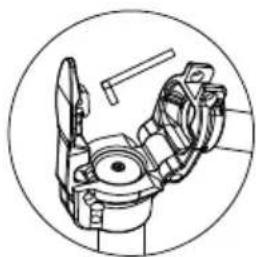
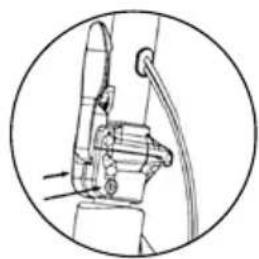
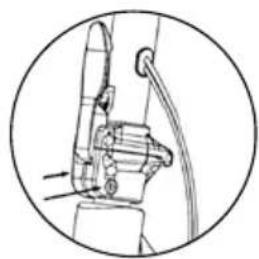
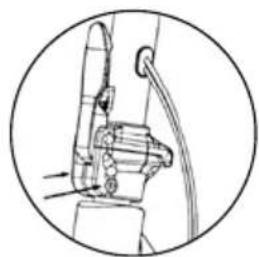
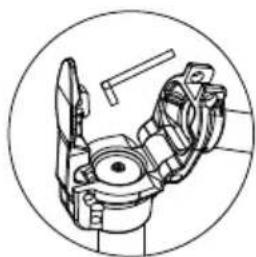
Two line drawings of a scooter with internal mechanical components, shown from different angles (no text or symbols)Adjusting the handlebar joint – In the transport mode, there is a bolt “C” (4mm Allen) accessible in the handlebar tube joint to tighten its fastening. Before tightening the Allen bolt in the handlebar tube joint, the Allen bolts in the joint socket must be loosened first as shown by the arrows on the figure “B”. Tighten the joint fitting gently to ensure that the steering rotation is not rigid and that the slack in the joint fitting is as small as possible. After adjusting the joint fitting, align the handlebars and tighten the bolts “B” firmly. Whenever the steering slack increases while riding the electric scooter, tighten as follows.
natural_image
Mechanical assembly diagram showing a rotating arm mechanism (no text or labels)A
natural_image
Technical line drawing of a mechanical assembly with no visible text or symbolsB
natural_image
Technical line drawing of a mechanical assembly with no visible text or symbolsC
Adjusting the lever of the folding mechanism – if the folding mechanism shows slack, an adjustment is required. The adjustment bolt fits into the lever of the folding mechanism and is located at the lower part of the handlebar tube. Tilt the handlebar to the transport position and define the slack by loosening the Allen bolt (turning counterclockwise). Loosen the bolt gradually and continuously try to fold the electric scooter into operating mode until the lever lock shows noticeable stiffness. Never loosen the bolt so that the folding mechanism lever can only be clicked in with great force.
Wheel and tyre check – The wheels are fitted with tubeless tyres, which are prone to wear. Never turn the front wheel with the motor unless the scooter is fully loaded with the rider and the wheel is in full contact with the riding surface. When braking, foresee problems well in advance and do not skid. Always clean the tyres with a damp cloth after riding and check for damage and grease. The wheels must be dry before riding.
10. Technical Specifications
| SCOOTER S70 | |
| Key Features | |
| Maximum speed up to 25km/h | |
| Travel range up to 45km | |
| Front and rear wheel suspension | |
| Aluminium framework | |
| SENCOR SCOOTER app available at Google Play and APP Store | |
| LED lighting | |
| LED display (mode, speed, battery, lighting, Bluetooth) | |
| Drive | |
| Engine power 400 W | |
| Speed SPORT mode up to 25km/h | |
| DRIVE mode up to 20km/h | |
| ECO mode up to 10km/h | |
| WALK mode up to 6km/h | |
| Range up to 50 km @ 55 kg weight | |
| up to 45 km @ 90 kg weight | |
| Cruise control Yes | |
| Maximum climb angle up to 15° | |
| Wheels | |
| 10-inch front and rear perforated tires | |
| Dual braking system - electrical and mechanical | |
| Disc brake | |
| Rear wheel suspension | |
| SENCOR SCOOTER app | |
| Available at Apple App Store and Google Play | |
| Lock the scooter with the app | |
| Range, distance ridden, running time, speed, battery level, etc. | |
| Bluetooth 4.1 | |
| Technical Specifications | |
| Maximum load 120kg | |
| Dimensions 112 x 44 x 118cm (unfolded) | |
| 112 x 44 x 51cm (folded) | |
| Weight: 16kg | |
| Working temperature -10 to 40°C | |
| Storage temperature -20 to 45°C | |
| Noise level <70 dB(A) | |
| Adapter | |
| Input voltage 100-240V AC 50/60 Hz | |
| Input current | 2A |
| Output voltage | 42V |
| Connector | Φ 5.5 x 10mm |
| Battery | |
| Capacity 15Ah Li-ion | |
| Charging time max. 9 hours | |
| Number of cells 50 | |
| Protection against short-circuit, overvoltage, overcharging, overheating | |
| Battery protection against excessive discharge | |
| Rated voltage 37V | |
| Charging Adapter Value and Accuracy Unit | ||
| Manufacturer's name or trademark, company ID and address | JIN XIN YU POWER (SHENZHEN) SUPPLY CO., LTDXVENo.38, yuanxin roadm, tongle longgang area,shezhen,guandong914403003601080704W | - |
| Model identification code XVE083-4200200 | - | |
| Input voltage AC 110–240 V | ||
| Input frequency 50/60" Hz | ||
| Output voltage | DC 42.0 | V |
| Output current | 2.0 | A |
| Output power | 84.0 | W |
| Average efficiency in active mode | 86 | % |
| Efficiency at low load (10%) | 85.7 | % |
| No load power consumption | 0.18 | W |
| Bluetooth | |
| Version 4.0 | |
| Maximum Transmitter Power | 100mW @ 2.4GHz-2.4835GHz |
| Noise Emissions |
| The weighted sound pressure level of a moving vehicle is less than 70dB (A). |
INSTRUCTIONS AND INFORMATION ON DISPOSING OF USED PACKAGING MATERIALS
Take the packaging material to a designated municipal waste facility.

DISPOSING OF USED ELECTRICAL AND ELECTRONIC EQUIPMENT
This symbol on products or original documents means that used electric or electronic products must not be added to standard municipal waste. For proper disposal and recycling, take these products to designated collection points. Or in some European Union states or other European countries the products can be returned to the local retailer when buying an equivalent new product. Correct disposal of this product helps save valuable natural resources and prevents damage to the environment caused by improper waste disposal. Ask your local authorities or collection facility for more details. In accordance with national regulations penalties may be imposed for the incorrect disposal of this type of waste.
For business entities in European Union states
If you want to dispose of electric or electronic devices, ask your retailer or supplier for the necessary information.
Disposal in other countries outside the European Union
This symbol is valid in the European Union. If you wish to dispose of this product, request the necessary information about the correct disposal method from the local council or from your retailer.

FAST CR, a.s. hereby declares that the radio device type SCOOTER S70 conforms to the 2014/53/EU directive.
Changes in the text, design and technical specifications may be made without prior notice and we reserve the right to make such changes.
FAST®
FAST ČR, a.s. U Sanitasu 1621, 251 01 Ríčany, Czech Republic tel.: +420 323 204 111, fax: +420 323 204 110
EU DECLARATION OF CONFORMITY
Product / brand: ELECTRIC SCOOTER / SENCOR
Type / model: SCOOTER S70 as factory model E9 MAX
DC 37,0V (Li-ion battery 15Ah), IPX4, Class III
Adapter Input AC 100-240; 50/60 Hz; 2,0A; Class II; IP20
Output DC 42,0V; 2,0A; 84,0W
Manufacturer: FAST ČR, a.s.
U Sanitasu 1621, 251 01 Ríčany, Czech Republic
VAT no: CZ24777749
Person in charge of completing the technical documentation: FAST ČR, a.s.
This declaration of conformity is issued under the sole responsibility of the manufacturer.
The object of the declaration described above is in conformity with the relevant Union harmonisation legislation:
Directive MD 2006/42/EC Directive LVD 2014/35/EU
Directive RED 2014/53/EU Directive EMC 2014/30/EU
Directive Noise 2000/14/EC Directive RoHS 2011/65/EU
The relevant harmonised standards and the other technical specifications:
EN 60335-1:2012+AC+A11+A13+A1+A14+A2 EN 60335-2-29:2004+A2+A11
EN 62233:2008 EN IEC 61000-6-1:2019 EN 55014-1:2017+A11
EN 61000-6-3:2007+A1+AC EN 55014-2:2015 EN 14619:2015
EN IEC 61000-3-2:2019 EN ISO 12100:2010 EN 61000-3-3:2013+A1
EN 60204-1:2006+A1+AC EN 62479:2010 EN 300 328 V2.1.1
EN 301 489-1 V2.2.0 EN 301 489-17 V3.2.0 EN 17128:2020

Place of issuance: Prague
Date of issuance: 26.10.2022
Name: Petr Uher (Responsible person)
Signature:
SENCOR®
EN Warranty conditions
Warranty card is not a part of the device packaging.
This product is warranted for the period of 24 months from the date of purchase to the end-user. Warranty is limited to the following conditions. Warranty is referred only to the customer goods using for common domestic use. The claim for service can be applied either at dealer's shop where the product was bought, or at below mentioned authorized service shops. The end-user is obligated to set up a claim immediately when the defects appeared but only till the end of warranty period. The end user is obligated to cooperate to certify the claiming defects. Only completed and clean (according to hygienic standards) product will be accepted. In case of eligible warranty claim the warranty period will be prolonged by the period from the date of claim application till the date of taking over the product by end-user, or the date the end-user is obligated to take it over. To obtain the service under this warranty, end-user is obligated to certify his claim with duly completed following documents: receipt, certificate of warranty, certificate of installation.
This warranty is void especially if apply as follows:
■ Defects which were put on sale.
■ Wear-out or damage caused by common use.
The product was damaged by unprofessional or wrong installation, used in contrary to the applicable instruction manual, used in contrary to legal enactment and common process of use or used for another purpose which has been designed for.
■ The product was damaged by uncared-for or insufficient maintenance.
The product was damaged by dirt, accident of force majeure (natural disaster, fire, and flood).
■ Defects on functionality caused by low duality of signal, electromagnetic field interference etc.
■ The product was mechanically damaged (e.g. broken button, fall).
■ Damage caused by use of unsuitable media, fillings, expendable supplies (batteries) or by unsuitable working conditions (e.g. high temperatures, high humidity, quakes).
■ Repair, modification or other failure action to the product by unauthorized person.
■ End-user did not prove enough his right to claim (time and place of purchase).
■ Data on presented documents differs from data on products.
Cases when the claiming product cannot be identified according to the presented documents (e.g. the serial number or the warranty seal has been damaged).
Authorized service centers
Visit www.sencor. for detailed information about authorized service centers. com
The original version of the instructions is in the Czech language, other language versions are made by the appropriate translation.
natural_image
Line drawing of a fully extended electric scooter with visible wheels and suspension components (no text or symbols)Ovladač rychlosti
LED svítilna
natural_image
Line drawing of a multi-wheeled electric scooter with visible suspension components and a close-up inset showing the lever mechanism (no text or symbols)natural_image
Line drawing of a multi-wheeled electric scooter with attached suspension components, shown with an inset close-up of its internal components (no text or symbols present)natural_image
Technical line drawing of a mechanical device with no visible text or symbols- Zapněte SCOOTER S70
4. Nabíjení
natural_image
Three circular diagrams showing a mechanical component with a knob and adjustment knob, no text or symbols present.natural_image
Simple line drawing of a person standing with a wheeled cart (no text or symbols)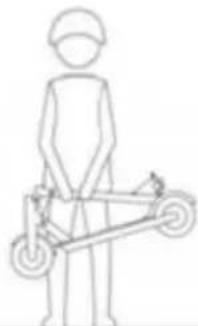
natural_image
Simple line drawing of a person standing with a bicycle (no text or symbols)Odpruženi
natural_image
Illustration of a person using a scooter with a hand gesture and circular motion indicator (no text or symbols)natural_image
Illustration of a person riding a scooter with motion arrows indicating speed (no text or symbols)natural_image
Two line drawings of a scooter with internal mechanical components, shown from different angles (no text or symbols)natural_image
Mechanical assembly diagram showing a rotating component with no visible text or symbolsA
natural_image
Mechanical assembly diagram showing a bracket and cable (no text or symbols)B
natural_image
Technical line drawing of a mechanical assembly inside a circular frame (no text or symbols)C
EU DECLARATION OF CONFORMITY
Product / brand: ELECTRIC SCOOTER / SENCOR
Type / model: SCOOTER S70 as factory model E9 MAX
DC 37,0V (Li-ion battery 15Ah), IPX4, Class III
Adapter Input AC 100-240; 50/60 Hz; 2,0A; Class II; IP20
Output DC 42,0V; 2,0A; 84,0W
Manufacturer: FAST ČR, a.s.
U Sanitasu 1621, 251 01 Říčany, Czech Republic
VAT no: CZ24777749
Person in charge of completing the technical documentation: FAST ČR, a.s.
This declaration of conformity is issued under the sole responsibility of the manufacturer.
The object of the declaration described above is in conformity with the relevant Union harmonisation legislation:
Directive MD 2006/42/EC Directive LVD 2014/35/EU
Directive RED 2014/53/EU Directive EMC 2014/30/EU
Directive Noise 2000/14/EC Directive RoHS 2011/65/EU
The relevant harmonised standards and the other technical specifications:
| EN 60335-1:2012+AC+A11+A13+A1+A14+A2 | EN 60335-2-29:2004+A2+A11 | |
| EN 62233:2008 | EN IEC 61000-6-1:2019 | EN 55014-1:2017+A11 |
| EN 61000-6-3:2007+A1+AC | EN 55014-2:2015 | EN 14619:2015 |
| EN IEC 61000-3-2:2019 | EN ISO 12100:2010 | EN 61000-3-3:2013+A1 |
| EN 60204-1:2006+A1+AC | EN 62479:2010 | EN 300 328 V2.1.1 |
| EN 301 489-1 V2.2.0 | EN 301 489-17 V3.2.0 | EN 17128:2020 |

Place of issuance: Prague
Date of issuance: 26.10.2022
Name: Petr Uher (Responsible person)
Signature:
SENCOR®
CZ Záruční podmínky
natural_image
Technical line drawing of a fully extended electric scooter with visible wheels and suspension components (no text or symbols)Ovládač rýchlosti
LED svetlo
natural_image
Line drawing of a multi-wheeled electric scooter with visible suspension components and a close-up inset showing the lever mechanism (no text or symbols)natural_image
Line drawing of a multi-wheeled electric scooter with attached suspension components, shown with an inset close-up of its internal components (no text or symbols present)natural_image
Technical line drawing of a mechanical device with no visible text or symbols- Zapnite SCOOTER S70
4. Nabíjanie
natural_image
Three circular diagrams showing a mechanical component with a knob and adjustment knob, no text or symbols present.natural_image
Simple line drawing of a person standing with a wheeled cart (no text or symbols)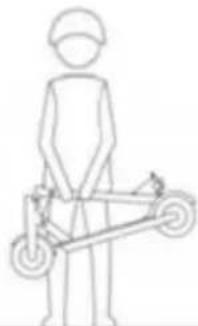
natural_image
Simple line drawing of a person standing with a bicycle (no text or symbols)Odpruženie
natural_image
Illustration of a person using a scooter to interact with a hand, showing the motion and posture (no text or symbols)natural_image
Illustration of a person riding a scooter with motion arrows indicating speed (no text or symbols)natural_image
Two line drawings of a scooter with internal components and motion arrows, no text or symbols present.natural_image
Mechanical assembly diagram showing a rotating component with no visible text or symbolsA
natural_image
Mechanical assembly diagram showing a bracket and cable (no text or symbols)B
natural_image
Technical line drawing of a mechanical assembly inside a circular frame (no text or symbols)C
EU DECLARATION OF CONFORMITY
Product / brand: ELECTRIC SCOOTER / SENCOR
Type / model: SCOOTER S70 as factory model E9 MAX
DC 37,0V (Li-ion battery 15Ah), IPX4, Class III
Adapter Input AC 100-240; 50/60 Hz; 2,0A; Class II; IP20
Output DC 42,0V; 2,0A; 84,0W
Manufacturer: FAST ČR, a.s.
U Sanitasu 1621, 251 01 Ríčany, Czech Republic
VAT no: CZ24777749
Person in charge of completing the technical documentation: FAST ČR, a.s.
This declaration of conformity is issued under the sole responsibility of the manufacturer.
The object of the declaration described above is in conformity with the relevant Union harmonisation legislation:
Directive MD 2006/42/EC Directive LVD 2014/35/EU
Directive RED 2014/53/EU Directive EMC 2014/30/EU
Directive Noise 2000/14/EC Directive RoHS 2011/65/EU
The relevant harmonised standards and the other technical specifications:
| EN 60335-1:2012+AC+A11+A13+A1+A14+A2 | EN 60335-2-29:2004+A2+A11 | |
| EN 62233:2008 | EN IEC 61000-6-1:2019 | EN 55014-1:2017+A11 |
| EN 61000-6-3:2007+A1+AC | EN 55014-2:2015 | EN 14619:2015 |
| EN IEC 61000-3-2:2019 | EN ISO 12100:2010 | EN 61000-3-3:2013+A1 |
| EN 60204-1:2006+A1+AC | EN 62479:2010 | EN 300 328 V2.1.1 |
| EN 301 489-1 V2.2.0 | EN 301 489-17 V3.2.0 | EN 17128:2020 |

Place of issuance: Prague
Date of issuance: 26.10.2022
Name: Petr Uher (Responsible person)
Signature:
SENCOR®
natural_image
Line drawing of a fully extended electric scooter with visible wheels and suspension components (no text or symbols)Elektromos roller
SCOOTER S70
FELHASZNÁLÓI KÉZIKÖNYV
HU
Tartalom
Sebességszabályzó
LED lámpa
natural_image
Technical line drawing of a multi-wheeled electric scooter with visible suspension components and a close-up inset showing the lever mechanism (no text or symbols)natural_image
Line drawing of a multi-wheeled electric scooter with attached suspension components, shown with an inset close-up of the engine (no text or symbols present)natural_image
Technical line drawing of a mechanical device with a hammer and lever assembly (no text or symbols)natural_image
Three circular diagrams showing a mechanical component with a knob and a tool, no text or symbols present.natural_image
Simple line drawing of a person standing with a wheeled cart (no text or symbols)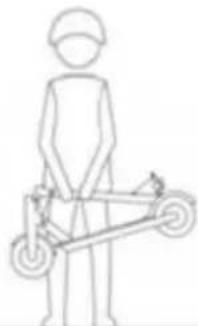
natural_image
Simple line drawing of a person standing with a bicycle (no text or symbols)Felfüggesztés
natural_image
Illustration of a person using a scooter to interact with a hand, showing the motion and posture (no text or symbols)natural_image
Illustration of a person riding a scooter with motion arrows indicating speed (no text or symbols)natural_image
Two line drawings of a person using a scooter, showing mechanical components and motion directions (no text or symbols)natural_image
Mechanical assembly diagram showing a rotating arm mechanism (no text or labels)A
natural_image
Mechanical assembly diagram showing a bracket and cable (no text or symbols)B
natural_image
Technical line drawing of a robotic arm joint (no text or symbols)C
EU DECLARATION OF CONFORMITY
Product / brand: ELECTRIC SCOOTER / SENCOR
Type / model: SCOOTER S70 as factory model E9 MAX
DC 37,0V (Li-ion battery 15Ah), IPX4, Class III
Adapter Input AC 100-240; 50/60 Hz; 2,0A; Class II; IP20
Output DC 42,0V; 2,0A; 84,0W
Manufacturer: FAST ČR, a.s.
U Sanitasu 1621, 251 01 Říčany, Czech Republic
VAT no: CZ24777749
Person in charge of completing the technical documentation: FAST ČR, a.s.
This declaration of conformity is issued under the sole responsibility of the manufacturer.
The object of the declaration described above is in conformity with the relevant Union harmonisation legislation:
Directive MD 2006/42/EC Directive LVD 2014/35/EU
Directive RED 2014/53/EU Directive EMC 2014/30/EU
Directive Noise 2000/14/EC Directive RoHS 2011/65/EU
The relevant harmonised standards and the other technical specifications:
EN 60335-1:2012+AC+A11+A13+A1+A14+A2 EN 60335-2-29:2004+A2+A11
EN 62233:2008 EN IEC 61000-6-1:2019 EN 55014-1:2017+A11
EN 61000-6-3:2007+A1+AC EN 55014-2:2015 EN 14619:2015
EN IEC 61000-3-2:2019 EN ISO 12100:2010 EN 61000-3-3:2013+A1
EN 60204-1:2006+A1+AC EN 62479:2010 EN 300 328 V2.1.1
EN 301 489-1 V2.2.0 EN 301 489-17 V3.2.0 EN 17128:2020
CE
Place of issuance: Prague
Date of issuance: 26.10.2022
Name: Petr Uher (Responsible person)
Signature:

Jótállási jegy
natural_image
Technical line drawing of a fully extended electric scooter with visible suspension components and wheels (no text or symbols)Regulator prędkości
Lampka LED
natural_image
Technical line drawing of a multi-wheeled electric scooter with visible suspension components and a close-up inset showing the lever mechanism (no text or symbols)natural_image
Line drawing of a multi-wheeled electric scooter with attached suspension components, shown with an inset close-up of the engine (no text or symbols present)natural_image
Technical line drawing of a mechanical device with no visible text or symbols- Włącz SCOOTER S70
4. Ładowanie
natural_image
Three circular diagrams showing mechanical components with arrows indicating motion or movement, no text or symbols present.natural_image
Simple line drawing of a person standing beside a wheeled cart (no text or symbols)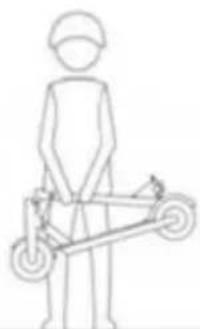
natural_image
Simple line drawing of a person standing next to a wheeled cart (no text or symbols)Amortyzacja
natural_image
Illustration of a person using a scooter with a hand gesture and motion capture inset (no text or symbols)natural_image
Illustration of a person riding a scooter with motion arrows and a circular diagram showing mechanical components (no text or symbols)natural_image
Two line drawings of a scooter with internal mechanical components, shown from different angles (no text or symbols)natural_image
Mechanical assembly diagram showing a rotating arm mechanism within a circular frame (no text or labels)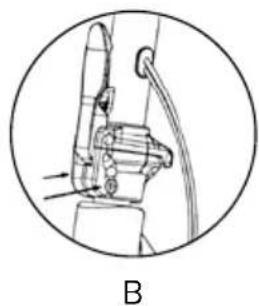
natural_image
Mechanical assembly diagram showing a lever and pivot mechanism (no text or labels)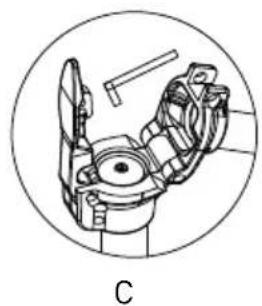
natural_image
Technical line drawing of a robotic arm component (no text or symbols)EU DECLARATION OF CONFORMITY
Product / brand: ELECTRIC SCOOTER / SENCOR
Type / model: SCOOTER S70 as factory model E9 MAX
DC 37,0V (Li-ion battery 15Ah), IPX4, Class III
Adapter Input AC 100-240; 50/60 Hz; 2,0A; Class II; IP20
Output DC 42,0V; 2,0A; 84,0W
Manufacturer: FAST ČR, a.s.
U Sanitasu 1621, 251 01 Říčany, Czech Republic
VAT no: CZ24777749
Person in charge of completing the technical documentation: FAST ČR, a.s.
This declaration of conformity is issued under the sole responsibility of the manufacturer.
The object of the declaration described above is in conformity with the relevant Union harmonisation legislation:
Directive MD 2006/42/EC Directive LVD 2014/35/EU
Directive RED 2014/53/EU Directive EMC 2014/30/EU
Directive Noise 2000/14/EC Directive RoHS 2011/65/EU
The relevant harmonised standards and the other technical specifications:
EN 60335-1:2012+AC+A11+A13+A1+A14+A2 EN 60335-2-29:2004+A2+A11
EN 62233:2008 EN IEC 61000-6-1:2019 EN 55014-1:2017+A11
EN 61000-6-3:2007+A1+AC EN 55014-2:2015 EN 14619:2015
EN IEC 61000-3-2:2019 EN ISO 12100:2010 EN 61000-3-3:2013+A1
EN 60204-1:2006+A1+AC EN 62479:2010 EN 300 328 V2.1.1
EN 301 489-1 V2.2.0 EN 301 489-17 V3.2.0 EN 17128:2020

Place of issuance: Prague
Date of issuance: 26.10.2022
Name: Petr Uher (Responsible person)
Signature:
SENCOR®
Fast Poland Sp. z o.o.
ul. Kwietniowa 36
05-090 Wypedy
tel. +48 22 102 16 90
Distributor details (FAST PL headquarter):
FAST POLAND SP. Z O.O.
ul. Kwietniowa 36
05-090 Wypedy
tel: +48 22 102 16 90
e-mail: biuro@fastpoland.pl
www.fastpoland.pl

- Table of Contents
- Contents of the Package and Scooter Description
- Supply Content
- SCOOTER S70 Description
- Controls
- Control Panel and Application
- Multifunction Button
- Riding Modes
- Starting the Operating Mode
- CAUTION:
- SCOOTER S70
- Assembly
- Charging
- Recommendation:
- Protecting the Battery Against Excessive Discharging
- Folding and Transport
- Suspension
- SCOOTER S70 Driving
- Remark:
- Safety Instructions
- Neither the manufacturer nor the distributor are liable for any financial damages, injuries, accidents, legal disputes or conflicts resulting from non-observance of the safety instructions.
- Maintenance and Adjustment
- Technical Specifications
- INSTRUCTIONS AND INFORMATION ON DISPOSING OF USED PACKAGING MATERIALS
- DISPOSING OF USED ELECTRICAL AND ELECTRONIC EQUIPMENT
- For business entities in European Union states
- Disposal in other countries outside the European Union
- FAST®
- EU DECLARATION OF CONFORMITY
- The object of the declaration described above is in conformity with the relevant Union harmonisation legislation:
- The relevant harmonised standards and the other technical specifications:
- SENCOR®
- EN Warranty conditions
- This warranty is void especially if apply as follows:
- Authorized service centers
- Nabíjení
- Odpruženi
- CZ Záruční podmínky
- Nabíjanie
- Odpruženie
- Tartalom
- Felfüggesztés
- Jótállási jegy
- Ładowanie
- Amortyzacja
- Distributor details (FAST PL headquarter):
Brand : SENCOR
Model : SCOOTER S70
Category : Scooter