
Scooter TWO S60 - Scooter SENCOR - Free user manual and instructions
Find the device manual for free Scooter TWO S60 SENCOR in PDF.


| Product Type | Electric Scooter |
| Brand | Sencor |
| Model | Scooter TWO S60 |
| Maximum Speed | Up to 25 km/h (Sport mode), 20 km/h (Comfort mode) |
| Battery Capacity | 7.8 Ah (Lithium-ion) |
| Estimated Range | Approximately 15–20 km |
| Charging Time | Not specified (typically 3–5 hours) |
| Maximum Load | 100 kg (typical) |
| Product Weight | Approximately 12 kg |
| Foldable Design | Yes (common for this category) |
| App Compatibility | iOS and Android (Sencor Scooter app) |
| Bluetooth | Yes, for app connectivity |
| Lights | Front and rear LED |
| Riding Modes | Comfort and Sport |
| Cruise Control | Configurable activation speed |
| Lock Function | Electronic lock with alarm |
| Speed Limit Setting | Adjustable via app |
| Energy Recovery | Adaptive regenerative braking |
| Maintenance | Keep away from water; clean with damp cloth; check tire pressure regularly |
| Safety Note | Do not use app while riding; lock does not prevent theft |
Frequently Asked Questions - Scooter TWO S60 SENCOR
User questions about Scooter TWO S60 SENCOR
0 question about this device. Answer the ones you know or ask your own.
Ask a new question about this device
Download the instructions for your Scooter in PDF format for free! Find your manual Scooter TWO S60 - SENCOR and take your electronic device back in hand. On this page are published all the documents necessary for the use of your device. Scooter TWO S60 by SENCOR.
USER MANUAL Scooter TWO S60 SENCOR
You do not need to have an app installed on your mobile device to operate the scooter. For safety reasons, never use the app while riding a scooter. The application offers an overview of statistics after the ride, as well as adjustment of settings, including additional functions, before you begin the ride.
Installing the app
The SENCOR SCOOTER app is available for download at the Play Store (Android) and the App Store (iOS).

QR code to download the app from the Play Store

QR code to download the appl from the App Store

Icon of the app
After successfully installing the app, turn on the Bluetooth connection on your mobile device and turn on the scooter. Then launch the app on your mobile device. Searching for available devices will begin automatically. You will see the name of the devices found on the screen, e.g. "Sencor957868". Press the name of the device to confirm its selection and enter the application.
SENCOR
Searching for bluetooth devices

natural_image
Simple concentric circle diagram with two curved lines (no text or symbols)SENCOR 399439
Connecting your scooter to the app
You will then be prompted to enter a Bluetooth connection password. If you have not already changed the preset password in the application, use the code "000000". You can use the "Remember Password" feature to store your password. Afterwards, you will not be repeatedly asked to enter the password from this device.
SENCOR
Please enter a Bluetooth password
Factory password is "000000"
Input

Remember password
Confirm
Home screen
After successfully searching and confirming the device, the main application screen appears with the following items:
SENCOR
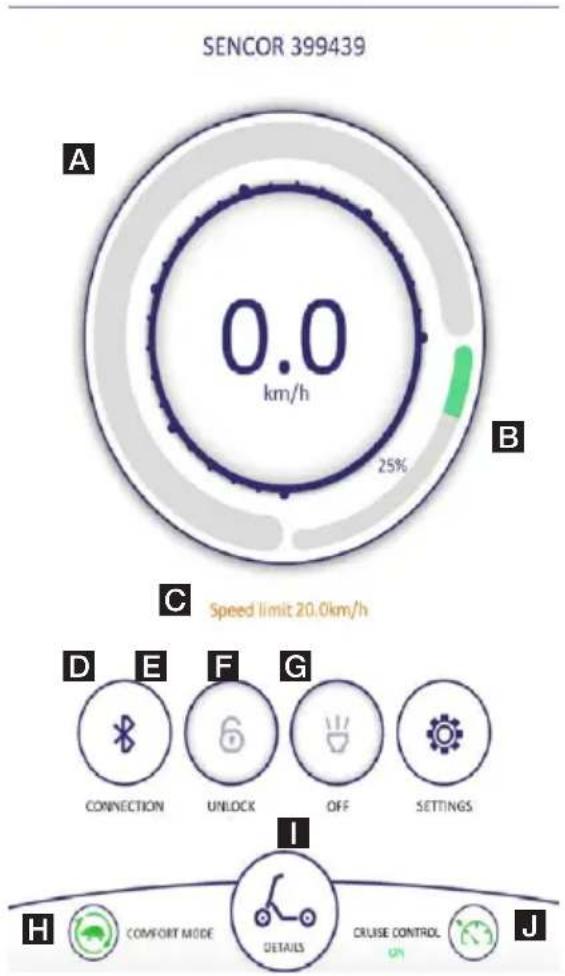
A Current speed indicator
B Scooter battery charge indicator
Warning: The indicator is only indicative and the individual charge levels have a wide range (for example, 90-100% corresponds to full battery status).
C Indicative notice
Depends on selected riding mode and custom settings
D Bluetooth pairing
Re-pairing or switching between multiple scooters
E Lock
Locking blocks the scooter motor and an acoustic signal sounds when the scooter is moving. Warning: This is not a way to prevent the scooter from being stolen.
F Scooter lights
The front and rear scooter lights come on when this function is activated.
G Settings
H Riding mode
1 Ride data
J Cruise control
Change the speed from which the cruise control is activated in Settings.
Setting the application and riding properties of the scooter

Settings
Unit: KPH

Set Bluetooth password

Cruise control

Cruise control speed
5km/h

Battery capacity
7.8Ah

Please choose the matching battery capacity, the battery capacity depends on the size of the remaining mileage statistics.
Energy recovery level
Adaptive
Riding mode
Comfort mode

Comfort mode speed limit value
20km/h

Headlight switch

- Unit: KPH/MPH
- Set Bluetooth Password: Allows you to change the preset password "000000" for Bluetooth connection of the app to your scooter. Press to select a field to fill, enter a 6-digit numeric code, and then press the next field to fill.
- Cruise control: ON / OFF Note: While driving, active cruise control is automatically deactivated when using a mechanical handbrake or speed control.
-
Cruise control speed: With cruise control mode on, it is possible to set the speed from which cruise control activates when driving at the same speed (the same speed must be maintained for approximately 5 seconds). Its activation is indicated by an acoustic signal.
-
Battery capacity: The set value depends on the inserted battery. Do not change the battery capacity setting.
- Riding mode: Sport mode allows you to achieve higher speeds, but it is more demanding on the battery.
- Speed limit: The maximum speed limit can be adjusted for the current mode.
• Headlight switch: ON / OFF

Brand : SENCOR
Model : Scooter TWO S60
Category : Scooter