
WS 7236 - Weather Station HYUNDAI - Free user manual and instructions
Find the device manual for free WS 7236 HYUNDAI in PDF.


| Product Type | Weather Station |
| Brand | Hyundai |
| Model | WS 7236 |
| Indoor Temperature Range | 0°C to 50°C |
| Indoor Temperature Resolution | 0.1°C |
| Indoor Temperature Detection Time | 15 seconds |
| Outdoor Temperature Range | -20°C to 50°C |
| Outdoor Temperature Resolution | 0.1°C |
| Number of Outdoor Sensors Supported | Up to 3 |
| Wireless Sensor Frequency | 433.92 MHz |
| Wireless Sensor ERP | -0.8 dBm |
| Alarm Features | Double alarms (AL1, AL2) |
| Snooze Function | Yes, 5-minute delay |
| LCD Backlight | Yes (5 seconds) |
| World Time Zone | Adjustable |
| DCF77 Time Signal Reception | 77.5 kHz |
| Calendar | 12/24 hour format, date, language selection (default German) |
| Power Supply | Not specified (typically batteries: assume 2x AA for station, sensor) |
| Safety Warnings | Keep plastic bag away from children, dispose of electronics properly |
| Compliance | Directive 2014/53/EU, EU Declaration of Conformity available online |
Frequently Asked Questions - WS 7236 HYUNDAI
User questions about WS 7236 HYUNDAI
0 question about this device. Answer the ones you know or ask your own.
Ask a new question about this device
Download the instructions for your Weather Station in PDF format for free! Find your manual WS 7236 - HYUNDAI and take your electronic device back in hand. On this page are published all the documents necessary for the use of your device. WS 7236 by HYUNDAI.
USER MANUAL WS 7236 HYUNDAI
- Indoor temperature display, resolution of 0,1°C, detection range 0°C \~ 50°C, detect time 15 seconds
- Outdoor temperature display, resolution of 0,1°C, detection range: - 20°C \~ 50°C
-Outdoor temperature can be received up to 3 sensors
-Double alarms
-Snooze function, delay 5 minute ring again
-LCD backlight
-World time zone
LCD FULL DISPLAY GRAPH
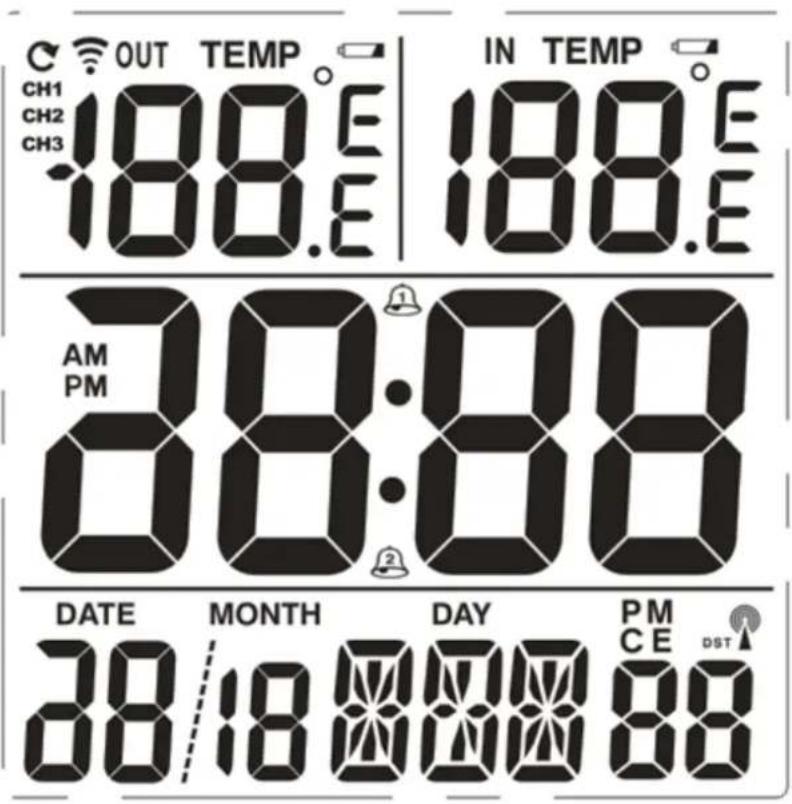
- Press MODE to switch AL time.
- Long press MODE into setting mode.
- Press switch between sensors in order: CH1>CH2>CH3>recycle
- Long press to delete the received sensor and launch sensors searching.
- Press switch ^ / ^ .
- Press for more than 2 s to launch searching DCF 77 time signal.
- Press for more than 2 s again to exit DCF 77 time signal searching mode.
- Press ALARM on/off AL.
- Press light the backlight for 5 s.
- Press into snooze mode and delay 5minutes ring again when alarm.
B) Time setting mode
- When standard time is displayed, long press MODE for more than 2s into time setting.
- Setting item will be blinking.
- Setting order: 12/24HR > time zone > hour > minute > language > year > mouth > date > exit
- Use the UP or DOWN button to set the time.
- Press MODE to confirm setting.
- No handling buttons for 30 s exit setting mode automatically and save the set value.
C) Alarm setting
- Press ALARM to select AL1 or AL2L.
- Press MODE to switch ALARM time.
- Long press MODE for more than 2s into alarm setting.
- Setting item will be blinking.
- Setting order: hour >minute>exit
- Use the or button to set the alarm.
- Press MODE to confirm.
- No handling buttons for 30s exit setting mode automatically and save the set value.
- Press ALARM to on/off ALARM, order is as follow: AL1>AL2>AL1/AL2>OFF
RESET
- After resetting, the weather station displays full segment for 1 second, then the weather station launches the sensor searching for 3 minutes, after 3 minutes launch the DCF 77 time searching automatically for 7 minutes.
• Calendar default 1st Jan 2009 0:00 - Alarm default is 0:00
• Temperature default is °C - Sensor default is CHANNEL 1
• Language default GERMANY
EXTERNAL SENSOR
Wireless Outdoor Sensor: 433,92 MHz RF transmitting frequency; ERP -0,8 dBm
• After power on the weather station launches the sensor searching for 3 minutes.
- The antenna symbol will be blinking.
- If it fails (the signal is not received), long press to re-activated the external sensor searching.
DFC77 TIME
- 3 minutes after power on, the weather station will automatically search for the DFC77 (77,5 kHz) time signal.
- Searching takes 7 minutes.
- While the DFC77 time signal is seeking, the tower-shaped icon will be blinking.
- The DFC77 time signal searching is automatically launched every day.
- The weather station will automatically search for the DFC77 time signal on am1:00, am2:00 and am3:00 every day. If the reception is not successful, the clock will attempt am4:00 and am5:00. If still the reception is not successful, the clock will not search for the signal on the current day.
- If it fails (the signal is not received), long press to re-activated the DFC77 time signal searching.
ALARM
BUZZER alarm time is 2 minutes and will alarm as follow:
• 0-10 seconds: beep once each second
• 10-20 seconds: beep twice each second
• 20-30 seconds: beep four times each second
• More than 30 seconds, beep continuously
- AL1 and AL2 is the same length of time and form
- When alarm, press " " will delay 5minutes to alarm, press other buttons exit alarm.
WE RESERVE THE RIGHT TO CHANGE TECHNICAL SPECIFICATIONS.


TO AVOID DANGER OF SUFFOCATION, KEEP THE PLASTIC BAG AWAY FROM BABIES AND CHILDREN. DO NOT USE THIS BAG IN CRIBS, BEDS, CARRIAGES OR PLAYPENS. THIS BAG IS NOT A TOY.
Disposal of old Electrical & Electronic Equipment (Applicable in the European Union and other European countries with separate collection systems).
This symbol on the product or on its packaging indicates that this product shall not be treated as household waste. Instead it shall be handed over to the applicable collection point for the recycling of electrical and electronic equipment. By ensuring this product is disposed of correctly, you will help prevent potential negative consequences for the environment and human health, which could otherwise be caused by inappropriate waste handling of this product. The recycling of materials will
help to conserve natural resources. For more detailed information about recycling of this product, please contact your local Civic Office, your household waste disposal service or the shop where you purchased the product.
Hereby, ETA a.s. declares that the radio equipment type WS7236 is in compliance with Directive 2014/53/EU. The full text of the EU declaration of conformity is available at the following internet address: http://www.hyundai-electronics.cz/declaration_of_conformity
FŐ JELLEMZŐK
Licensed by Hyundai Corporation, Korea

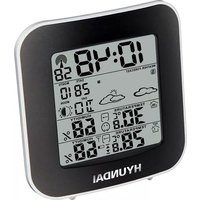
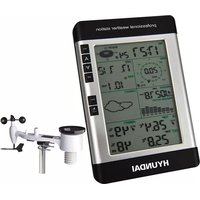

Brand : HYUNDAI
Model : WS 7236
Category : Weather Station