
DMX8020S - Media player KENWOOD - Free user manual and instructions
Find the device manual for free DMX8020S KENWOOD in PDF.


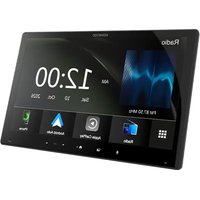
| Product Type | Media Player with DVD Receiver |
| Display | 6.95 inch TFT LCD, 800x480 pixels, LED backlight |
| Audio Decoding | MP3, WMA, AAC, WAV, FLAC, Vorbis |
| Video Decoding | MPEG-1, MPEG-2, MPEG-4, WMV, H.264, MKV |
| FM Tuner Frequency | 87.5 - 108.0 MHz (50 kHz step) |
| AM Tuner Frequency | 531 - 1611 kHz (9 kHz step) |
| Bluetooth Profiles | HFP (v1.7), SPP, A2DP, AVRCP (v1.6), PBAP |
| Bluetooth Audio Codec | LDAC (compatible models), SBC, AAC |
| USB Port Power | DC 5V, 1.5A (1 port) |
| Maximum Power Output | 50 W × 4 |
| Typical Power Output | 22 W × 4 (at < 1% THD) |
| Preout Voltage | 5 V / 10 kΩ |
| Speaker Impedance | 4 - 8 Ω |
| Operating Voltage | 12 V DC (car battery) |
| Audio Features | 13-band graphic EQ, 2-way/3-way crossover, time alignment (0 - 6.1 m) |
| Wireless Connectivity | Wi-Fi 5 (802.11ac) for wireless Apple CarPlay |
| Safety | CLASS 1 LASER PRODUCT |
| Maintenance | Clean with soft dry cloth; avoid solvents |
| Supported Discs | DVD-Video, VIDEO-CD, CD-DA |
Frequently Asked Questions - DMX8020S KENWOOD
User questions about DMX8020S KENWOOD
0 question about this device. Answer the ones you know or ask your own.
Ask a new question about this device
Download the instructions for your Media player in PDF format for free! Find your manual DMX8020S - KENWOOD and take your electronic device back in hand. On this page are published all the documents necessary for the use of your device. DMX8020S by KENWOOD.
USER MANUAL DMX8020S KENWOOD
MONITOR WITH DVD RECEIVER
DDX9020DABS
DDX920WDABS
DDX8020S
DDX820WS
MONITOR WITH RECEIVER
DMX8520DABS
DMX8020S
DMX820WS
คู่มือการใช้งาน
JVCKENWOOD Corporation
natural_image
Technical line drawing of two views of a flatboard or shelf unit (no text or symbols)
การเลือนแผงหน้าจอ
Language
אַרְשָׁה
DMX820WS
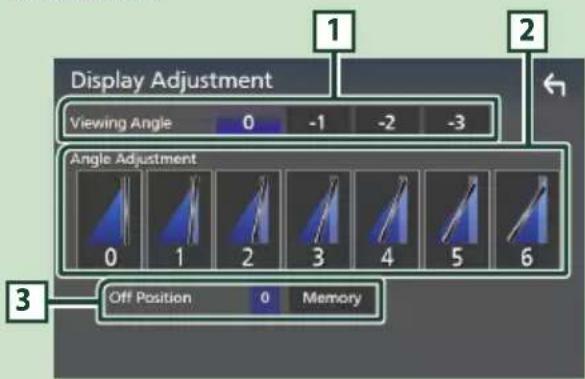
1 Viewing Angle
natural_image
Simple line drawing of a hand cursor clicking a button (no text or symbols)-การกดต้าง
DDX820WS / DMX820WS

NOTE

natural_image
Diagram of a CD or DVD disc being placed into a rectangular device (no text or symbols visible)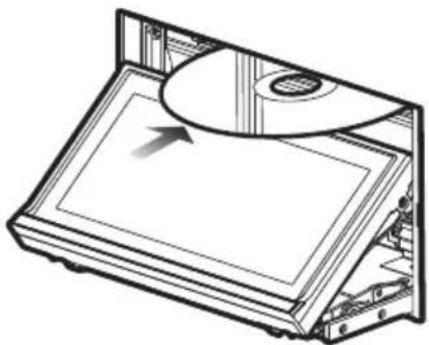
natural_image
Technical line drawing of a CD or DVD disc assembly with an arrow indicating motion (no text or symbols present)natural_image
Diagram of a CD or DVD disc being inserted into a flat case, showing internal components and an arrow indicating direction (no text or symbols present)natural_image
Scenic coastal landscape with green foliage and distant ocean, framed by numbered labels (6, 7, 8) — no readable text or symbols in the main scene.natural_image
Coastal landscape with green foliage and ocean background, no visible text or symbolsnatural_image
Coastal landscape with green banana plants and ocean in the background under a partly cloudy sky (no text or symbols visible)Apple CarPlay is connected
אַרְשָׁה


natural_image
Line drawing of a USB connector with a cable, showing a connector inserted into a port (no text or symbols present)หมายเหตุ
ปิดหน้าที่ช่อนไว้

1 ข้อมูลเพลง
אַרְשָׁה
natural_image
Solid dark green rectangular shape with no visible text, symbols, or features.
2 กดที่ AME

3 กดที่ YES

หมายเหตุ
1 แสดงสถานะ
- 0 : แสดงหน้ารายการบริการ สำหรับวิธีการค้นหา ดูที่ การค้นหาบริการ (หน้า 51)
- 11111 : เลือนดูบริการและส่วนที่เกี่ยวข้อง
สามารถเปลี่ยนใหมดการค้นหาได้ (ดูที่ 3 โหมดการค้นหา)
. : cardiac Diabetic Diabetic Diabetic Diabetic Diabetic Diabetic Diabetic Diabetic Diabetic Diabetic Diabetic Diabetic Diabetic Diabetic Diabetic Diabetic Diabetic Diabetic Diabetic Diabetic Diabetic Diabetic Diabetic Diabetic Diabetic Diabetic Diabetic Diabetic Diabetic Diabetic Diabetic Diabetic Diabetic Diabetic Diabetic Diabetic Diabetic Diabetic Diabetic Diabetic Diabetic Diabetic Diabetic Diabetic Diabetic Diabetic Diabetic Diabetic Diabetic Diabetic Diabolic Diabetic Diabetic Diabetic Diabetic Diabetic Diabetic Diabetic Diabetic Diabetic Diabetic Diabetic Diabetic Diabetic Diabetic Diabetic Diabetic Diabetic Diabetic Diabetic Diabetic Diabetic Diabetic Diabetic Diabetic Diabetic Diabetic Diabetic Diabetic Diabetic Diabetic Diabetic Diabetic Diabetic Diabetic Diabetic Diabetic Diabetic Diabetic Diabetic Diabetic Diabetic Diabetic Diabetic Diabetic Diabetic Diabetic Diabetic Diabetic Diabetic Diadiseptic Dendemic Dendemic Dendemic Dendemic Dendemic Dendemic Dendemic Dendemic Dendemic Dendemic Dendemic Dendemic Dendemic Dendemic Dendemic Dendemic Dendemic Dendemic Dendemic Dendemic Dendemic Dendemic Dendemic Dendemic Dendemic Dendemic Dendemic Dendemic Dendemic Dendemic Dendemic Dendemic Dendemic Dendemic
[

หมายเหตุ
■Announcement Select
■Select All
PBAP (Phonebook Access Profile)
เครื่องเล่นออติโอ:
A2DP (Advanced Audio Distribution Profile)
AVRCP (V1.6) (Audio/Video Remote Control Profile)
Sound codec
LDAC (DDX9020DABS / DDX920WDABS / DMX8520DABS),
SBC, AAC
หมายเหตุ
■TEL (HFP) 1, TEL (HFP) 2
หมายเหตุ
เลือกทั้งหมด
Bluetooth HF/Audio
natural_image
Coastal landscape with green foliage and ocean background, no visible text or symbols
natural_image
Beach scene with green plants and ocean in background, no visible text or symbols■NAV Voice Volume

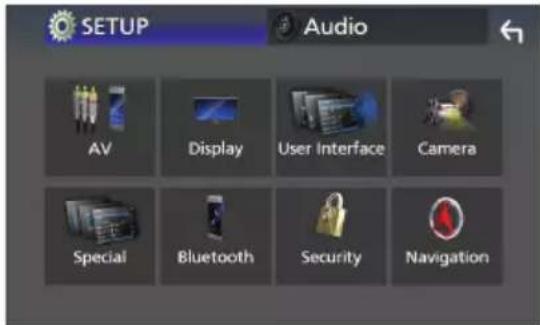
หมายเหตุ
■ Open Source Licensed
User
3 กดที่ Enter

DMX8520DABS / DMX8020S
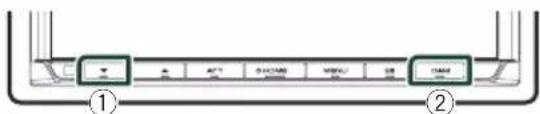
4 เลือกประเภทรถ
■Speaker
หมายเหตุ
HPF FREQ
■ FREQ (High Pass)
■ HPF FREQ, LPF FREQ (Band Pass)
■Fader / Balance
5 กดไปที่ Dual Zone

■ Zone Select
■ Front Source, Rear Source
■Bass Boost
"OFF"/ "Small"/ "Medium"/ "Large"
אַרְשָׁה
natural_image
Diagram of a battery pack with internal components and directional arrows indicating movement (no text or symbols)■VCD 1.X and 2.X (PBC OFF)
เลขแทร็ค
■VCD 2.X (PBC ON)
เลขฉาก / เลขแทร็ด
■ Music CD
หมายเลขแทร็ด
natural_image
Top-down schematic of a computer monitor with integrated circuit and display (no text or labels)พัดลมระบายความร้อน
![⑥ (M5 x 8 mm) x6 ⑦ [4] x1 ⑧ [3] (3.5 m) x1 ⑨ [3] x1 ⑩ [1] [2] x1 ⑪ [3] x3 ⑫ [3] x1 ⑬ [3] x1 ⑭ [3]](/content/2026/05/849793/images/f0c74c50b8fe4d8a314662898937e5af4a9cf6c6be7c3a52f746ca8bebeb5808.jpg)
natural_image
Diagram showing a box being placed on a frame with an arrow indicating rotation (no text or symbols present)
หมายเหตุ

7)
flowchart
graph TD
    A["控制面板"] --> B["PRK SW"]
    B --> C["PC"]
    C --> D["CAM-"]
    C --> E["CAM+"]
    D --> F["S SENS"]
    D --> G["S SENS"]
    E --> H["S SENS"]
    E --> I["S SENS"]
    F --> J["REVERSE"]
    G --> K["REVERSE"]
    H --> L["REVERSE"]
    I --> M["REVERSE"]

    B --> N["PPK SW"]
    N --> O["OPR"]
    O --> P["地表"]

    style A fill:#f9f,stroke:#333
    style B fill:#ccf,stroke:#333
    style C fill:#cfc,stroke:#333
    style D fill:#fcc,stroke:#333
    style E fill:#cff,stroke:#333
    style F fill:#ffc,stroke:#333
    style G fill:#cfc,stroke:#333
    style H fill:#cfc,stroke:#333
    style I fill:#cfc,stroke:#333

    subgraph 说明
        direction TB
        N --> O
        O --> P
        P --> Q["PPK SW"]
        Q --> R["OPR"]
        R --> S["地表"]
        S --> T["PPK SW"]
        T --> U["OPR"]
        U --> V["PPK SW"]
        V --> W["PPK SW"]
        W --> X["PPK SW"]
        X --> Y["PPK SW"]
        Y --> Z["PPK SW"]
        Z --> AA["PPK SW"]
        AA --> AB["PPK SW"]
        AB --> AC["PPK SW"]
        AC --> AD["PPK SW"]
        AD --> AE["PPK SW"]
        AE --> AF["PPK SW"]
        AF --> AG["PPK SW"]
        AG --> AH["PPK SW"]
        AH --> AI["PPK SW"]
        AI --> AJ["PPK SW"]
        AJ --> AK["PPK SW"]
        AK --> AL["PPK SW"]
        AL --> AM["PPK SW"]
        AM --> AN["PPK SW"]
        AN --> AO["PPK SW"]
        AO --> AP["PPK SW"]
        AP --> AQ["PPK SW"]
        AQ --> AR["PPK SW"]
        AR --> AS["PPK SW"]
        AS --> AT["PPK SW"]
        AT --> AU["PPK SW"]
        AU --> AV["PPK SW"]
        AV --> AW["PPK SW"]
        AW --> AX["PPK SW"]
        AX --> AY["PPK SW"]
        AY --> AZ["PPK SW"]
        AZ --> BA["PPK SW"]
        BA --> BB["PPK SW"]
        BB --> BC["PPK SW"]
        BC --> BD["PPK SW"]
        BD --> BE["PPK SW"]
        BE --> BF["PPK SW"]
        BF --> BG["PPK SW"]
        BG --> BH["PPK SW"]
        BH --> BI["PPK SW"]
        BI --> BJ["PPK SW"]
        BJ --> BK["PPK SW"]
        BK --> BL["PPK SW"]
        BL --> BM["PPK SW"]
        BM --> BN["PPK SW"]
        BN --> BO["PPK SW"]
        BO --> BP["PPK SW"]
        BP --> BQ["PPK SW"]
        BQ --> BR["PPK SW"]
        BR --> BS["PPK SW"]
        BS --> BT["PPK SW"]
        BT --> BU["PPK SW"]
        BU --> BV["PPK SW"]
        BV --> BW["PPK SW"]
        BW --> BX["PPK SW"]
        BX --> BY["PPK SW"]
        BY --> BZ["PPK SW"]
        BZ --> CA["PPK SW"]
        CA --> CB["PPK SW"]
        CB --> CC["PPK SW"]
        CC --> CD["PPK SW"]
        CD --> CE["PPK SW"]
        CE --> CF["PPK SW"]
        CF --> CG["PPK SW"]
        CG --> CH["PPK SW"]
        CH --> CI["PPK SW"]
        CI --> CJ["PPK SW"]
        CJ --> CK["PPK SW"]
        CK --> CL["PPK SW"]
        CL --> CM["PPK SW"]
        CM --> CN["PPK SW"]
        CN --> CO["PPK SW"]
        CO --> CP["PPK SW"]
        CP --> CQ["PPK SW"]

natural_image
Technical illustration of a mechanical component with a coiled cable and housing (no text or symbols)
There is an error in the speaker wiring. Please check the connections.
No Device (USB device)
Disconnected (iPod, Bluetooth audio player)
USB device over current status detected.
The GPS antenna must be connected to use Apple
CarPlay wirelessly. Please verify the proper connections or plug in by USB to use Apple CarPlay.
The GPS antenna must be connected to use Apple
CarPlay wirelessly. Please verify the proper connections or plug in by USB to use Apple CarPlay.
■ DVD disc marks

: TFT active matrix system
จำนวนพิกเชล
: 1,152,000 (800H × 480V × RGB)
Effective Pixels
: 99.99 %
Pixel Arrangement
: RGB striped arrangement
ไพร่หลัง
: LED
■เกี่ยวกับ DVD
(DDX9020DABS / DDX920WDABS / DDX8020S /
DDX820WS)
D/A Converter
: 24 bit/32 bit
Audio Decoder
: Linear PCM / Dolby Audio / MP3 / WMA / AAC /
WAV / FLAC / Vorbis
Video Decoder
: MPEG-1 / MPEG-2 / MPEG-4 / WMV / H.264 / MKV
Wow & Flutter
: Below Measurable Limit
Frequency Response
• 96 kHz : 20 - 44,000 Hz
• 48 kHz : 20 - 22,000 Hz
• 44.1 kHz : 20 - 20,000 Hz
Total Harmonic Distortion
: 0.010 % (1 kHz)
S/N Ratio (dB)
: 90.5 dB (DVD-Video 96 kHz)
Dynamic Range
: 89 dB (DVD-Video 96 kHz)
รูปแบบติสก์
: DVD-Video / VIDEO-CD / CD-DA
Quantifying Bit Number
: 16 bit/20 bit/24 bit
Maximum Power Supply Current
DDX9020DABS / DDX920WDABS / DMX8520DABS
: DC 5 V 1.5A × 2
DDX8020S / DDX820WS / DMX8020S / DMX820WS
: DC 5 V 1.5 A × 1
D/A Converter
: 24 bit/32 bit
Audio Decoder
: MP3 / WMA / AAC / WAV / FLAC / Vorbis
Video Decoder
: MPEG-1 / MPEG-2 / MPEG-4 / WMV / H.264 / MKV
Frequency Response
(DMX8520DABS / DMX8020S / DMX820WS)
• 192 kHz : 20 - 88,000 Hz
- 96 kHz:20-44,000 Hz
• 48 kHz:20-22,000 Hz
• 44.1 kHz : 20 - 20,000 Hz
Total Harmonic Distortion
(DMX8520DABS / DMX8020S / DMX820WS)
: 0.010 % (1 kHz)
S/N Ratio (dB)
(DMX8520DABS / DMX8020S / DMX820WS)
: 98.5 dB
Dynamic Range
(DMX8520DABS / DMX8020S / DMX820WS)
: 89 dB
11ac (80 MHz): 8 dBm ± 2 dB
5 GHz/MIMO
: 11n (20 MHz)/11ac (20 MHz): 11 dBm ± 2 dB /
11n (40 MHz)/11ac (40 MHz): 11 dBm ± 2 dB /
11ac (80 MHz): 11 dBm ± 2 dB
Maximum Communication range
: Line of sight approx. 10ม. (32.8 พต)
Audio Codec
: LDAC (DDX9020DABS / DDX920WDABS /
DMX8520DABS)/SBC/AAC
Profile (Multi Profile support)
• HFP (V1.7) (Hands Free Profile)
• SPP (Serial Port Profile)
• A2DP (Advanced Audio Distribution Profile)
• AVRCP (V1.6) (Audio/Video Remote Control Profile)
• PBAP (Phonebook Access Profile)
■เกี่ยวกับ DSP
Graphics equalizer
Band: 13 Band
ความถี (BAND1 - 13)
: 62.5/100/160/250/400/630/1k/1.6k/2.5k/4k/6.3k/
10k/16k Hz
Gain
:-9/-8/-7/-6/-5/-4/-3/-2/-1/0/1/2/3/4/5/6/7/8/9 dB
2-way X'Over
High pass filter
Frequency: Through, 30/40/50/60/70/80/90/100/
120/150/180/220/250 Hz
Slope: -6/-12/-18/-24 dB/Oct.
Low pass filter
Frequency: 30/40/50/60/70/80/90/100/120/150/
180/220/250 Hz, Through
Slope: -6/-12/-18/-24 dB/Oct.
3-way X'Over
High pass filter
Frequency: 250/300/1k/1.6k/2.5k/4k/5k/6.3k/8k/10k/12.5k
Hz
Slope: -12/-18/-24 dB/Oct.
Band pass filter
Frequency: Through, 50/60/70/80/90/100/120/150/
180/220/250/300 Hz
250/300/1k/1.6k/2.5k/4k/5k/6.3k/8k Hz,
Through
Slope: -12/-18/-24 dB/Oct.
Low pass filter
Frequency: 30/40/50/60/70/80/90/100/120/150 Hz,
Through
Slope: -12/-18/-24 dB/Oct.
ตําแหน่ง
Front / Rear / Subwoofer Delay
: 0 - 6.1 m (0.01 m Step)
Gain
:-8-0dB
Subwoofer level
:-50-+10 dB
Frequency Range (step)
: 87.5 MHz – 108.0 MHz (50 kHz)
Usable Sensitivity (S/N : 30 dB)
: 9.3 dBf (0.8 μV/75 Ω)
Quieting Sensitivity (S/N : 46 dB)
: 15.2 dBf (1.6 μV/75 Ω)
Frequency Response
: 30 Hz – 15 kHz
S/N Ratio (dB)
: 65 dB (MONO)
Selectivity (± 400 kHz)
: Over 80 dB
Stereo Separation
: 45 dB (1 kHz)
Frequency Range (step)
DDX8020S / DDX820WS / DMX8020S / DMX820WS
: 531 kHz - 1611 kHz (9 kHz)
DDX9020DABS / DDX920WDABS / DMX8520DABS
: 531 kHz – 1701 kHz (9 kHz)
Usable Sensitivity
DDX8020S / DDX820WS / DMX8020S / DMX820WS
: 25μV
DDX9020DABS / DDX920WDABS / DMX8520DABS
: 28dBμ
■ เกี่ยวกับ Video
Color System of External Video Input
: NTSC/PAL
External Video Input Level (mini jack)
: 1 Vp-p/75 Ω
External Audio Max Input Level (mini jack)
: 2 V/25 kΩ
Video Input Level (RCA jacks)
: 1 Vp-p/75 Ω
Video Output Level (RCA jacks)
: 1 Vp-p/75 Ω
Audio Output Level (mini jack)
: 0.9 V/10 kΩ
■เกี่ยวกับ Audio
Maximum Power (Front & Rear)
: 50 W × 4
Typical Power Output (Front & Rear)
Full Bandwidth Power (at less than 1% THD)
: 22 W × 4
Output frequency band
: 20 - 88,000 Hz
Preout Level (V)
: 5 V/10 kΩ
Preout Impedance
: ≤ 300 Ω
Speaker Impedance
: 4 - 8 Ω
■ทั่วไป
Operating Voltage
: 12 V DC car battery
CLASS 1 LASER PRODUCT
- DDX9020DABS
- DDX920WDABS
- DDX8020S
- DDX820WS
- DMX8520DABS
- DMX8020S
- DMX820WS
- การเลือนแผงหน้าจอ
- Language
- אַרְשָׁה
- Viewing Angle
- -การกดต้าง
- NOTE
- Apple CarPlay is connected
- หมายเหตุ
- ข้อมูลเพลง
- กดที่ AME
- กดที่ YES
- No Device (USB device)
- ■เกี่ยวกับ DVD
- ■ เกี่ยวกับ Video
- ■เกี่ยวกับ Audio
- ■ทั่วไป
- CLASS 1 LASER PRODUCT
Brand : KENWOOD
Model : DMX8020S
Category : Media player