
H 4881 BP - Built-in oven MIELE - Free user manual and instructions
Find the device manual for free H 4881 BP MIELE in PDF.


| Brand | MIELE |
| Model | H 4881 BP |
| Product type | Built-in oven |
| Dimensions (H x W x D) | approx. 597 x 597 x 569 mm |
| Interior volume | not specified (approx. 60 L) |
| Power supply | 240 V / 208 V, 60 Hz, 30 A (with 4-wire cable) |
| Cooking functions | Conventional Heat, Convection, Fan Plus, Grill, Maxi Grill, Roast, Rotisserie, Food probe, MasterChef automatic cooking |
| Cleaning | Pyrolytic (SELF CLEAN) |
| Interior coating | PerfectClean (non-stick) |
| Lighting | Halogen bulb 12 V, 10 W, G4 socket |
| Safety | System lock, door lock during pyrolysis, door contact switch |
| Included accessories | Rack, drip tray, grease filter, food probe, rotisserie, slide-out tool |
| Weight | not specified (approx. 40 kg) |
| Number of rack levels | 6 levels |
| Special programs | Sabbath, Rehydration, Proofing, Defrost, Favorites |
| Display | Touchscreen LCD (backlit) |
Frequently Asked Questions - H 4881 BP MIELE
User questions about H 4881 BP MIELE
0 question about this device. Answer the ones you know or ask your own.
Ask a new question about this device
Download the instructions for your Built-in oven in PDF format for free! Find your manual H 4881 BP - MIELE and take your electronic device back in hand. On this page are published all the documents necessary for the use of your device. H 4881 BP by MIELE.
USER MANUAL H 4881 BP MIELE
Operating and Installation Instructions

natural_image
Black-and-white line drawing of various food items including a cake, jar with berries, a dog, and decorative stars (no text or symbols)Oven
H 4881 BP
To prevent accidents and machine damage, read these instructions before installation or use.
en - US, CA, SG
M.-Nr. 07 077 620
IMPORTANT SAFETY INSTRUCTIONS....4
Guide to the oven....7
Guide to the display....8
Oven accessories 9
Wire rack....9
Roasting pan....9
Grease filter 10
Roast probe 10
Rotisserie 10
Slide opener 10
Locking the oven 11
Using the system lock: 11
Using the oven display 12
SETTINGS 13
Language 14
Clock 14
Temperatures....15
Oven Light 16
Temperature °F / °C 16
Tone Options 17
Display....18
Reset 19
System lock 19
Before using the oven 20
Using the oven 22
Selecting a function 22
Adjusting the oven temperature 22
Preheating 23
Delay Start 23
Duration 23
Start time....24
End time 24
Canceling a process 25
Turning off the oven....25
At the end of cooking: 25
Setting the timer....26
Guide to the functions....27
BAKE 29
Baking tips....29
ROAST 34
Roasting tips 37
Using the roast probe 38
MASTER CHEF 41
BROIL 44
Broiling tips 49
FAVORITES 50
SABBATH 51
DEHYDRATE....52
PROOF 53
DEFROST 54
Defrosting tips 54
Cleaning 55
PerfectClean 56
Removing the oven door....58
Removing the runners. 59
Lowering the upper heating element 60
Self Cleaning 61
Changing the light bulb 63
Frequently asked questions 65
Technical Service....66
Optional accessories....67
Installation instructions 69
Caring for the environment....70
Disposal of the packing materials 70
Disposal of an old appliance 70
Electrical connection....71
Appliance and Cut-out Dimensions 72
Installing the oven 73
This appliance is intended for residential use only.
Only use the appliance for its intended purpose. The manufacturer cannot be held responsible for damages caused by improper use of this oven.
This appliance complies with current safety requirements. Improper use of the appliance can lead to personal injury and material damage.
Read all instructions before installing or using the oven for the first time.
Keep these operating instructions in a safe place and pass them on to any future user.
Installation
Before installation make sure that the voltage and frequency listed on the data plate correspond with the household electrical supply. This data must correspond to prevent injury and machine damage. Consult a qualified electrician if in doubt.
▶ Be certain your appliance is installed and grounded by a qualified technician.
To guarantee the electrical safety of this appliance, continuity must exist between the appliance and an effective grounding system. It is imperative that this basic safety requirement be met. If there is any doubt, have the electrical system of the house checked by a qualified electrician.
The manufacturer cannot be held responsible for damages caused by the lack, or inadequacy, of an effective grounding system or the failure to adhere to national and local electrical codes.
The oven is not to be operated until it has been properly installed within cabinetry.
▶ Installation, maintenance and repair work should be performed by an authorized service technician. Work by unqualified persons could be dangerous and may void the warranty.
Before installation or service, disconnect the power supply to the work area by removing the fuse, "tripping" the circuit breaker, or shutting off the power main.
Oven use
⚠ WARNING: Ovens produce high internal temperatures that can cause burns.
▶ Prevent children from touching the appliance when in use.
▶ Use heat-resistant potholders when placing items in the oven, turning them, or removing them from the oven. The upper heating element and oven racks can become very hot and cause burns.
To prevent burns, always place oven racks in their desired height while the oven is cool.
▶ Open the door carefully to allow hot air or steam to escape before placing or removing food.
▶ To prevent burns, allow the heating element to cool before cleaning by hand.
During the self cleaning function the oven will become very warm. Prevent children form coming in contact with the oven.
Remove all accessories from the oven before starting the self cleaning function. The high temperatures needed for this program will damage the accessories.
The door gasket is essential for a good seal. Care should be taken not to rub, damage or move the gasket. The door gasket should only be cleaned with a solution of warm water and soap.
▶ Only clean parts listed in this manual.
▶ Caution: Heating elements may be hot even if they are not glowing. During and after use, do not let clothing or other flammable materials come in contact with heating elements or interior surfaces of the oven until they have had sufficient time to cool. External parts of the oven such as the door glass, vents, and the control panel can become hot.
▶ Do not block any vent openings.
▶ Aluminum foil should not be used to line the oven floor. To avoid damage, do not place pots, pans or baking sheets directly on the oven floor.
Do not let metal objects (aluminum foil, pans) or the meat probe come in contact with the heating element.
Do not slide pots or pans on the oven floor. This could scratch and damage the surface.
Do not lean, sit, or place heavy items on the open oven door.
▶ Only use the Miele roast probe supplied with the oven. Contact Miele if you need to purchase a new probe.
To prevent damage, remove the roast probe from the oven when it is not being used.
Do not heat unopened containers of food in the oven, pressure may build up and cause them to explode.
▶ Never add water to food on a hot tray or pan or directly onto food in a hot oven. The steam created could cause serious burns or scalds.
This oven must only be used for cooking. Do not use it as a dryer, kiln, dehumidifier, etc. Fumes or vapors given off by glues, plastics or flammable liquids and materials could be hazardous.
▶ Never store flammable liquids and materials in, above or under an oven, or near cooking surfaces.
When baking frozen pizzas or pies, place them on the rack lined with parchment paper. Do not use the baking tray or the roasting pan for frozen foods with a large surface area. The tray or pan could become warped and difficult to remove from the oven when hot. Frozen food like french fries, fish sticks, chicken fingers etc. can be baked on the baking tray.
General notes
Do not use a steam cleaner to clean the oven. Steam could penetrate electrical components and cause a short circuit.
Children should not be left alone or unattended in an area where an oven is in use. Never allow children to sit or stand on any part of the oven.
Caution: Do not store items of interest to children in cabinets above an oven. Children climbing on the oven to reach these items could be injured.
Do not leave the oven unattended when cooking with oils or fats, they are a fire hazard if overheated.
Do not use water on grease fires! Smother the fire with a properly rated dry chemical or foam fire extinguisher.
▶ Be aware of loose fitting or hanging garments while operating the cooktop, they present a fire hazard.
Do not use the oven to heat the room.
▶ Make certain that the power cords of small appliances do not come in contact with or get caught in the oven door.
▶ Use only dry, heat resistant potholders. Moist or damp potholders used on hot surfaces may result in steam burns. Do not let potholders come in contact with oils. Do not substitute towels or other bulky items for potholders.
It is recommended to cover all cooked food that is left in the oven to be kept warm. This will prevent moisture from condensing on the interior of the oven.
Be careful when using alcoholic beverages like rum, whiskey, wine etc. for baking or roasting. The alcohol evaporates at high temperatures but may in rare circumstances combust on the hot heating elements.
SAVE THESE INSTRUCTIONS
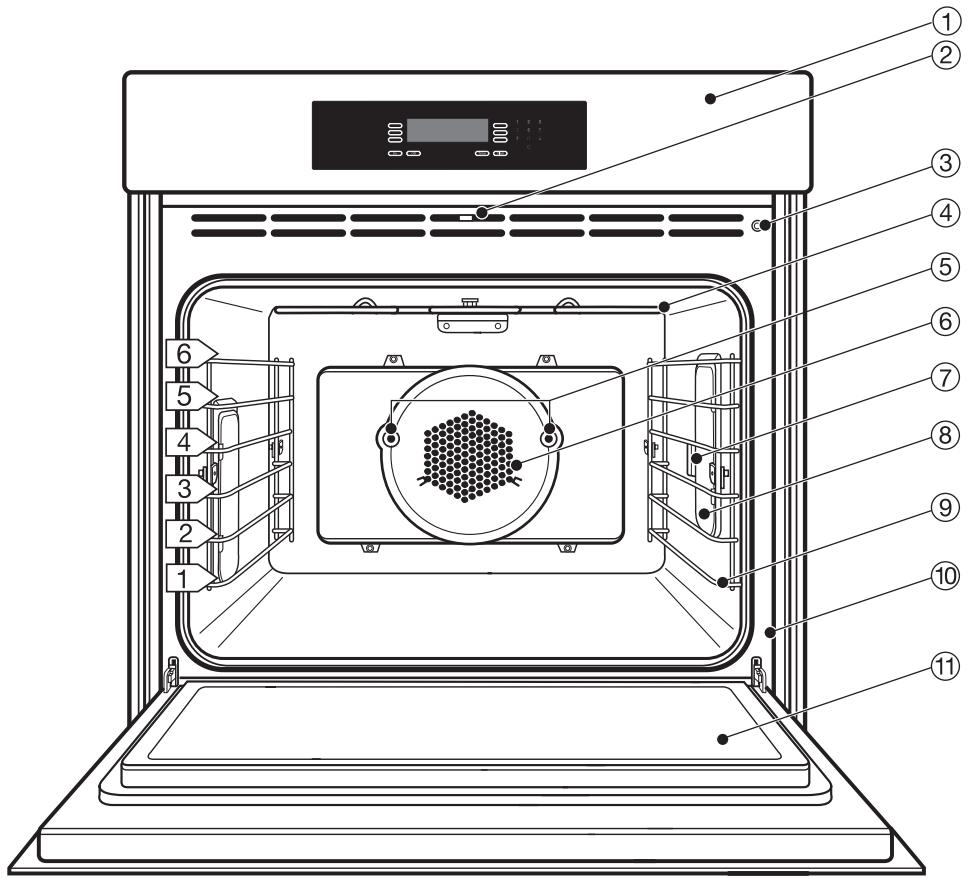
text_image
Technical diagram of an oven with numbered components for identification① Control panel
② SELF CLEAN door lock
③ Door contact switch *
④ Upper heating element
⑤ Rotisserie motors
⑥ Convection fan
⑦ Roast probe socket
⑧ Light
⑨ Non-tip, six level runners
⑩ Data plate
⑪ Oven door
* This switch shuts off the heating element and convection fan when the door is opened during use.

flowchart
graph TD
    A["①"] --> B["On"]
    A --> C["Off"]
    A --> D["Timer"]
    A --> E["Clear"]
    F["②"] --> G["1 2 3"]
    F --> H["4 5 6"]
    F --> I["7 8 9"]
    F --> J["0"]
① Touch controls
to select or set a function.
② Keypad
to enter times or temperatures.
③ "On" touch control
to turn the oven on.
④ "Off" touch control
to turn the oven off.
⑤ Display
shows the time or the functions.
⑥ "Timer" touch control
to set a timer independent of an oven function.
⑦ "Clear" touch control
to delete the last entry or to clear menu items.
Wire rack
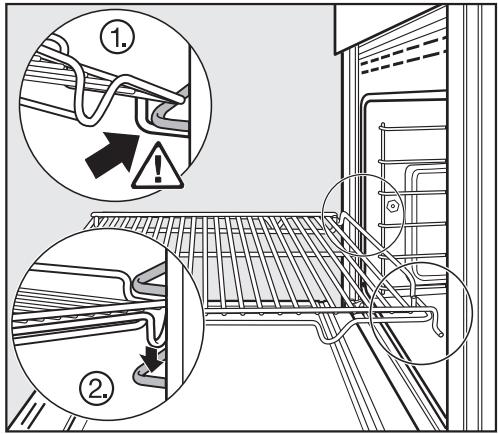
The racks are to be slid into the runners on either side of the oven. They have non-tip safety notches which prevent them from being pulled out completely while the oven is in use.
When inserting a rack, always check that the safety notches are at the rear of the oven.
The rack can only be removed by raising it upwards and then pulling out.
The wire racks are coated with PerfectClean and can be easily cleaned with a sponge and dish soap.
text_image
Technical diagram showing two views of a train hood with warning indicators and safety symbolsRoasting pan
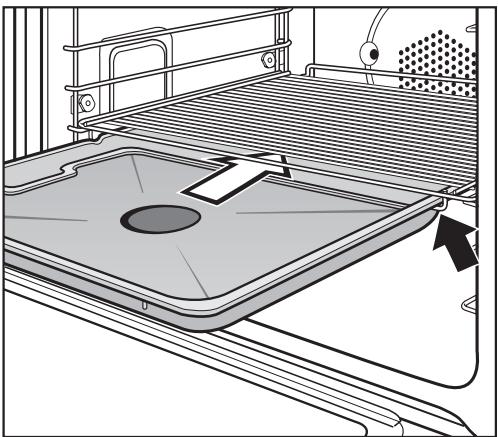
The roasting pan is ideal for catching drippings from meat or poultry roasted or broiled directly on the rack.
Slide the roasting pan onto the rail below the wire rack. See illustration.
It can also be used as a baking tray.
The roasting pan is coated with PerfectClean enamel and can be easily cleaned with a sponge and dish soap.
natural_image
Technical line drawing of a mechanical device with a central circular component and directional arrows indicating movement (no text or symbols)Grease filter
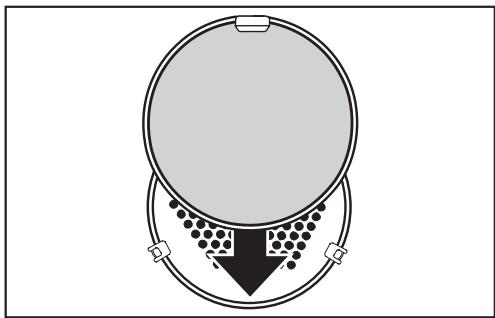
The filter helps to keep the oven fan clean from moisture and grease.
Anytime meat or poultry is prepared insert the grease filter in front of the fan opening.
natural_image
Diagram of a circular container with internal particles and a downward arrow, no text or symbols presentRoast probe
The roast probe reliably monitors the core temperature of meat and poultry during a roasting function.
The long pointed end of the probe is inserted into the thickest portion of the meat while the short end of the probe is inserted into the roast probe socket.

natural_image
Illustration of a medical or electrical tool with two probes, one straight and one pointed (no text or symbols)Rotisserie
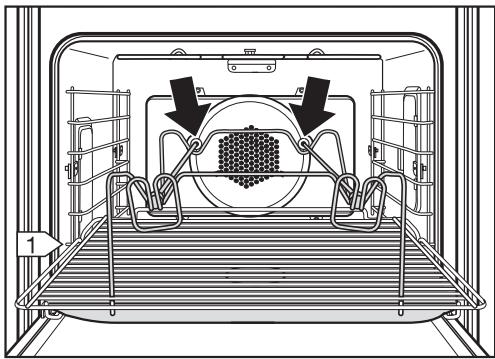
The rotisserie evenly broils and adds a finishing touch to items such as stuffed meat, ties roasts, poultry, and kabobs by gently turning the skewers during the broiling function.
The skewers are inserted into the rotisserie motors in the back panel.
natural_image
Technical diagram of a mechanical assembly with internal components and directional arrows (no text or symbols)Slide opener
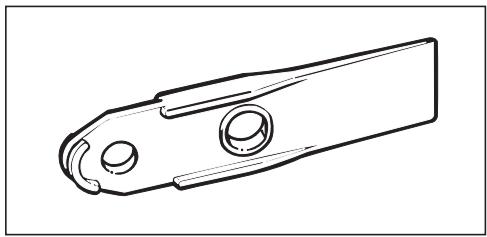
The slide opener is used to remove the light cover when changing a light bulb.
The flat end of the slide opener is wedged beneath the light cover to pry it off.
natural_image
Technical line drawing of a mechanical clamp or bracket component (no text or symbols)System lock
The oven is supplied with this setting deactivated as standard.
To use it you first have to activate it.
The system lock can be activated to prevent children from operating the oven or to conserve standby power when the oven will not be used for some time (e.g. vacation).
If activated the ⏻ symbol will show in the display when the oven is switched off.
To activate the system lock:
■ Touch the "On" control to activate the display.
■ Call up the menu SETTINGS ▶.
■ Call up the submenu SYSTEM LOCK.
■ Select the touch control next to "Accept" and confirm by touching "OK".
■ Touch the "Off" control.
☐ is displayed at the right side of the display.
To deactivate the system lock:
■ Call up the submenu SYSTEM LOCK.
■ Select the touch control next to "Do not accept" and confirm by touching "OK".
Using the system lock:
■ Select the touch control next to ⏻ and confirm "on".
The oven cannot be operated now.
The 🔒 symbol indicates that the lock has been activated. The timer can still be used while the lock is on.
The system lock remains active even after a power cut.
To switch the system lock off call up 🔒 and confirm "off".
The oven can now be used.
Note: If the system lock is activated for more than 4 days, the oven clock will have to be reset.
Using the oven display
This oven uses soft key technology and an LCD display to assist in the selection of functions.
To select a function, touch the control next to the desired function. The arrow next to each displayed function points to its corresponding control.
■ Touch the "On" control to activate the display.
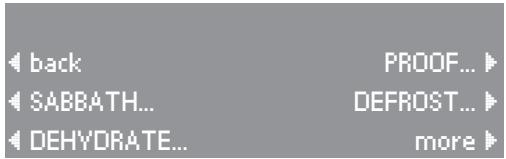
Additional functions are displayed by touching the "more" control.

text_image
BAKE... BROIL... ROAST... FAVORITES... MASTER CHEF... moreThe previous display can be recalled by touching the "back" control.
text_image
back PROOF... SABBATH... DEFROST... DEHYDRATE... moreDots after a function indicate a submenu.
The submenu will appear when the function is selected.

text_image
back SELF CLEAN SETTINGS ▶...The default oven settings can be changed in the function "SETTINGS". In this function you can customize the oven to suit your preferences. Settings may be adjusted by touching the appropriate touch control.
Available settings:

text_image
SETTINGS LANGUAGE ▼... OVEN LIGHT... CLOCK... TEMPERATURE °F TEMPERATURES... more ▶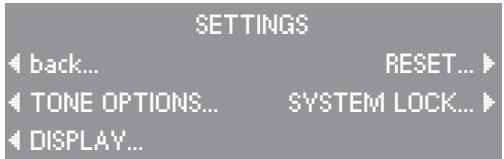
text_image
SETTINGS back... RESET... TONE OPTIONS... SYSTEM LOCK... DISPLAY...Language
■ Select the touch control next to the desired language and confirm by touching "OK".
The ▶ symbol indicates the "Language" setting. If you accidentally select an unfamiliar language, simply look for the ▶ symbol. Touch the control next to the flag symbol and select your language of choice.
Clock
"Enter Time" appears in the display.
■ Enter the current time using the keypad.
Different settings can be selected by touching the control next to the option:
- the size of the clock display,
Size Normal
Size Large
– the time format, 12 hour 24 hour - whether or not the time is displayed,
Clock-Display On
Clock-Display Off
■ Touch the "OK" control to confirm the entries.
If power to the oven is cut off for more than 4 days, the clock will have to be reset.
| LANGUAGE english | |
| English | francais |
| deutsch | OK |
| espanol | more |
| Enter Time: 04:23 | |||
| ◄ Size | Normal | Clock-Display | On ► |
| ◄ 12 hour | OK ► | ||
Temperatures
The default temperature of each function can be adjusted within the range shown below. If a temperature out of the range is selected, the oven will revert to the default temperature.
■ Touch the control of the function whose default temperature you wish to alter.
■ Enter the new default temperature using the keypad.
The next time this function is selected, the new temperature will be used.
| TEMPERATURES | ||
| BAKE | 375°F | |
| CONVECTION BAKE | 325°F | OK |
| SURROUND BAKE | 375°F | more |
| Function | °F | °C | ||
| default | range | default | range | |
| Bake | 375 °F | 200-500 °F | 190 °C | 100-260 °C |
| Convection Bake | 325 °F | 125-500 °F | 160 °C | 50-260 °C |
| Surround Bake | 375 °F | 125-550 °F | 190 °C | 50-290 °C |
| Browning | 375 °F | 200-500 °F | 190 °C | 100-260 °C |
| Intensive | 325 °F | 200-500 °F | 160 °C | 100-260 °C |
| Auto Roast | 325 °F | 200-425 °F | 160 °C | 100-210 °C |
| Convection Roast | 325 °F | 125-500 °F | 160 °C | 50-260 °C |
| Surround Roast | 400 °F | 175-550 °F | 200 °C | 80-290 °C |
| Broil | no default | 400-575 °F | no default | 200-300 °C |
| Maxi Broil | no default | 400-575 °F | no default | 200-300 °C |
| Convection Broil | no default | 200-500 °F | no default | 100-260 °C |
| Rotisserie | no default | 400-575 °F | no default | 200-300 °C |
| Defrost | 75 °F | 75-125 °F | 25 °C | 25-50 °C |
Oven Light
The "on" duration of the oven light can be altered.
■ Touch the control of the light setting you wish to choose.
- "Off after 1 minute"
The light goes off after the first minute of a function.
- "On during use"
The oven light remains lit during a function.
The selected setting will appear in the display.
■ Touch the "OK" control to confirm the selection.
Temperature °F / °C
All oven temperatures can be displayed in either Fahrenheit or Celsius degrees.
■ Touch the "TEMPERATURE" control to toggle between °F and °C.

text_image
OVEN LIGHT On during use Off after 1 minute On during use OK ▶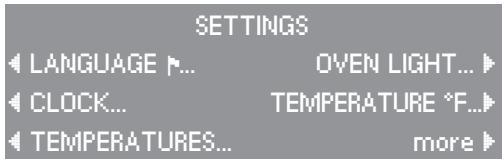
text_image
SETTINGS LANGUAGE ▶... OVEN LIGHT... CLOCK... TEMPERATURE °F... TEMPERATURES... more ▶Tone Options
Unique tones may be set for each of the two timers to differentiate the timers from an oven function tone.
"Timer 1" and "Timer 2"
The tone of Timer 1 and Timer 2 can be set to one of five tone options.
■ Select "Timer 1 Tone" or "Timer 2 Tone" by touching the corresponding control.
With every touch of the respective control, another tone will sound and the display will show the tone number.
■ Select the tone for each timer.
"Keypad tone"
The keypad can be set to make a sound with every touch of a control.
■ Touch the "Keypad tone" control to toggle between the on and off settings.
"Volume"
This control adjusts the volume of the tone options.
■ Touch the "Volume" control until you hear the desired volume.
| TONE OPTIONS | ||
| Timer 1 Tone 1 | Volume | 1 |
| Timer 2 Tone 2 | Tone | Short |
| Keypad tone on | OK | |
"Tone Short / Long"
The duration of the timer and oven tones can be modified.
- "Tone short" will beep in quick succession when an oven signal or the oven timer sounds.
- "Tone long", a continuous tone will sound when an oven signal or the oven timer sounds.
■ Touch the "Tone" control to toggle between the short and long setting.
■ Touch the "OK" control to confirm the "TONE OPTIONS" settings.
When the tone sounds to indicate an oven signal or the timer, touch any number on the keypad to turn off the tone.
Display
The brightness and contrast of the oven display can be adjusted by touching the controls next to "Brightness" and "Contrast".
Reset
The factory settings of the oven can be restored through the "RESET" function.
- Temperatures
- Settings
- Favorites
Reset Temperatures
If the request is confirmed with "yes", all changed temperatures will be restored to the factory default.
Reset Settings
If the request is confirmed with "yes", all changed settings will be restored to the factory default.
Reset Favorites
If the request is confirmed with "yes", all "favorite" entries will be deleted. Once deleted, these entries cannot be restored.
System lock
See chapter "Locking the oven".

text_image
RESET TEMPERATURE SETTINGS FAVORITES
text_image
RESET TEMPERATURES Are you sure? ← yes no ►
text_image
RESET SETTINGS Are you sure? ← yes no ►
text_image
RESET FAVORITES Are you sure? ← yes no ►Heat the oven
New ovens may have a slight odor during the first few uses. To eliminate the odor quickly, the oven should be operated at a high temperature for 2 hours.
Before heating the oven for the first time remove (if present)
– any stickers from the baking tray, roasting pan or interior floor.
– any cork spacers from the ceiling of the interior.
– foil from the appliance front.
Make sure the room is well ventilated during this process.
■ Remove all accessories from the oven.
■ Touch the "On" control.
■ Select the "BAKE" function.
■ Select "CONVECTION BAKE".
■ Select "Temperature".
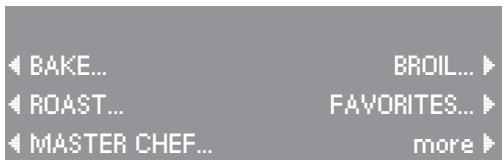
text_image
BAKE... BROIL... ROAST... FAVORITES... MASTER CHEF... more
text_image
BAKE FUNCTIONS ◀ BAKE BROWNING ▶ ◀ CONVECTION BAKE INTENSIVE ▶ ◀ SURROUND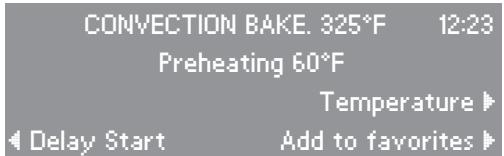
text_image
CONVECTION BAKE. 325°F 12:23 Preheating 60°F Temperature ▶ Delay Start Add to favorites ▶■ Set the temperature to 500 °F (260 °C) using the keypad.
text_image
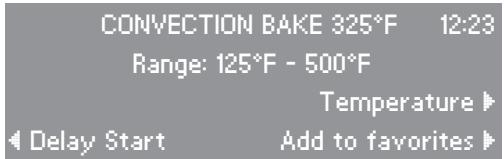
CONVECTION BAKE 325°F 12:23 Range: 125°F - 500°F Temperature ▶ ◀ Delay Start Add to favorites ▶■ Set the timer to run the oven for 2 hours by touching the "Delay Start" control.

text_image
CONVECTION BAKE 500°F 12:23 Temperature ▶ ◀ Delay Start Add to favorites ▶■ Select "Duration". Set the duration by entering "2", "0", "0" using the keypad.
■ Touch the "OK" control.

text_image
Delay Start: Please select 12:23 Start time hh:mm Duration hh:mm End time hh:mm OKThe oven will run for 2 hours and the count down will appear in the display.

text_image
CONVECTION BAKE 500°F 12:23 Preheating 60°F Remaining time 02:00 Temperature End time 02:23 Add to favoritesSelecting a function
■ Touch the "On" control to activate the display.
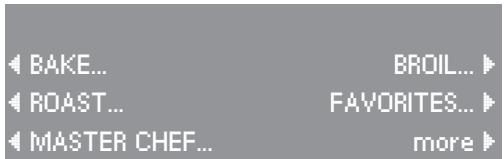
■ Touch the control next to the function you wish to select.
For example, touch the control next to the word "BAKE" to select this function.
The "BAKE" function submenu will appear in the display.
■ Touch the control next to the submenu function you wish to select.
For example, touch the control left of "CONVECTION BAKE".
The "CONVECTION BAKE" function will appear in the display.
The default temperature of 325 °F ( 160 °C ) will be displayed next to the function name.
Adjusting the oven temperature
This oven has been factory tested for the optimum operating temperature of each function. This temperature can be adjusted if needed.
■ Touch the "Temperature" control.
The temperature will be highlighted in the display.
■ Enter the new temperature using the keypad.
The oven will heat to the adjusted temperature.
text_image
BAKE... BROIL... ROAST... FAVORITES... MASTER CHEF... more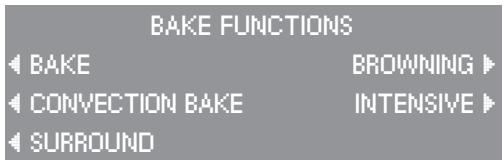
text_image
BAKE FUNCTIONS BAKE BROWNING CONVECTION BAKE(INTENSIVE) SURROUND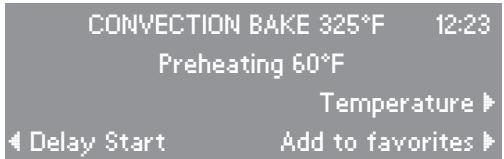
text_image
CONVECTION BAKE 325°F 12:23 Preheating 60°F Temperature ▶ Delay Start Add to favorites ▶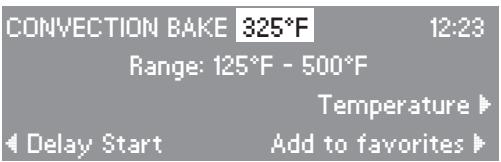
text_image
CONVECTION BAKE 325°F 12:23 Range: 125°F - 500°F Temperature ▶ ◀ Delay Start Add to favorites ▶Preheating
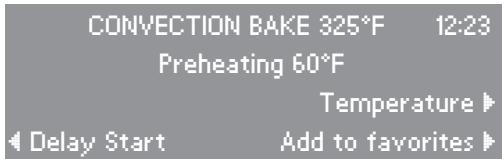
For proper cooking results, most recipes call for a preheated oven.
After a temperature has been selected, the rising temperature can be viewed in the display.
"Preheating" will show in the display until the oven has reached the selected temperature.
A tone will sound once the oven has finished preheating.
■ Place the food in the oven once the temperature has been reached.
The oven should not be preheated when using "AUTO ROAST".
Delay Start
This function allows you to turn cooking processes automatically off or on and off.
Duration
To enter the cooking time. After this time has elapsed the oven turns off automatically. The maximum duration time which can be entered is 11 hours 59 minutes.
■ Touch the "Delay Start" control.
■ Touch the "Duration" control and enter the cooking time.
■ Confirm the entries by touching the "OK" control or cancel by touching "Clear".
For example, enter "00:50" and the function will run for 50 minutes.
text_image
CONVECTION BAKE 325°F 12:23 Preheating 60°F Temperature ▶ Delay Start Add to favorites ▶
text_image
Delay Start: Please select 12:23 Start time hh:mm Duration hh:mm End time hh:mm OK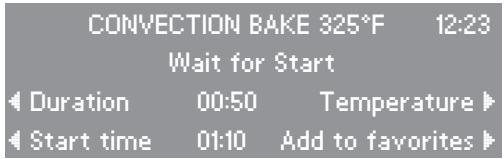
text_image
CONVECTION BAKE 325°F 12:23 Wait for Start Duration 00:50 Temperature Start time 01:10 Add to favoritesStart time
This feature allows you to delay the start of a function, from 1 minute to 23 hours 59 minutes, so that the cooking process begins at a specified time.
■ Touch the "Delay Start" control.
■ Touch the "Start time" control and enter the start time.
For example, enter "01:10" and the oven will start cooking at 1:10.
■ Touch the "Duration" control and enter the cooking time.
For example, enter "00:50" and the function will run for 50 minutes.
The "duration" must be entered for this feature to operate correctly.
■ Confirm the entries by touching the "OK" control or cancel by touching "Clear".
The end time will automatically be calculated.
End time
The desired end time allows you to set the actual time you would like cooking to complete. This time is limited to 24 from the current time.
■ Touch the "Delay Start" control.
■ Touch the "End time" control and enter the desired end time.
For example, enter "02:15" and the oven will to finish cooking at 2:15.
■ Touch the "Duration" control and enter the cooking time.
For example, "01:30" for 1 hour and 30 minutes.
If a duration time is entered, a delay start time will automatically be calculated.
If no duration time is entered, the oven will calculate a duration based on the current time.
■ Confirm the entry by touching the "OK" control or cancel by touching "Clear".
Canceling a process
■ Touch the "Clear" control.
The cooking process will be canceled.
If the timer was set in addition to a cooking process time, touching "Clear" will show all options which can be canceled
■ Select the option you wish to cancel.
Turning off the oven
■ Touch the "Off" control.
The oven will turn off and the time of day will appear in the display.
At the end of cooking:
- a tone will sound,
- "Ready" will appear in the display under the function name, and
– the oven will shut off automatically.
CONVECTION BAKE 325°F 12:23 Ready
Temperature
Delay Start Add to favorites
Setting a timer
The timer can be used to time any activity in the kitchen and can be set independently of a cooking function.
Two alarms (Timer 1 and 2) can be selected simultaneously.
A maximum time of 59 minutes and 59 seconds can be selected.
To set a timer:
■ Touch the "Timer" control.
■ Use the keypad to enter the desired time in minutes and seconds.
The second timer can be set in the same way as the first.
The count down of Timer 1 and 2 is shown in the lower area of the display.
At the end of the timed period, a tone will sound.
■ Touch "Clear" to cancel the timer tone.
To cancel the timer
■ Touch the "Clear" control.
■ Touch the control for the timer to be canceled or to cancel both timers and a running function touch "ALL FUNCTIONS".
■ Touch "OK".

text_image
Timer 1: min:sec Enter duration OK ▶ Timer 2: min:sec ▶
text_image
12:20 ◀ Timer 1: 0:47 Timer 2: 0:53 ▶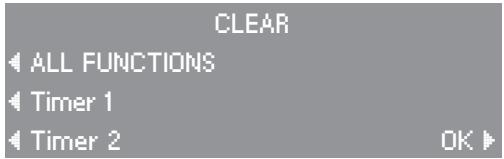
text_image
CLEAR ALL FUNCTIONS Timer 1 Timer 2 OK ▶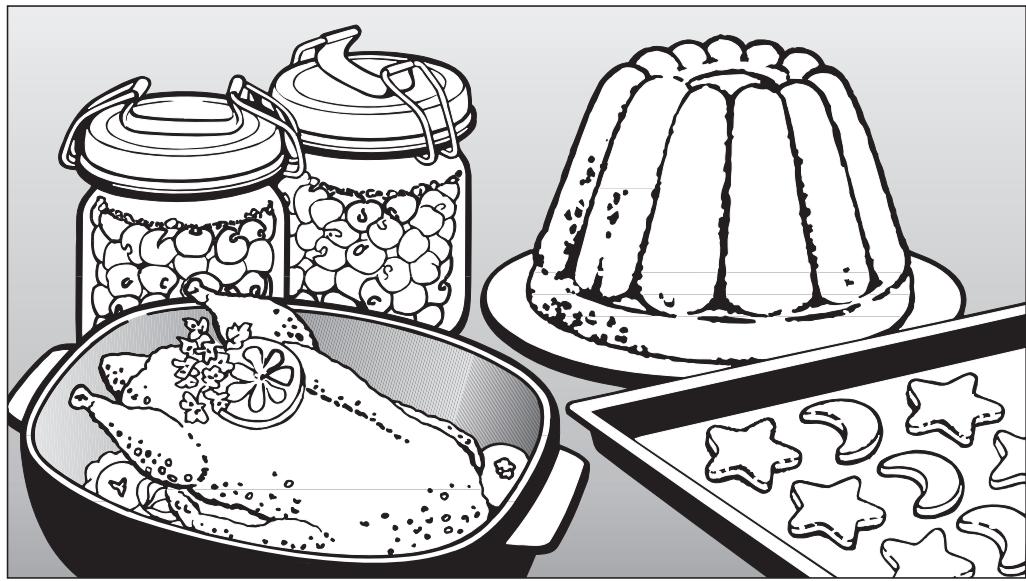
natural_image
Illustration of a meal set including a roasted chicken, jar with berries, a decorative cake, and star-shaped pastries (no text or symbols)Guide to the functions
Baking tips
When baking meat or poultry, insert the grease filter in front of the fan opening.
Remember to remove the grease filter from the fan opening when baking pastries. If the filter is not removed, increase the baking time.
The roasting pan does not need to be greased or covered with parchment paper. The PerfectClean enamel finish prevents spillovers from baking onto and into the surface. Baked food can be easily removed.
Use baking parchment only for dough with a high egg white content, i.e. for biscuit, meringue or macaroons.
BAKE
Default temperature . . . 375 °F (190 °C)
The "BAKE" function works by heating food from below. This is similar to the "bake mode" of a conventional oven.
Use this function for:
- boxed cake mixes,
- baked apples,
- frozen dinners.
The recommended positions are the 2^nd or 3^rd runners from the bottom.
flowchart
graph TD
    A["Central Processing Unit"] --> B{Control}
    B -->|Yes| C["Process Unit"]
    B -->|No| D["Feedback Loop 1"]
    D --> E["Output"]
    C --> F["Output"]
    F --> G["Feedback Loop 2"]
    G --> H["Output"]
    style A fill:#f9f,stroke:#333
    style C fill:#ccf,stroke:#333
    style E fill:#cfc,stroke:#333
    style F fill:#fcc,stroke:#333
    style G fill:#cff,stroke:#333
CONVECTION BAKE
Default temperature . . . 325 °F (160 °C)
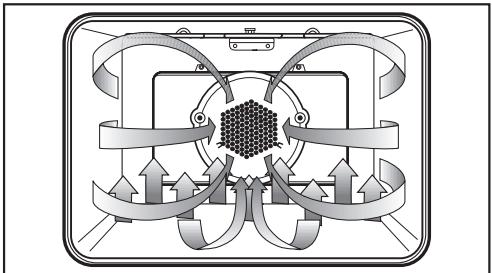
This function actively circulates heated air throughout the oven cavity for a consistent baking temperature.
Use this function for:
- cookies, cakes,
- quick breads,
- yeast breads,
- cheesecakes,
- pies, quiche,
- baked potatoes,
- casseroles.
When using the convection function, several runner levels can be used at the same time.
The recommended positions are:
1 tray = 1^st runner from the bottom
Exception: Place cookies on
the 3rd runner from the
bottom.
2 trays = 1^st and 4^th runners from the bottom
3 trays = 1^st , 3^rd and 5^th runners from the bottom
When baking 3 trays of cookies or small cakes at the same time, remove the respective tray when the desired browning is reached.
As a general rule, the temperature of a recipe not designed for baking in a convection oven should be lowered by 25 °F (15 °C.)

natural_image
Pure diagram of a mechanical or electrical component with symmetrical arms and central core, no text or symbols present.SURROUND
Default temperature... 375 °F (190 °C)
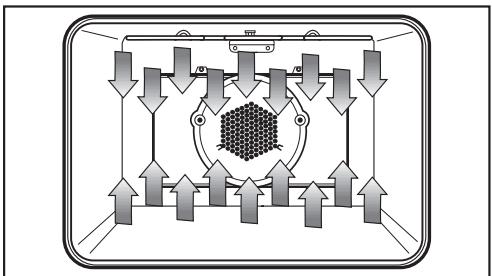
The "SURROUND" function is a premium conventional baking mode.
The oven heats with both the upper and lower heating elements without the convection fan.
Use this function for:
- souffles, meringues,
- angel food cakes,
- cream puffs,
- cookies, cakes,
- cheesecakes,
- pies, quiche,
- baked potatoes.
The recommended positions are the 1^st or 2^nd runners from the bottom.
flowchart
graph TD
    A["Top Panel"] --> B["Left Arrow"]
    A --> C["Right Arrow"]
    A --> D["Left Arrow"]
    A --> E["Right Arrow"]
    A --> F["Left Arrow"]
    A --> G["Right Arrow"]
    H["Central Hexagon"] --> I["Center Node"]
    I --> J["Arrow Up"]
    I --> K["Arrow Down"]
    I --> L["Arrow Up"]
    I --> M["Arrow Down"]
    I --> N["Arrow Up"]
    I --> O["Arrow Down"]
    P["Control Panel"] --> Q["Top Panel"]
    P --> R["Left Arrow"]
    P --> S["Right Arrow"]
    P --> T["Left Arrow"]
    P --> U["Right Arrow"]
    P --> V["Left Arrow"]
BROWNING
Default temperature . . . 375 °F (190 °C)
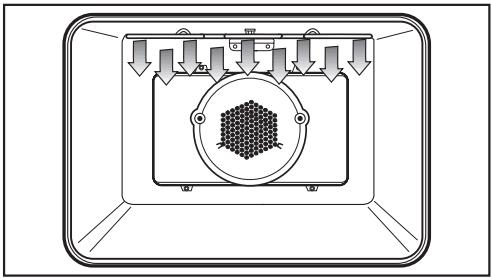
In the "BROWNING" function, food is heated from above.
Use this function for:
- browning meringue,
- melting a cheese topping,
- caramelizing a sugar topping as in crème brulee.
The recommended position is the 4^th runner from the bottom.
flowchart
graph TD
    A["Top Component"] --> B["Central Column"]
    B --> C["Bottom Component"]
    C --> D["Top Component"]
    style A fill:#f9f,stroke:#333
    style B fill:#ccf,stroke:#333
    style C fill:#cfc,stroke:#333
    style D fill:#fcc,stroke:#333
INTENSIVE
Default temperature . . . 325 °F (160 °C)
The "INTENSIVE" function generates heat from the lower heating element. The oven's fan gently circulates the heated air to create a brick oven (convection) environment.
Use this function for:
Use the 1^st runner from the bottom.
Should the bottom of the food burn, raise the rack to a higher runner.
When using "INTENSIVE", recipe temperatures should be lowered by 25^ F ( 15^ C).
Intensive is not recommended for roasting or shallow baking.
Do not bake on the oven floor.
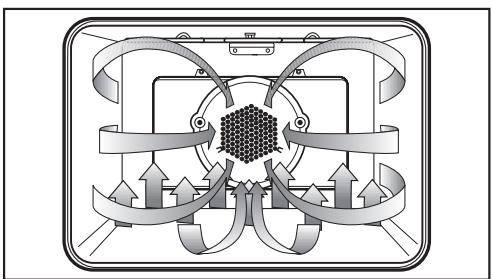
flowchart
graph TD
    A["Central Processing Unit"] --> B{Control}
    B -->|Yes| C["Process Unit"]
    B -->|No| D["Feedback Loop 1"]
    D --> E["Output"]
    C --> F["Output"]
    F --> G["Feedback Loop 2"]
    G --> H["Output"]
    style A fill:#f9f,stroke:#333
    style C fill:#ccf,stroke:#333
    style E fill:#cfc,stroke:#333
    style F fill:#fcc,stroke:#333
    style G fill:#cff,stroke:#333
AUTO ROAST
When roasting (all Roast functions), insert the grease filter in front of the fan opening.
Default temperature . . . 325 °F (160 °C)
This premium convection function heats the oven to a high temperature to sear the meat, retaining moisture and tenderness.
"Searing" appears in the display. Once the meat is seared, the function returns to the selected temperature and "Searing" is no longer shown.
Use this function for:
- poultry (whole birds),
- roasts, e.g. prime rib, pork loin, beef tenderloin, leg of lamb, etc.
The recommended position is the 1^st runner from the bottom.
The oven should not be preheated when using "AUTO ROAST".

natural_image
Pure technical diagram of a mechanical or electrical component with symmetrical arms and central hexagonal feature (no text or symbols)CONVECTION ROAST
Default temperature . . . 325 °F (160 °C)
This function uses the convection fan to actively circulate heated air throughout the oven.
This function does not spike the oven temperature for searing.
Use this function for:
- chicken pieces,
– small cuts of meat, - fish,
– salmon, lobster tails, - meat loaf.
The recommended position is the 1^st runner from the bottom.
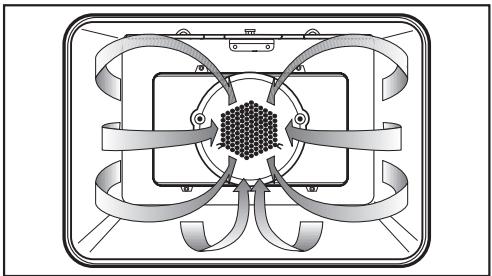
natural_image
Pure diagram of a rectangular device with internal components and curved arrows, no text or symbols present.SURROUND ROAST
Default temperature . . . 400 °F (200 °C)
"SURROUND ROAST" is a conventional roasting program for traditional recipes.
Use this function for:
- pot roast,
- brisket,
- stew.
The recommended position is the 2^nd runner from the bottom.
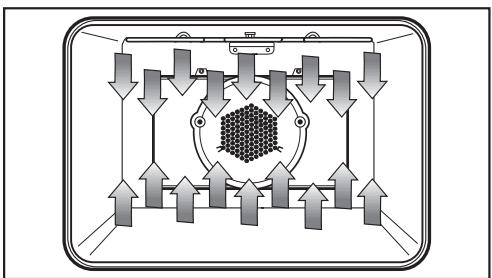
flowchart
graph TD
    A["Top Panel"] --> B["Central Cluster"]
    B --> C["Arrow Up"]
    B --> D["Arrow Down"]
    B --> E["Arrow Up"]
    B --> F["Arrow Down"]
    B --> G["Arrow Up"]
    B --> H["Arrow Down"]
    style B fill:#f9f,stroke:#333,stroke-width:2px
Roasting tips
- Always install the grease filter in the back of the oven before roasting.
- The larger the cut of meat to be roasted, the lower the temperature that should be used.
The roasting process will take a little longer, but the meat will be cooked evenly and the outside will become crisp. - Use the roast probe for accurate cooking temperatures and best results.
Roasting in a covered pot
When roasting in a covered pot, increase the recipe temperature by 70 °F ( 20 °C ).
Season the meat and place it in the pot. Add some butter, margarine or a little oil and about 12 cup of water when roasting a large piece of meat or roasting poultry with a high fat content.
Roasting on the rack
Use the rack with the roasting pan inserted below. Add a little oil to very lean meat or place a few strips of bacon on top to help retain moisture. Place a little water in the roasting pan below the meat to catch drippings.
Roasting poultry
For crispy skin, baste the poultry ten minutes before the end of cooking with salt water.
Using the roast probe
The roast probe reliably monitors the roasting process. The tip of the probe continuously measures the core temperature of the meat or poultry.
When the selected core temperature is reached, the oven automatically shuts off.
The roast probe can be used with the following functions:
- AUTO ROAST
- CONVECTION ROAST
- SURROUND ROAST
- CONVECTION BROIL
Using the roast probe:
■ Prepare the meat as usual (in a pot or on the rack).
Roasting bags or aluminum foil may be used, but only when left open at the end. Insert the probe into the meat or poultry through the opened end of the foil or bag.
■ Insert the probe into the middle of the meat. Make sure that the probe does not touch any bones and is not located in a fatty portion of the meat. Improper insertion of the probe could shut the oven off too early.
■ Put the meat into the oven.
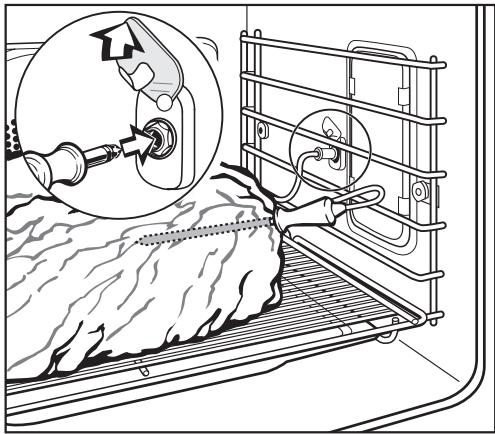
natural_image
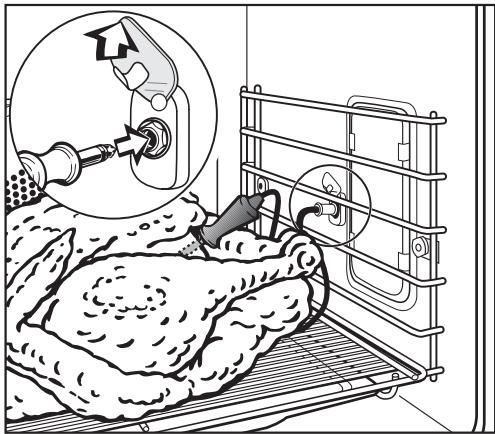
Diagram showing a mechanical device inserted into a rack with a magnified inset highlighting the component (no text or symbols present)When roasting poultry, the best place to insert the probe is in the thickest part of the bird between the thigh and body.
■ Insert the short end of the roast probe into the socket on the right side of the oven so it clicks into place.
natural_image
Medical procedure illustration showing a surgical tool interacting with a patient's abdomen and equipment (no text or symbols present)■ Select a roasting function.
For example, "AUTO ROAST".
The default temperature and the probe (core) temperature, once inserted, will show in the oven display.
To adjust the core temperature:
■ Touch the control to the left of "Probe".
■ Enter the new core temperature using the keypad.
The start of roasting can also be delayed at this time.
■ Touch the "Delay Start" control.

text_image
ROAST AUTO ROAST CONVECTION ROAST SURROUND ROAST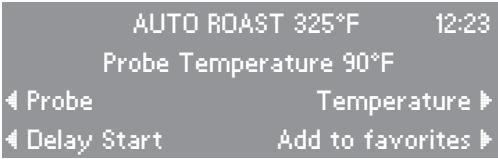
text_image
AUTO ROAST 325°F 12:23 Probe Temperature 90°F ◀ Probe Temperature ▶ ◀ Delay Start Add to favorites ▶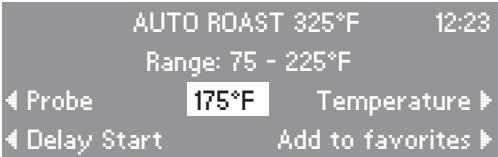
text_image
AUTO ROAST 325°F 12:23 Range: 75 - 225°F Probe 175°F Temperature Delay Start Add to favorites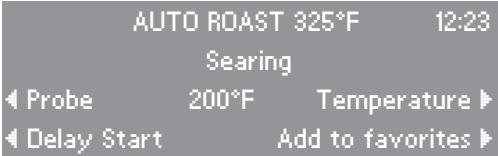
text_image
AUTO ROAST 325°F 12:23 Searing Probe 200°F Temperature Delay Start Add to favorites■ Enter the desired start time of the roasting process using the keypad.
At the end of cooking, when the selected core temperature has been reached, a tone will sound.
The tone can be canceled by touching "Clear".
Please note:
When finished, cover the meat with aluminum foil and allow to stand for 10 minutes. During this time, the core temperature will rise 5 - 10 degrees.
If the temperature probe is left in the food at the end of the cooking process, the oven display will show the core temperature first increasing and then decreasing.
| AUTO ROAST 325°F | 12:23 | ||
| Wait for Start | |||
| Probe | 200°F | Temperature | |
| Start time | 02:00 | Add to favorites | |
When using the "MASTER CHEF" function to cook meat or poultry insert the grease filter in front of the fan opening.
The "MASTER CHEF" function contains an easy to use list of preset functions of commonly cooked foods such as pizza, chicken and french fries.
■ Touch the "MASTER CHEF" control to view the list of preset functions.
■ Touch the control of the function you wish to select.
For example, to cook a 12 lb turkey you would select "POULTRY".
■ Touch the control to the left of "Turkey".
■ Touch the control that corresponds to the weight of the turkey, "10 - 15 lb".
■ Insert the roast probe into the turkey and into the roast probe socket, as prompted.
■ The remaining cooking time can be monitored in the display.
To view the settings of a "MASTER CHEF" function, touch the control for "Cooking Mode".
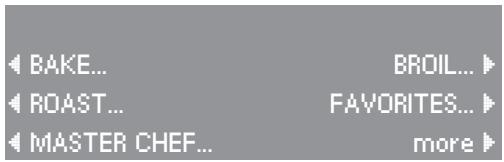
text_image
BAKE... BROIL... ROAST... FAVORITES... MASTER CHEF... more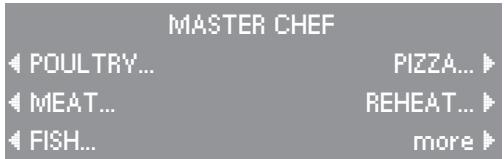
text_image
MASTER CHEF POULTRY... PIZZA... MEAT... REHEAT... FISH... more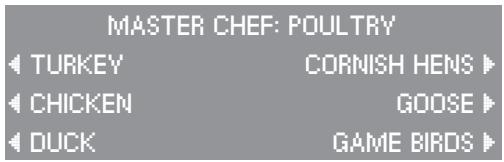
text_image
MASTER CHEF: POULTRY TURKEY CORNISH HENS CHICKEN GOOSE DUCK GAME BIRDS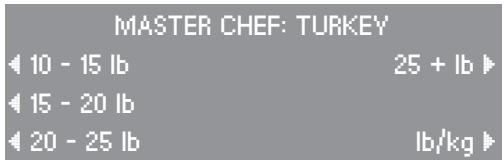
text_image
MASTER CHEF: TURKEY 10 - 15 lb 25 + lb 15 - 20 lb 20 - 25 lb lb/kg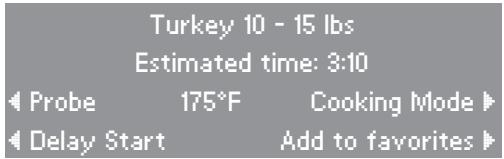
text_image
Turkey 10 - 15 lbs Estimated time: 3:10 Probe 175°F Cooking Mode Delay Start Add to favoritesTips for use
- To end an automatic program prematurely, turn the oven off.
- If the food is not cooked to your desire after an automatic program has elapsed, set the oven to Convection Bake 320 °F (160 °C) and cook or brown it for a few more minutes.
- After use let the oven cool to room temperature before using it again for an automatic program.
- When cooking poultry like goose or turkey, set the weight of the unstuffed poultry. When cooking more than one chicken at once, set the weight of the heavier chicken (not the total weight).
- During some programs the oven must be preheated before inserting the food into the oven. The respective info and time indication will show in the display.
- Automatic programs can be saved as "Favorites".
MASTER CHEF Functions
POULTRY
Turkey
10 - 15 lb
15 - 20 lb
20 - 25 lb
25 + lb
Chicken
Cordon Bleu
Whole: 0 - 5 lb
Whole: 5 + lb
Cutlets
Parts
Duck
3 - 5 lb
5 + lb
Cornish Hens
1 - 2 lb
Goose
5 - 10 lb
10 - 15 lb
Game birds
0 - 2 lb
2 - 4 lb
MEAT
Beef
Roast
Prime Rib
Pot Roast
Steaks
London Broil
Pork
Loin Roast
Blade Roast
Crown Roast
Cooked Ham
Natural Ham
Chops
Veal
Rolled Roast
Loin Roast
Rib Roast
Chops
Lamb
Leg
Rack
Half Shank
Half Sirloin
FISH
Steaks
Fillets
Whole
Lobster Tails
Paella
Shrimp
PIZZA
Fresh
Frozen
Self-Rising
Stromboli
Calzone
REHEAT
Pizza
Banquet Pan
Casserole
BAKED
GOODS
Fruit Pies
Layer Cakes
Cookies
Soufflé
Sponge Cake
Muffins
POTATOES
Baked
French Fries
BROIL
When broiling (all Broil functions), insert the grease filter in front of the fan opening.
No default temperature
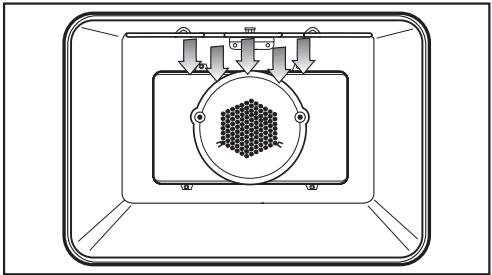
Only the inner part of the upper heating element is used for a smaller area of intense heat from above. This function is excellent for broiling or searing small quantities.
Use this function for:
- chops, ribs,
– small quantities of meat, - browning small dishes.
The recommended position is the 4^th runner from the bottom.
natural_image
Diagram of a scientific apparatus with a central hexagonal pattern and surrounding arrows, enclosed in a rectangular frame (no text or symbols)MA I BROIL
No default temperature
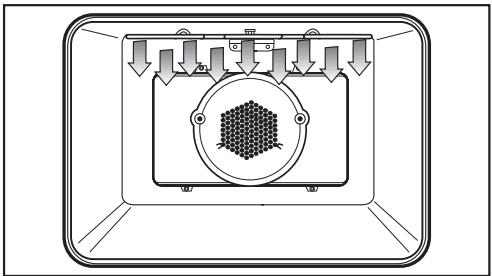
The entire upper heating element is used for intense heating from above. This function gives excellent browning and searing results.
Use this function for:
- chops, ribs,
– large quantities of meat, - browning large dishes.
The recommended position is the 4^th runner from the bottom.
natural_image
Diagram of a mechanical or electrical component with directional arrows and a central hexagonal pattern (no text or symbols)CONVECTION BROIL
No default temperature
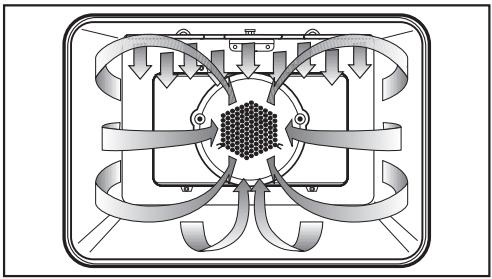
Hot air from the upper heating element is distributed over the food by the fan. This enables a lower temperature than conventional broiling to be used.
Use this function for:
– thick pieces of meat,
- London broil.
The recommended position is the 3^rd runner from the bottom.
Always insert the grease filter over the convection fan in the back of the oven when using this function.
The roast probe can be used in this function to monitor the meat's core temperature. Refer to "ROAST/ Using the roast probe" for more information.
flowchart
graph TD
    A["Input"] --> B["Process Unit"]
    B --> C{Control}
    C -->|Yes| D["Output 1"]
    C -->|No| E["Output 2"]
    D --> F["Feedback Loop"]
    E --> F
    F --> G["Final Output"]
ROTISSERIE
No default temperature
The "ROTISSERIE" function broils meat or poultry while turning it on a spit for even cooking results.
Use this function for:
- poultry, whole birds,
- tied roasts, e.g. pork loin, beef tenderloin, etc.,
- kabobs.
The roast probe cannot be used at the same time as the rotisserie. The cable could wind around the rotisserie and be damaged.

natural_image
Pure schematic diagram of a mechanical or electrical component with no text, numbers, or symbols■ Secure meat or poultry on the skewers.
(Poultry legs should be tied together to prevent them from catching on the heating element or burning.)
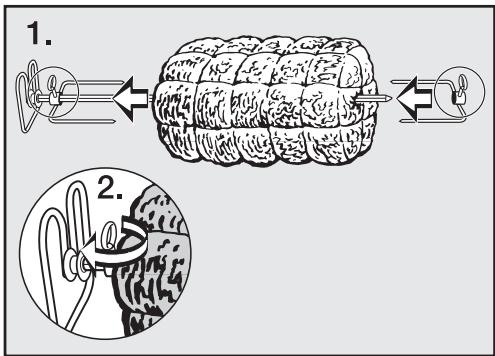
text_image
1. 2.■ Assemble the rotisserie as shown.
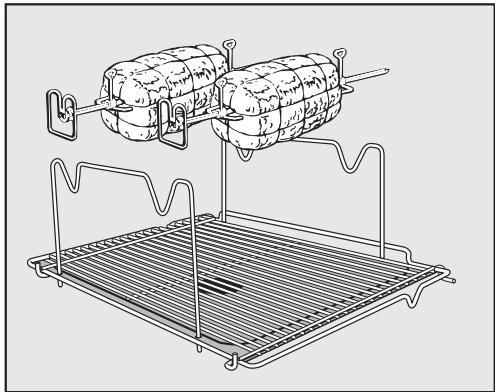
natural_image
Line drawing of a two-wheeled cylindrical dish being lifted by a rack, with no text or symbols present.■ Put the rotisserie in the oven, using the lowest level runner.
■ Insert the spits into the grill motors at the back of the oven.
■ Select "ROTISSERIE".
■ When the oven door is closed, the spits will rotate.
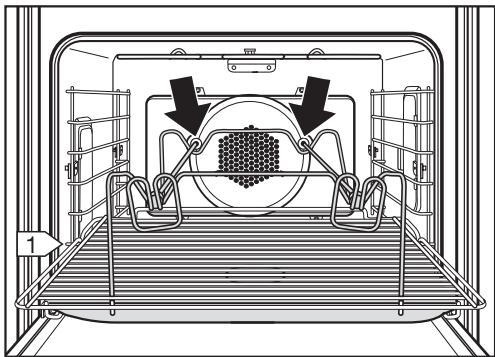
natural_image
Technical line drawing of a train interior with overhead structural elements and directional arrows (no text or symbols)Broiling tips
- Always insert the grease filter in the back of the oven before broiling.
- To ensure even cooking, it is best to broil foods of a similar thickness at the same time. Most items should be turned halfway through broiling.
- To determine how far through a thick piece of meat has been cooked, press down on its surface with a spoon.
If the surface presses down easily and with little resistance to the spoon, it is "rare".
If there is some resistance, it is "medium".
If there is great resistance, it is "well done".
If you often cook a recipe with the same settings (function, time, temperature) you can save them as a "favorite" for easy recall.
To save a favorite:
■ Enter the function, temperature and cooking times of the recipe. The oven will begin heating.
■ Touch the "Add to favorites" control.
Your "favorite" must be named before it can be saved to the memory.
■ Enter the letters and numbers of the name by touching the controls left and right of the alpha-numeric list. Confirm each character entry by touching the "Select" control.
■ Touch the "OK" control when naming is complete to save the "favorite" to memory.
Your "favorite" can now be recalled from the "FAVORITES" list. When selected the oven will automatically use the saved settings.
■ Touch "Clear" to cancel the running function if you are not cooking.

text_image
CONVECTION BAKE 325°F 12:23 Preheating 60°F Temperature ▶ ◀ Delay Start Add to favorites ▶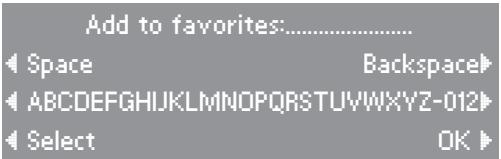
text_image
Add to favorites:.......... ◀ Space Backspace◀ ◀ ABCDEFGHIJKLMNOPQRSTUVWXYZ-012◀ ◀ Select OK ▶SABBATH
Default temperature... 375 °F (190 °C)
For religious observance, the oven can be set to run for the duration of the Sabbath. There will be no visual change to the control panel and the clock will not be displayed.
In this function, only "BAKE" and "SURROUND" are available.
■ Select the desired Sabbath function while the door is closed.
The oven will stay in "Hold" mode until the oven door is reopened.
■ Open the oven door.
■ Place the food in the oven.
■ Close the oven door.
After a 5 minute delay, the oven will start heating until the set temperature is reached. This temperature will be held constant for 72 hours.
Once the Sabbath function has started the settings cannot be changed. The oven can only be turned off with the "Off" control.
At the end of Sabbath
After 72 hours, the oven will shut off and "Fault 55" will appear in the display.
■ Turn the oven off to reset it to normal operation.
SABBATH
BAKE
SURROUND
DEHYDRATE
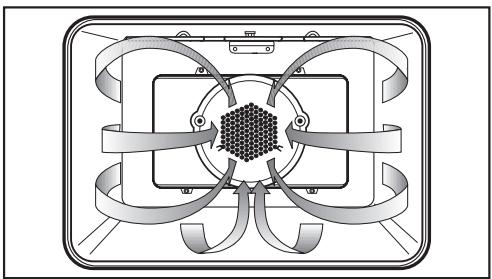
Default temperature ..... 175 °F (80 °C)
This function is for dehydrating fruits, vegetables and herbs.
A consistent low temperature and the fan maintain the ideal conditions for the long dehydration process.
For best results, blot food with a paper towel before dehydrating.
Foods to be dehydrated should be placed directly on the oven racks or on a drying screen (not supplied with oven).
natural_image
Pure technical diagram of a mechanical or electrical component with symmetrical arms and central hexagonal feature (no text or symbols)PROOF
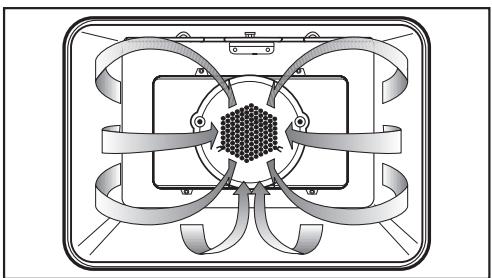
Default temperature ..... 125 °F (50 °C)
The warm environment created in the proof function will allow you to effectively proof dough. This function maintains a low temperature perfect for yeast to rise.
Place the dough in a large bowl on the oven rack positioned at the lowest runner level. Keep the oven door closed during this process.
natural_image
Pure diagram of a symmetrical mechanical or electrical component with no text, numbers, or symbolsDEFROST
Default temperature ..... 75 °F (25 °C)
This function allows you to defrost food at a constant temperature.
Defrosting times depend on the type and weight of the food, and at what temperature it was deep-frozen.

natural_image
Pure technical diagram of a mechanical or electrical component with symmetrical arms and central core (no text or symbols)Defrosting tips
- Remove the frozen food from the packaging and place it in the roasting pan or into an appropriate dish.
- Meat and poultry should be fully thawed before cooking. Do not use the liquids from defrosting.
- Fish does not need to be fully defrosted before cooking. Defrost so that the surface is soft enough to absorb herbs and seasoning.
- Cook all food immediately after defrosting.
Appliance front
The glass front of the appliance and the control area can be cleaned with glass cleaner when cool.
Stainless steel
Stainless steel surfaces can be cleaned using a non-abrasive stainless steel cleaner. To help prevent resoiling, a conditioner for stainless steel can also be used. Apply sparingly with even pressure.
Accessories
Roast probe
Wash with soapy water and a sponge. Rinse under running water.
Do not submerge the roast probe in water. Do not clean the roast probe in the dishwasher.
Grease filter
Clean with liquid dish soap and hot water, or in the dishwasher. Depending on the detergent, cleaning the grease filter in a dishwasher may cause permanent discoloration of the filter surface. Performance of the filter will not be affected.
Rotisserie
Clean with liquid dish soap and hot water, or in the dishwasher.
PerfectClean
The revolutionary PerfectClean enamel is a smooth, nonstick surface that cleans easily with a sponge.
The following have been treated with "PerfectClean":
- roasting pan,
- wire rack.
■ Do not clean items with PerfectClean in a dishwasher. Dishwasher detergents may damage the enamel.
■ Clean after each use with a sponge and a solution of hot water and liquid dish soap.
■ Do not use abrasive cleaners, ceramic cleaners, metal scourers, or oven cleaners on PerfectClean surfaces.
■ After cleaning, rinse thoroughly with water. The water should run off the surface easily, any residue will hinder this effect.
■ Stubborn baked on grease may need to be soaked first to loosen deposits.
■ Clean up spills on PerfectClean surfaces as soon as possible to prevent stains.
■ Spilt fruit juices may permanently discolor surfaces. This discoloration is permanent but will not affect the efficiency of the enamel.
Cleaning the oven cavity by hand
⚠️ Danger of burns! Allow the oven to cool before cleaning.
To make cleaning easier
- remove the oven door,
- remove the runners,
– lower the upper heating element.
■ Clean the oven surfaces with a solution of hot water, liquid dish soap and a sponge or soft nylon brush.
Do not use abrasive cleaning agents, hard brushes, metal scouring pads, steel wool, knives or other abrasive materials.
Do not use oven sprays on any part of this oven.
■ Dry surfaces before reassembly.
Removing the oven door
Please note: The oven door is quite heavy. It should be gripped firmly at the sides when being removed or refitted.
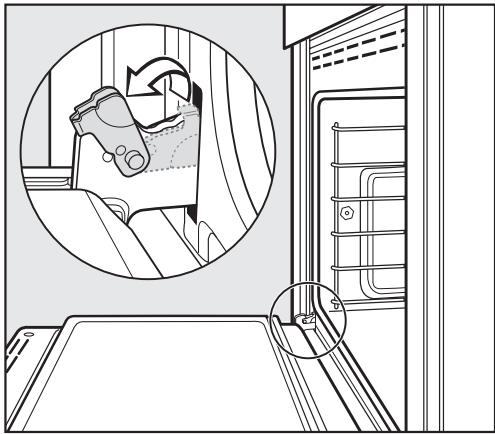
■ Open the door fully.
■ Flip up the locking clamps on each door hinge.
natural_image
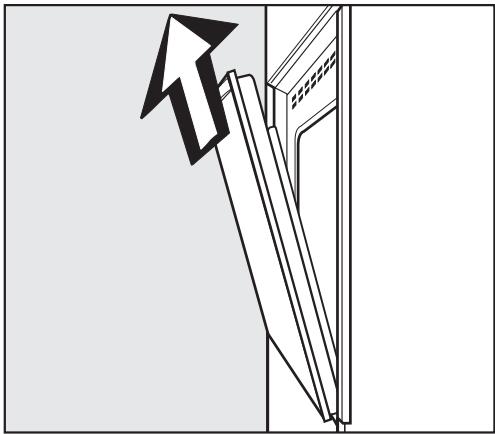
Line drawing of a car interior showing a seatbelt switch and a door, with no text or symbols present.■ Slowly shut the door until the protruding clamps stop the movement. Pull the door upward. See illustration.
natural_image
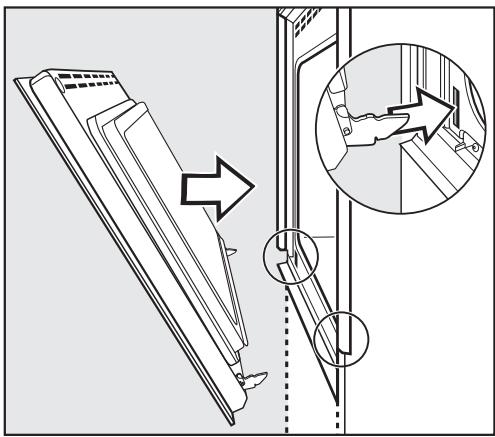
Diagram of a door with an arrow indicating upward motion, showing structural components (no text or symbols)Refitting the oven door
■ Insert the door onto the hinges and open the door completely.
■ Flip the locking clamps down.
Be sure that the locking clamps are flipped down when the door is reinstalled. Otherwise, on closing the door, the hinges could work loose from the guide holes and cause damage.
text_image
Diagram illustrating a door lock mechanism with labeled parts and directional arrows indicating movement or positioning.Removing the runners
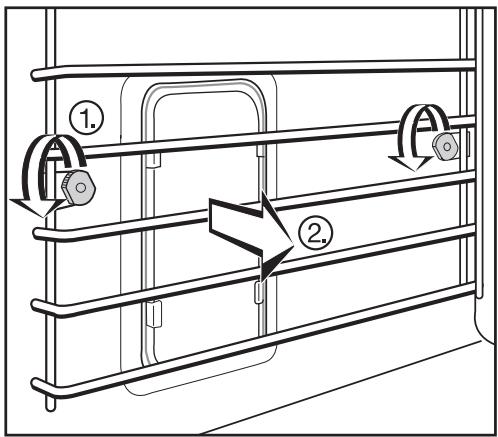
■ Turn the two screws, ①, counterclockwise and remove.
■ Remove the runners, ②, from the oven by pulling them away from the oven wall.
Reassemble in the reverse order, ensuring all parts are correctly in place.
text_image
Technical diagram showing two labeled components (① and ②) of a mechanical or structural assembly with directional arrows indicating flow or movement.Lowering the upper heating element
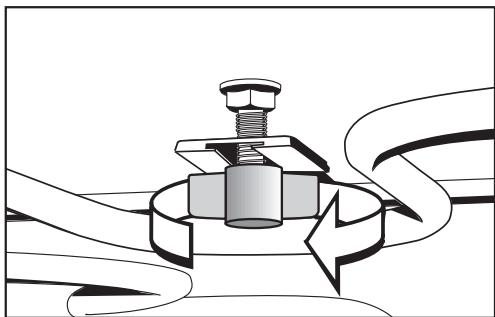
■ First remove the runners.
■ Loosen the wing nut.
natural_image
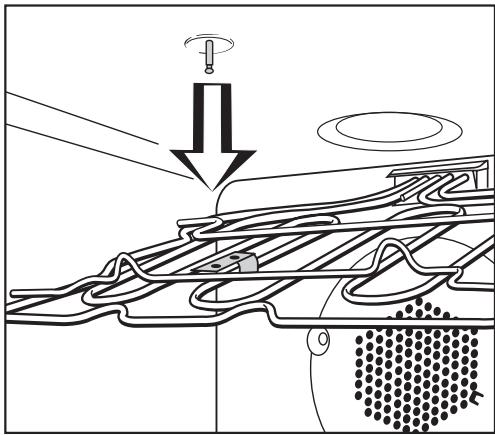
Mechanical diagram showing a bolt and nut assembly with a rotating arrow indicating motion (no text or symbols)■ Gently lower the upper heating element.
Do not use force to lower it, as this could cause damage.
■ Reassemble in the reverse order, ensuring all parts are correctly in place.
natural_image
Diagram of a mechanical or fluidic system with directional arrows and layered structures (no text or symbols)SELF CLEAN function
In the self cleaning function, the oven is heated to very high temperatures burning off any residue on the oven interior.
The duration of the "SELF CLEAN" function will depend on the amount of soiling in the oven.
After the cleaning process, any burnt off debris (e.g. ash) can be easily wiped out with a damp sponge.
If the oven is not cleaned regularly, debris may become extremely difficult to remove even with the "SELF CLEAN" function.
Spilled fruit juices may permanently discolor surfaces. This discoloration is permanent but will not affect the efficiency of the enamel.
Automatic door lock
Due to the extremely high temperatures reached in the self cleaning function, the door will lock automatically after the first minute of the function.
The lock releases once cleaning has ended and the oven temperature has dropped below 535 °F (280 °C).
If "SELF CLEAN" is accidentally selected, shut off the oven and wait for the oven temperature to drop and for the door lock to release.
Before starting the "SELF CLEAN" function:
- Remove large pieces of debris and any puddles of grease from the oven interior. Debris and grease can ignite at high temperatures.
- Remove all accessories, but the side runners, from the oven. The high temperatures of this function will damage the accessories.
■ Touch the "SELF CLEAN" control.
■ Touch the "Start" or "Delay Start" control.
"Start" will begin the function at once.
"Delay Start" will begin the function once the entered delay time has elapsed.
When the function starts, the display shows "In Process" and the oven door will lock.
A tone will sound when the "SELF CLEAN" function has ended and "Ready" will appear in the display.
■ Once the oven has cooled, remove the ash with a damp sponge.
Avoid cleaning the gasket which seals the glass pane of the door. It is made from glass fiber and will be damaged if rubbed or scrubbed.
A film may build up on the oven door. This can be removed with a shielded blade scraper or a non-abrasive sponge and a mild solution of warm water and dish soap.
The "SELF CLEAN" function will stop,
- if the oven interior is extremely soiled. (Remove large pieces of debris and restart the function.)
- if the "Clear" control is touched.
- if the oven is shut off.
- if there is a power failure.
The display will show "Process interrupted".
The oven door will remain locked until the oven temperature has fallen below 535 °F (280 °C).
⚠️ To reduce the risk of electric shock, disconnect this appliance from the power supply by shutting off the power main or tripping the circuit breaker.
Changing the light bulb
■ Remove the runners.
■ Spread a dishtowel on the oven floor to protect the enamel, in case the light cover falls.
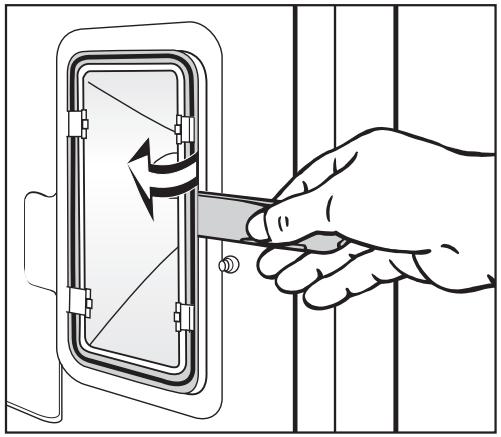
■ Insert the supplied slide opener between the light cover and the metal frame of the light along the edge closest to the oven door.
■ Pry the light cover out of the metal frame.
■ Slide the light cover out of the two clamps secured to the metal frame.
Do not bend these metal clamps. The clamps and the reflector could be damaged.
natural_image
Illustration of a hand using a tool to adjust or install a device panel (no text or symbols visible)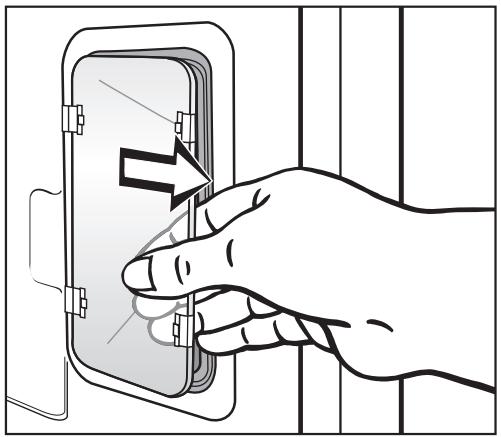
natural_image
Illustration of a hand inserting a device into a wall-mounted panel (no text or symbols)Changing the light bulb
■ Replace the halogen bulb.
Only use the following light bulb: 12 V, 10 W, 572 °F (300 °C) heat resistant, socket G4, type 64418 made by Osram.
Do not touch the new light bulb with your fingers; touching the bulb will reduce its life. Follow the bulb manufacturer's instructions.

natural_image
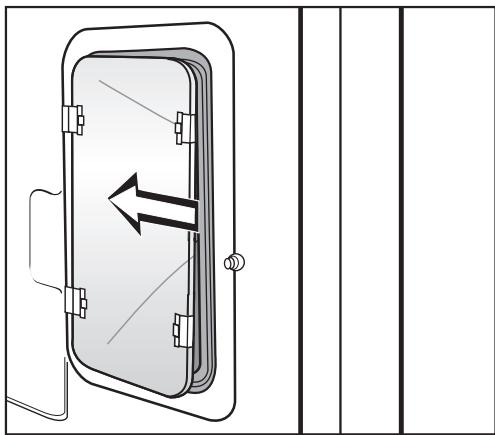
Diagram of a door with a valve and directional arrow indicating flow or movement (no text or symbols)■ Put the light cover back in place with the notch to the rear of the metal clamps.
natural_image
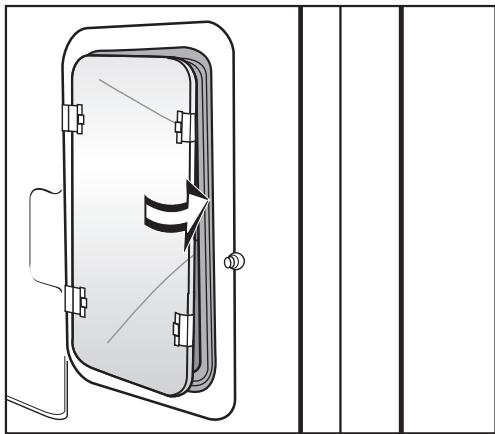
Diagram of a door with an arrow indicating left motion, shown in two orthogonal views (no text or symbols)■ Press the light cover into the metal frame.
natural_image
Technical line drawing of a door with handle and side panel, no text or symbols present■ Reassemble the runners.
What if the oven does not heat?
| Possible fault | Solution |
| The system lock is activated. | Deactivate the system lock. |
| The circuit breaker has tripped. | Check the breaker. |
| The delay start has been set. | Cancel the delay start. |
| The door is not fully closed. | Close the door firmly. |
Why is there no noise when the oven door is opened during operation?
This is normal. If the door is opened during operation, a safety contact switch causes the heating elements and the fan to shut off.
Why is a noise heard after turning the oven off?
This is normal. The fan will continue to run for a short time to cool the oven. When the oven has cooled sufficiently, the fan will turn off automatically.
Why is the display dark when the oven is first turned on?
| Possible fault | Solution |
| The clock display has been turned off. | Turn the display on: Turn the oven on.Select "Settings" - "Clock" - "Display on". |
What if the time of day cannot be entered after a power failure?
| Possible fault | Solution |
| The system lock is activated. | Deactivate the system lock. |
What if cakes and cookies are not cooked enough?
| Possible fault | Solution |
| The grease filter was not removed. | If the grease filter is not removed, increase baking by 10 to 15 minutes. |
Why is there uneven browning?
| Possible fault | Solution |
| Oven not preheated. | Allow the oven to preheat. |
| Oven temperature too high. | Lower the oven temperature. |
| Grease filter was not removed. | Remove the grease filter next time. |
| Shiny or thin pans were used. | Use dark, matte finish pans. |
What if "Fault" followed by two numbers appears in the display?
| Possible fault | Solution |
| An electronic fault has occurred. | Call Technical Service for assistance. |
| "Fault 55" the oven has shut down or the Sabbath function has finished. | Turn off the oven to reset it to normal operation. |
In the event of a fault which you cannot easily fix yourself, please contact the Miele Technical Service Department:
USA 1-800-999-1360
When contacting Technical Service please quote the serial number and model of your oven. This information is visible on the silver data plate.
MieleCare
MieleCare, our Extended Service Contract program, gives you the assurance of knowing that your appliance investment is covered by 5 years of worry free ownership. MieleCare is the only Extended Service Contract in the industry that guarantees repairs by a Miele Authorized Service Provider using genuine Miele parts. Only genuine Miele parts installed by factory trained professionals can guarantee the safety, reliability, and longevity of your Miele appliance.
Please note that unless expressly approved in writing by Miele's Service department, Extended Service Contracts offered by other providers for Miele products will not be recognized by Miele. Our goal here is to prevent unauthorized (and untrained) service personnel from working on your Miele products, possibly doing further damage to them, you and/or your home.
To learn more about MieleCare Extended Service Contracts, please contact your appliance dealer or visit us online at:
http://store.miele.com
The following accessories are available for purchase from your Local Miele Dealer or from Miele.
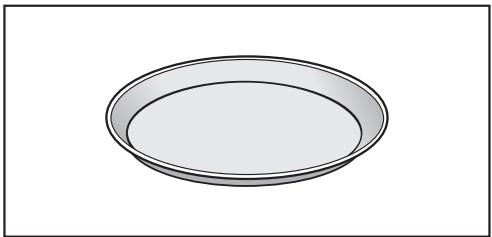
Pizza pan
This circular pan is suitable for cooking fresh or frozen pizzas, flat cakes, tarts, and baked desserts.
natural_image
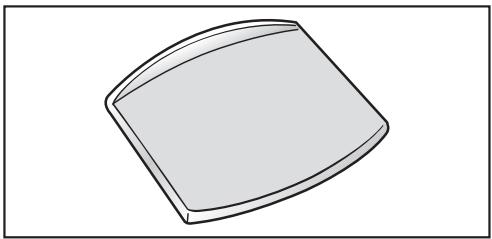
Simple 3D illustration of a circular tray or bowl with no text or symbolsPizza stone
The pizza stone is ideal for baking dishes with a crisp bottom like pizza and bread.
natural_image
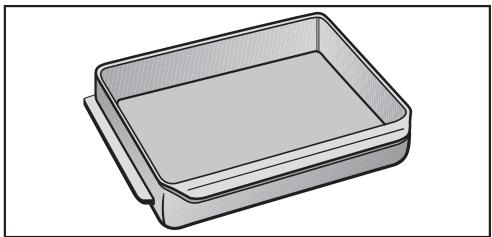
Simple line drawing of a rectangular object with rounded edges, resembling a tray or container (no text or symbols)Gourmet Casserole
The Gourmet Casserole can be set on the wire rack.
The casserole has a special non-stick coating and is available in two sizes. A lid is also available separately.
natural_image
3D rendering of a rectangular tray or container with no text or symbolsAnti-splash tray
The anti-splash tray may be placed in the roasting pan to reduce splattering of drippings from meat or poultry.
The anti-splash tray is coated with PerfectClean enamel and can be easily cleaned with a sponge and dish soap.

natural_image
Technical line drawing of a flat-panel electronic device with ventilation grilles (no text or symbols)
natural_image
Illustration of four different types of electrical fixtures: a plug, screwdriver, tap wrench, and a faucet (no text or symbols present)Installation Instructions
Disposal of the packing materials
The cardboard box and packing materials protect the appliance during shipping. They have been designed to be biodegradable and recyclable.
Ensure that any plastic wrappings, bags, etc. are disposed of safely and kept out of the reach of children. Danger of suffocation!
Disposal of an old appliance
Old appliances may contain materials that can be recycled. Please contact your local recycling authority about the possibility of recycling these materials.
Ensure the appliance presents no danger to children while being stored for disposal. Before discarding an old appliance, unplug it from the outlet and cut off its power cord. Remove any doors to prevent trapping hazards.
⚠️ CAUTION: Before servicing, disconnect the power supply by either removing the fuse, shutting off the power main or manually "tripping" the circuit breaker.
Installation work and repairs should only be performed by a qualified technician in accordance with all applicable codes and standards. Repairs and service by unqualified persons could be dangerous and the manufacturer will not be held responsible.
Before connecting the appliance to the power supply, make sure that the voltage and frequency listed on the data plate correspond with the household electrical supply. This data must correspond to prevent machine damage. Consult an electrician if in doubt.
Only operate the appliance after it has been installed into cabinetry.
Installer:
Please leave these instructions with the consumer.
Power supply
The oven is equipped with a 6 ft. (1.8 m) flexible power cord consisting of 4 wires ready for connection to a dedicated 3 pole, 4 wire grounded power supply:
- 240 V, 60 Hz, 30 A fuse rating or
- 208 V, 60 Hz, 30 A fuse rating
Black wire: connect to L1 (hot)
Red wire: connect to L2 (hot)
White wire: connect to N (neutral)
Green wire: connect to GND (ground)
A dedicated line and junction box should be used to connect the oven to a 30 A circuit.
Connection details are also given on the diagram located on the top of the oven.
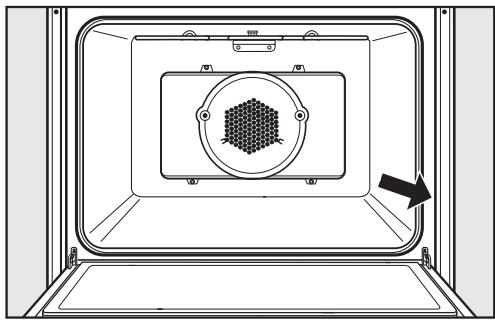
Data plate
natural_image
Technical diagram of a mechanical or electrical enclosure with a hexagonal component and an arrow indicating direction (no text or symbols)The silver data plate is located along the front side of the oven with the door open.
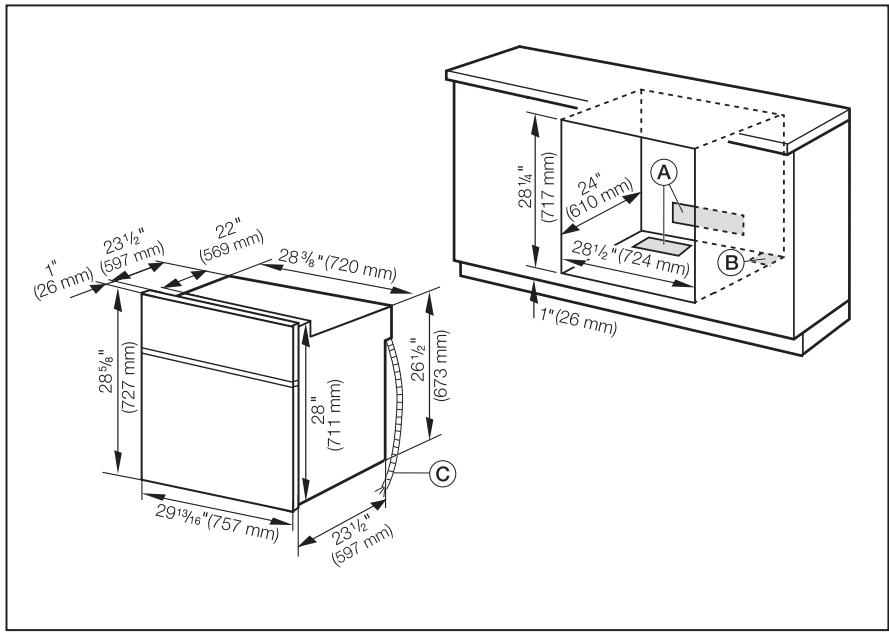
text_image
1" (26 mm) 23½" (597 mm) 22" (569 mm) 28¾" (720 mm) 28½" (724 mm) 28¼" (717 mm) 24" (610 mm) 28½" (724 mm) 1" (26 mm) 26½" (673 mm) C 29½" (757 mm) 23½" (597 mm)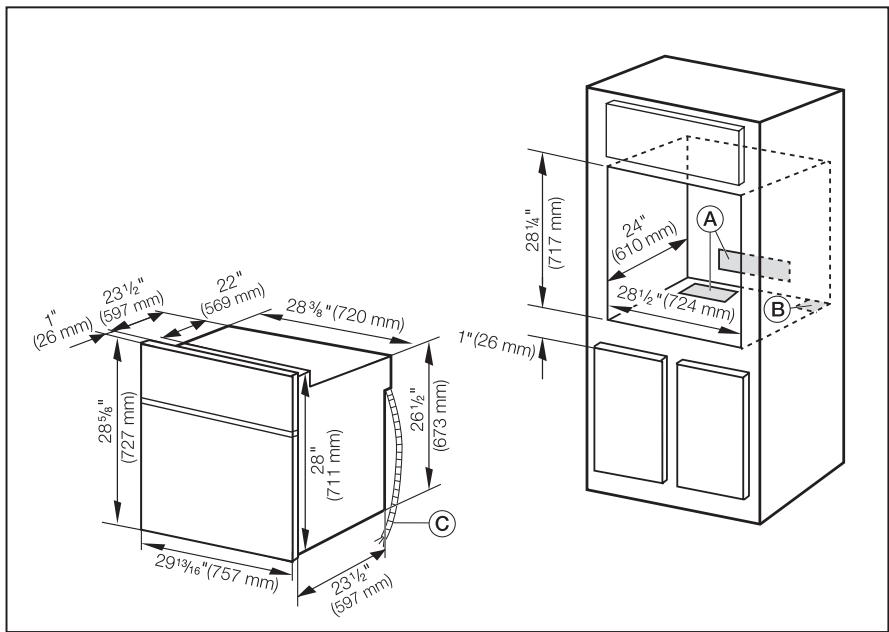
text_image
1" (26 mm) 23½" (597 mm) 22" (569 mm) 28¾" (720 mm) 28¾" (727 mm) 26½" (673 mm) 29½" (757 mm) 23½" (597 mm) 1" (26 mm) 24" (610 mm) 28½" (724 mm) A B CⒶ Vent cut-out (min. 24" ^2 / 150 cm ^2 ) possible at rear or platform of cabinet
⑧ Cut-out for power cord (min. 1" ^2 / 3 cm ^2 )
© Power cord
For the most current specifications see the Miele web site.
The oven must be installed into cabinetry and be supported from underneath.
⚠️ IMPORTANT INFORMATION Certain cabinet materials and finishes are very sensitive to high temperatures. To eliminate the risk of damage to surrounding cabinets, a 24 square inch (2"x12") [150 cm²] minimum opening must exist in the cabinet to allow air to flow into and around the appliance. In addition, the oven vent at the bottom of the door (bottom of the lower door in a double oven) must not be obstructed.
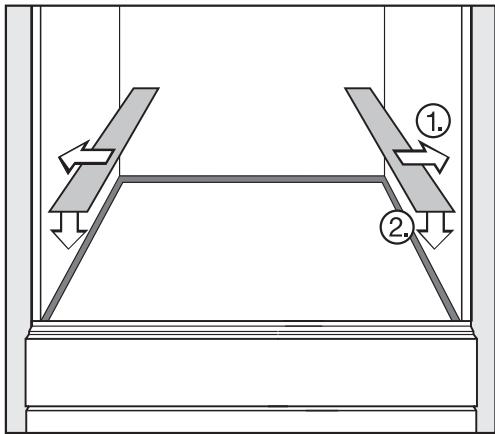
■ Adhere the skid plates to the cabinet floor.
■ Prepare the door for removal. Flip up the locking clamps on each door hinge.
text_image
Diagram showing two mechanical or structural components with labeled arrows and numbered parts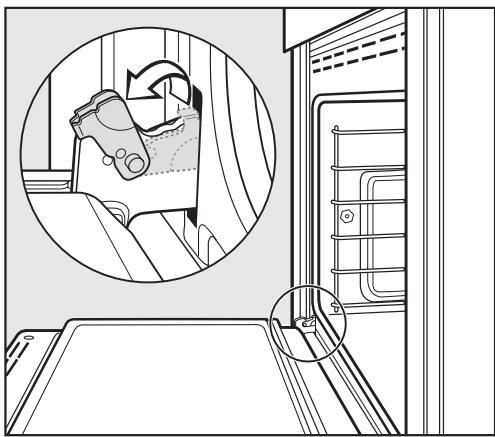
natural_image
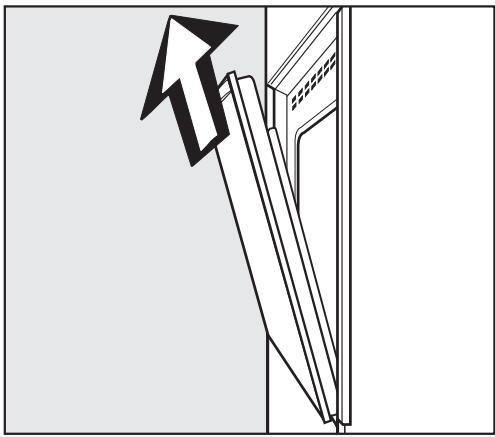
Line drawing of a car interior showing a seatbelt switch and a door, with no text or symbols present.■ Slowly shut the door until the protruding clamps stop the movement. Pull the door upward.
natural_image
Diagram showing a mechanical component with an arrow indicating upward motion (no text or symbols present)■ Connect the oven to the electrical supply.
■ Slide the oven into the cabinet and align.
■ Reinstall the door.
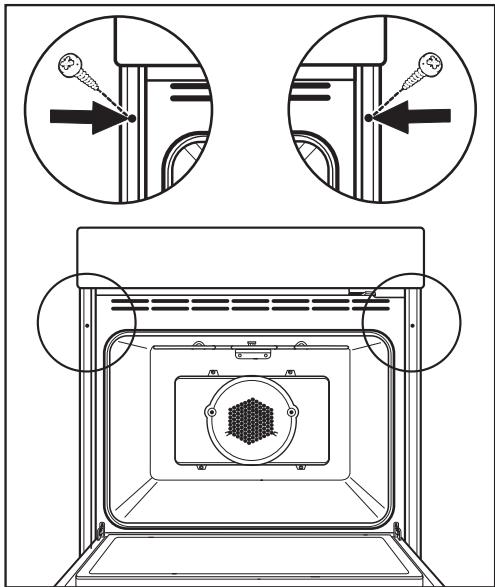
■ Open the oven door and locate the two mounting screw holes in the oven frame. Mark and drill 6 mm pilot holes. Secure the oven to the cabinetry by inserting screws through the frame and into the cabinetry.
text_image
Technical diagram showing mechanical assembly with labeled components and directional arrows indicating motion or force directions.Set the time
"Enter Time: hh:mm" will appear in the display once the oven is connected to electricity.
■ Set the current time using the keypad.
■ Save the time by touching the "OK" control.
USA:
Miele, Inc.
9 Independence Way
Princeton, NJ 08540
Phone: 800-843-7231
609-419-9898
Fax: 609-419-4298
Technical Service: 800-999-1360
www.miele.com
Canada:
Miele Limited
161 Four Valley Drive
Vaughan, ON L4K 4V8
Phone: 800-643-5381
905-660-9936
Fax: 905-532-2290
www.miele.ca
info@miele.ca (general enquiries)
professional@miele.ca (commercial enquiries)
Singapore:
Miele Southeast Asia
Miele Pte. Ltd.
163 Penang Road
# 04 - 02/03 Winsland House II
Singapore 238463
Tel : +65-67351191
Fax: +65-67351161
Email: infosea@miele.com.sg
Internet: www.miele.sg
