
H 4080 BM - Built-in oven MIELE - Free user manual and instructions
Find the device manual for free H 4080 BM MIELE in PDF.


| Product type | Built-in microwave combination oven |
| Brand | MIELE |
| Model | H 4080 BM |
| Power supply | 208 V or 240 V, 20 A, 60 Hz |
| Cooking type | Convection, microwave, grill, combination |
| Main functions | Convection Bake, Broil, Convection Broil, Microwave, Defrost, Auto Roast, Convection Roast, Master Chef, Timers, Favorites |
| Included accessories | Glass tray, combi rack, roasting probe, anti-boil stick |
| Control type | Touch controls and numeric keypad |
| Display | Backlit digital display |
| Interior lighting | 12 V, 10 W bulb, 572 °F (300 °C) |
| Safety | System lock, automatic shut-off, door contact |
| Cleaning | Manual cleaning with non-abrasive solutions; hinged upper heating element |
| Interior material | Stainless steel |
| Cooking probe | Roasting probe included for core temperature measurement |
| Automatic programs | Master Chef: poultry, meat, fish, pizza, pastries, gratins, vegetables, soups |
| Timers | Two independent timers (up to 59 min 59 sec) |
| Keep warm function | Yes, built-in |
| Customizable settings | Language, clock, default temperatures, volume, tone, brightness, contrast |
| Installation dimensions | Refer to the installation manual for exact dimensions |
Frequently Asked Questions - H 4080 BM MIELE
User questions about H 4080 BM MIELE
0 question about this device. Answer the ones you know or ask your own.
Ask a new question about this device
Download the instructions for your Built-in oven in PDF format for free! Find your manual H 4080 BM - MIELE and take your electronic device back in hand. On this page are published all the documents necessary for the use of your device. H 4080 BM by MIELE.
USER MANUAL H 4080 BM MIELE
Operating and Installation Instructions
Convection microwave oven H 4080 BM
To prevent accidents and machine damage read these instructions
before
installation or use.
en - US, CA
M.-Nr. 06 894 670
IMPORTANT SAFETY INSTRUCTIONS 4
Guide to the oven 10
Guide to the display 11
Oven accessories 13
Safety and energy saving features 15
Settings 16
Language 16
Clock 16
Temperatures. 17
Oven Light 17
Temperature ^ / ^ 17
Tone Options 18
Display. 19
System Lock 19
Warming function. 20
Power Level 20
Reset 21
Selecting cookware 22
Before using the oven 26
Programming the oven 26
Cleaning the appliance 26
Heating the oven 27
Using the oven 29
Selecting cooking times 31
Timer 33
Functions 34
Bake 35
Broil 37
Microwave 39
Master Chef 44
Defrost 46
Roast 47
Using the roast probe 49
Favorites 51
Cleaning and Care 53
Frequently asked questions 56
Technical Service 59
Installation instructions 61
Electrical connection 62
Installation 63
Programming the oven 65
When using electrical appliances always observe basic safety precautions, including the following:
WARNING - To reduce the risk of burns, electric shock, fire, injury to persons, or exposure to excessive microwave energy:
Read all instructions before installing or using the oven.
Read and follow the specific, "PRECAUTIONS TO AVOID POSSIBLE EXPOSURE TO EXCESSIVE MICROWAVE ENERGY".
This appliance is intended for residential use only. Only use the appliance for its intended purpose. The manufacturer cannot be held responsible for damages caused by improper use of this oven.
This appliance complies with current safety requirements. Improper use of the appliance can lead to personal injury and material damage.
Electrical safety
- Installation, repair and maintenance work should be performed by a Miele authorized service technician in accordance with national and local safety regulations and the provided installation instructions. Contact Miele's Technical Service Department for examination, repair or adjustment. Repairs and other work by unauthorized persons could be dangerous and may void the warranty.
Before installation make sure that the voltage and frequency listed on the data plate correspond with the household electrical supply. This data must correspond in order to prevent injury and machine damage. If in doubt, consult a qualified technician.
To guarantee the electrical safety of this appliance, continuity must exist between the appliance and an effective grounding system. It is imperative that this basic safety requirement be met. If there is any doubt, have the electrical system of the house checked by a qualified electrician. The manufacturer cannot be held responsible for damages caused by the lack, or inadequacy, of an effective grounding system.
IMPORTANT SAFETY INSTRUCTIONS
The appliance must only be operated after it has been correctly installed into cabinetry. This is necessary to ensure that all electrical components are shielded.
This appliance is not designed for maritime use or for use in mobile installations such as recreational vehicles or aircraft. However, under certain conditions it may be possible for installation in these applications. Please contact the Miele Technical Service Department with specific requirements.
Before service or maintenance work the power supply must be disconnected.
If the electrical cord is damaged it must be replaced by a Miele Service technician with a genuine Miele spare part.
Do not use an extension cord to connect the appliance to electricity.
Do not open the casing of the oven. Danger of electric shock!
Use
The appliance is intended for domestic use only: defrosting, heating, cooking, baking, roasting and broiling of food.
It is not designed for industrial or laboratory use.
Do not use corrosive chemicals or vapors in this appliance.
Do not use the appliance to store or dehydrate flammable materials. This is a fire hazard.
Do not use the oven to heat the room. Due to the high temperatures radiated, objects left near the oven could catch fire.
Prevent children from touching the appliance when in use.
Times for cooking, heating and defrosting food in the microwave are shorter than that of traditional food preparation methods. Extensive microwaving could dry out food and cause possible ignition. Fire hazard!
Do not use the microwave function to dry bread, flowers, herbs, etc. Use the Convection Bake function.
Do not heat cushions filled with herbs, gel, etc. with the microwave function. The cushions could ignite, even once removed from the oven after heating. This is a fire hazard.
Do not use full power when warming empty dishes. The lack or minimal amount of food could cause damage to the appliance.
IMPORTANT SAFETY INSTRUCTIONS
Supervise cooking with grease or oils. Oils and grease could ignite.
Never heat undiluted alcohol in the microwave oven, it can easily ignite.
If materials inside the oven ignite, keep the oven door closed to avoid fueling any flames. Turn the oven off or disconnect the power supply.
Cover food stored in the oven interior. Condensation from food and drinks could cause corrosion damage. It also prevents the food from drying out.
Spills or stains from food and liquids containing salt should be immediately cleaned from the stainless steel interior. Corrosion may occur.
If smoke occurs in the oven, to avoid fueling any flame, do not open the oven door. Switch the appliance off by pressing the ON/OFF button, switch off at the mains and remove the plug from the socket. Do not open the oven door until the smoke has dispersed.
Only use the Miele roast probe supplied with this appliance. If a replacement is necessary it can be ordered from Miele or your Miele dealer.
When not in use do not leave the roast probe in the oven, especially when broiling. The high temperatures used for broiling could cause plastic components on the roast probe to melt.
When using residual heat to keep food warm leave the selected function on and select the lowest temperature. Do not turn the oven off. Condensation from food and drinks could cause damage at the machine or the countertop and cabinetry. Leaving the machine on will keep the fan running to aid in dissipating the condensation.
The glass tray and combi rack can support a maximum weight of 17.5 lb (8 kg). These accessories may be damaged if over strained.
Do not lean, sit or place heavy items on the open oven door. The machine may be damaged.
Never place the hot glass tray directly on a cold surface, such as a tiled or granite countertop. The glass tray may crack.
Do not use a steam cleaner to clean this appliance. The steam could penetrate live components and permanently damage the oven or cause injury.
Do not operate this appliance if it has a damaged cord or plug, if it is not working properly or has been damaged or dropped.
Do not cover or block any opening on the appliance.
This appliance must not be installed or operated outdoors.
Do not use this appliance near water, e.g. sink, wet basement, swimming pool, etc.
Microwave function
PRECAUTIONS TO AVOID POSSIBLE EXPOSURE TO EXCESSIVE MICROWAVE ENERGY
Do not attempt to operate this oven with the door open since open-door operation can result in harmful exposure to microwave energy. It is important not to damage or tamper with the safety interlocks.
Do not place any object between the oven front and the door or allow soil or cleaner residue to accumulate on sealing surfaces.
Do not operate the oven if it is damaged. It is particularly important that the oven door closes properly and that there is no damage to the:
(1) door (bent), (2) hinges and latches (broken or loosened), (3) door seals and sealing surfaces.
The oven should not be adjusted or repaired by anyone except properly qualified service personnel.
Do not operate the Microwave empty! The oven will be damaged.
Items not suitable for use when using the microwave function or any combination functions: metal,
aluminum foil, cutlery, dishware with metal decoration, crystal glass containing lead, bowls with a knurled rim, non-temperature safe dishware, wooden dishware, metal clips, wire twist ties, food containers with metal coverings or residues.
Danger of machine damage and fire. The provided combi rack is specially designed for use in this oven.
Do not leave the appliance unattended when heating food in disposable, e.g. plastic, paper or other flammable materials.
See "Selecting cookware".
Do not use the oven to heat food in heat retaining packaging, e.g. take-out food bags.
This packaging contains a thin layer of aluminum foil which reflects the microwaves. This reflected energy can cause the paper layer to ignite.
IMPORTANT SAFETY INSTRUCTIONS
Before serving food allow a sufficient standing time. Always check the temperature of the food itself after taking it out of the microwave. Do not judge by the plate temperature. The heat is created in the food, the dishes may stay cool to the touch.
Always check the temperature before serving heated baby food.
Use a food thermometer to measure the foods temperature. Do not use thermometers containing mercury or liquids, they are not suitable for high temperatures and break easily.
Never cook or reheat food and liquids in sealed containers or bottles. Remove the nipple or lid before heating in the microwave. Built-up pressure may cause them to burst. Danger of injuries.
The combi rack will get hot when used in the microwave. Danger of burns.
When heating liquids, the provided boiling wand should be placed into the container.
When heating liquids, milk, sauces, etc., in the oven without the boiling wand, the boiling point of the liquid may be reached without the production of bubbles. The liquid will not boil evenly. This "boiling delay" can cause a sudden build up of steam bubbles, when the container is removed from the oven or shaken. This can lead to the liquid boiling over suddenly and explosively. Danger of burning!
The built-up pressure may force the oven door open. This could result in injury or damage. The boiling wand ensures that the liquid boils evenly and that steam bubbles form at an early stage.
IMPORTANT SAFETY INSTRUCTIONS
- Eggs must only be cooked in their shells in the microwave oven in a specially designed egg-boiling device. Hard-boiled eggs should not be reheated in the microwave oven. The eggs may burst, even once they have been removed from the oven.
Eggs can be cooked without their shells in the microwave oven only if the yolk membrane has been punctured first. The pressure could otherwise cause the egg yolk to explode. Danger of injuries. - Food with a thick skin or peel, such as tomatoes, sausages and potatoes should be pierced in several places before cooking to allow steam to vent and prevent the food from bursting.
Do not use dishware with hollow handles or lid knobs. Moisture can get into the hollow parts. (The hollow parts of some dishware can be vented). Danger of built-up pressure and the explosion of the hollow parts may cause injuries.
Solo functions:
Convection Bake, Auto Roast, Broil, Convection Broil
Caution! Danger of burns!
When using solo functions the oven interior gets very hot.
Do not allow children to touch or play in, on or near the oven when it is in operation. The oven gets hot at the oven door glass, the vapor vent, the handle and the operating controls. Danger of burns.
Use pot holders when working with a hot appliance. Especially the upper heating element gets extremely hot when using the functions broil and convection broil. Danger of burning!
- Allow the heating element to cool before attempting to lower it to clean the oven. Danger of burns.
Do not use force to lower the upper heating element. It may get damaged.
SAVE THESE INSTRUCTIONS
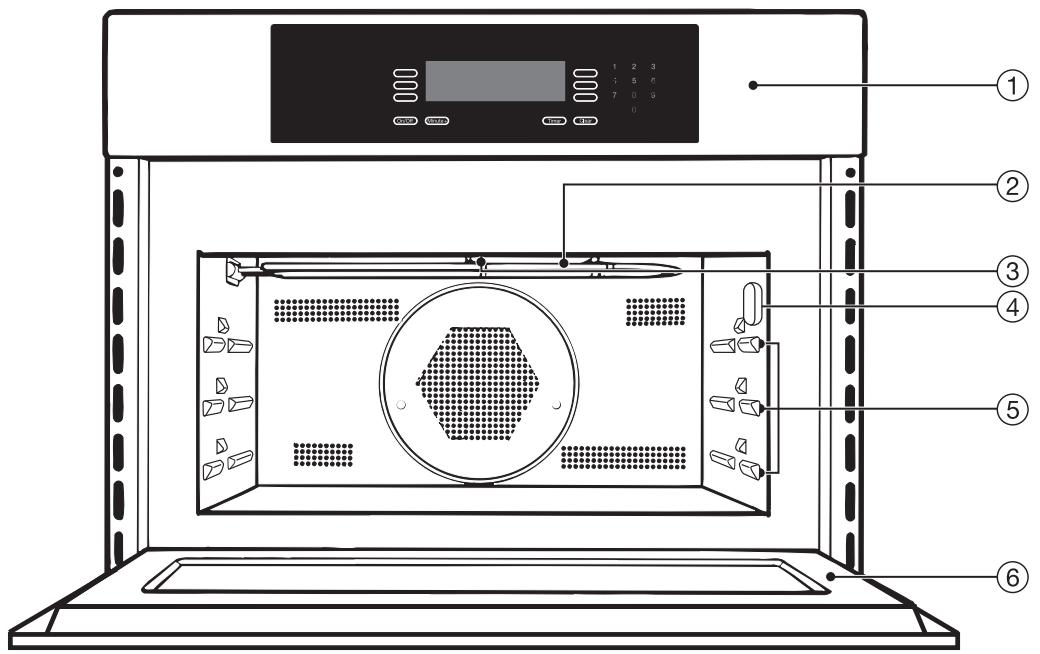
① Control panel
(2) Upper heating element
③ Light
④ Roast probe socket
(5) Three level runners
⑥ Oven door
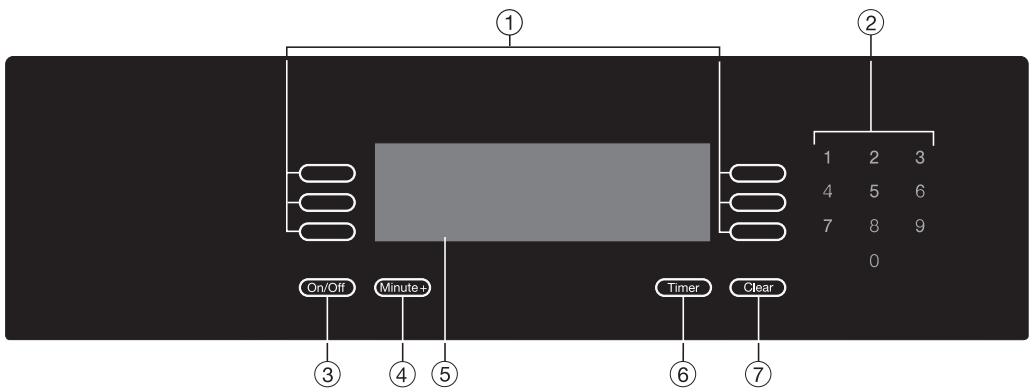
① Touch controls
Next to and below the display are electronic sensor controls which react to the touch of a finger. When the oven is turned on the display shows the allocation of the controls. The oven is operated by a touch of the respective control. Every touch of the controls is confirmed by a tone. The tone can be turned off. See "Settings - Tone Options - Keypad tone".
② Keypad
The number keypad lights when entries for temperatures or times are needed.
③ On/Off
Turns the oven on or off.
④ Minute+
To start the microwave with maximum power for 1 minute. You do not have to turn the microwave on to start this function.
Press the Minute+ button and the program will start automatically.
⑤ Display
⑥ Timer
To time any kitchen activity, e.g. cooking pasta. Two separate times can be entered.
⑦ Clear
To delete the last entry or to go back to the previous menu. If more than one function is entered, a question is displayed to clarify which one the user would like to delete.
Display

This symbol is allocated to a touch control and shows in the display with an option or request, e.g. "more", "back", "OK", etc. The display shows a maximum of six options. If more menu points are available, "more" will be displayed as the last menu option. The desired setting is selected by touching the sensor next to it.
If options are available for times or temperatures they will also be highlighted in the display. These numbers can be entered by using the keypad.
The currently selected setting will then be highlighted and/or shown at the top of the display.

Additional information for options are marked with this sign. Confirm with "OK" to close an info window.
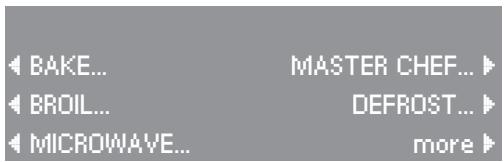
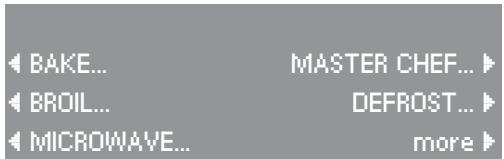
BAKE... MASTER CHEF...
BROIL... DEFROST...
MICROWAVE... more

Level 1 from the bottom Use rack and glass tray
12:23
OK
Oven accessories
Glass tray with non-tip safety notches
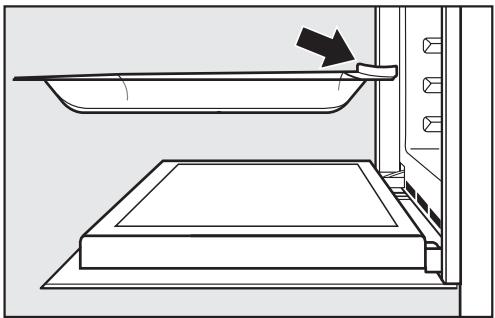
These trays are suitable for all microwave oven functions. They have non-tip safety notches which prevent them from being pulled out completely.
When inserted the safety notches should face the rear.
The glass tray has to be lifted to be taken out of the oven.
Combi rack
Insert the combi rack into the glass tray. Always use the combi rack together with the glass tray.
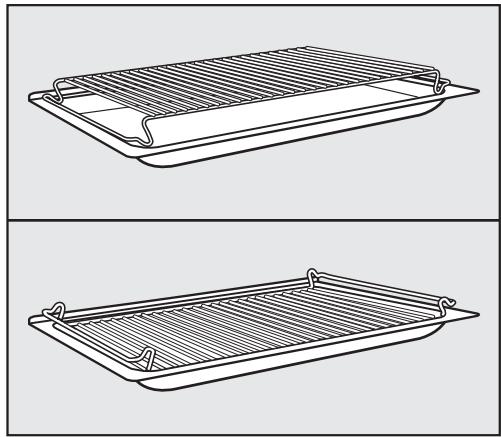
Depending on the oven function and food height, the combi rack can be used right-side-up (upper illustration) or upside down (lower illustration).
This assures an optimum distance to the upper heating element.
The combi rack is specially designed for microwaves. It should not be set on the bottom of the oven, direct contact could lead to sparks.
Roast probe
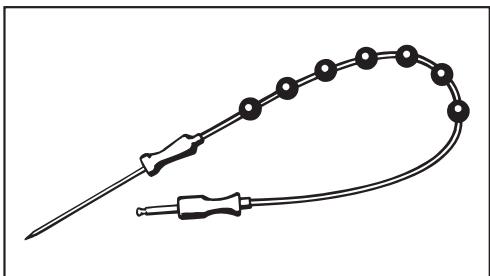
The roast probe is inserted in the food to monitor the roasting process. For more information see "Using the roast probe".
Boiling wand
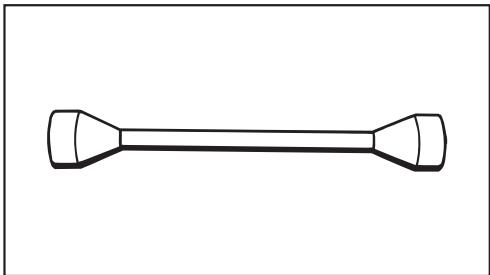
When heating liquids, the provided boiling wand should be placed into the container. It results in even boiling of the liquid.
System lock
When locked the oven cannot be operated, see "Settings - System lock".
Automatic Safety Shut Off
A solo oven function can be started without a cooking time set. To prevent a run-on operation and a fire hazard the oven shuts off automatically.
Depending on the temperature and function selected, the oven will turn off 1 to 10 hours after the last operation was selected.
When the microwave is turned off after one operation but will be used for a second cooking program right away, you must wait 30 seconds before the power can be turned on again.
Door contact switch
If the door is opened during a combination function e.g. Combination Bake, the heat and convection fan will automatically turn off. After closing the door and pressing "Start", the operation will continue. When the door is opened during a solo function e.g. Convection Bake, the operation will continue immediately after closing the door. It does not need to be restarted.
Interior light turned off
The interior light can be set to turn off after the process starts. See "Settings - Oven Light".
The default oven settings can be changed in the function "Settings". In this function you can customize the oven to suit your preferences. Settings may be adjusted by touching the corresponding touch control.
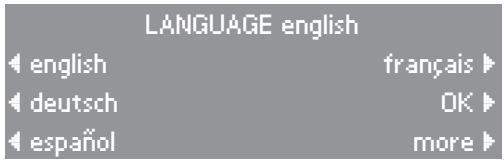
Language
- Select the touch control next to the desired language and confirm by selecting "OK".
The symbol indicates the "Language" setting. If you accidentally select an unfamiliar language, simply look for the symbol, touch the control next to it and select your language of choice.
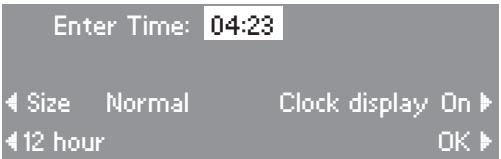
Clock
"Enter Time" appears in the display.
Enter the current time using the keypad.
Different settings can be selected by touching the control next to the option:
- the size of the clock display, Size Normal or LARGE
- the time format, 12 hour or 24 hour
- whether or not the time is displayed, Clock-Display On or Off
- Touch the "OK" control to confirm the entries.
If the power is cut off for more than 6 weeks the clock will have to be reset.
Temperatures
The default temperature of each function can be adjusted. If a temperature out of the available range is selected, the oven will revert to the default temperature.
- Touch the control of the function whose default temperature you wish to alter.
Enter the new default temperature using the keypad.
The next time this function is selected, the new temperature will be used.
Oven Light
The "on" duration of the oven light can be altered.
- Touch the control of the light setting you wish to change.
- "Off after 1 minute" The light goes off after the 1^st minute of a function.
- "On during use" The oven light remains lit during a function.
The selected setting will appear in the display.
Touch the "OK" control to confirm the selection.
Temperature ^ F / ^ C
All oven temperatures can be displayed in either Fahrenheit or Celsius.
Touch the "Temperature" control to toggle between ^ F and ^ C .
| TEMPERATURES | |
| CONVECTION BAKE | 325°F |
| CONVECTION BROIL | 400°F |
| AUTO ROAST | 325°F |
| more | |
| OVEN LIGHT On during use |
| Off after 1 minute |
| On during use OK |
| SETTINGS | |
| LANGUAGE... | OVEN LIGHT... |
| CLOCK... | TEMPERATURE *F... |
| TEMPERATURES... | more |
Tone Options
Unique tones may be set for each of the two timers to differentiate them from an oven function tone.
"Timer 1" and "Timer 2"
The tone of "Timer 1" and "Timer 2" can be set to one of five tone options.
- Select "Timer 1 Tone" or "Timer 2 Tone" by touching the corresponding control.
With every touch of the respective control, another tone will sound and the display will show the tone number.
For example, Timer 1 Tone 1.
Select a tone for each timer.
"Keypad Tone"
The keypad can be set to make a sound with each touch of a control.
- Touch the "Keypad tone" control to toggle between the on and off settings.
"Volume"
This control adjusts the volume of the tone options.
- Touch the "Volume" control until you hear the desired volume.
| TONE OPTIONS | ||
| Timer 1 Tone 1 | Volume | 1 |
| Timer 2 Tone 2 | Tone | Short |
| Keypad tone on | OK | |
"Tone Short / Long"
The duration of the timer and oven tones can be modified.
- "Tone short" will beep in quick succession when an oven signal or the oven timer sounds.
- "Tone long" a continuous tone will sound when an oven signal or the oven timer sounds.
- Touch the "Tone" control to toggle between the short and long settings.
- Touch the "OK" control to confirm the "Tone Options" settings.
When the tone sounds to indicate an oven signal or the timer, touch any number on the keypad to turn off the tone.
Display
The oven display can be adjusted as desired by touching the controls next to "Brightness" and "Contrast".
System Lock
The oven can be locked.
Do not accept
The lock is not used. Default setting
Accept
The lock is used.
When "Accept" is set, the display shows a lock which is either open or closed.
Off
The lock is open, the oven can be used.
On
The lock is closed, the oven can not be used.
The timer can still be used.
The oven will remain locked after a power failure.
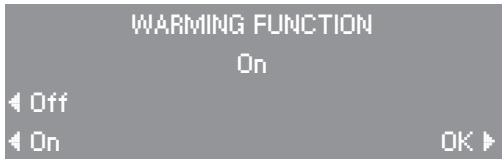
Warming function
The microwave has a built-in warming function which is activated by default. Food which is not immediately removed from the oven will be kept warm for a short period of time. The display shows "Keep warm".
The function can be deselected. The "Warming function" cannot be set as a separate function.
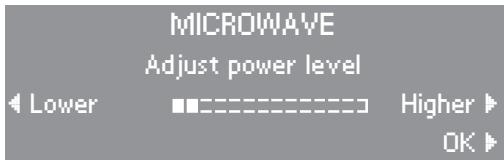
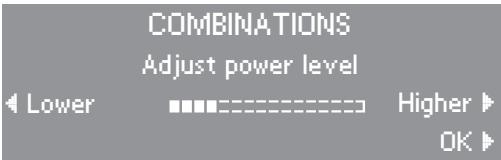
Power Level
The default power levels for microwave and combined microwave functions can be adjusted. Confirm with "OK".
They are shown in a bar. A full bar shows the maximum power.
Seven power levels are available for microwave.
If only two segments are shown the minimum power is displayed.
Four power levels are available for combination functions.
If only four segments are shown the minimum power is displayed.
Reset
The default settings of the microwave oven can be restored with "Reset".

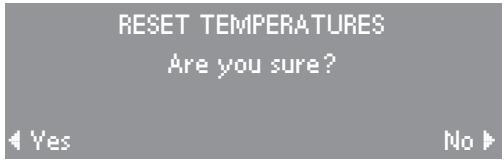
Temperatures
If the request is confirmed with "yes", all changed temperatures will be restored to the factory default.
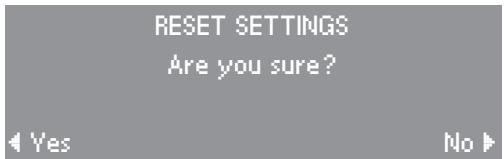
Settings
If the request is confirmed with "yes", all changed settings will be restored to the factory default.
Favorites
If the request is confirmed with "yes", all changed "Favorite" entries will be deleted. Once deleted, these entries cannot be restored.

Microwaves:
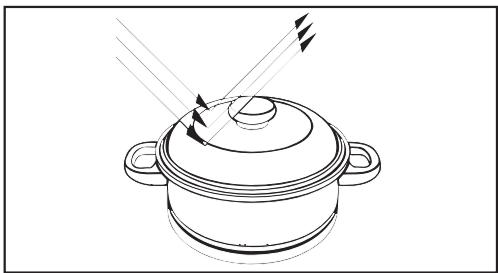
- are reflected by metal,
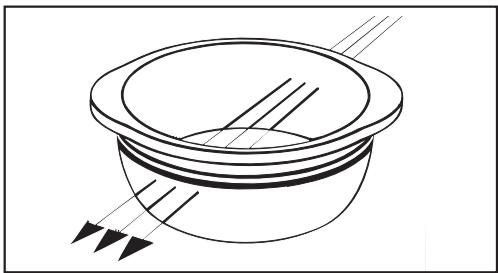
pass through glass and chinaware,
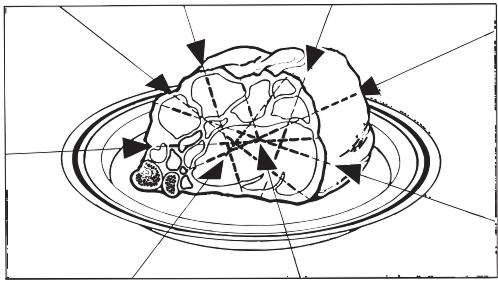
- are absorbed by the food.
Material and shape
The material and shape of containers used affect cooking results and times. Circular and oval containers work best. The food will heat more evenly than in a square container.
Metal
Do not use metal containers, aluminum foil, cutlery or dishes with metal decor during any microwave function including all combination functions.
The metal reflects the microwaves which can damage the microwave oven.
Exceptions:
- Pre-cooked meals in aluminum foil containers can be defrosted and reheated in the microwave oven.
Important: Remove the lid before heating the food.
The food is heated only from above. To heat the food evenly place it in a container suitable for microwaving.
- For even defrosting and to avoid overcooking unevenly shaped cuts of meat, poultry or fish, small pieces of aluminum foil may be used to mask wing-tips or other thin parts for the last few minutes of the process.
Make sure that the aluminum foil is at least 1 inch (2.5 cm) from the oven walls at all times. It must not touch the walls.
- Metal meat skewers or clamps should only be used if they are small in comparison to the size of the meat.
- The enclosed combi rack is suitable for microwaving. Do not set it on the oven floor.
The combi rack gets hot. Let it cool before touching or use pot holders to avoid injury.
Glassware
Heat-resistant glass or ceramic glassware are ideal for use in the microwave oven.
Crystal contains lead and is unsuitable.
Porcelain (china)
Porcelain (china) is suitable for use in the microwave oven.
Do not use porcelain with gold or silver edging or items with hollow knobs or handles, insufficient ventilation may cause damage.
Earthenware
Decorated earthenware is only suitable if the decoration is beneath the glaze.
Earthenware can get very hot and may crack.
Glazes and colors
Some glazes and colors contain metallic substances. They are not suitable for the microwave.
Plastics
Use plastic dishes only for Microwave - Solo. They must be heat resistant up to 230^ F (110°C) otherwise the plastic may melt into the food.
Special plasticware, designed for use in microwave ovens is available in retail outlets.
Plastic boiling bags can be used for cooking and reheating. They should be pierced beforehand so that steam can escape. This prevents a build-up of pressure and reduces the risk of the bag bursting.
Roasting bags
These bags can be used in the microwave oven. Please follow the manufacturers' instructions.
Wood
Wood containers are not suitable. The water from the wood evaporates during the cooking process causing it to dry out and crack.
Disposable containers
Only those plastic disposable containers specified under "Plastics" are suitable for use in the microwave oven.
Do not leave the oven unattended when reheating or cooking food in disposable containers made of plastic, paper or other flammable materials.
Disposable containers are not always microwave safe.
Covering the food
Use a cover only during the Microwave-Solo function. Plastics are only heat-resistant up to 230^ (110^) . Higher temperatures (Broiling, Convection Bake, etc.) can cause the cover to melt into the food.
The cover should not completely seal the container. This may prevent steam from escaping causing the cover to melt.
A cover:
- prevents most of the steam from escaping, especially when cooking foods which needs longer to cook, such as potatoes.
- shortens and evens out the cooking process.
- prevents the food from drying out.
- prevents any loss of aroma.
- prevents soiling of the oven interior.
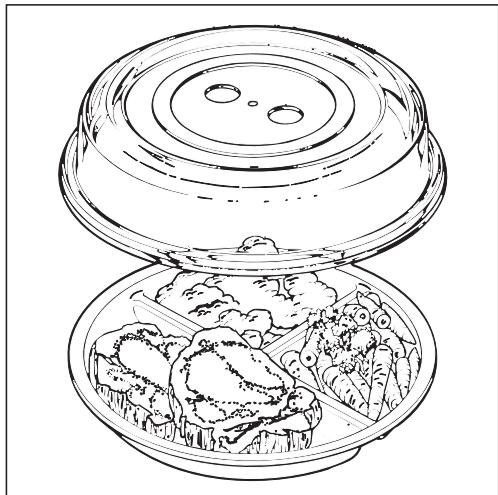
- Cover the food with a glass or plastic lid suitable for microwave ovens. They are available in retail stores. Plastic wrap suitable for microwaving can also be used.
Do not heat food in closed containers e.g. glass baby food containers. Vent the container before heating.
Do not use a lid or cover if:
- cooking food in which a crisp finish is desired e.g. breaded chicken, garlic bread, etc.
- a combination function is selected.
Before using the oven
Programming the oven
When the oven is first connected to the electrical supply you will be prompted to set the time of day. See "Settings - Clock".
Cleaning the appliance
Remove the protective film from the appliance front (if present).
Wipe the interior with a solution of warm water and liquid dish soap. Dry with a soft cloth.
Leave the door open until the interior is completely dry. Otherwise odors and corrosion may occur.
- Wash the accessories.
See "Cleaning and care" for more information.
Heating the oven
New ovens may have a slight odor during the first use. To eliminate the odor quickly, the oven should be operated at a high temperature for 2 hours.
Before heating the oven, remove all accessories and labels.
Make sure the room is well ventilated during this process.
Touch the "On" control.
- Select the "Bake" function.
Select "Convection Bake".
Select "Temperature".
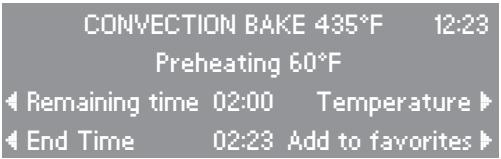
Set the temperature to 435^ F (225 °C) using the keypad.
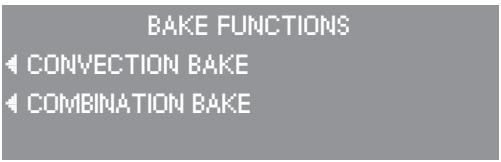
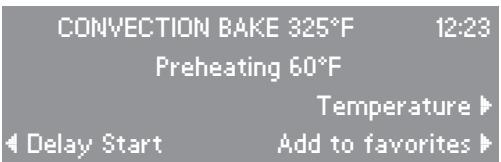
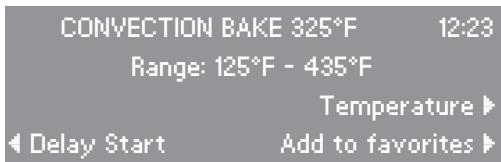
Before using the oven
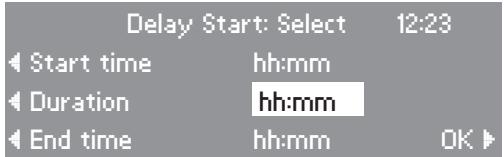
Set the timer by touching the "Delay Start" control.
- Select "Duration". Set a cooking time by entering "2", "0", "0" using the number keypad.
Touch the "OK" control.
The oven will run for 2 hours and the time remaining will appear in the display.
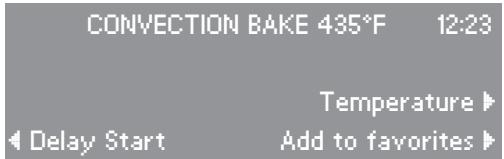
Turning the oven on and off
To turn the oven on or off touch the On/Off sensor.
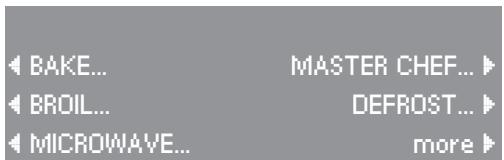
The main menu appears and displays 9 menu options.
- Select the desired menu (e.g. Bake) by touching the sensor next to it.
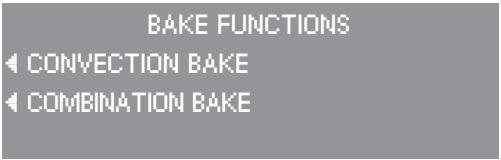
Functions will then appear.
- Select the desired function (e.g. Convection Bake) by touching the sensor next to it.
Each function has different settings which can be adjusted. (The settings will vary depending on the function selected.)
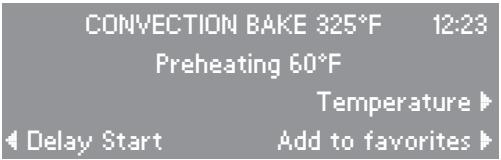
Temperature
Power Level
Delay Start
Duration
Add to favorites
Adjust the settings as desired.
The currently selected settings are then shown in the display.
The oven is factory set so that it starts automatically.
Once the oven has reached the selected temperature a tone will sound.
Manually starting a microwave function
Only when microwaving is used must the oven be started manually.
Turn the oven on.
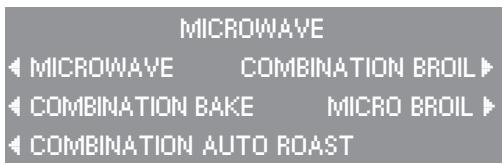
- Select the desired function e.g. Microwave. The submenu is shown.
- Select the desired option from the submenu e.g. Microwave.
Select the desired cooking time.
- Select a power level and temperature (depending on the function selected).
Confirm with "OK".
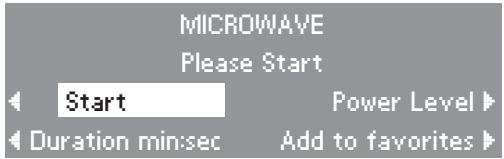
Select "Start".
The remaining time and time of day is displayed during the running program.
To stop the operation, touch the "Clear" sensor.
The door is unlocked when using the microwave and can be opened at any time. The operation is interrupted and will be continued once the door is closed.
To end a running program, touch the On/Off sensor.
If the oven is already heated from a previous cooking process, let it cool to room temperature before using it again. The cooking times and results could be affected by the heat.

The oven can be programmed to turn on and off automatically.
If a combination function is selected, "Duration" can be selected.
If a solo function is selected the following settings can be selected:
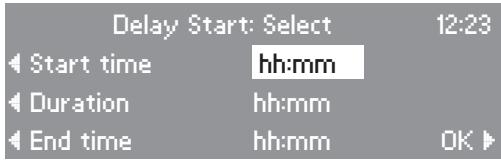
Delay Start
With this function you can program the oven to turn on at a desired time.
Duration
Enter the cooking time. After the time has elapsed, the oven will turn off automatically.
End Time
With this function you can program the oven to turn off automatically.
To automatically turn a cooking program on or off the cooking times can be entered by the,
duration and end time.
duration and start time.
- start and end time.
The time not entered will be determined automatically but cannot be adjusted.
Selecting cooking times
The entered program can be saved as its own program with "Add to favorites". See "Favorites" for more information.
The start time will be displayed until the oven is turned on.
Once the program has started, the remaining time will be displayed.
After the program has completed "Ready" will be displayed and a signal will sound.
Checking and adjusting entered cooking times
Entered cooking times can be checked or adjusted at any time by selecting the respective setting.
Deleting entered cooking times
Touch the "Clear" sensor.
All data will be deleted during a power failure.
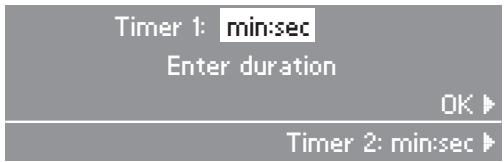
The timer can be used to time any activity in the kitchen and can be set independently of a cooking function.
Two timers (Timer 1 and 2) can be used individually or simultaneously.
A maximum time of 59 minutes and 59 seconds can be selected.
Setting a timer
Touch the "Timer" control.
Use the keypad to enter the desired time in minutes and seconds.
Press "OK" or the timer will start automatically after a few seconds.
The second timer can be set in the same way as the first.
The countdown of Timer 1 and 2 is shown in the lower area of the display.
At the end of the timed period, a tone will sound.
Touch "Clear" to cancel the timer tone.
Canceling a timer
Touch the "Clear" control.
- Touch the control for the timer to be canceled or to cancel both timers and a running function touch "All Functions".
Select "OK".
Solo functions
- Convection Bake to bake or cook food with heated air fanned throughout the interior.
- Broil to broil flat cuts of food. Broiling is done with the oven door closed.
- Convection Broil to broil large cuts of meat or poultry. Convection broiling is done with the oven door closed.
- Microwave to defrost, heat and cook food in a short period of time.
- Defrost
- Auto Roast to sear then roast food automatically.
- Convection Roast to roast food with heated air fanned throughout the interior.
Combination functions
Combination Bake
- Combination Auto Roast
Combination Broil
- Micro Broil
For a combination of the microwave function with a solo function. These functions allow for fast heating, cooking and browning of food.
Convection Bake is usually the most suitable. Since the heat immediately gets to the food, the time and energy efficiency is greatest.
Do not cover the food in combi functions. The food will not get a crisp finish.
Convection Bake
Default temperature . . . . 325°F (160°C)
This function is suitable to bake cookies, small cakes, puff pastry, etc.
It is also suitable to cook meat, poultry, fish and fresh or frozen vegetables.
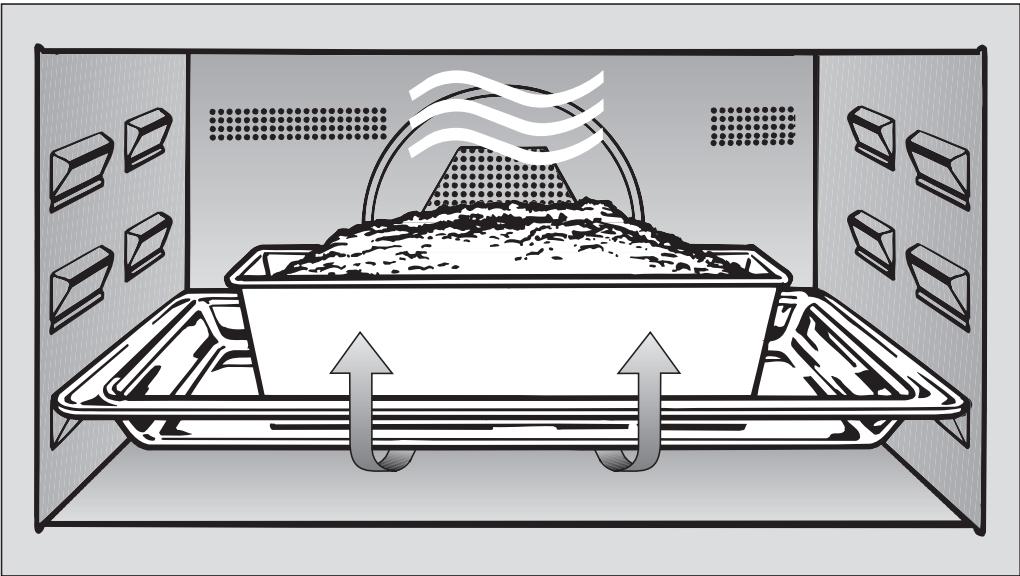
This system works by circulating air over the heating elements and fanning it back through the opening in the back panel of the oven.
Any heat-resistant cookware is suitable, e.g. casserole dish, china, earthenware. However shiny, thin pans are not recommended.
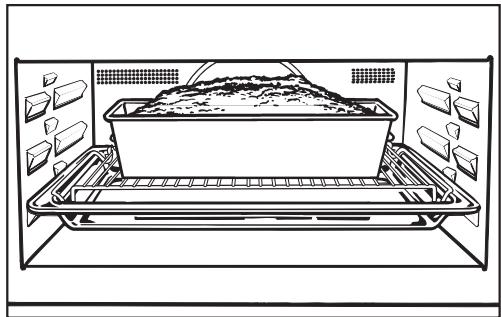
- Bake small cakes on the 1^st runner level from the bottom. Turn the combi rack upside down on the glass tray to ensure even airflow.
- When baking cookies or biscuits on the glass tray, select the 2^nd runner level from the bottom, this creates more even browning. Use the 2^nd and 3^rd level when baking several trays at a time.
- Cover food which is supposed to stew, like potatoes or vegetables. This prevents it from drying out.
- Do not cover food which is supposed to crisp, e.g. meat.
Place the food into the oven.
The program will start automatically.
Adjust the temperature if necessary.
- Select a delay start time if desired and confirm with "OK".
Combination Bake
Default temperature . . . . 325°F (160°C)
This function is suitable for baking items with a longer bake time e.g. dough, cake, cheesecake, etc.
This function combines the programs Microwave and Convection Bake. Heat reaches the food immediately shortening cooking times while still achieving a browned finish.
Heat-resistant glass or ceramic bakeware is suitable so microwaves can get through the material.
Do not use metal cake pans with this function.
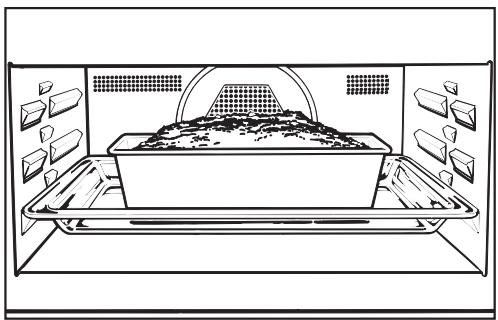
- Set the cake pan in the middle of the glass tray on the 1^st level runner from the bottom. Be sure that the pan does not touch the walls.
- Select a power level and temperature if desired. Confirm with "OK".
Select a duration.
Press "Start".
Baking tips
- Place rectangular cake pans with the longer side across the width of the microwave oven. The heat will better distribute.
Broil
Broiling is done at a fixed temperature.
The function Broil is designed for flat food like pork chops, steak, burgers and toast.
The upper heating element radiates high heat in order to cook the food, it will glow red hot several minutes after being turned on to produce sufficient heat for broiling.
Select a delay start time if desired and confirm with "OK".
The program will start automatically. If possible allow the oven to preheat for 5 minutes.
- Place the combi rack in the glass tray and place the food on it.
Insert it on the 2^nd or 3^rd runner level from the bottom.
Convection Broil
Default temperature . . . . 400°F (200°C)
The function Convection Broil is designed for broiling food with a larger diameter like shish kabobs, roasts and poultry.
The hot air from the upper heating element is distributed over the food by the fan on the rear wall of the oven. This allows a lower temperature to be selected than for normal broiling.
Select a delay start time if desired and confirm with "OK".
Adjust the temperature if desired.
The program will start automatically. If possible allow the oven to preheat for 5 minutes.
Place the combi rack on the glass tray and place the food on it.
Insert the glass tray on the 1^st level runner from the bottom. The 2^nd runner level can be selected for very flat food.
Micro Broil
Micro Broil is done at a fixed temperature and cannot be changed.
This function combines the programs Microwave and Broil allowing a power level to be selected.
Select a duration.
- Select a power level if desired. Confirm with "OK".
Press "Start".
Place the combi rack on the glass tray and place the food on it.
Insert the glass tray on the 2 ^ nd level runner from the bottom. The 3 ^ rd runner level can be selected for very flat food.
Combination Broil
Default temperature . . . . 400°F (200°C)
This function combines the programs Microwave and Convection Broil allowing a microwave power level to be selected as well as a temperature.
Select a duration.
- Select a power level and temperature if desired. Confirm with "OK".
Press "Start".
If possible allow the oven to preheat for 5 minutes.
- Place the combi rack in the glass tray and place the food on it.
Insert it on the 1st or 2nd runner level from the bottom.
Broiling Tips
- Slices should be cut evenly so that the broiling time is the same.
- The combi rack can be used upside down or right side up depending on the food height to allow an optimum distance to the upper heating element.
- Before placing food onto the combi rack baste it with oil, to avoid sticking.
- Turn the food at the half-way stage.
Microwave cooking offers speed, convenience and nutritional benefits when food does not require browning or crisping.
The moisture content of food will affect the speed at which it is cooked.
Heat is produced directly in the food, therefore:
- food can generally be cooked without adding much liquid or cooking oil.
defrosting, reheating and cooking in a microwave oven is quicker than using traditional oven methods.
nutrients, such as vitamins and minerals, are generally retained. - color, texture and taste of food are not impaired.
Microwave Solo
There are seven microwave power levels available.
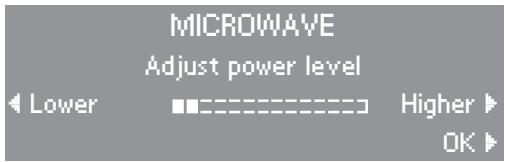
The power levels are shown in a bar. A full bar shows the maximum power. If only two bars are shown the minimum power is displayed.
Microwave Combination
There are four microwave power levels available.
Select a lower microwave power level (bar half filled) to bake food.
To cook, roast and broil select the maximum microwave power level.
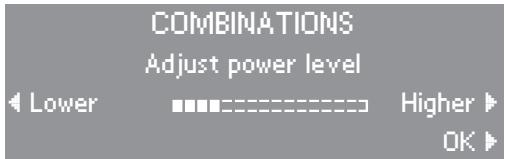
The power levels are shown in a bar. The full bar shows the maximum power. If only four segments are shown the minimum power is displayed.
Do Not Operate the Microwave empty! The oven will get damaged.
Only use microwave safe cookware. No metal!
In all microwave functions the power level and cooking time can be selected.
Combined microwave functions will shorten the cooking time and give a browned finish to the food.
Microwave
The function Microwave is suitable for cooking casseroles, rice pudding, etc.
- Place the food in a microwave-safe dish and cover.
- Set the cookware in the middle of the glass tray on the 1^st level runner from the bottom.
If the food is set directly on the oven floor it will not defrost / cook / heat evenly since the microwaves cannot reach the food from below.
Select a duration.
Select a power level. Confirm with OK.
Press "Start".
Stir and turn food at least once during cooking.
Combination Bake
See "Bake" for more information.
Combination Broil
See "Broil" for more information.
Micro Broil
See "Broil for more information.
Microwave tips
- Food with a thick skin or peel, such as potatoes and sausage, should be pierced several times before cooking to allow steam to vent and prevent the food from bursting.
Boil eggs in shell only in a specially designed microwave egg boiling device, otherwise the eggs may burst even once taken from the oven.
- Eggs can be cooked without their shells in the microwave oven only if the yolk has been punctured. The pressure could otherwise cause the egg yolk to explode.
- Do not cover the food when using combination functions.
- Add a little water when cooking vegetables that are not fresh in the microwave. Fresh vegetables cook quicker.
- Food from the fridge needs a longer cooking time than food at room temperature.
Defrosting
The function Microwave defrosts food gently and fast. The following microwave power levels are recommended for defrosting:
- 2 bars for defrosting delicate food such as heavy cream, butter, cheese, etc.
- 4 bars for defrosting all other foods.
Take the frozen food from the packaging and put it in a microwave safe container. - Set the cookware onto the middle of the glass tray on the 1^st level runner from the bottom.
- Select a cooking time and a power level.
Press "Start".
Defrosting tips
- When defrosting larger amounts of food, e.g. 4 lbs (2 kg) of fish, the glass tray can be used as a defrosting container on the 1^st runner level from the bottom.
- After defrosting allow the food to stand at room temperature long enough to distribute the heat evenly throughout the food.
Reheating
The microwave is useful for reheating food.
To reheat select a power level of:
- full bar for drinks,
- 10 to 12 bars for food,
- 8 bars for baby food.
Place the food in the microwave on the 1st level runner from the bottom. - Select a cooking time and a power level.
Press "Start".
The time required depends on the food, its initial temperature and the amount to be heated.
- Stir the food halfway through reheating.
After reheating
Be careful when removing a dish from the oven, it may be hot.
After reheating food, especially food for babies and small children, stir the food or shake the container and check that the temperature does not pose any danger.
Reheating tips
- Use a lid or cover for reheating food, except when a "drier" finish is needed, e.g. breaded foods.
- Remove the lid from glass containers e.g. baby food jars.
- Remove the lid or nipple from baby bottles before heating.
- To heat a liquid, insert the boiling wand into the container.
Take care that the baby food is at a safe temperature when served. Heat baby food only for 30 seconds at a time then check temperature.
Do not reheat hard boiled eggs, even without the shell, in the microwave oven. The eggs can burst.
Defrost / Heat and Cook
To defrost, heat and cook at the same time use the function Microwave or the combination function.
Microwave Solo
This function is suitable for frozen food, which does not require browning.
Frozen meals can be defrosted and then reheated or cooked. Consult the manufacturer's instructions.
- Remove the food from its packaging and place in a covered microwave safe dish on the 1^st level runner.
- Select a cooking time and power level.
Press "Start". - Soups and vegetables should be stirred several times during the process. Separate and turn slices of meat half-way through the program.
Combination Broil
This function, which combines the programs Microwave and Convection Broil, is recommended for pre-cooked dishes, which require heating and browning.
- Place the frozen food in a microwave safe container and set it on the glass tray.
Set the glass tray in the 2^nd runner level. Do not cover the food.
Frozen foods in an aluminum tray must be set directly on the glass tray.
Select a duration.
Select the maximum microwave power level. Confirm with "OK".
Adjust the temperature if necessary.
Press "Start".
If the food is not sufficiently browned, next time set the glass tray on the combi rack and set it in the 1^st runner level. This will bring the food closer to the heating element creating a more browned finish.
The "Master Chef" function contains an easy to use list of preset functions for commonly cooked foods e.g. pizza, chicken, etc.
Pay attention to notes in the display. For example the display may show a note to insert the roast probe or to add liquid.
For some programs the maximum food weight must not be exceeded. See the "Maximum food weight" table.
- Select "Master Chef" from the main menu.
Master Chef menus
Poultry
Meat
Fish
Pizza
Baked Goods
Casseroles
Vegetables
Soup
After the selection of the food group you can select between (except: Pizza, Baked Goods)
Cook
Reheat
Defrost
- Follow the prompts until the program starts. The prompts will vary depending on the type of food selected.
- You can toggle between pounds and kilograms by touching the "lb/kg" button.
If defrosting a large amount of food which consists of smaller portions e.g. 4 chicken breasts, enter a lower total weight than the actual total weight. This will give a more even defrosting result.
- Include a dish height in the "Casseroles" submenu. See "Casserole program dish heights".
A delayed start time can be selected, if desired.
The program will start automatically.
A Master Chef program can only be ended ahead of time if the oven is turned off.
Once a Master Chef program has started, the remaining time will be displayed.
All Master Chef programs have a fixed time assigned. When using the roast probe, an estimated time is displayed.
After the program has ended "Ready" will be displayed and a signal will sound.
If the food is not cooked to your desire, the program can be extended. When cooking with the roast probe, the core temperature can be increased.
- Select "Extend" from the submenu.
Maximum food weight
| Poultry | Turkey | Whole | max. 10 lbs (4.5 kg) without stuffing |
| Whole, Stuffed | max. 12 lbs (5.5 kg) with stuffing | ||
| Breast | max. 6 lbs (2.5 kg) | ||
| Goose | max. 10 lbs (4.5 kg) | ||
| Meat | Beef | Roast beef / Sirloin | max. 7 lbs (3 kg) |
| Tenderloin | max. 7 lbs (3 kg) | ||
| Pork | Blade Roast | max. 7 lbs (3 kg) | |
| Rack of Pork | max. 7 lbs (3 kg) | ||
| Tenderloin | each 10-11 oz. (300 g) | ||
| Veal | Tenderloin | 1.5 - 2.2 lbs (650-1000 g) | |
| Lamb | Leg | max. 5 lbs (max. 2 kg) | |
| Saddle of Lamb | max. 6 lbs (max. 2.5 kg) | ||
| Fish | Steaks | each 5 - 7 oz (150-200 g) | |
| Filletts | 4.5 lbs (2 kg) | ||
| Whole | max. 5.5 lbs (2.5 kg) | ||
| Lobster tails | max. 5 pieces up to 10 oz each (280 g) | ||
| max. 4 pieces up to 18 oz each (500 g) | |||
| Paella | Fresh | max. 4.5 lbs (2 kg) |
Casserole program dish heights
| Program | Dish height | ||
| thin | middle | thick | |
| Lasagna | up to 1 1/2" (3.5 cm) | 1 3¼" - 2 1/4" (4 - 5.5 cm) | over 2 1/2" (6 cm) |
| Gratin | 1 - 1 1/2" (2 - 3.5 cm) | 1 3¼" - 2" (4 - 5 cm) | 2 1/4" - 2 1/2" (5.5 - 6.5 cm) |
| Casseroles | up to1 1/4" (3 cm) | 1 1/2" - 1 3¼" (3.5 - 4.5 cm) | over 2" (5.5 cm) |
The defrost function allows you to defrost food at a consistent temperature.
Warm air is distributed over the food by the fan on the rear wall of the oven.
Place the food in the oven.
- Select "Delay Start" to select a cooking time.
- Select a temperature between 75^ (25^) and 125^ (50^) if desired. A lower temperature should be selected for more delicate foods, e.g. butter or cheese.
The program will start automatically.
The time it takes to defrost the food depends on its type and weight. The temperature at which it was deep frozen will also make a difference.
Defrosting tips
- During the defrosting time turn, stir or separate the food several times. As a reminder a tone sounds and a message is displayed.
- Remove frozen food items from the packaging and place them in a dish.
- Meat and poultry should be fully thawed before cooking. Do not use the defrosting liquids.
- Fish does not need to be fully defrosted before cooking. Defrost so that the surface is soft enough to absorb seasonings.
- Cook food immediately after defrosting.
Do not preheat the oven.
Exception: When cooking roast sirloin or tenderloins using Auto Roast preheat the oven to the temperature recommended in the recipe.
Auto Roast
Default temperature . . . . . 325°F (160°C)
This function allows you to brown meat and poultry.
Auto Roast heats the oven to a high temperature to sear the meat, retaining moisture and tenderness. The oven temperature then automatically returns to the preselected setting.
Suitable cookware:
Casserole dish, combi rack with glass tray, earthen cookware. The cookware must have heat-resistant handles.
In this function cooking times and delay start times can be programmed.
Insert the glass tray with the combi rack on the 1^st runner level.
If roasting in cookware set it directly on the glass tray, otherwise place food directly on the combi rack.
The program will start automatically.
- Select delay start if desired. Confirm with "OK".
Adjust the temperature if necessary.
The roasting time depends on the type, size and thickness of the meat.
Combination Auto Roast
Default temperature . . . . 325°F (160°C)
By combining the Microwave and Auto Roast functions the cooking time is shortened.
This function is not suitable for roast beef or tenderloins. The meat will cook before it browns.
Use only heat resistant cookware. No metal!
Insert the glass tray with the combi rack on the 1^st runner level.
Place the food in the oven.
- Select a duration, temperature and power level if desired. Confirm with "OK".
For meat and fish a microwave power level of 12 bars is recommended and for poultry a setting of 8 bars.
Press "Start".
After roasting let the food sit for 10 minutes.
Convection Roast
Default temperature . . . . 325°F (160°C)
This function is suitable to cook meat or poultry.
This function works by circulating air over the heating elements and fanning it back through the opening in the back panel of the oven.
Any heat-resistant cookware is suitable, e.g. casserole dish, china, earthenware.
A cookware with lid is ideal for roasting. The meat will stay moist and the oven interior stays clean.
Remove the lid after half of the roasting time to allow browning.
Insert the glass tray with the combi rack on the 1st runner level.
Place the food in the oven.
The program will start automatically.
Adjust the temperature if necessary.
- Select a delay start time if desired. Confirm with "OK".
The oven comes equipped with a roast probe.
The roast probe allows you to monitor the cooking temperature by measuring the core temperature of the meat.
When the desired temperature is reached the oven will automatically turn off.
The roast probe can be used during:
- All Roast functions
- Microwave (Solo and Combination functions)
Using the roast probe
Prepare the meat.
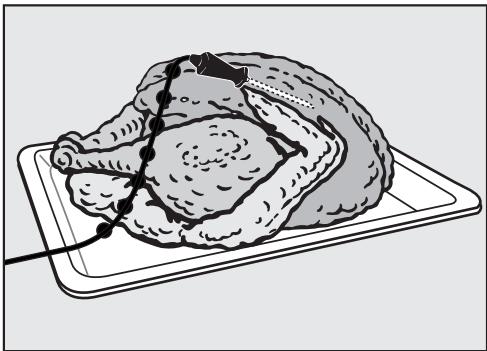
Insert the roast probe half way into the food so that the tip reaches the center of the thickest part of the meat.
Place the food in the oven.
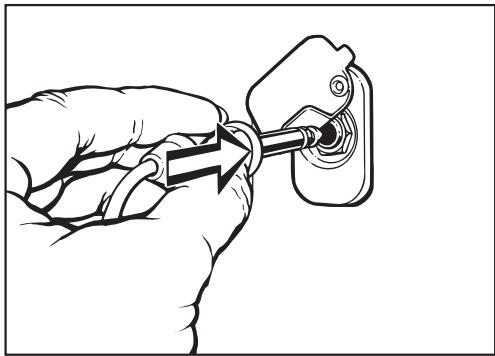
Plug the roast probe into the socket until it clicks (see arrow).
Close the appliance door.
Select the desired function.
A delayed start is possible if desired. (Not possible for Solo Microwave.)
The display shows the oven default temperature and the default core temperature.
If desired adjust the default temperature and/or power level.
If desired adjust the default core temperature by pressing "Probe". Enter the new core temperature using the keypad.
Select "OK".
- Select "Start" if using a microwave function.
The rising core temperature can be monitored in the display during the cooking program.
The cooking time is calculated automatically.
Once the selected core temperature is reached:
- the display shows "Ready".
- a signal will sound.
- the oven turns off automatically.
- the cooling fan stays on.
After roasting, cover the meat for about 10 minutes with aluminum foil.
During this time the core temperature will rise by 5 - 10^ .
Insert the roast probe into another part and repeat the cooking process if:
- the meat is not cooked to your desire. Raise the core temperature.
- the roast probe tip did not reach the center of the meat (large cuts of meat).
Roast probe tips
- The time it takes to cook meat when using the roast probe is similar to that of cooking by time.
- When using broiling bags, insert the roast probe through the foil into the meat core.
- Fat and bones may impair the temperature measuring and can cause the oven to turn off prematurely. Therefore the tip should not touch bones or be inserted into fatty areas of the meat.
- Select a higher core temperature for meat with a high fat content.
- Meat can be roasted in a container or on the rack with the glass tray.
Core temperatures
| Pot Roast | 176 - 194 °F | 80 - 90 °C |
| Roast | ||
| beef/Tenderloin | 104 - 122 °F | 40 - 50 °C |
| - rare | 122 - 145 °F | 50 - 63 °C |
| - medium | 147 - 158 °F | 64 - 70 °C |
| - well done | 176 - 194 °F | 80 - 90 °C |
| Pork roast | 158 - 176 °F | 70 - 80 °C |
| Pork file / chops | 167 - 176 °F | 75 - 80 °C |
| Veal roast | 167 - 176 °F | 75 - 80 °C |
| Leg of lamb | 185 - 194 °F | 85 - 90 °C |
| Poultry | 176 - 194 °F | 80 - 90 °C |
| Game | 167 - 185 °F | 75 - 85 °C |
| Fish |
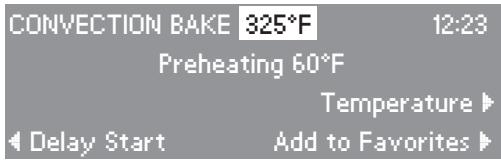
If you often cook a recipe with the same settings (function, time, temperature) you can save it as a Favorite for easy recall.
Saving a favorite
- Enter the function, temperature and cooking time of the recipe. The oven will begin heating.
Touch the "Add to Favorites" control.
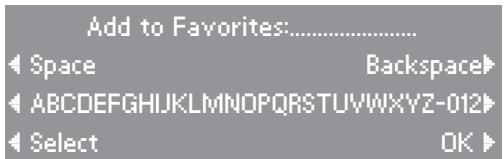
Your Favorite must be named before it can be saved into memory.
- Enter the letters and numbers of the name by touching the controls left and right of the alpha-numeric list. Confirm each character entry by touching the "Select" control.
- Select the "OK" control when naming is complete to save the "favorite" to memory.
- Touch "Clear" to cancel the running function if you are not cooking.
Your Favorite can now be recalled from the "Favorites" list. When selected the oven will automatically use the saved settings.
Selecting Favorites
- Select "Favorites" from the main menu.
- Select the desired Favorite from the menu.
Depending on the function saved you may need to press "Start" to begin the program. Follow the prompts.
Select and start your personal recipe.
Delete Favorites
- Select "Favorites" from the main menu.
In the submenu select "Clear Favorites". - Select the desired favorite and delete.
Oven Interior
Let the oven cool before cleaning the interior, the inside door and the gasket. Danger of burns!
Clean the oven after every use, accumulated soiling makes cleaning difficult and could damage the appliance.
Never use abrasive cleaners, scouring pads or steel wool on any part of the oven. They will damage the surfaces.
Do not use caustic (oven) cleaners when the oven is hot, even if the cleaner instructions state otherwise. Caustic cleaners sprayed on hot metal surfaces will discolor the oven. Only use caustic oven cleaners on a cool surface. Do not spray oven cleaners into any openings
Do not use the Microwave function if the door or gasket is damaged. Call Technical Service.
- Clean the interior, the inside of the door and gasket with a sponge and a solution of warm water and non-abrasive liquid detergent. Avoid using too much water, this could penetrate the openings.
Dry with a soft cloth. - Check the door and gasket at regular intervals for any sign of damage.
Stainless steel surfaces
The interior is made of stainless steel. Due to the high temperatures radiated the stainless steel may darken. This will not affect the performance of the oven.
Stainless steel surfaces can be cleaned using a non-abrasive stainless steel cleaner.
Cleaning tips
Juices and cake mixtures
Soiling such as spilled juices and cake mixtures are best removed while the oven or tray is still warm. Spilled fruit juices may cause lasting discoloration of the surfaces but will not affect the performance of the oven.
Hard-to-clean spills
Place a heat-resistant cup of water in the oven and bring it to a boil. The steam will condensate on the interior walls making it easier to clean.
Neutralizing odors
Place a heat-resistant cup of water and lemon juice in the oven and simmer for a few minutes.
Interior ceiling
To clean the interior ceiling, the upper heating element can be lowered.
Wait for the upper heating element to cool before lowering it. Danger of burns.
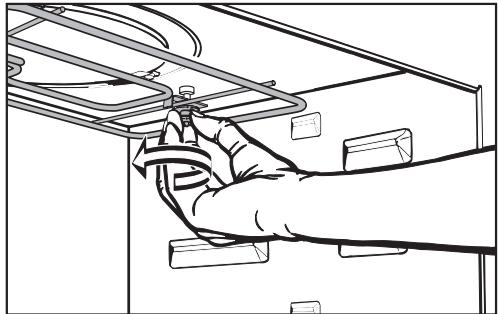
Unscrew the nut.
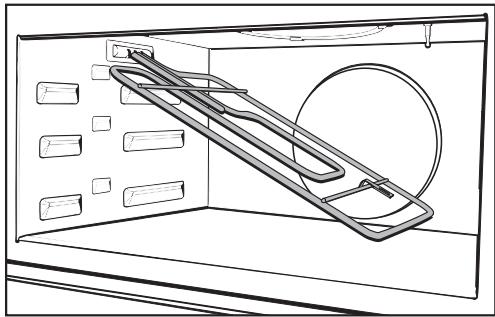
Lower the upper heating element.
Do not use force! It may cause damage.
After cleaning move the upper heating element back to its original position. Tighten the nut.
Appliance front
- All external surfaces and controls can be cleaned with warm water and liquid dish soap applied with a sponge.
Dry with a soft cloth.
Glass surfaces
Glass surfaces are not scratch proof.
Never use abrasive cleaners, scouring pads, steel wool or oven cleaners on glass surfaces. They will cause damage.
Do not use a shielded scraper blade to clean the door glass surface.
Stainless steel
Stainless steel surfaces can be cleaned using a non-abrasive stainless steel cleaner.
To help prevent resoiling, a conditioner for stainless steel can also be used. Apply sparingly with even pressure.
Oven accessories
Combi rack
The rack should be washed and dried after each use. It is easier to clean if it is soaked in a solution of hot water and liquid dish soap. Remove stubborn soils with a stainless steel cleaner.
Glass tray
Clean the glass tray in the dishwasher or wash it by hand.
Do not use abrasive cleaning agents, they will damage the surface.
Boiling wand
The boiling wand can be washed in the dishwasher or by hand.
Roast probe
Clean the roast probe with a damp cloth.
Do not submerge the roast probe in water or wash it in the dishwasher.
Frequently asked questions
Installation work and repairs should only be performed by a qualified technician in accordance with all applicable codes and standards. Repairs and other work by unqualified persons could be dangerous and may void the warranty.
The following faults can be corrected without contacting the Miele Service Department:
Why is the display dark when the oven is first turned on?
| Possible fault | Fix |
| The appliance is not correctly plugged in. | Check the plug. |
| The circuit breaker has tripped. | Check the breaker. |
| The display setting is set to "Off". | See "Settings - Clock". |
What if the oven does not heat?
| Possible fault | Fix |
| The door is not shut completely. | Close the door firmly. |
| The settings are not programmed. | - Select a power level and time setting for the microwave function. - Select a power level and a time setting for the microwave and a temperature setting for a solo function. |
Why is there no noise when the oven door is opened?
This is normal. If the door is opened during operation, a safety contact switch causes the heating elements and the fan to shut off.
Why is a noise heard after turning the oven off?
This is normal. The fan will continue to run for a short time to cool the oven. When the oven has cooled sufficiently, the fan will turn off automatically.
The fan will stop if the door is opened during the cooling phase. The fan will continue when the door is closed again until the cooling phase is complete.
Why does the oven operate but the light is off?
| Possible fault | Fix |
| The interior light has been turned off. | See "Settings - Oven light". |
| The light bulb is bad. | To reduce the risk of electric shock, disconnect the appliance from the power supply. ■ Loosen the screw of the light cover and take the cover off. ■ Remove the bulb and replace it with a new one. Only use a 12 V, 10 W, 572°F (300°C) heat resistant, Osram Type 64418, W271 bulb. ■ Do not touch the new light bulb with your fingers, this will reduce its life. Follow the manufacturer's instructions. ■ Restore power. |
Why is the food not adequately defrosted, heated or cooked at the end of the selected process?
| Possible Fault | Fix |
| The program was interrupted. | After interrupting a program the microwave must be started again. |
| The power and/or time settings are incorrect. | Check if the selected power has the appropriate time setting when cooking with the microwave. The lower the power, the longer the cooking time. |
Frequently asked questions
Why is there uneven browning?
| Possible fault | Fix |
| Oven temperature too high. | Use a lower cooking temperature. |
| Shiny or thin pans were used. | See "Selecting cookware". |
| Why does the food cool so fast when heated or cooked with Microwave? | |
In the microwave oven, food begins to cook from the outside first, the inside of the food relies on the transfer of heat. If food is cooked at a high power level it is possible that the heat may not have reached the center of the food. At the temperature equalization time the food will become hot in the inside and warm on the outside. When heating a meal, select a lower power level and a longer cooking time.
Why are there strange noises when the microwave oven is being used?
| Possible fault | Fix |
| Sparks are created by the use of dishware with a metallic finish. | See "Selecting cookware". |
| The food is covered with aluminum foil. | Remove the aluminum foil. |
F 54 shows in the display
| Possible fault | Fix |
| The roast probe is defective. | Remove the roast probe from the outlet. The message will disappear. Order a new roast probe from Miele. |
F 55 shows in the display
| Possible fault | Fix |
| The oven turns automatically off as a safety measure if the oven is operated for an unusually long time. | The length of time depends on the function and temperature. Turn the oven off and on again. Start the cooking process again. |
Call Technical Service for all other fault messages or if the fault could not be fixed. Do not open the outer casing of the appliance. The appliance must only be repaired by a qualified service technician.
In the event of a fault which you cannot easily fix yourself, please contact the Miele Technical Service Department at the phone number on the back of this booklet.
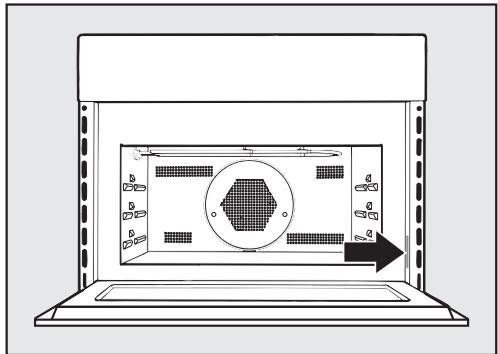
When contacting Technical Service please quote the serial number and model of your oven. This information is visible on the silver data plate along the right side of the oven.
MieleCare
MieleCare, our Extended Service Contract program, gives you the assurance of knowing that your appliance investment is covered by 5 years of worry free ownership. MieleCare is the only Extended Service Contract in the industry that guarantees repairs by a Miele Authorized Service Provider using genuine Miele parts. Only genuine Miele parts installed by factory trained professionals can guarantee the safety, reliability, and longevity of your Miele appliance.
Please note that unless expressly approved in writing by Miele's Service department, Extended Service Contracts offered by other providers for Miele products will not be recognized by Miele. Our goal is to prevent unauthorized (and untrained) service personnel from working on your Miele products, possibly doing further damage to them, you and/or your home.
To learn more about MieleCare Extended Service Contracts, please contact your appliance dealer or visit us online at:
http://store.miele.com
Installation Instructions
CAUTION: Before servicing, disconnect the power supply by either removing the fuse, shutting off the power main or manually "tripping" the circuit breaker.
Installation work and repairs should only be performed by a qualified technician in accordance with all applicable codes and standards. Repairs and service by unqualified persons could be dangerous and the manufacturer will not be held responsible.
Before connecting the appliance to the power supply, make sure that the voltage and frequency listed on the data plate correspond with the household electrical supply. This data must correspond in order to prevent machine damage. Consult an electrician if in doubt.
Only operate the appliance after it has been installed into cabinetry.
The appliance must be plugged into an appropriate outlet that is installed and grounded in accordance with all local codes and ordinances.
Power supply
The oven comes equipped with a 7.2 ft. (2.2 m) power cord with a NEMA 14-30 P molded plug ready for connection to a:
208 V, 20 A, 60 Hz power supply.
or
240 V, 20 A, 60 Hz power supply.
WARNING: THIS APPLIANCE MUST BE GROUNDED
Installer:
Please leave these instructions with the consumer.
Installation options
The appliance is designed for installation under a countertop, in a tall cabinet or in a tall cabinet in combination with an oven.
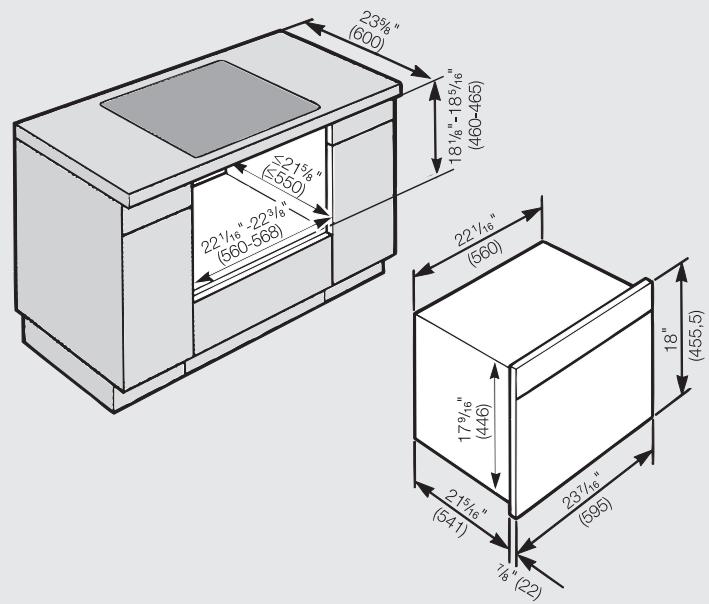
Installation under a countertop
When installed under a cooktop regard the installation instructions and dimensions of the cooktop.
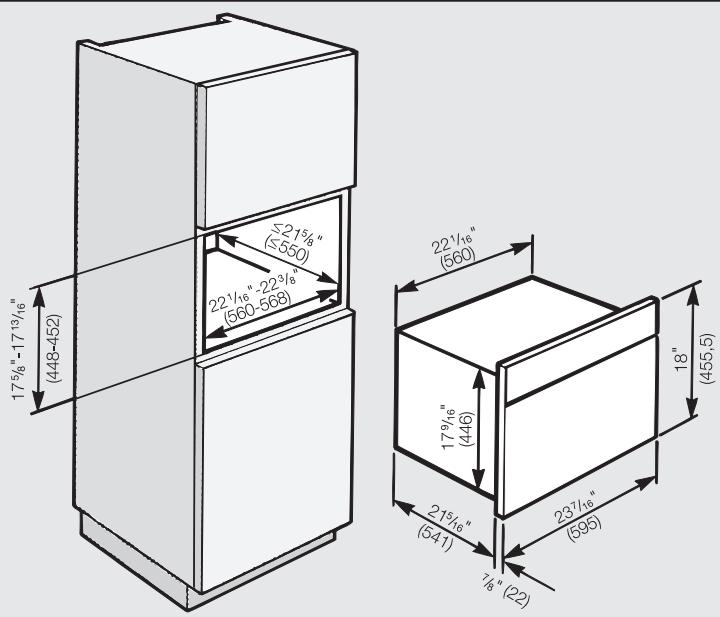
Installation in a tall cabinet
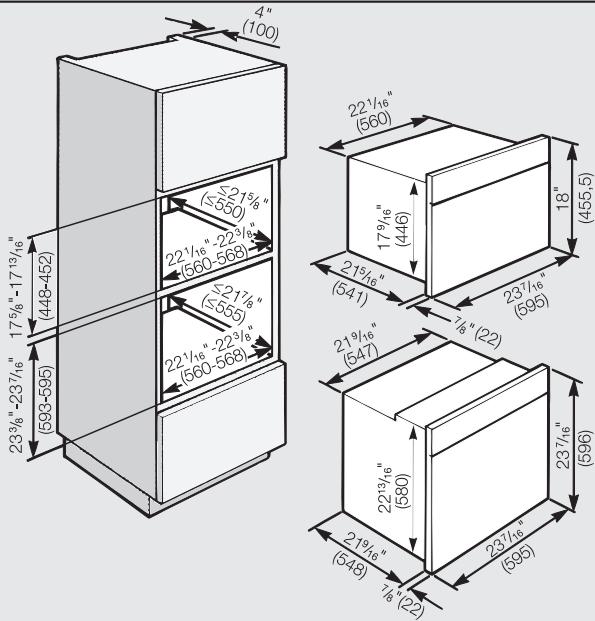
Installation in a tall cabinet in combination with an oven
Installation
If there are side handles, please remove them.
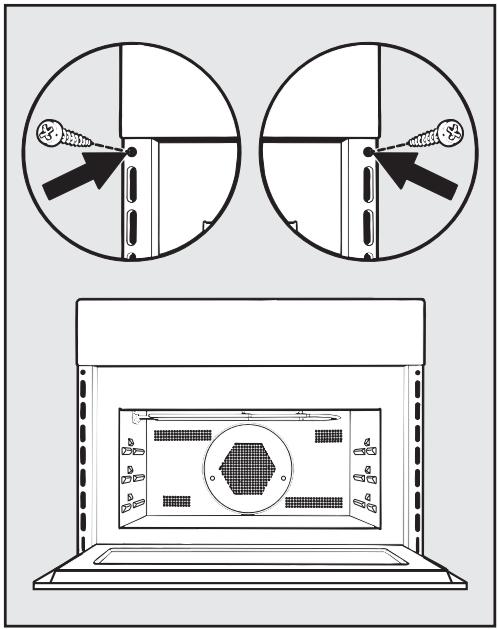
- Connect the oven to the electrical supply.
- Set the oven into the cabinet niche, push it all the way in and align it, right-angled.
- Open the oven and fix the appliance with the two supplied screws at the side panels of the cabinet.
Do not use the appliance until it has been properly installed.
Programming the oven
When the oven is first connected to the electrical supply you will be prompted to set the time of day. See "Settings - Clock".
Do not test the unit empty! The oven will get damaged.
U.S.A.
Miele, Inc.
National Headquarters
9 Independence Way
Princeton, NJ 08540
Phone: 800-843-7231
609-419-9898
Fax: 609-419-4298
www.miele.com
Technical Service & Support Nationwide
Phone: 800-999-1360
Fax: 888-586-8056
TechnicalService@mieleusa.com
Canada
Miele Limited
Headquarters and Showroom
161 Four Valley Drive
Vaughan, ON L4K 4V8
Phone: 800-643-5381
905-660-9936
Fax: 905-532-2290
www.miele.ca
info@miele.ca (general enquiries)
professional@miele.ca (commercial enquiries)
MieleCare National Service
Phone: 800-565-6435
905-532-2272
Fax: 905-532-2292
service@miele.ca (technical enquiries)

- Operating and Installation Instructions
- Convection microwave oven H 4080 BM
- IMPORTANT SAFETY INSTRUCTIONS 4
- Electrical safety
- IMPORTANT SAFETY INSTRUCTIONS
- Use
- Microwave function
- PRECAUTIONS TO AVOID POSSIBLE EXPOSURE TO EXCESSIVE MICROWAVE ENERGY
- Solo functions:
- Convection Bake, Auto Roast, Broil, Convection Broil
- SAVE THESE INSTRUCTIONS
- ① Touch controls
- ② Keypad
- ③ On/Off
- ④ Minute+
- ⑤ Display
- ⑥ Timer
- ⑦ Clear
- Display
- Oven accessories
- Glass tray with non-tip safety notches
- Combi rack
- Roast probe
- Boiling wand
- System lock
- Automatic Safety Shut Off
- Door contact switch
- Interior light turned off
- Language
- Clock
- Temperatures
- Oven Light
- Temperature ° F / ° C
- Tone Options
- "Timer 1" and "Timer 2"
- "Keypad Tone"
- "Volume"
- "Tone Short / Long"
- Do not accept
- Accept
- Off
- On
- Warming function
- Power Level
- Reset
- Settings
- Favorites
- Material and shape
- Metal
- Exceptions:
- Glassware
- Porcelain (china)
- Earthenware
- Glazes and colors
- Plastics
- Roasting bags
- Wood
- Disposable containers
- Covering the food
- A cover:
- Do not use a lid or cover if:
- Before using the oven
- Programming the oven
- Cleaning the appliance
- Heating the oven
- Turning the oven on and off
- Manually starting a microwave function
- Delay Start
- Duration
- End Time
- Selecting cooking times
- Checking and adjusting entered cooking times
- Deleting entered cooking times
- Setting a timer
- Canceling a timer
- Solo functions
- Combination functions
- Convection Bake
- Baking tips
- Broil
- Convection Broil
- Micro Broil
- Combination Broil
- Broiling Tips
- Microwave Solo
- Microwave Combination
- Microwave
- Combination Bake
- Microwave tips
- Defrosting
- Defrosting tips
- Reheating
- After reheating
- Reheating tips
- Defrost / Heat and Cook
- Master Chef menus
- Auto Roast
- Combination Auto Roast
- Convection Roast
- Using the roast probe
- Roast probe tips
- Saving a favorite
- Selecting Favorites
- Delete Favorites
- Oven Interior
- Stainless steel surfaces
- Cleaning tips
- Juices and cake mixtures
- Hard-to-clean spills
- Neutralizing odors
- Interior ceiling
- Appliance front
- Glass surfaces
- Stainless steel
- Glass tray
- Frequently asked questions
- Why is there no noise when the oven door is opened?
- Why is a noise heard after turning the oven off?
- Why does the oven operate but the light is off?
- Why is the food not adequately defrosted, heated or cooked at the end of the selected process?
- MieleCare
- Power supply
- WARNING: THIS APPLIANCE MUST BE GROUNDED
- Installation options
- Installation
Brand : MIELE
Model : H 4080 BM
Category : Built-in oven